MG210 - Car phone holder Arkon - Free user manual and instructions
Find the device manual for free MG210 Arkon in PDF.


| Brand | Arkon |
| Model | MG210 |
| Product Type | Car Mount |
| Color | Black |
| Material | Plastic, Adhesive pad |
| Dimensions (Base) | Approximately 3 x 3 x 1.5 inches |
| Weight | Approximately 4 oz |
| Power Source | None (mechanical mount) |
| Installation Type | Adhesive dashboard mount |
| Smartphone Compatibility | Universal (fits most phones with spring-loaded holder) |
| Mount Type | Slim Adhesive Console with Mobile Grip 2 |
| Adjustability | 360° swivel via adjustment ring |
| Included Components | Adhesive base, Mobile Grip 2 holder, Swivel adjustment ring |
| Key Features | Spring-loaded support leg for one-hand insertion, secure grip, slim design |
| Safety Precautions | Do not install over airbag covers or within airbag deployment zone |
| Maintenance & Cleaning | Clean adhesive base with mild soap and water; let dry before reapplication |
| Spare Parts / Reparability | Adjustment ring and adhesive base replaceable; contact Arkon for parts |
| Manufacturer | Arkon Resources, Inc. |
| Country of Origin | China and Taiwan |
| Customer Support | USA: (800) 841-0884, INT'L: (626) 254-9005, Mon-Fri 9am-5pm PST |
Frequently Asked Questions - MG210 Arkon
User questions about MG210 Arkon
0 question about this device. Answer the ones you know or ask your own.
Ask a new question about this device
Download the instructions for your Car phone holder in PDF format for free! Find your manual MG210 - Arkon and take your electronic device back in hand. On this page are published all the documents necessary for the use of your device. MG210 by Arkon.
USER MANUAL MG210 Arkon
Slim Adhesive Console
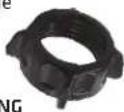
SP-SB-RING
Swivel Adjustment Ring

natural_image
Close-up of a black industrial device with a logo and handle (no visible text or symbols)MG002
Mobile Grip 2
Universal
Smartphone
Holder
1 Place adjustment ring over the mount ball and snap Mobile Grip 2 Universal Holder onto the mount.
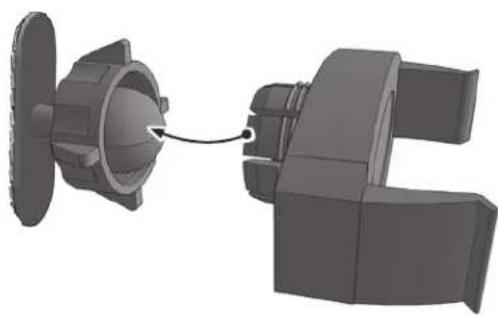
natural_image
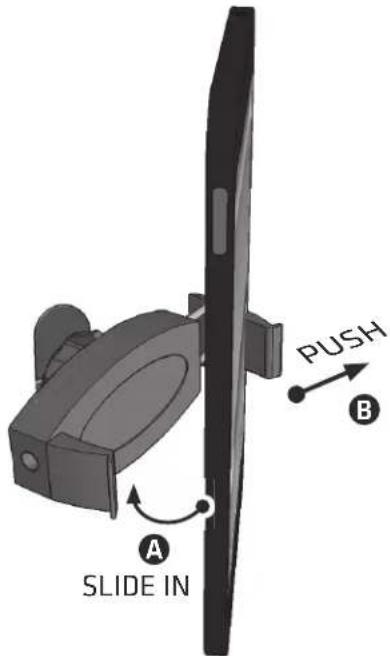
3D mechanical assembly diagram showing a component being inserted into a housing (no text or symbols visible)3 Insert smartphone into Mobile Grip 2 Holder by pushing against the spring-loaded support leg. Loosen adjustment ring to change position. Retighten to set.
② Apply adhesive base to dashboard area. Let cure 24 hours before use.

natural_image
Close-up of a mechanical component with a white arrow pointing to a specific part (no visible text or symbols)
Safety Precautions
Do not install Arkon products over an air bag cover or within the air bag deployment zone. Arkon Resources, Inc. assumes no responsibility of liability for injury or death as a result of car crashes and / or air bag deployment.
Arkon is not responsible for any damages caused to your car, your device, or yourself due to the installation or use of this pedestal mount.
ARKON
RESOURCES INC.
The Mobile Mounting Specialists™
Consumer Hotline:
USA (800) 841-0884
INT'L (626) 254-9005
Monday - Friday 9am -5 pm, PST
www.arkon.com
Arcadia, CA 91006 USA
Made in China and Taiwan
© Copyright 2014 Arkon Resources, Inc.
Brand : Arkon
Model : MG210
Category : Car phone holder