
AT-HD-V44M - HDMI switch Atlona - Free user manual and instructions
Find the device manual for free AT-HD-V44M Atlona in PDF.


| Product Type | 4x4 HDMI Matrix Switcher |
| Brand | Atlona |
| Model | AT-HD-V44M |
| Dimensions (Approx.) | 17.3 x 3.1 x 1.7 inches (typical 1U rackmount) |
| Weight (Approx.) | 2.5 lbs |
| Power Supply | 12V DC, 50/60Hz, 100-230 VAC universal adapter |
| Inputs | 4 x HDMI (female) |
| Outputs | 4 x HDMI (female) |
| Video Resolution Support | Up to 1080p, 1920x1200; supports VGA to UXGA, HDTV 480i-1080p |
| Audio Support | DTS-HD Master Audio, Dolby True-HD, Dolby Digital Plus |
| HDCP Compliance | Yes |
| Control Methods | Front panel buttons, IR remote, RS-232, IR extender |
| IR Extender Distance | Up to 300 meters |
| Data Rate | Up to 6.75 Gbps |
| Matrix Switching | Any input to any or all outputs simultaneously |
| Front Panel Indicators | Power LED (red), input source LEDs (blue), output status LEDs |
| Chassis | 19-inch rackmountable with included ear mounts |
| Safety Certifications | CE, FCC, RoHS |
| Operating Temperature | 32°F to 104°F (0°C to 40°C) |
| Storage Temperature | -4°F to 140°F (-20°C to 60°C) |
| Warranty | 3 years limited |
Frequently Asked Questions - AT-HD-V44M Atlona
User questions about AT-HD-V44M Atlona
0 question about this device. Answer the ones you know or ask your own.
Ask a new question about this device
Download the instructions for your HDMI switch in PDF format for free! Find your manual AT-HD-V44M - Atlona and take your electronic device back in hand. On this page are published all the documents necessary for the use of your device. AT-HD-V44M by Atlona.
USER MANUAL AT-HD-V44M Atlona
Atlona 4x4 HDMI Matrix Switcher
AT-HD-V44M
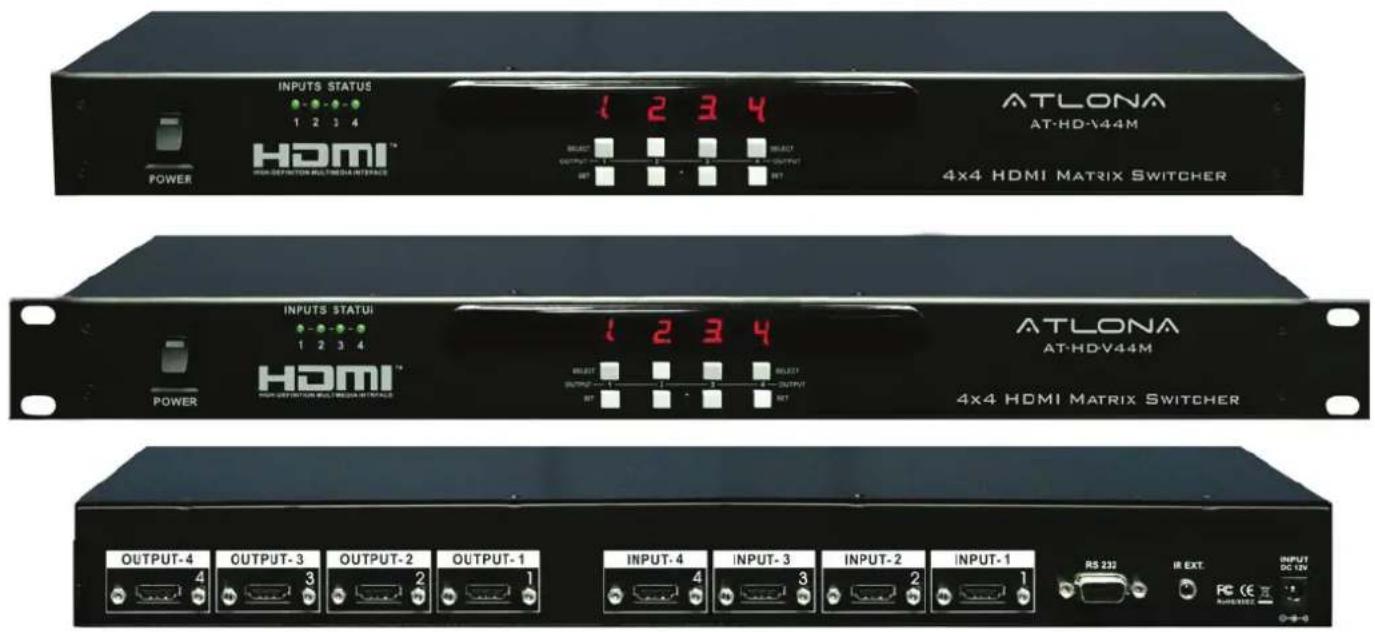
User Manual
Table of Contents
- Package Contents 1
- Introduction 1
- Features 1
- Specifications 2
- Panel Descriptions 2
5.1 Front Panel 2
5.2 Rear Panel 3 - Remote Control 3
- IR Extender 4
7.1 IR Extender Connection 4
7.2 The IR Extender Components Setup 4
8.RS-232 5 - Application 6
- Safety Information 7
- Warranty 8
- Atlona Product Registration 9
INTRODUCTION
Atlona Technologies' AT-HD-V44M is a 4x4 HDMI Matrix Switcher with audio designed to work as a switcher for multiple Audio/Video sources and displays. This Atlona unit is capable of switching HDMI signals between four sources and four displays. Because it is a matrix switch, any or all of the 4 inputs can simultaneously be switched to any or all of the outputs. This devise will support high definition video in multiple resolutions of up to 1080p or 1920x1200. This unit has quick and easy installation. With manual, RS232, as well as IR Remote control options, Atlona's AT-HD-V44M Matrix Switcher is HDCP Compliant making it is perfect for all HDMI devices, PC monitors, Plasma TV displays and HDTVs.
PACKAGE CONTENTS
• 4x4 HDMI Matrix Switcher (AT-HD-V44M)
• Instruction Manual
- IR Remote Control
• Universal AC/DC power adapter: 12VDC
• 19 inch Ear mount pair
• IR Extender receiver
• RS232 package (RS232 DVD Drive & RS232 Cable)
FEATURES
- Switches HDMI Video signal with Audio between 4 sources and 4 displays.
- Matrix Switch: each input can be directed to any or all outputs at the same time
- Quick and easy installation
• HDMI digital video/audio format, DVI format and HDCP compliant
• Supports video bandwidth up to . 5 Gbps (link clock rate of 225 MHz)
• Supports wide range of PC resolutions from VGA/920 UXGA 1 x1200 and HDTV/DTV resolutions 480i/480p, 576i/576p, 720p, 1080i, 1080p - Compatible with all HDMI devices, PC monitors, Plasma TV display and HDTV
• Supports Digital Video TMDS formats in Deep Color 36 bits - Support IR Remote and IR Extender with distance 300M Maximum.
- Various User Interface control:
- IR remote control
- Manual controlled by Front Panel button
- Attached Window based control software for Desktop or NB control by RS232 port
• Automatically scanning input status by LED on front panel
SPECIFICATIONS
• 4x4 HDMI Matrix Switcher: 4 HDMI Inputs To 4 HDMI Outputs,
- Input Signals: Video (TMDS) 0.5\~1.0Vpp, DDC 5Vpp
• Signal Supports : HDMI Standard, DVI and HDCP Compliant
• Video Supported: HDMI/DVI formats up to 1080p or 1920x1200
• Audio Supported: DTS-HD Master Audio, Dolby True -HD & Dolby Digital Plus
• Supports digital video standards such as:
RGB/YCBCR: 24/30/36-bits
YCBCR: 8/10/12/16/20/24-bits
Double data rate interface for RGB/YCBCR: 12/15/18-bits
- Controls: IR, IR EXT, RS232, and Select buttons on the front panel
• Data Rates: 250Mbps to 6.75Gbps.
• IR Extender Distance: 300 meters maximum.
• IR frequency: 38KHz.
• Safety Approvals: CE, FCC, RoHS(2002/95/EC).
• Power Supply: 12V DC
- Use Universal Switch Type 50/60Hz,100\~230 VAC
PANEL DESCRIPTIONS
1. Front Panel
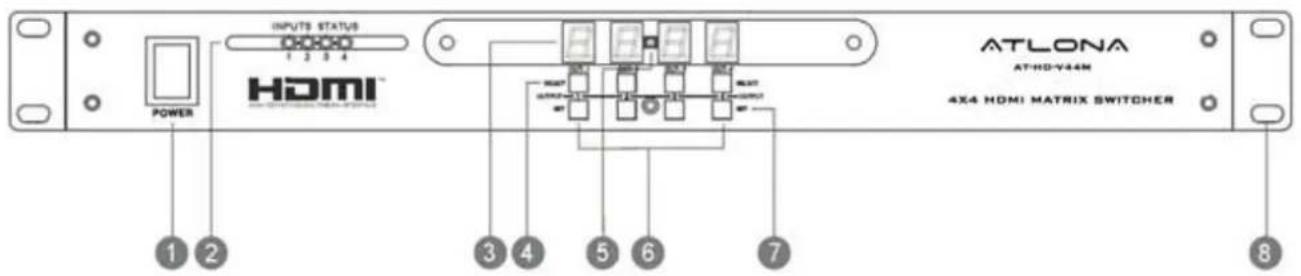
- POWER SWITCH. The power switch turns the unit on and off. The LED will illuminate red to indicate that the switcher is ON
- INPUT SOURCES STATUS DISPLAY. Input sources 1 to 4 LEDs illuminate blue to indicate desired video source is present on that input.
- OUTPUT SOURCES STATUS DISPLAY. Output Status shows by LED display.
- SOURCES SELECT BUTTONS. Separate outputs 1 \~ 4 source select buttons are provided. Select sources are 1-HDMI, 2-HDMI, 3-HDMI, 4-HDMI.
- IR SENSOR. The IR sensor receives IR commands from the supplied remote control.
- SOURCE SETUP BUTTONS. Setup the inputs 1 \~ 4
- SOURCE CHANNEL SETUP BUTTONS. Output Channels selection and setup buttons
- 19 INCH EAR MOUNT PAIR. 19 inch case Ear Mount pair
2. Rear Panel

- DC POWER INLET. Power Input: 12VDC
- IR EXTENDER CONTROL. Support one of IR Extender' extend distance maximum 300 Me- ters.
- RS 232 CONNECTION. DB-9pin Female connector for serial RS-232 control.
- VIDEO INPUTS: HDMI Inputs 1-4. HDMI Female connector.
- VIDEO OUTPUTS: HDMI Outputs 1-4. HDMI Female connector.
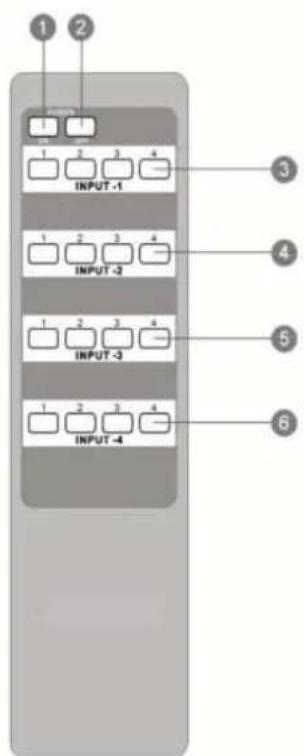
REMOTE CONTROL
Ensure the mains voltage supply matches the label on the supplied plug-Pack (+/- 10%)
Ensure that the power switch is OFF
Connect all audio video sources and destination equipment
Power up all HD Source and Displays
For each desired output select the appropriate input by using the front panel select buttons, IR remote control, or the RS232 serial communications port.
When powering up the AT-HD-V44M will return to its last used setting before Powered down.
(Select input 1, 2, 3 & 4 sources with selection button)
- INPUT 2 SOURCES SELECTION
(Select input 1, 2, 3 & 4 sources with selection button)
- INPUT 3 SOURCES SELECTION
(Select input 1, 2, 3 & 4 sources with selection button)
- INPUT 4 SOURCES SELECTION
(Select input 1, 2, 3 & 4 sources with selection button)
IR EXTENDER
1. IR Extender Connection
REAR PANEL IR EXTENDER PORT
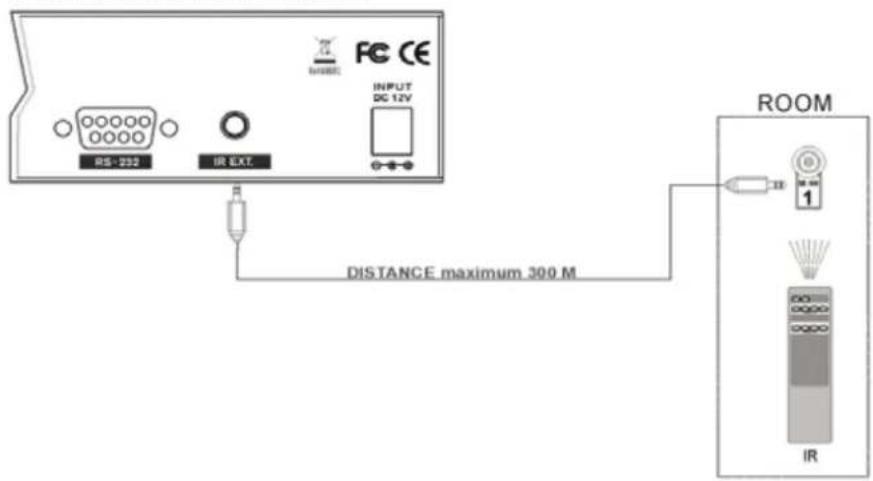
- The IR Extender Components Setup

Step 2


RS-232
Connection
RS-232 is connected through a 9-pin female D connector. The pins will have functions associated with them, some will be unassigned.
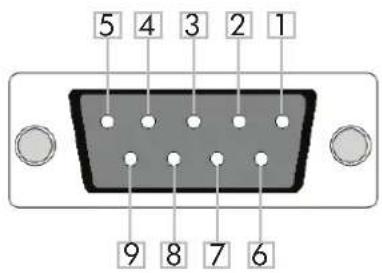
Baud Rate: 9600bps
Data Bit: 8bits
| No. | Pin Function | |
| 1 ---- | Not used | |
| 2 Tx | Transmit | |
| 3 Rx | Receive | |
| 4 ---- | Not used | |
| 5 Gnd | Ground | |
| 6 ---- | Not used | |
| 7 ---- | Not used | |
| 8 ---- | Not used | |
| 9 ---- | Not used |
Parity: None
Stop Bit: 1bit
Command
The command codes are very sensitive, do not change capitalization, spacing, or lettering.
| Command Feedback Description | ||
| PWON PWON Power on | ||
| PWOFF | PWOFF | Power off |
| All# | All# Resets all inputs to | corresponding outputs (in3 to out3) |
| x1 | x1 | Turns off output channel (to turn off output 3 = x3$) |
| x1AVx2 | x1AVx2 | Switch input to output (input 3 to output 5 = x3AVx5) |
| x1AVx2,x3,x4 | x1AVx2,x3,x4 | Switch input to multiple outputs (input 3 = x3AVx1,x2) |
| Statusx1 x7AVx1 | Shows what | input is connected to selected output |
| Status | x1AVx1, x2AVx2, x3AVx4, .... | Displays which inputs are currently connected to which outputs |
| Save[Y] | Save2 | Saves settings for future use, saves vary from 0 to 9 |
| Recall[Y] | Recall2 | Pulls up saved settings for the number you selected |
| Clear[Y] | Clear2 | Erases the save for the number you selected |
| Mreset | Mreset | Sets matrix back to the default settings |
Each command or feedback is terminated with a carriage return.
Note: If the command fails or is incorrect the feedback should be "Command FAILED"
APPLICATION
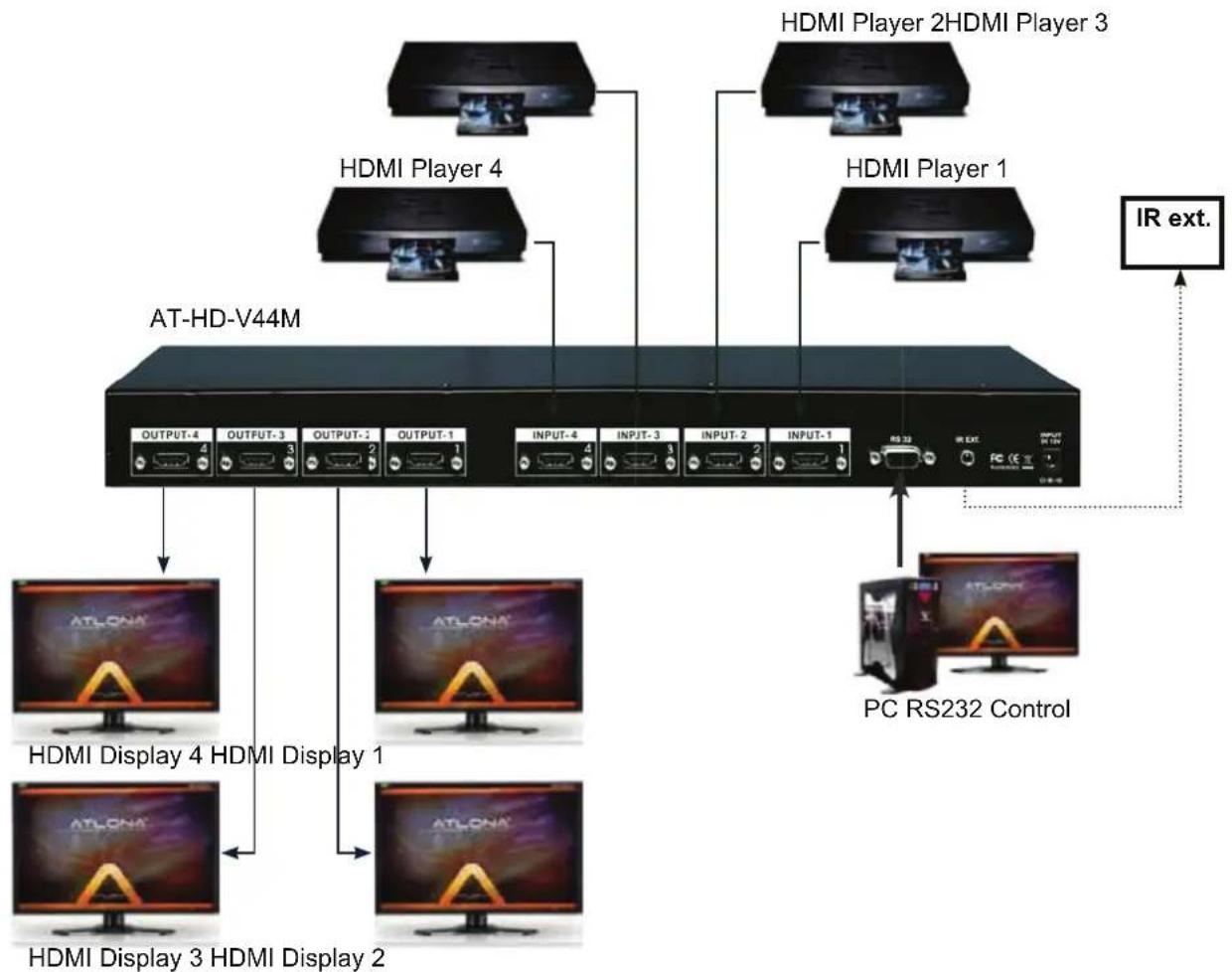
flowchart
graph TD
    A["AT-HD-V44M"] --> B["Output 4"]
    A --> C["OUTPUT 3"]
    A --> D["OUTPUT 2"]
    A --> E["OUTPUT 1"]
    A --> F["INPUT 4"]
    A --> G["INPUT 3"]
    A --> H["INPUT 2"]
    A --> I["INPUT 1"]
    A --> J["RS 32"]
    A --> K["IR EXT"]
    L["HDMI Player 4"] --> M["AT-HD-V44M"]
    N["HDMI Player 2"] --> O["AT-HD-V44M"]
    P["HDMI Player 1"] --> Q["AT-HD-V44M"]
    R["PC RS232 Control"] --> S["AT-HD-V44M"]
    T["HDMI Display 4 HDMI Display 1"] --> U["AT-HD-V44M"]
    V["HDMI Display 3 HDMI Display 2"] --> W["AT-HD-V44M"]
    X["IR ext."] --> Y["AT-HD-V44M"]
Safety Information
Safeguards

To reduce the risk of electric shock, do not expose this product to rain or moisture

If the wall plug does not fit into your local power socket, hire an electrician to replace your obsolete socket.

Do not modify the wall plug. Doing so will void the warranty and safety features.
This equipment should be installed near the socket outlet and the device should be easily accessible in the case it requires disconnection.
Precautions
FCC regulations state that any unauthorized changes or modifications to this equipment, not expressly approved by the manufacturer, could void the user's authority to operate this equipment.
Operate this product using only the included external power supply. Use of other power supplies could impair performance, damage the product, or cause fires.
In the event of an electrostatic discharge this device may automatically turn off. If this occurs, unplug the device and plug it back in.
Protect and route power cords so they will not be stepped on or pinched by anything placed on or against them. Be especially careful of plug-ins or cord exit points from this product.
Avoid excessive humidity, sudden temperature changes or temperature extremes.
Keep this product away from wet locations such as bathtubs, sinks, laundries, wet basements, fish tanks, and swimming pools.
Use only accessories recommended by Atlona to avoid fire, shock, or other hazards.
Unplug the product before cleaning. Use a damp cloth for cleaning and not cleaning fluid or aerosols. Such products could enter the unit and cause damage, fire, or electric shock. Some substances may also mar the finish of the product.
Never open, remove unit panels, or make any adjustments not described in this manual. Attempting to do so could expose you to dangerous electrical shock or other hazards. It may also cause damage to your AT-HD-V44M. Opening the product will void the warranty.
Do not attempt to service the unit. Disconnect the product and contact your authorized Atlona reseller or contact Atlona directly.
Warranty
Limited Warranty
Atlona Technologies warrants that (a) its products (the AT-HD-V44M) will perform substantially in accordance with the accompanying written materials for a period of 3 years from the date of receipt and (b) that the product will be free from defects in materials and workmanship under normal use and service for a period of 3 years. In the event applicable law imposes any implied warranties, the implied warranty period is limited to 3 years from the date of receipt. Some jurisdictions do not allow such limitations on duration of an implied warranty, so the above limitation may not apply to customers that fall within those areas.
Customer Remedies
Atlona Technologies' and its suppliers' entire liability and Customer's exclusive remedy shall be, at Atlona Technologies' decision, either return of the price paid for the product, repair, or replacement of the product that does not meet this Limited Warranty and which is returned to Atlona Technologies with a copy of the Customer's receipt. This Limited Warranty is void if failure of the product has resulted from accident, abuse, or misapplication. Any replacement product will be warranted for the remainder of the original warranty period.
No other warranties
To the maximum extent permitted by applicable law, Atlona Technologies and its suppliers disclaim all other warranties, either expressed or implied, including but not limited to, implied warranties of merchantability and fitness for a particular purpose, with regard to the product and any related written materials. This Limited Warranty gives customer specific legal rights. Customers may have other rights depending on the jurisdiction.
No liability for damages
To the maximum extent permitted by applicable law, in no event shall Atlona Technologies or its suppliers be liable for any damages arising out of the use of or inability to use this product, even if Atlona Technologies has been advised of the possibility of such damages. Such damages include but are not limited to: special, incidental, consequential, or indirect damages for personal injury, loss of business profits, business interruption, loss of business information, or any other pecuniary loss. Atlona Technologies' and its suppliers' entire liability under any provision of this agreement shall be limited to the amount actually paid by you for the product. Some jurisdictions do not allow the exclusion or limitation of liability for consequential or incidental damage. The above limitations may not apply to you in such jurisdictional cases.
Atlona Product Registration
Thank you for purchasing this Atlona product. - We hope you enjoy it and will take an extra few moments to register your new purchase.
Registration creates an ownership record if your product is lost or stolen and helps ensure you'll receive notification of performance issues and firmware updates.
At Atlona, we respect and protect your privacy, assuring you that your registration information is completely secure. Atlona product registration is completely voluntary and failure to register will not diminish your limited warranty rights.
To register go to: http://www.atlona.com/registration




- Atlona 4x4 HDMI Matrix Switcher
- AT-HD-V44M
- Table of Contents
- INTRODUCTION
- PACKAGE CONTENTS
- FEATURES
- SPECIFICATIONS
- PANEL DESCRIPTIONS
- Front Panel
- Rear Panel
- REMOTE CONTROL
- IR EXTENDER
- IR Extender Connection
- RS-232
- Connection
- Command
- APPLICATION
- Safety Information
- Safeguards
- Precautions
- Warranty
- Limited Warranty
- Customer Remedies
- No other warranties
- No liability for damages
- Atlona Product Registration
Brand : Atlona
Model : AT-HD-V44M
Category : HDMI switch