MWP-31 - Household Fan MPM - Free user manual and instructions
Find the device manual for free MWP-31 MPM in PDF.


| Product Type | Domestic Fan |
| Model | MWP-31 |
| Brand | MPM |
| Dimensions (approx.) | 35 cm (height) x 30 cm (width) x 30 cm (depth) |
| Net Weight | 3.2 kg |
| Power Supply | AC 220-240V, 50/60Hz |
| Power Consumption | 45 W |
| Fan Blade Diameter | 30 cm |
| Speed Settings | 3 speeds (low, medium, high) |
| Oscillation | Yes, automatic 90° oscillation |
| Tilt Adjustment | Manually adjustable tilt head |
| Remote Control | Included |
| Timer | 1-7 hours |
| Noise Level | ≤ 65 dB (A) |
| Protection Guard | Safety mesh guard |
| Maintenance | Clean with soft damp cloth; do not immerse in water |
| Safety Features | Overheat protection, stable base |
| Spare Parts Available | Blades, motor, remote control (contact support) |
| Repairability | Modular design; parts can be replaced by qualified technician |
| Warranty | 2 years |
Frequently Asked Questions - MWP-31 MPM
User questions about MWP-31 MPM
0 question about this device. Answer the ones you know or ask your own.
Ask a new question about this device
Download the instructions for your Household Fan in PDF format for free! Find your manual MWP-31 - MPM and take your electronic device back in hand. On this page are published all the documents necessary for the use of your device. MWP-31 by MPM.
USER MANUAL MWP-31 MPM
natural_image
Modern white and blue electric fan with a blue-lit tower, accompanied by a remote control unit (no visible text or symbols)WENTYLATOR BEZŚMIGŁOWY Z PILOTEM MWP-31
natural_image
Simple diagram of a cylindrical object with labeled points A and B, no text or symbols presentnatural_image
Simple diagram of a cylindrical object with labeled points A and B, no text or symbols presentRead carefully this manual before using the appliance.
- Close supervision is necessary when using the appliance near children.
Do not hang the power cord over sharp edges and do not allow the power cord to touch hot surfaces.
▶ Always unplug the appliance when it is not in use or before cleaning.
Do not use the appliance if it is damaged, also if the power cord or plug is damaged – return the appliance for repair to an authorized service centre.
To avoid the risk of damage or injury, always use the attachments recommended by the manufacturer.
Do not immerse the appliance, its cord and plug in water or any other liquids, keep it dry at all times.
Do not leave the appliance switched on when unattended.
▶ Always switch off the appliance before unplugging it.
Do not place the appliance in vicinity of heat sources.
Do not use the appliance for the purposes different than it was designed for.
Do not use the appliance outdoors.
Never insert your fingers nor any other items through the guard when the appliance is running.
Before moving the appliance to another location disconnect it from the power source.
Do not place the fan near open windows – raindrops may cause a short circuit and electrical shock! It is advisable not to place fans in rooms with high humidity, such as bathrooms.
This appliance is not intended for use by children under 8 years of age and individuals with reduced physical, sensory or mental capabilities, or lack of experience and knowledge, unless they have been given supervision or instruction concerning use of the appliance in a safe way and if they understand the hazards involved. Cleaning and user maintenance shall not be carried out by children without supervision.
- Store the appliance and its cord out of reach of children under 8 years of age.
Children should be supervised to ensure that they do not play with the appliance.
Do not switch on the appliance without front and rear guard mounted.
The appliance may be switched on only after complete assembly. Partially assembled unit does not provide safe and proper operation.
Do not plug the power cord with wet hands.
This appliance is intended for household use only.
Do not remove the plug from the mains by pulling by the cord.
In order to ensure your children's safety, please keep all packaging (plastic bags, boxes, polystyrene etc.) out of their reach.
WARNING! Do not allow small children to play with the foil as there is a danger of suffocation!
Do not use this unit in environments with flammable and explosive gases.
OVERVIEW

- Fan's rotating base
- Control panel
a. on/off touch switch
b. "Swing" touch button (fan's oscillating movement)
c. "Speed" touch button (airflow speed)
d. "Timer" touch button (delayed start)
e. "Mode" touch button


flowchart
graph TD
    A["f"] --> B["2"]
    B --> C["Swing"]
    B --> D["Sleep"]
    B --> E["Nat."]
    B --> F["Nor"]
    B --> G["4H"]
    B --> H["2H"]
    B --> I["1H"]
    B --> J["0.5H"]
    B --> K["High"]
    B --> L["Mid"]
    B --> M["Low"]
    B --> N["Power"]
    O["b"] --> P["Swing"]
    O --> Q["Mode"]
    O --> R["Timer"]
    O --> S["Speed"]
    O --> T["On/Off"]
    U["e"] --> V["b"]
    U --> W["Mode"]
    U --> X["Timer"]
    U --> Y["Speed"]
    U --> Z["On/Off"]
f. "Swing" indicator
g. "Speed" indicators
h. "Timer" indicators
i. "Mode" indicator
j. "POWER" device activation signal lamp
- Air intake
- Air exhaust
- Housing
- Remote
BEFORE FIRST USE
- Remove the fan from the box; remove all stickers, transport protectors, bags and fillers.
- Check the fan for any damages that might have occurred during transport. If you have any doubts, contact the seller.
- Place the fan on a horizontal, flat, even and dry surface.
- Install a CR2025 battery in the remote (see chapter: "CLEANING AND MAINTENANCE")
- Make sure the electrical mains parameters match the data on the fan's name plate.
CAUTION! To ensure the best performance of the fan, do not place it closer than 50 cm from any walls, furniture, etc.
CAUTION! Do not place the fan near curtains, shades, etc.
CAUTION! The battery is not included with MWP-31.
USE OF A FAN
- Connect the fan to the mains and start it by pressing the ON/OFF button (2a).
CAUTION! A mild odour might be detectable when the fan is started for the first time, indicating that the motor is warming up. The odour will disappear after some time. Uruchomienie wentylatora zostanie zasygnalizowane lampką kontrolną "Power" (2j)
- Use the "Swing" (2b) button to activate the fan's vertical, oscillating movement. The oscillating movement is signalled by an indicator (2f). Press the "Swing" (2b) button a second time to deactivate the function.
-
Use the "Speed" (2c) button to set the desired air flow.
-
"Low" - low air flow
- "Mid" – medium air flow
- "Hi" – high air flow
The current air flow speed is indicated by a relevant indicator (2g).
- Use the "Timer" (2d) button to set the time after which the fan shuts down automatically. Pressing the button (2d) again activates the indicators (2h), with the time shown by the indicators adding up. The maximal time that can be set is 7.5 hours. The deactivation of all indicators (2h) means that the fan shuts down after the set time.
-
Use the "Mode" button to activate an operating mode:
-
Nature – fan simulates natural outdoor blows (changing in time and with intervals)
- Sleep – fan reduces air injection speed, working discreetly
- Normal – standard fan operation
Selected operating mode is signaled by a respective signal lamp (2i)
- Once the operating time of the fan is over, use the ON/OFF (2a) to shut it down and disconnect it from the mains.
- All functions described above may be activated or deactivated with the remote (6).
CLEANING AND MAINTENANCE
CAUTION! Disconnect the device from the main before cleaning it. Do not submerge it in water or other liquids.
CAUTION! Do not use any aggressive cleaning agents, gasoline, solvents etc. to clean the device.
- Use a damp cloth to wipe the fan's housing and wipe it dry afterwards. Use a mild cleaning agent for stubborn dirt.
- The grates in the intake and exhaust openings can be vacuum-cleaned at low speed. Perform this cleaning very gently and carefully.
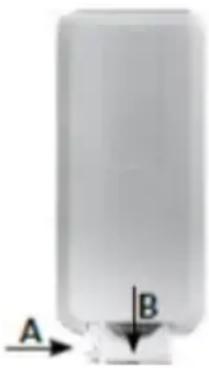
- The remote is powered by a CR2025 3V battery. To access the battery, press the interlock's embossing (arrow A) and then slide away the battery compartment (arrow B). When inserting a new battery, make sure the polarity is correct. Once the battery is replaced, slide back the battery compartment in the device.
natural_image
Simple diagram of a cylindrical object with labeled points A and B, no text or symbols presentCAUTION! Do not discard used batteries with your municipal waste. Only discard them in proper pick-up points or at the store. Do not place the battery in fire.
| Technical data sheet | |||
| MPM AGD S.A. | |||
| MODEL: MWP-31 | |||
| Description Symbol Value Unit | |||
| Maximum flow rate of the fan F 17,11 m | ^3/min | ||
| Fan power P 36,3 W | |||
| Operating value SV 0,47 (m | ^3/min)/W | ||
| Power consumption in standby mode P | SB | 0,43 | W |
| Fan's sound power level | LWA | 60,97 | dB(A) |
| Maximum air speed | c | 1,74 | m/s |
| Seasonal electricity consumption | Q | 12,10 | kWh/a |
| Standards used for measuring the operational values | EN IEC 60879:2019 | ||
| To get additional information, contact | MPM AGD S.A.ul. Brzozowa 3Milanówek 05-822, Polskatel. (22) 380-52-00BDO: 000027599 | ||
Technical parameters are indicated on the product nameplate.
Length of power cord: 1,7 m

ATTENTION! MPM agd S.A. reserves its right to modify the technical data!
PROPER DISPOSAL OF THE PRODUCT (waste electrical and electronic equipment)
Marking on the product indicates that after the service-life of the product expires, it should not be disposed with other type of municipal waste. Used equipment may have a negative impact on the environment and health of people due to potentially containing hazardous substances, mixtures and components. Mixing electric waste with other types of waste or disassembling those in an unprofessional manner may cause a release of substances that are hazardous to the environment and health. Used equipment should be handed-over to a point for collection of electric waste. In order to obtain detailed information regarding the electric waste collection points, the user should contact the municipal point of electric waste collection or used equipment processing department.
WSKAZÓWKI DOTYCZĄCE BEZPIECZEŃSTWA UŻYTKOWANIA
natural_image
Simple diagram of a cylindrical object with labeled points A and B, no text or symbols presentnatural_image
Simple diagram of a cylindrical object with labeled points A and B, no text or symbols presentnatural_image
Simple diagram of a cylindrical object with labeled points A and B, no text or symbols presentWe wish you satisfaction from using the product and invite you to check a wide range of other MPM appliances

Brand : MPM
Model : MWP-31
Category : Household Fan