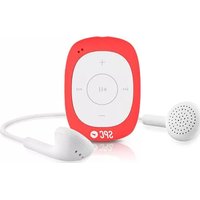
8584 - Mp3 player SPC - Free user manual and instructions
Find the device manual for free 8584 SPC in PDF.


| Product Type | MP3 Player |
| Brand | SPC |
| Model | 8584 |
| Dimensions (approx.) | 4.5 x 2.5 x 0.5 inches (114 x 63 x 12 mm) |
| Weight (approx.) | 1.8 oz (50 g) |
| Power Source | Internal rechargeable lithium-ion battery, USB charging |
| Battery Life (approx.) | Up to 20 hours of music playback |
| Display | 1.8-inch color TFT LCD |
| Storage Capacity | Internal memory (8 GB/16 GB/32 GB depending on variant) |
| Expandable Storage | microSD card slot (up to 128 GB) |
| Audio Formats Supported | MP3, WMA, WAV, FLAC, APE |
| Main Functions | Music playback, FM radio, voice recording, photo viewer, e-book reader, video playback |
| FM Radio | FM tuner with presets and recording |
| Recording | Built-in microphone for voice recording (WAV format) |
| Connectivity | USB 2.0 for data transfer and charging, 3.5mm headphone jack |
| Headphones | Included earbuds with 3.5mm plug |
| Operating System Compatibility | Windows, macOS, Linux (mass storage class) |
| Safety Precautions | Do not expose to water or extreme temperatures. Use only original charger. Keep away from children. |
| Maintenance & Cleaning | Clean with a soft dry cloth. Do not use solvents. Keep ports free of dust. |
| Spare Parts & Repairability | Spare parts (USB cable, earphones, battery) available through SPC service centers. Device not designed for user repair. |
| General Information | Compact multimedia player with intuitive controls. Supports multiple languages. |
Frequently Asked Questions - 8584 SPC
User questions about 8584 SPC
0 question about this device. Answer the ones you know or ask your own.
Ask a new question about this device
Download the instructions for your Mp3 player in PDF format for free! Find your manual 8584 - SPC and take your electronic device back in hand. On this page are published all the documents necessary for the use of your device. 8584 by SPC.
USER MANUAL 8584 SPC
natural_image
Silhouette of a rocket inside a white circular frame (no text or symbols)MP3 Player
SPORT CLIP SHUFFLE
MANUAL DE USUARIO / USER MANUAL / GUIA DO UTILIZADOR
¡ BIENVENIDO !
This guide includes all the information to make the most out of your SPC Sport Clip Shuffle 2.1.
EN
GET AN SPC ACCOUNT
Free advantages just one click away.
Before going on reading this manual, we strongly recommend you visiting www.spc-universe.com, SO YOU CAN CREATE AN SPC ACCOUNT AND REGISTER YOUR PRODUCT.
By doing this, you will be able to get into SPC universe: an exclusive club where our clients can get incredible offers and discounts and also upgrade or renew their products.
Moreover, having an account means free access to SPC services: tablet and smartphone apps, technical support...
This is SPC. A universe in technology.
PACKAGE CONTENT
MP3 Player
■ High Quality Stereo Headset
User guide
Warranty
FEATURES
■ Play: Digital MP3/WMA music.
■ Sound: Normal or random play mode button.
■ Other features: FM radio with 20 presets.
Battery: Up to 10 hours of MP3 playback (on saving mode) and 3 hours in radio mode.
■ Computer Connection: Compatible with Windows 8 / XP / Vista / 7, Mac, Linux systems.
■ Dimensions and weight: 50 x 36 x 9 mm. Peso: 14g (only player).
UNIT AND CONTROLS

- Headphone Jack
- Blue-light Indicator
- Red-light Indicator
- Volume +
- Fast-Forward / Next Song
- Volume -
- Play / Pause
- Fast-Rewind
- Random / Normal Play Button
- Radio mode - Audio Playback Mode Switch
11.HoldingClip - Reset
- Micro USB Connector

BATTERY CHARGE
The player has an internal battery. Charge it before use by connecting it to your PC.
To do this:
- Hold down the ▷‖(7) for 3 seconds to turn the player on.
- With the computer turned on, connect the player to the PC through the port (13).
- The battery begins charging. Charge the battery during 3 hours to ensure maximum usage time, thus extending its service life.
NOTA: In order for the player to charge properly, connect the player directly into the USB connector of your PC (not through a hub). If the battery is VERY flat, the player may need several minutes to start charging. Remember to charge the player before its first use.
CONNECTION TO THE COMPUTER AND MEMORY FORMAT
Connect the player to a computer that uses the following operating systems: 8 / XP / Vista / 7; MAC OS X (10.6 or lower) or Linux. You will not need to install anything; the computer will recognize the device automatically.
Once the computer has detected the player, the player will act as a removable disk. Therefore, the file transfer will be performed in the same manner as any other storage device (selecting the files to copy and dragging them to the unit, or by copying and pasting in the unit).
To format the unit (if necessary) go to "My PC" and "click" with the mouse's right button on the storage unit created by the system. Then click on the "Format ..." option. Select the FAT32 file and click on "Start".
To disconnect, double click on the small icon displayed at the bottom right of your screen in the taskbar and extract the formatted unit using the "Safely Remove Hardware" icon, select the unit and click on "Stop".
NOTE: Do not disconnect the player during the copying or deleting data process as it may cause unit malfunction and damage to the Software. Instead, use the “Safely Remove Hardware” icon at the bottom, in the task bar. Do not insert files or folders with names that are too long or contain strange characters, as this may cause player malfunction. In this case, rename files or folders.
USING THE PLAYER
TURNING THE DEVICE ON / OFF
Turn on the player by pressing ▷ button (7) for 3 seconds.
The player turns on automatically. It will start playing the music you have copied to the player's internal memory or the radio will start playing (depending on the player selector position). Turn the player off by pressing the ▷∥ button (7) for 3 seconds.
RESET
If the player does not play in a normal way or stays locked, turn the device off and then on again. The player will restart.
EN
If the player still does not work normally, enter a pointed object in the reset hole (12) to restart the device.
VOLUME ADJUSTMENT
During play, press the + (4) and - (6) buttons to increase or decrease the volume level.
PLAYING AUDIO FILES
Press the ▷button (7) to start playing audio files. To stop play press the ▷button (7) again. To skip to the next song or return to the previous song press either the ▷(5) o ◀◀◀ (8) buttons respectively.
PLAYBACK MODE SELECTOR
The button on the side of the player allows selecting between normal or random playback modes. Move the button down for random music selection, move the button up for sequential (normal mode) play.
FM RADIO
The player has a switch (10) to select radio mode or audio playback mode. To listen to the radio, move the switch (10) down. The radio will then start. Holding the ▶▶| (5) and ◀◀◀ (8) buttons down will enable a quick search through the stations. The player will scan the entire frequency range and memorize the stations with a powerful signal. Simply press the ▶|| button (7) to switch from one preset station to another. There are 20 presets. When new searches are performed, the new stations will be stored, erasing previously stored stations.
The information that this guide contains cannot be transmitted, played or distributed in any case without the written authorization of SPC.
COMERCIAL BRANDNAMES
SPC is a registered brandname of Telecom y Novatecno S.A.
NOTE: SPC reserves the right to modify the information of this guide in any moment. All the information and recommendations that we can find here do not guarantee anything.
BEM-VINDO
Marca/Brand/Marca: SPC
Director General/General Manager/Diretor-geral
Esta declaración de conformidad está de acuerdo con la Directiva Europea 2004/108/EC. This declaration of conformity is in compliance with the European Directive 2004/108/EC. Esta declaração de conformidade respeita as normas da Diretiva Europeia 2004/108/EC.
Brand : SPC
Model : 8584
Category : Mp3 player