823 - Mp3 player SPC - Free user manual and instructions
Find the device manual for free 823 SPC in PDF.


Pick your language and provide your email: we'll send you a specifically translated version.
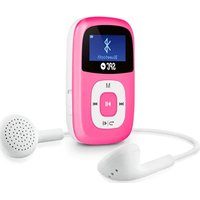
| Product type | MP3 player |
| Brand | SPC |
| Model | 823 |
| Display | 1.0-inch OLED screen |
| Storage capacity | 8 GB |
| Supported audio formats | MP3, WMA, WAV |
| Battery type | Built-in rechargeable lithium-ion |
| Battery capacity | 200 mAh |
| Playback time | Up to 8 hours |
| Charging interface | USB 2.0 (5V DC) |
| Headphone jack | 3.5 mm |
| Additional functions | FM radio, voice recording |
| Dimensions (W x H x D) | 90 x 40 x 10 mm |
| Weight | 30 g |
| Body material | ABS plastic |
| Device color | Black |
| Cleaning instructions | Wipe with a dry, soft cloth |
| Storage conditions | Keep in a dry, cool place away from direct sunlight |
| Safety precautions | Do not disassemble, expose to moisture, or use near heat sources |
| Repairs and spare parts | For repairs, contact SPC support; no user-serviceable parts inside |
Frequently Asked Questions - 823 SPC
How do I turn on the SPC 823 MP3 player?
Press and hold the Play/Pause button for about 3 seconds until the screen lights up. To turn it off, repeat the same action.
What audio formats are supported on the SPC 823?
The device supports MP3, WMA, and WAV files. For best compatibility, use MP3 files with a bitrate of 128 kbps.
How long does the battery last on a full charge?
With normal use, the built-in 200 mAh battery provides up to 8 hours of music playback. Actual battery life may vary depending on volume level and features used.
How do I charge the SPC 823?
Connect the included USB cable to a computer or a 5V USB adapter. The device will start charging and the battery indicator will show the progress. A full charge takes about 2 hours.
Can I use the SPC 823 as a USB flash drive?
Yes. When connected to a computer, the device appears as a removable drive. You can drag and drop music files directly into the storage folder.
How do I reset the MP3 player if it freezes?
If the device stops responding, press the Reset button (if available) with a pin, or turn the player off and on again. This does not erase your music files.
Does the SPC 823 have an FM radio?
Yes, it includes an FM radio function. Use the mode button to switch to radio mode, then scan for stations and save your favorites.
How do I record voice on this device?
Switch to voice recording mode using the mode button, then press the Record button to start. Press it again to stop and save the file as a WAV recording.
How do I transfer music files to the SPC 823?
Connect the player to your computer with the USB cable. It will be recognized as a mass storage device. Copy MP3/WMA/WAV files into the MUSIC folder. Safely eject the device before disconnecting.
What should I do if my computer doesn't recognize the device?
Try using another USB port or cable. Make sure the device is powered on. You can also reset the player. If the issue persists, check if your computer needs the driver (usually not required on Windows/macOS).
User questions about 823 SPC
0 question about this device. Answer the ones you know or ask your own.
Ask a new question about this device
No questions yet. Be the first to ask one.
Download the instructions for your Mp3 player in PDF format for free! Find your manual 823 - SPC and take your electronic device back in hand. On this page are published all the documents necessary for the use of your device. 823 by SPC.
USER MANUAL 823 SPC
Manual assistant
Powered by Anthropic
Waiting for your message
Product information
Brand : SPC
Model : 823
Category : Mp3 player