8294P - Mp3 player SPC - Free user manual and instructions
Find the device manual for free 8294P SPC in PDF.


Pick your language and provide your email: we'll send you a specifically translated version.
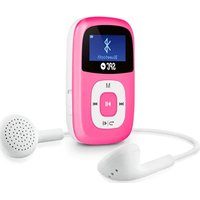
| Product Type | MP3 Player |
| Brand | SPC |
| Model | 8294P |
| Dimensions | Approx. 9 x 4 x 1 cm (3.5 x 1.6 x 0.4 in) |
| Weight | Approx. 40 g (1.4 oz) |
| Power Source | Rechargeable lithium-ion battery, 200 mAh |
| Battery Life | Up to 12 hours of continuous playback |
| Storage Capacity | 8 GB internal flash memory |
| Display | 1.5-inch LCD color screen |
| Supported Audio Formats | MP3, WMA, WAV, FLAC |
| Main Functions | Music playback, voice recording, FM radio, folder navigation |
| Connectivity | USB 2.0 for charging and data transfer, 3.5 mm headphone jack |
| Care and Cleaning | Wipe with a dry, soft cloth. Avoid moisture and extreme temperatures. |
| Safety Warnings | Do not disassemble. Keep away from heat sources and water. Use only specified charger. |
| Spare Parts and Repairability | Headphones and USB cable available as spare parts. Non-user-serviceable battery. |
| General Information | Supports multiple languages; portable and lightweight design |
Frequently Asked Questions - 8294P SPC
How do I transfer music to the SPC 8294P?
Connect the device to your computer using the USB cable. It will appear as a removable drive. Copy and paste your music files into the device's music folder.
What audio formats are supported?
The player supports MP3, WMA, WAV, and FLAC formats.
How long does the battery charge last?
A full charge provides up to 12 hours of continuous playback, depending on volume and format.
Can I record voice with this device?
Yes, the 8294P has a built-in voice recording function. Press the record button and save files as WAV.
How do I reset the player if it freezes?
Press and hold the power button for 10 seconds until the device restarts.
Is there an FM radio?
Yes, the device includes an FM radio tuner. Use the menu to scan and save stations.
Can I use the player while charging?
It is not recommended to use the player while charging to avoid overheating. Wait until fully charged.
How do I organize songs into folders?
On your computer, create folders like 'Music' or 'Playlists' on the device. The player supports folder navigation.
What should I do if the device is not recognized by my computer?
Try a different USB port or cable. Ensure the player is turned on. If still not recognized, reinstall drivers (if needed) or reset the device.
How do I care for the battery?
Avoid complete discharge frequently. Charge using the provided USB cable only. Do not expose to high temperatures.
User questions about 8294P SPC
0 question about this device. Answer the ones you know or ask your own.
Ask a new question about this device
No questions yet. Be the first to ask one.
Download the instructions for your Mp3 player in PDF format for free! Find your manual 8294P - SPC and take your electronic device back in hand. On this page are published all the documents necessary for the use of your device. 8294P by SPC.
USER MANUAL 8294P SPC
Manual assistant
Powered by Anthropic
Waiting for your message
Product information
Brand : SPC
Model : 8294P
Category : Mp3 player