5074 - Mp3 player SPC - Free user manual and instructions
Find the device manual for free 5074 SPC in PDF.


Pick your language and provide your email: we'll send you a specifically translated version.
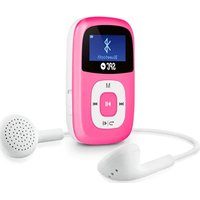
| Product Type | Portable MP3 Player |
| Brand | SPC |
| Model | 5074 |
| Display | LCD screen |
| Storage Capacity | Built-in 8GB, expandable via microSD |
| Audio Formats | MP3, WMA, WAV, FLAC |
| Playback Modes | Repeat, shuffle, folder play |
| FM Radio | Yes, with station presets |
| Voice Recording | Yes, built-in microphone |
| Battery Type | Rechargeable lithium-ion |
| Battery Life | Up to 20 hours of music playback |
| Connectivity | USB 2.0, 3.5mm headphone jack |
| Charging Time | Approx. 2 hours via USB |
| Dimensions | 35 x 75 x 11 mm (approx.) |
| Weight | 35 g (approx.) |
| Operating Temperature | 0°C to 40°C |
| Cleaning Instructions | Wipe with dry cloth; keep away from water and dust. |
| Safety Warnings | Do not disassemble; use approved charger; avoid high temperatures. |
| Reparability | Not user-serviceable; contact SPC support for repairs. |
| General Information | Includes USB cable and earphones. |
Frequently Asked Questions - 5074 SPC
How do I turn on the SPC 5074?
Press and hold the power button located on the side of the device for 3 seconds until the screen lights up.
How do I play MP3 files?
Transfer MP3 files to the device's internal storage or microSD card via USB, then select the file from the music library. The player supports MP3, WMA, WAV, and FLAC formats.
How do I charge the battery?
Connect the included USB cable to the device and a computer or USB charger. A full charge takes approximately 2 hours and provides up to 20 hours of playback.
How do I connect the SPC 5074 to a computer?
Use the supplied USB cable to connect the device to a computer. It will appear as a removable drive, allowing you to copy music files to the player.
How do I use the FM radio?
Navigate to the FM radio mode from the main menu. You can auto-scan stations or manually tune to your desired frequency. Save stations as presets for quick access.
Can I record voice memos?
Yes, the device has a built-in microphone. Go to Voice Recording mode, press the record button, and speak. Stop and save the recording for later playback.
How do I organize my music files?
Create folders on the device's storage and copy music files into them. The player can browse by folder view, ID3 tags, or playlists, making organization easy.
What should I do if the device becomes unresponsive?
Perform a reset by pressing the reset button (if available) or inserting a pin into the reset hole. If that fails, connect to a computer and try restoring via the SPC utility.
How do I clean the player?
Use a soft, dry cloth to wipe the screen and body. Do not use liquid cleaners or immerse the device in water.
What should I do if the headphone jack doesn't work?
Check that the earphones are fully inserted and the volume is not muted. Try a different pair of earphones. If the issue persists, the jack may need servicing; contact SPC support.
User questions about 5074 SPC
0 question about this device. Answer the ones you know or ask your own.
Ask a new question about this device
No questions yet. Be the first to ask one.
Download the instructions for your Mp3 player in PDF format for free! Find your manual 5074 - SPC and take your electronic device back in hand. On this page are published all the documents necessary for the use of your device. 5074 by SPC.
USER MANUAL 5074 SPC
Manual assistant
Powered by Anthropic
Waiting for your message
Product information
Brand : SPC
Model : 5074
Category : Mp3 player