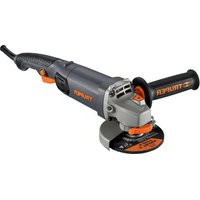
ESMA-4590N - Angle Grinder Truper - Free user manual and instructions
Find the device manual for free ESMA-4590N Truper in PDF.


| Product Type | Angle Grinder |
| Brand | Truper |
| Model | ESMA-4590N |
| Power Input | 900 W |
| Power Supply | 220-240 V, 50/60 Hz |
| No-Load Speed | 11,000 rpm |
| Disc Diameter | 115 mm (4.5 in) |
| Spindle Thread | M14 |
| Weight | 2.1 kg |
| Dimensions (L x W x H) | 280 x 120 x 100 mm |
| Main Functions | Cutting, grinding, sanding, polishing |
| Safety Features | Safety guard, spindle lock, anti-vibration handle |
| Maintenance | Regular brush inspection and replacement, clean air vents |
| Spare Parts | Carbon brushes, disc flange, guard, side handle |
| Certifications | CE, RoHS |
Frequently Asked Questions - ESMA-4590N Truper
User questions about ESMA-4590N Truper
0 question about this device. Answer the ones you know or ask your own.
Ask a new question about this device
Download the instructions for your Angle Grinder in PDF format for free! Find your manual ESMA-4590N - Truper and take your electronic device back in hand. On this page are published all the documents necessary for the use of your device. ESMA-4590N by Truper.
USER MANUAL ESMA-4590N Truper
natural_image
Illustration of a power outlet connected to two socket outlets (no text or symbols)natural_image
Technical illustration of two mechanical components with no visible text or symbolsPower Requirements. 3

General power tool safety warnings 4

Safety warnings for angle grinders 5
Parts 6
Assembly 6
Start Up 7
Maintenance 8
Authorized Service Centers 9
Warranty Policy 10

CAUTION
To gain the best performance of the tool, prolong the duty life, make the Warranty valid if necessary, and to avoid hazards of fatal injuries please read and understand this Manual before using the tool.
Keep this manual for future references.
The illustrations in this manual are for reference only. They might be different from the real tool.

ESMA-4590N
| Code | 12872 |
| Description | Angle grinder |
| Discs | 4 1/2" |
| Voltage | 127 V~ |
| Frequency | 60 Hz |
| Current | 7 A |
| Power | 1.2 Hp |
| Speed | 11 000 r/min |
| Duty cycle | 50 minutes work per 20 minutes idle.Maximum 6 hours per day. |
| Conductors | 16 AWG x 2C with insulating temperature of 221 °F |
| Insulating IP Grade | Class II IP 20 |
Power Cord Grips used in this product: Type Y
Tool Build Quality: Reinforced insulation.
Thermal insulation on motor winding: Class E
WARNING Avoid the risk of electric shock or severe injury. When the power cable gets damaged
it should only be replaced by the manufacturer or at a TRUPER® Authorized Service Center.
The build quality of the electric insulation is altered if spills or liquid gets into the tool while in use.
Do not expose to rain, liquids and/or dampness.
WARNING Before gaining access to the terminals all power sources should be disconnected.

Power Requirements
WARNING Tools with double insulation reinforced insulation are equipped with a polarized plug (one prong is wider than the other). This plug will only fit in the right way into a polarized outlet. If the plug cannot be introduced into the outlet, reverse the plug. If it still doesn't fit, call a qualified electrician to install for you a polarized outlet. Do not alter the plug in any way. Both insulation types eliminates the need of both a grounded third power cord with three prongs or a grounded power connection.

natural_image
Electrical outlet diagram showing a power plug connected to a wall socket with three outlets (no text or labels)WARNING When using an extension cable, verify the gauge is enough for the power that your product needs. A lower gauge cable will cause voltage drop in the line, resulting in power loss and overheating. The following table shows the right size to use depending on cable's length and the ampere capability shown in the tool's nameplate. When in doubt use the next higher gauge.
Ampere Capacity
| from 0 A and up to 10 A |
| from 10 A and up to 13 A |
| from 13 A and up to 15 A |
| from 15 A and up to 20 A |
Number of Conductors
| 3 (one grounded) |
Extension gauge
| from 6' to 49' | | higher than 49' |
| 18 AWG(*) | 16 AWG |
| 16 AWG | 14 AWG |
| 14 AWG | 12 AWG |
| 8 AWG | 6 AWG |
* It is safe to use only if the extensions have a built-in artifact for over current protection.
AWG = American Wire Gauge. Reference: NMX-J-195-ANCE
WARNING When operating power tools outdoors, use a volteck grounded extension cable labeled "For Outdoors Use". These extensions are specially designed for operating outdoors and reduce the risk of electric shock.

WARNING! Read carefully all safety warnings and instructions listed below. Failure to comply with any of these warnings may result in electric shock, fire and / or severe damage. Save all warnings and instructions for future references.
Work area
Keep your work area clean, and well lit.
Cluttered and dark areas may cause accidents.

Never use the tool in explosive atmospheres, such as in the presence of flammable liquids, gases or dust.
Sparks generated by power tools may ignite the flammable material.

Keep children and bystanders at a safe distance while operating the tool.
Distractions may cause loosing control.

Electrical Safety
The tool plug must match the power outlet. Never modify the plug in any way. Do not use any adapter plugs with grounded power tools.
Modified plugs and different power outlets increase the risk of electric shock.

Avoid body contact with grounded surfaces, such as pipes, radiators, electric ranges and refrigerators.
The risk of electric shock increases if your body is grounded.
Do not expose the tool to rain or wet conditions.
Water entering into the tool increases the risk of electric shock.
Do not force the cord. Never use the cord to carry, lift or unplug the tool. Keep the cord away from heat, oil, sharp edges or moving parts.
Damaged or entangled cords increase the risk of electric shock.
When operating a tool outdoors, use an extension cord suitable for outdoor use.
Using an adequate outdoor extension cord reduces the risk of electric shock.
If operating the tool in a damp location cannot be avoided, use a ground fault circuit interrupter (GFCI) protected supply.
Using a GFCI reduces the risk of electric shock.
Personal safety
Stay alert, watch what you are doing and use common sense when operating a tool. Do not use a power tool while you are tired or under the influence of drugs, alcohol or medication.
A moment of distraction while operating the tool may result in personal injury.
Use personal protective equipment. Always wear eye protection.
Protective equipment such as safety glasses, anti-dust mask, non-skid shoes, hard hats and hearing protection used in the right conditions significantly reduce personal injury.


Prevent unintentional starting up. Ensure the switch is in the "OFF" position before connecting into the power source and / or battery as well as when carrying the tool.
Transporting power tools with the finger on the switch or connecting power tools with the switch in the "ON" position may cause accidents.
Remove any wrench or vice before turning the power tool on.
Wrenches or vices left attached to rotating parts of the tool may result in personal injury.
Do not overreach. Keep proper footing and balance at all times.
This enables a better control on the tool during unexpected situations.
Dress properly. Do not wear loose clothing or jewelry. Keep hair, clothes and gloves away from the moving parts.
Loose clothes or long hair may get caught in moving parts.

If you have dust extraction and recollection devices connected onto the tool, inspect their connections and use them correctly.
Using these devices reduce dust-related risks.
Power Tools Use and Care
Do not force the tool. Use the adequate tool for your application.

The correct tool delivers a better and safer job at the rate for which it was designed.
Do not use the tool if the switch is not working properly.
Any power tool that cannot be turned ON or OFF is dangerous and should be repaired before operating.
Disconnect the tool from the power source and / or battery before making any adjustments, changing accessories or storing.
These measures reduce the risk of accidentally starting the tool.
Store tools out of the reach of children. Do not allow persons that are not familiar with the tool or its instructions to operate the tool.
Power tools are dangerous in the hands of untrained users.

Service the tool. Check the mobile parts are not misaligned or stuck. There should not be broken parts or other conditions that may affect its operation. Repair any damage before using the tool.
Most accidents are caused due to poor maintenance to the tools.
Keep the cutting accessories sharp and clean.
Cutting accessories in good working conditions are less likely to bind and are easier to control.
Use the tool, components and accessories in accordance with these instructions and the projected way to use it for the type of tool when in adequate working conditions.
Using the tool for applications different from those it was designed for, could result in a hazardous situation.
Service
Repair the tool in a TRUPER Authorized Service Center using only identical spare parts.
This will ensure that the safety of the power tool is maintained.
Safety warnings for angle grinders
Select the right disc
CAUTION • Never use discs with bigger diameter than the size required in the tool.
WARNING • Use only discs or accessories for minimum or more than 11000 RPM speeds.
CAUTION • Use only discs or accessories with an orifice that fits perfectly in the tool spindle.
CAUTION • Use only discs or accessories specifically designed for the chosen material.
Before operating the grinder
- Set apart some time and assess the job you are about to do. Pay attention to all the necessary cautions before starting to grind.
DANGER • Remove all the fastening wrenches from the tool. Otherwise they can shoot away causing sever injuries to the user.
WARNING • Double-check the guard. It should be perfectly fastened and in good working condition. Do not use the tool without a guard.
CAUTION • Double-check the disc. It should not be broken or cracked. Tap the disc gently with a wooden hammer and listen for a strange sound to learn if is cracked.
DANGER • Before plugging the tool, see if is in the OFF position. Otherwise the tool could start unexpectedly causing severe injuries.
CAUTION • Run the tool 30 seconds before using, to detect important vibration or any type of unusual movement. If detected, unplug the tool and take it to a TRUPER Authorized Service Center.
CAUTION • See if the disc rotates freely. • Do not tighten the disc. It could brake.
WARNING • To work with small work pieces fasten with wrenches. Never use your hands to hold the piece.
While operating the grinder
CAUTION • Do not start the tool when the disc is touching the work piece.
WARNING • Wear safety glasses, gloves and an apron when using the tool.


WARNING • Keep the power cable or extension in the back of the tool. Avoid accidentally damaging the cables with the disc.
WARNING • Never hold the tool by the power cable. Hold by the housing or auxiliary handle.
CAUTION • Hold the tool by the isolated parts.
The cutting tool could come into contact with hidden wiring or its own cable. Making contact with a "live" wire causes the metal parts to electrify and give an electric shock to the user.
- Never hit the work surface with the disc.
CAUTION • To get the best result with the grinding process, the inclination of the disc and the working surface should have an angle measuring 15^ to 30^
DANGER • When the disc is rotating never use the spindle lock to stop it. It is very dangerous and may cause injuries to the user.
CAUTION • Do not touch the disc or the working piece after grinding. Wait for them to cool down. Never try to cool them down using water or oil.
WARNING • Before checking, adjusting or changing discs, double-check the tool is not plugged in.
DANGER • Sparks caused when grinding may be dangerous. Use caution. Make sure sparks do not get into contact with skin or flammable substances.

natural_image
Technical illustration of two mechanical components with no visible text or symbols
Right way to operate the grinderWrong

Assembly
Protection Guard Assembly
- Match both cantilevered parts inside the guard bracket with the corresponding slots in the axis cover.
- Turn 180^ into the opposite position.
- Fix pushing the bracket lever.

Disc Assembly
- Fit the inner flange onto the spindle.
- Set the disc onto the inner flange.
- Set the outer flange onto the spindle.
- Press the spindle lock into the grinder head.
- Screw the outer flange with the lock nut wrench until securely fastened.
DANGER The spindle lock should only be used to change discs.
Never to stop the disc while rotating.


Auxiliary Handle Assembly
- For a safer operation use the auxiliary handle. Fit it into any of the two mounting orifices. Use the one that make your job easier.

Start Up
The angle grinder is a manual power tool. It is used to grind and cut steel, pipes, and angles in iron, bricks, tiles, stone and/or ceramic pieces. Also to remove burr from metal surfaces, to level and smoothing out soldering. When changing the tool accessory, it can be used to clean rust and to buff metal surfaces and other materials.
Switch On
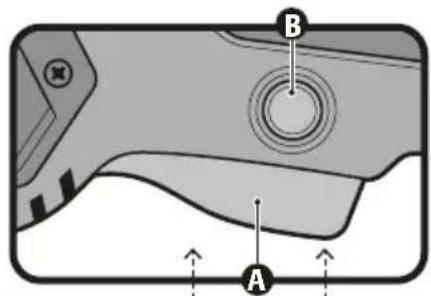
- Intermittent operation: Connect the plug into the power outlet. Press switch (A) to start the tool. To stop, just release the switch.
- Continuous operation: Connect the plug into the power outlet. Press switch (A) and block it pressing the continuous use button (B). To stop, press and then release the switch
How to correctly hold the tool
Always hold the tool using both hands. One hand holds the handle and the other hand on the auxiliary handle. Use care not to obstruct the ventilation slots.
- Grinding: For better results hold the tool at an angle of 15^ to 30^ with regards to the work piece. Move backward and forward with a constant rhythm and a slight pressure. This way the work piece will not get too hot, will not fade and rough edges will not appear. - Cutting: Do not press, tilt or oscillate the tool. Use a moderate speed. The disc should always rotate in a movement opposite to the cutting movement. Never the other way around, as there is danger that the tool shoots out of control. For cutting hard stone, using a diamond disc is recommended.


natural_image
Close-up of a hand using a TRUPER brand grating tool to cut a circular component (no text or symbols visible)Useful Tips
• To prevent damaging the disc work using the disc into the right position.
- Press onto the work piece using less force than the tool's weight to avoid overload and damaging the motor and disc.
- After installing a new disc allow it to rotate with no load at least during one minute. If it vibrates, replace immediately.
CAUTION • Avoid working onto wood or soft materials like lead. These materials saturate the disc very fast and make it unusable.
Maintenance
• Before cleaning the tool disconnect the tool.
- Never use water or other liquids. Use only a brush.
• To avoid motor overheating clean the ventilation slots regularly.
- Double-check all the tool components are securely fastened.
• The housing should not be cracked or damaged.
- Double-check the power cable is not cut or peeled.
• After a prolonged use the grease on the tool head should be replaced in a
TRUPER Authorized Service Center.
Repairs
Use only spare parts and accessories recommended by the manufacturer. In the event the tool is not working, repairs should be carried out in a
TRUPER Authorized Service Center.
Carbon Brush Replacement
- Replace worn (burnt, broken or smaller than 0.19" long) carbon brushes. Use new carbons.
- When replacing carbons always replace both carbons at the same time.
- Remove worn carbons from the housing. Clean accumulated dust with compressed air.
- Set the new carbons in a reverse order. Carbons should easily fall into the carbon housing.
• After setting up new carbon brushes let the grinder running a couple of minutes unloaded. This way the carbon brushes will adjust better. - Use only original TRUPER spare carbon brushes, designed specifically with the right strength and electric resistance for each type of motor. Carbon brushes with different specifications may damage the motor.
Storage
Store the tool neatly in a dry place. Protect against dust and water.
In the event of any problem contacting a Service Center, please see our webpage www.truper.com to get an updated list, or call our toll-free numbers (800) 690-6990 or (800) 018-7873 to get information about the nearest TRUPER Authorized Service Center.
AGUASCALIENTES
This product, its parts and components have a three years warranty against defects in its manufacture, operation and workmanship, except when: the product has been used in conditions other than those recommended, or has not been operated according to the instructions, or has been altered or repaired by personnel not authorized by TRUPER. In order to make the warranty valid or to purchase components and spare parts, you must present the product and its proof of purchase at Av. San Isidro #110, Col. Industrial San Antonio, ALC. Azcapotzalco, C.P. 02760, CDMX, Mex. or at the store where you bought it, or at a TRUPER service center listed in the attached warranty policy and/or at www.truper.com. Transportation costs resulting from compliance of this warranty will be covered by TRUPER. For questions or comments, call 800-690-6990.
Imported by: Truper, S.A. de C.V., Parque Industrial #1, Jilotepec, Edo. de México, México. C.P. 54240, Made in China
Stamp of the business:

3 YEARS
Delivery date:

- CAUTION
- Power Requirements
- Work area
- Electrical Safety
- Personal safety
- Power Tools Use and Care
- Service
- Safety warnings for angle grinders
- Select the right disc
- Before operating the grinder
- While operating the grinder
- Assembly
- Protection Guard Assembly
- Disc Assembly
- Auxiliary Handle Assembly
- Start Up
- Switch On
- How to correctly hold the tool
- Useful Tips
- Maintenance
- Repairs
- Carbon Brush Replacement
- Storage
- AGUASCALIENTES
Brand : Truper
Model : ESMA-4590N
Category : Angle Grinder