
KX-HN1003W - Home Automation PANASONIC - Free user manual and instructions
Find the device manual for free KX-HN1003W PANASONIC in PDF.


| Product Type | Home Automation Hub with Camera |
| Brand | Panasonic |
| Model | KX-HN1003W |
| Dimensions (H x W x D) | 10.5 x 6.5 x 2.5 cm |
| Weight | 180 g |
| Power Supply | AC adapter (input: 100-240V, output: 5V DC 1A) |
| Wireless Communication | Wi-Fi 802.11 b/g/n, Bluetooth 4.0 |
| Camera Resolution | HD 720p (1280 x 720 pixels) |
| Field of View | 120 degrees diagonal |
| Night Vision | Infrared LEDs, up to 5 meters |
| Motion Detection | Passive infrared sensor, adjustable sensitivity |
| Audio | Built-in microphone and speaker, two-way audio |
| Storage | MicroSD card slot (up to 128GB), cloud storage option |
| Compatibility | iOS 10+, Android 5.0+, Amazon Alexa, Google Assistant |
| Operating Temperature | 0°C to 40°C |
| Maintenance | Clean lens with soft dry cloth; avoid water and harsh chemicals |
| Safety Certifications | FCC, IC, CE |
| Spare Parts | AC adapter, mounting bracket, screws, quick start guide |
| Repairability | Designed for easy replacement of power adapter; camera unit sealed |
| General Information | White color; LED indicator for status; reset button |
Frequently Asked Questions - KX-HN1003W PANASONIC
User questions about KX-HN1003W PANASONIC
0 question about this device. Answer the ones you know or ask your own.
Ask a new question about this device
Download the instructions for your Home Automation in PDF format for free! Find your manual KX-HN1003W - PANASONIC and take your electronic device back in hand. On this page are published all the documents necessary for the use of your device. KX-HN1003W by PANASONIC.
USER MANUAL KX-HN1003W PANASONIC
Home Monitoring Camera
Model No. KX-HN1003
(KX-HNC800)
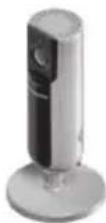

Thank you for purchasing a Panasonic product.
This document explains how to configure the camera and access it using a mobile device. These steps must be followed before you can use the camera. For details about how to use the camera, refer to the User's Guide (page 28).
Please read this document before using the unit and save it for future reference.
For assistance, please contact us at 1-800-272-7033 or visit our Web site: http://shop.panasonic.com/support for customers in the U.S.A.
Please register your product: http://shop.panasonic.com/support
In order to use this device, download the latest version of the [HomeHawk] app.
Printed in China
Table of Contents
Introduction
Accessory information ....3
Important Information
Graphical symbols for use on equipment and their descriptions ....5
About this system 6
For your safety 6
Important safety instructions .....8
Security cautions ......9
For best performance .....10
Privacy and rights of portrait ....11
Other information ......11
Setup
Part names and functions .....13
LED indicator 14
Connections 15
Setup overview ......16
Downloading the [HomeHawk] app ....17
Setting up the camera (initial setup)....18
Registering additional mobile devices to the camera .....21
Resetting the camera .....22
Appendix
Information about wireless communication ....23
Information about sensor features 24
Information about night vision mode ....26
Wall mounting 26
Adjusting the angle .....26
Removing the stand .....27
Accessing the User's Guide ....28
Specifications ......28
Open source software notice ...29
Software information ....30
FCC and other information .....31
Customer services ......33
Limited Warranty (ONLY FOR U.S.A.) 34
Accessory information
Supplied accessories

AC adaptor
Part number:
PNWYA1003W00 (white)
PNWYBHNC800 (black)

microSD card
Other information
- Design and specifications are subject to change without notice.
- The illustrations in these instructions may vary slightly from the actual product.
Trademarks
- microSDXC Logo is a trademark of SD-3C, LLC.
- iPhone and iPad are trademarks of Apple Inc., registered in the U.S. and other countries.
- iPad mini is a trademark of Apple Inc.
- Android and Google Play are registered trademarks or trademarks of Google Inc.
- Microsoft, Windows, and Internet Explorer are either registered trademarks or trademarks of Microsoft Corporation in the United States and/or other countries.
- WPA ^TM and WPA2 ^TM are registered trademarks or trademarks of Wi-Fi Alliance ^ .
- All other trademarks identified herein are the property of their respective owners.
For assistance, please visit http://shop.panasonic.com/support
Introduction
Notice
- The camera supports microSD, microSDHC, and microSDXC memory cards. In this document, the term "microSD card" is used as a generic term for any of the supported cards.
4 For assistance, please visit http://shop.panasonic.com/support
Graphical symbols for use on equipment and their descriptions
| Symbol | Explanation Symbol Explanation | ||
 | Alternating current (A.C.) |  | Class II equipment (equipment in which protection against electric shock relies on Double Insulation or Reinforced Insulation) |
 | Direct current (D.C.) “ON” (power) | ||
 | Protective earth “OFF” (po) | ||
 | Protective bonding earth |  | Stand-by (power) |
 | Functional earth “ON”/“OFF” (power; push-push) | ||
 | For indoor use only Cautic shock (of electric shock) |
Important Information
About this system
- This system is an auxiliary system; it is not designed to provide complete protection from property loss. Panasonic will not be held responsible in the event that property loss occurs while this system is in operation.
- This product should not be used as substitute for a medical or caregiver's supervision. It is the caregiver's responsibility to stay close enough to handle any eventuality.
- The system's wireless features are subject to interference, therefore functionality in all situations cannot be guaranteed. Panasonic will not be held responsible for injury or damage to property that occurs in the event of wireless communication error or failure.
For your safety
To prevent severe injury and loss of life/property, read this section carefully before using the product to ensure proper and safe operation of your product.
WARNING
Power connection
- \$e only the power source marked on the product.
- Do not overload power outlets and extension cords. This can result in the risk of fire or electric shock.
- Completely insert the AC adaptor/power plug into the power outlet. Failure to do so may cause electric shock and/or excessive heat resulting in a fire.
- Regularly remove any dust, etc. from the AC adaptor/power plug by pulling it from the power outlet, then wiping with a dry cloth. Accumulated dust may cause an insulation defect from moisture, etc. resulting in a fire.
- Unplug the product from power outlets if it emits smoke, an abnormal smell, or makes an unusual noise. These conditions can cause fire or electric shock. Wait for the product to stop emitting smoke, then visit the following web page and contact Panasonic for support.
http://shop.panasonic.com/support
6 For assistance, please visit http://shop.panasonic.com/support
Important Information
- Unplug from power outlets and never touch the inside of the product if its casing has been broken open. Danger of electric shock exists.
- Never touch the plug with wet hands. Danger of electric shock exists.
- Do not connect non-specified devices.
Installation
- prevent the risk of fire or electrical shock, do not expose the product to rain or any type of moisture.
- Do not place or use this product near automatically controlled devices such as automatic doors and fire alarms. Radio waves emitted from this product may cause such devices to malfunction resulting in an accident.
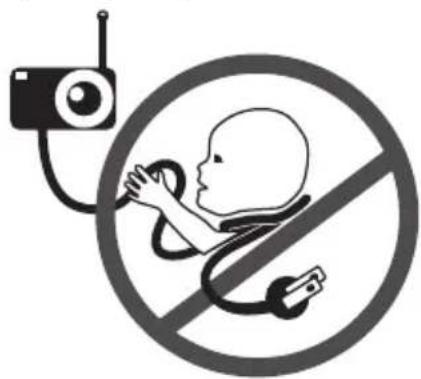
- WARNING: Strangulation Hazard: Children have STRANGLED in cords. Keep this cord out of the reach
of children more than 1 m (3 feet) away.
natural_image
Symbolic illustration of a baby with a stethoscope inside a circle, no text or symbols present.- Do not allow the AC adaptor cord to be excessively pulled, bent or placed under heavy objects.
- Keep small parts, such as microSD cards, out of the reach of children. There is a risk of swallowing. In the event they are swallowed, seek medical advice immediately.
Operating safeguards
- Toplug the product from power outlets before cleaning. Do not use liquid or aerosol cleaners.
- Do not disassemble the product.
- Never put metal objects inside the product. If metal objects enter the product, turn off the circuit breaker and contact an authorized service center.
For assistance, please visit http://shop.panasonic.com/support
Important Information
Medical
- Consult the manufacturer of any personal medical devices, such as pacemakers or hearing aids, to determine if they are adequately shielded from external RF (radio frequency) energy. Wireless communication features operate between the frequencies listed below, with a peak transmission power of 100 mW.
2.412 GHz - 2.462 GHz
5.180 GHz - 5.320 GHz
5.500 GHz - 5.700 GHz
5.745 GHz - 5.825 GHz
- Do not use the product in health care facilities if any regulations posted in the area instruct you not to do so. Hospitals or health care facilities may be using equipment that could be sensitive to external RF energy.

CAUTION
Installation and location
- Never install wiring during a lightning storm.
-
The AC adaptor is used as the main disconnect device. Ensure that the AC outlet is installed near the product and is easily accessible.
-
Mount the product on the stable location where the camera can be adequately supported when installing.
- Do not mount the product on soft material. It may fall down, break or cause injury.
- Do not mount the product on the following materials: gypsum board, ALC (autoclaved lightweight cellular concrete), concrete block, plywood less than 25 mm (1 inch) thick, etc.
Preventing accidents and injuries
- Do not put your ear(s) near the speaker, as loud sounds emitted from the speaker may cause hearing impairment.
Important safety instructions
When using your product, basic safety precautions should always be followed to reduce the risk of fire, electric shock, and injury to persons, including the following:
- Do not use this product near water for example, near a bathtub, washbowl, kitchen sink, or laundry tub, in a wet basement or near a swimming pool.
8
For assistance, please visit http://shop.panasonic.com/support
Important Information
- Use only the power cord indicated in this document.
SAVE THESE INSTRUCTIONS
Security cautions
Take appropriate measures to avoid the following security breaches when using this product. - Leaks of private information - Unauthorized use of this product - Unauthorized interference or suspension of the use of this product
Take the following measures to avoid security breaches:
- Configure the wireless router that connects your mobile device to this product to use encryption for all wireless communication.
- You may be vulnerable to security breaches if the unit is used with the login password, disarm code, or PIN code, or other settings at their default values. Configure your own values for these settings.
- Do not use passwords that could be easily guessed by a third party. If you keep a record of your passwords, protect that
record. Change passwords regularly.
- If you lose your mobile device, change the password used to access this product.
- If you enable the product's auto login feature, enable the screen lock or similar security feature on your mobile device.
- Take care when performing important security related operations, such as deleting unit IDs.
- To prevent disclosure of personal information, enable the screen lock or similar security feature on your mobile device.
- When submitting the product for repair, make a note of any important information stored in the product, as this information may be erased or changed as part of the repair process.
- Before handing the product over to a third party for repair or other purposes, perform a factory data reset to erase any data stored in the product and remove the microSD card. Use only trusted repair services authorized by Panasonic.
- Before disposing of the product, perform a factory data reset to erase any data stored in the
For assistance, please visit http://shop.panasonic.com/support
Important Information
product. Remove and erase the microSD card.
- If your mobile device will no longer be used with the product, delete your mobile device's registration from the product and delete the corresponding app from your mobile device.
- If this product experiences a power outage, its date and time setting may become incorrect. Confirm the date and time setting and correct it if necessary.
Additionally, note the following.
● Communications may be interrupted depending on network conditions and wireless signal quality.
- This product may be used in ways that violate the privacy or publicity rights of others. You are responsible for the ways in which this product is used.
For best performance
Product location/avoiding noise
This product uses radio waves to communicate with a wireless router.
- For maximum coverage and noise-free communications, place this product:
– at a convenient, central location with no obstructions between this product and the wireless router.
– away from electronic appliances such as TVs, radios, personal computers, wireless devices, or other phones. - facing away from radio frequency transmitters, such as external antennas of mobile phone cell stations. (Avoid putting this product on a bay window or near a window.)
- Coverage and transmission quality depends on the local environmental conditions.
- If the transmission quality is not satisfactory, move this product to another location.
Environment
- Keep the product away from electrical noise generating devices, such as fluorescent lamps and motors.
- The product should be kept free from excessive smoke, dust, high temperature, and vibration.
- Do not expose this product to direct sunlight or other forms of
powerful light such as halogen lights for long periods of time. (This may damage the image sensor.)
- Do not place heavy objects on top of the product.
- When you leave the product unused for a long period of time, unplug the product from the power outlet.
- The product should be kept away from heat sources such as heaters, kitchen stoves, etc. It should not be placed in rooms where the temperature is less than 0 °C (32 °F) or greater than 40 °C (104 °F). Damp basements should also be avoided.
- The maximum communication range may be shortened when the product is used in the following places: Near obstacles such as hills, tunnels, underground, near metal objects such as wire fences, etc.
- Operating the product near electrical appliances may cause interference. Move away from the electrical appliances.
Privacy and rights of portrait
When installing or using the camera, please take into consideration the rights of others with regard to privacy. It is generally said that “privacy” means the ability of an individual or group to stop information about themselves from becoming known to people other than those whom they choose to give the information. “Rights of portrait” means the right to be safe from having your own image taken and used indiscriminately without consent.
Other information
Routine care
- We the outer surface of the product with a soft moist cloth.
- Do not use benzine, thinner, or any abrasive powder.
Camera image quality
- camera images may have the following characteristics.
– Colors in images may differ from the actual colors.
Important Information
- Faces or objects may appear dark when there is light behind the subject (i.e., backlighting).
– Image quality may be reduced in dark locations.
– Images may appear hazy when there are outdoor lights in use.
Protecting your recordings
- ☑ not remove the microSD card or disconnect the product's AC adaptor while reading or writing data to the microSD card. Data on the card could become corrupted.
- If a microSD card malfunctions or is exposed to electromagnetic waves or static electricity, data on the card could become corrupted or erased. Therefore, we recommend backing up important data to a computer or other device.
Notice
- This product is designed for use in the United States of America. Sale or use of this product in other countries may violate local laws.
- Cet appareil est conçu pour être utilisé aux États-Unis d'Amérique. La vente ou l'emploi de cet appareil dans certains autres pays peut constituer une infraction à la législation locale.
- Este producto está diseñado para usarse en los Estados Unidos de América.
La venta o el empleo de este producto en ciertos países puede constituir violación de la legislación local. - 本產品專為美國使用而設。若在其他國家銷售或使用,可能會違反當地法例。
- この製品は、日本国外での使用を目的として設計されており、日本国内での使用は法律違反となります。従って、当社では日本国内においては原則として修理などのサービスは致しかねます。
12 For assistance, please visit http://shop.panasonic.com/support
Part names and functions

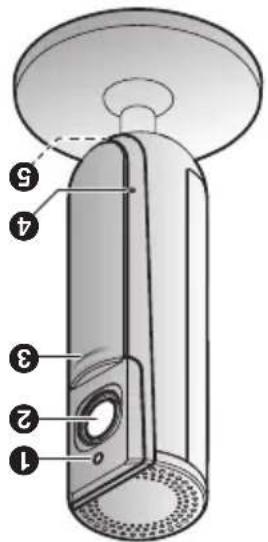
① Brightness sensor
Allows the camera to switch automatically to night vision mode in low-light conditions.
② Lens
③ Privacy shutter
Prevents others from monitoring live camera images or sound when the shutter is closed.
4 Microphone
⑤ LED indicator
⑥ microSD card slot
⑦ Stand
⑧ 【SETUP】
Used when performing initial setup.
⑨ Speaker
⑩ micro-USB connector
Used to connect the AC adaptor to the camera.
⑪ Reset button
Used to reset the camera's settings (page 22).
⑫ Temperature sensor

Setup
LED indicator
You can use the LED indicator to confirm the camera's status.
| Indicator Status | |
| Off | No power, or LED indicator is turned off ^1 |
| Blue, lit Normal operation | connected to wireless router ^*1 , privacy shutter is open |
| White, lit Normal operation | connected to wireless router ^*1 , privacy shutter is closed |
| White, blinking quickly | Camera is searching for wireless router |
| Green, lit Initial setup required | |
| Green, blinking slowly | Initial setup is in progress with mobile device connected |
| Green, blinking Initial setup is starting | |
| Red, lit | Motion detected ^*1 , or camera is starting up |
| Red, blinking slowly Live images are being viewed or recorded, or camera is starting up | |
| Red, blinking Device malfunction | |
*1 You can configure the camera so that its LED indicator does not light during normal operation or when motion is detected. For more information, refer to the User's Guide (page 28).
14 For assistance, please visit http://shop.panasonic.com/support
Connections
1 Insert the AC adaptor plug (①) firmly into the camera's micro-USB connector.
2 Connect the AC adaptor (②) to the power outlet.
3 Insert a microSD card (user-supplied; ③) into the camera's microSD card slot. (This is not necessary if you do not want to record camera images.)

Note:
- Use only the supplied AC adaptor S006AKU0500100.
- To remove the microSD card, push in the microSD card and then remove it.
Note about power connections
AC adaptor connection
- The AC adaptor must remain connected at all times. (It is normal for the adaptor to feel warm during use.)
- The AC adaptor should be connected to a vertically oriented or floor-mounted AC outlet. Do not connect the AC adaptor to a ceiling-mounted AC outlet, as the weight of the adaptor may cause it to become disconnected.
Power failure
• The camera will not work during a power failure.
For assistance, please visit http://shop.panasonic.com/support
Setup
Setup overview
After you have connected your camera, here is what you will need to do in order to access it from your mobile device.
1 Download (page 17)
Download the [HomeHawk] app to your mobile device.
2 Set up the camera (page 18)
Use the [HomeHawk] app to configure the camera to connect to your wireless router, and then register your mobile device to the camera.
3 (Optional)
Register additional mobile devices (page 21)
You can register additional mobile devices to the camera, for a total of 8.
Downloading the [HomeHawk] app
Download information is available at the web page listed below.
![PANASONIC KX-HN1003W - Downloading the [HomeHawk] app - 1](/content/2026/05/1074539/images/51ad10b87fcf46182db3419681aa65bf360898d06d18c8331a780a95f5beb198.jpg)
https://panasonic.net/cns/pcc/support/homehawk
Using your device's app store
iPhone, iPad users
Search for "Panasonic HomeHawk". iPad users should search in the "iPhone only" category.
Android™ device users
Search for "Panasonic HomeHawk".
Compatible mobile devices
Please check the latest information at the following supported page. https://panasonic.net/cns/pcc/support/homehawk iPhone 5s and later or iPad® (iOS 10.0 and later) or an Android devices (Android 4.1 and later) (As of October 2017)
Note:
- The [HomeHawk] app may not function properly depending on the operating environment, such as the model of your mobile device, peripherals connected to your mobile device, and the apps installed on your mobile device.
- Operating systems for mobile devices are continually updated. Accordingly, the versions of operating systems the [HomeHawk] app supports may also be updated.
- The following Android devices are not compatible with the [HomeHawk] app.
- Android devices that are not supported by Google Play™
- Android devices with limited hardware features (Bluetooth, wireless LAN, and microphone support are required.)
Setup
Setting up the camera (initial setup)
Confirm the following before you begin.
- Make sure you have installed the [HomeHawk] app on your mobile device
- Make sure the camera is located within range of your wireless router
- Make sure your mobile device is connected to your wireless router
- Make sure your mobile device can connect to the Internet
- Make sure you know the network name (SSID) and password assigned to your wireless router
Initial setup (for iPhone, iPad users)
1 Plug in the camera and wait about 1 minute for the camera's LED to light in green.
- If the LED does not light in green, or if you experience trouble during this procedure, reset the camera (page 22) and then repeat this procedure.
2 Start the [HomeHawk] app.
- The end-user license agreement is displayed the first time you start the app.
3 Follow the on-screen instructions.
4 Tap [Indoor HD Camera].
5 Tap [Set up the HD Camera].
6 When prompted, press the [SETUP] button on the back of the camera, and then tap [Next].
- The LED indicator blinks in green.
7 Change your mobile device's wireless LAN setting temporarily so that it connects to the camera directly.
- Open your mobile device's [Settings] app, tap [Wi-Fi], select "KX-HNC800_Panasonic", enter "00000000" as the
18 For assistance, please visit http://shop.panasonic.com/support
Setup
password, and then tap [Join].
- If more than 1 item named "KX-HNC800_Panasonic" is displayed, wait approx. 10 minutes and perform this procedure from the beginning.
8 Start the [HomeHawk] app again.
9 If necessary, enter the password required to connect to your wireless router and then tap [Next].
- The camera and your mobile device connect to your wireless router.
- If prompted, follow the on-screen instructions and connect your mobile device to your wireless router, start the app again, and then tap [Add This Mobile Device].
- If you enter the wrong password, an error is displayed. Repeat the initial setup procedure from the beginning.
10 When prompted, press the 【SETUP】 button on the back of the camera.
- The camera registers your mobile device.
11 When prompted, set the password that will be used to access the camera.
12 When prompted, enter a name for your mobile device and then tap [OK].
- This setting allows you to change the name assigned to your device. It can help you identify your mobile device when performing certain operations, such as deregistering a mobile device.
- A list of all cameras registered to the app is displayed when initial setup is complete.
Setup
Initial setup (for Android device users)
1 Plug in the camera and wait about 1 minute for the camera's LED to light in green.
- If the LED does not light in green, or if you experience trouble during this procedure, reset the camera (page 22) and then repeat this procedure.
2 Start the [HomeHawk] app.
- The end-user license agreement is displayed the first time you start the app.
3 Follow the on-screen instructions.
4 Tap [Indoor HD Camera].
5 Tap [Set up the HD Camera].
6 When prompted, press the 【SETUP】 button on the back of the camera.
- The LED indicator blinks in green.
- The app temporarily changes your mobile device's wireless LAN setting so that it connects to the camera directly.
7 If necessary, enter the password required to connect
to your wireless router and then tap [Next].
- The camera and your mobile device connect to your wireless router.
- If you enter the wrong password, an error is displayed. Repeat the initial setup procedure from the beginning.
8 When prompted, press the 【SETUP】 button on the back of the camera.
- The camera registers your mobile device.
9 When prompted, set the password that will be used to access the camera.
10 When prompted, enter a name for your mobile device and then tap [OK].
- This setting allows you to change the name assigned to your device. It can help you identify your mobile device when performing certain operations, such as deregistering a mobile device.
- A list of all cameras registered to the app is displayed when initial setup is complete.
Registering additional mobile devices to the camera
After you set up the camera, you can register additional mobile devices. You can register up to 8 mobile devices to a camera. Each mobile device can be registered to up to 32 cameras.
Confirm the following before you begin.
- Make sure you have completed the initial setup procedure
- Make sure your mobile device can connect to the Internet
- Make sure your wireless router and the camera are turned on
- Make sure your mobile device and the camera are connected to the same wireless router
1 Using the mobile device that you want to register, download the [HomeHawk] app and then start the app.
- If prompted, follow the on-screen instructions and select the appropriate region/country.
2 Tap [Indoor HD Camera].
3 Tap [Add This Mobile Device].
4 W hen prompted, press the 【SETUP】 button on the back of the camera.
- The camera registers your mobile device.
5 When prompted, enter the password required to access the camera.
- This password was set during initial setup.
6 When prompted, enter a name for your mobile device and then tap [OK].
- This setting allows you to change the name assigned to your device. It can help you identify your mobile device when performing certain operations, such as deregistering a mobile device.
- A list of all cameras registered to the app is displayed when registration is complete.
Setup
Resetting the camera
Use this procedure if you have trouble setting up the camera.
1 Plug in the camera.
2 Using an object with a thin tip, press and hold the reset button on the back of the camera for about 10 seconds, then release the button when the camera beeps.
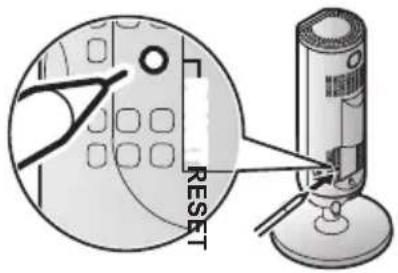
- The camera's settings are reset.
3 Wait for the camera's LED to light in green.
Note:
- After resetting the camera, you cannot use the camera again until it is set up. Refer to the relevant page in this section to set up the camera.
22 For assistance, please visit http://shop.panasonic.com/support
Appendix
Information about wireless communication
The camera uses wireless technology to communicate with your wireless router. Refer to the following information when planning where to place the camera.
- Do not use the camera in the following areas or locations, as they may cause malfunction or interference to radio communication.
- Indoor areas that have certain types of radio or mobile communications equipment
- Locations near microwave ovens or Bluetooth devices
- Indoor areas where antitheft devices or 2.4 GHz frequency devices such as POS systems are used
- Do not place the camera in areas where the following materials or objects are located between the camera and the wireless router. These materials and objects may interfere with wireless communication or cause wireless transmission speed to become slower.
- Metallic doors or shutters
– Walls containing aluminum-sheet insulation
– Walls made of concrete, stone, brick, or tin - Multiple walls
- Steel shelving
- Fireproof glass
Appendix
Information about sensor features
The camera has 3 sensor features: a visual sensor used for motion detection, a temperature sensor, and a sound sensor. Please read the following information about each sensor before deciding where to install the camera.
Note:
- The camera's sensor features are not designed to be used in situations that require high reliability. We do not recommend use of the sensor features in these situations.
- Panasonic takes no responsibility for any injury or damage caused by the use of the camera's sensor features.
Using visible light to detect motion
The camera can detect motion by recognizing changes in the
brightness of areas that are visible to the camera.
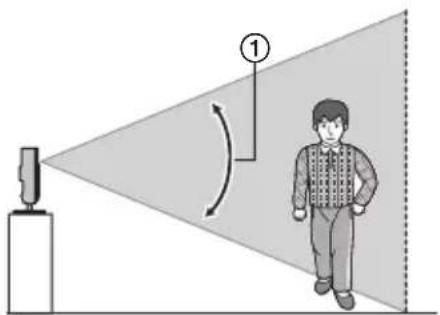
① Vertical detection range: approx. 67°
Note:
- Movement may be incorrectly detected when the moving object and the background have similar colors.
- Movement may be incorrectly detected when there are sudden changes to the overall brightness level, such as when lights are turned on.
- Detection becomes difficult when the image is dark.
- You can adjust the sensitivity of the camera's motion detection feature, and select which areas of the camera image are monitored for motion detection. For more information, refer to the User's Guide (page 28).
24 For assistance, please visit http://shop.panasonic.com/support
Direction of motion
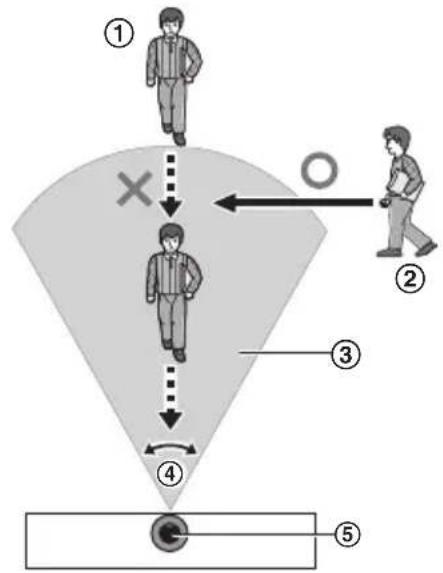
It is easier to detect objects that move sideways in front of the camera, and more difficult to detect objects that move directly toward the front of the camera.
flowchart
graph TD
    A["①"] --> B["②"]
    B --> C["③"]
    C --> D["④"]
    D --> E["⑤"]
    style A fill:#f9f,stroke:#333
    style B fill:#f9f,stroke:#333
    style C fill:#f9f,stroke:#333
    style D fill:#ccf,stroke:#333
    style E fill:#cfc,stroke:#333
① It is difficult to detect movement directly towards the front of the camera.
② It is easy to detect movement sideways in front of the camera.
③ Detection range
④ Horizontal detection range: approx. 121°
⑤ Camera
Temperature sensor
The sensor is triggered when the set temperature range is exceeded.
Note:
- The temperature sensor may not detect temperature accurately if the camera is exposed to warm or cool breezes from heating/cooling systems.
- You can adjust the temperature setting of the temperature sensor. For more information, refer to the User's Guide (page 28).
Sound sensor
The sensor is triggered when the set sound level is exceeded.
Note:
- The sound sensor may not function as desired when the camera is placed in noisy environments.
- You can adjust the sound level setting of the sound sensor. For more information, refer to the User's Guide (page 28).
For assistance, please visit http://shop.panasonic.com/support 25
Appendix
Information about night vision mode
The camera features an array of infrared LEDs that light automatically in low-light conditions, allowing camera images to be viewable even when the surrounding area is dark.
Note:
- When night vision mode is active, the colors in camera images may appear different from normal.
- When night vision mode is active, the array of infrared LEDs that surround the camera's lens light up in a faint red color that can be seen in the dark.
- If the camera is installed in front of a window and points directly at the window, images may be poor when night vision mode is active.
Wall mounting
Drive two screws (not supplied) into the wall, and then mount the unit as shown.

1 31 mm (1 7/32 inches)
② Screws
Note:
- Make sure that the wall and the fixing method are strong enough to support the weight of the unit.
Adjusting the angle
Adjust the angle as desired.
Note:
- When adjusting the angle, make sure the unit does not tip over.
Removing the stand
1 Hold the camera upside down and adjust the angle of the stand as shown.

natural_image
Diagram of a handheld device with a scroll wheel and handle, showing internal components and a curved arrow indicating rotation (no text or symbols present)2 I insert a thin, non-metallic object into the groove on the bottom of the camera body, and then remove the stand by rotating its base as shown.

natural_image
Diagram of a mechanical device with a rotating knob and directional arrow (no text or symbols)
natural_image
Illustration of a cylindrical device next to a circular disc (no text or symbols)Note:
- Wen mounting a tripod to the camera, do not mount a tripod with a screw length of 6.5 mm (1/4 inches) or more. This may damage the camera.
Attaching the stand
Insert a thin, non-metallic object into the groove on the bottom of the camera body, and then attach the stand by rotating its base as shown.

natural_image
Diagram of a mechanical device with a rotating knob and a circular component (no text or symbols)Appendix
Accessing the User's Guide
The User's Guide is a collection of online documentation that helps you get the most out of the [HomeHawk] app.
1 Tap ≡ in the app's home screen.
2 Tap [User's Guide].
Note:
- Microsoft Windows® Internet Explorer® 8 and earlier versions are not supported.
- Android 4.1 or later versions are recommended.
- You can also access the User's Guide at the web page listed below.

https://panasonic.net/cns/pcc/support/homehawk/manual/
Specifications
- Standards
IEEE 802.11a/b/g/n - Frequency range
2.412 GHz – 2.462 GHz (channels 1–11)
5.180 GHz – 5.320 GHz (channels 36–64)
5.500 GHz – 5.700 GHz (channels 100–140)
5.745 GHz – 5.825 GHz (channels 149–165)
- RF transmission power 100 mW (peak transmission power)
- Encryption
WPA2™-PSK (TKIP/AES), WPA™-PSK (TKIP/AES), WEP (128/64 bit)
• Power source 120 V AC, 60 Hz
• Power consumption Standby: approx. 2.3 W Maximum: approx. 3.8 W
- Operating conditions 0 °C – 40 °C (32 °F – 104 °F) 20 % – 80 % relative air humidity (dry)
• Image sensor 2.0 megapixel CMOS
- Minimum illuminance required ^*1 0 lx
- Focal length
28 For assistance, please visit http://shop.panasonic.com/support
Fixed (0.2 m (8 inches) - infinity)
• Angular field of view
Horizontal: approx. 121°
Vertical: approx. 67°
• Motion detection method
Visual sensor
- Adjustable mounting angle ^3
Vertical: facing forward - facing down, approx. 130°
- Dimensions (including stand) (height × width × depth)
Approx. 142 mm × 68 mm × 68 mm (5 19/32 inches ×
2 11/16 inches × 2 11/16 inches)
• Mass (weight) (including stand)
Approx. 210 g (0.46 lb)
*1 The infrared LEDs that surround the camera lens will illuminate in low-light conditions.
*2 Adjustable when mounting.
Open source software notice
- Parts of this product use open source software supplied based on the relevant conditions of the Free Software Foundation's GPL and/or LGPL and other conditions. Please read all licence information and copyright notices related to the open source software used by this product. This information is available at the following web page:
https://panasonic.net/cns/pcc/support/homehawk
At least three (3) years from delivery of this product,
Panasonic Corporation will give to any third party who contacts us at the contact information provided below, for a charge of no more than the cost of physically distributing source code, a complete machine-readable copy of the corresponding source code and the copyright notices covered under the GPL and the LGPL.
Please note that software licensed under the GPL and the LGPL is not under warranty.
https://panasonic.net/cns/pcc/support/homehawk
For assistance, please visit http://shop.panasonic.com/support
Appendix
Software information
- The End User License Agreement (EULA) for the HomeHawk app is available at the following web page: https://panasonic.net/cns/pcc/support/homehawk
30 For assistance, please visit http://shop.panasonic.com/support
FCC and other information
This device complies with Part 15 of the FCC Rules. Operation is subject to the following two conditions:
(1) This device may not cause harmful interference, and (2) this device must accept any interference received, including interference that may cause undesired operation.
Privacy of communications may not be ensured when using this device.
CAUTION:
Any changes or modifications not expressly approved by the party responsible for compliance could void the user's authority to operate this device.
NOTE:
This equipment has been tested and found to comply with the limits for a Class B digital device, pursuant to Part 15 of the FCC Rules. These limits are designed to provide reasonable protection against harmful interference in a residential installation. This equipment generates, uses, and can radiate radio frequency
energy and, if not installed and used in accordance with the instructions, may cause harmful interference to radio communications. However, there is no guarantee that interference will not occur in a particular installation. If this equipment does cause harmful interference to radio or television reception, which can be determined by turning the equipment off and on, the user is encouraged to try to correct the interference by one or more of the following measures:
– Reorient or relocate the receiving antenna.
– Increase the separation between the equipment and receiver.
- Connect the equipment into an outlet on a circuit different from that to which the receiver is connected.
- Consult the dealer or an experienced radio/TV technician for help.
Some devices operate at frequencies that may cause interference to nearby TVs and VCRs. To minimize or prevent such interference, this device should not be placed near or on top of a TV or VCR. If interference is experienced, move this device
For assistance, please visit http://shop.panasonic.com/support
Appendix
further away from the TV or VCR. This will often reduce or eliminate interference.
FCC RF Exposure Warning:
- This product complies with FCC radiation exposure limits set forth for an uncontrolled environment.
- To comply with FCC RF exposure requirements, the device must be installed and operated 20 cm (8 inches) or more between the product and all person's body.
- This product may not be collocated or operated in conjunction with any other antenna or transmitter.
- For body-worn operation, the device must be used only with a non-metallic accessory. Use of other accessories may not ensure compliance with FCC RF exposure requirements.
Notice:
- FCC ID can be found on the rear of the unit.
Customer services
Shop Accessories!
for all your Panasonic gear
Go to
http://shop.panasonic.com/support
Get everything you need to get the most out of your Panasonic products
Accessories & Parts for your Camera, Phone, A/V products, TV, Computers & Networking, Personal Care, Home Appliances, Headphones, Batteries, Backup Chargers & more...
Customer Services Directory
For Product Information, Operating Assistance, Parts, Owner's Manuals, Dealer and Service info go to http://shop.panasonic.com/support
You may also contact us directly at: 1-800-272-7033,
Monday - Friday 9 am to 9 pm;
Saturday - Sunday 10 am to 7 pm, EST.
For the hearing or speech impaired TTY: 1-877-833-8855
As of June 2015
For assistance, please visit http://shop.panasonic.com/support
Limited Warranty (ONLY FOR U.S.A.)
Panasonic Products Limited Warranty
Limited Warranty Coverage (For USA Only)
If your product does not work properly because of a defect in materials or workmanship, Panasonic Corporation of North America (referred to as "the warrantor") will, for the length of the period indicated on the chart below, which starts with the date of original purchase ("warranty period"), at its option either (a) repair your product with new or refurbished parts, (b) replace it with a new or a refurbished equivalent value product, or (c) refund your purchase price. The decision to repair, replace or refund will be made by the warrantor.
| Product or Part Name | Parts | Labor |
| Home Network System Products | One (1) Year | One (1) Year |
| microSD card (Included model only) | 90 days N/A |
During the “Labor” warranty period there will be no charge for labor. During the “Parts” warranty period, there will be no charge for parts. This Limited Warranty excludes both parts and labor for non-rechargeable batteries, antennas, and cosmetic parts (cabinet). This warranty only applies to products purchased and serviced in the United States. This warranty is extended only to the original purchaser of a new product which was not sold “as is”.
Mail-In Service--Online Repair Request
Online Repair Request
To submit a new repair request and for quick repair status visit our Web Site at http://shop.panasonic.com/support
When shipping the unit, carefully pack, include all supplied accessories listed in the Owner's Manual, and send it prepaid, adequately insured and packed well in a carton box. When shipping Lithium Ion batteries please visit our Web Site at http://shop.panasonic.com/support as Panasonic is committed to providing the most up to date information. Include a letter detailing the complaint, a return address and provide a daytime phone number where you can be reached. A valid registered receipt is required under the Limited Warranty.
IF REPAIR IS NEEDED DURING THE WARRANTY PERIOD, THE PURCHASER WILL BE REQUIRED TO FURNISH A SALES RECEIPT/PROOF OF PURCHASE INDICATING DATE OF PURCHASE, AMOUNT PAID AND PLACE OF PURCHASE. CUSTOMER WILL BE CHARGED FOR THE REPAIR OF ANY UNIT RECEIVED WITHOUT SUCH PROOF OF PURCHASE.
34 For assistance, please visit http://shop.panasonic.com/support
Limited Warranty Limits and Exclusions
This warranty ONLY COVERS failures due to defects in materials or workmanship, and DOES NOT COVER normal wear and tear or cosmetic damage. The warranty ALSO DOES NOT COVER damages which occurred in shipment, or failures which are caused by products not supplied by the warrantor, or failures which result from accidents, misuse, abuse, neglect, mishandling, misapplication, alteration, faulty installation, set-up adjustments, misadjustment of consumer controls, improper maintenance, power line surge, lightning damage, modification, introduction of sand, humidity or liquids, commercial use such as hotel, office, restaurant, or other business or rental use of the product, or service by anyone other than a Factory Service Center or other Authorized Servicer, or damage that is attributable to acts of God.
THERE ARE NO EXPRESS WARRANTIES EXCEPT AS LISTED UNDER "LIMITED WARRANTY COVERAGE".
THE WARRANTOR IS NOT LIABLE FOR INCIDENTAL OR CONSEQUENTIAL DAMAGES RESULTING FROM THE USE OF THIS PRODUCT, OR ARISING OUT OF ANY BREACH OF THIS WARRANTY.
(As examples, this excludes damages for lost time, travel to and from the servicer, loss of or damage to media or images, data or other memory or recorded content. The items listed are not exclusive, but for illustration only.)
ALL EXPRESS AND IMPLIED WARRANTIES, INCLUDING THE WARRANTY OF MERCHANTABILITY, ARE LIMITED TO THE PERIOD OF THE LIMITED WARRANTY.
Some states do not allow the exclusion or limitation of incidental or consequential damages, or limitations on how long an implied warranty lasts, so the exclusions may not apply to you. This warranty gives you specific legal rights and you may also have other rights which vary from state to state. If a problem with this product develops during or after the warranty period, you may contact your dealer or Service Center. If the problem is not handled to your satisfaction, then write to:
Consumer Affairs Department Panasonic Corporation of North America 661 Independence Pkwy Chesapeake, VA 23320
PARTS AND SERVICE, WHICH ARE NOT COVERED BY THIS LIMITED WARRANTY, ARE YOUR RESPONSIBILITY.
As of June 2015
IMPORTANT!
If your product is not working properly...
① Reconnect the AC adaptor to the camera.
② Use the HomeHawk app to access the User's Guide and refer to the Troubleshooting section.

Visit our Web site: http://shop.panasonic.com/support • FAQ and troubleshooting hints are available.
For your future reference
We recommend keeping a record of the following information to assist with any repair under warranty.
Serial No. Date of purchase
(found on the rear of the unit)
Name and address of dealer
Attach your purchase receipt here.
Panasonic Corporation of North America
Two Riverfront Plaza, Newark, NJ 07102-5490
© Panasonic Corporation 2017

Para obtener ayuda, visite http://shop.panasonic.com/support 19
support/homehawk/manual/
hits://panasonic.net/cns/pcc/

application [HomeHawk].
natural_image
Mechanical component diagram showing a rotating disc and a curved arrow indicating rotation (no text or symbols)natural_image
Technical line drawing of a mechanical component with a circular head and cylindrical shaft (no text or symbols)
natural_image
Diagram of a mechanical device with a rotating knob and handle, showing motion direction (no text or symbols)natural_image
Diagram of a device with a curved arrow indicating rotation or movement (no text or symbols present)como se muestra.
puede ver.
realice clerics operations,
realice clerics operations,
- La application cambia
verde.
• El led indicator parpadea en
realice clerics operations,
- Abra la application
camera.
2 Incise la application [HomeHawk].
procedimiento.
!Pad® (IOS 10.0 y versions
!Phone 5s y versions posters o
homehawk
hitps://panasonic.net/cns/pcc/support/
application [HomeHawk].
operatives que admite la application
https://panasonic.nets/cons/proc/support/
imagenes de cámara.
Puerta interior HomeHawk
Gua de instalcion
Panasonic

- Thank you for purchasing a Panasonic product.
- Table of Contents
- Introduction
- Important Information
- Setup
- Appendix
- Accessory information
- Supplied accessories
- Other information
- Trademarks
- Notice
- About this system
- For your safety
- WARNING
- Power connection
- Installation
- Operating safeguards
- Medical
- CAUTION
- Installation and location
- Preventing accidents and injuries
- Important safety instructions
- SAVE THESE INSTRUCTIONS
- Security cautions
- For best performance
- Environment
- Privacy and rights of portrait
- Routine care
- Camera image quality
- Protecting your recordings
- Part names and functions
- LED indicator
- Connections
- Note:
- Note about power connections
- AC adaptor connection
- Power failure
- Setup overview
- Download (page 17)
- Set up the camera (page 18)
- (Optional)
- Downloading the [HomeHawk] app
- Using your device's app store
- iPhone, iPad users
- Android™ device users
- Compatible mobile devices
- Setting up the camera (initial setup)
- Initial setup (for iPhone, iPad users)
- Initial setup (for Android device users)
- Registering additional mobile devices to the camera
- Resetting the camera
- Information about wireless communication
- Information about sensor features
- Using visible light to detect motion
- Direction of motion
- Temperature sensor
- Sound sensor
- Information about night vision mode
- Wall mounting
- Adjusting the angle
- Removing the stand
- Attaching the stand
- Accessing the User's Guide
- Specifications
- Open source software notice
- Software information
- FCC and other information
- CAUTION:
- FCC RF Exposure Warning:
- Notice:
- Customer services
- Shop Accessories!
- Customer Services Directory
- Limited Warranty (ONLY FOR U.S.A.)
- Panasonic Products Limited Warranty
- Limited Warranty Coverage (For USA Only)
- Online Repair Request
- Limited Warranty Limits and Exclusions
- THERE ARE NO EXPRESS WARRANTIES EXCEPT AS LISTED UNDER "LIMITED WARRANTY COVERAGE".
- IMPORTANT!
- For your future reference
Brand : PANASONIC
Model : KX-HN1003W
Category : Home Automation