
KX-TGA830FX - Telephone PANASONIC - Free user manual and instructions
Find the device manual for free KX-TGA830FX PANASONIC in PDF.


| Product Type | Additional Digital Cordless Handset |
| Compatible Base Units | KX-TG8301 / KX-TG8321 |
| Power Supply (Charger) | AC Adaptor PQLV209CE (220–240 V, 50/60 Hz) |
| Battery Type | Rechargeable Ni-MH AAA (R03) size, HHR-55AAAB |
| Number of Batteries Supplied | 2 |
| Initial Charging Time | Approximately 7 hours |
| Display Languages | 16 languages (Deutsch, English, Magyar, Polski, Slovenčina, Čeština, Hrvatski, Slovenscina, Eesti, LIETUVIŠKAI, Latviešu, Română, БЪЛГАРСКИ, Srpski, МАКЕДОНСКИ, Shqip) |
| Accessories Included | Charger, Rechargeable batteries (2), AC adaptor, Handset cover, Belt clip |
| Registration Required | Yes, to base unit before use |
| Battery Safety | Use only rechargeable Ni-MH AAA batteries; do not mix old/new; do not use alkaline, manganese, or Ni-Cd |
| AC Adaptor Safety | Use only supplied Panasonic PQLV209CE; must remain connected; unplug if smoke or abnormal smell |
| Cleaning Instructions | Wipe with soft moist cloth; do not use benzine, thinner, or abrasive powder |
| Answering System | Not available on KX-TG8301; available only when registered to KX-TG8321 |
| Spare Parts Available | Batteries (HHR-55AAAB), AC adaptor (PQLV209CE), charger |
| Repair Service | Contact authorized Panasonic service centre |
| Disposal | Do not dispose with household waste; follow local WEEE regulations |
Frequently Asked Questions - KX-TGA830FX PANASONIC
User questions about KX-TGA830FX PANASONIC
0 question about this device. Answer the ones you know or ask your own.
Ask a new question about this device
Download the instructions for your Telephone in PDF format for free! Find your manual KX-TGA830FX - PANASONIC and take your electronic device back in hand. On this page are published all the documents necessary for the use of your device. KX-TGA830FX by PANASONIC.
USER MANUAL KX-TGA830FX PANASONIC
TGA830FX(fx).book Page 1 Friday, April 4, 2008 10:37 AM


Panasonic
KX-TGA830FX
Installation Manual
Telepítési útmutató
natural_image
Line drawing of a mobile phone with a keypad and base (no text or symbols)Additional Digital Cordless Handset
natural_image
Pure geometric diagram with intersecting lines and circles, no text or symbols present
natural_image
Pure geometric diagram with intersecting lines and circles, no text or symbols present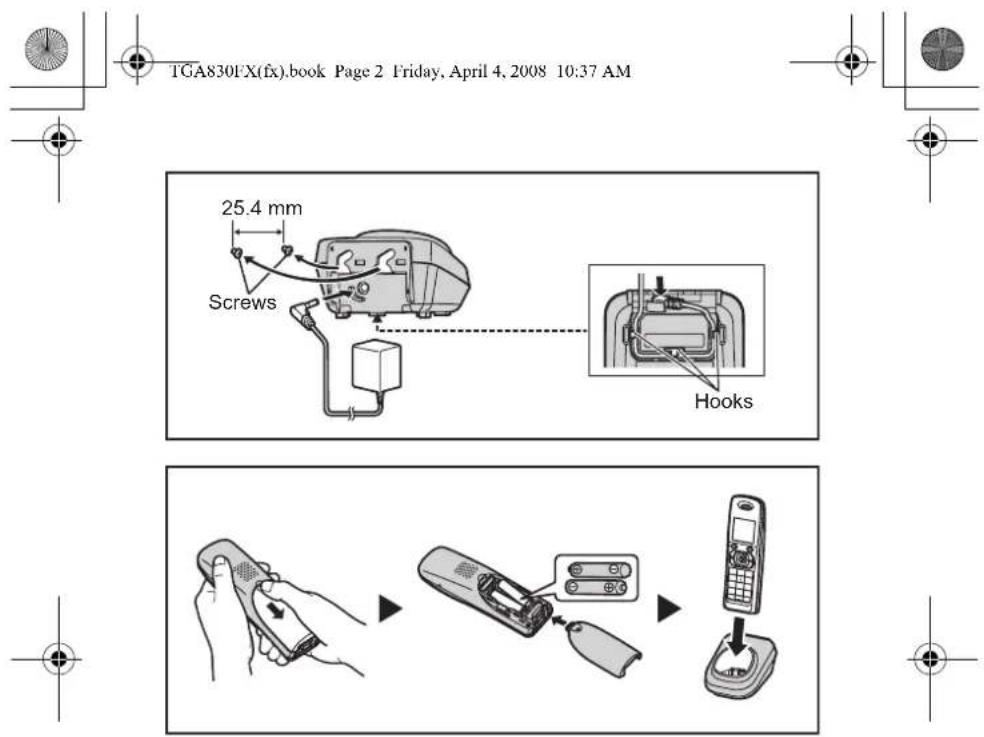
TGA830FX(fx).book Page 2 Friday, April 4, 2008 10:37 AM

natural_image
Pure geometric diagram with intersecting lines and circles, no text or symbols present
natural_image
Pure geometric diagram with crosshair and circular shapes, no text or symbols present

TGA830FX(fx).book Page 3 Friday, April 4, 2008 10:37 AM


Contents/Tartalomjegyzék/Spis treści/Obsah
English 4
Magyar....9
Polski....15
Slovenčina 21
Čeština 27


natural_image
Pure geometric diagram with intersecting lines and circles, no text or symbols present
natural_image
Pure geometric diagram with intersecting lines and circles, no text or symbols present3


TGA830FX(fx).book Page 4 Friday, April 4, 2008 10:37 AM

English
PLEASE READ BEFORE USE AND SAVE
This unit is an additional handset for use with the following series of Panasonic Digital Cordless Phone: KX-TG8301/KX-TG8321
You must register this handset with your base unit before it can be used. This installation manual describes only the steps needed to register and begin using the handset. Please read the base unit's operating instructions for further details.
Supplied accessories
| Charger......1 | Rechargeable batteries 1 ......2 |
| AC adaptor (PQLV209CE)......1 | Handset cover 2 ......1 |
| Belt clip......1 |
*1 Please read the base unit's operating instructions for replacement battery information.
*2 The handset cover comes attached to the handset.
Note:
- Please read the base unit's operating instructions for additional/replacement accessories.
• This equipment is designed for use in Czech, Slovakia, Estonia, Latvia, Lithuania, Slovenia, Romania, Bulgaria, Hungary and Poland. - In the event of problems, you should contact your equipment supplier in the first instance.
- For use in other countries, please contact your equipment supplier.
Connection
- Use only the supplied Panasonic AC adaptor PQLV209CE.
- The AC adaptor must remain connected at all times. (It is normal for the adaptor to feel warm during use.)
Battery installation/Battery charge
Important:
- Use the supplied rechargeable batteries (Part No. HHR-55AAAB).
- When installing the batteries:
- Wipe the battery ends (⊕, ⊖) with a dry cloth.
- Avoid touching the battery ends (⊕, ⊖) or the unit contacts.
- Confirm correct polarities (⊕, ⊖).
4

natural_image
Pure geometric diagram with intersecting lines and circles, no text or symbols present

natural_image
Pure geometric diagram with intersecting lines and circles, no text or symbols present

TGA830FX(fx).book Page 5 Friday, April 4, 2008 10:37 AM


- When replacing the batteries:
- USE ONLY rechargeable Ni-MH batteries AAA (R03) size.
- Do NOT use Alkaline/Manganese/Ni-Cd batteries.
- We recommend using the Panasonic rechargeable batteries noted in the base unit's operating instructions for replacement battery information.
Place the handset on the charger for about 7 hours before initial use.
Note:
- The handset display may show "Please Wait..." when the handset is placed on the charger if it is not registered to the base unit.
- If the batteries are fully charged, but the operating time seems to be shorter, clean the battery ends (⊕, ⊖) and the charge contacts with a dry cloth and charge again.
Display language
16 display languages are available. You can select "Deutsch", "English", "Magyar", "Polski", "Slovenčina", "Čeština", "Hrvatski", "Slovenscina", "Eesti", "LIETUVIŠKAI", "Latviešu", "Română", "БЫЛГАРСКИ", "Srpski", "МАКЕДОНСКИ", or "Shqip".

1 (centre of joystick) → OK
2 [▼]/[▲] "Display Setup" → OK
3 [▼]/[▲] "Select Language" → OK
4 [▼]/[▲] Select your desired language. → OK → [✗①]
Note:
- If you select a language you cannot read: [✗①] → ☐ → ⓕ → OK → Push the joystick down 2 times. → OK → Push the joystick down 4 times. → OK → [▼]/[▲]: Select your desired language. → OK → [✗①]
Registering the handset to the base unit
Ensure that the handset is switched on. If it is not on, press and hold [✗①] for few seconds to turn the handset on.
1 Handset:
Lift the handset and press [✗①].
2 Base unit:
Proceed with the operation for your model.
KX-TG8301
Press and hold [•••] for about 5 seconds. (No registration tone)
KX-TG8321
Press and hold [•••] for about 5 seconds, until the registration tone sounds.

natural_image
Pure geometric diagram with intersecting lines and circles, no text or symbols present
5


TGA830FX(fx).book Page 6 Friday, April 4, 2008 10:37 AM


- If all registered handsets start ringing, press the same button to stop. Then repeat this step.

3 Handset:
Place the handset on the base unit.
- Continue the operation even when the handset display shows
"Please Wait..."
4 With the handset still on the base unit, wait until a confirmation tone sounds and Y stops flashing.
Note:
- If an error tone sounds, or if Y is still flashing, register the handset according to the base unit's operating instructions.
• The KX-TG8301 does not feature an answering system. - Answering system features are available only when this handset is registered to the KX-TG8321.
For your safety
To prevent severe injury and loss of life/property, read this section carefully before using the product to ensure proper and safe operation of your product.
WARNING
Power connection
- Completely insert the AC adaptor/power plug into the power outlet. Failure to do so may cause electric shock and/or excessive heat resulting in a fire.
- Regularly remove any dust, etc. from the AC adaptor/power plug by pulling it from the power outlet, then wiping with a dry cloth. Accumulated dust may cause an insulation defect from moisture, etc. resulting in a fire.
- Unplug the product from power outlets if it emits smoke, an abnormal smell, or makes an unusual noise. These conditions can cause fire or electric shock. Confirm that smoke has stopped emitting and contact an authorised service centre.
Installation
- To prevent the risk of fire or electrical shock, do not expose the product to rain or any type of moisture.
- Do not place or use this product near automatically controlled devices such as automatic doors and fire alarms. Radio waves emitted from this product may cause such devices to malfunction resulting in an accident.
CAUTION
Installation and relocation
- The AC adaptor is used as the main disconnect device. Ensure that the AC outlet is installed near the product and is easily accessible.


natural_image
Pure geometric diagram with intersecting lines and a circular pattern, no text or symbols present6

natural_image
Pure geometric diagram with intersecting lines and circles, no text or symbols present

TGA830FX(fx).book Page 7 Friday, April 4, 2008 10:37 AM


Battery
- We recommend using the supplied batteries or additional/replacement batteries noted in the base unit's operating instructions for replacement battery information. USE ONLY rechargeable Ni-MH batteries AAA (R03) size
- Do not mix old and new batteries.
- Do not open or mutilate the batteries. Released electrolyte from the batteries is corrosive and may cause burns or injury to the eyes or skin. The electrolyte may be toxic if swallowed.
- Exercise care when handling the batteries. Do not allow conductive materials such as rings, bracelets or keys to touch the batteries, otherwise a short circuit may cause the batteries and/or the conductive material to overheat and cause burns.
- Charge the batteries provided with or identified for use with this product only, in accordance with the instructions and limitations specified in this manual.
- Only use a compatible base unit (or charger) to charge the batteries. Do not tamper with the base unit (or charger). Failure to follow these instructions may cause the batteries to swell or explode.
Other information
- Operating the product near electrical appliances may cause interference. Move away from the electrical appliances.
- Use only the power cord and batteries indicated in this manual. Do not dispose of batteries in a fire. They may explode. Check with local codes for possible special disposal instructions.
Routine care
- Wipe the outer surface of the product with a soft moist cloth.
- Do not use benzine, thinner, or any abrasive powder.
Notice for product disposal, transfer, or return
- This product can store your private/confidential information. To protect your privacy/confidentiality, we recommend that you erase the information such as phonebook or caller list entries from the memory before you dispose of, transfer, or return the product.
Information on Disposal for Users of Waste Electrical & Electronic
Equipment (private households)

This symbol on the products and/or accompanying documents means that used electrical and electronic products should not be mixed with general household waste.
For proper treatment, recovery and recycling, please take these
products to designated collection points, where they will be accepted on a free of charge basis. Alternatively, in some countries you may be able to

natural_image
Pure geometric lines and shapes without any text, numbers, or symbols
natural_image
Pure geometric diagram with intersecting lines and circles, no text or symbols present7

TGA830FX(fx).book Page 8 Friday, April 4, 2008 10:37 AM


return your products to your local retailer upon the purchase of an equivalent new product.
Disposing of this product correctly will help to save valuable resources and prevent any potential negative effects on human health and the environment which could otherwise arise from inappropriate waste handling. Please contact your local authority for further details of your nearest designated collection point. Penalties may be applicable for incorrect disposal of this waste, in accordance with national legislation.
For business users in the European Union
If you wish to discard electrical and electronic equipment, please contact your dealer or supplier for further information.
Information on Disposal in other Countries outside the European Union This symbol is only valid in the European Union.
If you wish to discard this product, please contact your local authorities or dealer and ask for the correct method of disposal.
natural_image
Pure geometric diagram with intersecting lines and circles, no text or symbols present
natural_image
Pure geometric diagram with crosshair and circular shapes, no text or symbols present

TGA830FX(fx).book Page 9 Friday, April 4, 2008 10:37 AM

Magyar
KÉRJÜK, HASZNÁLAT ELÖTT OLVASSA EL, ÉS ÖRIZZE MEG
natural_image
Pure geometric lines and crosshair symbols without any text or labels

natural_image
Pure electrical circuit lines without any symbols9


TGA830FX(fx).book Page 10 Friday, April 4, 2008 10:37 AM


natural_image
Pure geometric diagram with intersecting lines and circles, no text or symbols present

TGA830FX(fx).book Page 11 Friday, April 4, 2008 10:37 AM


natural_image
Pure geometric lines and shapes without any text, numbers, or symbols13
natural_image
Pure electrical circuit lines without any symbols

TGA830FX(fx).book Page 14 Friday, April 4, 2008 10:37 AM


natural_image
Pure geometric diagram with intersecting lines and circles, no text or symbols present

natural_image
Pure geometric diagram with intersecting lines and circles, no text or symbols present

TGA830FX(fx).book Page 15 Friday, April 4, 2008 10:37 AM


Polski
PRZECZYTAJ PRZED ROZPOCZĘCIEM UŻYTKOWANIA I ZACHOWAJ NA PRŻYSZŁOŚĆ
natural_image
Pure geometric diagram with intersecting lines and circles, no text or symbols present

natural_image
Pure geometric diagram with intersecting lines and circles, no text or symbols present

TGA830FX(fx).book Page 16 Friday, April 4, 2008 10:37 AM


natural_image
Pure geometric lines and shapes without any text, numbers, or symbols

natural_image
Pure electrical circuit lines without any symbols

TGA830FX(fx).book Page 18 Friday, April 4, 2008 10:37 AM


natural_image
Pure geometric diagram with intersecting lines and circles, no text or symbols present19

natural_image
Pure geometric diagram with intersecting lines and circles, no text or symbols present

TGA830FX(fx).book Page 20 Friday, April 4, 2008 10:37 AM


natural_image
Pure geometric lines and shapes without any text, numbers, or symbols

natural_image
Pure geometric diagram with intersecting lines and circles, no text or symbols present
TGA830FX(fx).book Page 21 Friday, April 4, 2008 10:37 AM

natural_image
Pure geometric diagram with intersecting lines and circles, no text or symbols presentSlovenčina
PRED POUŽÍVANÍM SI PREČÍTAJTE TIETO INFORMÁCIE A USCHOVAJTE SI ICH
natural_image
Pure geometric diagram with intersecting lines and circles, no text or symbols present
natural_image
Pure electrical circuit lines without any symbols

TGA830FX(fx).book Page 22 Friday, April 4, 2008 10:37 AM


- Pri vkladaní batéril:
natural_image
Pure geometric diagram with intersecting lines and circles, no text or symbols present
23


TGA830FX(fx).book Page 24 Friday, April 4, 2008 10:37 AM

VÝSTRAHA
natural_image
Pure geometric lines and crosshair symbols without any text or labels
25
natural_image
Pure geometric diagram with intersecting lines and circles, no text or symbols present

TGA830FX(fx).book Page 26 Friday, April 4, 2008 10:37 AM


natural_image
Pure geometric diagram with intersecting lines and circles, no text or symbols present

natural_image
Pure geometric diagram with intersecting lines and circles, no text or symbols present26

TGA830FX(fx).book Page 27 Friday, April 4, 2008 10:37 AM

natural_image
Pure geometric diagram with intersecting lines and circles, no text or symbols presentČeština
PŘED POUŽITÍM SI PŘEČTĚTE A ULOŽTE
natural_image
Pure geometric diagram with intersecting lines and circles, no text or symbols present
27

natural_image
Pure electrical circuit lines without any symbols

TGA830FX(fx).book Page 28 Friday, April 4, 2008 10:37 AM


natural_image
Pure geometric diagram with intersecting lines and circles, no text or symbols present

TGA830FX(fx).book Page 29 Friday, April 4, 2008 10:37 AM


natural_image
Pure geometric lines and shapes without any text, numbers, or symbols
29



TGA830FX(fx).book Page 30 Friday, April 4, 2008 10:37 AM


natural_image
Pure geometric diagram with intersecting lines and circular shapes, no text or symbols present
31

natural_image
Pure electrical circuit lines without any symbols

TGA830FX(fx).book Page 32 Friday, April 4, 2008 10:37 AM


Declaration of Conformity:
- Panasonic Communications Co., Ltd. declares that this equipment is in compliance with the essential requirements and other relevant provisions of Radio & Telecommunications Terminal Equipment (R&TTE) Directive 1999/5/EC. Declarations of Conformity for the relevant Panasonic products described in this manual are available for download by visiting: http://www.doc.panasonic.de
natural_image
Pure geometric diagram with intersecting lines and circles, no text or symbols present

TGA830FX(fx).book Page 33 Friday, April 4, 2008 10:37 AM


Prohlášení o shodě:
Contact to Authorised Representative/
Panasonic Testing Centre
Panasonic Marketing Europe GmbH
Winsbergring 15, 22525 Hamburg, Germany

natural_image
Pure geometric diagram with intersecting lines and shapes, no text or symbols present
natural_image
Pure geometric diagram with intersecting lines and circles, no text or symbols present33


TGA830FX(fx).book Page 34 Friday, April 4, 2008 10:37 AM


Sales department/Értékesítési osztály/Dział sprzedaży/Obchodné zastúpenie/Obchodní zastoupení


■ Magyarország
Panasonic South-East Europe Kft.
Panasonic Czech Republic, s.r.o.
Thámova 289/13 (Palác Karlín)
186 00 Praha 8
telefon: +420-236 032 511
natural_image
Pure geometric diagram with intersecting lines and circles, no text or symbols present

TGA830FX(fx).book Page 35 Friday, April 4, 2008 10:37 AM


■ Romania
Panasonic Romania SRL
Piata Montreal nr. 10, Cladirea WTC,
Intrarea D, Etajul 2, Camera 2.12; 2.13; 2.05
Sector 1, Bucuresti
Telefon: +40.21.316.31.61
Fax: +40.21.316.04.46
e-mail: suport.clienti@eu.panasonic.com
web: www.panasonic.ro


natural_image
Pure geometric diagram with intersecting lines and circles, no text or symbols present

C€0470

natural_image
Pure geometric lines and crosshair symbols without any text or labelsPanasonic Communications Co., Ltd.
1-62, 4-chome, Minoshima, Hakata-ku, Fukuoka 812-8531, Japan
© 2008 Panasonic Communications Co., Ltd. All Rights Reserved.

- Panasonic
- KX-TGA830FX
- Contents/Tartalomjegyzék/Spis treści/Obsah
- English
- PLEASE READ BEFORE USE AND SAVE
- Note:
- Connection
- Battery installation/Battery charge
- Important:
- Place the handset on the charger for about 7 hours before initial use.
- Display language
- Registering the handset to the base unit
- Handset:
- Base unit:
- Handset:
- For your safety
- WARNING
- Power connection
- Installation
- CAUTION
- Installation and relocation
- Battery
- Other information
- Routine care
- Notice for product disposal, transfer, or return
- Information on Disposal for Users of Waste Electrical & Electronic
- Equipment (private households)
- For business users in the European Union
- Magyar
- KÉRJÜK, HASZNÁLAT ELÖTT OLVASSA EL, ÉS ÖRIZZE MEG
- Polski
- PRZECZYTAJ PRZED ROZPOCZĘCIEM UŻYTKOWANIA I ZACHOWAJ NA PRŻYSZŁOŚĆ
- Slovenčina
- PRED POUŽÍVANÍM SI PREČÍTAJTE TIETO INFORMÁCIE A USCHOVAJTE SI ICH
- VÝSTRAHA
- Čeština
- PŘED POUŽITÍM SI PŘEČTĚTE A ULOŽTE
- Declaration of Conformity:
- Prohlášení o shodě:
- Contact to Authorised Representative/
- ■ Magyarország
- ■ Romania
Brand : PANASONIC
Model : KX-TGA830FX
Category : Telephone