
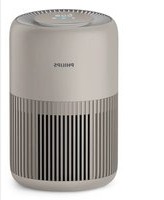
AC4558 - Air purifier PHILIPS - Free user manual and instructions
Find the device manual for free AC4558 PHILIPS in PDF.


| Product Type | Air Purifier |
| Brand | Philips |
| Model | AC4558 |
| Filter Type | NanoProtect filter Series 3 (FY3433) + NanoProtect filter Active Carbon (FY3432) + Pre-filter |
| Filter Replacement Indicator | Yes, with filter code display (A5 for FY3433, C7 for FY3432) |
| Healthy Air Protect Lock | Yes, auto-locks if filters not replaced in time |
| Air Quality Sensors | AeraSense PM2.5, Gas sensor, Indoor Allergen Index (IAI) |
| Air Quality Light Colors | Blue (good), Blue-purple (fair), Purple-red (poor), Red (very poor) |
| Auto Modes | General, Pollution, Gas, Allergen |
| Manual Fan Speeds | Sleep, Speed 1, Speed 2, Turbo |
| Wi-Fi Connectivity | 802.11b/g/n at 2.4 GHz, max 31.62 mW EIRP |
| Child Lock | Yes, via Clean Home+ App |
| Pre-filter Cleaning Alert | Yes (F0 on display) |
| Pre-filter Washable | Yes |
| Recommended Cleaning Frequency | Body: as needed; Sensor: every 2 months; Pre-filter: when alert (F0) |
| Power Cord | Detachable (not specified, but standard) |
| Safety Certifications | EMF compliant, EU Declaration of Conformity |
| Compatible App | Philips Clean Home+ (iOS and Android) |
| Replacement Filters | FY3433 (NanoProtect Series 3) and FY3432 (Active Carbon) |
| Warranty | Refer to worldwide guarantee leaflet |
Frequently Asked Questions - AC4558 PHILIPS
User questions about AC4558 PHILIPS
0 question about this device. Answer the ones you know or ask your own.
Ask a new question about this device
Download the instructions for your Air purifier in PDF format for free! Find your manual AC4558 - PHILIPS and take your electronic device back in hand. On this page are published all the documents necessary for the use of your device. AC4558 by PHILIPS.
USER MANUAL AC4558 PHILIPS
2


Contents
1 Important 2
Safety 2
2 Your air purifier 5
Product Overview (fig. ①) 5
Controls overview (fig. ②) 5
3 Getting started 6
Installing filters 6
Wi-Fi connection 6
4 Using the appliance 8
Understanding the air quality light 8
Turning on and off 9
Changing the Auto mode setting 9
Changing the fan speed 10
Using the light on/off function 11
Setting the child lock 11
5 Cleaning 12
Cleaning schedule 12
Cleaning the body of the appliance 12
Cleaning the air quality sensor 12
Cleaning the pre-filter 13
6 Replacing the air
purification filters 14
Understanding the healthy air protect lock 14
Replacing the filters 14
7 Storage 15
8 Troubleshooting 16
9 Guarantee and service 19
Order parts or accessories 19
10 Notices 19
Electromagnetic fields (EMF) 19
Recycling 20
Notice 20
Simplified EU declaration of conformity 20
1 Important
Safety
Read this user manual carefully before you use the appliance, and save it for future reference.
Danger
- Do not let water or any other liquid or flammable detergent enter the appliance to avoid electric shock and/or a fire hazard.
- Do not clean the appliance with water, any other liquid, or a (flammable) detergent to avoid electric shock and/or a fire hazard.
- Do not spray any flammable materials such as insecticides or fragrance around the appliance.
Warning
- Check if the voltage indicated on the appliance corresponds to the local power voltage before you connect the appliance.
- If the power cord is damaged, you must have
it replaced by Philips, a service center authorized by Philips, or similarly qualified persons in order to avoid a hazard.
- Do not use the appliance if the plug, the power cord, or the appliance itself is damaged.
- This appliance can be used by children aged from 8 years and above and persons with reduced physical, sensory or mental capabilities or lack of experience and knowledge if they have been given supervision or instruction concerning use of the appliance in a safe way and understand the hazards involved. Child shall not play with the appliance. Cleaning and maintenance shall not be made by children without supervision.
- Do not block the air inlet and outlet, e.g. by placing items on the air outlet or in front of the air inlet.
- Make sure that foreign objects do not fall into the appliance through the air outlet.
- Standard WiFi interface based on 802.11b/g/n at 2.4 GHz with a maximum output power of 31.62 mW EIRP.
Caution
- This appliance is not a substitute for proper ventilation, regular vacuum cleaning, or use of an extractor hood or fan while cooking.
- If the power socket used to power the appliance has poor connections, the plug of the appliance becomes hot. Make sure that you plug the appliance into a properly connected power socket.
- Always place and use the appliance on a dry, stable, level, and horizontal surface.
- Leave at least 20cm free space behind and on both sides of the appliance and leave at least 30cm free space above the appliance.
- Do not place anything on top of the appliance.
- Do not sit or stand on the appliance. Sitting or
standing on the appliance may lead to potential injury.
- Do not place the appliance directly below an air conditioner to prevent condensation from dripping onto the appliance.
• Make sure all filters are properly installed before you switch on the appliance.
- Only use the original Philips filters specially intended for this appliance. Do not use any other filters.
- Combustion of the filter may cause irreversible human hazard and/or jeopardize other lives. Do not use the filter as fuel or for similar purpose.
- Avoid knocking against the appliance (the air inlet and outlet in particular) with hard objects.
• Always lift or move the appliance by the handle on back side of the appliance.
- Do not insert your fingers or objects into the air outlet or the air inlet to prevent physical injury or malfunctioning of the appliance.
- Do not use this appliance when you have used indoor smoke-type insect repellents or in places with oily residues, burning incense, or chemical fumes.
- Do not use the appliance near gas appliances, heating devices or fireplaces.
• Always unplug the appliance after use and before cleaning, or carrying out other maintenance or replacing the filters. - Do not use the appliance in a room with major temperature changes, as this may cause condensation inside the appliance.
- To prevent interference, place the appliance at least 2 meters away from electrical appliances that use airborne radio waves
such as TVs, radios, and radio-controlled clocks.
- The appliance is only intended for household use under normal operating conditions.
- Do not use the appliance in wet surroundings or in surroundings with high ambient temperatures, such as the bathroom, toilet, or kitchen.
- The appliance does not remove carbon monoxide (CO) or radon (Rn). It cannot be used as a safety device in case of accidents with combustion processes and hazardous chemicals.
- If you need to move the appliance, disconnect the appliance from the power supply first.
- Do not move the appliance by pulling its power cord.
• Always cleanse your hands after changing the filters.
2 Your air purifier
Congratulations on your purchase, and welcome to Philips!
To fully benefit from the support that Philips offers, register your product at www.philips.com/welcome.
This appliance works with an air filtration system. Read this user manual carefully before you use the appliance, and save it for future reference.
Product Overview (fig. ①)
A Display panel
B Air quality light
C NanoProtect filter Series 3* (FY3433)
D NanoProtect filter Active Carbon* (FY3432)
E Pre-filter
F Front cover
G Air quality sensor
H Control buttons
*Hereinafter referred to as "air purification filter".
Controls overview (fig. ②)
Control buttons
Power on/off button
Light on/off button
Auto mode button
Fan speed button
Reset button
Display panel:
Wi-Fi indicator
Gas Gas display
PM2.5 PM2.5 display
IAI Indoor Allergen Index
Filter replacement alert
Sleep mode
Pre-filter cleaning alert
Child lock indicator**
**You can enable the child lock function through the Clean Home+ App.
3 Getting started
Installing filters
Remove all packaging of the filters before using the appliance. Unpack them and place them into the appliance described as follows:

Note
• Make sure that you place the air purification filter in the appliance first and then the pre-filter.
• Make sure that the side with the tag is pointing towards you when installing the filter.
1 Pull the top part of the front cover to remove it from the appliance (fig. ③).
2 Press the two clips down and pull the pre-filter towards you (fig. ④).
3 Remove all filters (fig. ⑤).
4 Remove all packaging materials of the air purification filter (fig. 6).
5 Put the unpacked air purification filter into the appliance (fig. ⑦).
6 Put the pre-filter back into the appliance (fig. ⑧).

Note
• Make sure that all hooks of the pre-filte is properly attached to the purifier.
7 To reattach the front cover, mount the cover onto the bottom of the appliance first (1). Then, gently push the top of the cover against the body of the appliance (2) (fig. 9).
Wi-Fi connection
Setting up the Wi-Fi connection for the first time
1 Download and install the Philips "Clean Home+" app from the App Store or Google Play.

2 Put the plug of the air purifier in the power socket and touch ⏻ to turn on the air purifier. →The Wi-Fi indicator ≈blinks orange for the first time.
3 Make sure that your smartphone or tablet is successfully connected to your Wi-Fi network.
4 Launch the "Clean Home+" app and click on "Connect a New Device" or press the "+" button on the top of the screen. Follow the onscreen instructions to connect the air purifier to your network.
5 After the successful pairing and connection, the Wi-Fi indicator will light up white. If pairing is not successful, consult the troubleshooting section, or the help section in the "Clean Home+" App for extensive and up-to-date troubleshooting tips.

Note
- This instruction is only valid when the air purifier is being set up for the first time. If the network has changed or the setup needs to be performed again, consult section "Reset the Wi-Fi connection" on page 7.
- If you want to connect more than one air purifier to your smartphone or tablet, you have to do this one by one. Complete the set up of one air purifier before you turn on the other air purifier.
- Make sure that the distance between your smartphone or tablet and the air purifier is less than 10 m without any obstructions.
- This App supports the latest versions of Android and iOS. Please check www.philips.com/cleanhome for the latest update of supported operating systems and devices.
Reset the Wi-Fi connection

Note
- This applies when the default network to which your purifier is connected has changed.
- Reset the Wi-Fi connection when your default network has changed.
1 Put the plug of the air purifier in the power socket and touch ⏻ to turn on the air purifier.
2 Touch and simultaneously for 3 seconds until you hear a beep.
→The air purifier goes to pairing mode.
→ The Wi-Fi indicator 📤 blinks orange.
3 Follow the steps 4-5 in "Setting up the Wi-Fi connection for the first time" section.
4 Using the appliance
Understanding the air quality light
| Air quality light color | Air quality level |
| Blue Good | |
| Blue-purple Fair | |
| Purple-red Poor | |
| Red Very poor |
The air quality light automatically goes on when the air purifier is switched on, and lights up all colors in sequence. After approximately 30 seconds, the air quality sensors select the color that corresponds to the surrounding air quality of airborne particles.
The color of the air quality light is determined by the highest level among PM2.5, Gas and IAI readings.
PM2.5
AeraSense sensing technology accurately detects and quickly responds to even the slightest particle change in the air. It provides you with reassurance with real-time PM2.5 feedback.
Most of the indoor air pollutants fall under PM2.5 – which refers to airborne particle pollutants smaller than 2.5 micrometers. Common indoor sources of fine particles are tobacco smoke, cooking, burning candles. Some airborne bacteria and the smallest mold spores, pet allergen and dust mite allergen particles also fall under PM2.5.
| PM2.5 level Air quality light color | |
| ≤12 Blue | |
| 13-35 Blue-purple | |
| 36-55 Purple-red | |
| >55 Red | |
GAS
With an advanced gas sensor, a display ranging from L1 to L4 shows the level change of potential harmful gases (incl. VOC, odor, etc.) detected. L1 indicates best air quality.
| Gas level Air quality light color | |
| L1 Blue | |
| L2 Blue-purple | |
| L3 Purple-red | |
| L4 Red | |
|AI
The professional-grade AeraSense sensor detects the level of indoor air allergen and with numerical feedback from 1 to 12 the potential risk level of indoor air allergens can be displayed. 1 indicates best air quality.
| IAI level Air quality | light color |
| 1-3 Blue | |
| 4-6 Blue-purple | |
| 7-9 Purple-red | |
| 10-12 Red |
Turning on and off

Note
- Always place the air purifier on a stable, horizontal, and level surface with the front of the unit facing away from walls or furniture.
- For optimum purification performance, close doors and windows.
- Keep curtains away from the air inlet or air outlet.
- Do not block the inlet or air outlet with clothing.
1 Put the plug of the air purifier in the wall outlet.
→The air purifier beeps.
→All lights go on once and then go out again.
2 Touch the ⏻ button to switch on the appliance (fig. ⑩).
→The air purifier operates under the general mode by default.
→When the air purifier is warming up, "---" displays on the screen.
→After 30 seconds, the air purifier shows the highest level among PM2.5/Gas/IAI on the screen. The air quality sensor automatically selects the appropriate air quality light color (fig. ⑪).
3 Touch and hold the button for 3 seconds to switch off the air purifier.

Note
- If the air purifier stays connected to the electrical outlet after turning OFF, the air purifier will operate under the previous settings when turned ON again.
Changing the Auto mode setting
You can choose 4 auto modes: the general mode, the Pollution mode, the Gas mode or the Allergen mode.
Auto general mode
The Auto general mode is designed to fast respond to even the slightest change in the air that automatically adjust fan speed to ensure optimal performance.
- Touch the Auto mode button to select Auto general mode (fig. 12).
→ Auto (R) displays on the screen for 3 seconds.
→Then the screen shows the hightest level among PM2.5/Gas/IAI.
Auto pollution mode
The specially designed auto pollution mode responds to real time particle level and effectively remove airborne pollutants such as PM2.5 (fig. 13).
- Touch the Auto mode button Ⓐ to select the Auto pollution mode.
→Then the PM2.5 level displays on the screen.
Auto Gas mode
The specially designed Auto Gas mode is designed to quickly remove indoor harmful gases such as formaldehyde (normally found in plywood), toluene (normally found in painting), carpet, natural gas, burning, cooking, air refresher, perfume and hair spray, cleaning agents, smoking, pesticide etc. and maintain it at safe level (fig. 14).
- Touch the Auto mode button to select the Auto Gas mode.
→The Gas level displays on the screen.
Auto allergen mode
The extra-sensitive Auto allergen mode is designed to react to even a small change in allergen levels in the surrounding air (fig. 15).
- Touch the Auto mode button Ⓐ to select the Auto allergen mode. → The IAI level displays on the screen.
Changing the fan speed
There are several fan speeds available.
When using the manual fan speed settings, the purifier will still monitor the air quality, but it will not automatically adjust the fan speed if it detects changes in the air quality.
Sleep mode ( )
In sleep mode, the air purifier operates quietly at a very low speed.
- Touch the fan speed button ⑯ select the sleep mode (fig. ⑯).
→The 5L displays on the screen for 3 seconds and then disappears.
→The sleep mode indicator goes on.
→After 3 seconds, all the icons are off, only the sleep mode indicator goes on.
Manual
- Touch the fan speed button
repeatedly to select the fan speed you need (speed 1 or speed 2) (fig. 17):
→After 3 seconds, the display shows the previous mode.

Tip
- If the air quality light lights up blue, it indicates that the air quality is good, and you can select a lower fan speed. On the other hand, if the air quality light lights up red-purple or red, it indicates that the air quality is unhealthy, and you can select a higher fan speed to purify the air more quickly.
Turbo(t)
In Turbo mode, the air purifier operates on the highest speed.
- Touch the fan speed button ⑯ select the Turbo mode (L) (fig. ⑱).
→The t " displays on the screen.
→After 3 seconds, the display shows the previous mode.
Using the light on/off function
With the light on/off button, you can switch on or off the air quality light, the display screen and the function indicator if desired.
1 Touch the light on/off button once, the air quality light and all buttons will go off and the screen be dimmed (fig. ⑲).
2 Touch the light on/off button 🎨 again, all lights will be on again (fig. 20).
Setting the child lock
You can use this function through the Clean Home+ App. When the function is enabled, the child lock indicator 📋 displays on the screen, all the other buttons are not responsive. (fig. 21).
5 Cleaning

Note
• Always unplug the appliance before you clean it.
- Never immerse the appliance in water or any other liquid.
- Never use abrasive, aggressive, or flammable cleaning agents such as bleach or alcohol to clean any part of the appliance.
- Only the pre-filter is washable. The air purifier filter is not washable nor vacuum cleanable.
Cleaning schedule
| Frequency Cleaning method | |
| When necessary | Wipe the surface of the appliance with a soft dry cloth |
| Clean the air outlet cover | |
| Every two months | Clean the air quality sensor with a dry cotton swab |
| When the pre-filter cleaning indicator lights up and F0 displays on the screen | Clean the pre-filter |
Cleaning the body of the appliance
Regularly clean the inside and outside of the appliance to prevent dusts from collecting.
1 Wipe away dust with a soft dry cloth from the body of the appliance.
Cleaning the air quality sensor
Clean the air quality sensor every two months for optimal functioning of the appliance. Clean it more frequently if you use the appliance in a dusty environment.

Note
- If the air purifier is used in a dusty environment, it may need to be cleaned more often.
- If the humidity level in the room is very high, condensation may develop on the air quality sensor and the air quality light may indicate a more poor air quality even though the air quality is actually good. If this occurs, clean the air quality sensor or use the air purifier on a manual speed setting.
1 Clean the inlet and outlet of the air quality sensor with a soft brush (fig. 22).
2 Remove the air quality sensor cover (fig. 23).
3 Clean the air quality sensor, the dust inlet and the dust outlet with a damp cotton swab (fig. 24).
4 Dry all parts thoroughly with a dry cotton swab.
5 Reattach the air quality sensor cover (fig. 25).
Cleaning the pre-filter
Clean the pre-filter when lights up and F0 is displayed on the screen (fig. 26).
1 Switch off the air purifier and unplug from the wall outlet.
2 Pull the top part of front cover to remove it from the appliance (fig. ③).
3 Press the two clips down and pull the pre-filter towards you (fig. ④).
4 If the pre-filter is very dirty, use a soft brush to brush away the dust. Then wash the pre-filter under running tap water (fig. 27).
5 Allow the pre-filter to air dry thoroughly before placing back in the air purifier.
6 Put the pre-filter back into the appliance (fig. ⑧).

Note
- Make sure that the pre-filters are completely dry before you put them back in the appliance. If they are still wet, bacteria may multiply in them and shorten the lifetime of the pre-filters.
7 To reattach the front cover, mount the cover onto the bottom of the appliance first (1). Then, gently push the top of the cover against the body of the appliance (2) (fig. ⑨).
8 Put the plug of the air purifier in the wall outlet.
9 Touch the ⏻ button to switch on the appliance.
10 Touch and hold the reset button ← for 3 seconds to reset the pre-filter cleaning time.
11 Wash your hands thoroughly after installing filters.
6 Replacing the air purification filters
Understanding the healthy air protect lock
This air purifier is equipped with a filter replacement indicator to make sure that the air purification filter is in optimal condition when the air purifier is operating. When the filters need to be replaced, the filter code displays on the screen and the filter replacement alert ( lights up red. If the filters are not replaced in time, the air purifier will stop operating and automatically lock to protect the air quality in the room. Replace the filters as soon as possible according to the filter code.
Replacing the filters

Note
- The air purification filters are not washable or reusable.
- Always turn off the air purifier and unplug from the electrical outlet before replacing the filters.
- Do not clean the filters with a vacuum.
- If the pre-filter is damaged, worn or broken, do not use. Visit www.philips.com/support or contact the Consumer Care Center in your country.
Filter alert chart ( fig. 28)
| Filter alert light status | Action |
| A5 displays on the screen and the filter replacement alert goes on. | Replace the NanoProtect filter Series 3 (FY3433) |
| C7 displays on the screen and the filter replacement alert goes on. | Replace the NanoProtect filter Active Carbon (FY3432) |
| A5 and C7 display on the screen alternately and the filter replacement alert goes on. | Replace both filters |
1 Turn off the air purifier and unplug from the power socket.
2 Take out the used air filter according to the filter alert light status displayed on the screen. Discard used filters (fig. 29).

Note
- Do not touch the pleated filter surface, or smell the filter as it has collected pollutants from the air.
3 Remove all packaging material of the new filters (fig. 6).
4 Put the unpacked air purification filters back into the appliance (fig. ⑦).
5 Put the plug of the air purifier in the power socket.
6 Touch the ⏻ button to switch on the appliance.
7 Touch and hold the reset button ← for 3 seconds to reset the filter lifetime counter.

Note
- Wash your hands after changing filters.
7 Storage
1 Turn off the air purifier and unplug from the wall outlet.
2 Clean the air purifier, air quality sensor and pre-filter (see chapter ‘Cleaning’).
3 Let all parts air dry thoroughly before storing.
4 Wrap the filters and pre-filter separately in air tight plastic bags.
5 Store the air purifier, filters and pre-filters in a cool, dry location.
6 Always thoroughly wash hands after handling filters.
8 Troubleshooting
This chapter summarizes the most common problems you could encounter with the appliance. If you are unable to solve the problem with the information below, contact the Consumer Care Center in your country.
| Problem Possible solution | |
| The appliance does not work even though it is plugged in. | Check if the top cover is properly installed.The filter replacement light has been on continuously but you have not replaced the corresponding filter.As a result, the appliance is now locked. In this case, replace the filter and reset the filter lifetime counter. |
| The airflow that comes out of the air outlet is significantly weaker than before. | The pre-filter is dirty. Clean the pre-filter (see the chapter "Cleaning"). |
| The air quality does not improve, even though the appliance has been operating for a long time. | Check if the packing material is removed from the filters.One of the filters has not been placed in the appliance.Make sure that all filters are properly installed in the following order, starting with the innermost filter:1) NanoProtect filter Series 3 (FY3433);2) NanoProtect filter Active Carbon (FY3432);3) pre-filter.The air quality sensor is wet. The humidity level in your room is high and causes condensation. Make sure that the air quality sensor is clean and dry (see the chapter "Cleaning"). |
| The color of the air quality light always stays the same. | The air quality sensor is dirty. Clean the air quality sensor (see the chapter "Cleaning"). |
| The appliance produces a strange smell. | · The first few times you use the appliance, it may produce a plastic smell. This is normal. However, if the appliance produces a burnt smell even if removing filters, contact your Philips dealer or an authorized Philips service center. The filter may produce smell after being used for a while because of the absorption of indoor gases. It's recommended that you reactivate the filter by putting it in direct sunlight for repeated use. If odor still exists, replace the filter. |
| The appliance is extra loud. | · If the appliance is too loud, you can change the fan speed to a lower fan speed level. When using the appliance in a bedroom at night, choose the silent speed. |
| The appliance still indicates that I need to replace a filter, but I already did. | · Perhaps you did not reset the filter lifetime counter. Switch on the appliance. Then touch and hold the reset button ( ) for 3 seconds. |
| Error code "E1" displays on the screen. | · The motor has malfunctions. Contact the Consumer Care Center in your country. |
| Error codes "E2", "E3", "E4" or "E5" displays on the screen. | · The sensor has malfunctions. Contact the Consumer Care Center in your country. |
Problem Possible solution
| The Wi-Fi setup is not successful. | ·If the router your purifier is connected to is dual - band and currently it is not connecting to a 2.4GHz network, please switch to another band of the same router (2.4GHz) and try to pair your purifier again. 5GHz networks are not supported.·Web authentication networks are not supported.·Check if the purifier is within range of the Wi-Fi router. You can try to locate the air purifier closer to the Wi-Fi router.·Check if the network name is correct. The network name is case-sensitive.·Check if the Wi-Fi password is correct. The password is case-sensitive.·Retry the setup with the instructions in section ‘Set up the Wi-Fi connection when the network has changed’.·The Wi-Fi connectivity can be interrupted by electromagnetic or other interferences. Keep the appliance away from other electronic devices that may cause interferences.·Check if the mobile device is in airplane mode. Make sure to have the airplane mode deactivated when connecting to the Wi-Fi network.·Consult the help section in the App for extensive and up-to-date troubleshooting tips. |
9 Guarantee and service
If you need information or if you have a problem, please visit the Philips website at www.philips.com or contact the Philips Consumer Care Center in your country (you can find its phone number in the worldwide guarantee leaflet). If there is no Consumer Care Center in your country, go to your local Philips dealer.
Order parts or accessories
If you have to replace a part or want to purchase an additional part, go to your Philips dealer or visit www.philips.com/support.
If you have problems obtaining the parts, please contact the Philips Consumer Care Center in your country (you can find its phone number in the worldwide guarantee leaflet).
10 Notices
Electromagnetic fields (EMF)
This Philips appliance complies with all applicable standards and regulations regarding exposure to electromagnetic fields.
Compliance with EMF
Koninklijke Philips N.V. manufactures and sells many products targeted at consumers, which, like any electronic apparatus, in general have the ability to emit and receive electromagnetic signals. One of Philips' leading Business Principles is to take all necessary health and safety measures for our products, to comply with all applicable legal requirements and to stay well within the EMF standards applicable at the time of producing the products.
Philips is committed to develop, produce and market products that cause no adverse health effects. Philips confirms that if its products are handled properly for their intended use, they are safe to use according to scientific evidence available today.
Philips plays an active role in the development of international EMF and safety standards, enabling Philips to anticipate further developments in standardization for early integration in its products.
Recycling

This symbol means that this product shall not be disposed of with normal household waste (2012/19/EU).
Follow your country's rules for the separate collection of electrical and electronic products. Correct disposal helps prevent negative consequences for the environment and human health.
Notice
App Store is a service mark of Apple Inc.
Google Play is a trademark of Google Inc.
This Philips appliance and Clean Home+ app applied multiple open source softwares, Copies of open source software license text used in this product can be derived from website-www.philips.com/cleanhome.
Simplified EU declaration of conformity
Hereby, Philips Consumer Lifestyle B.V. declares that the radio equipment type AC4558 is in compliance with Directive 2014/53/EU. The full text of the EU declaration of conformity is available at the following internet address: www.philips.com
Съдържание
1 Важно 22
Безопасност 22
- Contents
- Important 2
- Your air purifier 5
- Getting started 6
- Using the appliance 8
- Cleaning 12
- Replacing the air
- Storage 15
- Troubleshooting 16
- Guarantee and service 19
- Notices 19
- Important
- Safety
- Danger
- Warning
- Caution
- Your air purifier
- Product Overview (fig. ①)
- Controls overview (fig. ②)
- Getting started
- Installing filters
- Note
- Wi-Fi connection
- Setting up the Wi-Fi connection for the first time
- Reset the Wi-Fi connection
- Using the appliance
- PM2.5
- GAS
- |AI
- Turning on and off
- Changing the Auto mode setting
- Auto general mode
- Auto pollution mode
- Auto Gas mode
- Auto allergen mode
- Changing the fan speed
- Sleep mode ( )
- Manual
- Tip
- Turbo(t)
- Using the light on/off function
- Setting the child lock
- Cleaning
- Cleaning the body of the appliance
- Cleaning the air quality sensor
- Cleaning the pre-filter
- Replacing the air purification filters
- Understanding the healthy air protect lock
- Replacing the filters
- Storage
- Troubleshooting
- Problem Possible solution
- Guarantee and service
- Order parts or accessories
- Notices
- Electromagnetic fields (EMF)
- Compliance with EMF
- Recycling
- Notice
- Simplified EU declaration of conformity
- Съдържание
- Важно 22
Brand : PHILIPS
Model : AC4558
Category : Air purifier