USER MANUAL TLINK 11 THOMSON
Important safety information. 24
Package Contents. 31
Get Started. 31
Your Phone. 36
Powering on your device. 37
How to select your mobile operator. 38
Dual SIM management. 39
MP3 player. 39
Espanol
Contedio
! Do not become distracted by the device while driving, and always be fully aware of all driving conditions.
- Always operate the vehicle in a safe manner.
- Follow local regulations regarding the use of mobile phones.
- Switch off the device and remove the battery from time to time for optimum performance.
- The cable of the charger cannot be replaced. If this cable is destroyed, the adaptor should be destroyed.
- Do not expose the phone to rain or splashing. Do not place any objects filled with liquids, such as vases, on the device.
- Excessive sound pressure from earphones and headphone can cause hearing loss.
- The mains plug of the device should be easily accessed during use.
Battery Warning

Do not expose the device to heat or leave it in
a vehicle in the sun.
Use of the Supplied Li-Ion Battery
This product uses a Li-Ion battery. Caution: Risk of fire and burns if the battery pack is handled improperly.

Warning: Danger of explosion if battery is
incorrectly replaced. To reduce risk of fire or burns, do not attempt to open or service battery back. Do not disassemble, crush, puncture, short external contacts or circuits, dispose of in fire or water, or expose a battery pack to temperature higher than 60^ .
Use only recommended batteries. Please recycle and dispose of used batteries according to local regulations or the instructions supplied with the product.
- Do not use a sharp object to remove the battery.
- Keep the battery away from children.
- Only use authorized charger and accessories.
- Only replace the battery with the correct replacement battery. Using other battery presents a risk of fire or explosion.
Pacemakers and Other Medical Devices
Studies have shown that there may be a potential interaction between mobile phones and normal pacemaker operation. The pacemaker industry recommends that people with pacemakers follow these guidelines to minimize any risk of interference with pacemaker operation:
Always maintain a distance of 15 cm (6 inches) between the pacemaker and any mobile phone that is turned on.
- If you think that interference may be occurring, turn off the phone immediately.
- For other medical devices, consult with your physician or the manufacturer to determine if your mobile phone may interfere with the device, and to determine any precautions that you can take to avoid interference.
Emergency Calls

Important: This device operates using radio
signals, wireless networks, landline networks, and user-programmed functions. Connections in all conditions cannot be guaranteed.
You should never rely solely on any wireless device for essential communications like medical emergencies.
When making an emergency call, give all the necessary information as accurately as possible. Your wireless device may be the only means of communication at the scene of an accident. Do not end the call until given permission to do so.
Avoid Repetitive Motion
You may experience occasional discomfort in your hands, arms, shoulders, neck, or other parts of your body if you perform repetitive activities, such as typing or playing games, on the device.
Take frequent breaks. If you have discomfort while or after using the device, stop using and see a physician.
Always prefer to use a handsfree earset when talking. You are reminded that the use of your mobile device is forbidden when driving your car.
This mobile phone model meets the guidelines for exposure to radio waves.
Your mobile phone is a radio transmitter and receiver. It is designed not to exceed the limits for exposure to radio waves recommended by international guidelines. These guidelines were developed by the independent scientific organization ICNIRP and include safety margins designed to assure the protection of all persons, regardless of age and health. The exposure guidelines for mobile devices employ a unit of measurement known as the Specific Absorption Rate or SAR. The SAR limit stated in the ICNIRP guidelines is 2.0 watts/kilogram (W / kg) averaged over 10 grams of tissue.
Tests for SAR are conducted using standard operating positions with the device transmitting at its highest certified power level in all tested
frequency bands. The actual SAR level of an operating device can be below the maximum value because the device is designed to use only the power required to reach the network. That amount changes depending on a number of factors such as how close you are to a network base station.
The highest SAR value under the ICNIRP guidelines for use of this device at the ear is 0.87W / Kg

When using the earphone, reduce the volume to protect your ears.
Hereby, Admea declare that this GSM Phone is in compliance with the essential requirements and other relevant provisions of Directive 1999/5/EC.
The declaration of conformity is available on web
site: http://www.thomsonphones.eu

C∈0700
The European directive 2012/19/EC on Waste Electrical and Electronic Equipment (WEEE) requires that old household electrical appliances must not be disposed in the normal unsorted municipal waste stream. Old appliances must be collected separately in order to optimize the recovery and recycling of the materials they contain and reduce the impact on human health and the environment. The crossed out "wheeled bin" symbol on the product reminds you of your obligation, that when you dispose of the appliance it must be separately collected.
Contact your local authority or retailer for information concerning the correct disposal of old appliance.
Welcome
Thank you for purchasing this Thomson mobile phone. Its main features are as follows:
- 1.77" Screen with 128x160 65K colours
Quad-Band Compatibility: (850/900/1800/1900 MHz) for use anywhere in the world
Dual SIM for both professional and personal use on a single phone
Bluetooth
- MP3 player
Package Contents
- 1 mobile phone
- 1 battery
- 1 mains charge
Getting started
Follow the instructions carefully, to avoid damaging the back cover. Always switch the device off and disconnect the charger before removing the battery.
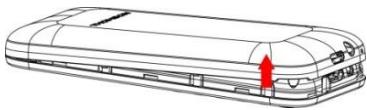
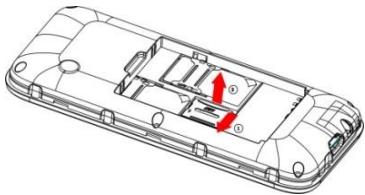
- Make sure the phone is switched off and the charger is not connected to the mains. Lift the rear cover from the notch as shown below. The cover can be opened easily. Do not attempt to force it open or pull it to either side; otherwise the cover can be damaged or broken.
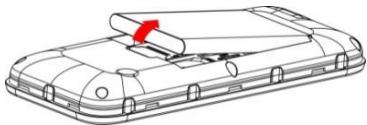
- If the battery is inserted, lift the battery in the direction of the arrow to remove it.
- This phone has two SIM card slots. You can use it for both personal and professional use with two different SIM cards. Be sure to insert your SIM card into the correct position by orienting the beveled corner of the card outwards and the metal parts of the card downwards.
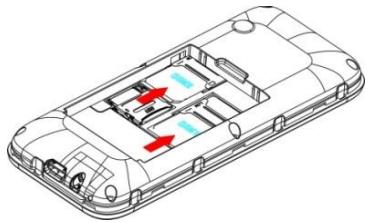
- Insert the Micro SD card as shown below (micro SD card is not provided).
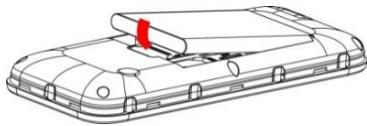
- Install the battery.
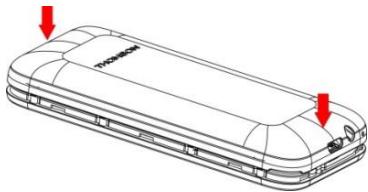
- Replace the back cover.
Battery Charging
The new battery is not fully charged. You need to install and charge the battery before using the device. In general conditions, the new battery will work under best condition after several times of charge and discharge.
- Connect the plug of the charger to the charger connector of the device.
- Connect the other plug of the charger to the proper power supply socket.
- When the battery icon is full and stop scrolling, which means the battery charging is completed, please pull out the plug.
To ensure normal operation of the phone, use only the charger supplied in this package.
Your Phone
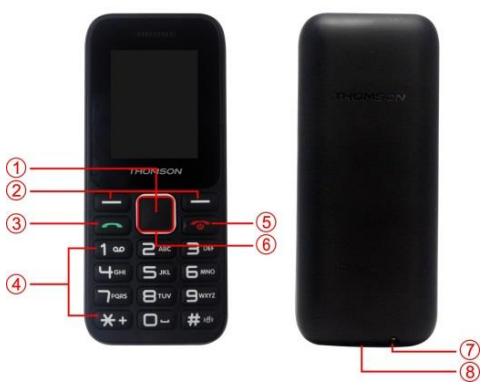
- OK key: Use to confirm a selection.
-
Left/Right selection key: Each of these keys performs the function indicated by the text shown on the displayed immediately above it, e.g. Select or OK.
-
Call key: Dials a phone number and answer a call. When in standby mode: shows the most recently dialed number.
- 0-9 enter numbers and characters.
- End Call key: Power on or off. Ends or rejects a call. Also exit from any function at any time.
- Navi key: Uses this key to scroll through names, phone numbers, menus and setting options.
- Headset connector
- USB connector
Powering on your device
Press for a few seconds the red colour key (end call) to power on your device.
How to lock / unlock your device
Press for a few seconds the right selection key in order to lock your device. To unlock, press one time the left selection key then the right selection key. To change the auto lock time setting, go to Menu > Settings > Display then select Auto keypad Lock.
How to change the ringtones
Go to Menu > Profiles, press Options and select Settings, press OK then go to Ring settings. Press OK and scroll up/down to change the ringtones for call or message.
How to select your mobile operator
In case your mobile phone operator is not selected automatically, go to Menu > Settings > Connection > Network selection > SIM1/SIM2 > Manual select and press OK to select a network compatible with your SIM card.

screen, it means that you are currently in roaming mode. In roaming mode, your operator may surcharge. In any case, always verify that the selected operator is correct. After that press Save and power off the phone, then power on again to take the change into account.
Dual SIM management
If you are using 2 SIM cards simultaneously, you can choose which SIM card to use by default for call, SMS. Go to Settings > Dual-SIM, then choose which SIM card to use by default, or otherwise select the option "Always ask". Remark: This menu is only available when two SIM cards have been inserted.
MP3 player
In order to use the MP3 player:
- Insert a Micro SD card (not provided),
- Copy your MP3 files into the "My Music" folder.
Files must be in MP3 format without anti-copy protection (DRM). Other file formats will not be played back.
All MP3 must be stored onto the "My Music" folder otherwise they will be ignored by the player. If this folder does not exist, create the new folder with your computer with exactly the same name as above. This device does not support video files.
When typing an SMS, long-press the * key to display special characters. To change input mode, long-press the # key.
Default password
Some options of the device (such as phone reset) requires a password. The default password is 0000.
Full instruction manual online
Visit the following internet website to access this device's instruction manual. http://www.thomsonphones.eu
Imported by ADMEA, 12 Rue Jules Ferry, 93110 Rosny sous bois, France.
THOMSON is a trademark of Technicolor SA used under license by ADMEA.