TV001 - Video projector Multilaser - Free user manual and instructions
Find the device manual for free TV001 Multilaser in PDF.


| Brand | Multilaser |
| Model | TV001 |
| Product Type | Video Projector |
| Package Contents | Projector, Mini USB Cable, Earphone Set, Power Adapter, Quick Start Guide, CD-ROM (User Manual) |
| Supported Storage | Micro SD card |
| Connectivity | Mini USB |
| Audio Output | Built-in speaker, Earphone jack |
| Play Modes | Music Mode (audio only), Projection Mode (with projection) |
| Power Source | Rechargeable battery via mini USB or power adapter |
| Charging Time (First) | At least 3 hours |
| Video File Formats | MP4 (H.264), MOV (H.264), AVI (H.264), MPEG4, MJPEG |
| Audio File Formats | MP3, WMA, WAV |
| Photo File Formats | JPEG, BMP |
| Controls | Power button (hold 2s), Up/Down keys for volume |
| Focus Adjustment | Manual focus ring |
| Battery | Embedded rechargeable battery |
| Included Power Adapter | Yes |
| Included Earphone | Yes |
| Included Documentation | Quick Start Guide, User Manual on CD |
Frequently Asked Questions - TV001 Multilaser
User questions about TV001 Multilaser
0 question about this device. Answer the ones you know or ask your own.
Ask a new question about this device
Download the instructions for your Video projector in PDF format for free! Find your manual TV001 - Multilaser and take your electronic device back in hand. On this page are published all the documents necessary for the use of your device. TV001 by Multilaser.
USER MANUAL TV001 Multilaser
Store the supported audio, photo and video files into one micro SD card and insert it into this projector. And you can manage the files by connecting to PC through bundled mini USB cable.
4 – Selecting Play Mode
This projector supports two play modes: Music and Projection modes. Music mode: Only play music without projection function Projection mode: Projection function is enabled. You can configure the settings and view the contents from the micro SD card inserted in the projector.
5 – Turning the projector on
Press the power Button for 2 seconds to turn it on. And in the same way to turn it off.
Note:
- Under Music mode, you can listen to the music directly from the embedded speaker or connected earphone. You can use Up and Down key to adjust the volume.
- In projection mode, if the projected image is blurring, please adjust the focus.
6 - Compatibility Table:
| File Compatibility | ||
| Vídeo Audio Photo | ||
| MP4 (H.264) MP3 JPEG | ||
| MOV(H.264) WMA BMP | ||
| AVI (H.264) WAV | ||
| MPEG4 | ||
| MJPEG | ||
Gula Rápido
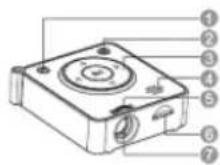
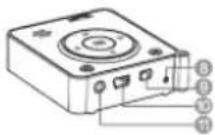

Please read following information carefully before operation
1 - Package:
- Projector
- Mini USB Cable
- Earphone set
- Power Adapter
- Quick Start Guide
• CD-Rom (User's Manual)
2 - Charging the battery
- To charge the embedded battery, please connect the bundled mini USB cable to this unit and your PC or using the power adaptor for charging. The projector will be charged automatically. Attention: When carrying the projector for the first time, it is recommended that the same be done for at least 3 hours.
Brand : Multilaser
Model : TV001
Category : Video projector