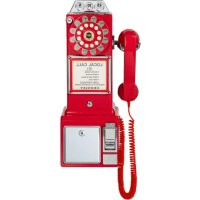
CR64 - Phone Crosley - Free user manual and instructions
Find the device manual for free CR64 Crosley in PDF.


Pick your language and provide your email: we'll send you a specifically translated version.
| Product Type | Corded Landline Phone |
| Brand | Crosley |
| Model | CR64 |
| Dimensions (Base) | Approx. 9.3 x 6.3 x 4.7 inches |
| Weight | Approx. 1.5 lbs (without handset cord) |
| Power Supply | Powered via telephone line (no external adapter required) |
| Dialing Type | Touch-tone or Pulse (switchable) |
| Handset Cord Length | Approx. 6 feet |
| Main Functions | Make and receive calls; last number redial; mute; ringer on/off; volume control |
| Ringer | Adjustable high/low/off |
| Indicator Lights | In-use light on base |
| Material | ABS plastic with retro design |
| Cable Connections | RJ11 phone line jack; handset coil cord |
| Compatibility | Standard analog telephone lines (PSTN) and VoIP via ATA |
| Cleaning Instructions | Wipe with a soft, dry cloth; do not use liquid cleaners or aerosols |
| Safety Warnings | Keep away from water; do not disassemble; use only with compatible line voltage |
| Spare Parts Available | Handset, handset cord, base, line cord (check with retailer or manufacturer) |
| Repairability | Limited; professional repair recommended for internal issues |
| Documentation | Includes user manual and warranty card |
Frequently Asked Questions - CR64 Crosley
Does the Crosley CR64 phone require batteries?
No, the phone is powered directly from the telephone line. No batteries are needed for standard operation.
Can I use this phone with a VoIP service?
Yes, the CR64 works with VoIP services if you connect it to an Analog Telephone Adapter (ATA). Ensure your ATA supports pulse or tone dialing.
How do I switch between tone and pulse dialing?
Look for a switch on the base of the phone labeled TONE/PULSE. Slide it to the desired setting. Most modern systems use tone dialing.
What should I do if the phone does not ring?
Check if the ringer switch is set to 'HIGH' or 'LOW' (not 'OFF'). Also verify the handset cord and line cord are securely connected. Try connecting to another phone jack.
Can I mount this phone on a wall?
The CR64 is designed for desk use only. It does not include wall-mounting brackets or keyholes.
How long is the handset cord?
The handset cord is approximately 6 feet long. Replacement cords are available if needed.
Is the phone compatible with hearing aids?
The handset is not labeled as hearing aid compatible (HAC). However, you may use a phone amplifier attachment if necessary.
What is the warranty on the Crosley CR64?
Crosley typically offers a 1-year limited warranty against defects in materials and workmanship. Retain your purchase receipt.
Can I replace the handset with a standard RJ9 handset?
Yes, the handset uses a standard RJ9 connector, so you can replace it with any compatible corded handset.
Why is there no dial tone?
Ensure the phone line cord is firmly plugged into both the phone and the wall jack. Try another device to verify line activity. If issue persists, contact your service provider.
User questions about CR64 Crosley
0 question about this device. Answer the ones you know or ask your own.
Ask a new question about this device
No questions yet. Be the first to ask one.
Download the instructions for your Phone in PDF format for free! Find your manual CR64 - Crosley and take your electronic device back in hand. On this page are published all the documents necessary for the use of your device. CR64 by Crosley.