
PHR108W - Monitor Pyle - Free user manual and instructions
Find the device manual for free PHR108W Pyle in PDF.


| Product Type | Monitor |
| Brand | Pyle |
| Model | PHR108W |
| Screen Size | 10.1 inches |
| Display Resolution | 1024 x 600 pixels |
| Aspect Ratio | 16:9 |
| Brightness | 250 cd/m² |
| Contrast Ratio | 1000:1 |
| Viewing Angle | 170° horizontal, 160° vertical |
| Refresh Rate | 60 Hz |
| Connectivity | HDMI, VGA, USB |
| Power Supply | DC 12V, 2A |
| Power Consumption | 12W (typical) |
| Dimensions (W x H x D) | 250 x 170 x 30 mm |
| Weight | 0.6 kg |
| Built-in Speakers | Yes, 2 x 1W |
| VESA Mount Compatibility | 75 x 75 mm |
| Color | Black |
| Display Features | Anti-glare screen, OSD controls |
| Cleaning Instructions | Use a soft dry cloth; avoid liquids |
| Safety Precautions | Keep away from heat sources; do not open casing |
| Spare Parts Available | Power adapter, stand |
Frequently Asked Questions - PHR108W Pyle
User questions about PHR108W Pyle
0 question about this device. Answer the ones you know or ask your own.
Ask a new question about this device
Download the instructions for your Monitor in PDF format for free! Find your manual PHR108W - Pyle and take your electronic device back in hand. On this page are published all the documents necessary for the use of your device. PHR108W by Pyle.
USER MANUAL PHR108W Pyle
Mounting/Flush Installation


natural_image
Illustration of a computer monitor with a download arrow overlay (no text or symbols)| Cut Out Width | 10.15" |
| Cut Out Height | 6.3" |
| Cut Out Depth | 0.8" |
Visit Pyleaudio.com
Follow Us On:


1600 63rd Street. Brooklyn. NY 11204
PHR105B
PHR108W
PYLE®

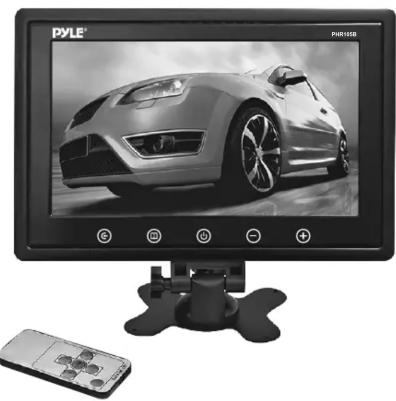
natural_image
Black-and-white photo of a Pyle TV monitor displaying a sports car image, with a remote control unit nearby (no readable text or symbols on the device)10" LCD Hi-Res Display Monitor
with Detachable Shroud Housing Bracket, RCA Connectors, Easy Touch Button Controls, Perfect for Custom Applications & Installations
Pyleaudio.com
Function keys panel

natural_image
Front view of a PYLE TV displaying a car in motion, with no visible text or symbols on the device itself.- Video input selection
- Menu
- Power on/off
- Analog variable decrease
- Analog variable increase
Methods of remote using

Wire diagram

Features:
• 10" TFT/LCD Digital Display Screen
• High Resolution 1024 x 600 Pixel Display
• 16:9 Wide Screen Format
• RCA Connectors: Audio & Video Connector Input Jacks
• Input Modes: AV1, AV2
- Easy Touch Button Panel Controls
• Built-in IR Transmitter for Wireless Headphones
• Built-in Dual Speakers
• NTSC/PAL System Compatible
• Brightness, Contrast, Color & Tint Adjustments
• Power Requirement: DC 12V +/- 10%
• Power Consumption: 5W Max
- Includes Power and Video Wiring Harness, Remote Control, Universal Stand
Mount & Shroud Headrest Housing Bracket
• Monitor Dimensions (W x H x D): 9.7" x 6.3" x 0.8" inches
• Housing/Shroud Dimensions (W x H x D): 10.5" x 7.5" x 1.1" inches
• Cut-Out Dimensions (W x H x D): 10.15" x 6.3" x 0.8" inches
- Sold as: Uint
• Weight: 3.15 lbs.
Brand : Pyle
Model : PHR108W
Category : Monitor