PLHRQD9B - Monitor Pyle - Free user manual and instructions
Find the device manual for free PLHRQD9B Pyle in PDF.


| Product Type | 9-inch Quad View Video Monitor |
| Brand | Pyle |
| Model | PLHRQD9B |
| Screen Size | 9 inches (diagonal) |
| Display Type | TFT/LCD Active Matrix |
| Resolution | 640 x 234 pixels |
| Video Format | PAL/NTSC Compatible |
| Viewing Modes | Single Full View, Split Dual Video View, Quad Four Source View |
| Number of Video Inputs | 4 (RCA connectors) |
| Reverse Image Function | Yes, for backup camera compatibility |
| Backup Camera Compatible | Yes |
| Power Supply | DC 12V +/-10% (AC adapter included) |
| Power Consumption | 5W Max |
| Operating Temperature | -20°C to +65°C |
| Dimensions (H x W x D) | 8.7 x 5.7 x 0.8 inches |
| Weight | 2.98 lbs |
| Mounting Options | Flush mount in headrest or dashboard stand |
| Controls | Front panel touch buttons and remote control |
| Included Accessories | Monitor, headrest shroud, dashboard stand, wiring harness, remote control, AC adapter |
| Care and Cleaning | Clean with a soft, dry cloth |
| Safety Precautions | Use in dry environment; avoid moisture; operate within temperature range |
| Repairability | Contact Pyle support for service |
Frequently Asked Questions - PLHRQD9B Pyle
User questions about PLHRQD9B Pyle
0 question about this device. Answer the ones you know or ask your own.
Ask a new question about this device
Download the instructions for your Monitor in PDF format for free! Find your manual PLHRQD9B - Pyle and take your electronic device back in hand. On this page are published all the documents necessary for the use of your device. PLHRQD9B by Pyle.
USER MANUAL PLHRQD9B Pyle
Mounting/Flush Installation

| Cut Out Width | 8.7" |
| Cut Out Height | 5.7" |
| Cut Out Depth | 0.8" |
Visit Pyleaudio.com
Follow Us On:


1600 63rd Street. Brooklyn. NY 11204
PLHRQD9B
PLHRQD9W
PYLE®


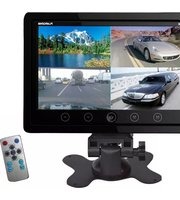
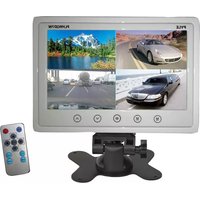
9" Video Display Monitor, Quad View (4) Source
Zone Display, Multiple Source Input, Selectable Viewing Mode, Backup Camera Compatible
Pyleaudio.com
Function keys panel

- Video input selection
- Menu
-
Power on/off
-
Analog variable decrease
- Analog variable increase
Methods of remote using

Wire diagram
Quad View (4) Source Zone Display
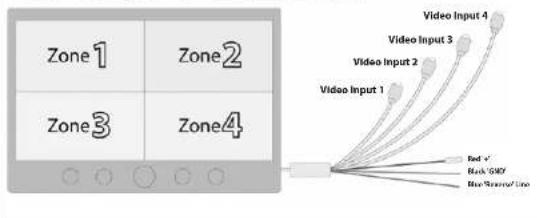
flowchart
graph TD
    A["Zone 1"] --> D["Central Output"]
    B["Zone 2"] --> D
    C["Zone 3"] --> D
    E["Zone 4"] --> D
    D --> F["Red +"]
    D --> G["Blue Show/Line"]
    D --> H["Black & Blue"]
    D --> I["Video Input 1"]
    D --> J["Video Input 2"]
    D --> K["Video Input 3"]
    D --> L["Video Input 4"]
Features:
• 9" Widescreen LCD Monitor
• Built-in Quad Control Box Screen Function
• Supports Four Video Camera Inputs (V1/V2/V3/V4)
- Selectable Viewing Modes: Single Full View / Split Dual Video View / Quad Four Source View
• Displays One, Two or Four Video Connections On-Screen
• Multiple Source Safety & Security Display
- Reverse Image Function (For Compatibility with Rearview/Backup Camera Systems)
Headrest Shroud for Flush Mounting & Installation
• (4) RCA Video Connector Jacks
• Connect up to Four Came
• Front Panel Touch Button Controls
• Brightness, Color, Contrast Picture Adjustments
- Includes Monitor, Mounting Headrest Shroud, Universal Dashboard Stand Mount, Power & Wiring Video Harness Accessory Cables, Remote Control
- AC Power Supply
Technical Specs:
• TFT/LCD Screen Display
• Active Matrix Video Monitor
• Pixel Resolution: 640 x 234
• Video Format System: PAL/NTSC Compatible
• Operating Temperature: -20 to +65
• Power Requirement: DC 12V +/- 10%
• Direct DC 12 Volt Connection
• Power Consumption: 5W Max
- Sold as : Unit
• Unit Dimensions: 8.7"H x 5.7"W x 0.8"D
• Weight:2.98 lbs.
Brand : Pyle
Model : PLHRQD9B
Category : Monitor