
PLHR76 - Monitor Pyle - Free user manual and instructions
Find the device manual for free PLHR76 Pyle in PDF.


| Brand | Pyle |
| Model | PLHR76 |
| Product Type | Portable LED Monitor |
| Screen Size | 7 inches |
| Display Resolution | 1024 x 600 pixels |
| Aspect Ratio | 16:9 |
| Brightness | 250 cd/m² |
| Contrast Ratio | 500:1 |
| Viewing Angle | 140° (H) / 120° (V) |
| Video Inputs | HDMI, VGA, Composite AV |
| Audio Output | 3.5mm headphone jack, built-in speaker |
| Power Supply | DC 12V, 1A |
| Power Consumption | ≤ 5W |
| Dimensions (W x H x D) | 18 x 12 x 2.5 cm |
| Weight | 0.45 kg |
| Mounting Options | VESA 75 x 75 mm, desktop stand included |
| Operating Temperature | 0°C to 40°C |
| Included Accessories | Power adapter, AV cable, remote control (optional) |
| Maintenance | Clean with soft, dry cloth; avoid liquids |
| Safety Certifications | FCC, CE |
| Spare Parts Availability | Contact Pyle customer service for replacement parts |
Frequently Asked Questions - PLHR76 Pyle
User questions about PLHR76 Pyle
0 question about this device. Answer the ones you know or ask your own.
Ask a new question about this device
Download the instructions for your Monitor in PDF format for free! Find your manual PLHR76 - Pyle and take your electronic device back in hand. On this page are published all the documents necessary for the use of your device. PLHR76 by Pyle.
USER MANUAL PLHR76 Pyle
HTTP://WWW.PYLEAUDIO.COM
PYLE®
view
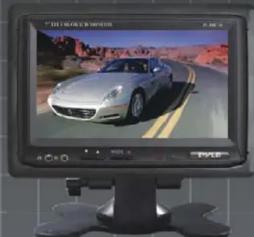
7" Widescreen TFT/LCD Video Monitor w/Headrest Shroud and Stand

natural_image
Computer monitor displaying a silver car on a desert road (no visible text or symbols)PLHR76
Thank you for purchasing the TFT LCD color monitor. To enjoy the features of this device and to ensure years of trouble-free operation, please read this manual carefully and follow the instructions.

Front Panel
- earphone jack
- Negative adjustment
- Activation of Menu Indicator
-
Light
-
Audio/Video input
- Positive adjustment
- Power ON/OFF
- Remote sensor
Remote control

- Power On/Off
2.Brightness - - Brightness +
4.Colour -
5.Colour + - Contrast -
- Contrast +
8.Volume
9.Volume +
10.V1/V2
11.Picture Swivel
Contents and specifications can be subjected to change without prior notice.
HTTP://WWW.PYLEAUDIO.COM
Basic operation
- Make sure the video and power connection are properly executed.
- Press MENU to display the adjustments in this order. Brightness-->Color-->Contrast-->Volume-->Brightness...
- Adjust the values by pressing AN+ or AN- .
- The POWER button activates/deactivates the monitor. It is not Necessary to disconnect the power source.
Specification
Screen Size: 7 inch System: NTSC/PAL
Power source: DC12V ±10%
Power consumption: < 9W
Video Input: Composition Video Signal
Operating Temperature: 0^ C → 60^ C
Storage Temperature: -20^ 80^
Headrest bracket

Accessory
1 x bracket 1 x headrest shroud
1 x remote control 1 x user's manual
2 x connection wire
Brand : Pyle
Model : PLHR76
Category : Monitor