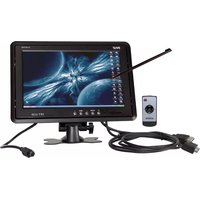
PLHR9TSB - Monitor Pyle - Free user manual and instructions
Find the device manual for free PLHR9TSB Pyle in PDF.


| Product Type | LCD Monitor |
| Brand | Pyle |
| Model | PLHR9TSB |
| Display Size | 9 inches (diagonal) |
| Resolution | 1920 x 1080 pixels (Full HD) |
| Aspect Ratio | 16:9 |
| Brightness | 300 cd/m² |
| Contrast Ratio | 1000:1 |
| Viewing Angle | 170° (H) / 160° (V) |
| Built-in Speakers | Yes, 2 x 2W |
| Video Inputs | HDMI, VGA, Composite (RCA) |
| Audio Input | 3.5mm stereo jack |
| Power Supply | DC 12V, 2A (adapter included) |
| Power Consumption | Less than 10W |
| Weight | 1.1 kg (2.5 lbs) |
| Dimensions (W x H x D) | 21.6 x 14.5 x 3.0 cm (8.5 x 5.7 x 1.2 in) |
| Mounting | VESA 75x75 mm compatible |
| Accessories | Remote control, power adapter, VESA mount, user manual |
| Cleaning | Use a soft, dry microfiber cloth; no liquids |
| Spare Parts | Available through Pyle customer support |
| General Information | Ideal for surveillance, multimedia, and car use |
Frequently Asked Questions - PLHR9TSB Pyle
User questions about PLHR9TSB Pyle
0 question about this device. Answer the ones you know or ask your own.
Ask a new question about this device
Download the instructions for your Monitor in PDF format for free! Find your manual PLHR9TSB - Pyle and take your electronic device back in hand. On this page are published all the documents necessary for the use of your device. PLHR9TSB by Pyle.
USER MANUAL PLHR9TSB Pyle
natural_image
Computer monitor with a stylus and icons, no visible text or symbols on the screen or backgroundBefore operating the Monitor, please read this manual thoroughly and retain it for future reference.
PYLE®
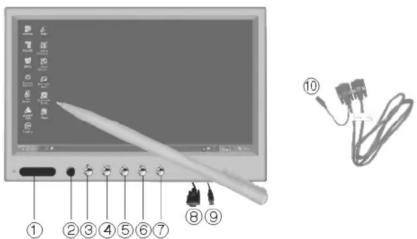
- Power Indicate Light 6. MENU
2.R/C Window 7. Positive Increase
3.Power 8.VGA Input
4.V1/V2/VGA Change 9.USB Input for Touch Screen Control
5.Negative Decrease 10.DC IN Jack
CAUTION:
For your safety, please rotate the angle of the display or turn off the display while driving.
SPECIAL STATEMENT:
LCD may have a few bright dots, which is normal for the matrix display technology, and doesn't indicate defects of faults
NOTICE:
- Please operate instruction manual completely before use;
•The unit is manufactured with precision elements pay attention to protection against dampness;
•Prevent the hard object from scratching LCD surface;
•High voltage inside non-technical authorized person is not allowed to dismantle the unit.
PLHR9TSW PLHR9TSB

REMOTE CONTROL
- Power
- V1/V2/VGA Change
- Positive Increase
- Menu
- Negative Decrease
- Reset
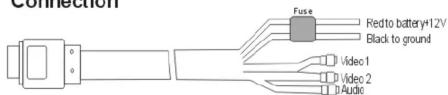
Connection
SPECIFICATIONS:
Display Size: 9.2 inch (16:9)
Resolution: 480*R.G.B.*234
Dual Video Inputs, 1 Audio Input VGA Input
System: PAL & NTSC Auto Switching
Power Supply: DC +12V
Built in Speaker
All Functions can be Controlled by Remote Control
Touch Screen
Wide View Angle
IF YOUR MONITOR IS WITH TOUCH SCREEN, PLEASE INSTALL THE DRIVER FROM THE DISC BEFORE USING.
P.S.: PLEASE DO NOT CONNECT THE USB CABLE TO THE MONITOR BEFORE INSTALLING THE DRIVER.
Brand : Pyle
Model : PLHR9TSB
Category : Monitor