
FWD398 - Hi-Fi System PHILIPS - Free user manual and instructions
Find the device manual for free FWD398 PHILIPS in PDF.


| Product Type | Hi-Fi System |
| Brand | Philips |
| Model | FWD398 |
| Dimensions (W x H x D) | 200 x 140 x 280 mm (main unit) |
| Weight | 3.2 kg (main unit) |
| Power Output | 2 x 60 W RMS |
| Power Supply | AC 220-240 V, 50/60 Hz |
| Disc Playback | DVD, DVD±R/RW, CD, CD-R/RW, MP3-CD |
| Radio Tuner | FM, AM |
| Cassette Deck | Yes (playback only) |
| USB Port | Yes (MP3 playback) |
| Audio Inputs | Aux-in (3.5 mm), FM antenna, AM antenna |
| Audio Outputs | Headphone (3.5 mm), speaker terminals |
| Remote Control | Included |
| Display Type | LCD with backlight |
| Speaker Type | 2-way bass reflex |
| Number of Speakers | 2 (stereo pair) |
| Standby Power | < 1 W |
| Energy Class | Class D (amplifier) |
| Included Accessories | Remote control, FM antenna, AM loop antenna, speaker cables, user manual |
Frequently Asked Questions - FWD398 PHILIPS
User questions about FWD398 PHILIPS
0 question about this device. Answer the ones you know or ask your own.
Ask a new question about this device
Download the instructions for your Hi-Fi System in PDF format for free! Find your manual FWD398 - PHILIPS and take your electronic device back in hand. On this page are published all the documents necessary for the use of your device. FWD398 by PHILIPS.
USER MANUAL FWD398 PHILIPS
Register your product and get support at
www.philips.com/welcome
User manual
natural_image
Exterior view of a multi-tiered black and silver electronic audio workstation with speaker amplifiers and control panel (no visible text or symbols)CAUTION
Use of controls or adjustments or performance of procedures other than herein may result in hazardous radiation exposure or other unsafe operation.


DOLBY. DIGITAL
Manufactured under license from Dolby Laboratories. Dolby and the double-D symbol are trademarks of Dolby Laboratories.

Windows Media and the Windows logo are trademarks, or registered trademarks of Microsoft Corporation in the United States and/or other counties.
Windows Media is a trademark of Microsoft Corporation.

DivX, DivX Ultra Certified, and associated logos are trademarks of DivX, Inc. and are used under license.
Official Divx® Ultra Certified product. Plays all versions of Divx® video (including Divx®6) with enhanced playback of Divx® media files and the Divx® Media Format.


English-6
Iny 49
This product incorporates copyright protection technology that is protected by method claims of certain U.S. patents and other intellectual property rights owned by Macrovision Corporation and other rights owners. Use of this copyright protection technology must be authorized by Macrovision Corporation and is intended for home and other limited viewing uses only unless otherwise authorized by Macrovision Corporation. Reserve engineering or disassembly is prohibited.
CONSUMERS SHOULD NOTE THAT NOT ALL HIGH DEFINITION TELEVISION SETS ARE FULLY COMPATIBLE WITH THIS PRODUCT AND MAY CAUSE ARTIFACTS TO BE DISPLAYED IN THE PICTURE. IN CASE OF 525 OR 625 PROGRESSIVE SCAN PICTURE PROBLEMS, IT IS RECOMMENDED THAT THE USER SWITCH THE CONNECTIN TO THE 'STANDARD DEFINITION' OUTPUT. IF THERE ARE QUESTIONS REGARDING OUR TV SET COMPATIBILITY WITH THIS MODEL 525p AND 625p DVD PLAYER, PLEASE CONTACT OUR CUSTOMER SERVICE CENTER.
- Use soft cloth slightly moistened with a mild detergent solution. Do not use a solution containing alcohol, spirits, ammonia or abrasives.
การทำความสะอาดดิสก
natural_image
Illustration of hands using a CD to disassemble or adjust a disc (no text or symbols visible)การใช้เจ็ดหฟัง
natural_image
Pure electrical circuit lines without any symbolsหมายเหตุ:
การบันทึก (ดิจิตอล)
⑭ DBB (Dynamic Bass Boost)
to select various sound effects.
โหมดแสดงการใช้งาน
ข้อควรระวัง!
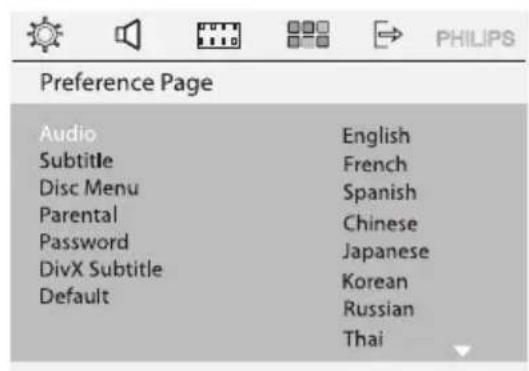
| Preference Page | |
| Audio | English |
| Subtitle | French |
| Disc Menu | Spanish |
| Parental | Chinese |
| Password | Japanese |
| DivX Subtitle | Korean |
| Default | Russian |
| Thai | |
natural_image
Close-up of a Philips DVD disc assembly with two discs mounted on a base (no visible text or symbols)- n MODE repeatedly to select the following: REPEAT TRACK → REPEAT ALL → SHUFFLE → SHUFFLE REPEAT → REPEAT OFF → REPEAT ALL DISC
natural_image
Simple line drawing of a mountain landscape with water and clouds (no text or symbols)natural_image
Simple line drawing of a mountain landscape with trees and a river (no text or symbols)16:9 จอกวาง

natural_image
Simple line drawing of a mountain landscape with trees and a river (no text or symbols)natural_image
Technical line drawing of a mechanical or electrical component with multiple compartments and mounting holes (no text or symbols)natural_image
Diagram of a cassette tape device with a downward arrow indicating compression or disassembly (no text or symbols present)natural_image
Diagram of a cassette tape with a screwdriver and a downward arrow indicating compression or disassembly (no text or symbols present)Be responsible Respect copyrights
Transport Transport Transport Transport Transport Transport Transport Transport Transport Transport Transport Transport Transport Transport Transport Transport Transport Transport Transport Transport Transport Transport Transport Transport Transport Transport Transport Transport Transport Transport Transport Transport Transport Transport Transport Transport Transport Transport Transport Transport Transport Transport Transport Transport Transport Transport Transport Transport Transport Transport Transport
| Karaoke Setup Page | ||
| MIC | On | On |
| MIC Volume | 10 | Off |
| Echo Level | 10 | |
| Key | 00 | |
| Scroe | Off | |
ไมค์
natural_image
Simple line drawing of a device with two ports and a cable, no text or symbols presentnatural_image
Recycling symbol composed of three chasing arrows forming a triangle (no text or labels)FWD398
CLASS 1 LASER PRODUCT
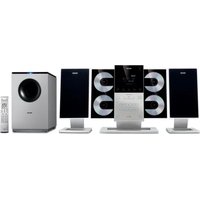

Brand : PHILIPS
Model : FWD398
Category : Hi-Fi System