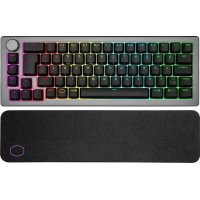
CM Storm SGK-4021-GKCM1 - Keyboard COOLER MASTER - Free user manual and instructions
Find the device manual for free CM Storm SGK-4021-GKCM1 COOLER MASTER in PDF.


| Product Type | Gaming Keyboard |
| Brand | Cooler Master |
| Model | CM Storm SGK-4021-GKCM1 |
| Dimensions (L x W x H) | 450 mm x 150 mm x 30 mm |
| Weight | 1.2 kg |
| Power Source | USB bus power (5V, 500mA) |
| Connectivity | USB 2.0 Type-A, detachable cable (1.8 m) |
| Switch Type | Mechanical (Cherry MX Red equivalent) |
| Key Layout | QWERTY (US/International) |
| Backlight | RGB per-key backlighting |
| Polling Rate | 1000 Hz |
| Key Rollover | Full N-key rollover (NKRO) |
| Wrist Rest | Detachable (magnetic or included) |
| Compatibility | Windows 7/8/10/11, macOS, Linux |
| Software | Cooler Master Portal for key mapping and lighting |
| Audio Pass-Through | None (no headphone/mic jacks) |
| USB Pass-Through | Yes (one USB 2.0 port) |
| Construction Material | ABS plastic case, steel plate |
| Keycaps | Standard ABS, laser etched |
| Cable Management | Three-channel routing underneath |
| Cleaning & Maintenance | Remove keycaps, clean with isopropyl alcohol and soft cloth |
| Safety Precautions | Avoid liquids; unplug before cleaning; keep away from heat sources |
| Spare Parts Availability | Cable, keycaps, wrist rest (contact support) |
| Repair Difficulty | Moderate (soldering required for switch replacement) |
| Warranty | 2 years (depending on region) |
Frequently Asked Questions - CM Storm SGK-4021-GKCM1 COOLER MASTER
User questions about CM Storm SGK-4021-GKCM1 COOLER MASTER
0 question about this device. Answer the ones you know or ask your own.
Ask a new question about this device
Download the instructions for your Keyboard in PDF format for free! Find your manual CM Storm SGK-4021-GKCM1 - COOLER MASTER and take your electronic device back in hand. On this page are published all the documents necessary for the use of your device. CM Storm SGK-4021-GKCM1 by COOLER MASTER.
USER MANUAL CM Storm SGK-4021-GKCM1 COOLER MASTER
CM Storm Quick Fire TK Stealth
Thank you for purchasing the CM Storm Quick Fire TK Stealth!
A rugged gaming keyboard using the highest grade gold plated mechanical switches (CHERRY MX) rated for over 50 million keystrokes.
Using Your CM Storm Quick Fire TK Stealth Keyboard
Accessing Advanced Functions
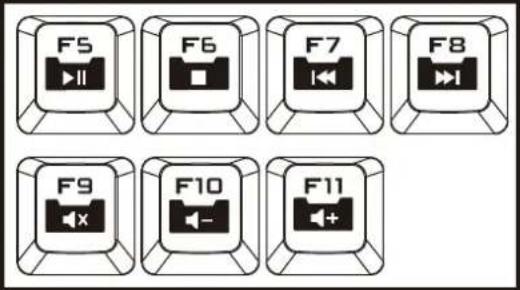
Media Keys
In FN-Lock mode F5-F11 act as media keys and let you control your favorite media player as well as your speaker/headset volume.
text_image
F5 F6 F7 F8 F9 F10 F11Windows Key Lock
In FN-Lock mode F12 key lets you disable the Windows keys so you don't get kicked out of a gaming session by accident.

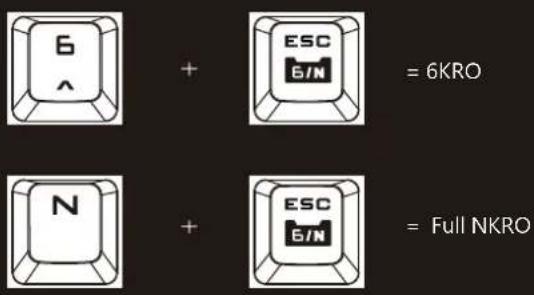
Switching between full N key and 6 key rollover
In FN-Lock mode pressing the ESC and N key at the same time switches the Keyboard to NKRO mode. Pressing the ESC and 6 key switches the Keyboard to 6KRO mode.
text_image
6 ^ + ESC 6IN = 6KRO N + ESC 6IN = Full NKRO- NKRO mode is not supported on MACs and prevents some PCs from booting
Package Content:
- Quick Fire TK Stealth Mechanical Gaming Keyboard
- User Guide
- Keycap puller
- 1.8 m braided USB Cable
System Requirements
PC or PC compatible device with a USB port
Windows® XP/Vista/7/8
Warranty
2 years limited manufacturer warranty
Damages as a result of removing keycaps improperly are not covered by the warranty
Technical Support
Free technical support and FAQs can be found on www.cmstorm.com
For free live-chat support visit www.coolermaster.com/livehelp