K64561US - Anti-theft KENSINGTON - Free user manual and instructions
Find the device manual for free K64561US KENSINGTON in PDF.


| Product Type | Security Cable Lock |
| Brand | Kensington |
| Model | K64561US |
| Compatibility | Standard Kensington Security Slot |
| Lock Mechanism | Key Lock |
| Cable Length | 6 ft (1.8 m) |
| Cable Diameter | 4 mm |
| Material | Galvanized Steel Cable, Zinc Alloy Lock Head |
| Weight | 0.5 lb (227 g) |
| Color | Black |
| Number of Keys Included | 2 |
| Security Level | Basic |
| Package Contents | Lock, 2 Keys, Mounting Hardware, Manual |
| Warranty | 1 Year Limited |
| Maintenance | Wipe clean with dry cloth; lubricate keyway sparingly if needed |
| Replacement Parts | Replacement keys available from Kensington |
Frequently Asked Questions - K64561US KENSINGTON
User questions about K64561US KENSINGTON
0 question about this device. Answer the ones you know or ask your own.
Ask a new question about this device
Download the instructions for your Anti-theft in PDF format for free! Find your manual K64561US - KENSINGTON and take your electronic device back in hand. On this page are published all the documents necessary for the use of your device. K64561US by KENSINGTON.
USER MANUAL K64561US KENSINGTON
Your new Kensington® CombSaver® Combination Notebook lock is the easiest and most reliable way to secure your notebook computer to help protect against theft. Simply set your personalized 4 digit combination code and attach to either a notebook computer or any other device that contains the Kensington Security Slot (C-Slot).
The K Slot is commonly found on notebook computers, projectors, external hand drives, LCD monitors, TVS, and printers.
Features
- Four 10 Digit Combination Diks allowing you to set up to 10,000 personalized combination codes.
-
Potented T-Bar engagement mechanism offering you superior strength and security to help protect against theft
-
Full steel core security cable with protective jacket to attach your notebook computer securely to a stationary paint
-
Easy to set combination mechanism requiring the attached Rest Tool to help prevent accidental combination resets
-
Backed by a Limited Lifetime Warranty
Registering Your Kensington Product
To help remember your personalized combination code please register your Lock and code online at www.kensington.com.
Technical Support
Technical support is available to all registered users of Kensington products. Technical Support contact information can be found on the back page of this manual.
Web Support
You may find the answer to your problem in the Frequently Asked Questions [FAQ] section of the Support Area on the Kensington Website: www.support. Kensington.com.
Telephone Support
There is no charge for technical support except long-distance charges where applicable. Please visit www.kensington.com for telephone support hours. In Europe, technical support is available by telephone Monday to Friday 0900 to 2100.
Please note the following when calling support:
• Call from a phone where you have access to your device
- Be prepared to provide the following information:
- Name, address, and telephone number
- The name of the Kensington product
- Symptoms of the problem and what led to them
Limited Lifetime Warranty
Kensington Computer Products Group, a division of ACCO Brands (Kensington), warrants to the original purchaser this product against defects in material and workmanship for the life of the product as follows: Kensington will supply, at its option, comparable new and rebuilt replacements for defective parts and will pay the labor charges to repair the product found to be defective. Should Kensington be unable to replace or repair the product, Kensington will reimburse you for your original purchase price providing you can submit the dated bill at sale as evidence of the original purchase price along with the defective product.
To obtain warranty service during the warranty period call one of the tech support number listed on the back page.
In order to keep this warranty in effect, the purchaser must have handled and used the product as prescribed in the Instruction Guide accompany this warranty. This warranty does not cover any damage due to accident, misuse, abuse, or negligence.
Repair or replacement as provided under this warranty is the exclusive remedy of the consumer. In no event shall Kensington be liable for any incidental or consequential damages. This warranty is in lieu of all other warranties, expressed or implied, including implied warranties of merchantability or fitness for a particular purpose.
Some states or countries do not allow the exclusion or limitation of incidental or consequential damages, so the above limitation or exclusion may not apply to you. Some states or countries do not allow limitations on how long an implied warranty lasts, so the above limitation may not apply to you. This warranty gives you specific legal rights, and you may also have other rights, which vary from state to state and country to country.
Kernington, ACCO and the ACCO says, Combustors and the K & Lack knows are rendered in markets of ACCO Brands. The Commission Promise is a new or mark of ACCO Brands Covered by one or more of the following patents US658241, US6113502, US5981885, US5778180, 7141834, 6819761, 5918781, open 2672372, open 3029201, open 3007295, 110026002 Canada 2186781, Canada 2407785, other patents sending.
© 2008 Kerington Computer Products Group, a division of AICCU Brands. Any unauthorized copying, duplicating, or other reproduction of the Northbound brand's prohibited without written consent from Kerington Computer Products Group, all rights reserved. 2/18
Technical Support
United States 1 800 535 4242
International Toll +31 53 424 9155
text_image
The Lexington Company AECO Corporation Products Group & division of AECO Brands 2013 Top 64th Group, Western Industrial Finance, CA 94185 www.aging.com.cn by a subsidiary AECO Corporation www.aging.com.cn ACCO Corporation ACCO Australia Bond 2 & 6th US IndustryNow 2013 Australia901-2153-00 MP
Kensington®
K
ComboSaver® Notebook Lock
Instruction Guide
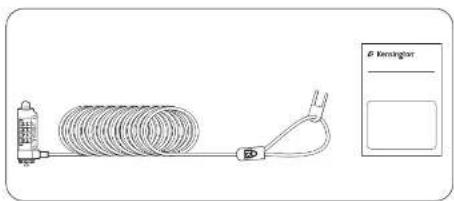
Contents
text_image
B Remington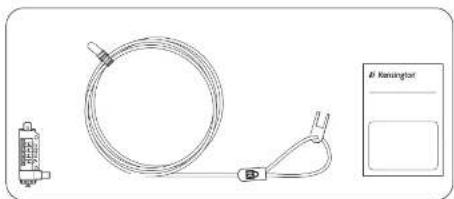
natural_image
Technical line drawing of a coiled hose with attached clamp and connector, alongside a labeled control panel (no text or symbols on the main diagram)Components

text_image
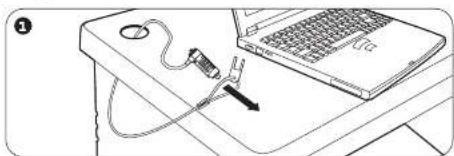
A—Cable B—T-Bar C—Combination Dial D—Reset Test E—Lock ButtonSecuring Your Device
natural_image
Line drawing of a laptop with a plug inserted into the screen, placed on a desk (no text or symbols)
natural_image
Diagram showing a switch inserted into a laptop keyboard, with no visible text or symbols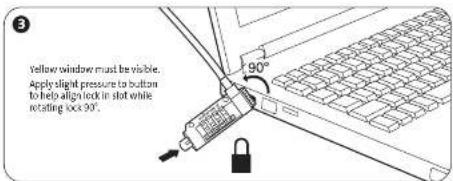
text_image
Yellow window must be visible. Apply slight pressure to button to help align lock in slot while rotating lock 90°.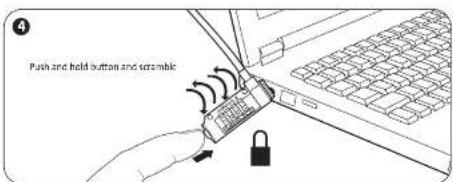
text_image
Push and hold button and scramble
natural_image
Line drawing of a laptop with cable and plug, placed on a desk (no text or symbols)Resetting the Combination
text_image
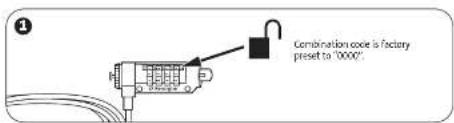
Combination code is factory preset to "0000"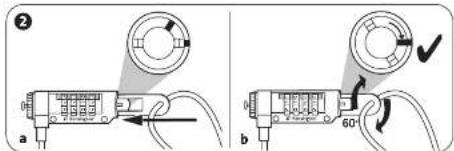
text_image
Diagram showing two electrical connector configurations labeled a and b, with arrows indicating wiring or connection points and a 60-degree angle marker.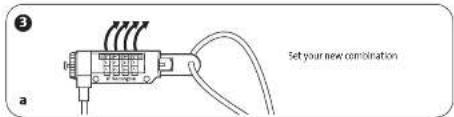
text_image
Set your new combination a
text_image
4 60° a bCaution!
To help remember your personalized combination code please register your lock and code online at www.kensington.com.