TY-LA1000 - Lamp PANASONIC - Free user manual and instructions
Find the device manual for free TY-LA1000 PANASONIC in PDF.


User questions about TY-LA1000 PANASONIC
0 question about this device. Answer the ones you know or ask your own.
Ask a new question about this device
Download the instructions for your Lamp in PDF format for free! Find your manual TY-LA1000 - PANASONIC and take your electronic device back in hand. On this page are published all the documents necessary for the use of your device. TY-LA1000 by PANASONIC.
USER MANUAL TY-LA1000 PANASONIC
Because of the possibility of injury, strictly follow the replacement procedure below.
This product has a High Intensity Discharge (HID) lamp that contains a small amount of mercury. Disposal of these materials may be regulated in your community due to environmental considerations.
For disposal or recycling information please contact your local authorities, or the Electronics Industries Alliance: http://www.else.org
■ Lamp replacement procedure
1 Turn power off, wait until power indicator stops blinking red, then unplug the power cord from the wall outlet and confi rm that the area around the lamp unit has cooled down.

text_image
LAMP indicator PC but /PC in- Please wait more than one hour for lamp replacement.
[If you need to replace the lamp more urgently]
- The Projection display has a forced cooling feature. After the POWER button is turned OFF, and during the first minute of the normal cooling fan operation, press the VOL+ button on the projection display and ▲button on the remote control at same time for more than 5 seconds. The cooling fan operates for about 10 minutes. The LAMP indicator fl ashes red 5 times every 5 seconds.
L80C0334
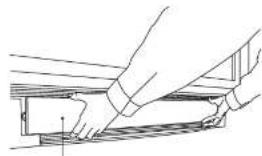
2 Remove the Front cover. Place your fingertips under the Front cover and pull it from the projection display.
natural_image
Line drawing of two hands installing or adjusting a structural component (no text or symbols)Front cover
3 Loosen the Lamp cover screw. First read caution and warning labels on lamp cover. Then, loosen the lamp cover screw by using a screwdriver.

text_image
Lamp cover handle ScrewdriverLamp cover screw
CAUTION:
[Under no circumstance should you touch the actual bulb.]
At this high operating temperature the natural oil on your finger can cause the glass to weaken where touched and the bulb can crack or explode.
4 Loosen the lamp unit screw with a screwdriver. Then, grasp the lamp unit as shown in the diagram, and slowly remove from the projection display. • Do not drop, as the impact of dropping may cause the lamp to explode.

WARNING:
The lamp may be hot. Be careful when handling.
CAUTION:
- High-pressure lamp may explode if improperly handled. - Danger of injury due to glass fragments.
5 Insert the new lamp unit being careful of the insertion direction. - Press on the arrow mark making sure insertion is done correctly.

6 Replace the Lamp unit and cover screws. Tighten the lamp unit/cover screw with a screwdriver. • Properly dispose of old lamp.
Note
Attach the lamp unit and lamp unit housing door securely. If the lamp unit and lamp unit housing door are not attached securely, the protective circuit will be activated and the lamp will not turn on.
7Replace the Front cover.
After lamp re place ment, follow the pro ce dure below
Warning:
Perform lamp time reset only when the lamp has been replaced.
■ Lamp time reset procedure
1 Be sure the power cord is plugged into a properly grounded wall outlet. Then, press the POWER button on the projection display or the remote control to turn the unit on.
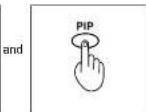
2 While pressing the VOL- button on the projection display, hold down the PIP button on the remote control at same time for more than 5 seconds.

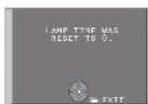
3 When reset procedure is complete, the screen on the right will appear.
Note
When lamp time reset is finished, the LAMP indicator goes out.
PANASONIC CONSUMER ELECTRONICS COMPANY, DIVISION OF MATSUSHITA ELECTRIC CORPORATION OF AMERICA
One Panasonic Way
Secaucus, New Jersey 07094
PANASONIC SALES COMPANY, DIVISION OF MATSUSHITA ELECTRIC OF PUERTO RICO, INC.,
Ave. 65 de Infanteria, Km. 9.5
San Gabriel Industrial Park Carolina, Puerto Rico 00985
Panasonic Lamp Unit Limited Warranty
Limited Warranty Coverage (LAMP Only)
If your Lamp unit does not work properly because of a defect in materials or workmanship, Panasonic Consumer Electronics Company or Panasonic Sales Company (collectively referred to as "the warrantor") will, for the length of the period indicated below, which starts with the date of original purchase ("warranty period"), replace it with a new lamp unit.
For ninety (90) days – In exchange for defective Lamp Unit
You must Mail-In your Lamp unit during the warranty period. This warranty only applies to products purchased and serviced in the United States or Puerto Rico. This warranty is extended only to the original purchaser of a new product which was not sold "as is".
Mail-In Service
For assistance in obtaining service in the United States please contact:
Panasonic Services Company Panasonic Plus Department
20421 84th Avenue South
Kent, WA 98032
Phone: 1-800-833-9626
Fax: 1-800-237-9080
If a Lamp unit defect occurs during the warranty period the purchaser will be required to furnish a sales receipt/proof of purchase indicating date of purchase.
Also, purchaser will be responsible for shipping the Lamp unit to the above address.
For assistance in Puerto Rico call Panasonic Sales Company (787)-750-4300 or fax (787)-768-2910.
Limited Warranty Limits And Exclusions
This warranty ONLY COVERS failures due to defects in materials or workmanship, and DOES NOT COVER normal wear and tear or cosmetic damage. The warranty ALSO DOES NOT COVER damages which occurred in shipment, or failures which are caused by products not supplied by the warrantor, or failures which result from accidents, misuse, abuse, neglect, mishandling, misapplication, alteration, faulty installation, set-up adjustments, misadjustment of consumer controls, improper maintenance, power line surge, lightning damage, modification, or commercial use (such as in a hotel, offi ce, restaurant, or other business), rental use of the product, service by anyone other than a Factory Servicenter or other Authorized Servicer, or damage that is attributable to acts of God.
THERE ARE NO EXPRESS WARRANTIES EXCEPT AS LISTED UNDER "LIMITED WARRANTY COVERAGE". THE WARRANTOR IS NOT LIABLE FOR INCIDENTAL OR CONSEQUENTIAL DAMAGES RESULTING FROM THE USE OF THIS PRODUCT, OR ARISING OUT OF ANY BREACH OF THIS WARRANTY. (As examples, this excludes damages for lost time, travel to and from the servicer. The items listed are not exclusive, but are for illustration only.) ALL EXPRESS AND IMPLIED WARRANTIES, INCLUDING THE WARRANTY OF MERCHANTABILITY, ARE LIMITED TO THE PERIOD OF THE LIMITED WARRANTY.
Some states do not allow the exclusion or limitation of incidental or consequential damages, or limitations on how long an implied warranty lasts, so the exclusions may not apply to you.
This warranty gives you specific legal rights and you may also have others rights which vary from state to state. If a problem with this product develops during or after the warranty period, you may contact your dealer or Servicenter. If the problem is not handled to your satisfaction, then write to the warrantor's Consumer Affairs Department at the addresses listed for the warrantor.
PARTS AND SERVICE WHICH ARE NOT COVERED BY THIS LIMITED WARRANTY ARE YOUR RESPONSIBILITY.
Printed in U.S.A.
LSQ00834