ARP-7010 - Air conditioner Royal Sovereign - Free user manual and instructions
Find the device manual for free ARP-7010 Royal Sovereign in PDF.


| Product Type | Portable Air Conditioner |
| Model | ARP-7010 |
| Brand | Royal Sovereign |
| Cooling Capacity | 7,000 BTU/h (approx.) |
| Coverage Area | Up to 300 sq ft |
| Dimensions (W x D x H) | 17.5 x 13.5 x 27.5 inches |
| Net Weight | 55 lbs |
| Power Supply | 115 V / 60 Hz |
| Power Consumption | 850 W (cooling) |
| Refrigerant | R410A |
| Control Type | Remote control and touch panel |
| Modes | Cool, Fan, Dehumidify, Sleep |
| Fan Speeds | 3 (Low, Medium, High) |
| Timer | 24-hour programmable timer |
| Air Filter | Washable mesh filter |
| Installation Kit | Window kit included |
| Noise Level | 54 dB (approx.) |
| Energy Efficiency | EER 9.0 (approx.) |
| Warranty | 1 year limited |
| Included Accessories | Remote control, exhaust hose, window adapter, user manual |
Frequently Asked Questions - ARP-7010 Royal Sovereign
User questions about ARP-7010 Royal Sovereign
0 question about this device. Answer the ones you know or ask your own.
Ask a new question about this device
Download the instructions for your Air conditioner in PDF format for free! Find your manual ARP-7010 - Royal Sovereign and take your electronic device back in hand. On this page are published all the documents necessary for the use of your device. ARP-7010 by Royal Sovereign.
USER MANUAL ARP-7010 Royal Sovereign
natural_image
White industrial air purifier unit with control panel and digital display (no visible text or symbols)OWNER'S MANUAL
ARP-7010, ARP-7013, ARP-7013H
ARP-7010, ARP-7013, ARP-7013H
PORTABLE AIR CONDITIONER ACONDICIONADOR DE AIRE PORTÁTIL
Read and retain these instructions for future reference.
For any Customer Support needs, please choose the Support tab on www.royalsovereign.com
Royal Sovereign International, Inc.
PORTABLE AIR CONDITIONER
Model ARP-7010, ARP-7013, ARP-7013H
INTRODUCTION
Thank you for choosing Royal Sovereign to provide you and your family with all of the "Home Comfort" requirements for your home, apartment, or office. This Portable Air Conditioner can be set-up in just minutes and can be easily moved from room to room. It is a multi-functional room air comfort system that offers you Air Conditioning, Dehumidification and Air Circulation modes. This manual will provide you with valuable information necessary for the proper care and maintenance for your new appliance. Please take a few moments and read the instructions thoroughly. If properly maintained, your appliance will give you many years of trouble-free operation.
CONTENTS
Page
Precautions for use 4
Identification of parts 5
Installation 6
Operation 7
Remote control 10
Maintenance 11
Troubleshooting 13
Specifications 14
Warranty 15
Contact information 16
Electrical Specifications and Power Cord
Check to ensure that the electrical service being used is adequate for the model you've chosen. The electrical rating of your new air conditioner is defined on the serial plate of the unit. Please refer to the rating when checking electrical requirements to ensure they meet the electrical codes of your location.
• Install the air conditioner according to the installation instructions supplied.
- Do not modify any part of this product.
- Do not insert any objects into the product or block the airflow in any way.
- Ensure that the power supply you use has an appropriate voltage rating.
- Only use a properly installed 3 pin, grounded AC socket that is rated 115V, 60Hz, 15 amps or more.
- If the electrical outlet you intend to use is not adequately grounded or protected by a time delay fuse or circuit breaker, you should have a qualified electrician install the proper outlet.
- This unit uses a plug with a built-in fuse. Conduct a Power Plug Check (see page 9) before use to confirm normal operation.
- Do not use this unit with any extension cords or adapter plugs.
- If the cord or plug is damaged in any way, please call the Royal Sovereign Service Department (see page 16.)
- Do not plug this cord into a loose electrical outlet.
- Turn the unit off and unplug, when cleaning the air conditioner, removing the filter or when the air conditioner will not be used for an extended time period.
General Use
- Do not block air outlets or intake with obstacles.
- Do not insert any objects into the air conditioner.
- Do not splash or pour water on the housing or control panel.
- Do not place heavy items or sit on unit.
- Make sure the drainage plug is installed on bottom of machine.
- Drain the unit when moving the air conditioner or when storing the unit.
natural_image
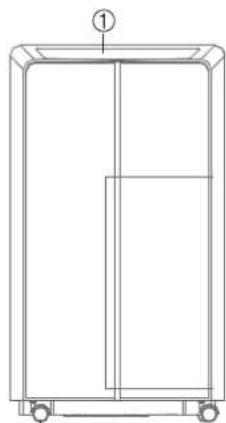
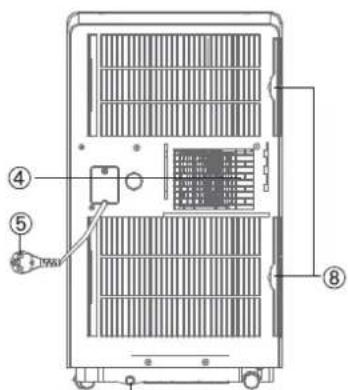
Simple line drawing of an electrical outlet with a plug and socket (no text or symbols)IDENTIFICATION OF PARTS
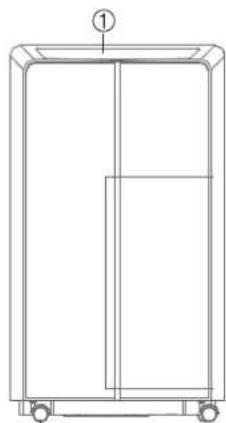
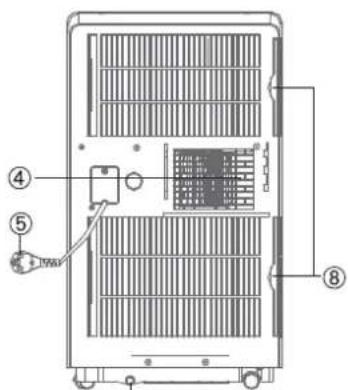
- Control panel
- Louver
- Air intake
- Air outlet
- Power cord
- Drain port
- Caster wheel
- Filters
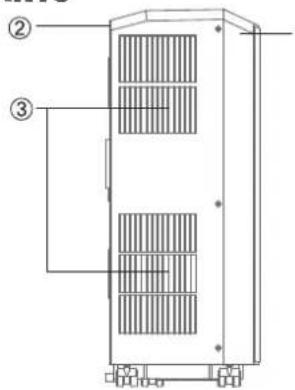
Side Front Back
natural_image
Technical line drawing of a rectangular cabinet or enclosure with wheels and a labeled component (no text or symbols present)⑦
⑥
Window Installation Kit Parts and Accessories
- Exhaust Hose (1 pieces)
- Hose connector (Window end) (1 pieces)
- Hose connector (PAC end) (1 pieces)
- Remote control (1 piece)
- Window Slider Kit (2 piece set)
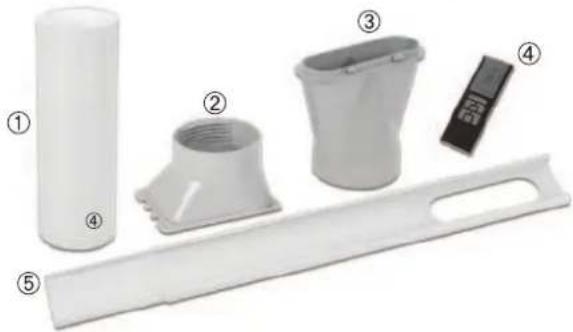
natural_image
Exploded view of white plastic kitchen utensils including a cylindrical tube, bucket, and tray (no text or symbols)
INSTALLATION
Unpack your New Portable Air Conditioner and let the machine stand upright for 2 hours before starting. Unpack all parts listed below. If any parts are missing do not return this product to the place of purchase. Please visit our website www.royalsovereign.com and click on the "Support" tab.
Part 1: Attaching exhaust hose
- Extend one end of the exhaust hose.
- Take the hose connector and twist it counterclockwise onto one end of the exhaust hose.
- Extend the opposite end of the exhaust hose.
- Take the hose adapter and twist it counterclockwise onto the unused end of the exhaust hose.
Part 2: Attaching exhaust hose
- Hold the exhaust hose parallel to the floor with the hose connector positioned Left to Right.
- First insert the long tab into the left side of the Air outlet. Then push the tabs on the right side of the air outlet down into the tabs connected to the unit.
Part 3: Installing window slider kit
- Open the window and place the window slider on the inside edge of the window.
- Adjust the window slider to the width of the window.
- Insert a screw into the top of the window slider to secure it at the correct length.
- Take window slider out and attach to exhaust hose by snapping the hose adapter into the hole on the window slider. Make sure that the tabs on the window slider are facing outside.
- Extend exhaust hose to desired length.
- Place window slider and hose into the edge of the window.
- Close window to secure slider.
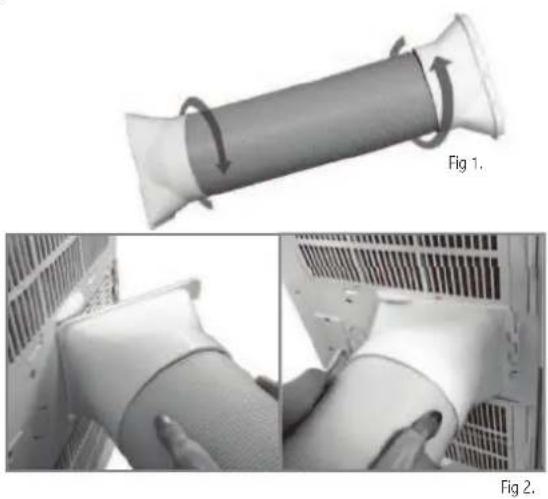
natural_image
Two-panel image showing a cylindrical pipe being folded, with arrows indicating rotation and a close-up of the pipe's handle (no text or symbols)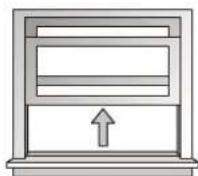
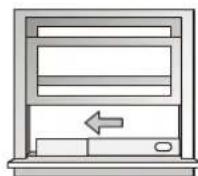
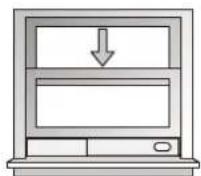
Fig 3.
OPERATION
Before Use
- Check to make sure rubber drain plug is securely plugged into the drain port on the back of the unit to prevent water leaks
- Check to make sure that air conditioner has been properly vented out the window ( See Installation pg 6.)
- Check to make sure air conditioner is on a flat surface
- Push down on the back of the louver located on the top of the unit. The louver will snap into open position. To close while unit is not in use, simply press back down. Do not run the air conditioner with the louver closed. This may damage the air conditioner.
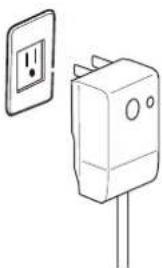
- Conduct a Power Plug Check:
- Press the RESET button on the power cord.
- Plug cord into an electrical outlet.
- Press the TEST button on the power cord. The RESET button should pop up.
- Press the RESET button for use.
- Do not use the air conditioner if the test fails.
Note: If you turn the air conditioner off and immediately restart it, allow 3 minutes for the compressor to restart cooling. In the event of a power failure, wait 3 minutes before restarting unit.
Control Panel
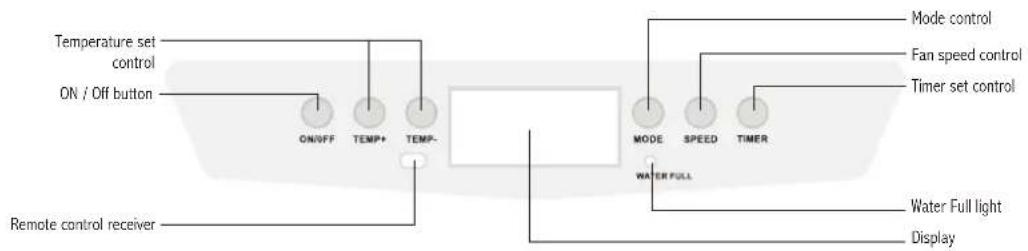
flowchart
graph LR
    A["ON/OFF"] --> B["TEMP+"]
    C["ON / Off button"] --> B
    D["Remote control receiver"] --> B
    B --> E["TEMP-"]
    F["MODE"] --> G["SPEED"] --> H["TIMER"]
    I["Water Full"] --> J["Water Full light"] --> K["Display"]
    L["Mode control"] --> M["Fan speed control"] --> N["Timer set control"]
LED Display
- AUTO Mode Indicator
- Fan Speed Indicator
- Cooling Mode Indicator
- Temperature / Timer Display
- Timer Indicator (when active)
- Degree Indicator
- Dehumidifier Indicator (when active)
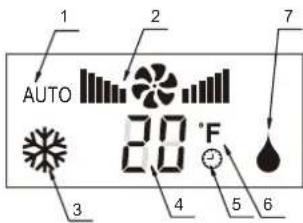
Control Panel Operation
Automatic, Cool, Dehumidify Mode Operation
1. Turn the unit on
Press the On / Off button to turn the unit on. The current mode, fan speed, and temperature will light up. Note: Even when air conditioner is turned off the LED display will show the mode the air conditioner was previously in and the current room temperature.
2. Select operating mode
Press the Mode button to choose between AUTO, Cool, or Dehumidify mode.
AUTO


3. Adjust temperature
The desired temperature can be set within the range of 64^ F to 90^ F. Press the Temperature + or - buttons to adjust temperature. Temperature can only be adjusted during Cool mode.
4. Adjust fan speed
Press the SPEED button to select Low, Medium, or High Fan. Green bars = Low, Orange bars = Medium, Red bars = High Fan speed can only be adjusted during Cool mode.
5. Power Off
Press the On / Off button again to turn the unit off. The air conditioner will turn off, but the LED display will show current room temperature and the previous operation mode.
ARP-7010, ARP-7013, ARP-7013H
Mode Descriptions
AUTO mode
When AUTO mode is selected the unit will automatically select the operation mode: Cool, dehumidify, fan, or heat (model ARP-7013H).
When the room temperature is less than 73 °F the unit will automatically select the fan to turn on.
When the room temperature is between 73 °F and 79 °F the set temperature will be 73 °F and the unit will automatically select dehumidify mode.
When the room temperature is greater than 79^ F the set temperature will be 75^ F and the unit will automatically select cool mode.
Cool mode
When the cool mode is chosen the air conditioner will run when the room temperature is higher than the set temperature. Fan speed and desired temperature can be changed during cool mode.
Dehumidify mode
When in dehumidify mode the fan speed will run at low speed. The temperature will automatically be set to the current room temperature.
Heat mode (model ARP-7013H only)
When heat mode is selected the unit will run when the room temperature is lower than the set temperature.
Timer Operation
The timer can be used to turn the unit off after a set amount of time, or to turn the unit on after a set amount of time.
To use the timer to turn the unit on: While the air conditioner is off press the Timer button. The LED display will blink 01 and the timer mode icon will light up. Press the Temp + and Temp — buttons to adjust the time up to 24 hours. Press the Timer button again to set the time. The timer mode indicator will light up to show that the timer is set. The unit will turn on after the set time has passed.
To use the timer to turn the unit off: Press the Timer button. The LED display will blink 01 and the timer mode icon will light up. Press the Temp + and Temp - buttons to adjust the time up to 24 hours. Press the Timer button again to set the time. The timer mode indicator will light up to show that the timer is set. The unit will turn on after the set time has passed.
REMOTE CONTROL
To use: aim remote control at the sensor on the control panel.
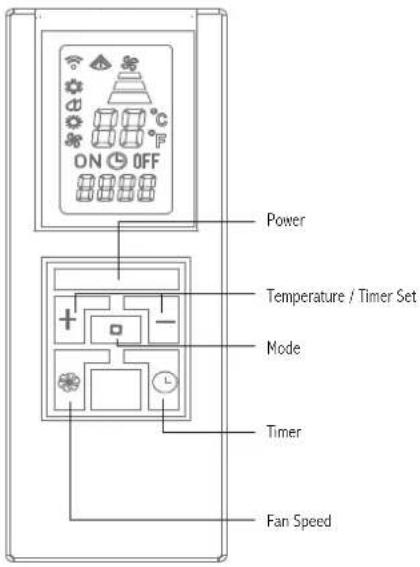
Power button
Press to turn the unit on or off
Mode button
Press to choose operation mode: cool, dehumidify, heat (model ARP-7013H only)
Fan Speed button
Press to adjust between low, medium, or high fan speed.
Temperature / Timer set button
Press + or to adjust set temperature or timer
Timer button
Press to set unit to automatically turn off or on with timer
Battery Installation
- The remote control uses two AAA batteries which have been included for your convenience.
- Remove the battery cover on back of the remote.
- Insert the batteries, making sure the (+) and (-) polarity is aligned correctly.
- Replace the battery cover.

Notes:
-When replacing batteries, always change both batteries at the same time.
-Remove the batteries if the remote control is not used for a month or longer.
-Do not dispose of batteries in a fire.
MAINTENANCE
Occasionally, you may need to drain the unit. The Water Full light will light up on the LED display when draining is necessary.
To drain:
- Turn off the power to the unit and unplug.
- Place a container to catch the water under the drainage port to collect water.
- Remove the rubber drainage plug.
- Replace the plug, when drainage water stops flowing.
For continuous drainage into a floor drain:
- Turn off the power to the unit and unplug.
- Remove the rubber drainage plug from the drainage port.
- Attach a drainage hose (not included) to the drainage port.
- Place other end of drainage hose into a floor drain.
- Replace the rubber drainage plug after operation to prevent leaks.
Cleaning the filter
The filter should be cleaned about every 2 weeks to maintain proper airflow.
- Turn off the power to the unit.
- Looking at the back of the unit locate the 2 filters on the right hand side.
- Slowly pull out both filters.
- Filter can be cleaned by a vacuum or soft cloth.
If the filter is very dirty it can be washed with a mild detergent and rinsed with water.
Make sure filter is dry before replacement. - Insert both filters back into the unit.
Note: Never run the unit without the filter in. This could damage the unit.
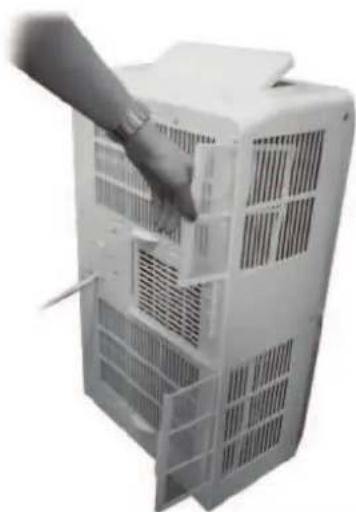
natural_image
Hand inserting a component into a white air conditioner unit (no text or symbols visible)
Cleaning the unit
- Turn off the power to the unit and unplug.
- Wipe down unit with a soft, dry, or damp cloth. A mild detergent can be used.
- Never use a volatile substance such a gasoline or abrasive cleaners.
- Do not splash water onto the unit.
Storing the air conditioner
If the unit will not be used for a long time, be sure to drain the air conditioner, clean the air filter, pull out the power supply cord, and remove the batteries from the remote control before storage. After draining, keep the air conditioner's fan running for at least 8 hours to dry the unit completely to prevent mold.
TROUBLESHOOTING
| Troubles Possible Causes | |
| Air Conditioner does not operate | - Check and reset the power plug. Wait 3 minutes and try to run the unit again.- The batteries in the remote may need to be replaced. Replace the batteries and try to run the unit again.- Make sure the plug is properly plugged into the outlet.- The set temperature may be too close to room temperature. Lower the set temperature.- The air outlet may be blocked. Check the air outlet and remove any items that may be found. |
| Air Conditioner runs but does not cool | - Check the room for open doors or windows and close them.- There may be another appliance in the room giving off heat. Check the room and turn off the appliance.- The air filter may be dirty. Check the filter and clean if necessary.- The air exhaust or intake may be blocked.- The set temperature may be too high. Check the set temperature and reduce it if necessary. |
| Water Full indicator is lit up - Unit needs to be drained. Follow draining instructions on page 11. | |
| Water is leaking from the unit | - Make sure unit is on a flat surface- Drain the unit. |
| Machine automatically turns off - Timer may have been set to shut off. Turn power back on. | |
| LED displays shows E0 - Room temperature sensor error | |
| LED display shows E1 - Evaporator sensor error | |
| LED display shows E2 - Water pump error | |
| LED display shows E3 - Condenser sensor error | |
SPECIFICATIONS
- Figures noted in the contents are for reference only; variation may result due to the application in different countries or regions, and shall be based on practical operation.
| Description of product Air Conditioner | |||
| Model ARP-7010 ARP-7013 ARP-7013H | |||
| Voltage/Frequency AC 115V~60Hz | |||
| Input power 990 W 1100 W 1100 W | |||
| Temperature range 64.4 °F - 95 °F | |||
| Cooling Capacity 10,000BTU/hr 13,000BTU/hr 13,000BTU/hr | |||
| Operating Sound Level: | 52dB | ||
| Coolant | R-410a | ||
| Timer | 24 | ||
| Dimension (w) X (h) x (d) | 16.3 x 28.4 x 11.5(in) 415 x 721 x 291(mm) | ||
| Weight | 61.7 lbs / 27.8 kgs | 66.1 lbs / 29.9 kgs | 66.1 lbs / 29.9 kgs |
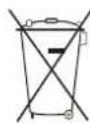
"Electrical waste products should not be disposed of with household waste.
Please recycle where facilities exist. Check with your local authority or retailer for recycling advice."
ARP-7010, ARP-7013, ARP-7013H
FULL ONE YEAR WARRANTY
Royal Sovereign warrants each Portable Air Conditioner to be free from defects in material and workmanship. Our obligation under this warranty is limited to the repair or replacement, free of charge, when delivered to an authorized Royal Sovereign service center, of any defective part(s) thereof, other than parts damaged in transit. This warranty is in effect to the original purchaser, for a period of one year from the date of purchase and is not transferable. This warranty shall apply only if the air conditioner is used on Alternating Current (AC) circuit, in accordance with the factory provided instructions which accompany it.
LIMITED FIVE YEAR WARRANTY (COMPRESSOR)
For a period of five years from the date of purchase, when this Royal Sovereign Portable Air Conditioner is operated and maintained according to the instruction manual provided with the product, Royal Sovereign will supply a replacement compressor (parts only), free of charge, if the original compressor is determined to be defective in workmanship or material. If repair becomes necessary, please contact our customer service center. You will be responsible for all freight, insurance, and any other transportation charges to get the unit to our factory or service center. If shipping is required, be sure to pack the unit properly to avoid shipping damages, as we will not be responsible for such damages.
EXCLUSIONS
This warranty excludes and does not cover defects, malfunctions or failures of your Royal Sovereign Portable Air Conditioner, caused by repairs by unauthorized persons or service centers, mishandling, improper installation, modification or unreasonable use including incorrect voltage, acts of God, or failure to provide reasonable and necessary maintenance. This warranty is in lieu of any and all expressed warranties. In no event shall Royal Sovereign be liable for consequential or incidental damages. This limitation would not apply if you live in a location that does not permit the exclusion of limitation of incidental or consequential damages. This warranty gives you specific legal rights and you may also have other rights which vary from state to state.
ROYAL SOVEREIGN INTERNATIONAL, INC.
2 Volvo Drive Rockleigh, NJ 07647 USA
TEL: +1) 800-397-1025 FAX: +1) 201-750-1022
RS INTERNATIONAL AUSTRALIA PTY. LTD.
30 Prime Drive, Seven Hills, NSW 2147, AUSTRALIA
TEL: +61) 2-9674-2127 FAX: +61) 2-9674-2027
RS Holland B.V.
Industrieweg 6K, 4104AR, Culemborg, The Netherlands
Tel: +31 (0)345 473 097 Fax: 31 (0)345 519 811
ROYAL SOVEREIGN INC.
1001, World Meridian II, 426-5, Gasan-dong, Geumcheon-gu, Seoul, 153-759, KOOES Westport Crescent, Mississauga On LST 1E8 CANADA
TEL: +82)2-2025-8800 FAX: +82)2-2025-8830 TEL: +1) 905-461-1095 TF: +1) 866 961-6673
RS CANADA INC.
CODEB Westport Crescent, Mississauga On L5T 1E8 CANADA
TEL: +1) 905-461-1095 TF: +1) 866 961-6673
Fax: +1) 905-461-1096
MANUAL DEL USUARIO
ARP-7010, ARP-7013, ARP-7013H
ARP-7010, ARP-7013, ARP-7013H
natural_image
White industrial air purifier unit with control panel and digital display (no visible text or symbols)natural_image
Simple line drawing of an electrical outlet with a plug and socket (no text or symbols)ARP-7010, ARP-7013, ARP-7013H
Side Front Back
natural_image
Technical line drawing of a rectangular cabinet or enclosure with wheels and a labeled component (no text or symbols present)⑦
⑥
natural_image
Exploded view of white plastic kitchen utensils including cylindrical, bucket, and tray (no text or symbols)21
INSTALACIÓN
natural_image
3D diagram of a cylindrical object with curved arrows indicating rotation, labeled Fig 1 (no text or symbols on the object itself)natural_image
Close-up of a hand holding a white plastic cup next to a white rack-mounted fan (no visible text or symbols)Fig 2.
natural_image
Hand inserting a component into a white air conditioner unit (no text or symbols visible)
30 Prime Drive, Seven Hills, NSW 2147, AUSTRALIA
TEL : +61) 2-9674-2127 FAX : +61) 2-9674-2027
RS Holland B.V.
Industrieweg 6K, 4104AR, Culemborg, The Netherlands
Tel: +31 (0)345 473 097 Fax: 31 (0)345 519 811
ROYAL SOVEREIGN INC.
1001, World Meridian II, 426-5, Gasan-dong, Geumcheon-gu, Seoul, 153-759, KOOES Westport Crescent, Mississauga On L5T 1E8 CANADA
TEL : +82)2-2025-8800 FAX : +82)2-2025-8830 TEL : +1) 905-461-1095 TF: +1) 866 961-6673
RS CANADA INC.
CODES Westport Crescent, Mississauga On L5T 1E8 CANADA
TEL: +1) 905-461-1095 TF: +1) 866 961-6673
Fax: +1) 905-461-1096

- OWNER'S MANUAL
- PORTABLE AIR CONDITIONER ACONDICIONADOR DE AIRE PORTÁTIL
- PORTABLE AIR CONDITIONER
- INTRODUCTION
- CONTENTS
- Page
- Electrical Specifications and Power Cord
- General Use
- IDENTIFICATION OF PARTS
- Window Installation Kit Parts and Accessories
- INSTALLATION
- Part 1: Attaching exhaust hose
- Part 2: Attaching exhaust hose
- Part 3: Installing window slider kit
- OPERATION
- Before Use
- Control Panel
- LED Display
- Control Panel Operation
- Turn the unit on
- Select operating mode
- Adjust temperature
- Adjust fan speed
- Power Off
- ARP-7010, ARP-7013, ARP-7013H
- Mode Descriptions
- AUTO mode
- Cool mode
- Dehumidify mode
- Heat mode (model ARP-7013H only)
- Timer Operation
- REMOTE CONTROL
- Power button
- Mode button
- Fan Speed button
- Temperature / Timer set button
- Timer button
- Battery Installation
- Notes:
- MAINTENANCE
- To drain:
- For continuous drainage into a floor drain:
- Cleaning the filter
- Cleaning the unit
- Storing the air conditioner
- SPECIFICATIONS
- FULL ONE YEAR WARRANTY
- LIMITED FIVE YEAR WARRANTY (COMPRESSOR)
- EXCLUSIONS
- MANUAL DEL USUARIO
- INSTALACIÓN
Brand : Royal Sovereign
Model : ARP-7010
Category : Air conditioner