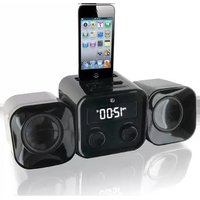
HM102B - Docking Station GPX - Free user manual and instructions
Find the device manual for free HM102B GPX in PDF.


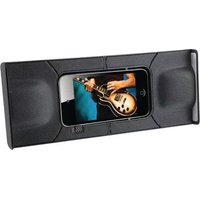
| Product Type | Docking Station with Clock Radio and Alarm |
| Brand | GPX |
| Model | HM102B |
| Power Supply | AC/DC adapter (included) |
| Battery Backup | 2 x AA batteries (not included) |
| Clock | Yes, with PM indicator |
| Alarm | Yes, with buzzer or radio wake-up |
| Radio Bands | AM and FM |
| Radio Tuning | Analog tuning dial |
| Audio Inputs | iPod dock (30-pin) and 3.5mm Line In |
| Speaker Outputs | External speakers included, connected via dedicated outputs |
| Display | LCD with time and alarm indicators |
| Remote Control | Not included |
| Double Insulation | Yes (Class II) |
| FCC Classification | Class D digital device, Part 15 |
| Safety Certifications | FCC, CE (implied) |
| Country of Origin | Not specified |
Frequently Asked Questions - HM102B GPX
User questions about HM102B GPX
0 question about this device. Answer the ones you know or ask your own.
Ask a new question about this device
Download the instructions for your Docking Station in PDF format for free! Find your manual HM102B - GPX and take your electronic device back in hand. On this page are published all the documents necessary for the use of your device. HM102B by GPX.
USER MANUAL HM102B GPX
IMPORTANT SAFETY INSTRUCTIONS
- Read these Instructions.
- Keep these Instructions.
- Heed all Warnings
- Follow all instructio
- Follow all instructions.
- Do not use this appropriate water
- Do not use this apparatus he
- Clean only with a dry cloth.
- Do not block any ventilation openings. Install in
accordance with the manufacturer's instructions. - Do not install near any heat sources such as radiators, heat registers, stoves, or other apparatus (including amplifiers) that produce heat.
- Do not defeat the safety purpose of the polarized or grounding - type plug. A polarized plug has two blades with one wider than the other. A grounding type plug has two blades and a third grounding prong. The wide blade or the third prong are provided for your safety. When the provided plug does not fit into your outlet, consult an electrician for replacement of the obsolete outlet.
- Protect the power cord from being walked on or pinched particularly at plugs, convenience receptacles, and the point where they exit from the apparatus.
- Only use attachments/accessories specified by the manufacturer.
- Use only with a cart, stand, tripod, bracket, or table specified by the manufacturer, or sold with the apparatus. When a cart is used, use caution when moving the cart/apparatus combination to avoid injury from tip-over. Unplug this apparatus during lightning storms or when unused for long periods of time.
- Refer all servicing to qualified service personnel. Servicing is required when the apparatus has been damaged in any way, such as power-supply cord or plug is damaged, liquid has been spilled or objects have fallen into the apparatus, the apparatus has been exposed to rain or moisture, does not operate normally, or has been dropped.

FCC Warnings
Warning: Changes or modifications to this unit not expressly approved by the party responsible for compliance could void the user's authority to operate the equipment. NOTE: This equipment has been tested and found to comply with the limits for a Class B digital device, pursuant to Part 15 of the FCC Rules. These limits are designed to provide reasonable protection against harmful interference in a residential installation. This equipment generates, uses, and can radiate radio frequency energy and, if not installed and used in accordance with the instructions, may cause harmful interference to radio communications. However, there is no guarantee that interference will not occur in a particular installation. If this equipment does not interfere with radio or television reception, which can be determined by turning the equipment off on, the use is encouraged to try to correct the interference by or more of the following measures:
• Reorient or relocate the receiving antenna.
- Increase the separation between the equipment and receiver.
- Connect the equipment into an outlet on a circuit different from that to which the receiver is connected.
- Consult the dealer or an experienced radio/TV technician for help.
Additional Warnings
WARNINGS AND PRECAUTIONS
- CAUTION: TO PREVENT ELECTRIC SHOCK, MATCH WIDE BLADE OF PLUG TO WIDE SLOT, FULLY INSERT.
- WARNING: To reduce the risk of fire or electric shock, do not expose this apparatus to rain or moisture.
- AVERTISSEMENT: Pour réduire le risque d'incendie ou de choc électrique, ne pas exposer cet appareil sous la pluie et l'humidité.
• CAUTION: Use of controls or adjustments or performance of procedures other than those specified may result in hazardous radiation exposure. - WARNING: Changes or modifications to this unit not expressly approved by the party responsible for compliance could void the user's authority to operate the equipment.
- WARNING: Do not place the unit on top of any soft, porous, or sensitive surfaces to avoid damaging the surface. Use a protective barrier between the unit and surface to protect the surface.
- WARNING: Use of this unit near fluorescent lighting may cause interference regarding use of the remote. If the unit is displaying erratic behavior move away from any fluorescent lighting, as it may be the cause.
- CAUTION: Danger of explosion if battery is incorrectly replaced. Replace only with the same or equivalent type.
- PRÉCAUTION: Danger d'explosion si les piles sont remplacées de façon incorrect. Remplacer les piles seulement par le même type de pile ou l'équivalent.
- WARNING: There is a danger of explosion if you attempt to charge standard Alkaline batteries in the unit. Only use rechargeable NiMH batteries.
- WARNING: The remote control's button cell battery contains mercury. Do not put in the trash, instead recycle or dispose of as hazardous waste
- WARNING: Lithium batteries, like all rechargeable batteries are recyclable and should be recycled or disposed of in normal household waste. Contact your local government for disposal or recycling practices in your area. They should never be incinerated since they might explode.
• WARNING: Shock hazard - Do Not Open.
• AVIS: RISQUE DE CHOC ÉLECTRIQUE - NE PAS OUVRIR
Mains plug is used as disconnect device and it should remain readily operable during intended use. In order to disconnect the apparatus from the mains completely, the mains plug should be disconnected from the mains socket outlet completely.
The lightning flash with arrowhead symbol, within an equilateral triangle, is intended to alert the user to the presence of uninsulated “dangerous voltage” within the product’s enclosure that may be of sufficient magnitude to constitute a risk of electric shock to persons.

The exclamation point within an equilateral triangle is intended to alert the user to the presence of important operating and maintenance (servicing) instructions in the literature accompanying the appliance.

This symbol indicates that this product incorporates double insulation between hazardous mains voltage and user accessible parts.
Introduction

Power
Press to turn the
unit on or off.
Clock
Press to begin
setting the clock.
Alarm Set
Press to begin
setting the alarm.

Setup
Power
Plug the included AC/DC power adapter into the DC POWER INPUT on the dock and an AC power outlet to power the dock.

natural_image
Line drawing of a pressure vessel connected to a control unit (no text or symbols)Battery Backup
The battery backup is intended for short power outages only. The clock radio's primary functions cannot run off of the battery backup alone.
Requires 2, AA-size, batteries (not included)

Connecting Speakers to the Unit
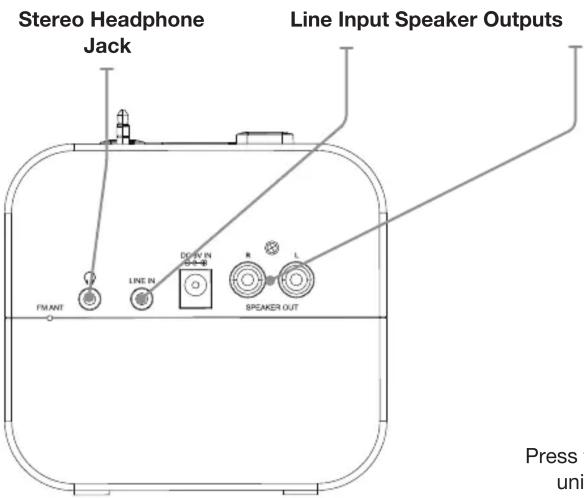
- Connect the speaker cables, which are attached to the external speakers, to the Speaker Outputs located on the back of the unit.
Clock
Setting the Clock
- In Power off mode, press and hold the Clock button.
- While holding the Clock button press the Hour button to adjust the hour. The PM indicator will light when the hour is set in the PM.
- While holding the Clock button press the Minute button to adjust the minute.
- Release the Clock button once the correct time is set.
Alarm
Setting the Alarm
- In Power off mode, press and hold the Alarm Set button.
- While holding the Alarm Set button press the Hour button to adjust the hour. The PM indicator will light when the hour is set in the PM.
- While holding the Alarm Set button press the Minute button to adjust the minute.
- Release the Alarm Set button once the correct time is set.
- To set the alarm sound, adjust the Source switch to Line In/iPod for the buzzer or AM/FM for the radio. Note: Line In/iPod will not play music through a connected device as an alarm.
- Press the Alarm On/Off button to activate or de-activate the alarm. When set and turned on, a small alarm indicator icon will appear on the display.
- Once the set alarm time is reached, the alarm will sound.
- Press the Alarm On/Off button to turn off the alarm sound.
Connecting and Playing an Audio Device
Using the Dock Connector
- Connect a iPod to the unit by inserting the Dock Connector into the headphone jack located at the bottom of the iPod.
- Adjust the Source switch (Line In, iPod, FM, AM) to iPod.
- Use the native controls on the connected iPod to play and control audio played through the unit.
Please note, this unit will not charge the connected device.
Using the Line In
Requires a 3.5mm audio cable (not included)
- Connect a 3.5mm audio cable to the Line In on the unit and an audio output on an MP3 player or other audio source.
- Adjust the Source switch (Line In, iPod, FM, AM) to the Line In position.
- Use the native controls on the connected MP3 player or other audio source to play and control audio played through the clock radio.
Radio
Tuning the AM or FM Radio
- Press the Power button to turn the unit on.
- Adjust the Source switch (Line In, iPod, FM, AM) to the FM or AM position.
- Turn the Tuning dial to the desired station.
Adjust the FM Antenna to improve FM radio reception.
An AM antenna is built into the unit. Adjust the unit to improve AM radio reception.

International Support
To download this User's Guide in English, Spanish, or French, or to get answers to frequently asked questions, visit the support section at: www.gpx.com


- IMPORTANT SAFETY INSTRUCTIONS
- FCC Warnings
- Additional Warnings
- WARNINGS AND PRECAUTIONS
- Introduction
- Setup
- Power
- Battery Backup
- Connecting Speakers to the Unit
- Clock
- Setting the Clock
- Alarm
- Setting the Alarm
- Connecting and Playing an Audio Device
- Using the Dock Connector
- Using the Line In
- Radio
- Tuning the AM or FM Radio
- International Support
Brand : GPX
Model : HM102B
Category : Docking Station