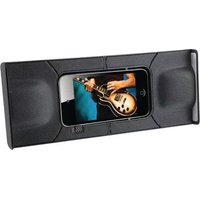
SP300B - Docking Station GPX - Free user manual and instructions
Find the device manual for free SP300B GPX in PDF.


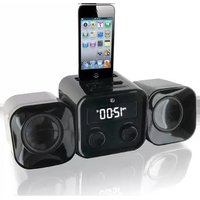
| Product Type | Portable Docking Station for iPhone/iPod |
| Brand | GPX |
| Model | SP300B |
| Power Supply | DC power input (adapter not included) or 2 AAA batteries (not included) |
| Audio Output | Stereo 3.5mm pin for direct iPhone/iPod connection |
| Built-in Amplifier | Yes |
| Switches | POWER/MONO/STEREO switch |
| Magnetic Power Connectors | Yes (ensures connection between speaker halves) |
| Foldable Design | Yes, folds into compact carrying case for travel |
| Stand | Flip-out stand for angled listening |
| Compatibility | iPhone and iPod touch with stereo headphone jack |
| Dimensions (Approximate) | Not specified in manual; typical portable dock size |
| Weight (Approximate) | Not specified; lightweight for portability |
| Battery Type | 2 x AAA (alkaline, NiMH, or lithium) - not included |
| AC/DC Adapter | Required for AC power, not included |
| Remote Control | Not included; uses native device controls |
| Safety Certifications | FCC Part 15 Class B |
| Cleaning Instructions | Wipe with dry cloth; do not use liquids or abrasives |
| Battery Warning | Do not mix old/new batteries or different types; danger of explosion if charging alkaline batteries; recycle batteries properly |
| Environmental Compliance | RoHS, recyclable materials, reduced packaging |
Frequently Asked Questions - SP300B GPX
User questions about SP300B GPX
0 question about this device. Answer the ones you know or ask your own.
Ask a new question about this device
Download the instructions for your Docking Station in PDF format for free! Find your manual SP300B - GPX and take your electronic device back in hand. On this page are published all the documents necessary for the use of your device. SP300B by GPX.
USER MANUAL SP300B GPX
For the most up-to-date version of this User's Guide, go to www.gpx.com
Introduction

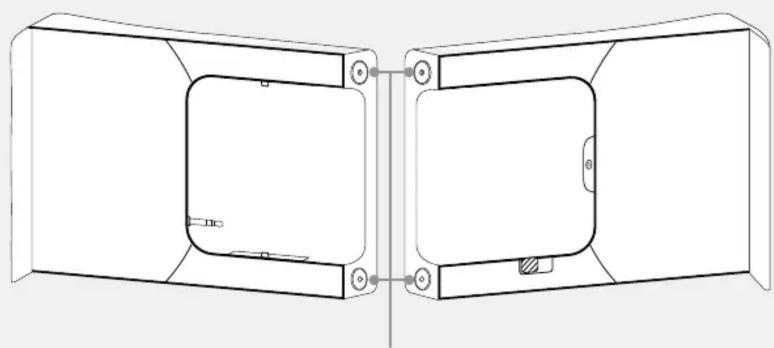
POWER/MONO/STEREO

natural_image
Technical line drawing of a two-part mechanical housing or enclosure with mounting holes and internal components (no text or symbols)MAGNETIC POWER CONNECTORS
• CAUTION: TO PREVENT ELECTRIC SHOCK, MATCH WIDE BLADE OF PLUG TO WIDE SLOT, FULLY INSERT.
- WARNING: To reduce the risk of fire or electric shock, do not expose this apparatus to rain or moisture.
- AVERTISSEMENT: Pour réduire le risque d'incendie ou de choc électrique, ne pas exposer cet appareil sous la pluie et l'humidité.
- CAUTION: Use of controls or adjustments or performance of procedures other than those specified may result in hazardous radiation exposure.
- WARNING: Changes or modifications to this unit not expressly approved by the party responsible for compliance could void the user's authority to operate the equipment.
- WARNING: Do not place the unit on top of any soft, porous, or sensitive surfaces to avoid damaging the surface. Use a protective barrier between the unit and surface to protect the surface.
- WARNING: Use of this unit near fluorescent lighting may cause interference regarding use of the remote. If the unit is displaying erratic behavior move away from any fluorescent lighting, as it may be the cause.
- CAUTION: Danger of explosion if battery is incorrectly replaced. Replace only with the same or equivalent type.
- PRÉCAUTION: Danger d'explosion si les piles sont remplacées de façon incorrect. Remplacer les piles seulement par le même type de pile ou l'équivalent.
- WARNING: There is a danger of explosion if you attempt to charge standard Alkaline batteries in the unit. Only use rechargeable NiMH batteries.
- WARNING: The remote control's button cell battery contains mercury. Do not put in the trash, instead recycle or dispose of as hazardous waste
- WARNING: Lithium batteries, like all rechargeable batteries are recyclable and should be recycled or disposed of in normal household waste. Contact your local government for disposal or recycling practices in your area. They should never be incinerated since they might explode.
Main plug is used as disconnect device and it should remain readily operable during intended use.
Do not mix old and new batteries.
Do not mix alkaline, standard (carbon-zinc), or rechargeable (ni-cad, ni-mh, etc) batteries.
NOTE: This equipment has been tested and found to comply with the limits for a Class B digital device, pursuant to Part 15 of the FCC Rules. These limits are designed to provide reasonable protection against harmful interference in a residential installation. This equipment generates, uses, and can radiate radio frequency energy and, if not installed and used in accordance with the instructions, may cause harmful interference to radio communications. However, there is no guarantee that interference will not occur in a particular installation. If this equipment does cause harmful interference to radio or television reception, which can be determined by turning the equipment off and on, the user is encouraged to try to correct the interference by one or more of the following measures:
• Reorient or relocate the receiving antenna.
- Increase the separation between the equipment and receiver.
- Connect the equipment into an outlet on a circuit different from that to which the receiver is connected.
- Consult the dealer or an experienced radio/TV technician for help.
Setup Operations
Power Connection
Plug an AC/DC power adapter (not included) into the DC POWER INPUT on the speaker and an AC power outlet to power the speaker.

natural_image
Diagram showing a device connected to an electrical outlet with wires (no text or symbols)Battery Power
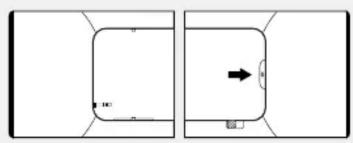
Requires 2, AAA size, batteries (not included)
- Press up the battery compartment latch to open the battery compartment.
natural_image
Two rectangular shapes with internal markings and a central arrow, no text or symbols present.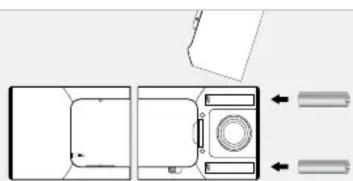
natural_image
Top-down schematic of a mechanical or electronic component with no visible text, numbers, or symbolsFeatures
- Plays audio from a connected iPhone or iPod
- Stereo 3.5mm pin
- Folds for easy travel
- Built-in amplifier
- DC power input: requires an AC/DC power adapter (not included)
-
Battery power: requires 2, AAA size, batteries (not included)
-
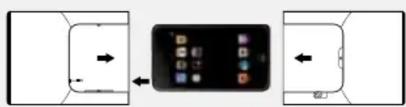
Slide an iPhone or an iPod touch into the cradle, lining the stereo headphone jack on the iPhone or iPod up with the STEREO 3.5mm PIN.
- Gently slide the two halves of the speaker together around the iPhone or iPod.
The MAGNETIC POWER
CONNECTORS need to make a good connection for both halves of the speaker to be powered.
flowchart
graph TD
    A["Device 1"] -->|Data Flow Left| B["Device 2"]
    B --> C["User Interface Display"]
    C --> D["Device 3"]
    D --> E["User Interface Display"]
    style A fill:#f9f,stroke:#333
    style B fill:#ccf,stroke:#333
    style C fill:#cfc,stroke:#333
    style D fill:#fcc,stroke:#333
    style E fill:#cff,stroke:#333

natural_image
Smartphone displaying app icons on a screen (no text or symbols visible)Playing
- Follow the connection instructions above.
- Adjust the POWER/MONO/STEREO switch to the STEREO position.
- Use the native controls on the docked iPhone or iPod to play and control your music.
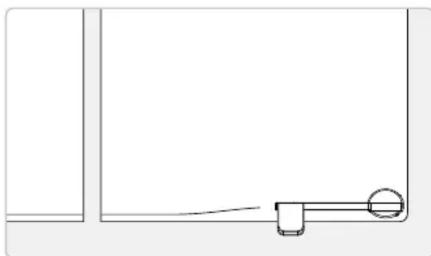
- Flip out the stand on the back of the speaker to set it at an angle ideal for listening.
natural_image
Simple line drawing of a mechanical or architectural component with no text or symbolsTravel
The speaker can be transformed into a compact carrying case for easy travel.

natural_image
Line drawing of a closed book with a bookmark (no text or symbols)Company Information
Green Initiative International Support
Environmental Commitment to 'Protect for Today and Sustain for Tomorrow'
2009 marked the official launch of DPI, Inc.'s corporate campaign for a greener and cleaner world. DPI is building upon environmental initiatives introduced at all of their facilities to help formulate and sustain significant and important conservation efforts within its manufacturing and marketing communities. In addition to targeting and selecting energy efficient product features, and structuring 'green office' procedures, other initial program efforts include:
• Reduction of all packaging sizes
- Recyclable plastics for clamshell packages, with a plan to eventually replace plastic with recyclable paper
• Recycled fiber board in place of the polyfoam in packing boxes
• Recycled plastics in place of the virgin material in product construction
To download this User's Guide in English, Spanish, or French, visit the support section at www.gpx.com.


Brand : GPX
Model : SP300B
Category : Docking Station