
BT500 - Bluetooth Accessory HP - Free user manual and instructions
Find the device manual for free BT500 HP in PDF.



| Product type | Bluetooth USB 2.0 adapter for printer |
| Brand | HP |
| Model | BT500 |
| Approximate dimensions | 2 x 1.5 x 0.5 cm |
| Approximate weight | 5 g |
| Power supply | USB bus (host port) |
| Connectivity | Bluetooth 2.0, USB type A port |
| Main functions | Connect a printer to Bluetooth devices (phones, PDAs, cameras) for wireless printing |
| LED indicators | Steady on: installed and powered; fast blink: discovery; blink: receiving data |
| Installation | Insert into the printer's USB host port; setup via CD or user guide |
| Compatibility | HP printers with USB host port and built-in Bluetooth support |
| Security | Passkey required for secure printing; adjustable visibility settings |
| Maintenance and cleaning | Clean with a soft, dry cloth; avoid moisture |
| Spare parts | Not available separately; adapter only |
| General information | User manual in PDF format downloadable at notice-facile.com |
Frequently Asked Questions - BT500 HP
User questions about BT500 HP
0 question about this device. Answer the ones you know or ask your own.
Ask a new question about this device
Download the instructions for your Bluetooth Accessory in PDF format for free! Find your manual BT500 - HP and take your electronic device back in hand. On this page are published all the documents necessary for the use of your device. BT500 by HP.
USER MANUAL BT500 HP
Welcome to the HP bt500
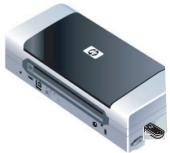
The HP bt500 Bluetooth USB 2.0 Wireless Printer Adaptor (HP bt500) uses Bluetooth wireless technology to connect devices without needing a cable.
When attached to a Bluetooth-enabled printer, the HP bt500 allows you to print to the printer from Bluetooth devices, such as camera phones, PDAs, and digital cameras.
NOTE: Check the documentation for your printer to verify the devices you can use to print to it.
Get more information

The CD contains a User Guide with detailed information about configuring and using your HP bt500, technical specifications, and regulatory information.
Connect to a printer
Generally, the sending device (camera, PDA, computer, etc.) sends a signal and discovers the nearby Bluetooth printing devices and displays their Bluetooth device names. Then, you simply print or send to that printer name.
Tip: The printer's default Bluetooth device name can be found in the printer's Bluetooth menu or user guide.
English
1
For most devices, the default settings will allow you to print without making any changes. However, a Bluetooth device may be set to be visible or invisible and may have security settings established. If you have difficulty printing to your printer, consult the user guide for your printer.
Installation and setup
Follow these instructions to install and set up your HP bt500 with a printer. More detailed setup instructions can be found in the user guide for your printer.
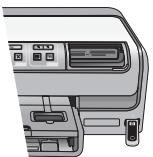
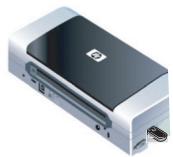
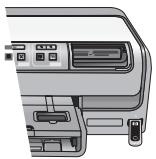
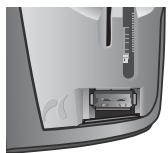
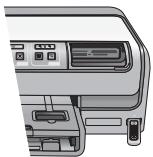
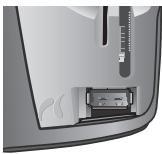
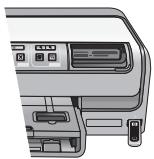
- Locate the host USB port on your printer or all-in-one. It will usually be located in the front and is shaped like the USB port on your computer. It may be called a camera or Pictbridge port.
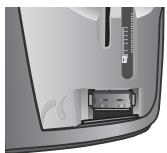
- Remove the cap from the HP bt500 and insert it in the port.
2
HP Bluetooth USB 2.0 Wireless Adapter

LED behavior
The LED on the HP bt500 provides information about its current state.
On steady—This is the default state and means the device is installed and has power.
Rapid blinking—A sending device is "Discovering" the HP bt500.
Blinking—The HP bt500 is receiving data.
General printing
Printing to your printer over Bluetooth should be fairly easy.
- From your sending device, start the Discovery of available Bluetooth printers.
- Select the printer and enter the Passkey if prompted.
Note: Secure printing may require you to know the Passkey of your printer.
More detailed information about printing from specific devices will be found in the User Guide on the CD.
English
3

HP bt500を購むとFollow-upはうなしえ
Intermitent—HP bt500 prime date.
YcTaHOBKa n HaCTpOyKa
CleyuTe 3Tm INHCTpyKcIyM, YTO6bI HAcTPOITb
InCnOlb3OBaHne HP bt500 COBMeCTHO C npINTEpOM. BoJeE
NoDpO6HbIe INHCTpyKcIu N OHaCTpoJKe MOxHO HaHTN B
pyKOBOdCTBe NoIb3OBaTeJI npINTEpa.
- Onpejenite MeToIOnJIoKeHne OChOBHOro npTa USB Ha npInTepe iNn yCtpoiCTBe "all-in-one".O6bHuO h HaxoINTcra Cpeeni yCtpoiCTBa N o603HaueH taKIM Je 3HaKOM, KaN i npT USB Ha KOMpbIoTepe. OH MoKeT Ha3bVbTaBcR npTOM dIy KaMepei NII npTOM Pictbridge.

- YdaJInte KoIINaUOK n BCTaBbTe yctpoIcTBo HP bt500 b nopT.
2
HP Bluetooth USB 2.0 Wireless Adapter

3HaueHnIHKaTopa
CBeToDIOJHbI INHdNkaTOp LED Ha yCTpOJIcTBe HP bt500 nOKa3bIbaet INHΦOpMaUIO O COCTOHN aJaTepa.
TOpNT NocToHNO — 3TO COCTOHNIE NO yMOJUaHNIU, KOTOpoe O3HaayeT, YTO yCTpoIcTBO yCTaHObJIeHO I Ha Hero IIOJaETCnIITaHne.
Hacto Mmraet - yctpOietBO OTnpaBKn HaxOJntCn B npOceCe 6bnapxkenia aanTepa HP bt500.
Miraet - aadantep HP bt500 npinHMaet daHbIe.
06za neaTB
Пeuат ha пиntер чез coeинене Bluetooth He Должно Bbl3blBaT b TpydHocTn.
- Cусточа ВОТправки ВьЮлни Te ПОИСК ДОCTУПНБИХ рinnтэрвBluetooth.
- BbIbepnTe npInTep n, ecIn Tpe6yeTcR, BVeINTe KJIouyOCTyna. IpumeyaHue. B 3aBnCmOCTn OT yPoBnR 6e3OnaCHOCTn npInTepa MoKET Notpe6oBaTbcr 3HaHne KJIoua DOCTya.
Bolue noDpo6HbIe CBeDeHnO neaTu n c KOHNpeTHbIX yCTpOJcTB MOxHO HaITn B pyKOBOdCTBe NOJIb3OBaTeJIHa KOMnAKT-DINCKE.
Pycckn
3

Vitajte pri modeli HP bt500
Bluetooth nioe nn nn nn nn nn nn.1
Jn
nnn nn nn nn nn nn nn nn nn.2
.7
JN NNTNUIINNNNINN09TN Jyn
.1nwnnnnnnnnn
y
n nn nnnnnnnnnnnnnnnnnnnnnnnnnnnnnnnnnnnnnnnnnnnnnnnnnnnnnnnnnnnnnnnnnnnnnnnnnnnnnnnnnnnnnnnnnnnnnnn
3
7 7 7 7 7 7 7 7 7 7 7 7 7 7 7 7 7 7 7 7 7 7 7 7 7 7 7 7 7 7 7 7 7 7 7 7 7 7 7 7 7 7 7
nni nni ni
HP bt500 nx nnnn nn nnnn nn nnnn nn nnnn nn nnnn nn nnnn nn nnnn nn nnnn nn nnnn nn nnnn nn nnnn nn nnnn nn nnnn nn nnnn nn nnnn nn nnnn nn nnnn nn nnnn nn nnnn nn nnnn nn nnnn nn nnnn nn nnnn nn nnnn nn nnnn nn nnnn
all- jn n nn nnnn USB-n nn n.1
n n n n nn n nn n nn n nn n nn n nn n nn n nn n nn n nn n nn n nn n nn n nn n nn n nn n nn n nn n nn n nn n nn n nn n nn n nn n nn n nn n nn n nn n nn n nn n nn n nn n nn n nn n nn n nn n nn n nn n nn n nn n nn n nn n nn n nn n nn n nn n nn n nn n nn n nn nnnn
.111111 HP bt500-nn nn nn 2
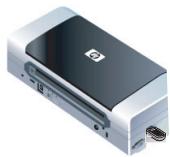
2 HP Bluetooth USB 2.0 Wireless Adapter

HP bt500-7 Dn
HP bt500 Bluetooth USB 2.0 Wireless Printer Adapter nnnn nn nnnn nnnn nnnn (HP bt500)
7 7
nHHPb500nnnn
n nn nnnnnnnnnnnnnnnnnnnnnnnnnnnnnnnnnnnnnnnnnnnnnnnnnnnnnnnnnnnnnnnnnnnnnnnnnnnnnnnnnnnnnnnnnnnnnnnnnnnnnnnnnnnnnnnnnnn
(PDA) T' n nn nn nn nn nn nnnn
Bluetooth
172 172 172 172 172 172 172 172 172 172 172 172
.
ytn
ywnnnn nn nnnnnnnnnnnnnnnnnnnnnnnnnnnnnnnnnnnnnnnnnnnnnnnnnnnnnnnnnnnnnnnnnnnnnnnnnnnnnnnnnnnnnnnnnnnnnnnnnnnnnnnnnnnnnnnnnnnnnnnnnnnnnnnnnnnnnnnnnnnnnnnnnnnnnnn


no9n7
2gall USB 1k kK u K u K u aolal all
.Pictbridge 111111111111111111
Jalal al alal,HP bt500 1e alal g jil.

Y
HP Bluetooth USB 2.0 Wireless Adapter

HP bt500
USB 2.0 HP bt500 Bluetooth (HP bt500) 2.0
S OBC = S COD + S_ BOC
HP bt500 allBluetooth aaiai aiaiaiaiaiaiaiaiaiaiaiaiaiaiaiaiaiaiaiaiaiaiaiaiaiaiaiaiaiaiaiaiaiaiaiaiaiaiaiaiaiaiaiaiaiaiaiaiaiaiaiaiaiaiaiai
PDA
Cllagall jia jia jgaaal
j 1
yss s ydo cdo gdo
Gg g Hp bt500
Aagbiill cloggall

aJui
jg jg jll PDA jgs 1ySs) Jnall jgs pale
a 1
Jluyj y j acjllbl 11 juiy dle la .gai aalbl Bluetooth o jz i elaw
AaBb
aalll jlll Bluetooth jss pwl gcl sall
blt