
BTH-W150ANC - Headphones AKAI - Free user manual and instructions
Find the device manual for free BTH-W150ANC AKAI in PDF.


| Product Type | Wireless Bluetooth Headphones with ANC |
| Brand | AKAI |
| Model | BTH-W150ANC |
| Bluetooth Version | V5.3 |
| Bluetooth Frequency | 2.402-2.480 GHz |
| Maximum RF Output | 6 dBm |
| Bluetooth Channel Emission Power | 8 dBm |
| Working Distance | 10 m |
| Frequency Range | 20 Hz - 20 kHz |
| Active Noise Cancellation (ANC) | Yes, up to 23±2 dB reduction |
| Music Playing Time | Approximately 13 hours |
| Charging Time | 1.5 hours |
| Battery Type | Li-Po, 400 mAh |
| Input | DC 5V, 1000 mA |
| Output | DC 5V, 300 mA |
| Charging Port | USB Type-C |
| Supported Systems | iOS, Android |
| Materials | Eco-friendly, wooden ear cups |
| Weight | Approximately 200 g (estimated) |
| Dimensions | Approximately 180 x 170 x 80 mm (estimated) |
| Package Contents | Earphones, Type-C charging cable, User manual, Warranty card |
| Special Features | NTC charging protection, auto power off after 5 min if not connected |
Frequently Asked Questions - BTH-W150ANC AKAI
User questions about BTH-W150ANC AKAI
0 question about this device. Answer the ones you know or ask your own.
Ask a new question about this device
Download the instructions for your Headphones in PDF format for free! Find your manual BTH-W150ANC - AKAI and take your electronic device back in hand. On this page are published all the documents necessary for the use of your device. BTH-W150ANC by AKAI.
USER MANUAL BTH-W150ANC AKAI
Bluetooth wooden headphones

natural_image
Two black head earchamps with 'AKAI' branding on front panels (no additional text or symbols visible)User Manual
EN - ENGLISH
SAFETY INFORMATION :
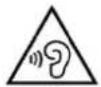
To avoid possible hearing damage, limit listening time to high volumes!
PACKAGE CONTENT:
User manual
Warranty card
Earphones
Type C charging cable
SPECIFICATIONS:
Li-Po battery: 400mAh
Frequency range: 20Hz-20KHz
Max RF output: 6dBm
Bluetooth compatible version: V5.3
Bluetooth frequency: 2.402-2.480GHz
Bluetooth channel emission power: 8dBM
Working distance: 10m
ANC DB: 23±2dB
Music playing time: Around 13 hours
Charging time: 1.5 hours
Input: DC5V = 1000mA
Output: DC5V = 300mA
Supported systems: IOS, Android
FEATURES :
ECO friendly materials
ANC noise reduction
Light weight
NTC charging protection

Operation and function descriptions :
1. Power on/off

Power on: Press and hold for 2 seconds, the blue and red lights will flash alternatively after power on. Power off: Press and hold for 2 seconds, the red light will flash 2 times and then the headphones are shutting down.
2. Wired connection mode
When the headphone is turned on, external the 3.5mm plug audio cable, the headphone will automatically shut down and a voice prompt will specify: power off. (At this time, the headphone can only listen to the music in the mobile phone, and all the buttons of the headphone are invalid).
3. Wireless Bluetooth connection mode
a. Bluetooth reconnection:
After the headphone is on, and enter to pairing mode, the red and blue lights flash alternately, and the headphone will automatically re-connect with the bluetooth of mobile phone which was previously used. After the reconnection will be made a voice prompt will specify: connected and the blue light is on.
b. Bluetooth connection :
After the headphone is on and enter to pairing mode, the red and blue lights flash alternately, use the mobile phone to search the Bluetooth name "BTH-W150ANC" and connect it. After the connection is made, a voice prompt will specify: connected and the blue light is on.
c. Button function:

Short press for volume increase, long press for the next song, and there will be a beep when the volume reaches at maximum level.

Short press to pause; short press this button to resume playback and long press for turn off the headphones.

Short press for volume down, long press for previous song, and there will be a beep when the volume is at minimum.
d. Bluetooth disconnection:
Turn on the wireless connection from the mobile phone, click "BTH-W150ANC" to disconnect, and a prompt voice will specify: disconnected. The red and blue lights flash alternately for 1S/time.
4. Call

a. Answer the phone:
When there is an incoming call, short press to answer the call.
b. End the call:
During a call, short press once, to End the call.
c. Decline calls:
When there is an incoming call, press and hold for one second to reject the call.
d. Last Code Redial:
Double tap to dial the last call in Bluetooth mode.
5. ANC mode

ANC On

ANC Off
6. Noise cancellation key (ANC)
Noise-cancelling technology cannot wholly isolate sound due to the air trapped between your audio device and eardrum. However, the air is essential for you to hear music. For using this function, please remember the following:
The noise cancelling effect may not be pronounced in a tranquil environment, or some sound may be heard. If there is little ambient noise, it is even advisable not to switch on the NC function, as it needs ambient input to function optimally.
Noise cancellation does not transfer during telephone calls. Although it protects the headphones user from the surrounding noise, it does not apply to the receiver of the call: they will potentially hear background noise.
Depending on how you wear the headset, the noise-cancelling effect may vary, or a beeping sound (howling) may occur. In these cases, take off the headset and put it on again.
The noise cancelling function primarily works for noise in the low-frequency band (train, airplane, engine noise). Although noise is reduced, it is not cancelled altogether.
When you use the headphone in a train or a car, noise may occur depending on environmental conditions. It is not advisable to wear noise-cancellation headphones while driving, as taking notice of traffic sounds is essential for your safety.
Mobile phones may cause interference and noise. Should this occur, locate the headphones further away from the mobile phone.
Do not cover the microphones! The noise cancelling function or the Ambient Sound Mode may not work optimally, or a beeping sound (howling) may occur. In these cases, take your hands off the headset microphones.
7.Low battery
When the headphone power drop to 3.3V, the headphone red light will flash 1 time in each 3 Seconds until power off.
8.Connection timeout
When the headphones are turned on but not connected to Bluetooth, they will automatically turn off after 5 minutes.
9.Charging
When using the Type C cable for charging the headphones, the red light will be on. Please make sure the noise cancellation button will be turn off, otherwise, the led will be green. Once the headphones are fully charged, the red led will turn off.
10. Battery Safety Instructions
Improper battery replacement can be an explosion hazard and can only be replaced with a battery of the same type or equivalent.
For products with removable batteries, the batteries must be recycled or disposed of properly. For products that are not removable, disassembly is prohibited.
Battery is not allowed to be disassembled, impacted squeezed or put into fire. Do not expose the battery to conductive materials, liquids, fire or high temperatures.
Not allow metal objects to touch the two poles of the battery. Do not continue to use the battery if it is inflated, leaking, odorous, or any other abnormality.
Not use the battery after it has been immersed in water.
If the battery is used improperly, it may explode or leak, resulting in burns and other personal injury; if the battery leaks, be careful and dispose of the battery immediately according to local battery management laws and regulations.
Note: Any attempt to remove or replace the battery will damage the product and affect the product's warranty.
*When the earphones are lack of power, please charge earphones immediately to avoid affecting battery life.
11.NTC charging protection (Negative Temperature Coefficient)
NTC circuit is designed on the PCBA board of the headphones to provide charging protection. When the NTC circuit measures that the battery temperature exceeds the preset safety range (usually 45 degrees), the PCBA board will protect the battery from overheating, overcooling, or being affected by excessive temperature based on the set protection mechanism, such as disconnecting the charging circuit, stopping charging, etc., thereby reducing safety risks.
12. Usefull Safety Instructions
- To avoid hearing damage, keep the volume at a moderate level. Avoid listening to music at high volume for long time, which can cause permanent damage or hearing loss to your hearing.
- Please do not use the headphones in situations that require your attention, such as driving, cycling, crossing the road, etc.
- Do not disassemble or modify the headphone by any reason, otherwise it may cause headphone's malfunction and burn. These are not covered by the warranty.
-
Do not let headphone get wet with the liquid, otherwise it will cause serious damage to the device. Warranty is not covered for the damage caused by the water in the device.
-
Do not place headphone in a location exposed to the sun or high temperatures (Above 45^ C). High temperatures can shorten the life of electronic components, damage batteries, and deform some plastic parts.
- Do not place headphone in a cold place (Below 0°C) to avoid damaging the internal circuit board.
- Please avoid using headphone indicator light near the eyes of children or animals.
- Do not use headphone during thunderstorms. Thunderstorms can cause the device to malfunction and increase the risk of electric shock.
Do not drop, strongly vibrate, hit the product with a hard object, do not use harsh chemicals or detergents to clean headphone, so as not to damage the internal circuit.
DISPOSAL OF ELECTRICAL AND ELECTRONIC EQUIPMENT

This symbol on the product or packaging means that the product should not be treated as household waste. Do not throw garbage at the end of its life, but take it to a collection center for recycling. in this way you will help to protect the environment and be able to prevent any negative consequences
that it would have on the environment and human health.
To find your nearest collection center:
- Contact local authorities
- Access the website: www.mmediu.ro
- Request additional information from the store where you purchased the product.
IMPORTER/PRODUCER: SC INTERVISION TRADING-RO SRL
I.C Bratianu Boulevard 48-52 no, Building A, 5 ^th floor,
504-505 room, Pitesti City, Arges County, Romania
Post code: 110121
AKAI
BTH-W150ANC
natural_image
Two black head earchamps with 'AKAI' branding on front panels (no additional text or symbols visible)Manual de utilizare
RO - ROMÂNĂ
INFORMATII PRIVIND SIGURANTA:

Reducerea zgomotului ANC
Greutate redusă
natural_image
Pair of black headphones with pink foam covers, no visible text or symbols on the ear itselfnatural_image
Two black headphones with wooden ear covers, labeled 'AKAI' on the front (no additional text or symbols visible)Instrukcja obsługi
PL - POLSKI
INFORMACJE DOTYCZĄCE BEZPIECZEŃSTWA:

natural_image
Pair of black and pink headcoats with 'AKAI' branding (no additional text or symbols visible)Návod k použití
CZ – ČESKY
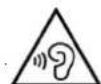
INFORMACE TÝKAJÍCÍ SE BEZPEČNOSTI:
natural_image
Pair of black and pink headcoats with 'AKAI' branding, no visible text or symbols on the covers.Návod na použitie
SK – SLOVENSKY
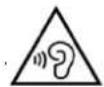
INFORMÁCIE TÝKAJÚCE SA BEZPEČNOSTI:



- Bluetooth wooden headphones
- FEATURES :
- Operation and function descriptions :
- Power on/off
- Wired connection mode
- Wireless Bluetooth connection mode
- Call
- ANC mode
- Noise cancellation key (ANC)
- 7.Low battery
- 8.Connection timeout
- 9.Charging
- Battery Safety Instructions
- 11.NTC charging protection (Negative Temperature Coefficient)
- Usefull Safety Instructions
- DISPOSAL OF ELECTRICAL AND ELECTRONIC EQUIPMENT
- AKAI
- BTH-W150ANC
- Instrukcja obsługi
- Návod k použití
- Návod na použitie
- SK – SLOVENSKY
Brand : AKAI
Model : BTH-W150ANC
Category : Headphones