
BTH-P23 - Headphones AKAI - Free user manual and instructions
Find the device manual for free BTH-P23 AKAI in PDF.


| Product Type | Wireless Headphones |
| Model | AKAI BTH-P23 |
| Power Supply | DC 5V (USB) |
| Battery Type | 3.7V 300mAh Lithium-ion |
| Bluetooth Version | V5.0 |
| Bluetooth Frequency | 2402 - 2480 MHz |
| Bluetooth Range | 10 m (33 ft) |
| Bluetooth Transmission Power | +6 dBm |
| FM Frequency Range | 76 - 108 MHz |
| Speakers | 40 mm each |
| Frequency Response | 20 Hz - 20 kHz |
| Charging Time | 2 - 3 hours |
| Playing Time | 7 hours |
| Charging Port | Micro USB |
| Audio Input | 3.5 mm aux |
| Memory Card Slot | Micro SD (TF card) |
| Controls | Multi-function buttons (Power/Play/Pause, Volume +/-, Skip, Mode/Phone) |
| Microphone | Built-in |
| Wired Mode | Yes, via 3.5 mm aux cable |
| Package Contents | Headphones, USB charging cable, AUX cable, Instruction manual |
| Safety | Keep dry, avoid sun/high temperature, do not open, do not drop/shake, do not use harsh chemicals, do not charge over 10 hours |
Frequently Asked Questions - BTH-P23 AKAI
User questions about BTH-P23 AKAI
0 question about this device. Answer the ones you know or ask your own.
Ask a new question about this device
Download the instructions for your Headphones in PDF format for free! Find your manual BTH-P23 - AKAI and take your electronic device back in hand. On this page are published all the documents necessary for the use of your device. BTH-P23 by AKAI.
USER MANUAL BTH-P23 AKAI
natural_image
Black outdoor headphones with black covers and earbuds, isolated on white background (no text or symbols visible)WIRELESS HEADPHONES
MODEL: BTH-P23
TECHNICAL DATA
| MODEL NO: | AKAI BTH-P23 |
| Power supply charge voltage: | DC 5V (USB) |
| Battery characteristics | 3.7V 300mAh |
| Bluetooth version | V5.0 |
| Bluetooth channel emission power BTH | +6dbm |
| Bluetooth Frequency | 2402 - 2480 MHz |
| Bluetooth action range | 10m |
| FM frequency | 76-108 MHz |
| Speakers | 40mm/pcs |
| Frequency Response | 20-20KHZ |
| Charging time | 2-3 hours |
| Playing time | 7 hours |
SAFETY INFORMATION
Important safety instructions - read carefully before use. It is important that this instruction manual should be retained with the appliance for future reference. These warnings have been provided in the interest of safety. You must read them carefully before installation or use.
WARNING
- Keep the product dry. Do not store it in damp areas.
- Do not exposure the product to the sun or high temperature.
- Do not attempt to open the product, especially operated by non-professional person.
- Do not make the product fall down, shake the product violently, or strike the product with hard objects.
- Do not use harsh chemicals or cleaner to clean the headset.
- Do not use something sharp to scratch the surface of the product.
- Do not continuously charge the headset for over 10 hours to avoid affecting the service life.
PACKAGE CONTENT
• INSTRUCTION MANUAL
• HEADPHONES
- AUX CABLE
• USB CHARGING CABLE
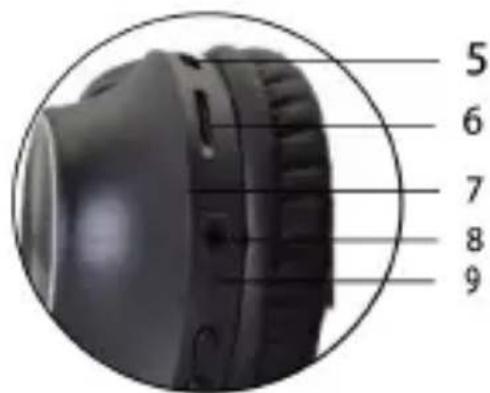
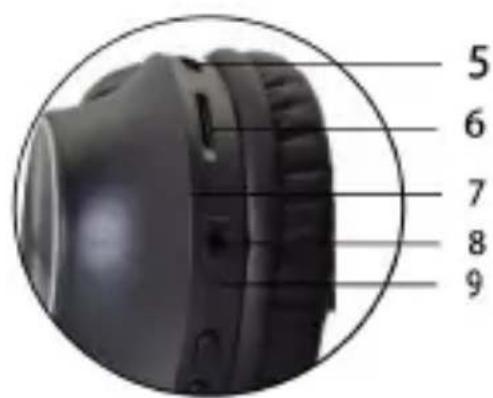
FEATURES AND CONTROLS
- NEXT SONG/VOLUME+
- PREVIOUS SONG/VOLUME-
- CALL ACCEPT/CANCEL/REJECT/FM MODE
- PAUSE/PLAY/POWER ON/OFF
- CHARGING SLOT
- TF/SD CARD SLOT
- LED LIGHT
- AUDIO INPUT SLOT
- MICROPHONE

natural_image
Black outdoor headphones with black earbuds and white bezel (no text or symbols visible)
USING YOUR APPLIANCE
BEFORE FIRST USE
- Remove the product from the box.
- Remove any packaging from the product.
- Please retain all packaging until you have checked and counted all the parts and the contents against the parts list. Your appliance is now ready for normal use.
For best results, fully charge the unit before using.
Connect one end of the included USB cable into your computer or into another charging device, and the other end into the charging port of the earphones.
- The red indicator light will turn on
- When charging it takes approximately 2 to 3 hours for the earphones to fully charge.
- The red indicator will go out once the earphones are fully charged.
Note: Yours earphones cannot be used while charging.
POWERING ON/OFF & BLUETOOTH
- Press the Play/Pause/Power On / Off button for about 4 seconds, until the red and blue indicator lights starts flashing alternately.
- Turn on the Bluetooth function on your smartphone.
- Search for Bluetooth devices and select "AKAI BTH-P23".
- If paring is successful, the blue indicator light will start flashing.
Note: Your Bluetooth Headphones need to be
paired with your smartphone for your first use. After this, the headphones will connect to your smartphone automatically when they are switched on.
If you have an incoming call, any music you are listening will pause, allowing you to answer the call. Your music will continue once the call is ended.
ANSWERING A CALL
- Pick up via Headset When a call comes in, quick press the Mode/Phone button once to answer. Press the Mode/Phone button again to end the call.
- Pick up via Phone To answer the call through your smartphone, simply press the answer button when the call is incoming.
ENDING A CALL
You can end the call via your phone or by quick pressing the Mode/Phone button on your headset once more.
REJECTING A CALL
Hold the Mode/Phone button for 2 seconds and then release.
LISTENING TO MUSIC
Once the headset is paired with your device you can stream music wireless through the headphone. Should you encounter any problems while streaming please refer your device's user manual for further information.
PLAYING MUSIC
When you listen music you can press the Play/Pause, Skip Backward and Skip Forward
buttons to select the music you want to listen and to control the volume.
- Skip Forward: Quick press the Skip Forward Button
- Skip Backward; Quick press the Skip Backward Button.
• +Volume: Long Press the Skip Forward Button
- -Volume: Long Press the Skip Backward Button.
FM MODE
- Short Press the Mode/Phone button once to enter the FM mode, then press the play/pause button to scan and memorize the FM radio stations.
- Press the Skip Forward or Skip Backward button once to select the desired channels. Press and hold the (+) or (-) button to adjust the volume.
- When the volume reaches its max level an alarm will sound. Always be carefully when increasing the volume on any device.
Note: To switch from MP3 mode to FM mode, or from FM mode to Bluetooth mode, quick press the Mode/Phone button once until you reach the required mode.
WIRED HEADPHONE USE
Plug the 3.5mm cable to "audio input" port and plug the other end into the computer or other music device. The headset will then work as a wired unit. While connected in "audio input" mode, FM/MP3 and Bluetooth function will not work and you will not be able to adjust the volume via the headphone buttons.
SD CARD MODE
-
In Bluetooth mode, insert a SD card containing the songs you want to listen, the headphone will play the tracks automatically.
-
Press the Skip Back and Skip Forwards buttons to select your desired song.
- Press the hold the (+) and (-) buttons to obtain your desired volume level.
- When the volume reaches its maximum level an alarm (beep) will sound.
DOES AND DON'TS
Do not play music at excessive levels as damage to hearing and/or equipment may result. Do not use in wet or in damp surroundings
DISPOSAL OF ELECTRICAL AND ELECTRONIC EQUIPMENT
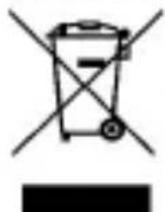
This symbol on the product or packaging means that the product should not be treated as household waste. Do not throw garbage at the end of its life, but take it to a collection center for
recycling. in this way you will help to protect the environment and be able to prevent any negative consequences that it would have on the environment and human health.
To find your nearest collection center:
-Contact local authorities
- Access the website: www.mmediu.ro
- Request additional information from the store where you purchased the product.
IMPORTATOR: SC INTERVISION TRADING-RO SRL
Bld. I.C Bratianu, nr. 48-52, corp A, etaj. 5, camera 504-505, oras Pitesti, judet Arges, Romania Cod postal: 110121
AKAI

natural_image
Black outdoor headphones with black covers and earbuds (no visible text or logos)CĂSTI WIRELESS
MODEL: BTH-P23
DATE TEHNICE
natural_image
Black outdoor headphones with black covers and earbuds, no visible text or symbols on the device itself.

UTILIZAREA APARATULUI
ÎNAINTE DE PRIMA UTILIZARE
natural_image
Black outdoor headphones with black covers and earbuds, isolated on white background (no text or symbols visible)БЕЗЖИЧНИ СЛУШКИ
МОДЕЛ: ВТН-Р23
ТЕХНИЧЕСКИ ДАННИ
natural_image
Black outdoor headphones with black covers and earbuds, isolated on white background (no text or symbols visible)KABELLOSE KOPFHÖRER
MODELL: BTH-P23
TECHNISCHE DATEN
- Keep the product dry. Do not store it in damp areas.
- Do not exposure the product to the sun or high temperature.
- Do not attempt to open the product, especially operated by non-professional person.
- Do not make the product fall down, shake the product violently, or strike the product with hard objects.
- Do not use harsh chemicals or cleaner to clean the headset.
- Do not use something sharp to scratch the surface of the product.
- Do not continuously charge the headset for over 10 hours to avoid affecting the service life.
PACKUNGSINHALT
natural_image
Black outdoor headphones with black covers and earbuds, no visible text or symbols on the device itself.
natural_image
Black multi-band headphones with black covers and earbuds (no visible text or logos)VEZETÉK NÉLKÜLI FEJHALLGATÓ
MODELL: BTH-P23
MÜSZAKI ADATOK
natural_image
Black outdoor headphones with earbuds and black bezel (no visible text or logos)natural_image
Black multi-band headphones with black covers and earbuds, no visible text or symbols on the device itself.

KORZYSTANIE Z URZADZENIA
PRZED PIERWSZYM UŻYCIEM
natural_image
Black outdoor headphones with earbuds and black covers, no visible text or symbolsBEZDRÁTOVÁ SLUCHÁTKA
MODEL: BTH-P23
TECHNICKÉ SPECIKACE
natural_image
Black outdoor headphones with black covers and earbuds, no visible text or symbols on the device itself.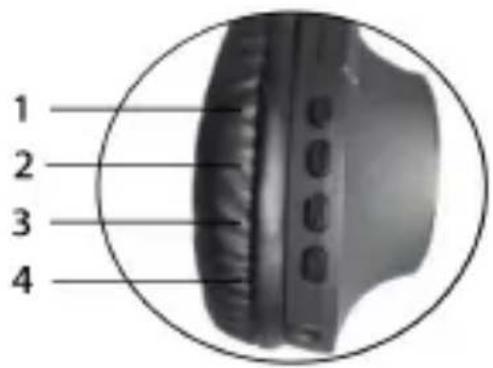

POUŽITÍ ZAŘÍZENÍ
PŘED PRVNÍM POUŽITÍM
natural_image
Black outdoor headphones with black covers and earbuds, isolated on white background (no text or symbols visible)BEZDRÔTOVÉ SLUCHÁTKA
MODEL: BTH-P23
TECHNICKÉ ŠPECIFIKÁCIE
| MODEL č.: | AKAI BTH-P23 |
| Nabijacie napätie zdroja napájania: | 5 V (USB) |
| Charakteristiky batérie | 3,7 V 300 mAh |
| Verzia Bluetooth | V5.0 |
| Pronosový výkon kanála Bluetooth BTH | +6 dbm |
| Frekvencia Bluetooth | 2402 - 2480 MHz |
| Dosah Bluetooth | 10 m |
| Frekvencia FM | 76 - 108 MHz |
| Reproduktory | 40 mm/ks |
| Frekvenčná odozva | 20-20 KHZ |
| Doba nabíjania | 2-3 hodiny |
| Doba prehrávania | 7 hodín |
BEZPEČNOSTNÉ INFORMÁCIE


POUŽÍVANIE ZARIADENIA
PRED PRVÝM POUŽITÍM




- SAFETY INFORMATION
- WARNING
- PACKAGE CONTENT
- FEATURES AND CONTROLS
- USING YOUR APPLIANCE
- BEFORE FIRST USE
- POWERING ON/OFF & BLUETOOTH
- ANSWERING A CALL
- ENDING A CALL
- REJECTING A CALL
- LISTENING TO MUSIC
- PLAYING MUSIC
- FM MODE
- WIRED HEADPHONE USE
- SD CARD MODE
- DOES AND DON'TS
- DISPOSAL OF ELECTRICAL AND ELECTRONIC EQUIPMENT
- IMPORTATOR: SC INTERVISION TRADING-RO SRL
- AKAI
- UTILIZAREA APARATULUI
- ÎNAINTE DE PRIMA UTILIZARE
- PACKUNGSINHALT
- KORZYSTANIE Z URZADZENIA
- PRZED PIERWSZYM UŻYCIEM
- POUŽITÍ ZAŘÍZENÍ
- PŘED PRVNÍM POUŽITÍM
- BEZPEČNOSTNÉ INFORMÁCIE
- POUŽÍVANIE ZARIADENIA
- PRED PRVÝM POUŽITÍM
Brand : AKAI
Model : BTH-P23
Category : Headphones