GT-806A60 - Audio/video converter Planet - Free user manual and instructions
Find the device manual for free GT-806A60 Planet in PDF.


| Product Type | 10/100/1000BASE-T to 100/1000BASE-X Media Converter |
| Model | GT-806A60 |
| Brand | Planet |
| Copper Connector | 1 x RJ45 (10/100/1000Mbps, auto-MDI/MDI-X) |
| Fiber Connector | 1 x SFP slot (100/1000BASE-X, LC type) |
| Data Transfer Rate (Copper) | 10/100/1000 Mbps |
| Data Transfer Rate (Fiber) | 100/1000 Mbps (depends on SFP module) |
| Jumbo Frame Support | 9K bytes |
| Duplex Mode | Full duplex, auto-negotiation (both ports) |
| DIP Switch | LFP (Link Fault Pass-through) Disable/Enable |
| LFP Function | LLCF (Link Loss Carry Forward) and LLR (Link Loss Return) |
| LED Indicators | PWR, Fiber LNK/ACT, TP LNK/ACT, TP 1000 LNK/ACT |
| Power Supply | 5V DC, 2A max. via DC jack (2.5mm) or media converter chassis |
| Power Consumption | Approximately 10W (max) |
| Dimensions (W x D x H) | 97 x 70 x 26 mm (3.8 x 2.8 x 1.0 in) |
| Weight | Approximately 0.2 kg (0.44 lbs) |
| Operating Temperature | 0°C to 50°C (32°F to 122°F) |
| Storage Temperature | -10°C to 70°C (14°F to 158°F) |
| Humidity | 5% to 90% non-condensing |
| Standards Compliance | IEEE 802.3, 802.3u, 802.3ab, 802.3z; FCC Class A, CE |
| Installation Options | Wall mount, DIN-rail, or Planet media converter chassis |
| Package Contents | Media converter, AC-DC power adapter, user manual |
| Warranty | Refer to dealer or Planet website |
Frequently Asked Questions - GT-806A60 Planet
User questions about GT-806A60 Planet
0 question about this device. Answer the ones you know or ask your own.
Ask a new question about this device
Download the instructions for your Audio/video converter in PDF format for free! Find your manual GT-806A60 - Planet and take your electronic device back in hand. On this page are published all the documents necessary for the use of your device. GT-806A60 by Planet.
USER MANUAL GT-806A60 Planet
● Data transfer rate: TP - 10/100/1000Mbps; SFP - 100/1000Mbps
● DIP switch for LFP function (Disable/Enable) setting
- 9K jumbo frame supported
- Compliant with PLANET's 10"/19" media converter chassis
2. Checklist
Your GT-805A carton should contain the following items:
The Gigabit Ethernet Media Converter
AC-DC Power Adapter (Output: 5V DC, 2A max.)
This User's Manual
If any item is missing or damaged, please consult the dealer from whom you purchased your Gigabit Ethernet Media Converter.

Note
The GT-805A comes with one vacant SFP module slot. The mini GBIC SFP module is not bundled in the package.
-1--2-
Power Information
The power jack of Gigabit Ethernet Media Converter measures 2.5mm in the central post and requires +5VDC power input. It conforms to the bundled AC-DC adapter and Planet's Media Chassis. Should you have the issue to make the power connection, please contact your local sales representative.
The AC-DC adapter is used as a spare part when your Gigabit Ethernet Media Converter is installed to a Media Chassis.

2.5mm
DC Receptacle 2.5mm
+5V for each slot
- +
DC receptacle is 2.5mm wide that conforms to the Gigabit Ethernet Media Converter's 2.5mm DC jack's central post. Do not install any improper unit.
4. Link Fault Pass-through (LFP)
The LFP function includes the Link-Fault-Passthrough function (LLCF/LLR) and the DIP Switch design. LLCF/LLR can immediately alarm administrators the issue of the link media and provide efficient solution to monitor the network. The DIP Switch will disable or enable the LFP function.
LLCF (Link Loss Carry Forward) means when a device is connected to the converter and the TP line loses the link, the converter's fiber will disconnect transmission link. LLR (Link Loss Return) means when a device is connected to the converter and the fiber line loses the link, the converter's fiber will disconnect.
-3-
3. Product Outlook
Front View
There are one RJ45 twisted-pair jack (auto-MDI/MDI-X), one 100/1000X SFP fiber-optic slot and four LED indicators. Also one DIP switch for Link-Fault Passthrough (LFP) feature and "ON" to turn on the LLCF and LLR detection. And "OFF" to turn off the feature. Please refer to the following sections for more.
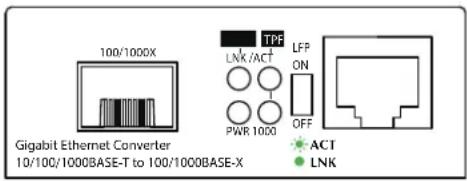
Figure 1: GT-805A Front View
Rear View
The rear panel of the Gigabit Ethernet Media Converter indicates one DC jack, which accepts input power with 5V DC 2A.
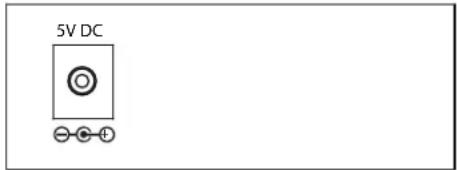
Figure 2: GT-805A Rear View

Note
LFP function is ON by default setting. If you are familiar with the network installation and for diagnostic purpose (i.e. check which end is broken), you can turn it off and reset the converter to make it take effect. Otherwise, please keep it in the default position.
5. Duplex Mode Support
The GT-805A TP port supports triple speed -- 10/100/1000BASE-T, auto-negotiation. It will auto detect the link speed and the duplex mode by default with its link partner. The fiber port (100/1000BASE-FX/SX/LX) allows 100/1000Mbps full duplex by auto-negotiation. Please also check the setting of the link partner.
6. LED Indication
| LED | Color | Description |
| PWR | Green | Lit: To indicate +5V DC power is detected. |
| FiberLNK/ACT | Green | Lit: To indicate the link through fiber port is successfully established. |
| Blinks: To indicate the fiber port is actively sending or receiving data. |
-4-
User's Manual
www.PLANET.com.tw
10/100/1000BASE-T to 100/1000BASE-X Media Converter
GT-805A
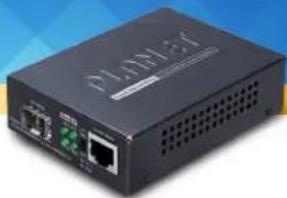
natural_image
Exterior view of a black DPLOE4 network switch with ports and indicator lights (no readable text or symbols)PLANET Technology Corp.
10F., No. 96, Minquan Rd., Xindian Dist., New Taipei City 231, Taiwan
2350-AA4250-001
Warning:
This equipment is compliant with Class A of CISPR 32.
In a residential environment this equipment may cause radio interference.


Energy Saving Note of the Device
This power required device does not support Standby mode operation. For energy savings, please remove the DC plug or slide the hardware-based Power Switch to the OFF position to disconnect the device from the power circuit. Without removing the DC plug from or switching off the device, the device will still consume power from the power source. In view of Saving the Energy and reducing the unnecessary power consumption, it is strongly suggested to power off or to remove the DC plug from the device if this device is not intended to be active.
| TPLNK/ACT | Green | Lit: To indicate the link through TP port is successfully established. |
| Blinks: To indicate the port is actively sending or receiving data. | ||
| TP 1000LNK/ACT | Green | Lit: To indicate the port is running at 1000Mbps. |
| Blinks: To indicate the port is actively sending or receiving data.Off: To indicate the port is running at 10/100Mbps. |
7. Cable Connection Parameter
The wiring details are shown below:
| Duplex | Connection | Limitation (max.) |
| Twisted Pair | ||
| Half/Full | Node to NodeNode to Switch/Hub | 100 meters |
Fiber Optic Cables:
| Standard(Wavelength) | 100BASE-FX(1310nm) | 1000BASE-SX(850nm) | 1000BASE-LX(1310nm) |
| Fiber Type& Cable | Multi-mode 50/125μm or 62.5/125μm | ||
| Specifications | Single-mode | 9/125μm | |
8. Product Specifications
| Model GT-805A | ||
| Fiber Connector SFP, LC type | ||
| Fiber Mode May vary on module | ||
| Fiber Maximum Distance | May vary on module | |
| Copper Connector 10/100/1000Mbps RJ45 | ||
| Copper Modes Full duplex, auto-negotiation | ||
| Packet Forwarding Rate (64bytes) | 14880pps @10Mbps/148810pps@100Mbps/1488000pps @ 1000Mbps | |
| DIP switch LFP Disable/Enable | ||
| Protocols and Standards | IEEE 802.3 10BASE-TIEEE 802.3u 100BASE-TX/100BASE-FXIEEE 802.3ab 1000BASE-TIEEE 802.3z 1000BASE-SX/LX | |
| Jumbo Packet Size 9K | ||
| Dimensions(W x D x H) | 97 x 70 x 26 mm | |
| Power 5V DC, 2A max. | ||
| Emission FCC CE | ||
| Temperature | Operating: 0 ~ 50°CStorage: -10 ~ 70°C | |
| Humidity 5% ~ 90% | non-condensing | |
| Installation Wall mount, DIN-rail, chassis installation | ||
 Note Note | 1. For connection to the Gigabit Ethernet products,please refer to the device's technical manual.2. Consult your dealer for DIN-rail or chassis installation. | |
Brand : Planet
Model : GT-806A60
Category : Audio/video converter