IGTP-2205AT - Audio/video converter Planet - Free user manual and instructions
Find the device manual for free IGTP-2205AT Planet in PDF.


| Product Type | Audio/Video Converter |
| Brand | Planet |
| Model | IGTP-2205AT |
| Dimensions (approx.) | 200 x 150 x 50 mm |
| Weight (approx.) | 0.5 kg |
| Power Supply | 5V DC, 1A via USB or included adapter |
| Input Interface | HDMI, VGA, Composite (RCA) |
| Output Interface | HDMI, VGA, Composite (RCA), Audio L/R |
| Supported Video Formats | 480p, 720p, 1080p up to 60 Hz |
| Supported Audio Formats | PCM 2.0, LPCM 2.0 |
| Max Resolution | 1920x1080 @ 60Hz |
| Operating Temperature | 0°C to 50°C |
| Storage Temperature | -10°C to 60°C |
| Care & Cleaning | Wipe with a dry, soft cloth. Do not use liquids or solvents. |
| Safety Precautions | Avoid exposure to moisture, extreme temperatures, and physical shock. Use only the supplied power adapter. |
| Spare Parts & Repairability | No user-serviceable parts. Contact Planet support for repairs. |
| General Information | Converts analog video/audio to digital and vice versa. Plug-and-play, no drivers required. |
Frequently Asked Questions - IGTP-2205AT Planet
User questions about IGTP-2205AT Planet
0 question about this device. Answer the ones you know or ask your own.
Ask a new question about this device
Download the instructions for your Audio/video converter in PDF format for free! Find your manual IGTP-2205AT - Planet and take your electronic device back in hand. On this page are published all the documents necessary for the use of your device. IGTP-2205AT by Planet.
USER MANUAL IGTP-2205AT Planet
Compact Industrial 2-Port 100/1000X SFP to 2-Port 10/100/1000T 802.3at PoE+ Media Converter
IGTP-2205AT
User's Manual
Table of Contents
- Package Contents .... 3
- Product Specifications .... 4
- Hardware Introduction ...... 6
3.1 Three-View Diagram....6
3.2 LED Definition: 8
3.3 Wiring the Power Inputs....9
- Hardware Installation....10
4.1 DIN-rail Installation.... 10
4.2 Wall Mounting....11
4.3 Side Wall Mounting 11
4.4 Grounding the Device....12
- Fiber and PoE Installation....13
Customer Support....14
1. Package Contents
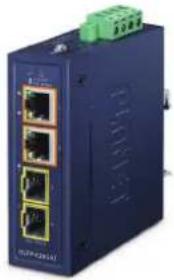
Thank you for purchasing PLANET Compact Industrial 100/1000X to 10/100/1000T 802.3at PoE+ Media Converter, IGTP-2205AT. In the following sections, the term "Industrial PoE+ Media Converter" means the IGTP-2205AT.
Open the box of the Industrial PoE+ Media Converter and carefully unpack it. The box should contain the following items:
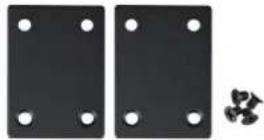
| Industrial PoE+ Media Converter x 1 | QR Code Sheet x 1 Wall-mount Kit x 1 | |
 |  |  |
| DIN-rail Kit x 1 SFP Dust Cap x 2 RJ45 Dust Cap x 2 | ||
 |  |  |
If any of these are missing or damaged, please contact your dealer immediately; if possible, retain the carton including the original packing material, and use them again to repack the product in case there is a need to return it to us for repair.
- Product Specifications
| Model IGTP-2205AT | |
| Hardware Specifications | |
| Copper Port | 2 10/100/1000BASE-T RJ45 auto-MDI/MDI-X ports with PoE injector function |
| SFP Port | 2 1000BASE-SX/LX/BX SFP interfacesCompatible with 100BASE-FX SFP |
| Flow Control | Back pressure for half duplex modeIEEE 802.3x pause frame for full duplex mode |
| Maximum Frame Size | 9K |
| LED | System: P1/P2 (Green)Fiber 100/1000BASE-X: LNK/ACT (Green)TP 10/100/1000BASE-T: LNK/ACT (Green)PoE: Power-in-use (Amber) |
| Dimensions(W x D x H) | 30 x 70 x 104 mm |
| Weight 260 g | |
| Power Requirements | DC 48~54V, redundant power with reverse polarity protection function(>51V DC for PoE+ output recommended) |
| Power Consumption | System ON without loadingDC 48V: 1.44W/4.91BTUDC 54V: 1.62W/5.53BTUFull loading with PoEDC 48V: 81.6W/278.43 BTUDC 54V: 82.1W/280.14 BTU |
| Enclosure IP30 metal case | |
| Installation DIN-rail or wall mounting | |
| ESD Protection 6KV DC | |
| Cables | 10/100/1000BASE-T:2-pair UTP Cat. 3, 4, 5, 5e, 6 (maximum 100 meters)EIA/TIA-568 100-ohm STP (maximum 100 meters)100BASE-FX/1000BASE-SX/LX:Multi-mode: 50/125μm or 62.5/125μm optical fiberSingle-mode: 9/125μm optical fiber |
| Power Over Ethernet | |
| PoE Standard IEEE 802.3at Power over Ethernet Plus | |
| PoE Power Output 48~54V DC: 30 watts per port | |
| PoE Power Supply Type | End-span |
| Power Pin Assignment | 1/2(+), 3/6(-) |
| PoE Power Budget 60 watts | |
| Standards Conformance | |
| Regulatory Compliance | FCC Part 15 Class A, CE |
| Protocols and Standards Compliance | IEEE 802.3 EthernetIEEE 802.3u Fast EthernetIEEE 802.3ab Gigabit EthernetIEEE 802.3z Gigabit Ethernet over Fiber OpticIEEE 802.3x Flow ControlIEEE 802.3az Energy Efficient Ethernet (EEE)IEEE 802.3af Power over EthernetIEEE 802.3at Power over Ethernet Plus |
| Stability Testing | IEC60068-2-32 (free fall)IEC60068-2-27 (shock)IEC60068-2-6 (vibration) |
| Environment | |
| Temperature | Operating: -40~75 degrees CStorage: -40~85 degrees C |
| Humidity | Operating: 5~90% (non-condensing)Storage: 5~90% (non-condensing) |
3. Hardware Introduction
3.1 Three-View Diagram
The three-view diagram of the Industrial PoE+ Media Converter consists of Ethernet interfaces and one removable 4-pin terminal block. The LED indicators are also located on the front panel.
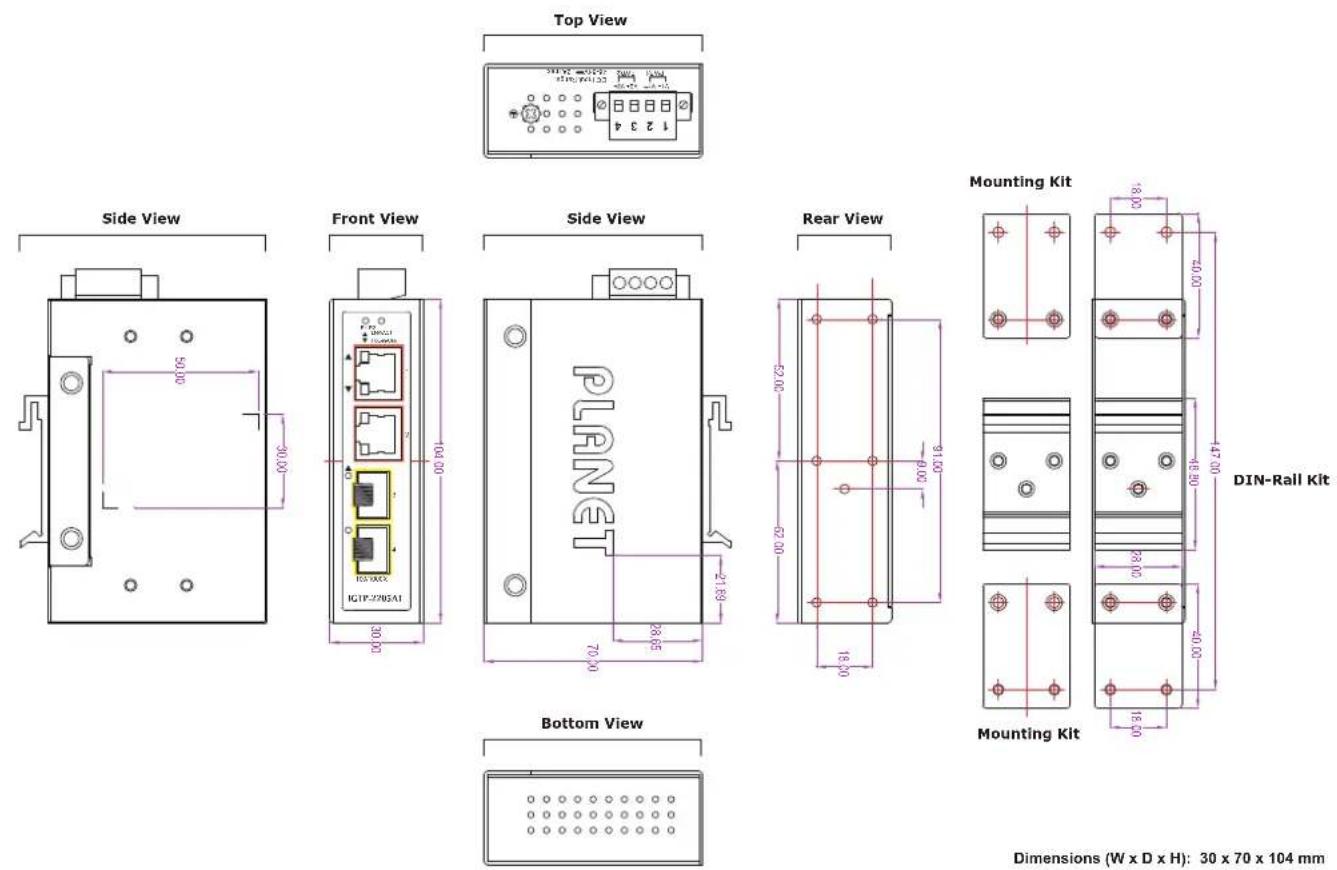
Figure 1: IGTP-2205AT Three-View Diagram
■ Front View
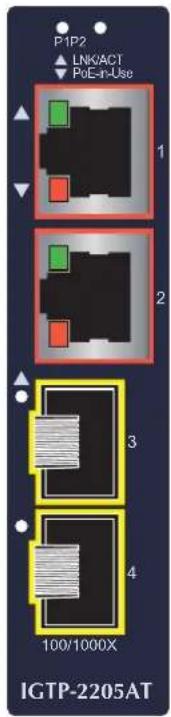
Figure 2: IGTP-2205AT Front View
3.2 LED Definition:
■ System
| LED Color Function | ||
| P1 | Green | Lights to indicate the Industrial PoE+ Media Converter has power. |
| P2 | Green | Lights to indicate the Industrial PoE+ Media Converter has power. |
■ 10/100/1000BASE-T Ports (Ports 1 to 2)
| LED Color Function | ||
| TPLNK/ACT | Green | Lit: Indicates that the Copper Port is successfully connecting to the network at 10/100/1000Mbps. |
| Blinks: Indicates the Copper Port is receiving or sending data. | ||
| PoE-in-Use | Amber | Lit: Indicates that the port is providing PoE power to remote powered device. |
| Off: Indicates that the port is not providing PoE power to remote powered device. | ||
■ 100/1000BASE-X SFP Ports (Ports 3 to 4)
| LED Color Function | ||
| FiberLNK/ACT | Green | Lit: Indicates that the fiber optic port is successfully connecting to the network at 100Mbps or 1000Mbps. |
| Blinks: Indicates the fiber optic port is receiving or sending data. | ||
3.3 Wiring the Power Inputs
The 4-contact terminal block connector on the top panel of Industrial PoE+ Media Converter is used for 48\~54V DC power inputs. Please follow the steps below to insert the power wire.

Caution
When performing any of the procedures like inserting the wires or tightening the wire-clamp screws, make sure the power is OFF to prevent from getting an electric shock.
- Insert positive and negative DC power wires into contacts 1 and 2 for POWER 1, or contacts 3 and 4 for POWER 2.
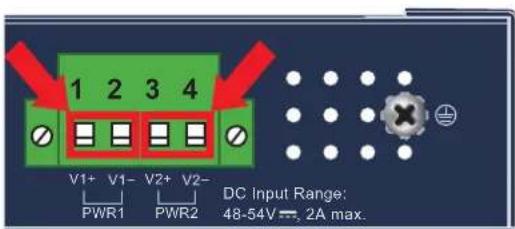
- Tighten the wire-clamp screws for preventing the wires from loosening.

natural_image
Green electrical connector with four slots and terminal blocks (no text or symbols)1 2 3 4
Power 1 Power 2
+ - + -

Note
-
The wire gauge for the terminal block should be in the range between 12 and 24 AWG.
-
The DC power input range is 48V \~ 54V DC.
4. Hardware Installation
This section describes the functionalities of the Industrial PoE+ Media Converter's components and guides you to installing it on the DIN rail and wall. Please read this chapter completely before continuing.

Note
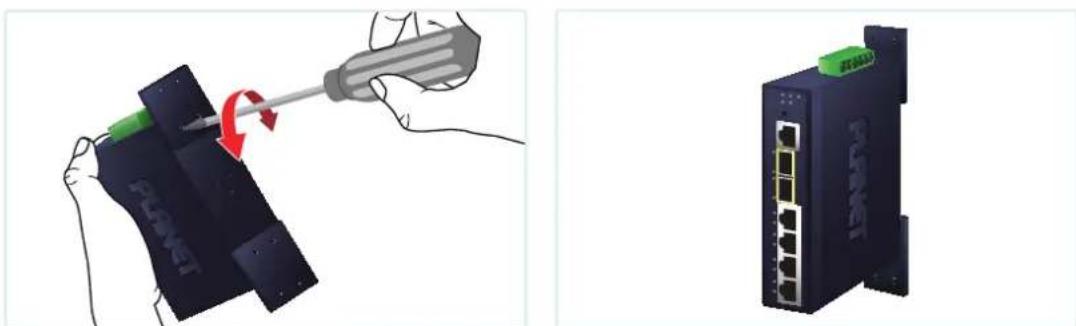
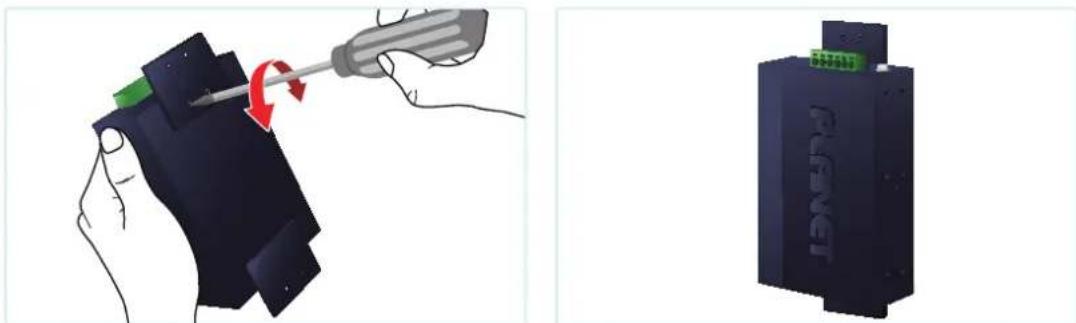
This following pictures guide you to installing the device, and the device is not IGTP-2205AT.
4.1 DIN-rail Installation
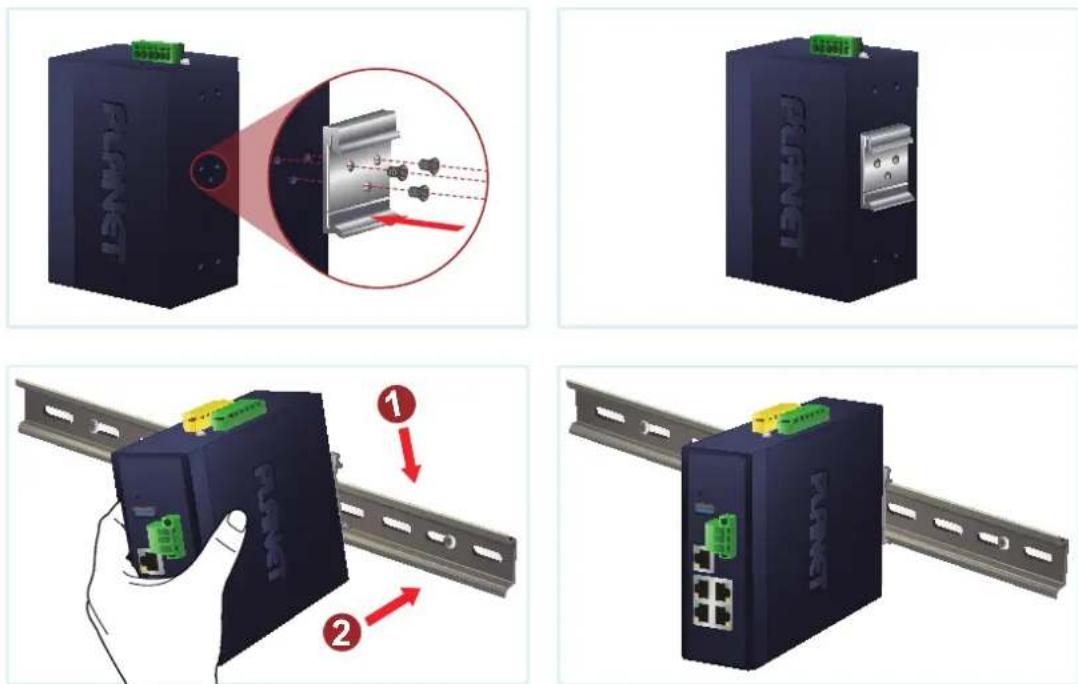
Figure 3: DIN-rail Mounting
Place the bracket on the back of the device and with the given 3 screws, tighten them. Slide the device with the bracket mounted through the DIN-rail to installation.
4.2 Wall Mounting
natural_image
Illustration showing a hand using a screwdriver to press down a device labeled 'PLAET', with a separate view of the device showing network ports (no text or symbols present)Figure 4: Wall Mounting
Place both mounting plates on the back of the device, and tighten them with the given screws. Then put the device with the plates mounted on the wall, and screw them to finish the installation.
4.3 Side Wall Mounting
natural_image
Illustration showing a hand using a screwdriver to press down a device component, with a separate close-up of a black electronic device labeled 'FANG' (no text or symbols on the device itself)Figure 5: Wall Mounting
Place the two mounting plates on the bottom of the device, and tighten them with the given screws. Then put the device with the plates mounted on the wall, and screw them to finish the installation.

Caution
You must use the screws supplied with the wall-mounting brackets. Damage caused to the parts by using incorrect screws would invalidate your warranty.
4.4 Grounding the Device
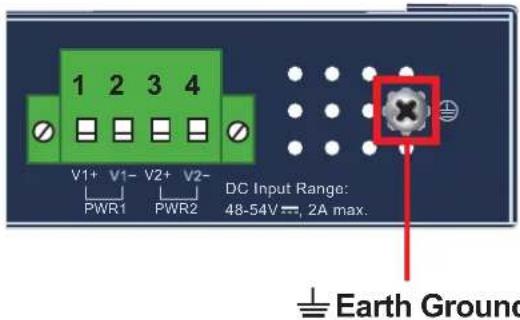
Users MUST complete grounding wired with power cord adapter or power supply source should be connected to a socket outlet with an earthing connection; otherwise, a sudden lightning could cause fatal damage to the device.

Note
EMD (Lightning) DAMAGE IS NOT COVERED UNDER WARRANTY.
5. Fiber and PoE Installation
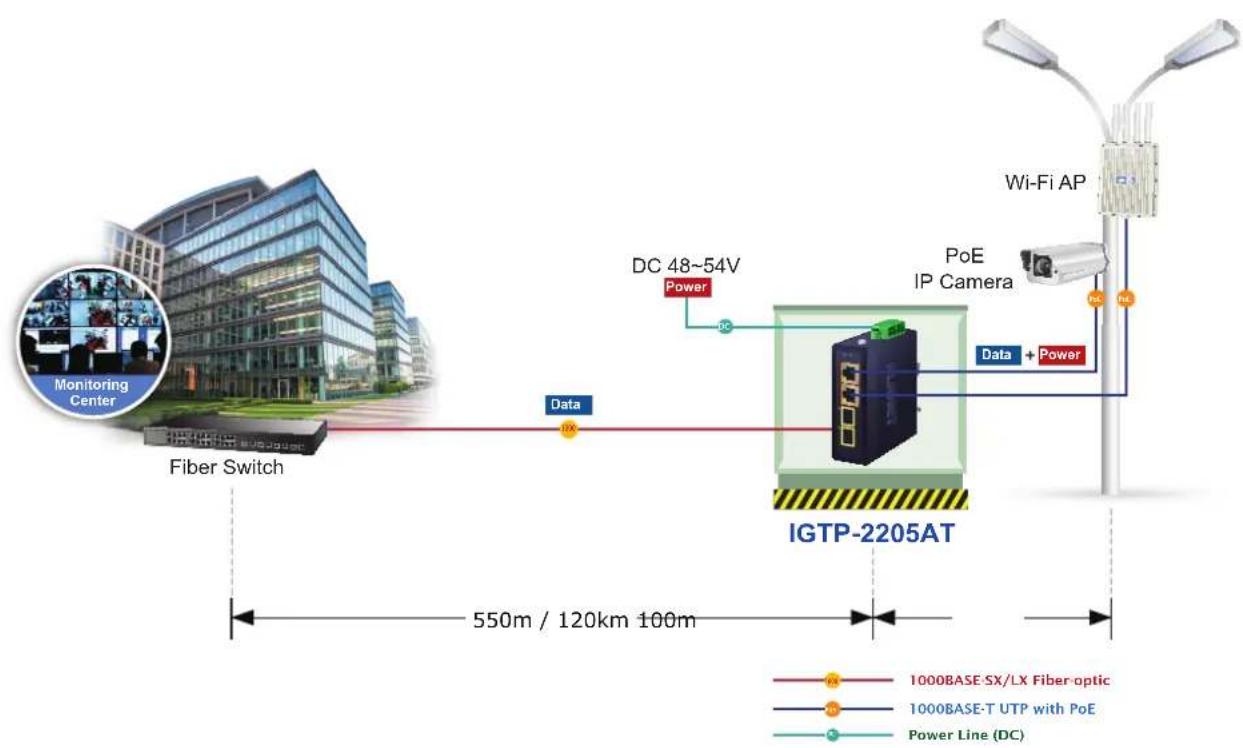
The IGTP-2205AT is flexible enough to extend the distance from 550m to 120 depends on the 1000BASE-X or 100BASE-FX SFP transceivers. The SFP transceivers are hot-pluggable and hot-swappable. You can plug in and out the transceiver to/from any SFP port without having to power down the Industrial 802.3at PoE+ Media Converter.
If there is any IEEE 802.3at/802.3af devices needed to power on, the IGTP-2205AT can provide you with a way to supply power for this Ethernet device conveniently and easily.
The IGTP-2205AT needs DC 48-54V input to inject the DC power into the pin of the twisted pair cable (Pins 1, 2, 3 and 6).
flowchart
graph TD
    A["Fiber Switch"] -->|Data| B["IGTP-2205AT"]
    B -->|DC 48~54V Power| C["Wi-Fi AP"]
    C -->|Data + Power| B
    style A fill:#f9f,stroke:#333
    style B fill:#ccf,stroke:#333
    style C fill:#cfc,stroke:#333
    note1["Monitoring Center"] --> A
    note2["1000BASE-SX/LX Fiber-optic"] --> B
    note3["1000BASE-T UTP with PoE"] --> B
    note4["Power Line (DC)"] --> B
Customer Support
Thank you for purchasing PLANET products. You can browse our online FAQ resource on PLANET web site first to check if it could solve your issue. If you support information, please contact PLANET switch support team.
PLANET online FAQs:
https://www.planet.com.tw/en/support/faq
Switch support team mail address:
support_switch@planet.com.tw
Copyright © PLANET Technology Corp. 2025.
Contents are subject to revision without prior notice.
PLANET is a registered trademark of PLANET Technology Corp.
All other trademarks belong to their respective owners.
- Compact Industrial 2-Port 100/1000X SFP to 2-Port 10/100/1000T 802.3at PoE+ Media Converter
- Table of Contents
- Package Contents
- Hardware Introduction
- Three-View Diagram
- ■ Front View
- LED Definition:
- Wiring the Power Inputs
- Hardware Installation
- DIN-rail Installation
- Wall Mounting
- Side Wall Mounting
- Grounding the Device
- Fiber and PoE Installation
- Customer Support
Brand : Planet
Model : IGTP-2205AT
Category : Audio/video converter