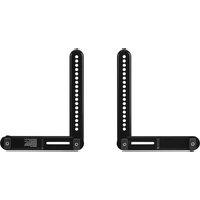
BE-SBM112 - Speaker Stand Best Buy - Free user manual and instructions
Find the device manual for free BE-SBM112 Best Buy in PDF.


| Product Type | Speaker Stand |
| Brand | Best Buy |
| Model | BE-SBM112 |
| Material | Steel |
| Height Adjustment | Yes (adjustable from 30 to 50 inches) |
| Base Dimensions | 12 x 12 inches |
| Top Plate Dimensions | 6 x 6 inches |
| Load Capacity | 20 lbs (9 kg) |
| Weight | 8 lbs (3.6 kg) |
| Color | Black |
| Assembly Required | Yes |
| Cable Management | Yes (built-in cable routing) |
| Rubber Feet | Yes (anti-slip) |
| Warranty | 1 year |
| Compatibility | Most bookshelf speakers up to 20 lbs |
| Maintenance | Wipe with dry cloth |
| Safety | Use on level surface; do not exceed load capacity |
| Spare Parts | Contact Best Buy customer service |
Frequently Asked Questions - BE-SBM112 Best Buy
User questions about BE-SBM112 Best Buy
0 question about this device. Answer the ones you know or ask your own.
Ask a new question about this device
Download the instructions for your Speaker Stand in PDF format for free! Find your manual BE-SBM112 - Best Buy and take your electronic device back in hand. On this page are published all the documents necessary for the use of your device. BE-SBM112 by Best Buy.
USER MANUAL BE-SBM112 Best Buy
Adjustable Rear-Mounted Soundbar Bracket for Wall Mounted TVs/
natural_image
Technical line drawing of a mechanical lever assembly (no text or symbols)
natural_image
Technical line drawing of a mechanical lever or clamp device (no text or symbols)ENGLISH .....2
ESPAÑOL.....25
BEST BUY essentials™
Contents
ENGLISH....2
Safety information and specifications 2
Before You Begin 3
Features....3
What you need 4
Package contents: parts....4
Package contents: hardware 5
Hardware bag 5
Installation instructions....7
Specifications 22
ONE-YEAR LIMITED WARRANTY 23
ESPAÑOL....25
ENGLISH
Safety information and specifications

IMPORTANT SAFETY INSTRUCTIONS
CAUTION: Do not use this product for any purpose not explicitly specified by Best Buy essentials.
Improper installation may cause property damage or personal injury. If you do not understand these directions, or have doubts about the safety of the installation, contact Customer Service or call a qualified contractor. Best Buy essentials is not responsible for damage or injury caused by incorrect installation or use.
The weight of your soundbar must not exceed 15 lbs. (6.8 kg). Also, the weight of the soundbar plus the weight of your TV cannot exceed the total rated weight of the TV wall mount. Refer to your TV wall mount assembly guide for specific weight limits.
This product contains small items that could be a choking hazard if swallowed. Keep these items away from young children!
This soundbar mount was designed to be installed and utilized ONLY as specified in this manual. The manufacturer is not responsible for improper assembly, use, or handling of this product.
SAVE THESE INSTRUCTIONS
Before You Begin
Please check the following items:
- Your TV and any accessories you plan to use do not exceed the specified weight limit of your TV mount.
- You read and understand these directions.
- You refer to the documentation that came with your TV for additional guidance.
- You have the tools needed for installation.
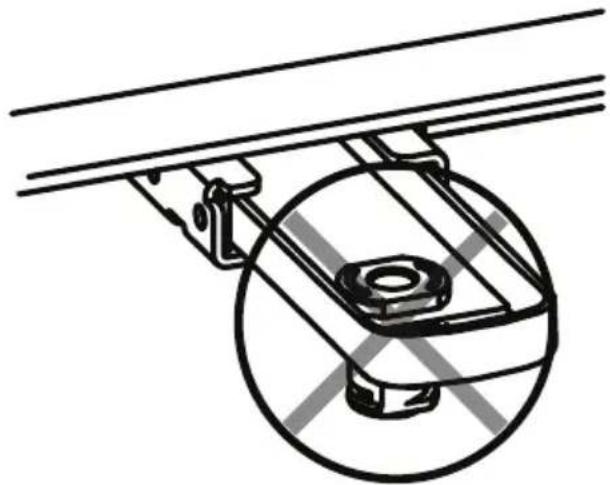
- If your TV bracket has built-in or integrated spacers (see Figure 1), or mounting holes or slots that are wider than .43 in. [11mm] (see Figure 2), you cannot use this product. Call Customer Service for assistance.
natural_image
Technical line drawing of a mechanical assembly with a circular component and mounting bracket (no text or symbols)Figure 1
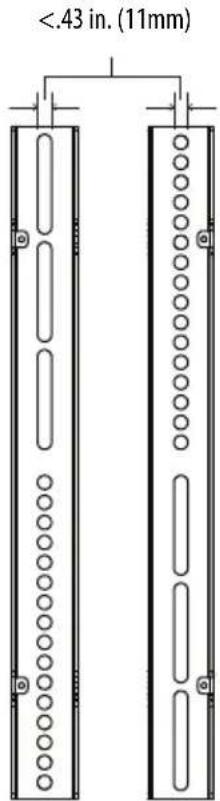
Figure 2
Features
- Attaches a soundbar to your TV's existing wall mount
- Works with most soundbars weighing up to 15 lbs. (6.8 kg)
• Supports rear-mounted soundbars with a durable steel design - Sits flush between the bottom of your TV and the soundbar
• VESA-compliant up to 400 × 400 - Includes hardware needed for installation
• Built and backed by Best Buy
What you need
You will need the following to assemble your new sound bar mount:

natural_image
Isometric line drawing of a structural frame with vertical supports and horizontal beams (no text or symbols)TV Wall Mount Bracket

Phillips screwdriver

Level
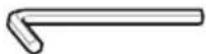
3/16 in. Hex key (Included in this kit)
Package contents: parts
Make sure that you have all the parts necessary to assemble your new sound bar mount.

natural_image
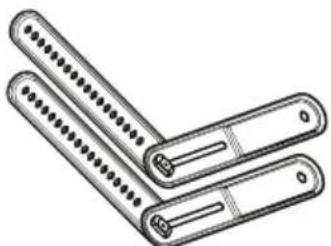
Illustration of two folded metal clamps with evenly spaced pins (no text or symbols)Soundbar bracket assembly - A (2)
Package contents: hardware
Make sure that you have all the hardware necessary to assemble your new soundbar mount. Not all hardware included will be used:
Hardware bag
| LABEL PART # LABEL PART # | ||||
| C | 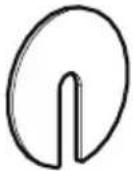 Fender washer Fender washer | 2 | 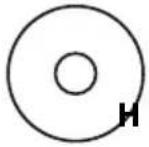 M6/M8 washers M6/M8 washers | |
| D |  Keyhole screw Keyhole screw | 2 |  | |
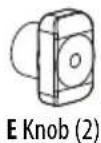
| E | 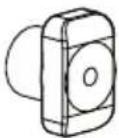 Knob Knob | 2 | J |  M5 × 16 mm screw M5 × 16 mm screw |
| F | 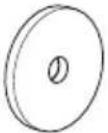 Mount spacer Mount spacer | 2 | K | 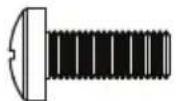 M6 × 16 mm screw M6 × 16 mm screw |
| G |  M4/M5 washer M4/M5 washer | 4 | L |  M6 × 25 mm screw M6 × 25 mm screw |
| GG 4 |  M4/M5 washer M4/M5 washer | 4 |  M8 × 20 mm screw M8 × 20 mm screw | |
| H |  M6/M8 washers M6/M8 washers | 4 | N | 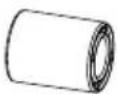 Spacers Spacers |
Hardware bag (continued)
| LABEL PART # LABEL PART # | ||
| P | 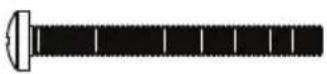 M4 × 40 mm screw M4 × 40 mm screw | 4 |
| Q | 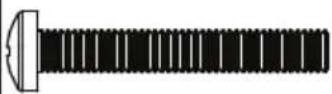 M5 × 40 mm screw M5 × 40 mm screw | 4 |
| R |  - M6 × 40 mm screw - M6 × 40 mm screw | 4 |

Installation instructions
STEP 1: Option 1 - Mount the bracket arms to the soundbar
You'll need
natural_image
Illustration of three folded metal pens with dot patterns (no text or symbols)A Soundbar bracket assembly (2)



1 Check the compatibility of the soundbar bracket with your soundbar.
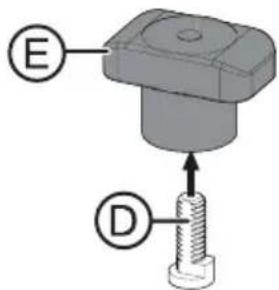
2 Insert the keyhole screws (D) into the knobs (E).
3 Attach the soundbar bracket assembly (A) to your soundbar with the assembled knob/keyhole screws.
Note: When planning on the position of the soundbar, make sure you will be able to properly access control buttons, if necessary.

4 [OPTIONAL] If there are gaps or recesses under the soundbar arms, slip a "Fender" washer (C) onto the keyhole screws (D) and under the soundbar bracket assembly (A) make sure that it lays flat on the soundbar.
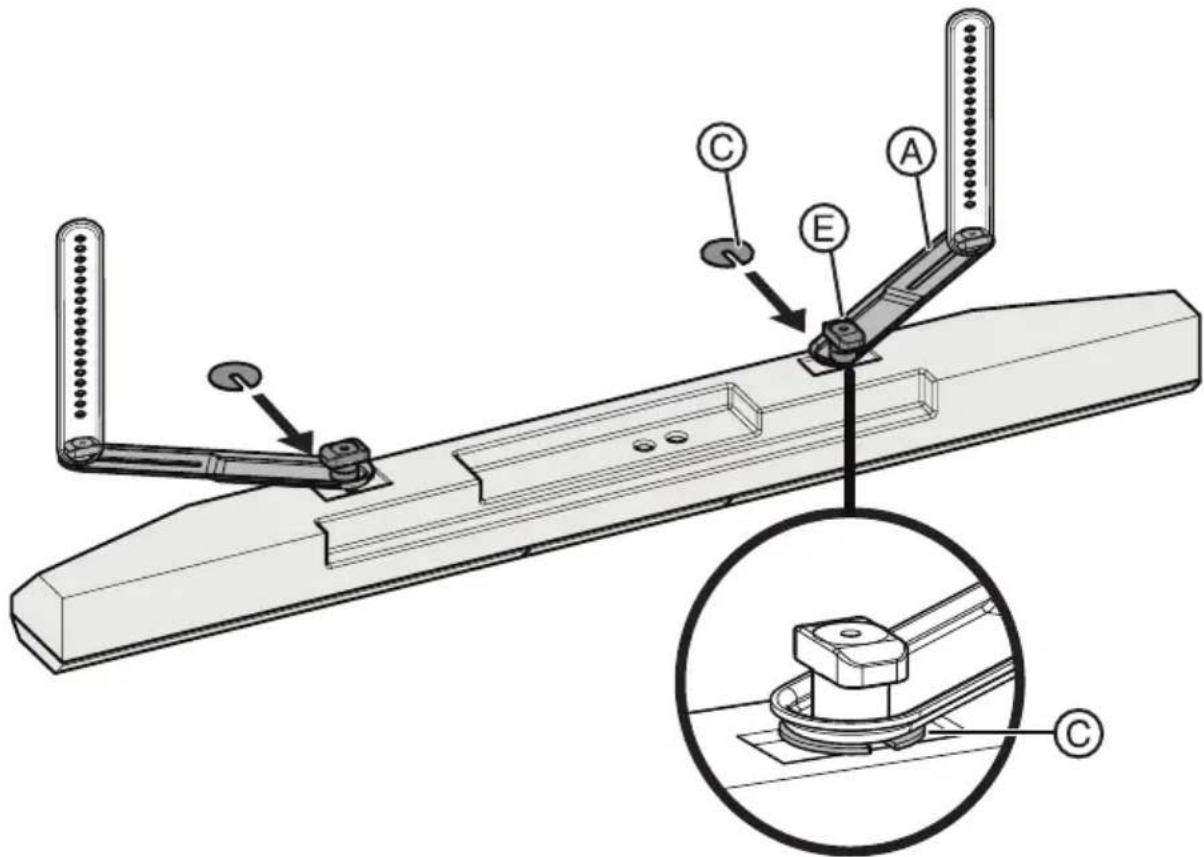
5 Loosely tighten the knobs (E).
STEP 1: Option 2 - Mount the bracket arms to a hanger
You'll need

natural_image
Line drawing of three L-shaped metal pens with holes, no text or symbols presentA Soundbar bracket assembly (2)

D Keyhole screws (2)

E Knob (2)

Phillips screwdriver
Some soundbars come with a manufacturer supplied hanger (for example Samsung).
1 Check the compatibility of the soundbar bracket with your soundbar.
2 Insert the keyhole screws (D) into the knobs (E).
3 Attach the soundbar bracket assembly (A) to the soundbar hanger with the assembled knob/keyhole screws. Do not fully tighten knobs.

STEP 2 - Preparing your TV (go to Step 3 if your TV is not already mounted on the wall).
CAUTION: Refer to your TV wall mount assembly instructions for how to properly remove your TV from the brackets.
You'll need

Phillips screwdriver
1 Remove all cables attached to your TV.

natural_image
Technical line drawing of a mechanical assembly inside a rectangular frame (no text or symbols)2 Remove your TV from the wall.
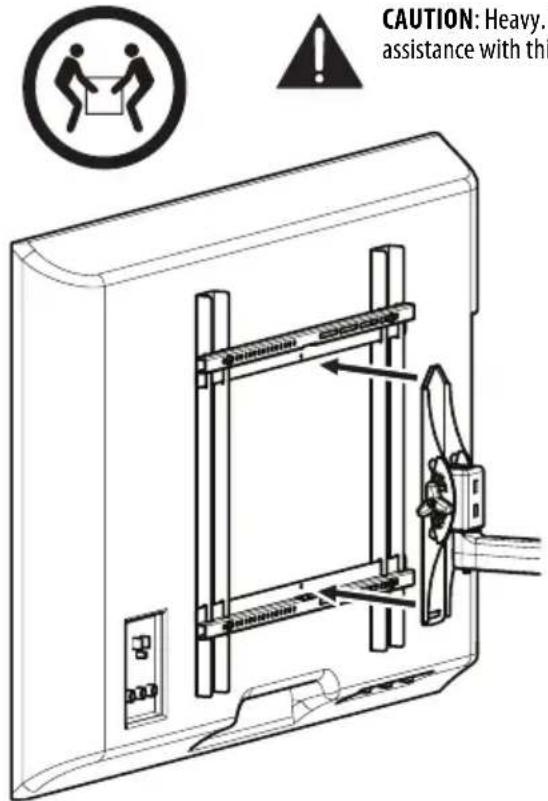
3 Remove the existing wall mount bracket from the back of your TV.

natural_image
Technical line drawing of a mechanical assembly with mounting holes and a control panel (no text or symbols)- Save the existing screws and washers in case you want to use the TV without the soundbar in the future.
- You MUST use the screws and washers provided with the soundbar mount instead of the screws and washers that came with your existing wall mount.
STEP 3 - Determine whether your TV has a flat back or an irregular or obstructed back
You'll need

natural_image
Isometric line drawing of a rectangular frame with vertical supports (no text or symbols)TV wall mount bracket
1 Carefully place your TV screen face-down on a cushioned, clean surface to protect the screen from damages and scratches.
2 If your TV has a table-top stand attached, remove the stand. See the documentation that came with your TV for instructions.
3 Temporarily lay your existing TV wall mount brackets (not included) on the back of your TV.
4 Align the screw holes in your existing TV wall mount brackets with the mounting screw holes on your TV.
5 Identify which type of back your TV may have:
- Flat back: The brackets lay flush against the back of your TV and do not block any jacks. You do not need spacers when assembling the wall mount.

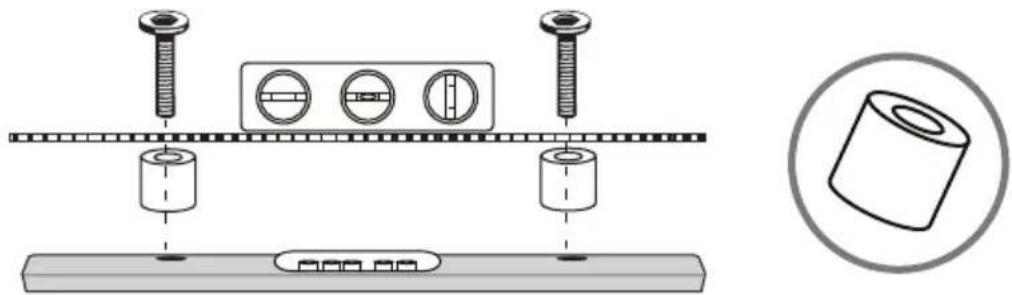
- Obstructed back: A bracket blocks any of the jacks on the back of your TV. You will need spacers when assembling the wall mount.
natural_image
Technical diagram showing bolt installation and assembly process with a magnified inset of a cylindrical component (no text or symbols)- Irregularly-shaped back: There is a gap between a bracket and some part of the back of your TV. You will need spacers when assembling the wall mount.

natural_image
Technical illustration showing screw fasteners and a 3D cylinder assembly (no text or symbols)6 Remove the TV brackets.
STEP 4 - Select screws, washers, and spacers
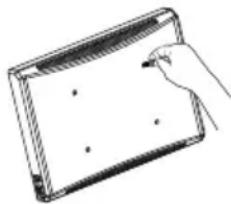
1 Select the hardware necessary for your TV (screws, washers, and spacers). A limited number of TVs come with mounting hardware included. (If there are screws that came with the TV, they are almost always in the holes on the back of the TV.) If you don't know the correct length and diameter of the mounting screws your TV requires, test various sizes by hand threading the screws.
Select one of the following types of screws:
| M4 × 16 mm screws (I) | M6 × 25 mm screws (L) |
| M4 × 40 mm screws (P) | M6 × 40 mm screws (R) |
| M5 × 16 mm screws (J) | M6 × 50 mm screws (S) |
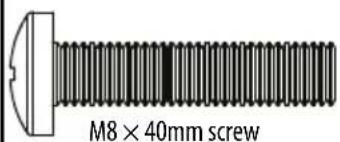
| M5 × 40 mm screws (Q) | M8 × 40 mm screws (T) |
| M6 × 16 mm screws (K) |
Select one of the following types of washers:
M4/M5 washers (G)
M6/M8 washers (H)
M4/M5 washers large (GG)
M6/M8 washers large (HH)
For an irregular or obstructed TV back, use the spacers (N) provided.
CAUTION: To avoid potential personal injuries and property damage, make sure that there are adequate threads to secure the brackets to your TV. If you encounter resistance, stop immediately and contact customer service. Use the shortest screw and spacer combination to accommodate your TV. Using hardware that is too long may damage your TV. However, using a screw that is too short may cause your TV to fall from the mount.
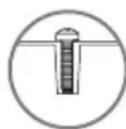

Screw fits correctly
natural_image
Line drawing of a hand holding a blank document or tablet device (no text or symbols visible)
Screw is too long

Screw is too short
2 Remove the screws.
3 For a flat back TV, go to STEP 5 - Option 1: Attaching the mounting hardware to TVs with a flat back on page 16.
-OR-
For an irregular or obstructed back, go to STEP 5 - Option 2: Attaching the mounting hardware to TVs with irregular or obstructed backs on page 18.
STEP 5 - Option 1: Attaching the mounting hardware to TVs with a flat back
You'll need
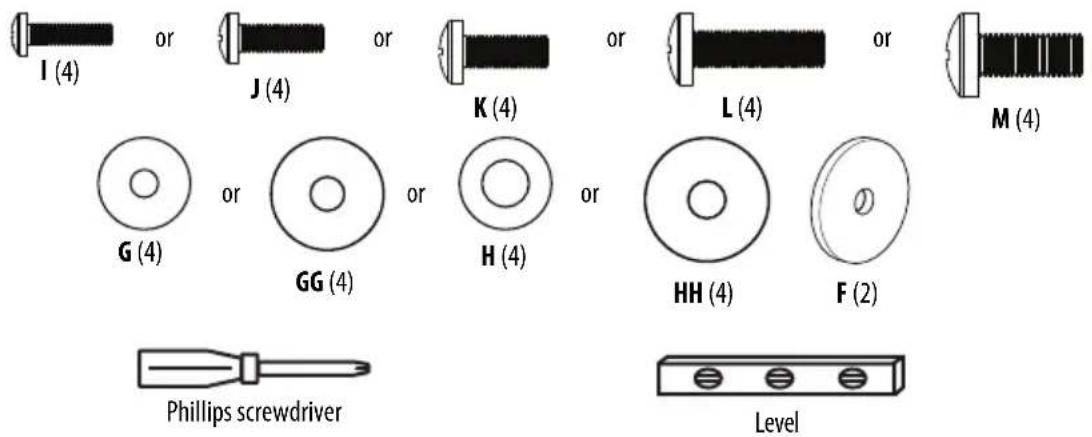
1 Place the mount spacers (F) over the top two screw holes on the back of the TV.
2 Place the soundbar bracket assembly (A) over the bottom two screw holes on the back of the TV. To make sure the arms are not visible when on the wall, align the arms so they reach the bottom or corners of the TV, but do not over hang the edges.
3 Align your existing TV wall mount brackets with the screw holes on the back of the TV.
4 Install screws (I, J, K, L, or M) and washers (G, GG, H, or HH) through the top two holes in the wall mount bracket. The TV brackets should be level on the back of the TV. Do not tighten.
5 Install screws (I, J, K, L or M) and washers (G, GG, H, or HH) through the bottom two holes in the wall mount bracket.
6 Tighten all screws, but do not over-tighten.
CAUTION: Refer to your TV wall mount assembly instructions for how to properly remove your TV from the brackets.
Note: Your existing TV wall mount may vary from the one shown below. Refer to the instructions that came with your existing TV wall mount for attaching brackets to the back of the TV. However, you MUST use the screws and washers provided with the soundbar mount instead of the screws and washers that came with your existing wall mount.
WARNING: You must use the larger washers (GG or HH) unless they do not fit your TV bracket.

Note: The soundbar or hanger must be mounted below your TV. Soundbar hanger shown here.
STEP 5 - Option 2: Attaching the mounting hardware to TVs with irregular or obstructed backs
You'll need
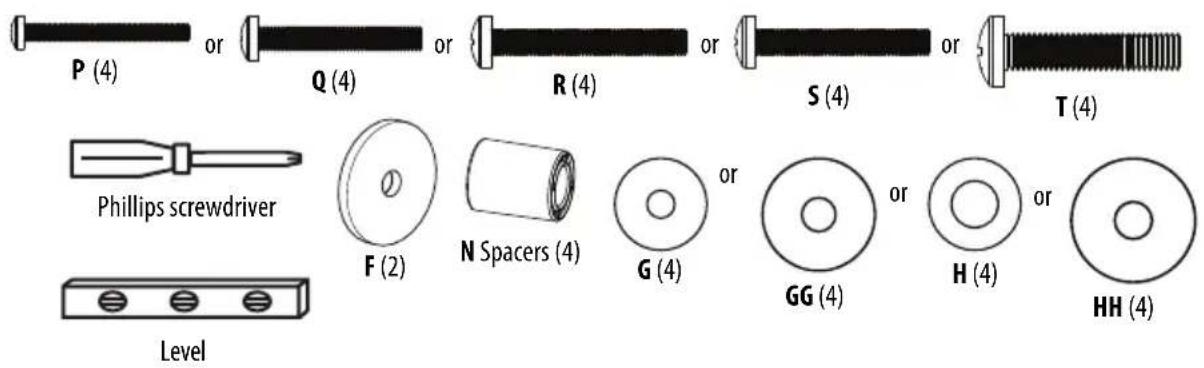
1 Place the spacers (N) and mount spacers (F) over the top two screw holes on the back of the TV.
2 Place the spacers (N) and the soundbar bracket assembly (A) over the bottom two screw holes on the back of the TV. To make sure the arms are not visible when on the wall, align the arms so they reach the bottom or corners of the TV, but do not over hang the edges.
3 Align your existing TV wall mount bracket with the screw holes on the back of the TV.
4 Install screws (P, Q, R, S, or T) and washers (G, GG, H, or HH) through the top two holes in the wall mount bracket. The TV brackets should be level on the back of the TV. Do not tighten.
5 Install screws (P, Q, R, S, or T) and washers (G, GG, H, or HH) through the bottom two holes in the wall mount bracket.
6 Tighten all screws, but do not over-tighten.
Note: Your existing TV wall mount may vary from the one shown below. Refer to the instructions that came with you existing TV wall mount for attaching brackets to the back of the TV. However, you MUST use the screws and washers with the soundbar mount instead of the screws and washers that came with your existing wall mount.
WARNING: You must use the larger washers (GG or HH) unless they do not fit your TV bracket.

Note: The soundbar or hanger must be mounted below your TV. Soundbar hanger shown here.
STEP 6 - Final adjustments, tightening, and hanging the TV
You'll need

Phillips screwdriver

3/16 in. Hex key
1 Adjust the soundbar bracket assembly (A) until the soundbar is in the position you want.
Note: The soundbar must be positioned within 2 inches (5.1 cm) of the TV.
Without a manufacturer supplied bracket

CAUTION: Heavy. You may need assistance with this step.

natural_image
Technical line drawing of a mechanical assembly with rotating arms and mounting brackets (no text or symbols)2 in. (5.1 cm)
OR
Without a manufacturer supplied bracket
Attaching the soundbar using the manufacturer's supplied bracket.

natural_image
Technical line drawing of a mechanical linkage assembly (no text or symbols present)Note: The TV/bracket arms should be positioned as vertically as possible.

natural_image
Diagram of a mechanical assembly with two vertical supports and a circular cross-section, no text or symbols present.
natural_image
Simple line drawing of a mechanical frame with a circular outline and a checkmark (no text or symbols)
natural_image
Technical diagram of a mechanical assembly with a cross symbol indicating a defect or failure (no text or labels present)2 When the soundbar is in the correct position, tighten all fasteners. Do not overtighten the screws.
Note: Tighten the upper four connectors with the screwdriver and the bracket connectors with the 3/16 in. hex key. The soundbar knobs should be hand tightened.
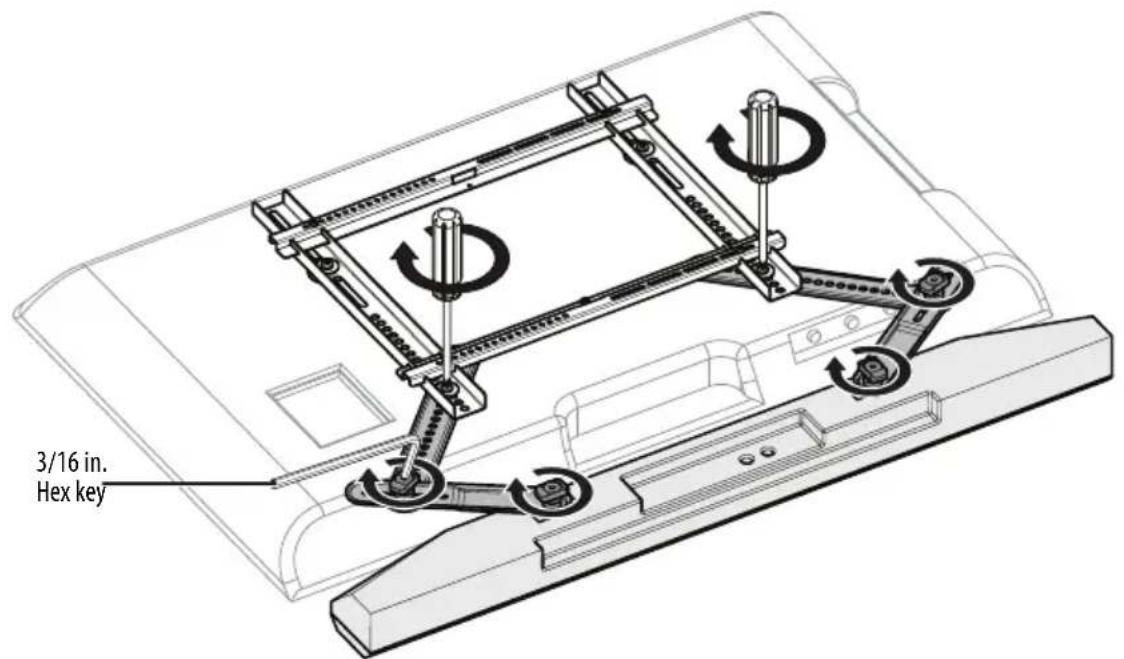
3 Hang the TV/soundbar assembly on the wall, following the instructions that came with your existing TV wall mount, then reconnect the cables and power cord.
CAUTION: Heavy. You may need assistance with this step.
For customer service, call: 1-866-597-8427 (U.S./Canada markets).
Specifications
| Overall dimensions (H × W × D): 11.9 × | 1.75 × 1.0 in. (30.2 × 4.4 × 2.5 cm) |
| Soundbar mount weight 1.74 lbs. (.79 kg) | |
| Maximum soundbar weight 15 lbs. (6.8 kg) | |
ONE-YEAR LIMITED WARRANTY
Definitions:
The Distributor* of Best Buy essentials branded products warrants to you, the original purchaser of this new Best Buy essentials-branded product ("Product"), that the Product shall be free of defects in the original manufacturer of the material or workmanship for a period of one (1) year from the date of your purchase of the Product ("Warranty Period").
For this warranty to apply, your Product must be purchased in the United States or Canada from a Best Buy branded retail store or online at www.bestbuy.com or www.bestbuy.ca and is packaged with this warranty statement.
How long does the coverage last?
The Warranty Period lasts for 1 year (365 days) from the date you purchased the Product. Your purchase date is printed on the receipt you received with the Product.
What does this warranty cover?
During the Warranty Period, if the original manufacture of the material or workmanship of the Product is determined to be defective by an authorized Best Buy essentials repair center or store personnel, Best Buy essentials will (at its sole option): (1) repair the Product with new or rebuilt parts; or (2) replace the Product at no charge with new or rebuilt comparable products or parts. Products and parts replaced under this warranty become the property of Best Buy essentials and are not returned to you. If service of Products or parts are required after the Warranty Period expires, you must pay all labor and parts charges. This warranty lasts as long as you own your Best Buy essentials Product during the Warranty Period. Warranty coverage terminates if you sell or otherwise transfer the Product.
How to obtain warranty service?
If you purchased the Product at a Best Buy retail store location or from a Best Buy online website (www.bestbuy.com or www.bestbuy.ca), please take your original receipt and the Product to any Best Buy store. Make sure that you place the Product in its original packaging or packaging that provides the same amount of protection as the original packaging.
To obtain warranty service, in the United States and Canada call 1-866-597-8427. Call agents may diagnose and correct the issue over the phone.
Where is the warranty valid?
This warranty is valid only in the United States and Canada at Best Buy branded retail stores or websites to the original purchaser of the product in the country where the original purchase was made.
What does the warranty not cover?
This warranty does not cover:
- Customer instruction/education
• Installation - Setup adjustments
- Cosmetic damage
• Damage due to weather, lightning, and other acts of God, such as power surges
• Accidental damage - Misuse
- Abuse
• Negligence
- Commercial purposes/use, including but not limited to use in a place of business or in communal areas of a multiple dwelling condominium or apartment complex, or otherwise used in a place of other than a private home.
- Modification of any part of the Product, including the antenna
- Display panel damaged by static (non-moving) images applied for lengthy periods (burn-in).
- Damage due to incorrect operation or maintenance
- Connection to an incorrect voltage or power supply
- Attempted repair by any person not authorized by Best Buy essentials to service the Product
- Products sold "as is" or "with all faults"
- Consumable s, including but not limited to batteries (i.e. AA, AAA, C etc.)
- Products where the factory applied serial number has been altered or removed
- Loss or Theft of this product or any part of the product
- Display panels containing up to three (3) pixel failures (dots that are dark or incorrectly illuminated) grouped in an area smaller than one tenth (1/10) of the display size or up to five (5) pixel failures throughout the display. (Pixel based displays may contain a limited number of pixels that may not function normally.)
- Failures or Damage caused by any contact including but not limited to liquids, gels or pastes.
REPAIR REPLACEMENT AS PROVIDED UNDER THIS WARRANTY IS YOUR EXCLUSIVE REMEDY FOR BREACH OF WARRANTY. BEST BUY ESSENTIALS SHALL NOT BE LIABLE FOR ANY INCIDENTAL OR CONSEQUENTIAL DAMAGES FOR THE BREACH OF ANY EXPRESS OR IMPLIED WARRANTY ON THIS PRODUCT, INCLUDING, BUT NOT LIMITED TO, LOST DATA, LOSS OF USE OF YOUR PRODUCT, LOST BUSINESS OR LOST PROFITS. BEST BUY ESSENTIALS PRODUCTS MAKES NO OTHER EXPRESS WARRANTIES WITH RESPECT TO THE PRODUCT, ALL EXPRESS AND IMPLIED WARRANTIES FOR THE PRODUCT, INCLUDING BUT NOT LIMITED TO ANY IMPLIED WARRANTIES OF AND CONDITIONS OF MERCHANTABILITY AND FITNESS FOR A PARTICULAR PURPOSE, ARE LIMITED IN DURATION TO THE WARRANTY PERIOD SET FORTH ABOVE AND NO WARRANTIES, WHETHER EXPRESS OR IMPLIED, WILL APPLY AFTER THE WARRANTY PERIOD. SOME STATES, PROVINCES AND JURISDICTIONS DO NOT ALLOW LIMITATIONS ON HOW LONG AN IMPLIED WARRANTY LASTS, SO THE ABOVE LIMITATION MAY NOT APPLY TO YOU. THIS WARRANTY GIVES YOU SPECIFIC LEGAL RIGHTS, AND YOU MAY ALSO HAVE OTHER RIGHTS, WHICH VARY FROM STATE TO STATE OR PROVINCE TO PROVINCE.
Contact Best Buy essentials:
1-866-597-8427
www.bestbuy.com/bestbuyessentials
BEST BUY essentials is a trademark of Best Buy and its affiliated companies.
* Distributed by Best Buy Purchasing, LLC
7601 Penn Ave South, Richfield, MN 55423 U.S.A.
©2021 Best Buy. All rights reserved.
ESPAÑOL
Índice
natural_image
Mechanical assembly diagram showing a wheel mounted on a bracket with no visible text or symbolsFigura 1

Figura 2
Características
natural_image
Isometric line drawing of a rectangular frame with vertical supports and horizontal bars (no text or symbols)natural_image
Line drawing of two folded metal tools with evenly spaced pins (no text or symbols)natural_image
Illustration of three cylindrical mechanical components with threaded ends and a central slot (no text or symbols)natural_image
Illustration of three rolled-up paper strips with different edge patterns (no text or symbols)natural_image
Technical line drawing of a mechanical assembly with no visible text or symbols2 Retire su televisor de la pared.

natural_image
Technical line drawing of a mechanical assembly with mounting holes and a control panel (no text or symbols)natural_image
Isometric line drawing of a rectangular frame with vertical supports (no text or symbols)natural_image
Technical diagram showing bolt installation and a no-reinforced cylindrical component (no text or symbols)natural_image
Technical diagram showing assembly of screw and cylindrical components with a magnified inset of a cylindrical part (no text or symbols)natural_image
Technical diagram showing a screw assembly with three circular components and a separate 3D cylinder (no text or symbols)natural_image
Line drawing of a hand holding a blank rectangular object (no text or symbols)natural_image
Technical line drawing of a mechanical assembly with rotating components and directional arrows (no text or symbols)2 pulg. (5.1 cm)
0
natural_image
Technical line drawing of a mechanical linkage assembly (no text or symbols)natural_image
Diagram of a mechanical assembly with two vertical rods and a checkmark (no text or symbols)
natural_image
Simple line drawing of a mechanical frame with two supports and a checkmark (no text or symbols)
natural_image
Technical diagram of a mechanical assembly with a circular cross symbol (no text or labels)www.bestbuy.com/bestbuyessentials
BEST BUY essentials™
Part Number: 6907-302051
For product inquiries, please contact us with the information below:
1-866-597-8427
www.bestbuy.com/bestbuyessentials
BEST BUY essentials is a trademark of Best Buy and its affiliated companies.
Distributed by Best Buy Purchasing, LLC
7601 Penn Ave South, Richfield, MN 55423 U.S.A.
©2021 Best Buy. All rights reserved.
www.bestbuy.com/bestbuyessentials


- Adjustable Rear-Mounted Soundbar Bracket for Wall Mounted TVs/
- BEST BUY essentials™
- Contents
- ENGLISH
- Safety information and specifications
- IMPORTANT SAFETY INSTRUCTIONS
- SAVE THESE INSTRUCTIONS
- Before You Begin
- Features
- What you need
- Package contents: parts
- Package contents: hardware
- Hardware bag (continued)
- Installation instructions
- STEP 1: Option 1 - Mount the bracket arms to the soundbar
- You'll need
- STEP 1: Option 2 - Mount the bracket arms to a hanger
- STEP 2 - Preparing your TV (go to Step 3 if your TV is not already mounted on the wall).
- STEP 3 - Determine whether your TV has a flat back or an irregular or obstructed back
- STEP 4 - Select screws, washers, and spacers
- STEP 5 - Option 1: Attaching the mounting hardware to TVs with a flat back
- STEP 5 - Option 2: Attaching the mounting hardware to TVs with irregular or obstructed backs
- STEP 6 - Final adjustments, tightening, and hanging the TV
- Without a manufacturer supplied bracket
- Specifications
- ONE-YEAR LIMITED WARRANTY
- Definitions:
- How long does the coverage last?
- What does this warranty cover?
- How to obtain warranty service?
- Where is the warranty valid?
- What does the warranty not cover?
- 1-866-597-8427
- ESPAÑOL
- Índice
- Características
Brand : Best Buy
Model : BE-SBM112
Category : Speaker Stand