SPK-QC002 - Radio Laser - Free user manual and instructions
Find the device manual for free SPK-QC002 Laser in PDF.


User questions about SPK-QC002 Laser
0 question about this device. Answer the ones you know or ask your own.
Ask a new question about this device
Download the instructions for your Radio in PDF format for free! Find your manual SPK-QC002 - Laser and take your electronic device back in hand. On this page are published all the documents necessary for the use of your device. SPK-QC002 by Laser.
USER MANUAL SPK-QC002 Laser
Qi Wireless Charging Alarm Clock Bluetooth Speaker SPK-QC002
User Manual
Product Feature
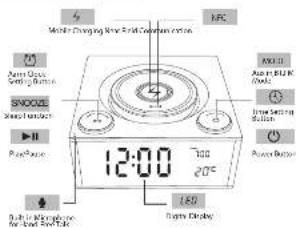
text_image
SNOOZE PowerButton 12:00 700 20°C LED Power Button Power Switch Button Power Clock SNOOZE SNOOZE SNOOZE SNOOZE SNOOZE SNOOZE SNOOZE SNOOZE SNOOZE SNOOZE SNOOZE SNOOZE SNOOZE SNOOZE SNOOZE SNOOZE SNOOZE SNOOZE SNOOZE SNOOZE SNOOZ SNOOZ SNOOZ SNOOZ SNOOZ SNOOZ SNOOZ SNOOZ SNOOZ SNOOZ SNOOZ SNOOZ SNOOZ SNOOZ SNOOZ SNOOZ SNOOZ SNOOZ SNOOZ SNOOZ SNOO2 SNOO2 SNOO2 SNOO2 SNOO2 SNOO2 SNOO2 SNOO2 SNOO2 SNOO2 SNOO2 SNOO2 SNOO2 SNOO2 SNOO2 SNOO2 SNOO2 SNOO2 SNOO2 SNOO2 SNOO3 SNOO3 SNOO3 SNOO3 SNOO3 SNOO3 SNOO3 SNOO3 SNOO3 SNOO3 SNOO3 SNOO3 SNOO3 SNOO3 SNOO3 SNOO3 SNOO3 SNOO3 SNOO3 SNOO3 SNOO4 SNOO4 SNOO4 SNOO4 SNOO4 SNOO4 SNOO4 SNOO4 SNOO4 SNOO4 SNOO4 SNOO4 SNOO4 SNOO4 SNOO4 SNOO4 SNOO4 SNOO4 SNOO5 SNOO5 SNOO5 SNOO5 SNOO5 SNOO5 SNOO5 SNOO5 SNOO5 SNOO5 SNOO5 SNOO5 SNOO5 SNOO5 SNOO5 SNOO5 SNOO5 SNOO5 SNEE 12:00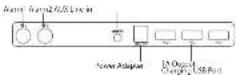
Set Time (At standby Model)
- Tap the MODE/Time to make the hour blink.
Clockwise or anticlockwise turn MODE/Time to set the hour. - Short press MODE/Time again to make the minute blink
Clockwise or anticlockwise turn MODE/Time to set the
Minute. - Short press again MODE Time of Wall: 15 seconds then. Setting have finished.
Setting have finished.
2 Hour/24 Hour Mode
While in current time display, Long press Alarm1 and Alarm 2 at the same time to switch from 12 hour mode to 24 hour mode.
Set Alarm (At standby Model)
- Short press the Alarm/SNOOZE button. The ALARM ↑ icon
will show in the top right corner. The hour begin blink and turn
Mode/Time button for hour setting. Same operation to set
minute. Turn Mode/Time button for alarm sounds choice
(FM/FU1/FU2/FU3) after finished setting alarm. Tap Alarm/Squeeze
to finish and move to Alarm 2.
-
Same operation for Alarm 2 setting.
-
Long press alarm 1 or alarm 2 for turn on/off alarm,
2
Temperature Unit
To switch the temperature unit from Celsius to Fahrenheit, short press alarm1 and alarm2 at the same time.
Snooze
- Short Press the Alarm/Snoze button to snooze for 9 minutes
when alarming, sponge Z iron would be blink in the top right
corner. Long Press the Alarm/Squeeze button to cancel the
SNODZE function
- When the alarm sounds, short press/turn Mode/lime to turn off alarm.
on all
Bluetooth Mode
- Long Press MODE/Time button to power on. And enter the
bluetooth mode & BT indicator light will be blink on the LED
display. Meanwhile the blue Leo light of bottom will be bright
- Open the Bluetooth of device and search 5PK-QCO02 in the
list of bluetooth for initial pairing. Will sounds little cell when
ALARMSSNOO7E button to pause the music play
answer phone/ hang up phone.
3
Audio AUX Mode
- Short Press the MODE Time from FM Mode eater AUX
Mode. Aux indicator light showing on the LED display.
- Use a 3.5mm audio cable to connect your portable media device to the AUX Jack at back of the speaker.
FM Radio Mode
Short Press the MODE/Time from bluetooth mode enter
FM Radio mode. FM indicator light show on the LED display.
Long press ALARM/SNOOZE button will begin to search
the radio automatically. P01 will be showing on the LED
display when searched the radio. The first radio will play
automatically after all radios has been searched. Turn
left or right of Alarm/Snooze button to choose the radio
Q wireless Charger(Android /iphone)
In standby mode, put the mobile phone for wireless
charging an center upon of speaker. If your mobile phone can
not support wireless charger, will need wireless charger
receiver to completely charging.
NFC
Please open the NFC Function if your device support the
NFC. Then put the device touch the NFC position on upon
of speaker. It will connect the device automatically.
USB charging (5V/3A output)
There are 3 USB ports at the back of the speaker. Simply
connect your portable device using a USB cable to begin
charging.
Build-ins storage music playing (3 songs)
- In standby mode, Long press the Alarm/Squeeze button and
and I will show on the LED display. Turn Mode: Time button
to adjust volume. The audit music will be off automatically
until playing 30 minutes. Short press Alarmy Snooze button
mize off.
- Choose audio Long press the Alarm/Smoke button, long
press again after set audio on the LED display. Some operation to choose audio music
Operation to choose adds music.
Specification
Driver: SW2
Wireless Range: 10 Meters
Frequency Range: 60Hz\~180Hz
USB Charging Port DGSV 3A
Build-in 3 sleep songs and 5 alarm sounds in system
6
^1 ^2 ^3
The Corporation's Company, which is now a new product for the first select company.
The following table is provided in the image. The text 'Name' and 'Date' are part of the table structure, but there is no specific characters or punctuation.
and the year and under the Australian Consumer, award to other rights and proposals of the
The following are a effective use of open lens and the use of upper and lower lenses.
p. Valuation to make product sales, due
[1] A. B. C. D. E. F. G. H. I. J. K. L. M. N. O. P. Q. R. S. T. U. V. W. X. Y. Z. A. B. C. D. E. F. G. H. I. J. K. L. M. N. O. P. Q. R. S. T. U. V. W. X. Y. Z. A. B. C. D. E. F. G. H. I. J. K. L. M. N. O. P. Q. R. S. T. U. V. W. X
The following table provides the information in English:
The following table is provided in the image.
Sua 24: Contact your place of a park. They will invest in the public transport, public or private
the product or the plant's role of research policy.
(1) = _eff / _eff / _eff
The 2016-2017 data is not available for any other information.
La ma (e) il lha(1), La ma (e) alba(2), La ma (e) alba(3), La ma (e) alba(4), La ma (e) alba(5), La ma (e) alba(6), La ma (e) alba(7), La ma (e) alba(8), La ma (e) alba(9), La ma (e) alba(10).
consider the defective product and a copy of eos/wood. Laser will cover the case of the return delivery.
-
-
-
-
-
-
-
-
-
-
-
-
-
-
-
-
-
-
-
-
-
-
-
-
-
-
-
-
-
-
-
-
-
-
-
-
-
-
-
-
-
-
-
-
-
-
-
-
-
-
-
-
-
-
-
-
-
-
-
-
-
-
-
-
-
-
-
-
-
-
-
-
-
-
-
-
-
-
-
-
-
-
-
-
-
-
-
-
-
-
-
-
-
-
-
-
-
- 99.
-
-
-
-
-
-
-
-
-
-
-
-
-
-
-
-
-
-
-
-
-
-
-
-
-
-
-
-
-
-
-
-
-
-
-
-
-
-
-
-
-
-
-
-
-
-
-
-
-
-
-
-
-
-
-
-
-
-
-
-
-
-
-
-
-
-
-
-
-
-
-
-
-
-
-
-
-
-
-
-
-
-
-
-
-
-
-
-
-
-
-
-
-
-
-
-
The following table is a series of numerical data:
The following table is provided in the image. The text 'in the image' is not clearly legible and contains no actual characters or punctuation. Therefore, the correct OCR output must reflect the absence of any specific character in the source image.
VARTENDE YOY PONIONO CINCE NO JAK F
2023 For Further installation or construction of the existing material and Construction for "Aurora"
In the following section, we have been a large number of 1000000 units.
the of concisance and the is a die not important to a target.