ELPMB54 - Video projector EPSON - Free user manual and instructions
Find the device manual for free ELPMB54 EPSON in PDF.


| Type de produit | Lighting Track Mount for Video Projector |
| Marque | Epson |
| Modèle | ELPMB54 |
| Poids du support (unité stopper, plaque, rotation, couvercle) | Environ 0.7 kg (1.5 lb) |
| Capacité de charge maximale | Environ 5.9 kg (13 lb) |
| Couleurs disponibles | Blanc (ELPMB54W) / Noir (ELPMB54B) |
| Types de rails compatibles | Halo (TEK441, TEK442, TEK443), Juno (TEK44FT (BL), TEK44FT (WH)), Global trac tek (TEK44-1, TEK44-2, TEK44-3) |
| Accessoires inclus | Couvercle stopper, entretoises (x10), adaptateur secteur, couvercle d'adaptateur, vis M4x10 mm (10) |
| Installation | Montage sur rail d'éclairage, nécessite au moins deux personnes |
| Sécurité | Utiliser le câble de sécurité fourni ; vérifier régulièrement le serrage des vis |
| Entretien | Vérifier périodiquement le serrage des vis et l'état du support |
| Réparabilité | Pièces de rechange disponibles auprès du fabricant (vis, entretoises) |
| Origine | Fabriqué par SEIKO EPSON CORPORATION |
Frequently Asked Questions - ELPMB54 EPSON
User questions about ELPMB54 EPSON
0 question about this device. Answer the ones you know or ask your own.
Ask a new question about this device
Download the instructions for your Video projector in PDF format for free! Find your manual ELPMB54 - EPSON and take your electronic device back in hand. On this page are published all the documents necessary for the use of your device. ELPMB54 by EPSON.
USER MANUAL ELPMB54 EPSON
natural_image
Technical line drawing of a mechanical device with a cylindrical component and mounting bracket (no text or symbols)
Safety Instructions
This guide explains how to install the projector on a lighting track using the Lighting Track Mount.
Make sure you read this guide carefully to use the installation mounts and the projector safely. Incorrect handling that ignores instructions in this guide could damage this product or could result in personal injury or property damage. Keep this installation guide at hand for future reference.
Regarding how to handle the projector, read the User's Guide and Safety Instructions supplied with your projector and follow the instructions in these documents.
Safety Indications
The documentation and this product use graphical symbols to show how to use this product safely and correctly to prevent injury to customers and others, and damage to property.
The indications and their meaning are as follows. Make sure you understand them properly before reading the guide.
| Symbol Explanation | |
| Warning | This symbol indicates information that, if ignored, could possibly result in personal injury or even death due to incorrect handling. |
| Caution | This symbol indicates information that, if ignored, could possibly result in personal injury or physical damage due to incorrect handling. |
General Information Indications
| Symbols Explanation | |
 | Symbol indicating an action that must not be done |
 | Symbol indicating an action that should be done |
 | Symbol indicating related or useful information |
Precautions on Installing the Projector
 Warning Warning | |
| Installing the projector on a lighting track should only be performed by a professional with the necessary skills and know-how.If installation work is not carried out correctly, the mount or the projector could fall causing injury or accident to occur. | [5546] |
| Follow the instructions in this guide when performing installation work.If the instructions are not followed, the mount or the projector could fall causing injury or accident to occur. |  |
| Installation should be performed by at least two people. Also, make sure you have a secure, stable footing so that you do not drop the mount or the projector. |  |
| Make sure you turn off the lighting track before performing work.If you perform work while the lighting track is turned on, an electric shock could occur. |  |
| Make sure you attach the safety wire supplied with the projector to prevent the mount from falling due to earthquakes or vibrations. |  |
| Do not attach anything to this mount except for a projector from EPSON.Otherwise, the mount may falls and could cause death or personal injury. |  |
| Note the following when handling the power cable. Otherwise, it could cause a fire or electric shock.Do not handle the plug with wet handsDo not use a damaged or modified power cableDo not apply excessive force to the power cableDo not trap the cable between parts of the mount and so on during installation |  |
| When installing, do not pull or apply excessive force to the cable connected to the projector. |  |
| Do not wind cables around the projector or the mount. |  |
| When wiring cables and so on, route the cables so that it avoids the screws and bolts.If the cables come into contact with screws or bolts, it could cause a fire or electric shock to occur. |  |
| Make sure you tighten the screws or bolts completely when installing.If they are not tightened completely, the mount or the projector could fall causing injury or accident to occur. |  |
| Never loosen the screws or bolts after installation.Make sure that you check for any loose screws or bolts on a regular basis, and if any are loose,tighten them completely. If they are not tightened completely, the mount or the projector could fall causing injury or accident to occur. |  |
| When securing the mount, do not use adhesives to prevent the screws from loosening,and do not use lubricants, oils, and so on.If you use adhesives to prevent the screws from loosening, or if you use things such as lubricantsor oils, the mount or the projector case may crack causing an injury or an accident. | [ZYSG] |
| Do not hang from the mount or the projector, and do not place heavy objects on them.Otherwise, the mount or the projector may fall and could cause death or injury. |  |
| Do not apply excessive force to the projector or the mount when installing.Otherwise, the mount or the projector may be damaged and could cause death or injury. | [ZDSK] |
| Do not install in the following situations. Contact your local dealer or Epson Service Call Center.If the product has been dropped or damaged before or during installationIf the mount is abnormal or damaged |  |
Warnings and Cautions on the Installation Locations
 Warning Warning | |
| Only install on lighting tracks that support installation for this mount. Otherwise, the mount or the projector may fall and could cause death or injury. |  |
| Do not attach to the lighting track in the following ways. Otherwise, the lighting track could be damaged. Also, the mount or projector may fall and cause an injury or accident to occur. • Lighting tracks attached to walls, floors, or inclined locations • Lighting tracks attached to un-reinforced ceilings • Lighting tracks that are hung from pipes • Lighting tracks that are built-in to the ceiling |  |
| Do not install or use the projector in locations where it could be exposed to rain or water, such as outdoors, in baths or shower rooms. Otherwise, it could cause a fire or electric shock. |  |
| Do not use the projector in a location subject to combustible or explosive gas. If the inside of the projector gets too hot, it could ignite and cause a fire. |  |
| Do not cover the projector's air intake vent or air exhaust vent. If either of the vents are covered, the projector's internal temperature could rise and cause a fire. |  |

Caution


Using the Product Safely
Safety Instructions .... 1
Safety Indications....1
General Information Indications|....1
Precautions on Installing the Projector.....1
Warnings and Cautions on the Installation
Locations 3
Preparing the Projector
Package Contents.... 5
Mountable Lighting Tracks ....6
Installation Procedure
Preparing the Projector .... 7
Attaching the Mount to the Projector
8
Attaching the Rotating Unit....8
Attaching the Plate Unit....9
Attaching the Projector to the Lighting
Track 11
Attaching the Stopper Unit ..... 11
Attaching the Plate Unit to the Stopper Unit
12
Connecting Cables ....15
Installing the Safety Wire .... 16
Appendix
Specification 18
Figures of Installation Dimensions ..... 18

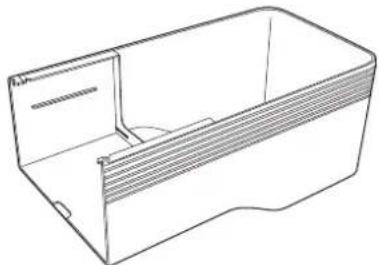
Package Contents
Check that you have all of the following accessories before you start work.
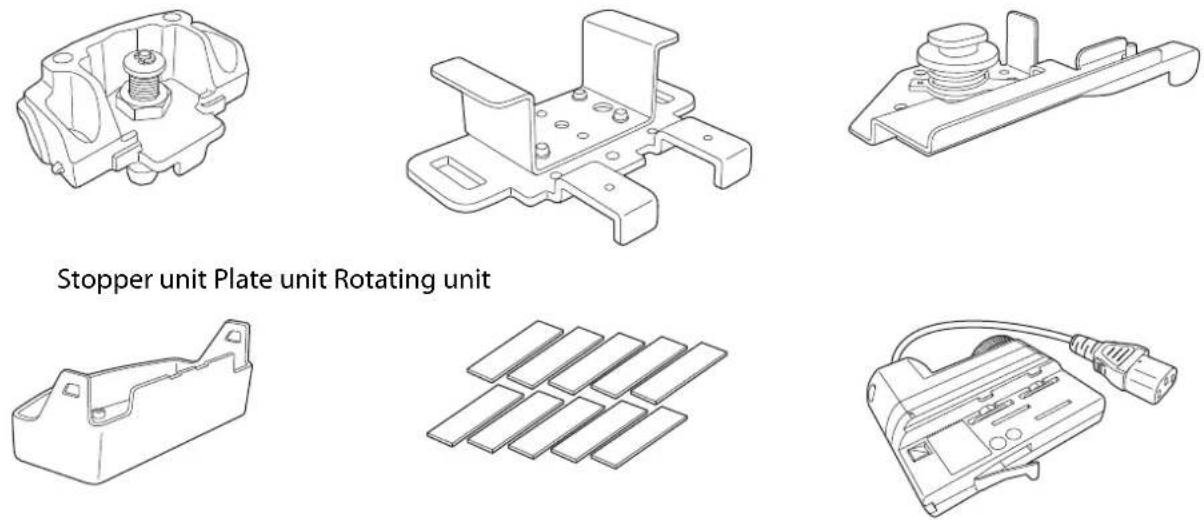
Stopper cover Spacers x10 Power adapter
natural_image
Line drawing of a rectangular box with internal structure and mounting holes (no text or symbols)Power adapter cover
| Shape Name | Quantity | Application |
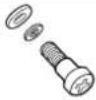 | M4 x 10 mm cross recessed head screw (with washer) | 10 Secures the mount. |
• Make sure you use the bolts or screws supplied with this product to install mounts.
• Gather the tools and parts you need before you begin installation.

Caution
Do not touch the sharp parts with unprotected hands as this could cause an injury.

Mountable Lighting Tracks
Check the model number of the lighting track you want to install on before performing installation. You can attach the mount to the following types of lighting track.
| Manufacturer Model Number | |
| Halo | TEK441TEK442TEK443 |
| Juno | TEK44FT (BL)TEK44FT (WH) |
| Global trac tek | TEK44-1TEK44-2TEK44-3 |

Preparing the Projector
Adjust the orientation of the projector to make installing easier.

Place the projector on a flat surface on a soft cloth.

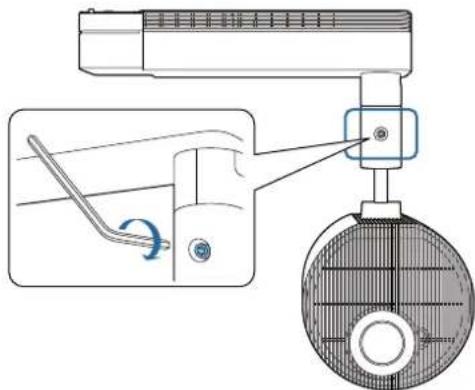
Loosen the screw for the ball joint with a hexagonal wrench supplied with the projector.
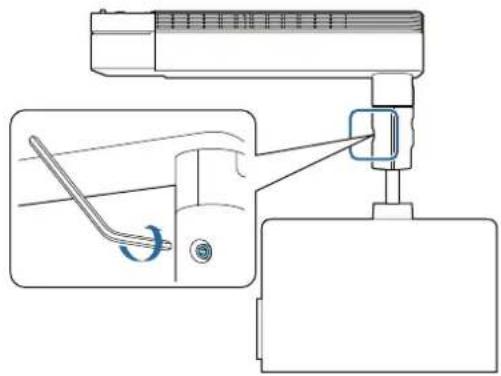

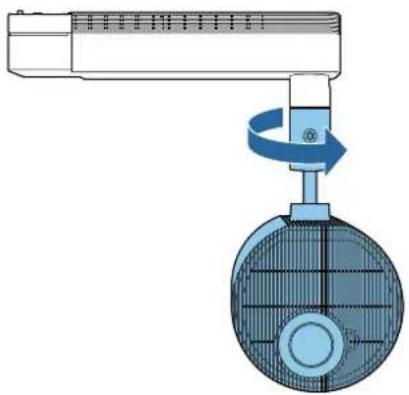
Change the projector's orientation.
You can change the orientation of the projector as shown below.
natural_image
Diagram of a mechanical device with a rotating knob and a circular component, no text or symbols present.
Tighten the screw for the ball joint with a hexagonal wrench to secure it in place.
Make sure you tighten the screw completely so that the ball joint does not move during installation.

Attaching the Mount to the Projector
Attaching the Rotating Unit
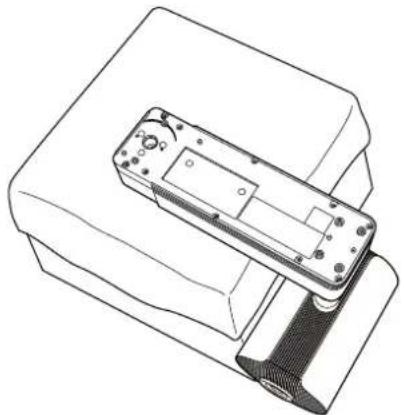
1
Place the projector on your workbench.
Place the projector on a soft cloth on a workbench (330 mm (13 inches) high).
natural_image
Technical line drawing of a mechanical device with a housing and internal components (no text or symbols)2
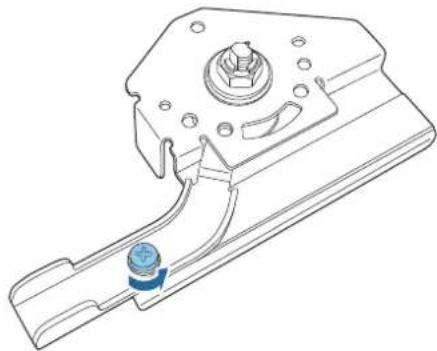
Remove the M4 x 10 mm screw securing the lever of the rotating unit.
natural_image
Technical line drawing of a mechanical component with a blue circular component at the base (no text or symbols)3
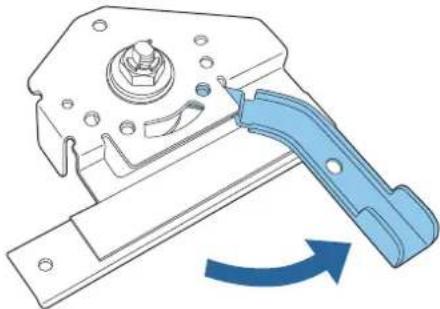
Rotate the lever 90 degrees counterclockwise.
natural_image
Mechanical component diagram showing a lever mechanism with blue motion arrow (no text or symbols)
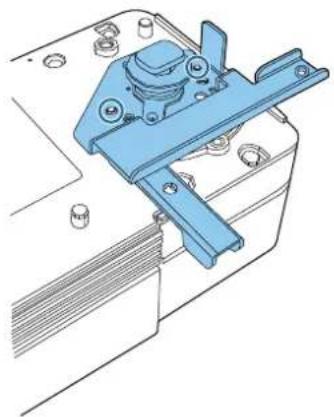
Place the rotating unit on the projector.
Align the pins (2 points) on the projector with the holes on the rotating unit.
natural_image
Technical line drawing of a mechanical clamp or bracket assembly (no text or symbols)
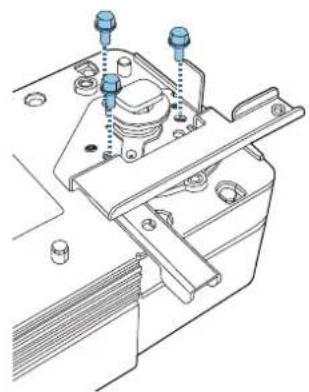
Secure the rotating unit to the projector using the M4 x 10 mm screws supplied (x3).
natural_image
Technical line drawing of a mechanical assembly with bolts and mounting brackets (no text or symbols)Attaching the Plate Unit

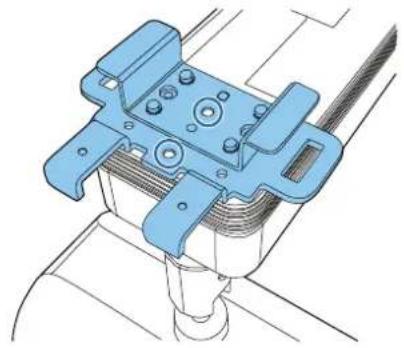
The plate unit includes a support bracket (A) that braces against the ceiling to minimize projector vibration. If your ceiling is not strong enough for direct contact, remove the support bracket.
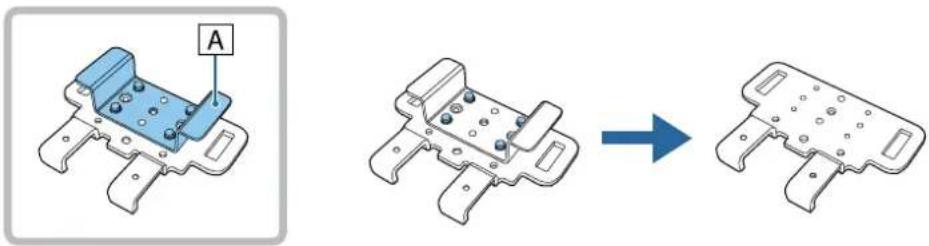

Place the plate unit on the projector.
Align the pins (2 points) on the projector with the holes on the plate unit.
natural_image
Technical line drawing of a mechanical clamp or bracket assembly (no text or symbols)
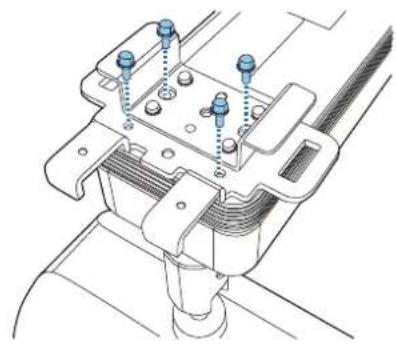
Secure the plate unit to the projector using the M4 x 10 mm screws supplied (x4).
natural_image
Technical line drawing of a mechanical assembly with mounting flanges and bolts (no text or symbols)
Attaching the Projector to the Lighting Track

Warning
- Make sure you turn off the lighting track before performing installation work. Otherwise an electric shock could occur.
- Make sure the lighting track is firmly secured. Otherwise, the mount or projector may fall and cause an injury or accident to occur.
Attaching the Stopper Unit
1
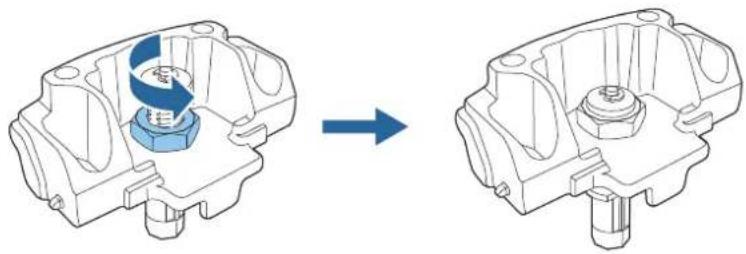
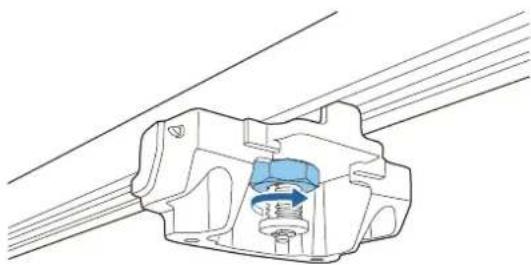
Loosen the nut for the stopper unit.
Loosen until the nut reached the end of the rotating shaft.
natural_image
Mechanical assembly diagram showing a component before and after transformation (no text or labels)2
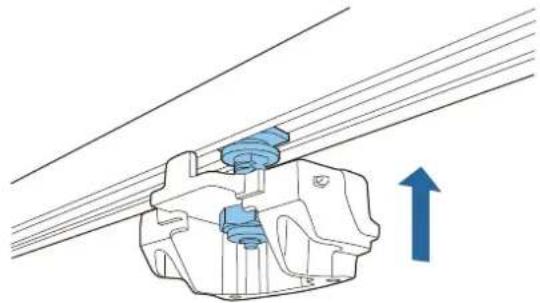
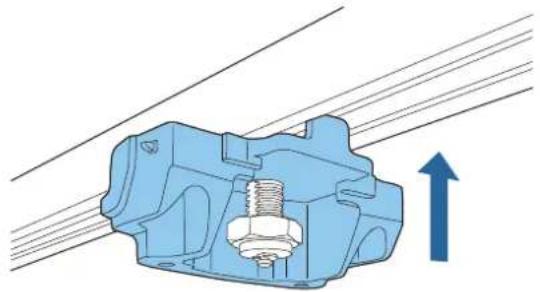
Insert the rotating shaft of the stopper unit into the groove on the lighting track.
Push the rotating shaft up so that the tip of the shaft fits into the duct.
natural_image
Mechanical assembly diagram showing a bracket with blue components and an upward arrow indicating motion (no text or symbols)3
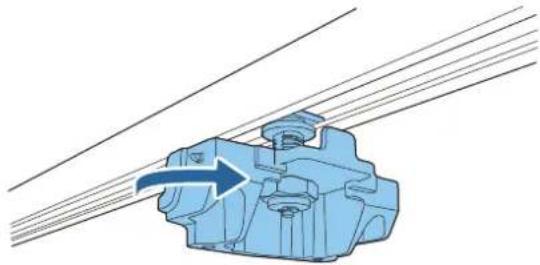
Rotate the stopper unit 90 degrees.
The rotating shaft for the stopper unit fits into the groove on the lighting track.
natural_image
Mechanical component diagram showing a blue housing with a blue arrow indicating direction, connected to parallel lines (no text or symbols)4 Push up the stopper unit to insert the protruding section into the groove on the lighting track.
natural_image
Mechanical component diagram showing a bolted assembly with an upward arrow indicating motion (no text or symbols present)5 Completely tighten the nut for the stopper unit to secure the lighting track and the stopper unit.
natural_image
Technical line drawing of a mechanical component with internal blue housing and mounting holes (no text or symbols)Attaching the Plate Unit to the Stopper Unit
1 Attach the hook on the plate unit to the stopper unit.
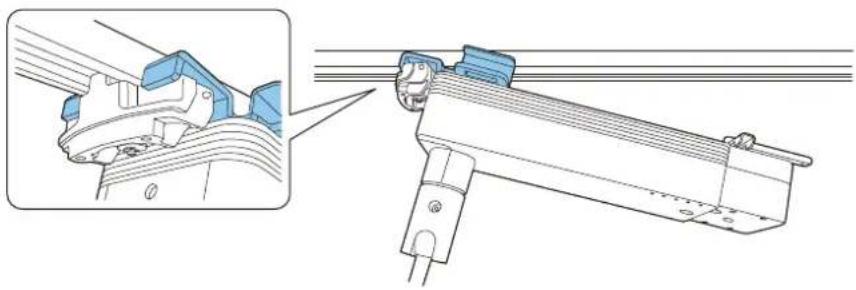
natural_image
Technical illustration of a mechanical assembly with a close-up inset showing a component detail (no text or symbols present)
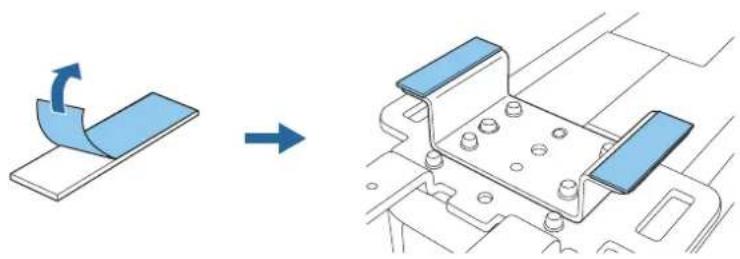
If there is a gap between the ceiling and the support mount, attach the spacer supplied to the support bracket. If the gap is wide, insert multiple spacers.
natural_image
Diagram showing a blue panel being rotated to form a mechanical bracket (no text or symbols present)2
Insert the protruding section on the rotating unit into the groove on the lighting track.

natural_image
Mechanical assembly diagram showing a bracket with mounting holes and a close-up of the component (no text or symbols)3
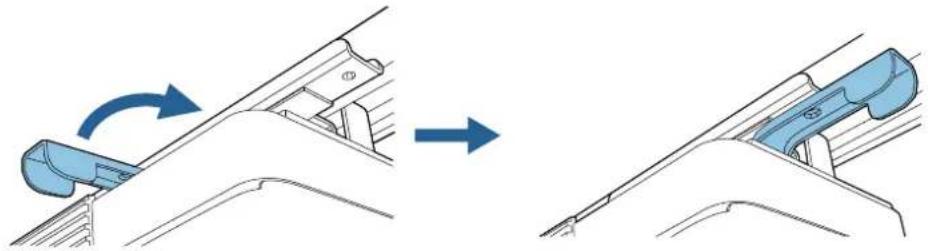
Rotate the lever of the rotating unit 90 degrees clockwise.
Rotate so that the screw hole positions overlap as shown in the following image.
natural_image
Diagram showing a blue mechanical component being adjusted to form a larger component, with no visible text or symbols.4
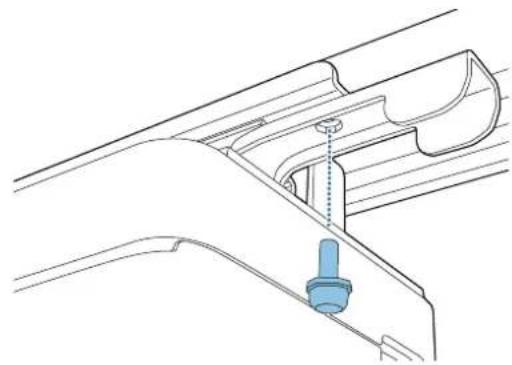
Secure the lever for the rotating unit with the M4 x 10 mm screw (x1).
Secure using the screw removed in step 2 from "Attaching the Rotating Unit" p.8.
natural_image
Technical line drawing of a mechanical component with a blue cylindrical pin inserted into a housing (no text or symbols)5
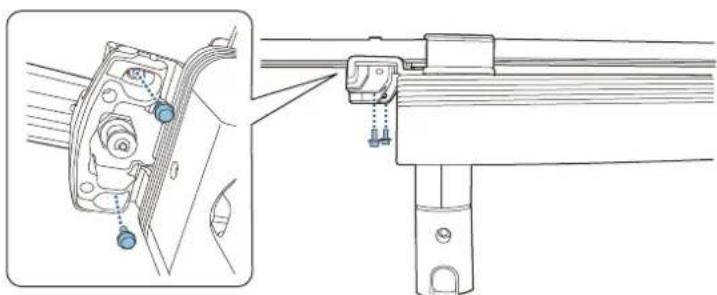
Secure the plate unit to the stopper unit using the M4 x 10 mm screws supplied (x2).
natural_image
Technical line drawing of a mechanical assembly with mounting bracket and railings (no text or symbols)
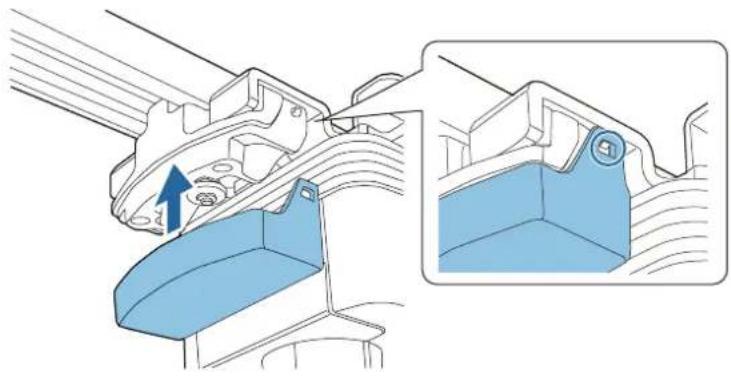
Attach the stopper cover to the stopper unit.
Press in the stopper unit tabs until they snap into the stopper cover.
natural_image
Technical illustration of a mechanical component with a blue highlighted section showing a 3D view (no text or symbols present)
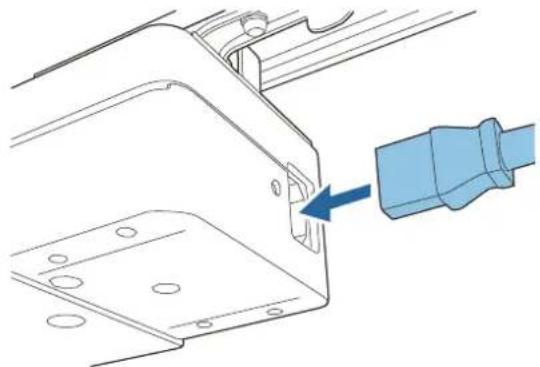
Connecting Cables
Connect the power adapter supplied to the projector's power inlet.
natural_image
Technical diagram showing a mechanical component with a blue arrow pointing to a small component (no text or symbols present)2 Connect the power adapter to the lighting track.
2 Connect the necessary cables and the SD card to the projector's interface.
Check the Projector's User's Guide for information on the connection ports.
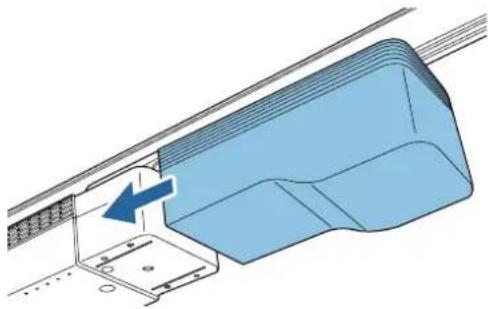
Attach the power adapter cover supplied with the mount to the projector.
natural_image
3D diagram of a blue structural component with an arrow indicating direction, no text or symbols present
Caution
Do not use the power adapter cover supplied with the projector.

Installing the Safety Wire
Install the safety wire supplied to the projector to prevent the projector from falling.

Caution
Attach the wire firmly so that it cannot come loose.
1
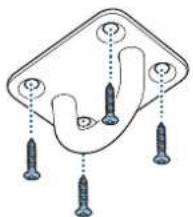
Attach the wire hook mount supplied with the projector to the ceiling.
natural_image
Diagram of a hand holding three screws, with no text or symbols present
- When installing the wire hook mount, use commercially available wood screws with a nominal diameter of 3.8 mm (0.15 inch).
- Make sure that the wood screws enter at least 20 mm (0.8 inch) into the ceiling's underlay.
2
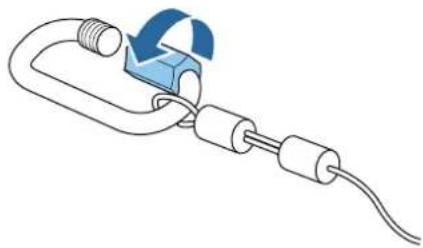
Loosen the carabiner for the safety wire supplied with the projector.
natural_image
Diagram of a mechanical clamp or connector with a blue circular arrow indicating rotation (no text or symbols)3
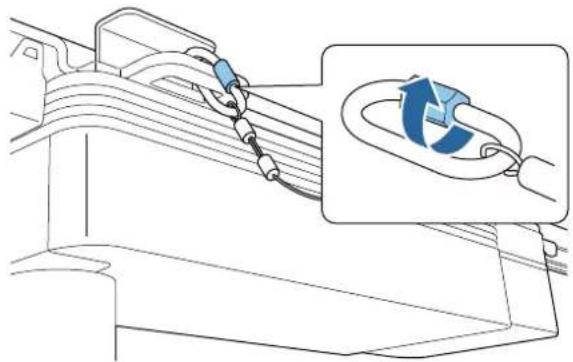
Insert the loosened carabiner through the hole in the plate unit, and then tighten it.
natural_image
Diagram showing cable installation with a magnified inset illustrating the cable's rotation (no text or symbols present)
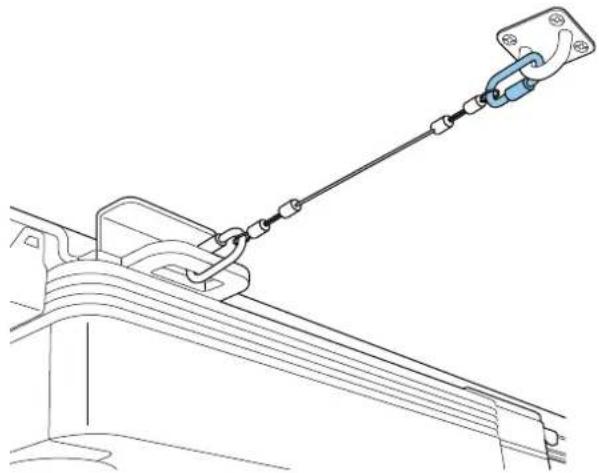
Attach the carabiner for the safety wire to the wire hook mount attached to the ceiling.
natural_image
Technical line drawing of a mechanical lifting or suspension system with a hanging clamp (no text or symbols)
Specification
| Item Specification | |
| Weight (stopper unit, plate unit, rotating unit, stopper cover) | Approx. 0.7 kg (1.5 lb) |
| Maximum load capacity Approx. 5.9 kg (13 lb) | |
| Exterior color ELPMB54W: White | ELPMB54B: Black |
Figures of Installation Dimensions
The following provides the dimensions for the EV-100/105.
[Unit: mm/inches]
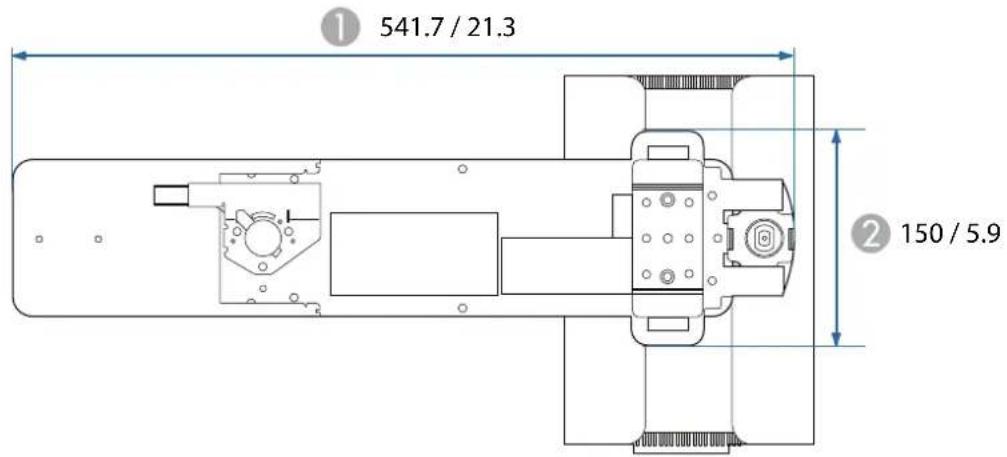
1 Width of top of projector
2 Vertical width of top of projector
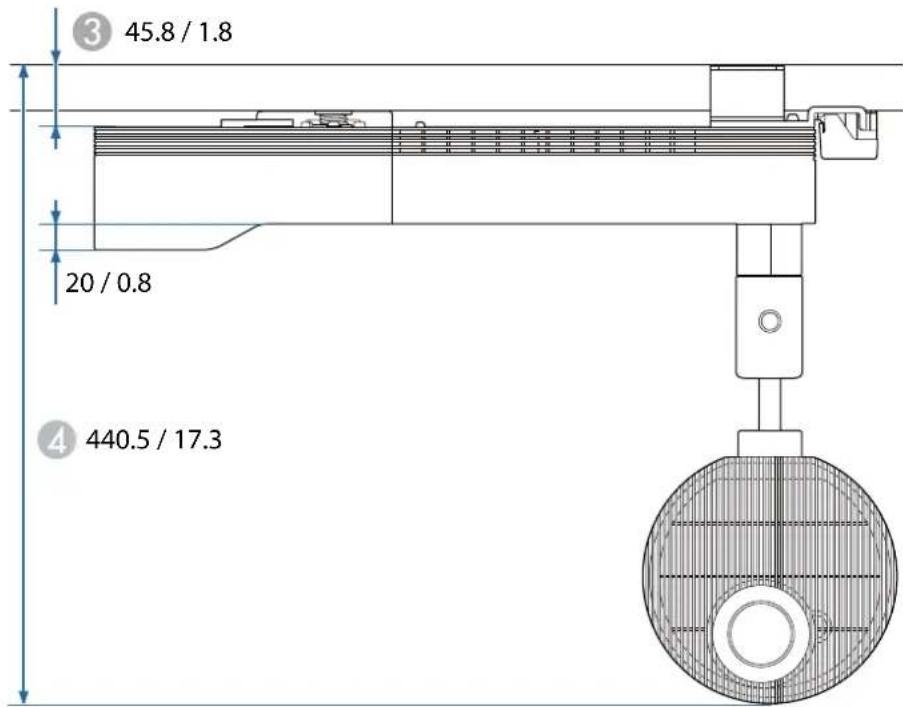
3 Height from ceiling to top of projector
4 Height from ceiling to bottom of projector
©SEIKO EPSON CORPORATION 2018. All rights reserved.