
PowerLite 5025UB - Video projector EPSON - Free user manual and instructions
Find the device manual for free PowerLite 5025UB EPSON in PDF.


| Product type | Video projector |
| Brand | Epson |
| Model | PowerLite 5025UB |
| Native resolution | 1080p (1920 x 1080) |
| Brightness (color light output) | 2200 lumens |
| Brightness (white light output) | 2200 lumens |
| Lens | Fujinon, 2.1x optical zoom, manual focus |
| Lens shift | Vertical and horizontal (manual dials) |
| Projection size | Up to 300 inches (7.62 m) |
| 3D capability | Active 3D with RF shutter glasses (supports side-by-side, top-and-bottom, frame packing) |
| Input ports | 2x HDMI, 1x Component (Y, Pb, Pr), 1x Composite (Video), 1x VGA (PC), 1x RS-232C, 1x Trigger out, 1x Service port |
| Lamp type | UHE (replaceable, ELPLP69) |
| Lamp life (Normal mode) | Approximately 3000 hours |
| Lamp life (ECO mode) | Approximately 4000 hours |
| Power consumption | Normal: 340 W, ECO: 270 W, Standby: 0.4 W |
| Dimensions (W x D x H) | 17.5 x 13.8 x 5.6 inches (445 x 350 x 142 mm) |
| Weight | Approximately 13.6 lb (6.2 kg) |
| Noise level (Normal mode) | 30 dB |
| Noise level (ECO mode) | 25 dB |
| Included accessories | Remote control, batteries (AA), power cord, documentation CD |
| Security features | Kensington lock slot, control panel lock, child lock |
| Maintenance | Clean lens, replace air filter (V13H134A39), replace lamp (ELPLP69) |
| Warranty | Basic warranty; extra care home service available |
Frequently Asked Questions - PowerLite 5025UB EPSON
User questions about PowerLite 5025UB EPSON
0 question about this device. Answer the ones you know or ask your own.
Ask a new question about this device
Download the instructions for your Video projector in PDF format for free! Find your manual PowerLite 5025UB - EPSON and take your electronic device back in hand. On this page are published all the documents necessary for the use of your device. PowerLite 5025UB by EPSON.
USER MANUAL PowerLite 5025UB EPSON
Introduction to Your Projector 8
Projector Features....8
Product Box Contents....9
Additional Components 10
Optional Equipment and Replacement Parts 10
Warranty and Registration Information 11
Notations Used in the Documentation.... 11
Where to Go for Additional Information 12
Projector Part Locations 12
Projector Parts - Front/Top 13
Projector Parts - Rear 14
Projector Parts - Base 15
Projector Parts - Control Panel 16
Projector Parts - Remote Control 18
Setting Up the Projector 21
Projector Placement.... 21
Projector Setup and Installation Options 21
Projection Distance.... 23
Projector Connections 25
Connecting to Video Sources 26
Connecting to an HDMI Video Source 26
Attaching and Removing the Cable Clips 27
ConnectingtoaComponentVideoSource....27
Connecting to a Composite Video Source 28
Connecting to Computer Sources.... 29
Connecting to a Computer for VGA Video.... 29
Connecting to a Computer for HDMI Video 29
Connecting to External Speakers 30
Installing Batteries in the Remote Control 31
Using Basic Projector Features 33
Turning On the Projector 33
Turning Off the Projector 35
Viewing 3D Images 36
Pairing the 3D Glasses with the Projector.... 37
Charging the 3D Glasses.... 38
3D Viewing Range 39
Selecting the Language for the Projector Menus.... 40
Adjusting the Image Height 41
Adjusting the Image Position Using Lens Shift 42
Image Shape 44
Correcting Image Shape with the Keystone Buttons.... 44
Resizing the Image with the Zoom Ring 45
Focusing the Image Using the Focus Ring 46
Adjusting the Color Convergence (Panel Alignment) 47
Remote Control Operation 49
Selecting an Image Source 50
Projection Modes 52
Changing the Projection Mode Using the Menus.... 52
Image Aspect Ratio 53
Changing the Image Aspect Ratio 53
Available Image Aspect Ratios 54
Color Mode.... 54
Changing the Color Mode.... 55
Available Color Modes.... 55
Turning On Auto Iris.... 56
Using Picture in Picture 57
Available Picture in Picture Options.... 58
Adjusting Projector Features 59
Shutting Off the Picture Temporarily 59
Projector Security Features.... 59
Locking the Projector's Buttons 59
Unlocking the Projector's Buttons 60
Installing a Security Cable 61
Saving Settings to Memory and Using Saved Settings 61
Adjusting the Menu Settings 63
Using the Projector's Menus.... 63
Image Quality Settings - Image Menu 64
Input Signal Settings - Signal Menu 67
Projector Feature Settings - Settings Menu 71
Projector Setup Settings - Extended Menu.... 74
Projector Memory Options - Memory Menu 78
Projector Information Display - Info Menu 79
Projector Reset Options - Reset Menu 80
Maintaining and Transporting the Projector 82
Projector Maintenance 82
Cleaning the Lens....82
Cleaning the 3D Glasses 83
Cleaning the Projector Case 84
Air Filter and Vent Maintenance 84
Cleaning the Air Filter.... 85
Replacing the Air Filter 87
Projector Lamp Maintenance 89
Replacing the Lamp 89
Resetting the Lamp Timer 94
Replacing the Remote Control Batteries 95
Transporting the Projector....97
Solving Problems 98
Projection Problem Tips 98
Projector Light Status 99
Solving Image Problems 102
Solutions When No Image Appears.... 102
Solutions When "No Signal" Message Appears.... 103
Displaying From a PC Laptop 103
Displaying From a Mac Laptop 104
Solutions When "Not Supported" Message Appears 104
Solutions When Only a Partial Image Appears 104
Solutions When the Image is Not Rectangular 105
Solutions When the Image Contains Noise or Static 105
Solutions When the Image is Fuzzy or Blurry 106
SolutionsWhentheImageBrightnessorColorsareIncorrect....106
SolutionsWhena3DImageDoesNotDisplayCorrectly....107
Solving Projector or Remote Control Operation Problems 108
Solutions to Projector Power or Shut-Off Problems 108
Solutions to Problems with the Remote Control.... 109
Where to Get Help.... 110
Technical Specifications 112
General Projector Specifications 112
Projector Lamp Specifications 113
Remote Control Specifications.... 114
Projector Dimension Specifications.... 114
Projector Electrical Specifications 114
Projector Environmental Specifications 115
Projector Safety and Approvals Specifications.... 115
Supported Video Display Formats 115
Notices 118
Recycling.... 118
Important Safety Information.... 118
Important Safety Instructions.... 119
3D Safety Instructions 122
Restriction of Use 123
FCC Compliance Statement.... 123
Trademarks 124
Open Source Software License 125
Copyright Notice.... 170
ANoteConcerningResponsibleUseofCopyrightedMaterials....170
Copyright Attribution 170
PowerLiteHomeCinema5025UBUser'sGuide
WelcometothePowerLiteHomeCinema5025UBUser'sGuide.
IntroductiontoYourProjector
Refertothesesectionstolearnmoreaboutyourprojectorandthismanual.
ProjectorFeatures
NotationsUsedintheDocumentation
WheretoGoforAdditionalInformation
ProjectorPartLocations
ProjectorFeatures
ThePowerLiteHomeCinema5025UBprojectorincludesthesespecialfeatures:
Bright, high-resolution projectionsystem
• Upto2200lumensofcolorbrightness(colorlightoutput) and 2200lumensofwhitebrightness(white lightoutput)
Note: Color brightness (color light output) and white brightness (white light output) will vary depending on usage conditions. Colorlight output measured in accordance with IDMS15.4; whitelight output measured in accordance with ISO21118.
•1080pnativereresolution
- Imagesupto300inches(7.62m)forprojectiononanywallorscreen
•Fujinonlensforuniformity
Full3Dprojection
•Active3DprojectionwithRFactiveshutterglasses
- Supportsside-by-side, top-and-bottom, andframepacking3D formats
Flexibleconnectivity
- TwoHDMIportsforvideodeviceorcomputerconnections
Easy-to-usesetupandoperationfeatures
- Verticalandhorizontallensshiftdials,andverticalkeystonecorrectionbuttonsforflexibleprojector placement
- 2.1 × opticalzoomratioforimprovedzoomingcapability
ProductBoxContents
AdditionalComponents
OptionalEquipmentandReplacementParts
Warranty and Registration Information
Parenttopic: Introduction to Your Projector
ProductBoxContents
Saveallthepackagingincaseyouneedtoshiptheprojector.Alwaysusetheoriginalpackaging(or equivalent)whenshipping.
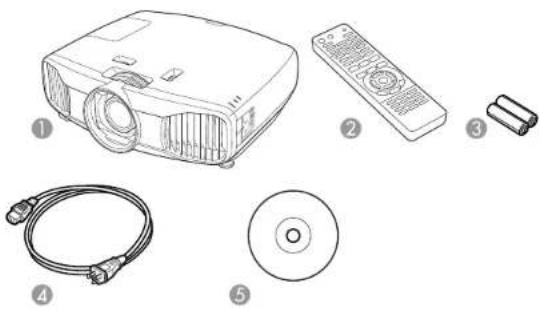
Makesureyourprojectorboxincludedalloftheseparts:
natural_image
Illustration of various electronic devices including projector, remote control, CD, and cable (no text or symbols)1Projector
2Remotecontrol
3Remotecontrolbatteries(twoAAalkaline)
4Powercord
5ProjectordocumentationCD
Parenttopic:ProjectorFeatures
AdditionalComponents
Dependingonhowyouplantousetheprojector,youmayneedtoobtainthefollowingadditional components:
- Toreceiveaccomponentvideosignal,youneedacompatiblecomponentcable.Youcanpurchase onefromEpsonoranauthorizedEpsonreseller.
- ToreceiveanHDMIsignal,youneedacompatibleHDMIcable.YoucanpurchaseonefromEpsonoranauthorizedEpsonreseller.
Note: To connect a Mac that includes only a Mini DisplayPort, Thunderbolt port, or Mini-DVI port for video output, you need to obtain an adapter that allows you to connect to the projector's HDMI port. ContactAppleforcompatibleadapteroptions.
- Toreceiveandviewa3Dsignal,youneedacompatibleHDMlcableandactiveshutter3Dglasses.YoucanpurchasethemfromEpsonoranauthorizedEpsonreseller.Ifyourvideosourceisa3DBlu-raydisc,youalsoneedaBlu-rayplayerthatsupports3Dplayback.Seeyourlocalcomputerorelectronicsdealerforpurchaseinformation.
Parenttopic:ProjectorFeatures
Relatedreferences
OptionalEquipmentandReplacementParts
OptionalEquipmentandReplacementParts
Youcanpurchasescreens,otheroptionalaccessories,andreplacementpartsfromanEpsonauthorizedreseller.Tofindthenarestreseller,call800-GO-EPSON(800-463-7766).Oryoucanpurchaseonlineatepsonstore.com(U.S.sales)orepson.ca(Canadiansales).
Epsonoffersthefollowingoptionalaccessoriesandreplacementpartsforyourprojector:
| OptionorpartPartnumber | |
| GenuineEpsonreplacementlamp(ELPLP69)V13H010L69 | |
| ReplacementairfilterV13H134A39 | |
| RF3Dglasses(ELPGS03)V12H548006 | |
| ProjectorceilingmountCHF1000 | |
| BelkinPureAVHDMIaudiovideocable,6ftAV22300-06 | |
| BelkinPureAVHDMIaudiovideocable,12ftAV22300-12 | |
| BelkinPureAVHDMlaudiovideocable,3ftAV22300-03 | |
| BelkinProSeriesVGA/SVGAcable,6ftF3H982-06 | |
| BelkinProSeriesVGA/SVGAcable,10ftF3H982-10 | |
| BelkinProSeriesVGA/SVGAcable,25ftF3H982-25 | |
| KensingtonsecuritylockELPSL01 | |
| Remotecontrol1598522 |
Inadditiontotheaccessorieslistedabove,1-yearand2-yearextendedserviceplansareavailable.
Parenttopic:ProjectorFeatures
Warranty and Registration Information
Yourprojectorcomeswithabasicwarrantythatletsyouprojectwithconfidence.Fordetails,seethe warrantybrochurethatcamewithyourprojector.
Inaddition, EpsonoffersfreeExtraCareHomeService. In the unlikely event of an equipment failure, you won't havetowait for your unit to be repaired. Instead, Epson will ship you are replacement unit anywhere in the United States, Canada, or Puerto Rico. See the Extra Care Home Service brochure for details.
RegistryyourproductonlineusingtheprojectorCDoratthissite:epson.com/webreg
Registeringalsoletsyoureceivespecialupdatesonnewaccessories,products,andservices.
Parenttopic:ProjectorFeatures
NotationsUsedintheDocumentation
Followtheguidelinesinthesenotationsasyoureadyourdocumentation:
- Warningsmustbefollowedcarefullytoavoidbodilyinjury .
- Cautionsmustbeobservedtoavoiddamagetoyourequirement.
- Notes contain important information about your projector.
- Tipscontainadditionalprojectioninformation.
Parenttopic: Introduction to Your Projector
WheretoGoforAdditionallInformation
Needquickhelponusingyourprojector?Here'swheretolookforhelp:
•epson.com/support(U.S)orepson.ca/support(Canada)
ViewFAQs(frequentlyaskedquestions)ande-mailyourquestionstoEpsontechnicalsupport24 hoursaday.
• If you still need help after checking this manual and the sources listed above, you can use the Epson PrivateLineSupportservicetogethelpfast. Fordetails, see "Where to Get Help".
Parenttopic: Introduction to Your Projector
Relatedreferences
WheretoGetHelp
ProjectorPartLocations
Check the projector part illustration to learn about the part's your projector.
ProjectorParts-Front/Top
ProjectorParts-Rear
ProjectorParts-Base
ProjectorParts-ControlPanel
ProjectorParts-RemoteControl
Parenttopic: Introduction to Your Projector
ProjectorParts-Front/Top
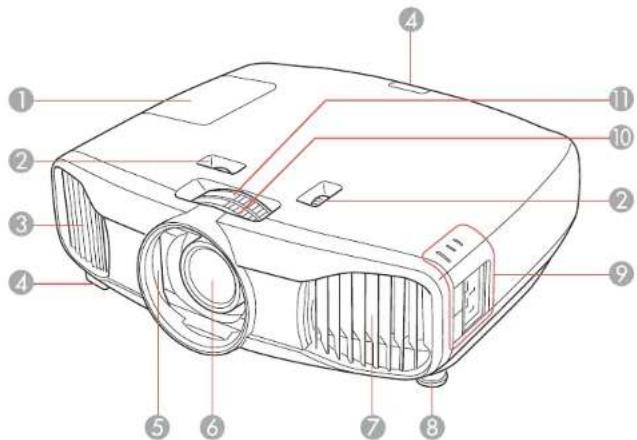
1 Lampcover
2Horizontalandverticalensshiftdials
3Exhaustvent
4Remotereceiver
5Lensshutter
6Lens
7Airintake/airfiltercover
8Frontadjustablefoot
9Controlpanelandlights
10 Focusring
11Zoomring
Parenttopic:ProjectorPartLocations
ProjectorParts-Rear
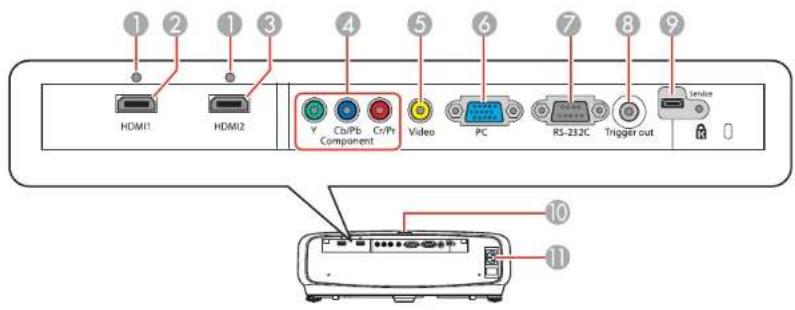
1Cableclipholes
2HDMI1port
3HDMI2port
4Componentports
5Videoport
6PCport(VGA)
7RS-232Cport
8Triggeroutport
9Serviceport
10Remotereceiver
11ACinputport
Parenttopic:ProjectorPartLocations
Relatedtasks
InstallingaSecurityCable
AttachingandRemovingtheCableClips
ProjectorParts-Base
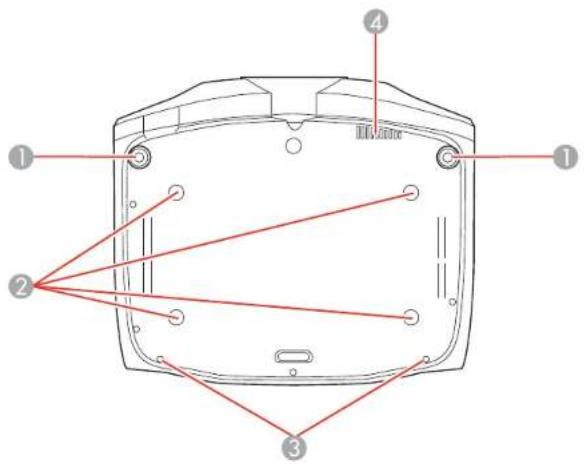
1Frontadjustablefeet
2Mountingbracketholes
3Cablecoverattachmentpoint
4Airexhaustvent
Parenttopic:ProjectorPartLocations
ProjectorParts-ControlPanel
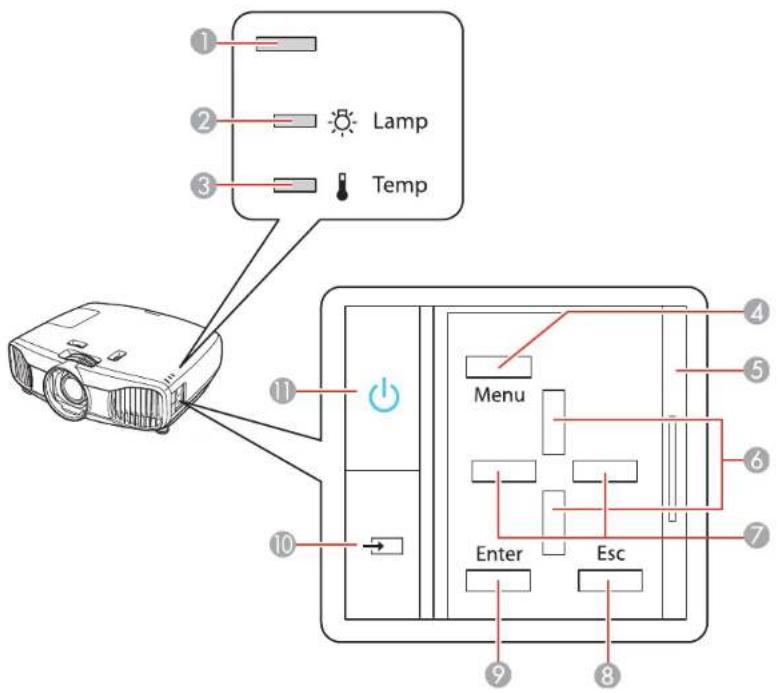
1Statuslight
2Lamplight
3Templight
4Menubutton(accessesprojectormenusystem)
5Controlpanelcover
6Verticalkeystoneadjustmentbuttons(adjustscreenshape)andarrowbuttons
7Arrowbuttons
8Escbutton(cancels/exitsfunctions)
9Enterbutton(selectsoptions)
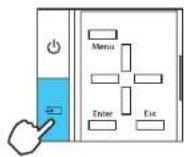
10Sourcebutton(cyclesthroughthelistofsources)
11 Powerbutton/light
Parenttopic:ProjectorPartLocations
Relatedreferences
ProjectorLightStatus
ProjectorParts-RemoteControl
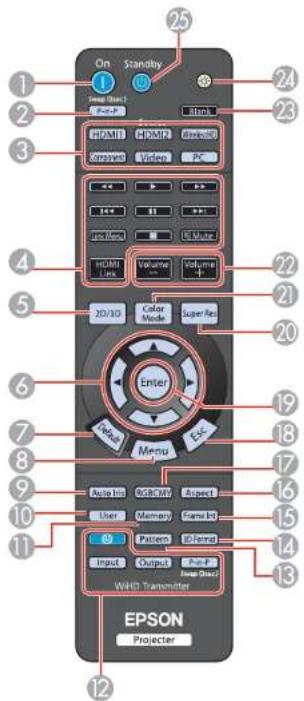
1Onbutton(turnsonprojector)
2P-in-Pbutton(controlsthePicture-in-PicturemodeforHDMinputs)
3Sourcebuttons(selectspecificvideoinputsources)
4HDMILinkbutton(displaysthesettingsmenuforHDMILink)
LinkMenubutton(displaystheimainmenuoftheconnecteddevice)
Controlbuttons(control playback and other features of connected devices that support the HDMI CEC standard)
52D/3Dbutton(cyclesbetween2Dand3Dmodes)
6Arrowbuttons(movethoughon-screenoptions)
7Defaultbutton(returnsselectedsettingtodefaultvalue)
8Menubutton(accessesprojectormenusystem)
9Autolrisbutton(optimize the image based on brightness of content)
10Userbutton(customizablefordifferentfunctions)
11Memorybutton(accessestheMemorymenu)
12WirelessHDtransmittercontrolbuttons(buttonsarenotfunctional)
13Patternbutton(displaysatestpattern)
143DFormatbutton(changesthe3Dformat)
15FrameIntbutton(adjuststheFrameInterpolationsetting)
16Aspectbutton(selectstheimageaspectratio)
17RGBCMYbutton(adjustshue,saturation,andbrightnessforeachRGBCMYcolor)
18Escbutton(cancels/exitsfunctions)
19Enterbutton(selectsoptions)
20SuperResbutton(reducesblurringaroundtheedgesofimageswhenviewing3Dcontent)
21ColorModebutton(selectsdisplaymodes)
22Volumeup/downbuttons(adjustvolumefordevicesconnectedviaHDMILink)
23Blankbutton(turnsoffvideoprojection)
24Illuminationbutton(lightstheremotecontrol)
25Standbybutton(turnsofftheprojector)
Parenttopic:ProjectorPartLocations
Relatedreferences
RemoteControlOperation
ProjectorMemoryOptions-MemoryMenu
SettingUptheProjector
Followtheinstructionsinthesesectionstosetupyourprojectorforuse.
ProjectorPlacement
ProjectorConnections
Installing Batteries in the Remote Control
ProjectorPlacement
Youcanplacetheprojectoronalmostanyflatsurfacetoprojectanimation.
Youcanalsoinstalltheprojectorinaceilingmountifyouwanttouseitinafixedlocation.
Keeptheseconsiderationsinmindasyouselectaprojectorlocation:
- Placetheprojectoronasturdy, levelsurfaceorinstallitusingacompatiblemount.
- Leaveplentyofspacearoundandundertheprojectorforventilation, anddonotplaceitontopofor nexttoanythingthatcouldblockthevents.
- Position the projector within reach of foreground electrical outlet to extension cord.
ProjectorSetupandInstallationOptions
ProjectionDistance
Parenttopic:SettingUptheProjector
Relatedtasks
ChangingtheProjectionModeUsingtheMenus
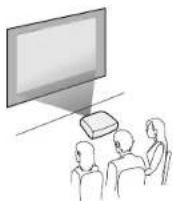
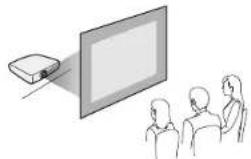
ProjectorSetupandInstallationOptions
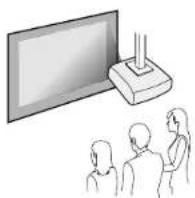
Youcansetuporinstallyourprojectorinthefollowingways:
Front
Rear
natural_image
Illustration of a projector on a screen with three people watching (no text or symbols)FrontCeiling
RearCeiling
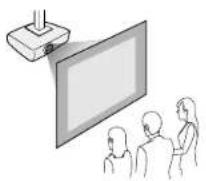
Whereveryousetuptheprojector, makesuretopositionitsquarelyinfrontofthecenterofthescreen, notatanangle, if possible.
If you project from the ceiling or from the rear, be sure to select the correct Projection option in the projector's menusystem.
Parenttopic:ProjectorPlacement
Relatedreferences
ProjectorFeatureSettings-SettingsMenu
ProjectionDistance
The distance at which you place the projector from the screen, but can vary depending on the zoom factor, aspect ratio, and other settings.
Usethetablesheretodetermineapproximatelyhowfartoplacetheprojectorfromthescreenbasedon thesizeoftheprojectedimage.(Conversionfiguresmayhavebeenroundedupordown.)
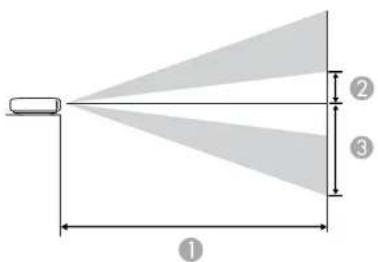
4:3AspectRatioImageorScreen
| ScreenorimagesizeProjection distance(1)OffsetWidetoTele | romlenscenterOffsetfrom(2)(3) | mlenscenter | |
| 40inches(101.6cm)57to1 | 21.7inches11inches(28cm)(144to309cm) | 35.0inches(89cm) | |
| 60inches(152.4cm)85.8to | 183.5inches16.5inches(42cm)(218to466cm) | 52.4inches(133cm) | |
| 80inches(203.2cm)115to | 245.3inches22inches(56cm)(292to623cm) | 70.1inches(178cm) | |
| 100inches(254cm)144.1to | 306.7inches27.6inches(70cm)(366to779cm) | 87.4inches(222cm) | |
| 120inches(304.8cm)173.2to | 368.5inches33.1inches(440to936cm) | 105.1inches(267cm) | |
| 150inches(381cm)216.9to | 461.0inches41.3inches(105cm)(551to1171cm) | 131.1inches(333cm) | |
| 180inches(457.2cm)289.8to | 615inches54.7inches(139cm)(736to1562cm) | 174.8inches(444cm) | |
16:9 AspectRatioImageorScreen
| ScreenorimagesizeProjection | actiondistance(1)OffsetFromWidetoTele | romlenscenterOffsetfrom(2)(3) | mlenscenter |
| 40inches(101.6cm)46.1to | 94.2inches9.1inches(23cm)(117to252cm) | 28.7inches(73cm) | |
| 60inches(152.4cm)69.7to | 149.6inches13.4inches(34cm)(177to380cm) | 42.9inches(109cm) | |
| 80inches(203.2cm)93.7to | 200inches18.1inches(46cm)(238to508cm) | 57.1inches(145cm) | |
| ScreenorimagesizeProjection distance(1)OffsetWidetoTele | omlenscenterOffsetfrom(2)(3) | mlerscenter | |
| 100inches(254cm)117.3to | 250.4inches22.4inches(5(298to636cm) | 7cm)71.3inches(181cm) | |
| 120inches(304.8cm)141.3to | 300.8inches26.8inches(359to764cm) | (68cm)85.8inches(218cm) | |
| 150inches(381cm)177.2to | 376.4inches33.5inches(8(450to956cm) | 5cm)107.1inches(272cm) | |
| 180inches(457.2cm)212.6to | 452inches40.6inches(1(540to1148cm) | 03cm)128.7inches(327cm) | |
Parenttopic:ProjectorPlacement
ProjectorConnections
Youcanconnecttheprojectortovarietyofcomputer,video,andaudiosourcestodisplay presentations,movies,orotherimages,withorwithoutsound.
- Forvideoprojection,connectdevicessuchasDVDplayers,gamingconsoles,streamingdevices,digitalcameras,smartphones,andtabletswithcompatiblevideooutputports.
Note: To connect a smartphone ortablet, you may need to obtain an adapter that allows you to connect the projector. This allows you to mirror your smartphone ortabletscreens, watch movies, and more. Contact your device manufacturer for compatible adapter options.
- Connectanytypeofcomputer(WindowsorMac)thathasastandardvideooutput(15-pinVGA monitor)port,orHDMIport.
Caution: If you will use the projector at altitudes above 4921 feet (1500 m), turn on High Altitude Mode to ensure the projector's internal temperature is regulated properly.
ConnectingtoVideoSources
ConnectingtoComputerSources
ConnectingtoExternalSpeakers
Parenttopic:SettingUptheProjector
Relatedreferences
ProjectorSetupSettings-ExtendedMenu
ConnectingtoVideoSources
Followtheinstructionsinthesesectionstoconnectvideodevicestotheprojector.
ConnectingtoanHDMIVideoSource
AttachingandRemovingtheCableClips
ConnectingtoaComponentVideoSource
ConnectingtoaCompositeVideoSource
Parenttopic:ProjectorConnections
ConnectingtoanHDMIVideoSource
If your videosourcehas an HDMI port, you can connect it to the projector using an optional HDMI cable. The HDMI connection provides the best image equality.
-
ConnecttheHDMIcabletoyourvideosource'sHDMIoutputport.
-
Connecttheotherendtooneoftheprojector'sHDMIports.
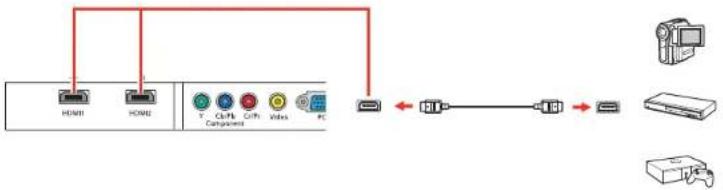
flowchart
graph TD
    A["HDMI"] --> B["PC"]
    C["HOME"] --> B
    D["T  CPU"] --> E["PCI"]
    F["Grift"] --> E
    G["Vibrs"] --> E
    H["PC"] --> I["PC"]
    J["Computer"] --> K["Printer"]
Note: If you connected a game console, it may take a few seconds for your image to appear when you switchtothegameconsole'sinputsource.Toreducethepotentiallaginresponsetimetogame commands, setyourgameconsole'soutputformatoaprogressivesignalof480p,720p,orhigher.See yourgameconsoledocumentationforinstructions.
YoucanalsoselecttheFastImageProcessingsettingtoreducelagtime.
Note: When an audio/video source that meets the HDMI CEC standard is connected to the projector's HDMIport,youcanusetheprojector'sremotecontroltocontrolcertainfeaturesofthelinkeddeviceby pressing the HDMI Link button on the remote control and setting HDMI Link to On.
Parenttopic: ConnectingtoVideoSources
Relatedreferences
InputSignalSettings-SignalMenu
Relatedtasks
AttachingandRemovingtheCableClips
AttachingandRemovingtheCableClips
YoucaninstallthecableclipsthatcamewithyourprojectortoprovideadditionalsupporttotheHDMI cables.
- PlugintheHDMIcables.
- Inserteachguide into the cable clip holes near the HDMI port.
- AttachthecableclipstotheHDMlcables.Besuretoleavetheclampsunlocked.
4.Slideeachcableclipontotheguidesandlocktheclampsontotheconnectors.
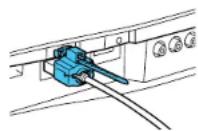
Toremovethecableclips, opentheclamps and disconnect the cables. Then pinch the sides of each guide and carefully pull them out of the cable clip holes.
Parenttopic: ConnectingtoVideoSources
ConnectingtoaComponentVideoSource
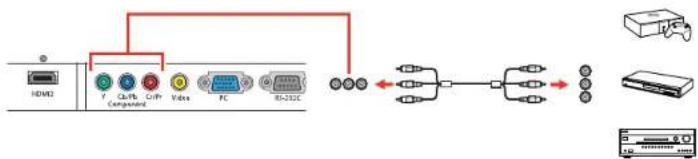
If your videosource has component videoports, you can connect it to the projector using an optional component videocable. Depending on your component ports, you may need to use an adapter cable along with a component videocable.
-
Connect the component connector to your video source's color-coded component video output ports, usually labeled Y, Pb, Pr or Y, Cb, Cr. If you are using an adapter, connect these connectors to your component videocable.
-
Connect the other end to the projector's color-coded Component video input ports.
flowchart
graph TD
    A["HDVI2"] --> B["CLNT"]
    B --> C["Copt"]
    C --> D["Video"]
    D --> E["FC"]
    E --> F["RS-312C"]
    F --> G["Wireless Interface"]
    G --> H["Device"]
    H --> I["Wireless Interface"]
If your image colors appear incorrect, you may need to change the Input Signal setting in the projector's Extendedmenu.
Note: If you connected a game console, it may take a few seconds for your image to appear when you switch to the game console's input source. Toreducethe potential allagin responsetimetogame commands, set your game console's output format to a progressive signal of 480p, 720p, or higher. See your game console documentation for instructions.
YoucanalsoselecttheFastImageProcessingsettingtoreducelagtime.
Parenttopic: ConnectingtoVideoSources
Relatedreferences
InputSignalSettings-SignalMenu
ConnectingtoaCompositeVideoSource
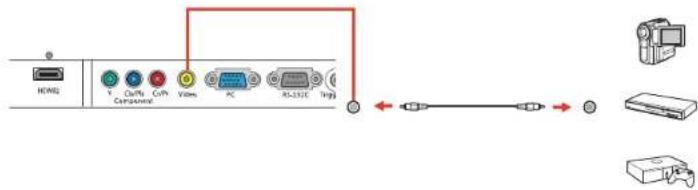
If your videosource has a composite video port, you can connect it to the projector using an optional RCA-style video or A/V cable.
- Connect the cable with they yellow connector to your video source's yellow video output port.
- Connecttheotherendtotheprojector'sVideoport.
Note: If you connected a game console, it may take a few seconds for your image to appear when you switch to the game console's input source. Toreducethe potential allagin responsetimetogame commands, set your game console's output format to a progressive signal of 480p, 720p, or higher. See your game console documentation for instructions.
Parenttopic: ConnectingtoVideoSources
ConnectingtoComputerSources
Followtheinstructionsinthesesectionstoconnectacomputertotheprojector.
ConnectingtoaComputerforVGAVideo
ConnectingtoaComputerforHDMIVideo
Parenttopic:ProjectorConnections
ConnectingtoaComputerforVGAVideo
YoucanconnecttheprojectortoyourcomputerusingaVGAcomputercable.
Note: To connect a Mac that includes only a Mini DisplayPort, Thunderbolt port, or Mini-DVI port for videooutput,youneedtoobtainanadapterthatallowsyoutoconnecttotheprojector'sVGAvideoport. ContactAppleforcompatibleadapteroptions.
- If necessary, disconnect your computer's monitorable.
- Connectthe VGAcomputercabletoyourcomputer'smonitorport.
- ConnecttheotherendtoaPCportontheprojector.

flowchart
graph LR
    A["Components"] --> B["PC"]
    B --> C["USB"]
    C --> D["Laptop"]
- TightenthescrewsontheVGAconnector.
Parenttopic: ConnectingtoComputerSources
ConnectingtoaComputerforHDMIVideo
If your computer has an HDMI port, you can connect it to the projector using an optional HDMI cable.
Note: To connect a Mac that includes only a Mini DisplayPort, Thunderbolt port, or Mini-DVI port for video output, you need to obtain an adapter that allows you to connect to the projector's HDMI port.
- ConnecttheHDMIcabletoyourcomputer'sHDMIoutputport.
- Connecttheotherendtooneoftheprojector'sHDMIports.

flowchart
graph LR
    A["HD/MI"] --> B["HD/ML"]
    C["Y"] --> D["Ch/Ps Component"]
    E["Ch/Ps"] --> F["Video"]
    G["Video"] --> H["PC"]
    I["PC"] --> J["USB Cable"]
    J --> K["USB Cable"]
    K --> L["Laptop"]
Parenttopic: ConnectingtoComputerSources
Relatedtasks
AttachingandRemovingtheCableClips
ConnectingtoExternalSpeakers
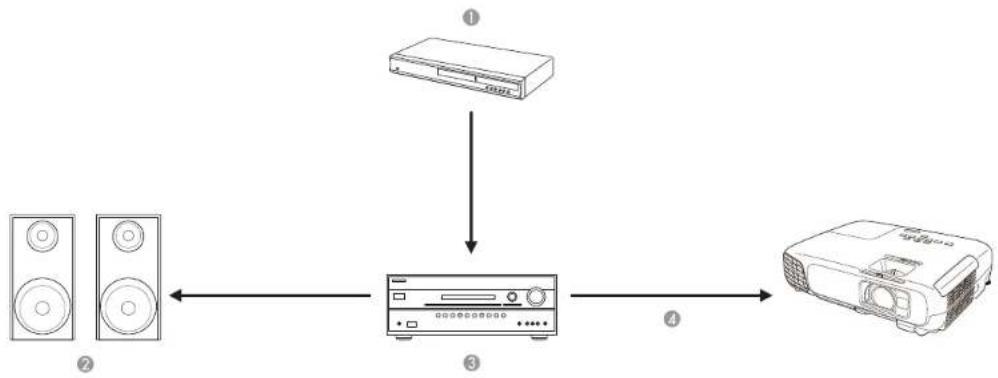
Toaddsound, you can connect your videos or audio source and speaker to an audio video receiver, then connect there to a receiver to the projector using one of the receiver's compatible video outputs (an HDMI connection provides the best image equality, if available). You can also connect speaker to any video source that has its own speakers or connections.
flowchart
graph TD
    A["Speaker"] --> B["CD"]
    C["Speaker"] --> B
    B --> D["Protractor"]
    style A fill:#f9f,stroke:#333
    style C fill:#f9f,stroke:#333
    style D fill:#ccf,stroke:#333
1 Videosource
2Surroundsoundspeakers
3Receiver
4Videocable
Parenttopic:ProjectorConnections
Installing Batteries in the Remote Control
TheremotecontrolusesthetwoAAbatteriesthatcamewiththeprojector.
Caution: Use only the type of batteries specified in this manual. Do not install batteries of different types, ormixnewandoldbatteries.
- Removethebatterycover.
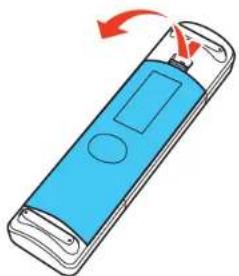
natural_image
Illustration of a blue handheld device with a circular button and red rotation arrow (no text or symbols)- Insert the batteries with the + and - ends facing as shown.
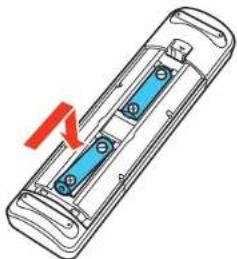
natural_image
Diagram of a handheld electronic device with blue internal components and a red arrow indicating rotation (no text or symbols)- Replacethebatterycoverandpressitdownuntilclicksintoplace.
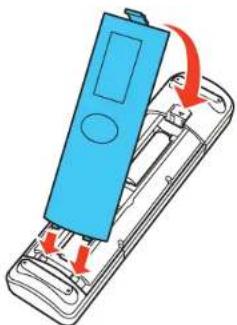
natural_image
Illustration of a blue handheld device with red arrows indicating internal components (no text or symbols)Warning: Dispose of used batteries according to local regulations. Do not expose batteries to heat or flame. Keep batteries out of thereachofchildren; they are choking hazards and are every dangerous if swallowed.
Parenttopic:SettingUptheProjector
Relatedreferences
RemoteControlSpecifications
UsingBasicProjectorFeatures
Followtheinstructionsinthesesectionstouseyourprojector'sbasicfeatures.
TurningOntheProjector
TurningOfftheProjector
Viewing3DImages
SelectingtheLanguagefortheProjectorMenus
AdjustingtheImageHeight
ImageShape
ResizingthImagewiththeZoomRing
FocusingtheImageUsingtheFocusRing
AdjustingtheColorConvergence(PanelAlignment)
RemoteControlOperation
SelectinganImageSource
ProjectionModes
ImageAspectRatio
ColorMode
UsingPictureinPicture
TurningOntheProjector
Turnonthecomputerorvideoequipmentyouwanttousebeforeyouturnontheprojectorsoitcan displaytheimagesource.
- Connectthepowercordtotheprojector'spowerinlet.
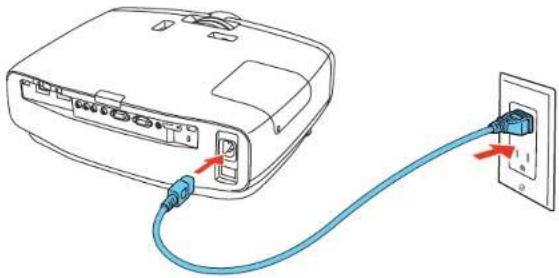
natural_image
Line drawing of a device with blue cable and red arrows indicating connection to an electrical outlet (no text or symbols)- Plug the power cord into an electrical outlet.
Note: With Direct Power On turned on, the projector turns on as soon as you plug it in.
- Press the power button on the projector or the On button on the remote control to turn on the projector.
TheshutteropensandtheStatuslightflashesblueastheprojectorwarmsup.Oncetheprojectoris warmedup,theStatuslightstopsflashingandturnsblue.
Warning: Never look into the projector lens when the lamp is on. This can damage your eyes and is especially dangerous for children.
If you donot see a projected imagerightaway, try the following:
• Turnontheconnectedcomputerorvideodevice.
- InsertaDVDorothervideomediaandpresstheplaybutton,ifnecessary.
- Press the Source button on the projector to detect the video source, or press a source button on the remotecontrol.
Parenttopic: UsingBasicProjectorFeatures
Relatedreferences
ProjectorSetupSettings-ExtendedMenu
TurningOfftheProjector
Before turning off the projector, shutdown any computer connected to it so you can see the computer display during shutdown.
Note: Turn off this product when not in use to prolong the life of the projector. Lamp life will vary depending upon modeselected, environmental conditions, and usage. Brightness decreases over time.
Note: When using the Blank feature, the projector lamp is still on. To turn off the lamp, turn off the projector.
- PressthepowerbuttonontheprojectortheStandbybuttonontheremotecontrol.
Theprojectordisplaysashutdownconfirmationscreen.
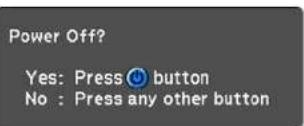
- Press the power button on the projector or the Standby button on the remote control again. (To leaveiton, press any other button.)
Theshuttercloses, theampturnsoff, andtheStatuslightturnsoff.
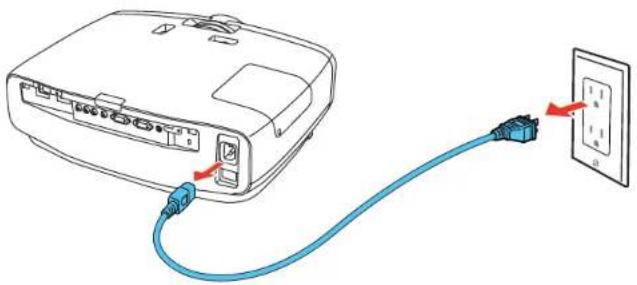
- Totransportorstoretheprojector, makesuretheStatuslightisoff, thenunplugthepowercord.
natural_image
Line drawing of a portable electronic device connected to an electrical outlet (no text or symbols)Caution: To avoid damaging the projector or lamp, never unplug the power cord when the status light is on or flashing.
Parenttopic: UsingBasicProjectorFeatures
Relatedtasks
ShuttingOffthePictureTemporarily
TransportingtheProjector
Viewing3DImages
Youcanview3Dimagesusingyourprojector.Viewing3Dimagesrequiresa3D-compatiblevideo deviceandapairofEpsonRF3Dglasses(notincludedwithyourprojector).Youcanalsoconvert2D images to 3D using the 2D-to-3D Conversion setting in your projector's Signal > 3D Setup menu.
YoucanpurchaseEpsonRF3DglassesfromanEpsonauthorizedreseller. Tofindthenarestreseller, call800-GO-EPSON(800-463-7766). Oryoucanpurchaseonlineatepsonstore.com(U.S.sales) or epson.ca(Canadiansales).
- Connecta3D-compatiblevideodevicetotheprojectorusingacompatibleHDMlcable.
- Turnonthevideodevice, thenturnontheprojector.
- Begin playback from the video device.
Note: Makesureyousetthevideodevicetoplaycontentin3Dmode.
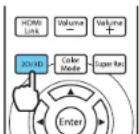
- Pressthe2D/3D buttonontheremotecontroltoactivate3Dmode, if necessary.
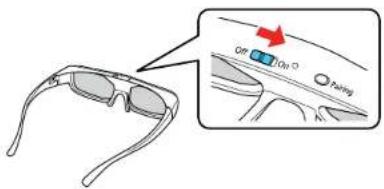
5.Slidethepowerswitchonthe3DglassestotheOnposition.
- Putonthe3Dglasses.Ifyoudonotseea3Dimage, pairtheglasseswiththeprojector.
Note: If you change the video source or you are not within range of your projector, the glasses enter standby mode and the status light flashes green. Slide the power switch on the glasses to the Off positionandthenbacktotheOnpositiontoresume3Dviewing.
Pairingthe3DGlasseswiththeProjector
Chargingthe3DGlasses
3DViewingRange
Parenttopic: UsingBasicProjectorFeatures
Relatedtasks
ConnectingtoanHDMIVideoSource
ConnectingtoaComputerforHDMIVideo
Pairingthe3DGlasseswiththeProjector
Pairtheglasseswiththeprojectortoestablishcommunicationbetweenthemfor3Dviewing.
-
Turnon the projector.
-
SettheimagesourcetoHDMI.
3.Projecta3Dimage.
4.Slidethepowerswitchonthe3DglassestotheOnposition.
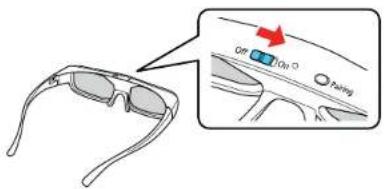
- Move the glasses within 10 feet (3 m) of the projector, then hold down the Pairing button on the glassesforatleastthreeseconds.
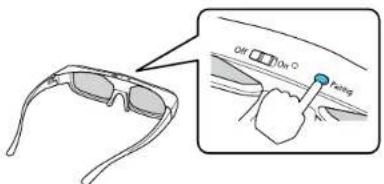
Thestatuslightontheglassesflashesgreenandred.Ifpairingissuccessful,thelightturnsgreen for10secondsandthenturnsoff.
Parenttopic: Viewing3DImages
Chargingthe3DGlasses
Chargetheglasseswhenthestatuslightontheglassesflashesredtoindicatealowbattery.
- Connectthesmallerendofthechargingcabletotheportonthebridgeoftheglasses.
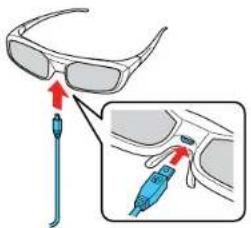
Note: Make sure you connect the cable in the correct orientation or you may damage the glasses or cable.
2.Dooneofthefollowing:
- PlugtheotherendofthechargingcableintoapoweredUSBportonacomputerorotherdevice.
- PlugtheotherendofthechargingcableintoaUSB-to-ACadapterwiththefollowing specifications:
Input:100-240V,\~0.15A,50-60Hz
Output:5V=1A
The glasses are fully charged when the status light on the glasses stays green.
Parenttopic: Viewing3DImages
3DViewingRange
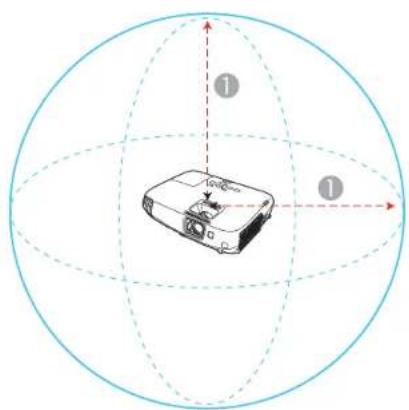
Whenyouview3Dimages, makesureyouarepositionedwithintheviewingrangeshownhere.
natural_image
Diagram of a projector on a sphere with coordinate axes and numbered labels (1 and 2), no readable text or symbols beyond labels.132ft(10m)
Parenttopic: Viewing3DImages
SelectingtheLanguagefortheProjectorMenus
If you want to view the projector's menus and messages in another language, you can change the Languagesetting.
-
Turnon the projector.
2.PresstheMenubutton. -
SelecttheExtendedmenuandpressEnter.
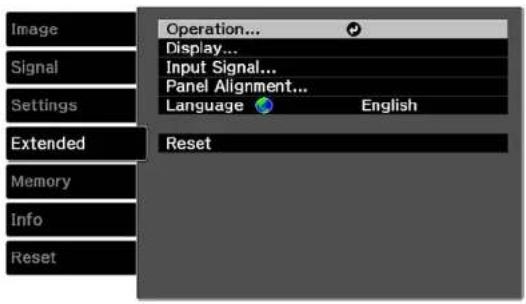
- SelecttheLanguagesettingandpressEnter.
- SelectthelanguageyouwanttouseandpressEnter.
- PressMenuorEsctoexitthemenus.
Parenttopic: UsingBasicProjectorFeatures
AdjustingthelmageHeight
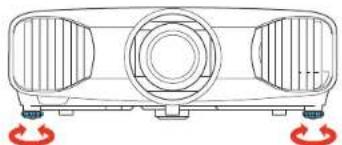
If you are projecting from a table or other flats surface, and the image is too high or low, you can adjust the image height using the projector's adjustable feet.
- Turnon the projector and display an image.
- If the image is tilted, rot at the front foot to adjust their height.
natural_image
Technical line drawing of a three-bar industrial fan or vent with red circular base mount (no text or symbols)- Use the vertical and horizontal lens shift dialson the project to adjust the position of the projected image as necessary.
If the projected image is unevenly rectangular, you need to adjust the imageshape.
AdjustingtheImagePositionUsingLensShift
Parenttopic: UsingBasicProjectorFeatures
Relatedconcepts
ImageShape
AdjustingtheImagePositionUsingLensShift
If you cannot install the project or directly in front of the screen, you can adjust the position of the projected image using the lens shift feature.
Note: Wait 30 minutes after turning on the projector before setting the focus, zoom, and lens shift for maximum accuracy.
-
Turnon the projector and display an image.
-
Turnthe vertical and horizontal shift dialson the project to adjust the position of the projected image as necessary.
Note: You cannot move the image to both the horizontal and vertical maximum values.
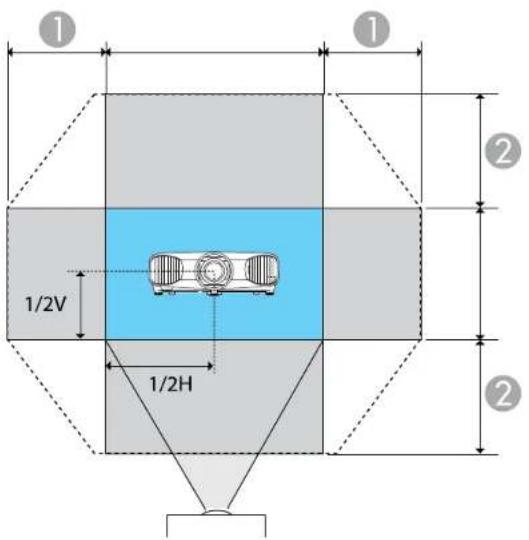
1Horizontalwidth×47%
2Verticalheight×96%
Followtheseguidelineswhenusinglensshifttoadjustyourimages:
- Whenadjustingtheimageheight,positiontheimagelowerthanwhereyouwantittobeandthenmoveitupusingtheverticalallensshiftdial.Thiswillhelppreventtheimagefrommovingdownafter adjustment.
- Keeptheverticalandhorizontallensshiftdialsintheircenterpositionsfortheclearestpicture.
Parenttopic:AdjustingtheImageHeight
ImageShape
Youcanprojectanevenlyrectangularimagebyplacingtheprojectordirectlyinfrontofthecenterofthe screenandkeepingitlevel. Ifyouplacetheprojectoratanangletothescreen,ortiltedupordown,oroff totheside,youmayneedtocorrecttheimageshapeforthebestdisplayquality.
CorrectingImageShapewiththeKeystoneButtons
Parenttopic: UsingBasicProjectorFeatures
CorrectingImageShapewiththeKeystoneButtons
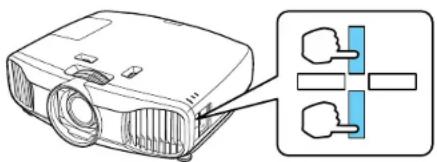
Youcanusetheprojector'skeystonecorrectionbuttonstocorrecttheshapeofanimagethatis unevenlyrectangularonthesides.
Note: To provide the best possible image quality, adjust the projector's position to correct the image shape. If this isn't possible, usetheystone correction button on the project tortocorrect the image shape.
- Turnon the projector and display an image.
Note: You can display a pattern to aid in adjusting the projected image using the Settings menu.
Note: You can also display the pattern by pressing the Pattern button on the remote control.
- PressoneofthesekeystonebuttonsonthecontrolpaneltodisplaytheKeystoneadjustment screen.
natural_image
Diagram of a projector with labeled components and a close-up view of its internal structure (no text or symbols present)- Pressakeystonebuttonontheprojector'scontrolpaneltoadjusttheimageshape.
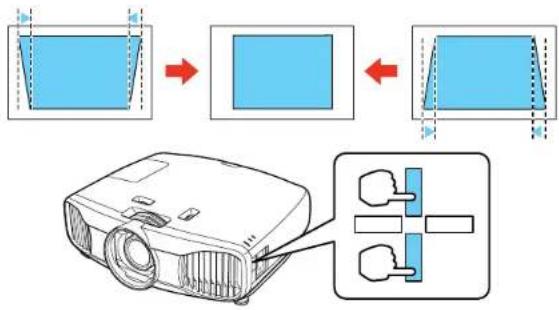
flowchart
graph TD
    A["Slide with blue frame"] --> B["Screen with blue square"]
    B --> C["Output Screen with red arrow"]
    C --> D["Protractor with blue internal components"]
Aftercorrection, your image is slightly smaller.
Note: If the projector is installed out of reach, you can also correct the image shape with the remote controlling the Keystonesettingsintheprojectormenus.
Parenttopic:ImageShape
Relatedreferences
ProjectorFeatureSettings-SettingsMenu
ResizingthelmagewiththeZoomRing
- Turnontheprojectoranddisplayanimation. Wait30minutesafterturningontheprojectorbefore settingthefocus, zoom, and lensshiftformaximumaccuracy.
Note: You can display a pattern to aid in adjusting the projected image using the Pattern button on theremotecontrol.
- Toenlargeorreducetheimagesize, rotatetheprojector'szoomring.
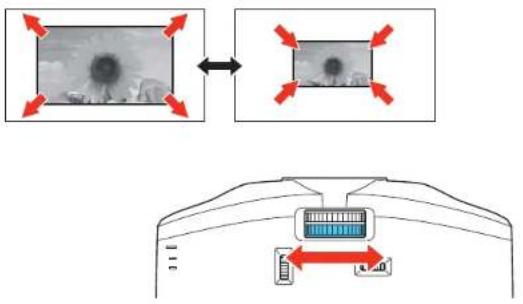
Parenttopic: UsingBasicProjectorFeatures
FocusingtheImageUsingtheFocusRing
- Turnontheprojectoranddisplayanimage. Wait30minutesafterturningontheprojectorbefore settingthefocus, zoom, and lensshiftformaximumaccuracy.
Note: You can display a pattern to aid in adjusting the projected image using the Pattern button on theremotecontrol.
- Tosharpentheimagefocus, rotatetheprojector's focusring.
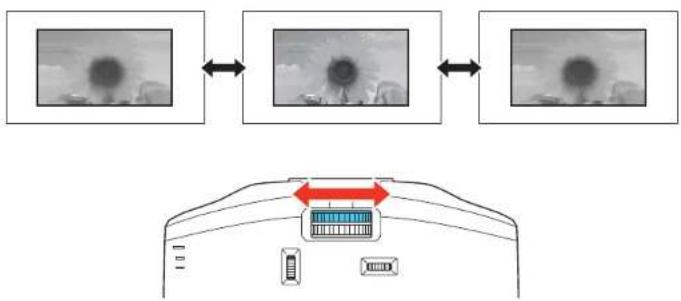
flowchart
graph TD
    A["Input Image 1"] <--> B["Input Image 2"] <--> C["Output Image 3"]
    D["Central Display Panel"] --> E["Red Arrow Down"]
    style D fill:#f9f,stroke:#333
Parenttopic: UsingBasicProjectorFeatures
AdjustingtheColorConvergence(PanelAlignment)
YoucanusethePanelAlignmentfeaturetomanuallyadjustthecolorconvergence(thealignmentofthe red,greenandbluecolors)intheprojectedimage.
Note: Allow your projector to warm up for at least 10 to 15 minutes and make sure the image is in focus before you use the Panel Alignment feature. The projected images should be a minimum of 60 inches (152cm) diagonally and the projections surfaces should not be colored or textured, otherwise the adjustment grid will be difficult to align.
- Turnon the projector.
2.PresstheMenubutton. - SelecttheExtendedmenuandpressEnter.
- SelectthePanelAlignmentsettingandpressEnter.
![[Panel Alignment] Panel Alignment On Select Color R Pattern Color R/G/B Start Adjustments Reset Extended Reset Memory Info Reset](/content/2026/05/1068888/images/2833f7552bd5e90d88ffa568a16bf36a485e0dabe69d2ec8b72bdd167361cdaa.jpg)
- SelectthePanelAlignmentsettingandpressEnter.
6.SelectOnandpressEnter. - SelecttheSelectColorsettingandchooseoneofthefollowing:
•Rtoadjusttheredcolorconvergence.
• Btoadjustthebluecolorconvergence.
Note: You can only adjust the red or blue color convergence. Green is the standard color panel and cannotbeadjusted.
- Select the PatternColorsettingandpressEnter.
- Select the pattern you want to use and press Enter.
- SelectStartAdjustmentsandpressEnter.
Youseethisscreen:
![[Correct LCD Align.] Select Color: R H : 0 Y : 0 Adjust Back Reset Next](/content/2026/05/1068888/images/1ba7269925544ccd4aca539239ea3a4c5856c38203a5afb6f0aaf7473f5e9d54.jpg)
- Usethearrowbuttonsontheremotecontroltoadjustthecoloralignmentinthecornerofthescreen highlightedbytheorangebox.
12.PresstheEnterbuttontomovetothenextcornerofthescreen. - When you are finished adjusting each corner of the screen, press Enter.
Youseethisscreen:
[Panel Alignment]
Adjustment complete.
To make finer adjustments, you can also select any intersection and then adjust.

14.Dooneofthefollowing:
- If your projector's panel alignment is now correct, select Exit and press Enter to return to the PanelAlignmentmenu.
- If your projector needs additional panel alignment, select Select intersection and adjust and press Enter. Use the arrow key son theremote control to highlight the corner of any box on the screent hatism is aligned and press Entertoadjust the color convergence. Repeat this step as necessary.
Parenttopic: UsingBasicProjectorFeatures
RemoteControlOperation
Theremotecontrolletsyoucontroltheprojectorfromalmostanywhereintheroom.Youcanpointitat thescreen,orthefrontorbackoftheprojector.
Makesurethatyouaimtheremotecontrolattheprojector'sreceiverswithinthedistanceandangles listedhere.
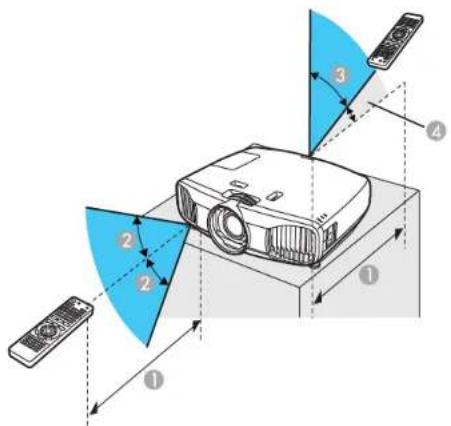
132feet(10m)
2 ± 30^
360°
410°
Note: Avoid using the remote control in conditions with bright fluorescent lights or in direct sunlight, or theprojectormaynotrespondtocommands. If you will not use theremotecontrolforalongtime, removethebatteries.
Parenttopic: UsingBasicProjectorFeatures
SelectinganImageSource
If you connected multiple images our cestotheprojector, such as a computer and DVD player, you may want to switch from one images our ceto the other.
- Makesuretheconnectedimagesourceyouwanttouseisturnedon.
- For video images sources, insert a DVD or other video media and press its play button, if necessary.
3.Dooneofthefollowing: - PresstheSourcebuttonontheprojectoruntilyouseetheimagefromthesourceyouwant.
- Pressthebuttonforthesourceyouwantontheremotecontrol.Ifthereismorethanoneportfor thatsource,pressthebuttonagaintcyclethroughthesources.
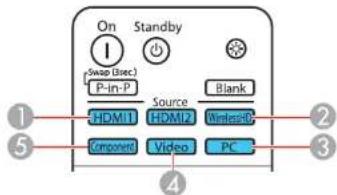
1HDMIportsources
2WirelessHDsources(buttonisnotfunctional)
3PCport(VGA)source
4Compositevideosource
5Componentsource
Parenttopic: UsingBasicProjectorFeatures
ProjectionModes
Dependingonhowyoupositionedtheprojector,youmayneedtochangetheprojectionmodesoyour imagesprojectcorrectly.
- Front(defaultsetting)letsyouprojectfromatableinfrontofthescreen.
- Front/Ceiling flips the image over top-to-bottom to project upside-down from a ceiling or wall mount.
•Rearflipstheimagehorizontallytoprojectfrombehindatransluentscreen. - Rear/Ceiling flips the image over top-to-bottom and horizontally to project from the ceiling and behind atranslucentscreen.
ChangingtheProjectionModeUsingtheMenus
Parenttopic: UsingBasicProjectorFeatures
ChangingtheProjectionModeUsingtheMenus
Youcanchangetheprojectionmodetofliptheimageovertop-to-bottomand/orleft-to-rightusingtheprojectormenus.
- Turnon the projector and display an image.
2.PresstheMenubutton. - SelecttheSettingsmenuandpressEnter.
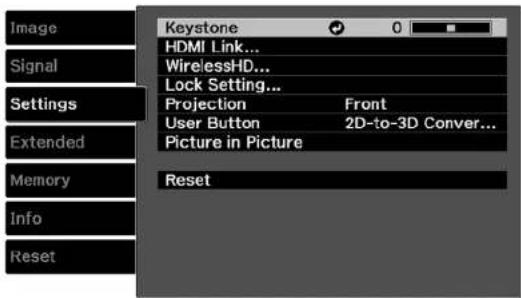
- SelecttheProjectionsettingandpressEnter.
-
SelectaprojectionmodeandpressEnter.
-
PressMenuorEsctoexitthemenus.
Parenttopic: ProjectionModes
Relatedconcepts
ProjectorPlacement
ImageAspectRatio
Theprojectorcandisplayimagesindifferentwidth-to-heightratioscalledaspectratios.Normallythe inputsignalfromyourvideosourcedeterminestheimage'saspectratio.However,forcertainimages youcanchangetheaspectratiotofityourscreenbypassingabuttonontheremotecontrol.
If you always want to use a particular aspect ratio for certain video inputs, you can select it using the projector's menus.
ChangingtheImageAspectRatio
AvailableImageAspectRatio
Parenttopic: UsingBasicProjectorFeatures
ChangingtheImageAspectRatio
Youcanchangetheaspectratioofthedisplayedimagetoresizeit.
Note: For HDMI sources, the input signal determines the image's aspect ratio.
-
Turnon the projector and switch to the images source you want to use.
-
PresstheAspectbuttonontheremotecontrol.
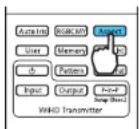
Alistoftheavailableaspectratiosappears.
-
Tocyclethroughtheavailableaspectratiosforyourinputsignal, presstheupordownarrowbutton.
-
PressEntertoselecttheaspectratio.
Parenttopic:ImageAspectRatio
AvailableImageAspectRatio
You can select the following image aspectratios, depending on the input signal from your images source.
Note: When the projector is in 3D mode, the aspect ratio is automatically set to Normal.
Note: Black bands and cropped images may project in certain aspect ratios, depending on the aspect ratio and resolution of your input signal.
| AspectratiosettingDescription | |
| AutoAutomaticallysetstheaspectratio | ioaccordingtotheinputsignal. |
| NormalDisplaysimagesusingthefull | projectionareaandmaintainstheaspectratiooftheimage. |
| ZoomDisplaysimagesusingthefullw | idthoftheprojectionareaandmaintainstheaspectratiooftheimage. |
| FullDisplaysimagesusingthefullw | thoftheprojectionarea,butdoesnotmaintaintheaspectratio. |
Note: The Auto aspect ratio setting is available only for HDMI and component image sources.
Parenttopic:ImageAspectRatio
Relatedreferences
InputSignalSettings-SignalMenu
ColorMode
TheprojectoroffersdifferentColorModestoprovideoptimumbrightness,contrast,andcolorfora varietyofviewingenvirnmentsandimagetypes.Youcanselectamodedesignedtomatchyourimage andenvironment,orexperimentwiththeavailablemodes.
If you always want to use a particular color mode for certain video inputs, you can select using the projectormenus.
ChangingtheColorMode
AvailableColorModes
TurningOnAutolris
Parenttopic: UsingBasicProjectorFeatures
Relatedreferences
ImageQualitySettings-ImageMenu
ChangingtheColorMode
Youcanchangetheprojector'sColorModeusingtheremotecontroltooptimizetheimageforyourviewingenvironment.
- Turnon the projector and switch to the images source you want to use.
- If you are projecting from a DVD player or other videos source, insert ad disc or other video media and press the play button, if necessary.
- PresstheColorModebuttonontheremotecontroltochangetheColorMode.
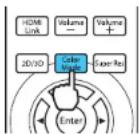
AlistofavailableColorModesappears.
- TocyclethroughalltheavailableColorModesforyourinputsignal, presstheupordownarrow button.
- PressEntertoselectaColorMode.
Parenttopic:ColorMode
AvailableColorModes
YoucansettheprojectortousetheseColorModes,dependingontheinputsourceyouareusing:
2DImages
| ColorModeDescription | |
| DynamicBestforprojectinginabrightroom | |
| NaturalorTHXBestforprojectinginadarkroom | |
| BrightCinemaBestforprojectinginaroomwithclosedcurtains | |
| CinemaBestformoviesprojectedinadarkroom | |
| B&WCinemaBestforblackandwhitem | moviesprojectedinadarkroom |
3DImages
| ColorModeDescription | |
| 3DDynamicBestforprojectinginabrightroom | |
| 3DCinemaBestformoviesprojectedinadarkroom | |
| 3DTHXBestforprojectinginadarkroom | |
Parenttopic:ColorMode
TurningOnAutolris
Incertaincolormodes,youcanturnontheAutoIrissettingtoautomaticallyoptimizetheimagebasedon thebrightnessofthecontentyouproject.
- Turnon the projector and switch to the images source you want to use.
2.PresstheMenubutton.
Note: You can also press the Auto Iris button on the remote control to access the Auto Iris setting directly.
- Select theImagemenuandpressEnter.
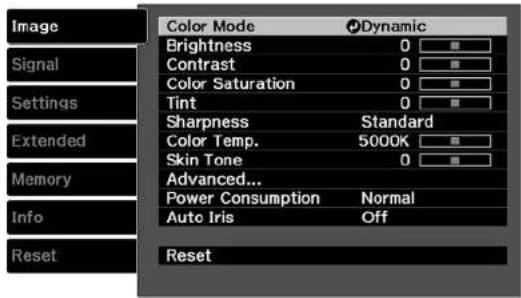
- Select the Autolrissetting and choose one of the following:
•HighSpeedtoadjustbrightnessassoonasthescenechanges.
•Normalforstandardbrightnessadjustment.
Note: You can set Auto Iris for each Color Mode that supports the feature.
- PressMenuorEsctoexitthemenus.
Parenttopic:ColorMode
UsingPictureinPicture
YoucanusePictureinPicturemodetoviewtwoimagesourcessimultaneously.
Note: YoucandisplayonlyHDMIvideosourceswhenPictureinPicturemodeisactive.
-
TurnontheprojectorandswitchtotheHDMimagesourceyouwanttouse.
-
PresstheP-in-Pbuttonontheremotecontrol.
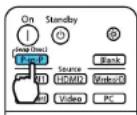
ThesecondHDMIvideosourceappearsasasub-screeninthecorneroftheimage.
Note: While Picture in Picture mode is active, press the Menu button on the remote control to adjust the size and position of the sub-screen.
-
To swap the main screen and sub-screen video sources, press and hold the P-in-P button for at leastthreeseconds.
-
PresstheP-in-Pbuttonagaintoclosethesub-screenandresumenormalprojection.
AvailablePictureinPictureOptions
Parenttopic: UsingBasicProjectorFeatures
AvailablePictureinPictureOptions
You can adjust the following options by pressing the Menu button on the remote control while Picture in Picturemodeisactive:
| SettingDescription | |
| SubscreenSizeAdjuststhesizeofthesub-screen | |
| SubscreenPositionAdjuststhelocationwherethesub-screenisdisplayed | |
| SwapMain/SubSwitchesthevideosourcedisplayedonthemainscreenwiththesourcedisplayedonthesub-screen | |
| ExitPictureinPictureClosesthesub-screenandresumesnormalprojection | |
Parenttopic: UsingPictureinPicture
AdjustingProjectorFeatures
Followtheinstructionsinthesesectionstouseyourprojector'sfeatureadjustments.
ShuttingOffthePictureTemporarily
ProjectorSecurityFeatures
SavingSettingstoMemoryandUsingSavedSettings
ShuttingOffthePictureTemporarily
Youcantemporarilyturnofftheprojectedpictureifyouwanttoredirectyouraudience'sattentionduring apresentation.Anyvideoactioncontinuestorun,however,soyoucannotresumeprojectionatthepoint thatyoustoppededit.
- PresstheBlankbuttonontheremotecontroltotemporarilystopprojection.
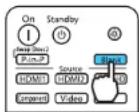
- Toturnthepicturebackon, presstheBlankbuttonagain.
Parenttopic: AdjustingProjectorFeatures
ProjectorSecurityFeatures
You can secure your project to do the theft or prevent unintended use by setting up the following security features:
- Buttonlocksecuritytoblockoperationoftheprojectorusingthebuttonsonthecontrolpanel.
•Securitycablingtophysicallycabletheprojectorinplace.
LockingtheProjector'sButtons
InstallingaSecurityCable
Parenttopic: Adjusting Projector Features
LockingtheProjector'sButtons
Youcanlockthebuttonsontheprojector'scontrolpaneltopreventanyonefromusingtheprojector.
1.PresstheMenubutton.
2. SelecttheSettingsmenuandpressEnter.
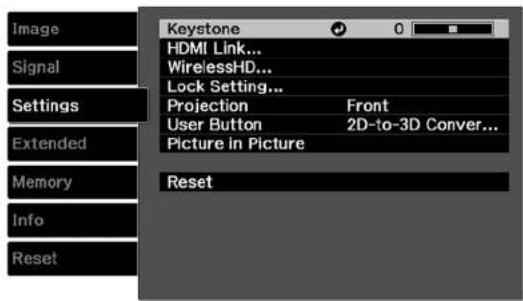
- SelecttheLockSettingsettingandpressEnter.
-
SelectoneoftheselocktypesandpressEnter:
-
To lock the projector's power button, select Child Lock. To turn the projector on, you must press the power button for longer than three seconds.
- Tolockallbuttonsexceptthepowerbutton,selectControlPanelLock.
Youseeaconfirmationprompt.
- SelectYesandpressEnter.
6.Restarttheprojectorforthelocksettingstotakeeffect.
UnlockingtheProjector'sButtons
Parenttopic:ProjectorSecurityFeatures
Relatedreferences
ProjectorFeatureSettings-SettingsMenu
UnlockingtheProjector'sButtons
If the projector's buttons have been locked, hold the Enter button on the projector's control panel for sevensecondstounlockthem.
Parenttopic:LockingtheProjector'sButtons
InstallingaSecurityCable
YoucanusethesecurityslotonthebackoftheprojectortoattachaKensingtonMicrosaverSecurity system,availablefromEpson.
Parenttopic:ProjectorSecurityFeatures
SavingSettingstoMemoryandUsingSavedSettings
Youcansavecustomizedsettingsforeachofyourvideoinputsandthenselectthesavedsettings wheneveryouwanttousethem.
- Turnon the projector and display an image.
2.PresstheMenubutton.
Note: You can also press the Memory button on the remote control to access the Memory menu directly.
- Select the Memory menu and press Enter.
Youseethisscreen:
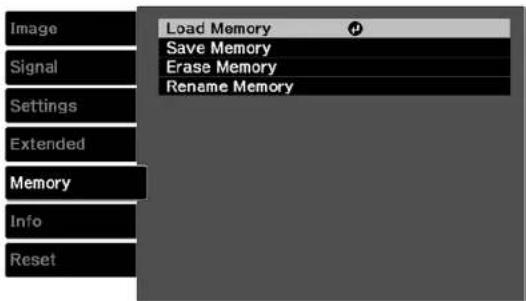
-
Selectoneofthefollowingoptions:
-
LoadMemory: Overwritesyourcurrentsettingswithsavedsettings
- SaveMemory: Savesyourcurrentsettingstomemory(10memorieswithdifferentnamesare available)
Note: Amemorynamethathasalreadybeenusedisindicatedbyagreenmark.Savingovera previously saved memory over writesthesettings with your current settings.
-
EraseMemory: Erasestheselectedmemorysettings
•RenameMemory: Renamesasavedmemory -
PressEsctoexit.
Parenttopic: Adjusting Projector Features
AdjustingtheMenuSettings
Followtheinstructionsinthesesectionstoaccesstheprojectormenusystemandchangeprojector settings.
UsingtheProjector'sMenus
ImageQualitySettings-ImageMenu
InputSignalSettings-SignalMenu
ProjectorFeatureSettings-SettingsMenu
ProjectorSetupSettings-ExtendedMenu
ProjectorMemoryOptions-MemoryMenu
ProjectorInformationDisplay-InfoMenu
ProjectorResetOptions-ResetMenu
UsingtheProjector'sMenus
Youcanusetheprojector'smenustoadjustthesettingsthatcontrolhowyourprojectorworks. The projectordisplaysthemenusonthescreen.
- Pressthe Menubutton on the control panel or remote control.
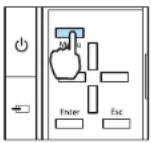
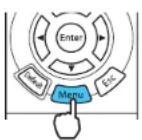
Youseethemenuscreendisplayingthelmagemenusettings.
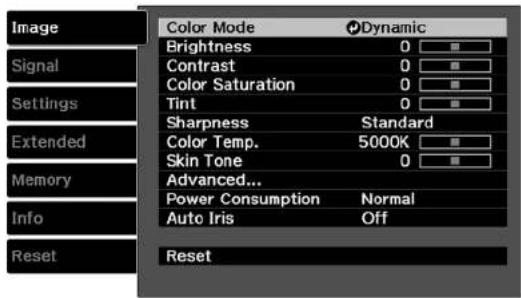
- Presstheupordownarrowbuttontomovethroughthemenuslistedontheleft. Thesettingsfor eachmenuaredisplayedontheright.
Note: The available settings depend on the current input source.
- Tochangesettingsinthedisplayedmenu, pressEnter.
- Presstheupordownarrowbuttontomovethroughthesettings.
- Changethesettingsusingthebuttonslistedonthebottomofthemenuscreens.
- Toreturnallthemenusettingstotheirdefaultvalues,selectReset.
- When you finish changing settings on an amino, press Esc.
- PressMenuorEsctoexitthemenus.
Parenttopic:AdjustingtheMenuSettings
ImageQualitySettings-ImageMenu
Settings on the Imagemenulet you adjust the quality of your image for the input source you are currently using.
Note: The available settings depend on the currently selected input source.
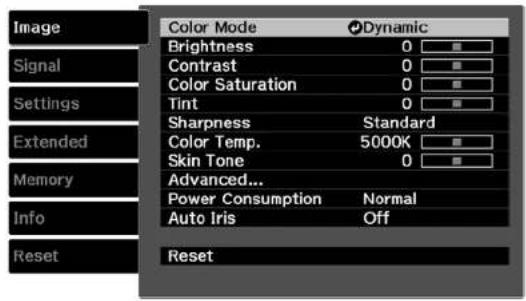
Tochangesettingsforaninputsource,makesurethesourceisconnectedandselectthatsource.
| SettingOptionsDescription | ||
| ColorModeSeethelistofavailableColorAdjuststhevividnessofimage Modescolorsforvariousimagetypes andenvironments | ||
| BrightnessVaryinglevelsavailableLightensordarkenstheoverall image | ||
| ContrastVaryinglevelsavailableAdjuststhedifferencebetween lightanddarkareasoftheimage | ||
| ColorSaturationVaryinglevelsavailableAdjuststheintensityoftheimag colors | ||
| TintVaryinglevelsavailableAdjuststhebalanceofgreento magentatonesintheimage | ||
| SharpnessVaryinglevelsavailableAdjuststhesharpnessor softnessofimagedetails | ||
| ColorTemp.(colortemperature)VaryinglevelsavailableSetstheoverall colortone;higher valuestinttheimageblueand lowervaluestinttheimagered | ||
| SkinToneVaryinglevelsavailableMakesfineadjustmentstothe | colortone;highervaluestintthe imageblueandlowervaluestint theimagered | |
| AdvancedGammaSelectsvariousdetailedcolorRGBRGBCMYEPSONSuperWhite | settingsGamma:adjuststhegamma levelsoftheimageRGB:adjuststheoffsetandgain foreachcolorRGBCMY:adjuststhehue, saturation,andbrightnessfor eachcolorEPSONSuperWhite:reduces over-exposureofwhitesinyour image;canbesetonlywhen ColorModeissettoNatural,Cinema,THX,3DTHX,B&W Cinema,or3DCinema. | |
| PowerConsumptionNormalSelectsthebrightnessmodeofECO | theprojectorlampNormal:setmaximumlamp brightnessECO:reduceslampbrightness andfannoise,and savespower andlamplife | |
| AutoIrlsOffAdjuststheprojectedluminanceNormalHighSpeed | basedontheimagebrightness whencertainColorModesare selected | |
Note: The Brightness setting does not affect lamp brightness. To change the lamp brightness mode, usethePowerConsumptionsetting.
Parenttopic:AdjustingtheMenuSettings
Relatedconcepts
ColorMode
InputSignalSettings-SignalMenu
Normally the project detects and optimizes the input signal settings automatically. If you need to customize these settings, you can use the Signal menu.
Note: The available settings depend on the currently selected input source.
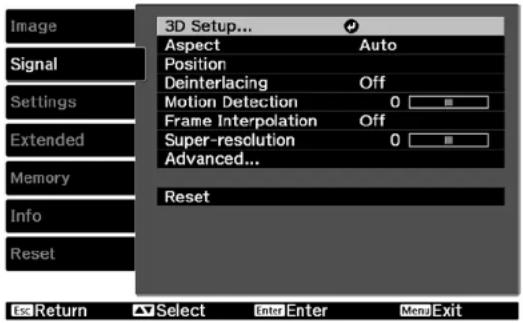
Tochangesettingsforaninputsource, makesurethesourceisconnectedandselectthatsource.
| SettingOptionsDescription | ||
| 3DSetup3DDisplaySelectsvarious | 3Doptions2D-to-3DConversion3DDisplay:enables3Dmode3DFormat2D-to-3DConversion:converts3DDepthDiagonalScreenSize3DBrightnessInverse3DGlasses3DViewingNotice | 2Dimagesto3D3DFormat:selectsthe3Dformat3DDepth:setsthedepthforthe3DimageDiagonalScreenSize:selectstheactualsizeofthescreento maximizethe3Deffect3DBrightness:adjuststhe brightnessofthe3DimageInverse3DGlasses:reverses theimagesprojectedfortheleft andrighteyes(enableonlyif3D imagesdonotdisplaycorrectly)3DViewingNotice:enablesthe viewingnoticedisplayedwhen using3Dmode |
| AspectSeethelistofavailableaspect | Setstheaspectratio(width-to-ratiosheightratio)fortheselectedinput | source |
| TrackingVaryinglevelsavailableAdjust | justssignaltoeliminate | verticalstripesincomputer imagesfromthePCinputport |
| Sync.VaryinglevelsavailableAdjust | tssignaltoeliminate | fuzzinessorflickeringin computerimagesfromthePC inputport |
| PositionUp,down,left,rightAdjust | theimagelocationonthe | screen |
| DeinterlacingOffSetswhethertoconvertVideoFilm/Auto | interlaced-to-progressivesignals forcertainvideoimagetypesOff:forfast-movingvideoimagesVideo:formostvideoimagesFilm/Auto:formovies,computer graphics,andanimation | |
| MotionDetection1to5Selectshowtheimageis | convertedtoprogressivesignal (Adjustthissettingifyou experienceproblemswithstill imagequalityorflickeringvideo. Selectalowersettingforstill imagesorahighersettingfor fast-movingvideocontent.) | |
| FrameInterpolationOffSmoothsfastmovingvideobyLowNormalHigh | comparingconsecutiveframes andinsertinganintermediate framebetweenthem | |
| Super-resolution0to5Sharpensburredimages | ||
| AutoSetupOnAutomaticallyoptimizesOff | computerimagequality | |
| AdvancedNoiseReductionNoise | Reduction: reducesSetupLevelOverscanHDMIVideoRangeImageProcessing | flickeringinanalogimagesin threelevelsSetupLevel: adjuststhelevelat whichdarkareasoftheimage arerenderedblack;leavethis settingat0%formostvideo equipment;checkyourvideo equipmentspecificationstoverify thecorrectsettingOverscan: changesthe projectedimageratiotomakethe edgesvisiblebyaselectable percentageorautomaticallyHDMIVideoRange: setsthe videorangetomatchthesetting ofthedeviceconnectedtothe HDMinputportImageProcessing: adjustshow imagesareprocessed;selectFasttodisplayimagesquicker; selectFinetodisplayimagesin higherquality |
Note:
- The Deinterlacing setting is available only for 480i, 576i or 1080i signals from Component or HDMI videosources.
- You can set the HDMI Video Range setting only when the Epson Super White setting is set to Off.
- The Reset setting does not reset the Diagonal Screen Size, 3D Viewing Notice, Aspect, and Image Processingsettings.
- When you view 3D images, the Frame Interpolation and Super-resolution settings are only available for 1080p24fpssignals from HDMI videosources.
•TheAspectsettingisnotavailableforHDvideosignals.
Parenttopic:AdjustingtheMenuSettings
Relatedconcepts
ImageAspectRatio
Relatedtasks
Viewing3DImages
ProjectorFeatureSettings-SettingsMenu
OptionsontheSettingsmenuletyoucustomizevariousprojectorfeatures.
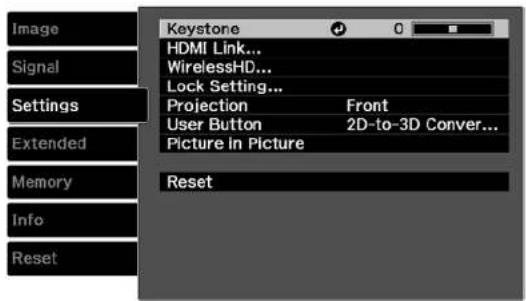
| SettingOptionsDescription | ||
| KeystoneVaryinglevelsavailableA | Adjustsimageshapeto | rectangular(vertically) |
| HDMILinkDeviceConnectionsAdjuststheHDMILinkoptionsHDMILinkPowerOnLinkPowerOffLink | thatalowtheprojectorremoteto controlHDMI-connecteddevices thatsupporttheCECstandardDeviceConnections:liststhe devicesconnectedtotheHDMI1 andHDMI2portsHDMILink:enablesordisables theHDMILinkfunctionPowerOnLink:controlswhat happenswhenyouturnonthe projectororalinkeddevice•PJ->DeviceorBidirectional: turnsonthelinkeddevicewhentheprojectoristurnedon•Device->PJorBidirectional: turnsontheprojectorwhenthe linkeddeviceisturnedonPowerOffLink:controls whetherlinkeddevicesare turnedoffwhentheprojectoris turnedoff | |
| LockSettingChildLockControlsprojectorbuttonlockingControlPanelLock | tosecuretheprojectorChildLock:locksthepower buttonControlPanelLock:locksall buttonsexceptthepowerbutton | |
| ProjectionFrontSelectsthewaytheprojectorFront/CeilingRearRear/Celling | facesthescreensotheimageis orientedcorrectly | |
| UserButton2D-to-3DConversion | Assignsamenuoptiontothe3DDepth3DBrightnessInverse3DGlassesPowerConsumptionInfo | Userbuttonontheremotecontrolforone-touchaccess |
| PictureinPictureSeethelistofavailable | ablePictureinAdjuststhesizeandlocationofPictureoptionsthesub-screen,swap | assourcesandexitsPictureinPicturemode |
Parenttopic: Adjusting theMenu Settings
Relatedconcepts
ProjectorSecurityFeatures
ProjectorPlacement
Relatedreferences
AvailablePictureinPictureOptions
Relatedtasks
CorrectingImageShapewiththeKeystoneButtons
ConnectingtoanHDMIVideoSource
ChangingtheProjectionModeUsingtheMenus
ProjectorSetupSettings-ExtendedMenu
SettingstheExtendedmenuletyoucustomizevariousprojectorsetupfeaturesthatcontrolits operation.
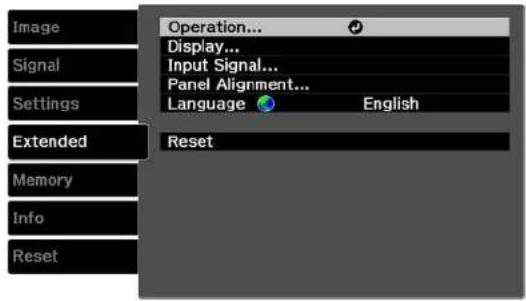
| SettingOptionsDescription | ||
| OperationDirectPowerOnSelect | variousoperationSleepModeIlluminationTriggerOutHighAltitudeMode | optionsDirectPowerOn:letsyouturn ontheprojectorwithoutpressing thepowerbuttonSleepMode:automatically placestheprojectorinstandby modeafteranintervalof inactivityIllumination:turnsoffthelights ontheprojectorTriggerOut:outputsaDC12V signalfromthe3.5mmmini-jack TriggerOutportwheneverthe projectoristurnedonHighAltitudeMode:regulates theprojector'soperating temperatureataltitudesabove 4921feet(1500m) |
| DisplayMenuPositionSelectsvariousdisplayoptionsMenuColorMenuPosition:adjuststheMessagesDisplayBackgroundStartupScreenStandbyConfirmation | thelocationwherethemenuisdisplayedMenuColor:selectsthecolorofthemenuMessages:controlswhethermessagesaredisplayedonthescreenDisplayBackground:selectsthescreencolororlogotodisplaywhennosignalisreceivedStartupScreen:controlswhethertheEpsonlogoappearswhentheprojectorstartsupStandbyConfirmation:displaysaconfirmationmessageafterpressingtheStandbybuttonontheremotecontrol | |
| InputSignalVideoSignalSelectstheinputsignalsforComponent | certainportsVideoSignal:SpecifiesthesignaltypefrominputsourcesconnectedtotheVideoportorselectAutotodetectthesignalautomaticallyComponent:SpecifiesthesignaltypefrominputsourcesconnectedtotheComponentportorselectAutotodetectthesignalautomatically | |
| PanelAlignmentPanelAlignment | CorrectscolormisalignmentinSelectColorPatternColorStartAdjustments | theprojectedimagePanelAlignment:enablesadjustmentsforcolorconvergence(thealignmentoftheredandbluecolorsintheprojectedimage)SelectColor:specifiesthecolorconvergencetocorrectPatternColor:specifiesthecolorpatternusedduringpanelalignmentStartAdjustments:startsthePanelAlignmentfeature |
| LanguageVariouslanguagesavailable | ableSelectsthelanguagefor | projectormenuandmessagedisplays(notchangedbyResetoption) |
Note: The Reset setting does not reset the High Altitude Mode or Language settings.
Parenttopic:AdjustingtheMenuSettings
Relatedtasks
AdjustingtheColorConvergence(PanelAlignment)
ProjectorMemoryOptions-MemoryMenu
Yourprojectorcomeswith10memorylocationswhereyoucansavecustomizedsettingstoobtainthe bestpicturequalityforeachofyourvideoinputs.
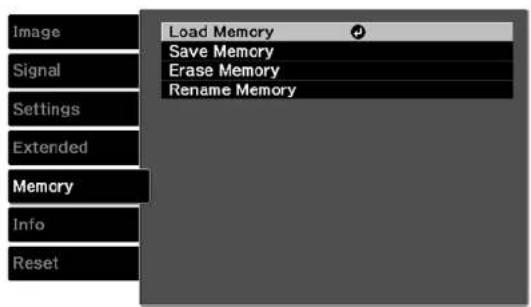
| SettingDescription | |
| LoadMemoryDisplaysthelistofcustomizedsettingsentriesthatyouhavecreated;selectanentryandpressEnterontheremotecontrolto loadit | |
| SaveMemorySavesthecurrentprojectorsettingstotheprojector'smemory | |
| EraseMemoryDisplaysthelistofcustomizedsettingsentriesthatyouhavecreated;selectanentryandpressEnterontheremotecontrolto eraseit | |
| RenameMemoryDisplaysthelistofcustomizedsettingsentriesthatyouhavecreated;selectanentryandpressEnterontheremotecontrolto renameit | |
Parenttopic:AdjustingtheMenuSettings
Relatedtasks
SavingSettingstoMemoryandUsingSavedSettings
ProjectorInformationDisplay-InfoMenu
YoucandisplayinformationabouttheprojectorandinputsourcesbyviewingtheInfomenu.However, youcannotchangeanysettingsinthemenu.
Note: The information displayed depends on the currently selected inputs source.
Note: The lamp usage timer does not register any hours until you have used the lamp for at least 10 hours. Available settings depend on the current inputs source.
InformationitemDescription
Lamp Hours
Displays the number of hours (H) the lamp has been used in each PowerConsumptionmode
SourceDisplaysthenameoftheporttowhichthecurrentinputsourcesis connected
InputSignalDisplay the inputsignal typesetting of the current input source
ResolutionDisplaystheresolutionofthecurrentinputsource
ScanModeDisplaysthescanmode(progressiveorinterlaced)
RefreshRateDisplaystherefreshrateofthecurrentinputsource
3DFormatDisplaysthe3Dformatofthecurrentinputsource
SyncInfoDisplaysinformationthatmaybeneededbyaservicetechnician
| InformationitemDescription | |
| DeepColorDisplaysDeepColorinformation | |
| StatusDisplaysinformationaboutprojectorproblemsthatmaybeneededbyaservicetechnician | |
| SerialNumberDisplaystheprojector'sserialnumber | |
| VersionDisplaysthefirmwareversionoftheprojector |
Parenttopic: Adjusting theMenu Settings
Relatedreferences
OptionalEquipmentandReplacementParts
Relatedtasks
ReplacingtheLamp
ResettingtheLampTimer
ProjectorResetOptions-ResetMenu
You can reset most of the projector settings to their default values using the Reset All option on the Resetmenu.
You can reset the projector's lamp usage timer to zero when you replace the lamp using the Reset Lamp Hours option and you can also reset all memory entries using the Reset Memory option.
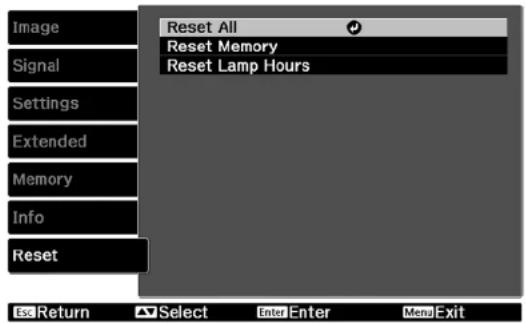
You cannot reset the following settings using the ResetAlloption:
•PCSignal
•Language
•LampHours
- Memorysettings
Parenttopic:AdjustingtheMenuSettings
MaintainingandTransportingtheProjector
Followtheinstructionsinthesesectionstomaintainyourprojectorandtransportitfromplacetoplace.
ProjectorMaintenance
TransportingtheProjector
ProjectorMaintenance
Yourprojectorneedslittlemaintenancetokeepworkingatitsbest.
Youmayneedtocleanthelensperiodically, andcleantheairfilterandairventstoppreventtheprojector fromoverheatingduetoblockedventilation.
Theonlypartsyoushouldreplacearethelamp,airfilter,andremotecontrolbatteries.Ifanyotherpart needsreplacing,contactEpsonoranauthorizedEpsonservicer.
Warning: Before cleaning any part of the projector, turn it off and unplug the power cord. Never open any cover on the projector, except a specifically explained in this manual. Dangerous electrical voltages in the projector can injure you severely.
Warning: Do not try to service this product yourself, except as specifically explained in this manual. Referallotherservicingtoqualifiedservicers.
CleaningtheLens
Cleaningthe3DGlasses
CleaningtheProjectorCase
AirFilterandVentMaintenance
ProjectorLampMaintenance
ReplacingtheRemoteControlBatteries
Parenttopic: Maintaining and Transporting the Projector
Relatedreferences
WheretoGetHelp
CleaningtheLens
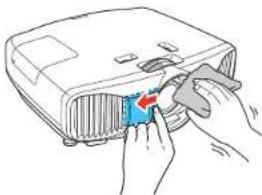
Cleantheprojector'slensperiodically,orwheneveryounoticedustorsmudgesonthesurface.
- Toremovedustorsmudges, gentlymovetheshuttertotheside and wipethelens with lens-cleaning paper.
natural_image
Illustration of hands installing or adjusting a blue component on a projector (no text or symbols visible)• Toremovestubbornsmudges, moistenasoft, lint-freeclothwithlenscleanerandgentlywipethelens. Donotsprayanyliquiddirectlyonthelens.
Warning: Donotusealenscleaner that contains flammable gas. The high heat generated by the projector lamp may cause a fire.
Caution: Do not use glass cleaner or any harsh materials to clean the lens and do not subject the lens toanyimpacts;youmaydamageit.Donotusecannedair,orthegasesmaybearesidue.Avoid touchingthelenswithyourbarehandstopreventfingerprintsonordamagetothelenssurface.
Parenttopic: Projector Maintenance
Cleaningthe3DGlasses
Toremovedust, dirt, smudges, orfingerprints from the glasses, use alint - freecloth.
Note: Unpluganych charging cables from the glasses before cleaning them.
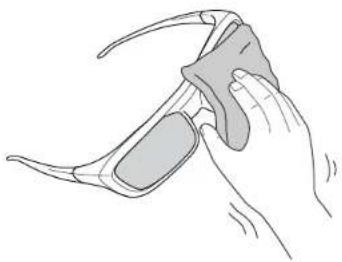
natural_image
Illustration of a hand holding a pair of eyeglasses (no text or symbols)Caution: Donotusepapertowelsoranyotherabrasivematerialstocleantheglasses.
Parenttopic: Projector Maintenance
CleaningtheProjectorCase
Beforecleaningtheprojectorcase,turnofftheprojectorandunplugthepowercord.
• Toremovedustordirt, useasoft, dry, lint-freecloth.
- Toremovestubborndirt, useasoftclothmoistenedwithwaterandmildsoap. Donotsprayliquid directlyontheprojector.
Caution: Do not use wax, alcohol, benzine, paint thinner, or other chemicals to clean the projector case. Thesecandamagethecase. Donotusecannedair, orthegasesmayleavearesidue.
Parenttopic:ProjectorMaintenance
AirFilterandVentMaintenance
Regularfiltermaintenanceisimportanttomaintainingyourprojector.YourEpsonprojectorisdesigned withaneasilyaccessible,user-replaceablefiltertoprotectyourprojectorandmakeregularmaintenance simple.Filtermaintenanceintervalswilldependontheenvironment.
Ifregularmaintenanceisnotperformed,yourEpsonprojectorwillnotifyyouwhenthetemperature insidetheprojectorhasreachedahighlevel.Donotwaituntilthiswarningappearstomaintainyour projectorfilterasprolongedexposuretohightemperaturesmayreducethelifeofyourprojectorlamp.
DamageduetothefailuretoproperlymaintaintheprojectororitsfiltermaynotbecoveredbytheprojectorlampLimitedWarranties.
CleaningtheAirFilter
ReplacingtheAirFilter
Parenttopic:ProjectorMaintenance
Relatedreferences
ProjectorLightStatus
CleaningtheAirFilter
Youneedtocleantheprojector'sairfilterinthefollowingsituations:
•Thefilterorventsgetdusty.
• Youseeamessagetellingyoutocleanit.
-
Turnoff the projector and unplug the power cord.
-
Pressinontheinneredgeoftheairfiltercovertoreleasethelatch, thenpulltoremove.
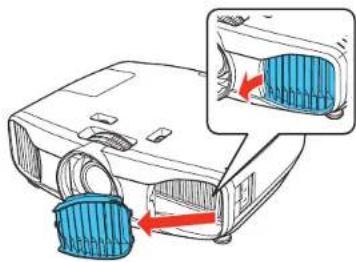
natural_image
Illustration of a projector with blue filter bands and red arrows indicating airflow direction (no text or symbols)- Pulltheairfilteroutoftheprojector.
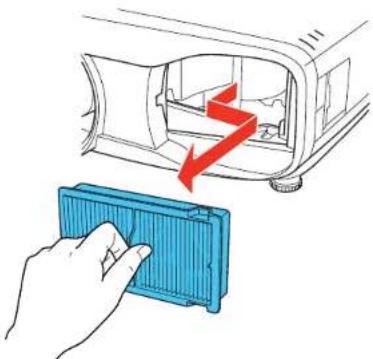
natural_image
Illustration of a hand placing a blue plastic component into a device with a red arrow indicating motion (no text or symbols)- Tapeachsideoftheairfilter4to5timestoshakeoffanyexcessdust.
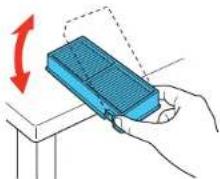
natural_image
Illustration of a hand holding a blue rectangular device with a red arrow indicating rotation (no text or symbols)Caution: Donotuse excessive force when tapping the air filter, or it may crack and become unusable. Donotrinset the air filter in water, or use any detergent solvent to clean it. Donotuse canned air; the gases may leave a residue, or push dust and debris into the projector's optics or others sensitive areas.
- Vacuum the front of the air filter (thesidewith the abs) to remove any remaining dust.
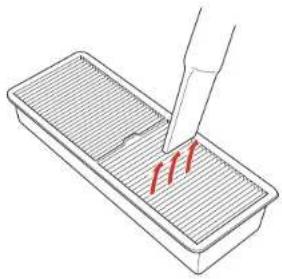
natural_image
Illustration of a pipette dispensing red liquid into a rectangular container (no text or symbols)Note: If dust is difficult to remove the air filter is damaged, replace the air filter.
- Placetheairfilterbackintheprojectorasshown.
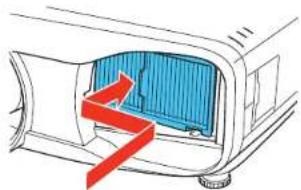
natural_image
Diagram of a car interior showing airflow or fluid flow with red arrows indicating direction (no text or symbols)- Attach the air filter cover and press gently until it clicks in to place.
Parenttopic: AirFilterandVentMaintenance
Relatedtasks
ReplacingtheAirFilter
ReplacingtheAirFilter
Youneedtoreplacetheairfilterinthefollowingsituations:
• Aftercleaningtheairfilter, youseeamessagetellingyoutocleanorreplaceit
•Theairfilteristornordamaged
• If the filter is adark gray color
Youcanreplacetheairfilterwhiletheprojectorismountedtotheceilingorplacedonatable.
-
Turnoff the projector and unplug the power cord.
-
Pressinontheinneredgeoftheairfiltercovertoreleasethelatch, thenpulltoremove.
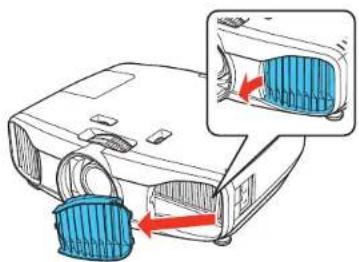
natural_image
Illustration of a projector with blue filter bands and red arrows indicating motion (no text or symbols)- Pulltheairfilteroutoftheprojector.
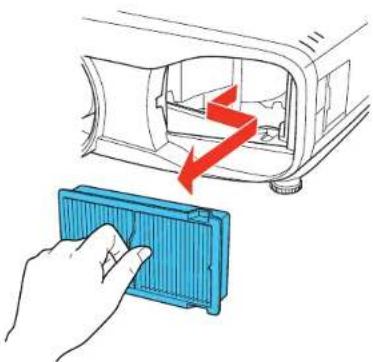
natural_image
Illustration of a hand placing a blue plastic component into a device with red arrows indicating motion (no text or symbols)Note: Air filters contain polypropylene. Dispose of used air filters according to local regulations.
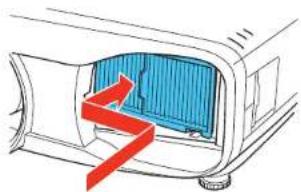
- Placethenewairfilterintheprojectorasshown.
natural_image
Diagram of a car interior showing airflow or heat transfer (no text or symbols)- Attach the air filter cover and press gently until it clicks in to place.
Parenttopic: AirFilterandVentMaintenance
ProjectorLampMaintenance
The projector keep a stack of the number of hours the lamp is used and displayed this information in the projector's menusystem.
Replacethelampassoonaspossiblewhenthefollowingoccurs:
• The projected image gets darker or start stodeteriorate
- Amessageappearswhenyouturnontheprojectortellingyoutoreplacethelamp
• The projector's lamplightis flashing orange and its power light is flashing blue
ReplacingtheLamp
ResettingtheLampTimer
Parenttopic:ProjectorMaintenance
Relatedreferences
OptionalEquipmentandReplacementParts
ProjectorInformationDisplay-InfoMenu
ProjectorLampSpecifications
ReplacingtheLamp
Beforeyoureplacethelamp,lettheprojectorcooldownforatleastonehoursothelampwillnotbehot.
Warning: Letthelampfullycoolbeforereplacingittoavoidinjury.
Youcanreplacethelampwhiletheprojectorismountedtotheceiling,ifnecessary.
-
Turnoff the projector and unplug the power cord.
-
Allow the projector lamptocooldown for at least one hour.
-
Use the crew driver included with the replacement lamptoloosenthescrewsecuring the lamp cover.
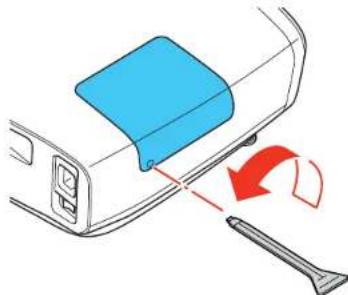
natural_image
Diagram showing a blue plastic container being inserted into a device with a red arrow indicating rotation (no text or symbols present)Warning: If the lamp is broken, glass fragments may be loose inside the lamp chamber. Be careful removing any brokenglassto avoid injury. If the projector is installed on the ceiling, stand to these side of the lamp cover and not underneath; pieces of glass could fall into you or yes from mouth when you open the lamp cover.
4.Slidethelampcoveroutandliftitoff.
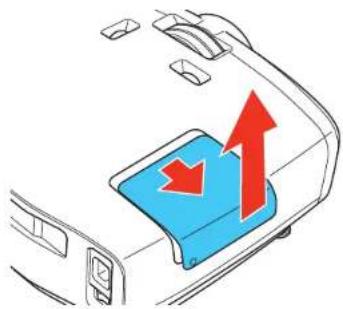
natural_image
Diagram of a car interior showing a blue plastic tray with red upward arrows indicating flow or movement (no text or symbols)- Loosenthescrewssecuringthelamptotheprojector. Thescrewsdonotcomeallthewayout.
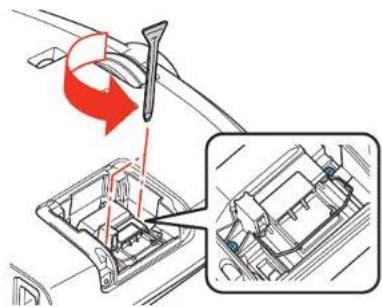
- Liftupthelamphandleandgentlypullthelampoutoftheprojector.
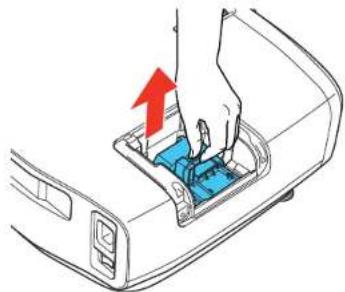
natural_image
Illustration of a hand pressing down on a device component with a red arrow indicating the motion (no text or symbols present)Note: The lamp(s) in this product contain mercury. Please consult your state and local regulations regarding disposal or recycling. Donotputin the trash.
- Gently insert thenewlamp into the projector. If it does not fit easily, makes sure it is facing the right way. Pressthe handled down until blocks in place.
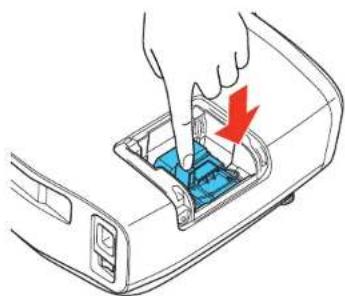
natural_image
Illustration of a hand inserting a device into a computer case with a red arrow indicating the insertion point (no text or symbols present)Caution: Donottouchanyglassonthelampassemblytoavoidprematurelampfailure.
8.Pushinthelampfirmlyandtightenthescrewstosecureit.
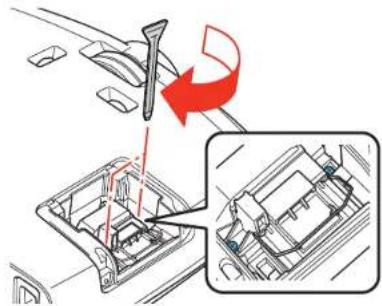
Caution: Donotover-tightenthescrews.
- Replacethelampcoverandtightenthescrewtosecureit.
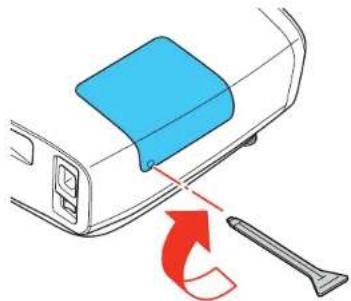
natural_image
Diagram showing a blue container being inserted into a device with a red arrow indicating rotation (no text or symbols)Note: Besurethelampcoverissecurely installedorthelampwillnotcomeon.
Resetthelamptimertozerotokeeptrackofthenewlamp'susage.
Parenttopic: Projector Lamp Maintenance
Relatedtasks
ResettingtheLampTimer
ResettingtheLampTimer
Youmustresetthelamptimerafterreplacingtheprojector'slamptoclearthelampreplacement messageandtokeeptrackoflampusagecorrectly.
Note: Do not reset the lamp timer if you have not replaced the lamp to avoid inaccurate lamp usage information.
- Turnon the projector.
2.PresstheMenubutton. - SelecttheResetmenuandpressEnter.
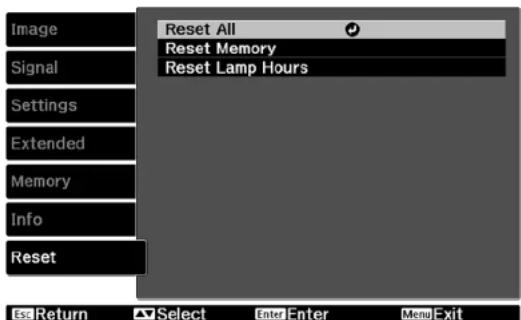
- SelectResetLampHoursandpressEnter.
Youseeapromptaskingifyouwanttoresetthelamphours.
- SelectYesandpressEnter.
- PressMenuorEsctoexitthemenus.
Parenttopic: Projector Lamp Maintenance
ReplacingtheRemoteControlBatteries
TheremotecontrolusestwoAAmanganeseoralkalinebatteries. Replacethebatteriesassoonasthey runout.
Caution: Use only the type of batteries specified in this manual. Do not install batteries of different types, ormixnewandoldbatteries.
- Removethebatterycoverasshown.
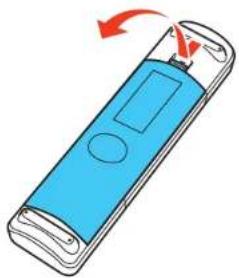
natural_image
Illustration of a blue handheld device with a red arrow indicating rotation (no text or symbols)- Removetheoldbatteries.
Warning: If the battery fluid has leaked, wipe it away with a soft cloth and avoid getting the fluid on yourhands. Ifitgetsonyourhands, wash them immediately to avoid injury.
- Insert the batteries with the + and - ends facing as shown.
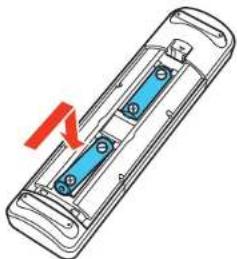
natural_image
Diagram of a handheld electronic device with blue internal components and a red arrow indicating rotation (no text or symbols)- Replacethebatterycoverandpressitdownuntilclicksintoplace.
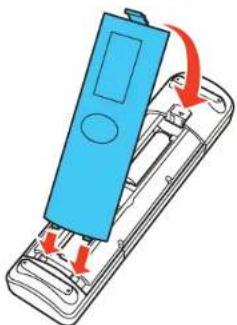
natural_image
Illustration of a blue handheld device with red arrows indicating internal components (no text or symbols)Warning: Dispose of used batteries according to local regulations. Do not expose batteries to heat or flame. Keep batteries out of thereachofchildren; they are choking hazards and are every dangerous if swallowed.
Parenttopic: Projector Maintenance
Relatedreferences
RemoteControlSpecifications
TransportingtheProjector
The projector contains precision parts, some of which are glass. Follow these guidelines to transport, ship, or store the projectors safely:
- Removeanyequipmentconnectedtotheprojector.
- Centerthelenspositionusingtheverticalandhorizontallensshiftdials.
- Whentransportingtheprojectoralongdistanceorascheckedluggage,packitinafirmboxwith cushioningarounditandmarkthebox"Fragile."
- Whenshippingtheprojectorforrepairs,placeitinitsoriginalpackingmaterials,ifpossible,oruse equivalentmaterialswithcushioningaroundtheprojector.Markthebox"Fragile."
Note: Epson shall not believe for any damages incurred during transportation.
Parenttopic: Maintaining and Transporting the Projector
SolvingProblems
Checkthesolutionsinthesesectionsifyouhaveanyproblemsusingtheprojector.
ProjectionProblemTips
ProjectorLightStatus
SolvingImageProblems
SolvingProjectororRemoteControlOperationProblems
WheretoGetHelp
ProjectionProblemTips
If the projector is not working properly, try turning it off and unplugging it. Then plug it back in and turn it on.
If this does not solve the problem, check the following:
• Thelightsontheprojectormayindicatewhattheproblemis.
- Thesolutionsinthismanualcanhelpyousolvemanyproblems.
If noneofthesesolutionshelp, you can contact Epsonfortechnical support.
Parenttopic: Solving Problems
Relatedreferences
WheretoGetHelp
ProjectorLightStatus
ProjectorLightStatus
Thelightsontheprojectorindicate the projector status and let you know when a problem occurs. Check the status and color of the lights and look for a solution in the table here.
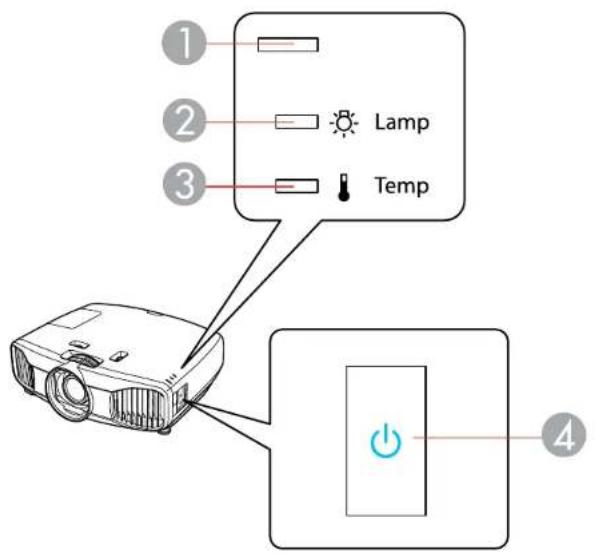
1Statuslight
2Lamplight
3Templight
4Powerlight
| PowerlightStatus | slightLamplight | TemplightStatus | andsolution | |
| BlueBlueOff | OffNormaloperation | |||
| PowerlightStatus | slightLamplight | TemplightStatus | solutionsolution | |
| BlueFlashingblue | OffOffWarmingup | waitforanimageto | appear | |
| OffOffOffOffStandbyorsleepmode | ||||
| BlueFlashingblue | OffOffShuttingdown | whentheStatuslight | stopsflashing,youcanunplugtheprojector | |
| FlashingblueVaries | OffFlashingProjectoristoohot | orange | •Makesurethattheventsandairfilterarenotcloggedwithdustorobstructedbynearbyobjects•Cleanorreplacetheairfilter•Makesuretheenvironmentaltemperatureisnottoohot | |
| OffFlashingblue | OffOrangeProjectorhasoverheatedandturned | off;leaveitturnedofftocooldownforaboutfiveminutes,thendothefollowing:•Makesurethattheventsandairfilterarenotcloggedwithdustorobstructedbynearbyobjects•Cleanorreplacetheairfilter•Ifoperatingtheprojectorathighaltitude,turnonHighAltitudeMode•Iftheproblempersists,unplugtheprojectorandcontactEpsonforhelp | ||
| PowerlightStatus | slightLamplight | TemplightStatus | andsolution | |
| OffFlashingblue | Orange | OffLamphasaproblem | •ChecktheLampHoursinthelInfo menutoseefthelampisburned out.Waitforthelamptocooldown, andthenremoveittoseeifitis brokenorinstalledincorrectly; reseatorreplacethelampas necessary•Cleanorreplacetheairfilter•Ifoperatingtheprojectorathigh altitude,turnonHighAltitude Mode•Iftheproblempersists,unplugthe projectorandcontactEpsonfor help | |
| FlashingblueVaries | FlashingOffRe | Placethelampsoontoavoid orangedamage;donotcontinueusingthe projector | ||
| OffFlashingblue | OffFlashingAfanorsensorhasaproblem;turnorangetheprojectoroff,unplugit,and contactEpsonforhelp | |||
| OffFlashingblueFlashing | FlashingFlashingA | Autolriserror;tu orange | rntheprojectoroff,orangeunplugit,andcontactEpsonforhelp | |
| OffFlashingblue | OrangeOrange | Powererror;rturntheprojectoroff,unplugit,andcontactEpsonforhelp | ||
| OffFlashingblueFlashing | Offlnternalprojectorererrcr;turnthe orangeprojectoroff,unplugit,andcontact Epsonforhelp | |||
Note: If the lights display a pattern not listed in the table above, turn the projector off, unplug it, and contactEpsonforhelp.
Parenttopic: Solving Problems
Relatedreferences
ProjectorSetupSettings-ExtendedMenu
Relatedtasks
CleaningtheAirFilter
ReplacingtheLamp
ReplacingtheAirFilter
SolvingImageProblems
Checkthesolutionsinthesesectionsifyouhaveanyproblemswithprojectedimages.
SolutionsWhenNoImageAppears
SolutionsWhen"NoSignal"MessageAppears
SolutionsWhen"NotSupported"MessageAppears
SolutionsWhenOnlyaPartialImageAppears
SolutionsWhentheImageisNotRectangular
SolutionsWhentheImageContainsNoiseorStatic
SolutionsWhenthelmageisFuzzyorBlurry
SolutionsWhentheImageBrightnessorColorsareIncorrect
SolutionsWhena3DImageDoesNotDisplayCorrectly
Parenttopic: Solving Problems
SolutionsWhenNoImageAppears
Ifnoimageappears, try the following solutions:
- PresstheBlankbuttonontheremotecontroltoseeiftheimagewastemporarilyturnedoff.
- Makesureallnecessarycablesaresecurelyconnectedandthepowerisonfortheprojectorand connectedvideosources.
- Presstheprojector'spowerbuttontowakeitfromstandbyorsleepmode. Alsoseeifyourconnected computerisinsleepmodeordisplayingablankscreensaver.
- CheckthesettingsontheSignalmenutomakesuretheyarecorrectforthecurrentvideosource.
- Adjust the Brightness setting or select the Normal Power Consumption setting.
- Check the Display setting to make sure Messages is set to On.
- If the projectordoesnotrespondwhenyoupressthecontrolpanelbuttons, the buttonsmaybe locked. Unlockthebuttons.
- ForimagesprojectedwithWindowsMediaCenter,reducethescreensizefromfullscreenmode.
- ForimagesprojectedfromapplicationsusingWindowsDirectX,turnoffDirectXfunctions.
Parenttopic: SolvingImageProblems
Relatedreferences
ImageQualitySettings-ImageMenu
ProjectorSetupSettings-ExtendedMenu
SolutionsWhen"NoSignal"MessageAppears
If the "NoSignal" message appears, try the following solutions:
- Pressthesourcebuttonontheprojectorrepeatedlytocyclethroughtheavailablesources.Waitafew secondsforanimagetoappear.
- Turnontheconnectedcomputerorvideosource,andpressitsplaybuttontobeginyourpresentation, ifnecessary.
- Checktheconnectionfromtheprojectortoyourvideosources.
- If you are projecting from alaptop computer, makes sure it is setup to display on an external monitor.
- If necessary, turn the projector and the connected computer or video source off and then on again.
- If the other solutions do not solve the problem, reset all of the settings using the Reset menu.
DisplayingFromaPCLaptop
DisplayingFromaMacLaptop
Parenttopic: SolvingImageProblems
Relatedconcepts
ProjectorConnections
DisplayingFromaPCLaptop
If you se the "No Signal" message when you display from a PC laptop, you need to setup the laptop to display on an external monitor.
- Hold down the laptop's Fn key and press the key labelled with a monitor icon or CRT/LCD. (See yourlaptopmanualfordetails.) Waitafewsecondsforanimagetoappear.
- Todisplayonboththelaptop'smonitorandtheprojector, trypressingthesamekeysagain.
-
If the same image is not displayed by the laptop and projector, check the Windows Display utility to make sure the external monitor portisenabled and extended desktop mode is disabled. (Seeyour computer or Windows manual for instructions.)
-
If necessary, check your video card settings and set the multiple display option to Mirror or Duplicate.
Parenttopic: SolutionsWhen"NoSignal"MessageAppears
DisplayingFromaMacLaptop
If you see the "No Signal" message when you display from a Mac laptop, you need to setup the laptop form or redd display. (Se your laptop manual for details.)
- OpentheSystemPreferencesutilityandselectDisplays.
- ClicktheArrangementtab.
- Select the Mirror Displays checkbox.
Parenttopic: SolutionsWhen"NoSignal"MessageAppears
SolutionsWhen"NotSupported"MessageAppears
If the "Not Supported" message appears, try the following solutions:
- MakesurethecorrectinputsignalisselectedontheExtendedmenu.
- Makesurethecomputer'sdisplayresolutiondoesnotexceedtheprojector'sresolutionandfrequency limit.Ifnecessary,selectadifferentdisplayresolutionforyourcomputer.(Seeyourcomputermanual fordetails.)
Parenttopic: SolvingImageProblems
Relatedreferences
ProjectorSetupSettings-ExtendedMenu
InputSignalSettings-SignalMenu
SupportedVideoDisplayFormats
SolutionsWhenOnlyaPartialImageAppears
Ifonlyapartialcomputerimageappears,trythefollowingsolutions:
- TryadjustingtheimagepositionusingthePositionmenusetting.
- PresstheAspectbuttonontheremotecontroltoselectadifferentimageaspectratio.
- Checkyourcomputerdisplaysettingstodisabledualdisplayandsettheresolutionwithinthe projector'slimits.(Seeyourcomputermanualfordetails.)
- Checktheresolutionassignedtoyourpresentationfilestoseeiftheyarecreatedforadifferentresolutionthanyouareprojectingin.(Seeyoursoftwarehelpfordetails.)
Parenttopic: SolvingImageProblems
Relatedreferences
InputSignalSettings-SignalMenu
SupportedVideoDisplayFormats
SolutionsWhenthelmageisNotRectangular
If the projected image is not evenly rectangular, try the following solutions:
- Placetheprojectordirectlyinfrontofthecenterofthescreen, facingitsquarely, if possible.
- If you adjusted the projector height using the projector feet, press the keystone button on the project to adjust the imageshape.
- AdjusttheimageshapeusingtheKeystonemenusetting.
Parenttopic: SolvingImageProblems
Relatedreferences
ProjectorFeatureSettings-SettingsMenu
Relatedtasks
CorrectingImageShapewiththeKeystoneButtons
SolutionsWhentheImageContainsNoiseorStatic
If the projected images seem to contain electronic interference (noise) or static, try the following solutions:
- Checkthecablesconnectingyourcomputerorvideosourcetotheprojector. Theyshouldbe:
• Separated from the power cord to prevent interference
•Securelyconnectedatbothends
• Notconnectedtoanextensioncable
•Nolongerthan10feet(3m)forVGA/computercablesor24feet(7.3m)forHDMIcables
- Checkthesettingsontheprojector'sSignalmenutomakesuretheymatchthevideosource.If availableforyourvideosource,adjusttheNoiseReductionsetting.
- Selectacomputervideoresolutionandrefreshratethatarecompatiblewiththeprojector.
- If you adjusted the image shape using the projector controls, try decreasing the Sharpness setting to improve image equality.
- If you connected an extension powerable, try projecting without it to see if it caused interference in the signal.
Parenttopic: SolvingImageProblems
Relatedreferences
InputSignalSettings-SignalMenu
ImageQualitySettings-ImageMenu
SupportedVideoDisplayFormats
SolutionsWhenthelmageisFuzzyorBlurry
If the projected image is fuzzy or blurry, try the following solutions:
- Adjusttheimagefocus.
•Cleantheprojectorlens. - Position the projector close enough to the screen, and directly in front of it.
- AdjusttheSharpnesssettingtoimproveimagequality.
- If you are projecting from a computer, display uniformly patterned image on the screen and adjust the Tracking and Sync settings.
- If you are projecting from a computer, use a lower resolution.
- Checktheresolutionofyourvideosource.Ifyouareprojectingfromastandarddefinitionvideo source,yourimagewillnotbeasclearasanHD(720p/1080i/1080p)videosource.
Parenttopic: SolvingImageProblems
Relatedreferences
ProjectionDistance
ImageQualitySettings-ImageMenu
Relatedtasks
CleaningtheLens
FocusingtheImageUsingtheFocusRing
SolutionsWhentheImageBrightnessorColorsareIncorrect
If the projected image is stood dark or light, orthecolors are incorrect, try the following solutions:
- Press the Color Mode button on the remote control to try different color modes for the image and environment.
- Checkyourvideosourcesettings.
- Adjust the available settings on the Image menu for the current input source, such as Brightness, Contrast, Tint, Advanced, and Color Saturation.
- Make sure you selected the correct PC Signal or Video Signal setting on the Extended menu, if available for your imagesource.
- Makesureallthecablesaresecurelyconnectedtotheprojectorandyourvideodevice.Ifyou connectedlongcables,tryconnectingshortercables.
- If you are using the ECO Power Consumption setting, try selecting Normal in the projector's menus.
- Position the projector closeenoughtothescreen.
• If the image has been progressively darkening, you may need to replace the projector lamp soon.
Parenttopic: SolvingImageProblems
Relatedreferences
ImageQualitySettings-ImageMenu
ProjectorSetupSettings-ExtendedMenu
SolutionsWhena3DImageDoesNotDisplayCorrectly
Ifa3Dimagedoesnotdisplaycorrectly,trythefollowingsolutions:
- Pressthe2D/3Dbuttonontheremotecontroltoswitchto3Dmode,ifnecessary. Youcanalso activate 3D mode by setting the 3D Display setting on the Signal menu to On.
- Makesureyourvideodeviceandmediaareboth3D-compatible.Refertothedocumentationthat camewithyourvideodeviceformoreinformation.
- MakesureyouareusinganHDMIcablethatsupports3Dsignals.
- Make sure you selected the correct 3D Format setting on the Signal menu. Normally this should be set to Auto, but in some cases you may need to select a different setting to match the 3D signal from yourvideodevice.
- MakesureyouareusingRF3Dactiveshutterglasses.YoucanpurchasethemfromEpson.
- Makesureyour3Dglassesareturnedonandfullycharged. If the glasses have entered standby mode, slide the power switch on the glasses to the Off position and then back to the On position.
- Makesureyour3Dglassesarepairedwiththeprojector.
- Adjustthe3DDepthsettingontheSignalmenu.
- Makesureyouarewithinthe3Dviewingrange.
- MakesureyourscreensizematchestheDiagonalScreenSizesettingontheSignalmenu.
- Avoidusingtheprojectornearwirelessnetworks,microwaveovens,2.4GHzcordlessphones,or otherdevicesthatusethe2.4GHzfrequencyband.Thesedevicescaninterferewiththesignal between the projector and the 3D glasses.
- If the other solutions do not not solve the problem, change the Inverse 3D Glasses setting on the Signalmenu. Return these setting to its original value if changing it does not solve the problem.
Parenttopic: SolvingImageProblems
Relatedreferences
ProjectorFeatureSettings-SettingsMenu
3DViewingRange
OptionalEquipmentandReplacementParts
Relatedtasks
Chargingthe3DGlasses
Pairingthe3DGlasseswiththeProjector
Cleaningthe3DGlasses
SolvingProjectororRemoteControlOperationProblems
Checkthesolutionsinthesesectionsifyouhaveproblemsoperatingtheprojectororremotecontrol.
SolutionstoProjectorPowerorShut-OffProblems
SolutionstoProblemswiththeRemoteControl
Parenttopic: Solving Problems
SolutionstoProjectorPowerorShut-OffProblems
If the projectordoes not come on when you press the power button or it'shut soffun unexpectedly, try the followingsolutions:
- Makesurethepowercordissecurelyconnectedtotheprojectorandtoaworkingelectricaloutlet.
- Theprojector'sbuttonsmaybelockedforsecurity.Unlockthebuttonsorusetheremotecontrolto turnontheprojector.
- Thepowercordmaybedefective.DisconnectthecordandcontactEpson.
- If the projector's lampshut soffun unexpectedly, it may have entered stand by mode after a period of inactivity. Pressthe power button to wake the projector.
• If the projector's lampshutsoff, the Statuslightisflashingblue, and the Templightisorange, the projector has overheated and shutoff. Check the solutions for this light status.
- If the power button on theremote control does not turn on the projector, checks batteries and make sure the Remote Receiversetting is turned on the projector's menu, if available.
Parenttopic: Solving Projector or Remote Control Operation Problems
Relatedreferences
WheretoGetHelp
ProjectorLightStatus
ProjectorFeatureSettings-SettingsMenu
Relatedtasks
UnlockingtheProjector'sButtons
ReplacingtheRemoteControlBatteries
SolutionstoProblemswiththeRemoteControl
If the projectordoesnotrespondtoremotecontrolcommands, try the followingsolutions:
- Check that theremote control batteries are installed correctly and have power. If necessary, replace the batteries.
- Makesureyouareoperatingtheremotecontrolwithinthereceptionangleandrangeoftheprojector.
- Makesuretheprojectorisnotwarminguporshuttingdown.
- Checktoseeifabuttonontheremotecontrolisstuckdown,causingittoentersleepmode.Release thebuttontowaketheremotecontrolup.
• Strongfluorescentlighting, directsunlight, orinfrareddevicesignals maybeinterfering with the projector's remotereceivers. Dimthelightsormovetheprojectorawayfromthesunorinterfering equipment.
• If available, turnoffoneoftheremotereceiversintheprojector'smenusystem, orcheckifallthe remotereceiverswereturnedoff.
• If you assigned an ID number to other remote control to operate at multiple projectors, you may need to check or change the ID setting (feature not available with all projectors).
- If you los etheremote control, you can order another one from Epson.
Parenttopic: SolvingProjector or RemoteControlOperationProblems
Relatedreferences
OptionalEquipmentandReplacementParts
RemoteControlOperation
ProjectorFeatureSettings-SettingsMenu
Relatedtasks
ReplacingtheRemoteControlBatteries
WheretoGetHelp
If you need to contact Epson for technical supports services, use the following support options.
InternetSupport
Visit Epson's support website at epson.com/support (U.S.) or epson.ca/support (Canada) for solutions to commonproblemswithyourprojector.Youcandownloadutilitiesanddocumentation,getFAQsandtroubleshootingadvice,ore-mailEpsonwithyourquestions.
SpeaktoaSupportRepresentative
TousetheEpsonPrivateLineSupportservice, call(800)637-7661. This service is available for the duration of your warranty period. You may also speak with projectorsupport specialist by dialing(562) 276-4394(U.S.) or (905)709-3839(Canada).
Supporthoursare6AMto8PM, PacificTime, MondaythroughFridayand7AMto4PM, PacificTime, Saturday.
Daysandhoursofsupportaresubjecttochangewithoutnotice. Tollerlongdistancechargesmay apply.
Beforeyoucall,havethefollowinginformationready:
•Productname
- Productserialnumber(locatedonthebottomorrearoftheprojector,orinthemenusystem)
•Proofofpurchase(suchasastorereceipt)anddateofpurchase
•Computerorvideoconfiguration
•Descriptionoftheproblem
PurchaseSuppliesandAccessories
Youcanpurchasescreens,otheroptionalaccessories.andreplacementpartsfromanEpsonauthorizedreseller.Tofindthenarestreseller,call800-GO-EPSON(800-463-7766).Oryoucanpurchaseonlineatepsonstore.com(U.S.sales)orepson.ca(Canadiansales).
Topurchaseareplacementremotecontrol, call(562)276-4394(U.S.) or (905)709-3839(fordealerreferralinCanada).
Parenttopic: Solving Problems
TechnicalSpecifications
Thesesectionslistthetechnicalspecificationsofyourprojector.
GeneralProjectorSpecifications
ProjectorLampSpecifications
RemoteControlSpecifications
ProjectorDimensionSpecifications
ProjectorElectricalSpecifications
ProjectorEnvironmentalSpecifications
ProjectorSafetyandApprovalsSpecifications
SupportedVideoDisplayFormats
GeneralProjectorSpecifications
TypeofdisplayPoly-siliconTFTactivematrix
Resolution1920×1080pixels
LensF=2.3to3.6
Focallength:22.5to47.2mm
ColorreproductionFullcolor,1.07billioncolors
Brightness
NormalPowerConsumptionmode:
Whitelightoutput:2200lumens(ISO21118standard)
Colorlightoutput:2200lumens
Note: Colorbrightness(colorlightoutput)andwhitebrightness (whitelightoutput)will vary depending on usage conditions. Color light output measured in accordance with IDMS15.4; whitelight output measured in accordance with ISO21118.
Contrastratio2Dmode:
Upto600000:1inNormalPowerConsumptionmodewithAutolris on
Imagesize30inches(0.76m)to300inches(7.62m)
(innativeaspectratio)
Projectiondistance34inches(0.87m)to754inches(19.15m)
(innativeaspectratio)
ProjectionmethodsFront, rear, ceiling-mounted
Opticalaspectratio16:9
(width-to-height)
FocusadjustmentManual
ZoomadjustmentManual(optical)
Zoomratio1-2.1
(Tele-to-Wide)
Noiselevel32dB(NormalPowerConsumptionmode)
22dB(ECOPowerConsumptionmode)
KeystonecorrectionangleVertical:±30°(manual)
Parenttopic: Technical Specifications
ProjectorLampSpecifications
TypeUHE(UltraHighEfficiency, E-TORL)
Powerconsumption230W
LamplifeNormalPowerConsumptionmode:
Uptoabout4000hours
ECOPowerConsumptionmode:
Uptoabout5000hours
Note: Turn off this product when not in use to prolong the life of the projector. Lamp life will vary depending upon modeselected, environmental conditions, and usage. Brightness decreases over time.
Parenttopic: Technical Specifications
RemoteControlSpecifications
Receptionrange32feet(10m)
Batteries TwoalkalineormanganeseAA
Parenttopic: Technical Specifications
ProjectorDimensionSpecifications
Height(excludingfeet)5.51inches(140mm)
Width18.35inches(466mm)
Depth15.55inches(395mm)
Weight18.4lb(8.4kg)
Parenttopic: Technical Specifications
ProjectorElectricalSpecifications
Ratedfrequency50/60Hz
Powersupply100to240VAC±10%
3.7to1.6A
PowerconsumptionOperating:
(100to120V)NormalPowerConsumptionmode:350W
ECOPowerConsumptionmode:280W
PowerconsumptionOperating:
(220to240V)NormalPowerConsumptionmode:334W
ECOPowerConsumptionmode:270W
Parenttopic: Technical Specifications
ProjectorEnvironmentalSpecifications
TemperatureOperating:41to95°F(5to35°C)
Storage:14to140°F(-10to60°C)
Humidity(relative,non-Operating:20to80%
condensing)
Storage:10to90%
OperatingaltitudeUpto4921feet(1500m)
Upto7500feet(2286m)withHighAltitudeModeenabled
Parenttopic: Technical Specifications
ProjectorSafetyandApprovalsSpecifications
UnitedStatesFCCPart15ClassB(DoC)
UL60950-12ndedition(cTUVusMark)
CanadaICES-003ClassB
CSAC22.2No.60950-1-07(cTUVusMark)
Parenttopic: Technical Specifications
SupportedVideoDisplayFormats
Forbestresults, your computer's monitor port or video card resolutions should be set to display in the projector's nativer resolution. However, your projector includes Epson's Size Wise chip that supports other computer display resolutions, so your image will be resized to automatically.
Yourcomputer'smonitorportorvideocardrefreshrate(verticalfrequency)mustbecompatiblewiththe projector.(Seeyourcomputerorvideocardmanualfordetails.)
Thetablehereliststhecompatiblerefreshrateandresolutionforeachcompatiblevideodisplayformat.
| DisplayformatRefreshrate(inHz) | Resolution(inpixels) | |
| Computersignals(analogRGB) | ||
| VGA60/72/75/85640×480 | ||
| SVGA56/60/72/75/85800×600 | ||
| XGA60/70/75/851024×768 | ||
| WXGA601280×768 | ||
| 601366×768 | ||
| 60/75/851280×800 | ||
| SXGA70/75/851152×864 | ||
| 601280×960 | ||
| 601280×1024 | ||
| WXGA++601600×900 | ||
| Compositevideo | ||
| TV(NTSC)60720×480 | ||
| TV(PAL)50/60720×576 | ||
| TV(SECAM)50720×576 | ||
| TV(NTSC4.43)60720×480 | ||
| TV(M-PAL)60720×576 | ||
| TV(N-PAL) | 50720×576 | |
| TV(PAL60) | 60720×576 | |
| Componentvideo | ||
| SDTV(480i) | 60720×480 | |
| SDTV(576i) | 50720×576 | |
| SDTV(480p) | 60720×480 | |
| SDTV(576p) | 50720×576 | |
| HDTV(720p) | 50/601280×720 | |
| HDTV(1080i) | 50/601920×1080 | |
| HDTV(1080p) | 50/601920×1080 | |
| HDMinputsignals | ||
| VGA60640×480 | ||
| SDTV(480i/480p)60720×480 | ||
| SDTV(576i/576p)50720×576 | ||
| HDTV(720p)50/601280×720 | ||
| HDTV(1080i)50/601920×1080 | ||
| HDTV(1080p)24/30/50/601920×1080 | ||
HDMI3DSignals
| DisplayformatRefreshrate(inHz) | Resolution(inpixels) | 3D formats | |
| HDTV(720p)50/601280×720FramePacking | SidebySideTopandBottom | ||
| HDTV(1080i) | 50/601920×1080 | SidebySide | |
| HDTV(1080p) | 50/601920×1080 | SidebySide | |
| 24 | 1920×1080 | FramePackingSidebySideTopandBottom | |
Parenttopic: Technical Specifications
Notices
Checkthesesectionsforimportantnoticesaboutyourprojector.
Recycling
ImportantSafetyInformation
ImportantSafetyInstructions
FCCComplianceStatement
Trademarks
OpenSourceSoftwareLicense
CopyrightNotice
Recycling
Epson offers a recycling program for end of life products. Please go to this site for information on how to return your products for proper disposal.
Parenttopic:Notices
ImportantSafetyInformation
Caution: Never look into the projector lens when the lamp is turned on; the bright light can damage your eyes. Neverletchildrenlookintothelenswhenitison. Neveropenanycoverontheprojector, except thelampandfiltercovers. Dangerousselectricalvoltagesinsidetheprojectorcanseverelyinjureyou. Except as specifically explained in this User's Guide, do not attempt to service this product yourself. Referallservicingtoqualifiedservicepersonnel.
Warning: The projector and its accessories come packaged in plastic bags. Keep plastic bags away from small childrento avoid any risk of suffocation.
Caution: When you replace the lamp, never touch the new lamp with your bare hands; the invisible residue left by the oil on your handsmay short enthe lamplife. Use cloth glovet to handle thenew lamp.
Parenttopic:Notices
ImportantSafetyInstructions
Followthesesafetyinstructionswhensettingupandusingtheprojector:
- Donotlookintothelenswhentheprojectorison.Thebrightlightcandamageyoureyes.Avoid standinginfrontoftheprojectorsothebrightlightdoesnotshineintoyoureyes.
- Donotplacetheprojectoronanunstablecart,stand,ortable.
- Donotoperatetheprojectoronitsside,orwhiletiltedtooneside.
• If the projector is mounted on aceiling or wall, it should be installed by qualified technicians using mounting hardware designed for use with this projector.
- Wheninstallingoradjustingaceilingorwallmount,donotuseadhesivestopreventthescrewsfrom looseninganddonotuseoilsorlubricants.Thismaycausetheprojectorcasetocrackandthe projectortofallfromitsceilingmount.Thiscouldcauseseriousinjurytoanyoneunderthemountand coulddamagetheprojector.
- Donotusetheprojectornearwater, sourcesofheat, high-voltageelectricalwires, or sourcesof magneticfields.
- Usethetypeofpowersourceindicatedontheprojector. Useofadifferentpowersourcemayresultin fireorelectricshock. If you are not sure of the power available, consult your dealer or power company.
- Placetheprojectornearawalloutletwheretheplugcanbeeasilyunplugged.
•Takethefollowingprecautionswhenhandlingtheplug:Donotholdtheplugwithwethands.Donot inserttheplugintoadustyoutlet.Inserttheplugfirmlyintotheoutlet.Donotpullthepowercordwhen disconnectingtheplug;alwaysbesuretoholdtheplugwhendisconnectingit.Donotoverloadwall outlets,extensioncords,orpowerstrips.Failuretocomplywiththeseprecautionscouldresultinfireor electricshock.
- Donotplacetheprojectorwherethecordcanbewalkedon. This may result in infrayingordamageto the plug.
- Unplugtheprojectorfromthewalloutletbeforecleaning. Useadrycloth(or,forstubborndirtor stains,amoistcloththathasbeenwrungdry)forcleaning.Donotuseliquidoraerosolcleaners,any sprayscontainingflammablegas,orsolventssuchasalcohol,paintthinner,orbenzine.
- Donotblocktheslotsandopeningsintheprojectorcase. Theyprovideventilationandpreventthe projectorfromoverheating. Donotoperatetheprojectoronasofa,rug,orthersoftsurface,orsetit ontopofloosepapers. Donotcovertheprojectorwithabblanket,curtain,ortablecloth.Ifyouare settinguptheprojectornearawall,leaveatleast7.9inches(20cm)ofspacebetweenthewalland theairexhaustvent.
- Donotoperatetheprojectorinaclosed-incabinetunlessproperventilationisprovided.
- Neverallowobjectsofanykindtoenteranyopeningsintheprojector.Donotleaveobjects,especially flammableobjects,neartheprojector.Neverspilliquidofanykindintotheprojector.
- If you are using two or more projector sides-by-side, leave at least 2 feet (60 cm) of space between the projector to allow for proper ventilation.
- Youmayneedtocleantheairfilterandvent.Acloggedairfilterorventcanblockventilationneeded tocooltheprojector.Donotusecannedair,orthegasesmaybearesidue.
- Donotstoretheprojectoroutdoorsforanextendedlengthoftime.
- Exceptasspecificallyexplainedinthismanual,donotattempttoservicethisproductyourself.Refer allservicingtoqualifiedpersonnel.Openingorremovingcoversmayexposeyoutodangerous voltagesandotherhazards.
- Neveropenany covers on the projectore except a specifically explained in this manual. Never attempt to disassemble or modify the projector. Refer all repair to qualified service personnel.
- Unplugtheprojectorfromthewalloutletandreferservicingtoqualifiedservicepersonnelunderthe followingconditions:ifitdoesnotoperatenormallywhenyoufollowtheoperatinginstructions,or exhibitsadistinctchangeinperformance;ifsmoke,strangeodors,orstrangenoisescomefromthe projector;ifthepowercordorplugisdamagedorfrayed;ifliquidorforeignobjectsgetinsidethe projector,orifithasbeenexposedtorainorwater;ifithasbeendroppedorthehousinghasbeen damaged.
- Donottouchtheplugduringanelectricalstorm. Otherwise, you may receive an electric shock.
- Unplugtheprojectorwhenitwillnotbeusedforextendedperiods.
- Donotusetheprojectorwhereitmaybeexposedtorain,water,orexcessivehumidity.
- Donotuseorstoretheprojectorwhereitmaybeexposedtosmoke,steam,corrosivegases, excessivedust,vibration,orshock.
- Donotusetheprojectorwhereflammableorexplosivegasesmaybepresent.
- Donotuseorstoretheprojectororremotecontrolinahotlocation,suchasnearaheater,indirect sunlight,orinaclosedvehicle.
- If you set the projector in a country other than where you purchased it, use the correct power cord for that country.
- Donotstandontheprojectorplaceheavyobjectsonit.
-
Donotusetheprojectoroutsideoftherequiredtemperaturerangeof41to95°F(5to35°C).Doing somaycauseanunstabledisplayandcouldleadtoprojectordamage.Donotuseorstorethe projectorwhereitmaybeexposedtosuddenchangesintemperature.
-
Donotstoretheprojectoroutsideoftherequiredtemperaturerangeof14to140°F(-10to60°C)orindirectsunlightforlongperiodsoftime.Doingsomaycausedamagetothecase.
- Donotplaceanythingthatcanbecomewarpedordamagedbyheatneartheexhaustvents.Donot bringyourhandsorfaceclosetotheventswhileprojectionisinprogress.Donotbringyourfaceclose totheprojectorwhileitisinuse.
• Before you mov the projector, makes sure its power is turned off, the plug is disconnected from the outlet, and all cables are disconnected. - Nevertrytoremovethelampimmediatelyafterusebecauseitwillbeextremelyhot.Beforeeremoving thelamp,turnoffthepowerandwaitatleastanhourtoallowthelamptocoolcompletely.
- Donotdisassemblethelamporsubjectittoimpacts.
- Donotplacethesourceofanopenflame, such as alitcandle, on near the projector.
- Donotblockthelensduringprojectionusingabookoranyobjectotherthanthelenscover. Thiscould damagetheprojectorcauseafire.
- Donotmodifythepowercord.Donotplaceheavyobjectsontopofthepowercordorbend,twist,or pullitexcessively.Keepthepowercordawayfromhotelectricalappliances.
• Ifthelampbreaks, ventilatetheroomtopreventgasescontainedinthelampfrombeinginhaledor comingincontactwithyoueyesormouth. If youdoinhalegasesorgasescomeincontactwithyour eyesormouth, seekmedicaladviceimmediately. - If the projector is mounted overhead and the lamp breaks, be careful to prevent pieces of glass from falling into you are a mouth when you open the lamp cover. If pieces of glass do get into you are an mouth, seek medical advice immediately.
Note: Hg The lamp(s) in this product contain mercury. Please consult your state and local regulations regarding disposolorrecycling.Donotputinthetrash.
WARNING: The cords included with this product contain chemicals, including lead, known to the State of California to cause birth defects or other reproductive harm. Wash hands after handling. (This notice is provided in accordance with Proposition 65 in Cal. Health & Safety Code §25249.5 and following.)
3DSafetyInstructions
RestrictionofUse
Parenttopic:Notices
3DSafetyInstructions
Followthese3Dsafetyinstructionswhensettingupandusingtheprojector:
- If you or any viewer experience the following symptoms or other major discomfort from viewing 3D video images, immediately stop viewing and contact your healthcare provider: convulsions, eye or muscle twitching, loss of awareness, altered vision, involuntary movements, disorientation, eyestrain, nausea/vomiting, dizziness, headaches, fatigue, or blurry/double vision that lasts longer than few seconds. Donot engage in an hypotentially hazardous activity (such as driving vehicle or operating machinery) until your symptom have completely gone away. If the symptoms persist, discontinue use and donot resum stereoscopic 3D viewing without discussing your symptom with a healthcare provider/physician.
•Someviewersmayexperienceaseizureorblackoutwhenexposedtoflashingimagesorlights containedincertain3Dcontent.Anyonewhohasahistoryofseizures,lossofawareness,symptoms linkedtoanepilepticcondition,orhasafamilyhistoryofepilepsy,shouldcontactahealthcare providerbeforeusingthe3Dfunction.Itisrecommendedthatallviewerstakeregularbreakswhile watching3Dvideoimagesorplayingstereoscopic3Dgames. Thesuggestedbreaksare,atleast5to 15minutesafterevery30to60minutesofstereoscopic3Dcontentviewing.*
*Basedontheguidelinesissuedbythe3DConsortiumrevisedDecember10,2008. Thelengthand frequencyofnecessarybreakswillvaryfrompersontoperson. Ifyouexperienceanydiscomfort,you shouldimmediatelystopwatchingthe3Dvideoimagesorplayingstereoscopic3Dgamesuntilthe discomfortends;consultaheathcareprovider/physicianifnecessary.
- Duetothepossibleimpactonvision development, viewers of 3D video imagesshouldbeage6 or older. Children and teenagers may be resusceptible to health issues associated with viewing in 3D and should be closely supervised to avoid prolonged viewing without rest.
- Maintainadistancefromthescreenofatleastthreetimesthescreenheightwhenviewing3Dimages. Therecommendedviewingdistanceforan80inchescreenisatleast10feet(3m)andatleast12feet (3.6m)fora100inchscreen.Also,werecommendedusingascreensizeslessthan120inches. Viewinganycloserthantherecommendedviewingdistanceoronascreenlargerthanrecommended mayresultineyefatigue.
- Viewing3Dcontentmaycausedizzinessanddisorientationforsomeviewers. Therefore,toavoid injurydonotplaceyourprojectorscreennearopenstairwells,balconies,orwires,anddonotsit nearobjectsthatcouldbebrokenifaccidentallyhit.
•The following peoples should limit 3D content viewing:
•Peoplewithahistoryofphotosensitivity
•Peoplewithheartdisease
•Peopleinpoorhealth
•Peoplewhoaresleepdeprived
•Peoplewhoarephysicallytired
•Peopleundertheinfluenceofdrugsoralcohol
• Anyonewhohaseverexperiencedepilepticseizuresorsensorydisturbancestriggeredbyflashing lighteffects
•SOMELIGHTPATTERNSMAYINDUCESEIZURESINPERSONSWITHNOPRIORHISTORY OFEPILEPSY.
- Donotusethedevicenearanymedicalequipmentorequipmentthatisautomaticallycontrolled,such asautomaticdoorsorfirealarms.Electromagneticinterferencefromthedevicemaycausesuch equipmenttomalfunctionandcauseanaccident.
- Donotleavethe3Dglassesoranypartssuppliedwiththeglasseswithinreachofchildren. They couldbeaccidentallyswallowed. If anythingisaccidentallyswallowed, contactadoctorimmediately.
•Becarefuloftheedgesoftheframewhenwearingthe3Dglassesanddonotplaceyourfingerinany ofthemovingsectionssuchasthehinges. Otherwise you could injure you rees or fingers.
- Whendisposingofthe3Dglasses,followanylocalrulesandregulations.
Parenttopic: Important Safety Instructions
RestrictionofUse
Whenthisproductisusedforapplicationsrequiringhighreliability/safetysuchastransportationdevices relatedtoaviation,rail,marine,automotive;disasterpreventiondevices;varioussafetydevices;or functional/precisiondevices,youshouldusethisproductonlyaftergivingconsiderationoincludingfail-safesandredundanciesintoyourdesigntomaintainsafetyandtotalsystemreliability.
Because this product was not intended for use in applications requiring extremely high reliability/safety such as aerospace equipment, main communication equipment, nuclear power control equipment, or medicalequipment related to direct medical care, please make your own judgment on this product's suitability after a fullevaluation.
Parenttopic: Important Safety Instructions
FCCComplianceStatement
ForUnitedStatesUsers
ThisequipmenthasbeentestedandfoundtocomplywiththelimitsforaClassBdigitaldevice,pursuant toPart15oftheFCCRules. Theselimitsaredesignedtoprovidereasonableprotectionagainstharmful interferenceinaresidentialinstallation. Thisequipmentgenerates,uses,andcanradiateradio
frequencyenergyand,ifnotinstalledandusedinaccordancewiththeinstructions,maycauseharmfulinterferencetoradiocommunications.However,thereisnoguaranteethatinterferencewillnotoccurinaparticularinstallation.Ifthisequipmentdoescauseinterferencetoradioandtelevisionreception,whichcanbedeterminedbyturningtheequipmentoffandon,theuserisencouragedtotrytocorrecttheinterferencebyoneormoreofthefollowingmeasures:
• Reorientorrelocatethereceivingantenna.
- Increase these separation between the equipment and receiver.
- Connecttheequipmentintoanoutletonacircuitdifferentfromthattowhichthereceiverisconnected.
- Consultthedealeroranexperiencedradio/TVtechnicianforhelp.
WARNING
The connection of an on-shielded equipment interface cable to this equipment will invalidate the FCC Certification or Declaration of this device and may cause interference levels which exceed the limits established by the FCC forthisequipment. It is the responsibility of the user to obtain and use a shielded equipment interface cable with this device. If this equipment has more than one interface connector, do not leave cables connected to unused interfaces. Changes or modifications not expressly approved by the manufacturer could void the user's authority to operate the equipment.
ForCanadianUsers
CANICES-3(B)/NMB-3(B)
Parenttopic:Notices
Trademarks
EPSON ^® , InstantOff ^® , and PowerLite ^® areregistered trademarks and EPSON Exceed Your Vision is a registered logomark of Seiko Epson Corporation.
PrivateLine® isaregisteredtrademark,andEpsonStore ^SM andExtraCare ^SM areservicemarksofEpson America,Inc.
MacandMacOSaretrademarksofAppleInc., registeredintheU.S.andothercountries.
HDMIandHigh-DefinitionMultimediaInterfacearethetrademarksorregisteredtrademarksofHDMI
LicensingLLC. HDMI
GeneralNotice: Other product names used herein are for identification purposes only and maybe trademark of their respective owners. Epson disclaims any and all rights in those marks.
EPSON®
EXCEED YOUR VISION
Parenttopic:Notices
OpenSourceSoftwareLicense
GNUGPL
This projector product include the open source software programs which apply the GNU General Public License Version 2 or laterversion ("GPL Programs").
WeprovidethesourcecodeoftheGPLProgramsuntilfive(5)yearsafterthediscontinuationofsame modelofthisprojectorproduct.
If you desire to receive the source code of the GPL Programs, contact Epson as described in the User's Guide.
TheseGPLProgramsareWITHOUTANYWARRANTY;withouteventheimpliedwarrantyof MERCHANTABILITYANDFITNESSFORAPARTICULARPURPOSE.SeetheGNUGeneralPublic Licenseformoredetails.
ThelistofGPLProgramsisasfollowsandthenamesofauthoraredescribedinthesourcecodeofthe GPLPrograms
ThelistofGPLPrograms
busybox-1.13.4
iptables-1.4.4
libgcc1(gcc-4.3.3)
libstdc++-6.0.10
linux-2.6.27
patches
udhcp0.9.8
uvcrev.219
wireless_tools29
EPSONoriginaldrivers
StonestreetOneDrivers
The GNUGeneralPublicLicenseVersion2isasfollows. YoualsocanseetheGNUGeneralPublicLicenseVersion2athttp://www.gnu.org/licenses/.
GNUGENERALPUBLICLICENSE
Version2, June 1991
Copyright(c)1989,1991FreeSoftwareFoundation,Inc.,51FranklinStreet,FifthFloor,Boston,MA 02110-1301USAEveryoneispermittedtocopyanddistributeverbatimcopiesofthislicensedocument, butchangingitisnotallowed.
Preamble
The licenses form most software are designed to take away your freedom to share and change it. By contrast, the GNU General Public License is intended to guarantee your freedom to share and change free software --tomakesure the software is free for all its users. This General Public License applies to most of the Free Software Foundation's software and to any other program whose authors commit to using it. (Some other Free Software Foundation software is covered by the GNU Lesser General Public License instead.) You can apply it to your programs, too.
Whenwespeakoffreesoftware, wearereferringtofreedom, notprice. OurGeneralPublicLicensesare designedtomakesurethatyouhavethefreedomtodistributecopiesoffreesoftware(andchargefor thisserviceifyouwish), thatyoureceivesourcecodeorcangetitifyouwantit, thatyoucanchangethe softwareorusepiecesofitinnewfreeprograms; andthatyouknowyoucandothesethings.
Toprotectyourrights,weneedtomakerestrictionsthatforbidanyonetodenyyoutheserightsortoask youtsurrendertherights.Theserestrictionstranslatetocertainresponsibilitiesforyouifyoudistribute copiesofthesoftware,orifyoumodifyit.
Forexample, if youdistributecopiesofsuchaprogram, whethergratisorforafee, youmustgivethe recipientsalltherightsthatyouhave. Youmustmakesurethatthey, too, receiveorcangetthesource code. Andyoumustshowthemthesetermssotheyknowtheirrights.
Weprotectyourrightswithtwosteps:(1)copyrightthesoftware,and(2)offeryouthislicensewhich givesyoulegalpermissiontocopy,distributeand/ormodifythesoftware.
Also,foreachauthor'sprotectionandours,wewanttomakecertainthateveryoneunderstandsthat thereisnowarrantyforthisfreesoftware.Ifthesoftwareismodifiedbysomeoneelseandpassedon, wewantitsrecipientstoknowthatwhattheyhaveisnottheoriginal,sothatanyproblemsintroducedby otherswillnotreflectontheoriginalauthors'reputations.
Finally, any free program is threatened constantly by software patents. Wewish to avoid the danger that redistributors of a free program will individually obtain patent licenses, ineffect making the program
proprietary. Topreventthis, we havemade it clear that any patent must be licensed for everyone's free use or not licensed at all.
Theprecisetermsandconditionsforcopying,distributionandmodificationfollow.
GNUGENERALPUBLICLICENSETERMSANDCONDITIONSFORCOPYING,DISTRIBUTIONAND MODIFICATION
- This License appliesto any program or other work which contains an notice placed by the copyright holders saying it may be distributed under the term so this General Public License. The "Program", below, refer to any such program or work and a work based on the Program "mean neither the Program or any derivative work under copyright law that is also, a work containing the Program or portion of it, either by a victim or with modifications and/or translated into another language. (Hereinafter, translation is included without limitation in the term "modification".) Each licensee is addressed as "you".
Activitiesotherthancopying,distributionandmodificationarenotcoveredbythisLicense;theyare outsideitsscope.TheactofrunningtheProgramisnotrestricted,andtheoutputfromtheProgramis coveredonlyifitscontentsconstituteaworkbasedontheProgram(independentofhavingbeenmade byrunningtheProgram).WhetherthatistruedependsonwhattheProgramdoes.
- You may copy and distribute overbatim copies of the Program's source code easy to receive it, in any medium, provided that you conspicuously and appropriately publish one each copy an appropriate copyright notice and disclaimer of warranty; keep intact all then notice that refer to this License and to the absence of any warranty; and give any other recipients of the Program's copy of this License along with the Program.
Youmaychargeafeeforthephysicalactoftransferringacopy, andyoumayatyouroptionoffer warrantyprotectioninexchangeforafee.
- You may modify your copy or copies of the Program or any portion of it, thus forming a work based on the Program, and copy and distributes such modifications or work under the terms of Section 1 above, provided that you also meet all of these conditions:
a) You must cause the modified file to carry prominent notices stating that you changed the files and the date of any change.
b) You must cause any work that you distribute or publish, that in whole or in part contains or is derived from the Program or any part thereof, to be licensed as a whole at no charge to all third parties under the terms of this License.
c) If themodifiedprogramnormallyreadscommandsinteractivelywhenrun,youmustcauseit,when startedrunningforsuchinteractiveuseinthemostordinaryway,toprintordisplayanannouncement includinganappropriatecopyrightnoticeandanoticethatthereisnowarranty(orelse,sayingthatyou provideawarranty)andthatusersmayredistributetheprogramundertheseconditions,andtellingthe userhowtoviewacopyofthisLicense.(Exception:iftheProgramitselfisinteractivebutdoesnot
normallyprintsuchanannouncement,yourworkbasedontheProgramisnotrequiredtoprintan announcement.)
Theserequirementsapplytothemodifiedworkasawhole.Ifidentifiablesectionsofthatworkarenot derivedfromtheProgram,andcanbereasonablyconsideredindependentandseparateworksin themselves,thenthisLicense,anditsterms,donotapplytothosesectionswhenyoudistributethemas separateworks.Butwhenyoudistributethesamesectionsaspartofawholewhichisaworkbasedon theProgram,thedistributionofthewholemustbeonthetermsofthisLicense,whosepermissionsfor otherlicenseesextendtotheentirewhole,andthustoeachandeverypartregardlessofwhowroteit.
Thus, it is not the intent of this section to claim rights or contest your right to work written entirely by you; rather, the intent to exercise the right to control the distribution of derivative or collectiveworks based on the Program.
In addition, mere aggregation of another work not based on the Program with the Program (or with a work based on the Program) on a volume of fast storage or distribution medium does not bring the other work under the scope of this License.
- You may copy and distribute the Program (or a work based on it, under Section 2) in object code or executable form under the terms of Sections 1 and 2 above provided that you also do one of the following:
a) Accompanyitwiththecompletecorrespondingmachine-readablesourcecode, which must be distributed under the terms of Sections 1 and 2 above on a medium customarily used for software interchange; or,
b) Accompanyitwithawrittenoffer, validforatleastthreeyears, togiveanythirdparty, forachargeno morethanyourcostofphysicallyperformingsourcedistribution, acompletemachine-readablecopy of thecorrespondingsourcecode, tobedistributedunderthetermsofSections1 and2 aboveona mediumcustomarilyusedforsoftwareinterchange; or,
c) Accompanyitwiththeinformationyoureceivedastotheoffertodistributecorrespondingsource code. (Thisalternativeisallowedonlyfornoncommercialdistributionandonlyifyoureceivedthe programinobjectcodeoreexecutableformwithsuchanoffer,inaccordwithSubsectionabove.)
Thesourcecodeforaworkmeansthepreferredformoftheworkformakingmodificationstoit. Foran executablework, completesourcecodemeansallthesourcecodeforallmodulesitcontains, plusany associatedinterfacedefinitionfiles, plusthescriptsusedtocontrolcompilationandinstallationofthe executable. However, asaspecialexception, thesourcecodedistributedneednotincludeanythingthat isnormallydistributed(ineithersourceorbinaryform) with themajorcomponents(compiler, kernel, and soon) of theoperatingsystemonwhichtheexecutableruns, unless that componentitselfaccompanies theexecutable.
If distribution of executable or object code is made by offering access to copy from a designated place, then offering equivalent access to copy the source code from the same place counts as distribution of
thesourcecode, even though third parties are not compelled to copy the source along with the object code.
-
You may not copy, modify, sublicense, ordistributethe Program except as expressly provided under this License. Any attempt other wisetocopy, modify, sublicense or distribute the Program is void, and will automatically terminate your rights under this License. However, parties who have received copies, or rights, from you under this License will no have their license terminated so long such parties remain in full compliance.
-
You are not required to accept this License, since you haven not signed. However, nothing else grants your permission to modify the Program or its derivative works. These actions are prohibited by law if you don't accept this License. Therefore, by modifying the distribution the Program (or any work based on the Program), you indicate your acceptance of this License, and all its terms and conditions for copying, distributing or modifying the Program or works based on it.
-
Each time you are distributed the Program (or any work based on the Program), there is a automatically receives a license from the original licensor to copy, distribute or modify the Program subject to these terms and conditions. You may not impose any further restrictions on their recipients' exercise of their rights granted herein. You are not responsible for enforcing compliance by third parties this License.
-
If, asaconsequenceofacourtjudgmentorallegationofpatentinfringementorforanyotherreason (notlimitedtopatentissues), conditionsareimposedonyou (whetherbycourtorder,agreementor otherwise)thatcontradicttheconditionsofthisLicense,theydonotexcuseyoufromtheconditionsof thisLicense.IfyoucannotdistributesoastosatisfysimultaneouslyyourobligationsunderthisLicense andanyotherpertinentobligations,thenasaconsequenceyoumaynotdistributetheProgramatall. Forexample,ifapatentlicensewouldnotpermitroyalty-freeredistributionoftheProgrambyallthose whoreceivecopiesdirectyorindirectlythroughyou,thentheonlywayyoucouldsatisfybothitandthis LicensewouldbetorefrainentirelyfromdistributionoftheProgram.
If any portion of this section is held invalid or unenforceable under any particular circumstance, the balance of these section is intended to apply and these section as a whole is intended to apply in other circumstances.
Itisnotthepurposeofthissectiontoinduceyoutoinfringeanypatentsorotherpropertyrightclaimsortocontestvalidityofanysuchclaims;thissectionhasthesolepurposeofprotectingtheintegrityofthefreesoftwaredistributionsystem,whichisimplementedbypubliclicensepractices.Manypeoplehavemadegenerouscontributionstothewiderangeofsoftwaredistributedthroughthatsysteminrelianceonconsistentapplicationofthatsystem;itisuptotheauthor/donortodecideifheorsheiswillingtodistributesoftwarethroughanyothersystemandalicenseecannotimposethatchoice.
This section is intended to make through clearly clear what is believed to be a consequence of the rest of this License.
- If the distribution and/or use of the Program is restricted in certain countries either by patents or by copyrighted interfaces, the original copyright holder who places the Program under this License may add an explicit geographical distribution limitation excluding those countries, so that distribution is permitted only in our country's not thus excluded. In such case, this License incorporates the limitation as if written in the body of this License.
- The Free Software Foundation may publish revised and/or new version of the General Public License from timetotime. Such new versions will be similar to spirit to the present version, but may differ in detail to address new problems or concerns.
Eachversionisgivenadistinguishingversionnumber. If the Programs specifies aversionnumber of this License which appliestoit and "anylaterversion", you have the option off following the terms and condition either of that version or any laterversion published by the Free Software Foundation. If the Program does not specify aversion number of this License, you may choose any version ever published by the Free Software Foundation.
- If you wish to incorporate part of the Program into other free programs, whose distribution conditions are different, writeto the author to ask for permission. For software which is copyrighted by the Free Software Foundation, writeto the Free Software Foundation; wesometimes make exceptions forth this. Our decision will be guided by the two goals of preserving the freestatus of all derivatives of four free software and of promoting the sharing and reuse of software generally.
NOWARRANTY
11.BECAUSETHEPROGRAMISLICENSEDFREEOFCHARGE, THEREISNOWARRANTYFOR THEPROGRAM, TOTHEEXTENTPERMITTED BY APPLICABLE LAW. EXCEPT WHEN OTHERWISE ESTATED IN WRITING THE COPYRIGHT RIGHTHOLDERS AND/OR OTHER PARTIES PROVIDETHEPROGRAM "ASIS" WITHOUT WARRANTY OF ANY KIND, EITHER EXPRESSED OR IMPLIED, INCLUDING, BUT NOT LIMITED TO, THE IMPLIED WARRANTY OF MERCHANTABILITY AND FITNESS FOR APARTICULAR PURPOSE. THE ENTIRERISKASTOTHEQUALITY AND PERFORMANCE OF THE PROGRAM IS WITH YOU SHOULD THE PROGRAM PROVE DEFECTIVE, YOU ASSUMETHECOSTOFALL NECESSARY SERVICING, REPAIROR CORRECTION.
12. INNOEVENTUNLESSREQUIRED BYAPPLICABLELAWORAGREEDTOINWRITINGWILL ANYCOPYRIGHTHOLDER, ORANYOTHERPARTYWHOMAYMODIFYAND/ORREDISTRIBUTE THEPROGRAMASPERMITTEDABOVE, BELIABLETOYOUFORDAMAGES, INCLUDING ANY GENERAL, SPECIAL, INCIDENTALORCONSEQUENTIALDAMAGESARISINGOUTOFTHEUSE ORINABILITYTOUSETHEPROGRAM (INCLUDINGBUTNOTLIMITEDTOLOSSOFDATAOR DATABASEINGRENDEREDINACCURATEORLOSSESSUSTAINEDBYYOUORTHIRDPARTIES ORAFAILUREOFTHEPROGRAMTOOPERATEWITHANYOTHERPROGRAMS), EVENIFSUCH HOLDEROROTHERPARTYHASBEENADVISEDOFTHEPOSSIBILITY OFSUCHDAMAGES.
ENDOFTERMSANDCONDITIONS
HowtoApplyTheseTermstoYourNewPrograms
If you develop an new program, and you want to be of the greatest possible us to the public, the best way to achieve this is a make it free software which everyone can redistribute and change under these terms.
Todos, attach the following notice to the program. It is a test to attach them to the start of each source file to most effectively convey the exclusion of warranty; and each file should have at least the "copyright" line and a point to where the full notice is found.
Copyright(c)
Thisprogramisfreesoftware;youcanredistributeitand/ormodifyitunderthetermsoftheGNU GeneralPublicLicenseaspublishedbytheFreeSoftwareFoundation;eitherversion2oftheLicense,or (atyouroption)anylaterversion.
Thisprogramisdistributedinthehopethatitwillbeuseful,butWITHOUTANYWARRANTY;without eventheimpliedwarrantyofMERCHANTABILITYorFITNESSFORAPARTICULARPURPOSE.See theGNUGeneralPublicLicenseformoredetails.
You should have received a copy of the GNU General Public License along with this program; if not, writeto the Free Software Foundation, Inc., 51 Franklin Street, Fifth Floor, Boston, MA02110-1301 USA.
Alsoaddinformationonhowtocontactyoubyelectronicandpapermail.
If the program is interactive, make it output a short notice like this when it starts in an interactive mode:
Gnomovisionversion69, Copyright(c)yearnameofauthorGnomovisioncomeswithABSOLUTELYNO WARRANTY;fordetailstype'showw'.Thisisfreesoftware, and you are welcome to distribute it under certain conditions; type'showc'fordetails.
The hypothetical commands 'showw' and 'showc' should show the appropriate part of the General Public License. Of course, the commands you use may be called something other than 'showw' and 'showc'; they could even be mouse click or menu items -- whatever suits your program.
Youshouldalsogetyouremployer(ifyouworkasaprogrammer)oryourschool,ifany,tosigna "copyrightdisclaimer"fortheprogram,ifnecessary.Hereisasample;alterthenames:
Yoyodyne, Inc., hereby disclaims all copyright interest in the program 'Gnomovision' (which makes passes at compilers) written by James Hacker.
TyCoon, PresidentofVice
ThisGeneralPublicLicenseddoesnotpermitincorporatingyourprogramintoproprietaryprograms.If yourprogramisasubroutinelibrary,youmayconsideritmoreusefultopermitlinkingproprietary
applicationswiththelibrary.Ifthisiswhatyouwanttodo,usetheGNULesserGeneralPublicLicense insteadofthisLicense.
GNULGPL
ThisprojectorproductincludestheopensourcesoftwareprogramswhichapplytheGNULesserGeneralPublicLicenseVersion2orlaterversion("LGPLPrograms").
WeprovidethesourcecodeoftheLGPLProgramsuntilfive(5)yearsafterthediscontinuationofsame modelofthisprojectorproduct.
If you desiretoreceivethesourcecodeoftheLGPLPrograms, please seethe "EPSONProjector ContactList" in the User's Guide, and contact the customers support of your region.
TheseLGPLProgramsareWITHOUTANYWARRANTY;withouteventheimpliedwarrantyof MERCHANTABILITYANDFITNESSFORAPARTICULARPURPOSE.SeetheGNUGeneralPublic Licenseformoredetails.
ThelistofLGPLProgramsisasfollowsandthenamesofauthoraredescribedinthesourcecodeoftheLGPLPrograms.
LGPLPrograms
glibc-2.8
SDL-1.2.13
SDL-Image
The GNU Lesser General Public License Version 2 is as follows. You also can se the GNU Lesser General Public License Version 2 at http://www.gnu.org/licenses/.
GNULESSERGENERALPUBLICLICENSE
Version2.1, February 1999
Copyright©)1991,1999FreeSoftwareFoundation,Inc.51FranklinStreet,FifthFloor,Boston,MA 02110-1301USAEveryoneispermittedtocopyanddistributeverbatimcopiesofthislicensedocument, butchangingitisnotallowed.
[ThisisthefirstreleasedversionoftheLesserGPL.ItalsocountsasthesuccessoroftheGNULibraryPublicLicense,version2,hencetheversionnumber2.1.]
Preamble
The licensesformostsoftwarearedesignedtotakeawayyourfreedomtoshareandchangeit. By contrast, the GNUGeneralPublicLicensesareintendedtoguaranteeyourfreedomtoshareand changefreesoftware--tomakesurethesoftwareisfreeforallitsusers.
Thislicense,theLesserGeneralPublicLicense,appliestosomespeciallydesignatedsoftware packages--typicallylibraries--oftheFreeSoftwareFoundationandotherauthorswhodecidetouseit. Youcanuseittoo,butwesuggestyoufirstthinkcarefullyaboutwhetherthislicenseortheordinary GeneralPublicLicenseisthebetterstrategytouseinanyparticularcase,basedontheexplanations below.
Whenwespeakoffreesoftware, wearereferringtofreedomofuse, notprice. Our General Public Licenses are designed to make sure that you have the freedom to distribute copies offreesoftware (and charge forth this service if you wish); that you receive source code or can get it you want it; that you can chan the software and use pieces of fit in new free programs; and that you are informed that you can do the settings.
Toprotectyourrights,weneedtomakerestrictionsthatforbiddistributorstodenyyoutheserightsorto askyoutsurrendertheserights.Theserestrictionstranslatetocertainresponsibilitiesforyouifyou distributecopiesofthelibraryorifyoumodifyit.
Forexample, if youdistributecopiesofthelibrary, whethergratisorforafee, youmustgivethe recipientsalltherightsthatwegaveyou. Youmustmakesurethatthey, too, receiveorcangetthe sourcecode. If youlinkothercodewiththelibrary, youmustprovidecompleteobjectfilestothe recipients, sothattheycanrelinkthemwiththelibraryaftermakingchangestothelibraryand recompilingit. Andyoumustshowthemthesetermssotheyknowtheirrights.
Weprotectyourrightswithatwo-stepmethod:(1)wecopyrightthelibrary, and(2)weofferyouthis license, whichgivesyoulegalpermissiontocopy,distributeand/ormodifythelibrary.
Toprotecteachdistributor,wewanttomakeitveryclearthatthereisnowarrantyforthefreelibrary. Also,ifthelibraryismodifiedbysomeoneelseandpassedon,therecipientsshouldknowthatwhatthey haveisnottheoriginalversion,sothattheoriginalauthor'sreputationwillnotbeaffectedbyproblems thatmightbeintroducedbyothers.
Finally, software patents pose a constant threat to the existence of any free program. Wewishtomake sure that a company cannot effectively restrict the users of a free program by obtaining a restrictive license from apatentholder. Therefore, we insist that any patent license obtained for aversion of the library must be consistent with the full freedom of us specified in this license.
MostGNUsoftware,includingsomelibraries,iscoveredbytheordinaryGNUGeneralPublicLicense. Thislicense,theGNULesserGeneralPublicLicense,appliestocertaindesignatedlibraries,andisquite differentfromtheordinaryGeneralPublicLicense.Weusethislicenseforcertainlibrariesinorderto permitlinkingthoselibrariesintonon-freeprograms.
Whenaprogramislinkedwithalibrary,whetherstaticallyorusingasharedlibrary,thecombinationof thetwoislegallyspeakingacombinedwork,aderivativeoftheoriginallibrary.TheordinaryGeneral PublicLicensethereforepermitssuchlinkingonlyiftheentirecombinationfitsitscriteriaoffreedom.The LesserGeneralPublicLicensepermitsmorelaxcriteriaforlinkingothercodewiththelibrary.
Wecallthislicensethe"Lesser"GeneralPublicLicensebecauseitdoesLesstoprotecttheuser's freedomthantheordinaryGeneralPublicLicense.ItalsoprovidesotherfreesoftwaredevelopersLess ofanadvantageovercompetingnon-freeprograms.Thesedisadvantagesarethereasonweusethe ordinaryGeneralPublicLicenseformanylibraries.However,theLesserlicenseprovidesadvantagesin certainspecialcircumstances.
Forexample, onrareoccasions, theremaybeaspecialneedtoencouragethewidestpossibleuseofacertainlibrary, sothatitbecomesade-factostandard. Toachievethis, non-freeprogramsmustbe allowedtousethelibrary. Amorefrequentcaseisthatafreelibrarydoesthesamejobaswidelyused non-freelibraries. Inthiscase, thereislittletogainbylimitingthefreelibrarytofreesoftwareonly, sowe usetheLesserGeneralPublicLicense.
Inothercases, permissionouseaparticularlibraryinnen-freeprogramsenablesagreaternumberofpeopletousealargebodyoffreesoftware. Forexample, permissionousetheGNUCLibraryinnen-freeprogramsenablesmanymorepeopletousetthewholeGNUoperatingsystem,aswellasitsvariant,theGNU/Linuxoperatingsystem.
Although the Lesser General Public License is less protective of the users' freedom, it does ensure that the user of a program that is linked with the Library has the freedom and the herewith a torun that program using a modified version of the Library.
Theprecisetermsandconditionsforcopying,distributionandmodificationfollow.Paycloseattentionto thedifferencebetweena"workbasedonthelibrary"anda"workthatusesthelibrary".Theformer containscodederivedfromthelibrary,whereasthelattermustbecombinedwiththelibraryinorderto run.
GNULESSERGENERALPUBLICLICENSETERMSANDCONDITIONSFORCOPYING, DISTRIBUTIONANDMODIFICATION
- This License Agreement applies to any software library or other program which contains an notice placed by the copyright holder or other authorized part(saying it may be distributed under the terms of this Lesser General Public License (also called "this License"). Each licensee is addressed as "you".
A"library"meansacollectionofsoftwarefunctionsand/ordatapreparedsoastobeconvenientlylinked withapplicationprograms(whichusesomeofthosefunctionsanddata)toformexecutables.
The "Library", below, refer to any such software library or work which has been distributed under these terms. A "work based on the Library" mean either the Library or any derivative work under copyright law: that is to say, a work containing the Library or portion of it, either verbatim or with modifications and/or translated straightforwardly into another language. (Hereinafter, translation is included without limitation in the term "modification".)
"Sourcecode"foraworkmeansthepreferredformoftheworkformakingmodificationstoit. Fora library, completesourcecodemeansallthesourcecodeforallmodulesitcontains, plusanyassociated interfacedefinitionfiles, plusthescriptsusedtocontrolcompilationandinstallationofthelibrary.
Activitiesotherthancopying,distributionandmodificationarenotcoveredbythisLicense;theyare outsideitsscope.TheactofrunningaprogramusingtheLibraryisnotrestricted,andoutputfromsucha programiscoveredonlyifitscontentsconstituteaworkbasedontheLibrary(independentoftheuseof theLibraryinatoolforwriting).WhetherthatistruedependsonwhattheLibrarydoesandwhatthe programthatusestheLibrarydoes.
- You may copy and distribute overbatim copies of the Library's completes source code as you receive it, in an medium, provided that you conspicuously and appropriately publish one each copy an appropriate copyright notice and disclaimer of warranty; keep intact all then notices that refer to this License and to the absence of any warranty; and distribute a copy of this License along with the Library.
You may charge a fee for the physical act of transferring acopy, and you may at your option offer warranty protection in exchange for a fee.
- You may modify your copy or copies of the Library or any portion of fit, thus forming a work based on the Library, and copy and distributes such modifications or work under the terms of Section 1 above, provided that you also meet all of these conditions:
a) Themodifiedworkmustitselfbeasoftwarelibrary.
b) Youmustcausethefilesmodifiedtocarryprominentnoticesstatingthatyouchangedthefilesandthe dateofanychange.
c) You must cause the whole of the work to be licensed at no charge to all third parties under the terms of this License.
d) If a facility in them modified Library refer to a function or a table of data to be supplied by an application program that uses the facility, other than an argument passed when the facility is invoked, then you must make a good faith for to ensure that, in the event an application does not supply such function or table, the facility still operates, and performs whatever part of its purpose remains meaningful.
(Forexample, afunctioninalibrarytocomputesquarerootshasapurposethatisentirelywell-defined independentoftheapplication. Therefore, Subsection2drequiresthatanyapplication-suppliedfunction ortableusedbythisfunctionmustbeoptonal:iftheapplicationdoesnotsupplyit,thesquareroot functionmuststillcomputesquareroots.)
Theserequirementsapplytothemodifiedworkasawhole.Ifidentifiablesectionsofthatworkarenot derivedfromtheLibrary,andcanbereasonablyconsideredindependentandseparateworksin themselves,thenthisLicense,anditsterms,donotapplytothosesectionswhenyoudistributethemas separateworks.Butwhenyoudistributethesamesectionsaspartofawholewhichisaworkbasedon theLibrary,thedistributionofthewholemustbeonthetermsofthisLicense,whosepermissionsfor otherlicenseesextendtotheentirewhole,andthustoeachandeverypartregardlesssofwhowroteit.
Thus, it is not the intent of this section to claim rights or contest your right to work written entirely by you; rather, the intent to exercise the right to control the distribution of derivative or collectiveworks based on the Library.
In addition, mere aggregation of another work not based on the Library with the Library (or with a work based on the Library) on a volume of fast storage or distribution medium does not bring the other work under the scope of this License.
- YoumayopttoapplythetermsoftheordinaryGNUGeneralPublicLicenseinsteadofthisLicensetoagivencopyoftheLibrary.Todothis,youmustalterallthenoticesthatrefertothisLicense,sothattheyrefertotheordinaryGNUGeneralPublicLicense,version2,insteadoftothisLicense.(Ifanewerversionthanversion2oftheordinaryGNUGeneralPublicLicensehasappeared,thenyoucanspecifthatversioninsteadifyouwish.)Donotmakeanyotherchangeinthesenotics.
Oncethischangeismadeinagivency,itisirreversibleforthatcopy,sotheordinaryGNUGeneral PublicLicenseappliestoallsubsequentcopiesandderivativeworksmadefromthatcopy.
ThisoptionisusefulwhenyouwishtocopypartofthecodeoftheLibraryintoaprogramthatisnota library.
- You may copy and distribute the Library (or portion order derivative of fit, under Section 2) in object code to execute a form under the terms of Sections 1 and 2 above provided that you accompany it with the complete corresponding machine-readable source code, which must be distributed under the terms of Sections 1 and 2 above on a medium customarily used for software interchange.
If distributionofobjectcodeismadebyofferingaccesstocopyfromadesignatedplace,thenofferingequivalentaccesstocopythesourcecodefromthesameplacesatisfiestherequirementtodistributethesourcecode,eventoughthirdpartiesarenotcompelledtocopythesourcealongwiththeobjectcode.
- A program that contains n oderivative of any portion of the Library, but is designed to work with the Library by being compiled or linked with it, is called a "work that uses the Library". Such a work, in isolation, is not a derivative of the library, and therefore falls outside the scope of this License.
However, linkinga "workthatusestheLibrary" with the Library creates an executable that is a derivative of the Library (because it contains portion of the Library), rather than a "workthatusesthe library". The executable is therefore recovered by this License. Section 6 state terms for distribution of such executables.
Whena"workthatusestheLibrary"usesmaterialfromaheaderfilethatispartoftheLibrary,theobject codefortheworkmaybeaderivativeworkoftheLibraryeventhoughthesourcecodeisnot.Whether thisistrueisespeciallysignificantiftheworkcanbelinkedwithouttheLibrary,oriftheworkisitselfa library.Thethresholdforthistobetrueisnotpreciselydefinedbylaw.
If such an object file uses only numerical parameters, data structure layouts and accessors, and small macros and small inline functions (ten lines or less in length), then the use of the object file is unrestricted, regardless of whether it is legally a derivative work. (Executables containing this object code plus portion of the Library will still fall under Section 6.)
Otherwise, iftheworkisaderivativeoftheLibrary, youmaydistributetheobjectcodefortheworkunder thetermsofSection6.AnyexecutablescontainingthatworkalsofallunderSection6, whetherornot theyarelinkeddirectlywiththeLibraryitself.
- AsanexceptiontotheSectionsabove, you may also combine or link a "work that uses the Library" with the Library to produce a work containing portion of the Library, and distribute that work under terms of your choice, provided that the terms permit modification of the work for the customer's own use and reverse engineering for debugging such modifications.
YoumustgiveprominentnoticewitheachcopyoftheworkthattheLibraryisusedinitandthatthe LibraryanditsusearecoveredbythisLicense. YoumustsupplyacopyofthisLicense. Ifthework duringexecutiondisplayscopyrightnotices, youmustincludethecopyrightnoticefortheLibraryamong them, aswellasareferencedirectingtheusertothecopyofthisLicense. Also, youmustdooneof thesethings:
a)Accompanytheworkwiththecompletecorrespondingmachine-readablesourcecodefortheLibrary includingwhateverchangeswereusedinthework(whichmustbedistributedunderSections1 and2 above);and,iftheworkisanexecutablelinkedwiththeLibrary,withthecompletemachine-readable "workthatusestheLibrary",asobjectcodeand/orsourcecode,sothattheusercanmodifytheLibrary and thenrelinktoproduceamodifiedexecutablecontainingthemodifiedLibrary.(Itisunderstood that theuserwhochangesthecontentsofdefinitionsfilesintheLibrarywillnotnecessarilybeableto recompiletheapplicationousethemodifieddefinitions.)
b) UseasuitablesharedlibrarymechanismforlinkingwiththeLibrary.Asuitablemechanismisonethat(1)usesatruntimeacopyofthelibraryalreadypresentontheuser'scomputersystem,ratherthan copyinglibraryfunctionsintotheexecutable,and(2)willoperateproperlywithamodifiedversionofthe library,iftheuserinstallsone,aslongasthemodifiedversionisinterface-compatiblewiththeversion thattheworkwasmadewith.
c) Accompanytheworkwithawrittenoffer, validforatleastthreeyears, togivethesameuserthe materialsspecifiedinSubsection6a, above, forachargenomorethanthecostofperforming this distribution.
d) If distribution of the work is made by offering access to copy from a designated place, offer equivalent access to copy the above specified materials from the same place.
e) Verify that the user has already received a copy of these materials that you have already sent this user acopy.
Foranexecutable, therequiredformofthe"workthatusesetheLibrary"mustincludeanydataandutility programsneededforreproducingtheexecutablefromit. However,asaspecialexception,thematerials tobedistributedneednotincludeanythingthatisnormallydistributed(ineithersourceorbinaryform) withthemajorcomponents(compiler, kernel, andsoon)oftheoperatingsystemonwhichthe executableruns,unlessthatcomponentitselfaccompaniestheexecutable.
Itmayhappenthatthisrequirementcontradictsthelicenserestrictionsofotherproprietarylibrariesthat donotnormallyaccompanytheoperatingsystem.Suchacontradictionmeansyoucannotuseboth themandtheLibrarytogetherinanexecutablethatyoudistribute.
- You may placelibraryfacilitiesthatareaworkbasedontheLibraryside-by-sideinasinglelibrary together with other library facilities not covered by this License, and distributes such a combined library, provided that these separated distribution of the work based on the Library and of the other library facilities is otherwise permitted, and provided that you do the set two things:
a)AccompanythecombinedlibrarywithacopyofthesameworkbasedontheLibrary,uncombinedwithanyotherlibraryfacilities. ThismustbedistributedunderthetermsoftheSectionsabove.
b) Give prominent notice with the combined library of the fact that part of it is a work based on the Library, and explaining what to find the accompanying uncombined form of the homework.
8. Youmaynotcopy, modify, sublicense, linkwith, ordistributetheLibraryexceptasexpresslyprovided underthisLicense.Anyattemptotherwisetocopy, modify, sublicense, linkwith, ordistributetheLibrary isvoid, and will automatically terminate your rights under this License. However, parties who have received copies, or rights, from you under this License will not have their license terminated as long as such parties remain infull compliance.
9. You are not required to accept this License, since you haven not signed. However, nothing else grants your permission to modify the library or its derivative works. These actions are prohibited by law if you don't accept this License. Therefore, by modifying or distributing the Library (or any work based on the Library), you indicate your acceptance of this License to do so, and all its terms and conditions for copying, distributing or modifying the Library or works based on it.
10. Each time you're distributed the Library (or any work based on the Library), there is a automatically receives a license from the original licensortocopy, distribute, link with or modify the Library subject to the terms and conditions. You may not impose any further restrictions on the recipients' exercise of the rights granted herein. You are not responsible for enforcing compliance by third parties with this License.
11. If, as a consequence of court judgment or allegation of patent infringement for any other reason (not limited to patent issues), conditions are imposed by you (whether by court order, agreement or otherwise) that contradict the condition of this License, they don't excuse you from the condition of this License. If you cannot distribute so astosatisfysimultaneously your obligations under this License and any other pertinent obligations, then as a consequence you may not distribute the Library at all. For example, if a patent license would not permit royalty - freer distribution of the Library by all those who receive copies directly or indirectly through you, then the only way you could satisfy both it and this License would be therefore from distribution of the Library.
If any portion of this section is held invalid or unenforceable under any particular circumstance, the balance of these section is intended to apply, and these section as a whole is intended to apply in other circumstances.
Itisnotthepurposeofthissectiontoinduceyoutoinfringeanypatentsorotherpropertyrightclaimsortocontestvalidityofanysuchclaims;thissectionhasthesolepurposeofprotectingtheintegrityofthefreesoftwaredistributionsystemwhichisimplementedbypubliclicensepractices. Manypeoplehavemadegenerouscontributionstothewiderangeofsoftwaredistributedthroughthatsysteminrelianceonconsistentapplicationofthatsystem;itisuptotheauthor/donortodecideifheorsheiswillingtodistributesoftwarethroughanyothersystemandalicenseecannotimposethatchoice.
This section is intended to make through a clear what is believed to be a consequence of the rest of this License.
-
If the distribution and/or use of the Library is restricted in certain countries either by patents or by copyrighted interfaces, the original copyright holder who places the library under this License may add an explicit geographical distribution limitation excluding those countries, so that distribution is permitted only in our countries not thus excluded. In such case, this License incorporates the limitation as if written in the body of this License.
-
The Free Software Foundation may publish revised and/or new version so the Lesser General Public License from timetotime. Such new versions will be similar to the present version, but may differ in detail to address new problems or concerns.
Eachversionisgivenadistinguishingversionnumber.IftheLibraryspecifiesaversionnumberofthisLicensewhichappliestoitand"anylaterversion",youhavetheoptionoffollowingthetermsandconditionseitherofthatversionorofanylaterversionpublishedbytheFreeSoftwareFoundation.IftheLibrarydoesnotspecifyalicenseversionnumber,youmaychooseanyversioneverpublishedbytheFreeSoftwareFoundation.
- If you wish to incorporate part of the Library into other free programs, whose distribution conditions are incompatible with these, writeto the author to ask for permission. For software which copyrighted by the Free Software Foundation, writeto the Free Software Foundation; wesometimes make exceptions forth this. Our decision will be guided by the two goals of preserving the freestatus of all derivatives of four free software and of promoting the sharing and reuse of software generally.
NOWARRANTY
15.BECAUSETHELIBRARYISLICENSEDFREEOFCHARGE, THEREISNOWARRANTYFOR THELIBRARY, TOTHEEXTENTPERMITTED BYAPPLICABLELAW.EXCEPTWHENOTHERWISE STATEDINWRITINGTHECOPYRIGHTHOLDERSAND/OROTHERPARTIESPROVIDETHE LIBRARY"ASIS"WITHOUTWARRANTYOFANYKIND,EITHEREXPRESSEDORIMPLIED, INCLUDING,BUTNOTLIMITEDTO,THEIMPLIEDWARRANTIESOFMERCHANTABILITYAND FITNESSFORAPARTICULARPURPOSE.THEENTIRERISKASTOTHEQUALITYAND PERFORMANCEOFTHELIBRARYISWITHYOU.SHOULDTHELIBRARYPROVEDEFECTIVE, YOUASSUMETHECOSTOFALLNECESSARYSERVICING,REPAIRORCORRECTION.
- INNOEVENTUNLESSREQUIRED BYAPPLICABLELAWORAGREEDTOINWRITINGWILL ANYCOPYRIGHTHOLDER, ORANYOTHERPARTYWHOMAYMODIFYAND/ORREDISTRIBUTE
THELIBRARYASPERMITTEDABOVE,BELIABLETOYOUFORDAMAGES,INCLUDINGANY GENERAL,SPECIAL,INCIDENTALORCONSEQUENTIALDAMAGESARISINGOUTOFTHEUSE ORINABILITYTOUSETHELIBRARY(INCLUDINGBUTNOTLIMITEDTOLOSSOFDATAORDATA BEINGRENDEREDINACCURATEORLOSSESSUSTAINEDBYYOUORTHIRDPARTIESORA FAILUREOFTHELIBRARYTOOPERATEWITHANYOTHERSOFTWARE),EVENIFSUCH HOLDEROROTHERPARTYHASBEENADVISEDOFTHEPOSSIBILITYOSUCHDAMAGES.
ENDOFTERMSANDCONDITIONS
HowtoApplyTheseTermstoYourNewLibraries
If you develop anewlibrary, and you want it to be of the greatest possible us to the public, we recommend making it free software that everyone can redistribute and change. You can do by permitting redistribution under these terms (or, alternatively, under the term so the ordinary General Public License).
Toapplytheseterms, attachthefollowingnoticestothelibrary. Ittisafesttoattachthemtothestartof eachsourcefiletomosteffectivelyconveytheexclusionofwarranty; andeachfileshouldhaveatleast the "copyright" lineandapointertowherethefullnoticeisfound.
Copyright(c)
Thislibraryisfreesoftware:youcanredistributeitand/ormodifyitunderthetermsoftheGNULesser GeneralPublicLicenseaspublishedbytheFreeSoftwareFoundation;eitherversion2.1oftheLicense, or(atyouroption)anylaterversion.
Thislibraryisdistributedinthehopethatitwillbeuseful,butWITHOUTANYWARRANTY;withouteven theimpliedwarrantyofMERCHANTABILITYorFITNESSFORAPARTICULARPURPOSE.Seethe GNULesserGeneralPublicLicenseformoredetails.
You should have received a copy of the GNU Lesser General Public License along with this library; if not, writ to the Free Software Foundation, Inc., 51 Franklin Street, Fifth Floor, Boston, MA02110-1301 USA
Alsoaddinformationonhowtocontactyoubyelectronicandpapermail.
Youshouldalsogetyouremployer(ifyouworkasaprogrammer)oryourschool,ifany,tosigna "copyrightdisclaimer"forthelibrary,ifnecessary.Hereisasample;alterthenames:
Yoyodyne, Inc., hereby disclaims all copyright interest in the library 'Frob' (alibrary fort weakening knobs) written by James Random Hacker.
TyCoon, PresidentofVice
This projector product includes the open source software program "University of California, Berkeley License (Berkeley Software Distribution License)" which applies the terms and conditions provided by owner of the copyright to the BSDLicense.
The "BSDLicense" are WITHOUT ANY WARRANTY; without event the implied warranty of MERCHANTABILITY AND FITNESS FOR APARTICULAR PURPOSE.
ListofBSDLicenseprograms
busybox-1.13.4
Licensetermsofconditionsofeachprogramwhichareprovidedbyownerofthecopyrighttothe"BSD License"areasfollows.
Copyright(c)TheRegentsoftheUniversityofCalifornia.Allrightsreserved.
ThiscodeisderivedfromsoftwarecontributedtoBerkeleybyKennethAlmquist.
Redistributionanduseinsourceandbinaryforms,withorwithoutmodification,arepermittedprovided thatthefollowingconditionsaremet:
-
Redistributionsofsourcecodemustretaintheabovecopyrightnotice, thislistofconditionsandthe followingdisclaimer.
-
Redistributionsinbinaryformmustreproducetheabovecopyrightnotice,thislistofconditionsandthe followingdisclaimerinthedocumentationand/orothermaterialsprovidedwiththedistribution.
-
Neither then a name of the University nort h names of its contributors maybe used to endorse or promote products derived from this software without specific prior written permission.
THISSOFTWAREISPROVIDEDBYTHEREGENTSANDCONTRIBUTORS"ASIS"ANDANY EXPRESSORIMPLIEDWARRANTIES,INCLUDING,BUTNOTLIMITEDTO,THEIMPLIED WARRANTIESOFMERCHANTABILITYANDFITNESSFORAPARTICULARPURPOSEARE DISCLAIMED.INNOEVENTSHALLTHEREGENTSORCONTRIBUTORSBELIABLEFORANY DIRECT,INDIRECT,INCIDENTAL,SPECIAL(EXEMPLARY,ORCONSEQUENTIALDAMAGES (INCLUDING,BUTNOTLIMITEDTO,PROCUREMENTOFSUBSTITUTEGOODSORSERVICES; LOSSOFUSE,DATA,ORPROFITS;ORBUSINESSINTERRUPTION)HOWEVERCAUSEDANDON ANYTHEORYOFLIABILITY,WHETHERINCONTRACT,STRICTLIABILITY,ORTORT(INCLUDING NEGLIGENCEOROTHERWISE)ARISINGINANYWAYOUTOFTHEUSEOFTHISSOFTWARE, EVENIFADVISEDOFTHEPOSSIBILITYOFSUCHDAMAGE.
libjpeg
This projector product includes the open source software program "libjpeg" which applies the terms and conditions provided by owner of the copyright to the "libjpeg".
The "libjpeg" are WITHOUT ANY WARRANTY; without even the implied warranty of MERCHANTABILITY AND FITNESS FOR APARTICULAR PURPOSE.
Listoflibjpegprograms
libjpeg-6b
Licensetermsofconditionsofeachprogramwhichareprovidedbyownerofthecopyrighttothe"libjpeg"areasfollows.
Copyright(c)1994-1997, Thomas G. Lane. This file is part of the Independent JPEG Group's software. For condition so distribution and use, seethe accompanying README file.
This distribution contains the sixth public release of the Independent JPEG Group's free JPEG software. You are welcomed to distribute this software and to use it for any purpose, subject to the conditions under LEGALISSUES, below.
LEGALISSUES
InplainEnglish:
-
Wedon'tpromisethatthissoftwareworks.(Butifyoufindanybugs,pleaseletusknow!)
-
Youcanusethissoftwareforwhateveryouwant. Youdon'thavetopayus.
-
You may not pretend that you wrotethissoftware. If you use it in a program, you must acknowledge somewhere in your documentation that you've used the IJGcode.
Inlegalese:
TheauthorsmakeNOWARRANTYorrepresentation, eitherexpressorimplied, withrespecttothis software, itsquality, accuracy, merchantability, orfitness for a particular purpose. This software is provided "ASIS", and you, its user, assumetheentireriskasto its quality and accuracy.
Thissoftwareiscopyright(c)1991-1998, ThomasG.Lane.AllRightsReservedexceptasspecified below.
Permissionisherebygrantedtouse,copy,modify,anddistributethissoftware(orportionsthereof)for anypurpose,withoutfee,subjecttotheseconditions:
(1) If any part of the source code for this software is distributed, then this README file must be included, with this copyright and no-warrant notice unaltered; and any additions, deletions, or changesto the original files must be clearly indicated in accompanying documentation.
(2) If only executable code is distributed, then the accompanying documentation must state that "this software is based in part on the work of the Independent JPEG Group".
(3) Permission for use of this software is granted only if the user accepts full responsibility for any undesirable consequences; the authors accept NOLIABILITY for damages of any kind.
TheseconditionsapplytoanysoftwarederivedfromorbasedonthelJGcode,notjusttotheunmodified library.Ifyouuseourwork,yououghttoacknowledgeus.
PermissionisNOTgrantedfortheuseofanyIJGauthor'snameorcompanynameinadvertisingor publicityrelatingtothissoftwareorproductsderivedfromit. Thissoftwaremaybereferredtoonlyas "theIndependentJPEGGroup'ssoftware".
Wespecificallypermitandencouragetheuseofthissoftwareasthebasisofcommercialproducts, providedthatallwarrantyorliabilityclaimsareassumedbytheproductvendor.
ansi2knr.cisincludedinthisdistributionbypermissionofL.PeterDeutsch,soleproprietorofits copyrightholder,AladdinEnterprisesofMenloPark,CA.ansi2knr.cisNOTcoveredbytheabove copyrightandconditions,butinsteadbytheusualdistributiontermsoftheFreeSoftwareFoundation; principally,thatyoumustincludesourcecodeifyouredistributeit.(Seethefileansi2knr.cforfulldetails.) However,sinceansi2knr.cisnotneededaspartofanyprogramgeneratedfromthelJGcode,thisdoes notlimityoumorethantheforegoingparagraphsdo.
TheUnixconfigurationscript"configure"wasproducedwithGNUAutoconf.ItiscopyrightbytheFree SoftwareFoundationbutisfreelydistributable.Thesameholdsforitssupportingscripts(config.guess, config.sub,ltconfig,ltmain.sh).Anthersupportscript,install-sh,iscopyrightbyM.I.T.butisalsofreely distributable.
ItappearsthatthearithmeticcodingoptionoftheJPEGspeciscoveredbypatentsownedbyIBM, AT&T,andMitsubishi.Hencearithmeticcodingcannotlegallybeusedwithoutobtainingoneormore licenses. Forthisreason,supportforarithmeticcodinghasbeenremovedfromthefreeJPEGsoftware. (SincearithmeticcodingprovidesonlyamarginalgainovertheunpatentedHuffmanmode,itisunlikely thatverymanyimplementationswillsupportit.)Sofarasweareaware,therearenopatentrestrictions ontheremainingcode.
The IJGdistributionformerlyincludedcodetoreadandwriteGIFfiles.ToavoidentanglementwiththeUnisysLZWpatent.GIFreadingsupporthasbeenremovedaltogether,andtheGIFwriterhasbeen simplifiedtoproduce"uncompressedGIFs".ThistechniquedoesnotusetheLZWalgorithm;the resultingGIFfilesarelargerthanusual,butarereadablebyallstandardGIFdecoders.
Wearerequiredtostatethat
"TheGraphicsInterchangeFormat(c)istheCopyrightpropertyofCompuServeIncorporated.GIF(sm)isaServiceMarkpropertyofCompuServeIncorporated."
libpng
This projector product includes the open source software program "libpng" which applies the terms and conditions provided by owner of the copyright to the "libpng".
The "libpng" are WITHOUT ANY WARRANTY; without event the implied warranty of MERCHANTABILITY AND FITNESS FOR APARTICULAR PURPOSE.
Listoflibpngprograms
libpng-1.2.49
License terms of conditions of each program which are provided by owner of the copyright to the "libpng" areas follows.
Thiscopyofthelibpngnoticesisprovidedforyourconvenience.Incaseofanydiscrepancybetween thiscopyandthenoticesinthefilepng.hthatisincludedinthelibpngdistribution,thelattershallprevail.
COPYRIGHTNOTICE, DISCLAIMER, and LICENSE:
Ifyoumodifylibpngyoumayinsertadditionalnoticesimmediatelyfollowingthissentence.
Thiscodeisreleasedunderthelibpnglicense.
libpngversion1.2.6, August 15, 2004, through 1.2.49, March 29, 2012, are Copyright (c) 2004, 2006-2009 Glenn Randers-Pehrson, and a redistributed according to the same disclaimer and licensee as libpng-1.2.5 with the following individual added to the list of Contributing Authors
CosminTruta
libpngversions1.0.7,July1,2000,through1.2.5-October3,2002,areCopyright(c)2000-2002Glenn Randers-Pehrson,andaredistributedaccordingtothesamedisclaimerandlicenseaslibpng-1.0.6with thefollowingindividualsaddedtothelistofContributingAuthors
Simon-PierreCadieux
EricS.Raymond
GillesVollant
andwiththefollowingadditionstothedisclaimer:
Thereisnowarrantyagainstinterferencewithyourenjoymentofthelibraryoragainstinfringement. Thereisnowarrantythatoureffortsorthelibrarywillfulfillanyofyourparticularpurposesoneeds. This libraryisprovidedwithallfaults,andtheentireriskofsatisfactoryquality,performance,accuracy,andeffortiswiththeuser.
libpngversions0.97, January 1998, through 1.0.6, March 20, 2000, are Copyright ©) 1998, 1999 Glenn Randers-Pehrson, and a red distributed according to the same disclaimer and license as libpng-0.96, with the following individuals added to the list of Contributing Authors:
TomLane
GlennRanders-Pehrson
WillemvanSchaik
libpngversions0.89,June1996,through0.96,May1997,areCopyright(c)1996,1997AndreasDilger Distributedaccordingtothesamedisclaimerandlicenseaslibpng-0.88,withthefollowingindividuals addedtothelistofContributingAuthors:
JohnBowler
KevinBracey
SamBushell
MagnusHolmgren
GregRoelofs
TomTanner
libpngversions0.5, May 1995, through 0.88, January 1996, are Copyright(c) 1995, 1996 Guy Eric Schalnat, Group 42, Inc.
For the purposes of this copyright and license, "Contributing Authors" is defined as the following set of individuals:
AndreasDilger
DaveMartindale
GuyEricSchalnat
PaulSchmidt
TimWegner
ThePNGReferenceLibraryissupplied"ASIS".TheContributingAuthorsandGroup42,Inc.disclaimall warranties,expressedorimplied,including,withoutlimitation,thewarrantiesofmerchantabilityandof fitnessforanypurpose.TheContributingAuthorsandGroup42,Inc.assumenoliabilityfordirect, indirect,incidental,special,exemplary,orconsequentialdamages,whichmayresultfromtheuseofthe PNGReferenceLibrary,evenifadvisedofthepossibilityofsuchdamage.
Permissionisherebygrantedtouse,copy,modify,anddistributethissourcecode,orportionshereof,for anypurpose,withoutfee,subjecttothefollowingrestrictions:
-
The origin of this source codemust not bemis represented.
-
Altered versions must be plainly marked such and must not be represented as being the original source.
-
This Copyrightnoticemaynotberemovedoralteredfromanysourceoralteredsourcedistribution.
The Contributing Authors and Group 42, Inc. specifically permit, without fee, and encourage the use of this source code as a component to supporting the PNG file format in commercial products. If you use this source code in a product, acknowledgment is not required but would be appreciated.
A"png_get_copyright"functionisavailable,forconvenientusein"about"boxesandthelike:
printf("%s", png_get_copyright(NULL));
Also, the PNGlogo(inPNGformat, ofcourse) is supplied in the files "pngbar.png" and "pngbar.jpg" (88x31) and "pngnow.png" (98x31).
LibpngisOSICertifiedOpenSourceSoftware.OSICertifiedOpenSourceisacertificationmarkofthe OpenSourceInitiative.
GlennRanders-Pehrson
glennrp@users.sourceforge.net
March29,2012
zlib
This projector product includes the open source software program "zlib" which applies the terms and conditions provided by owner of the copyright to the "zlib".
The "zlib" are WITHOUT ANY WARRANTY; without event the implied warranty of MERCHANTABILITY AND FITNESS FOR APARTICULAR PURPOSE.
Listofzlibprograms
zlib-1.1.4
Licensetermsofconditionsofeachprogramwhichareprovidedbyownerofthecopyrighttothe"zlib" areasfollows.
Copyrightnotice:
(c)1995-1998Jean-IoupGaillyandMarkAdler
Thissoftwareisprovided'as-is',withoutanyexpressorimpliedwarranty.Innoeventwilltheauthorsbe heldliableforanydamagesarisingfromtheuseofthissoftware.
Permissionisgrantedtoanyonetousethissoftwareforanypurpose,includingcommercialapplications, andtoalteritandredistributeitfreely,subjecttothefollowingrestrictions:
-
The origin of this software must not be represented; you must not claim that you would the original software. If you use this software in a product, an acknowledgment in the product documentation would be appreciated but is not required.
-
Alteredsourceversions must be plainly marked as such, and must not be represented as being the original software.
-
Thisnoticemaynotberemovedoralteredfromanysourcedistribution.
Jean-loupGailly
jloup@gzip.orgMarkAdler
madler@alumni.caltech.edu
Ifyouusethezlibractoryinaproduct, wewouldappreciate*not*receivinglengthylegaldocumentsto sign. Thesourcesareprovidedforfreebutwithoutwarrantyofanykind. Thelibraryhasbeenentirely writtenbyJean-loupGaillyandMarkAdler; itdoesnotincludethird-partycode.
If you are distributed from modified sources, we would appreciate that you include in the file Change Log history information documenting your changes.
mDNSResponder
This projector product include the open source software program "mDNS Responder" which applies the following license terms "Apache License Version 2.0, January 2004".
Listof"mDNSResponder"
mDNSResponder-107.6(onlymDNSResponderPosixisused)
Licenseterms"ApacheLicenseVersion2.0, January 2004" areasfollows.
ApacheLicense
Version2.0, January 2004
http://www.apache.org/licenses/
TERMSANDCONDITIONSFORUSE, REPRODUCTION, AND DISTRIBUTION
- Definitions.
"License" shall mean the terms and conditions for use, reproduction, and distribution as defined by Sections 1 through 9 of this document.
"Licensor" shall mean the copyright owner entity authorized by the copyright owner that is granting the License.
"LegalEntity" shall mean the union of the acting entity and all other entities that control, are controlled by, or are under common control with that entity. For the purposes of this definition, "control" means (1) the power, director indirect, to cause the direction or management of such entity, whether by contractor otherwise, or (ii) ownership of fifty percent (50%) or more of the outstanding shares, or (iii) beneficial ownership of such entity.
"You" (or "Your") shall mean an individual or Legal Entity exercising permissions granted by this License.
"Source"formshallmeanthepreferredformformingmodifications,includingbutnotlimitedto softwaresourcecode,documentationsource,andconfigurationfiles.
"Object"formshallmeananyformresultingfrommechanicaltransformationortranslationofaSource form,includingbutnotlimitedtocompiledobjectcode,generateddocumentation,andconversionsto othermediatypes.
"Work" shall mean the work of authorship, whether in Source or Object form, made available under the License, as indicated by copyright notice that is included in nor attached to the work (an example is provided in the Appendix below).
"DerivativeWorks" shall mean any work, whether in SourceObject form, that is based on (ordered from) the Work and for which the editorial revisions, annotations, elaborations, or other modifications represent, as a whole, an original work authorship. For the purposes of this License, Derivative Works shall not include work that remain separable from, or merely link (or bind by name) to the interfaces of, the Work and Derivative Work thereof.
"Contribution" shall mean any work of authorship, including the original version of the Work and any modifications or addition to that Work or Derivative Work thereof, that is intentionally submitted to Licensor for inclusion in the Work by the copyright owner or by an individual legal entity authorized to submit on behalf of the copyright owner. For the purposes of this definition, "submitted" means any form of electronic, verbal, or written communications sent to the Licensor or its representatives, including but not limited to communication one electronic mailing lists, source code control systems, and dissuetetracking system that are managed by, or on behalf of the Licensor for the purpose of discussing and improving the Work, but excluding communication that is conspicuously marked or otherwise designated in writing by the copyright to itself as a Contribution."
"Contributor" shall mean Licensor and any individual legal entity on behalf of whom a Contribution has been received by Licensor and subsequently incorporated within the Work.
-
GrantofCopyrightLicense. SubjecttothetermsandconditionsofthisLicense, eachContributor herebygrantstoYouaperpetual, worldwide, non-exclusive, no-charge, royalty-free, irrevocable copyrightlicensetoreproduce, prepareDerivativeWorksof, publiclydisplay, publiclyperform, sublicense, anddistributetheWorkandsuchDerivativeWorksinSourceorObjectform.
-
GrantofPatentLicense. SubjecttothetermsandconditionsofthisLicense, eachContributorhereby grantstoYouaperpetual, worldwide, non-exclusive, no-charge, royalty-free, irrevocable(exceptas statedinthissection)patentlicensetomake, havemade, use, offertosell, sell, import, and otherwise transfertheWork, wheresuchlicenseappliesonlytothosepatentclaimslicensablebysuchContributor thatarenecessarilyinfringedbytheirContribution(s)aloneorbycombinationoftheirContribution(s)with theWorktowhichsuchContribution(s)wassubmitted. If Youinstitutepatentlitigationagainstanyentity (includingacross-claimorcounterclaiminalawsuit)allegingthattheWorkoraContribution incorporatedwithintheWorkconstitutesdirectorcontributorypatentinfringement, thenanypatent licensesgrantedtoYouunderthisLicenseforthatWorkshallterminateasofthedatesuchlitigationis filed.
-
Redistribution. You may reproduce and distribute copies of the Work or Derivative Work thereof in anymedium, with or without modifications, and in Source or Object form, provided that You meet the following conditions:
(a) You must give any other recipients of the Work or Derivative Works as copy of this License; and
(b) You must cause an unmodified file to store a copy of the following: You can change the files and
(c) You must retain, in the Source form of any Derivative Work that You distribute, all copyright, patent, trademark, and attribution notices from the Source form of the Work, excluding those notices that donot pertainto an yap part of the Derivative Works; and
(d) If the Work includes a NOTICE text file as part of its distribution, then any Derivative Work that You distributemust include are adable copy of the attribution notices contained with in such NOTICE file, excluding those notices that do not pertaint to any part of the Derivative Works, in at least one of the following places: within a NOTICE text file distributed as part of the Derivative Works; within the Source form documentation, if provided along with the Derivative Works; or, within a display generated by the Derivative Works, if and where versus third-part notices normally appear. The content so the NOTICE file are for informational purposes only and donot modify the License. You may add Your own attribution notices within Derivative Work that You distribute, alongside or as an addendum to the NOTICE text from the Work, provided that such additional attribution notices cannot be construed as modifying the License.
YoumayaddYourowncopyrightstatementtoYourmodificationsandmayprovideadditionalordifferentlicensetermsandconditionsforuse,reproduction,ordistributionofYourmodifications,orforanysuchDerivativeWorksasawhole,providedYouruse,reproduction,anddistributionoftheWorkotherwisecomplieswiththeconditionsstatedinthisLicense.
- Submission of Contributions. Unless You explicitly state otherwise, any Contribution intentionally submitted for inclusion in the Work by Youtube the Licensor shall be under the terms and conditions of this License, without any additional terms or conditions.
Notwithstandingtheabove,nothinghereinshallsupersedeormodifythetermsofanyseparatelicense agreementyoumayhaveexecutedwithLicensorregardingsuchContributions.
-
Trademarks. This Licensed does not grant permission to set the tradenames, trademarks, service marks, or product names of the Licensor, except as required for reasonable and customary use in describing the origin of the Work and reproducing the content of the NOTICE file.
-
DisclaimerofWarranty.Unlessrequiredbyapplicablelaworagreedtoinwriting,Licensorprovides theWork(andeachContributorprovidesitsContributions)onan"ASIS"BASIS,WITHOUT WARRANTIESORCONDITIONSOFANYKIND,eitherexpressorimplied,including,withoutlimitation, anywarrantiesorconditionsofTITLE,NON-INFRINGEMENT,MERCHANTABILITY,orFITNESSFOR APARTICULARPURPOSE.Youaresolelyresponsiblefordeterminingtheappropriatenessofusingor redistributingtheWorkandassumeanyrisksassociatedwithYoureexerciseofpermissionsunderthis License.
-
Limitation of Liability. Innoevent and underno legal theory, whether intort (including negligence), contract, or otherwise, unless required by applicable law (such as deliberate and grossly negligent acts) or agreed to in writing, shall any Contributor be liable to You for damages, including any direct, indirect, special, incidental, or consequential damages of any character arising as a result of this License or out of the use or inability to set the work (including but not limited to damages for loss of goodwill, work stoppage, computer failure or malfunction, or any and all other commercial damages or losses), even if such Contributor has been advised of the possibility of such damages.
- Accepting Warranty or Additional Liability. Whiler distributing the Work or Derivative Work thereof, You may choose to offer, and charge a fee for, acceptance of support, warranty, indemnity, or other liability obligations and/or rights consistent with this License. However, in accepting such obligations, You may act only on Your own behalf and on Yours responsibility, not on behalf of any other Contributor, and only if You agree to indemnify, defend, and hold each Contributor harmless for any liability incurred by, or claims asserted against, such Contributor by reason of your accepting any such warranty or additional liability.
ENDOFTERMSANDCONDITIONS
APPENDIX: How to apply the Apache License to your work.
ToapplytheApacheLicensetoyourwork,attachthefollowingboilerplatenotice,withthefields enclosedbybrackets”["replacedwithyourownidentifyinginformation.(Don'tincludethebrackets!) Thetextshouldbeenclosedintheappropriatecommentsyntaxforthefileformat.Wealsorecommend thatafileorclassnameanddescriptionofpurposebeincludedonthesame"printedpage"asthe copyrightnoticeforeasieridentificationwithinthird-partyarchives.
Copyright[yyyy][nameofcopyrightowner]
LicensedundertheApacheLicense, Version2.0(the"License");
youmaynotusethisfileexceptincompliancewiththeLicense.
YoumayobtainacopyoftheLicenseat
http://www.apache.org/licenses/LICENSE-2.0
Unlessrequiredbyapplicablelaworagreedtoinwriting,softwaredistributedundertheLicenseis distributedonan"ASIS"BASIS,WITHOUTWARRANTIESORCONDITIONSOFANYKIND,either expressorimplied.
SeetheLicenseforthespecificlanguagegoverningpermissionsandlimitationsundertheLicense.
aes-src-29-04-09
This projector product include the open source software program "aes-src-29-04-09" which applies the terms and conditions provided by owner of the copyright to the "aes-src-29-04-09".
The "aes-src-29-04-09" are WITHOUT ANY WARRANTY; without event the implied warranty of MERCHANTABILITY AND FITNESS FOR APARTICULAR PURPOSE.
Listofes-src-29-04-09programs
newlib
This projector product includes the open source software program "newlib" which applies the terms and conditions provided by owner of the copyright to the "newlib".
The "newlib" are WITHOUT ANY WARRANTY; without event the implied warranty of MERCHANTABILITY AND FITNESS FOR APARTICULAR PURPOSE.
Listofnewlibprograms
newlib1.17.0
Licensetermsofconditionsofeachprogramwhichareprovidedbyownerofthecopyrighttothe"newlib"areasfollows.
Thenewlibsubdirectoryisacollectionofsoftwarefromseveralsources.
Eachfilemayhaveitsowncopyright/licensethatisembeddedinthesourcefile.Unlessotherwisenoted inthebodyofthesourcefile(s),thefollowingcopyrightnoticeswillapplytothecontentsofthenewlib subdirectory:
(1) RedHat Incorporated
Copyright(c)1994-2007RedHat, Inc. Allrightsreserved.
Thiscopyrightedmaterialismadeavailabletoanyonewishingtouse,modify,copy,orredistributeitsubjecttothetermsandconditionsoftheBSDLicense.Thisprogramisdistributedinthehopethatitwillbeuseful,butWITHOUTANYWARRANTYexpressedorimplied,includingtheimpliedwarrantiesofMERCHANTABILITYorFITNESSFORAPARTICULARPURPOSE.Acopyofthislicenseisavailableathttp://www.opensource.org/licenses.AnyRedHattrademarksthatareincorporatedinthesourcecodeordocumentationarenotsubjecttotheBSDLicenseandmayonlybeusedorreplicatedwiththeexpresspermissionofRedHat,Inc.
(2)UniversityofCalifornia,Berkeley
Copyright(c)1981-2000TheRegentsoftheUniversityofCalifornia.
Allrightsreserved.
Redistributionanduseinsourceandbinaryforms,withorwithoutmodification,arepermittedprovided thatthefollowingconditionsaremet:
*Redistributionsofsourcecodemustretaintheabovecopyrightnotice,thislistofconditionsandthe followingdisclaimer.
*Redistributionsinbinaryformmustreproducetheabovecopyrightnotice,thislistofconditionsandthe followingdisclaimerinthedocumentationand/orothermaterialsprovidedwiththedistribution.
*NeitherthenameoftheUniversitynorthenamesofsitscontributorsmaybeusedtoendorseor promoteproductsderivedfromthissoftwarewithoutspecificpriorwrittenpermission.
THISSOFTWAREISPROVIDEDBYTHECOPYRIGHTHOLDERSANDCONTRIBUTORS"ASIS" ANDANYEXPRESSORIMPLIEDWARRANTIES,INCLUDING,BUTNOTLIMITEDTO,THEIMPLIED WARRANTIESOFMERCHANTABILITYANDFITNESSFORAPARTICULARPURPOSEARE DISCLAIMED.INNOEVENTSHALLTHECOPYRIGHTOWNERORCONTRIBUTORSBELIABLE FORANYDIRECT,INDIRECT,INCIDENTAL,SPECIAL(EXEMPLARY,ORCONSEQUENTIAL DAMAGES(INCLUDING,BUTNOTLIMITEDTO,PROCUREMENTOFSUBSTITUTEGOODSOR SERVICES;LOSSOFUSE,DATA,ORPROFITS;ORBUSINESSINTERRUPTION)HOWEVER CAUSEDANDONANYTHEORYOFLIABILITY,WHETHERINCONTRACT,STRICTLIABILITY,ORTORT(INCLUDINGNEGLIGENCEOROTHERWISE)ARISINGINANYWAYOUTOFTHEUSEOF THISSOFTWARE,EVENIFADVISEDOFTHEPOSSIBILITYOFSUCHDAMAGE.
(3) David M. Gay (AT&T 1991, Lucent 1998)
TheauthorofthissoftwareisDavidM.Gay.
Copyright©)1991byAT&T.
Permissionouse, copy, modify, and distributethissoftware for any purpose without fee is hereby granted, provided that this notice is included in all copies of any software which is includes a copy or modification of this software and all copies of the supporting documentation for such software.
THISSOFTWAREISBEINGPROVIDED"ASIS", WITHOUTANYEXPRESSORIMPLIED WARRANTY.INPARTICULAR,NEITHERTHEAUTHORNORAT&TMAKESANY REPRESENTATIONORWARRANTYOFANYKINDCONCERNINGTHEMERCHANTABILITYOF THISSOFTWAREORITSFITNESSFORANYPARTICULARPURPOSE.
TheauthorofthissoftwareisDavidM.Gay.
Copyright(c)1998-2001byLucentTechnologies
AllRightsReserved
Permissionouse, copy, modify, and distributethissoftwareanditsdocumentationforanypurpose and withoutfeeisherebygranted, providedthattheabovecopyrightnoticeappearinallcopiesandthatboth thatthecopyrightnoticeandthispermissionnoticeandwarrantydisclaimerappearinsupporting documentation, and thatthenameofLucentoranyofitsentitiesnotbeusedinadvertisingorpublicity pertainingtodistributionofthesoftwarewithoutspecific,writtenpriorpermission.
LUCENTDISCLAIMSALLWARRANTIESWITHREGARDTOTHISSOFTWARE,INCLUDINGALL IMPLIEDWARRANTIESOFMERCHANTABILITYANDFITNESS.INNOEVENTSHALLUCENTOR
ANYOFITSENTITIESBELIABLEFORANYSPECIAL,INDIRECTORCONSEQUENTIALDAMAGES ORANYDAMAGESWHATSOEVERRESULTINGFROMLOSSOFUSE,DATAORPROFITS, WHETHERINANACTIONOFCONTRACT,NEGLIGENCEOROTHERTORTIOUSACTION, ARISINGOUTOFORINCONNECTIONWITHTHEUSEORPERFORMANCEOFTHISSOFTWARE.
(4)AdvancedMicroDevices
Copyright1989,1990AdvancedMicroDevices,Inc.
ThissoftwareisthepropertyofAdvancedMicroDevices,Inc(AMD)whichspecificallygrantstheusertherighttomodify,useanddistributethissoftwareprovidedthisnoticeisnotremovedoraltered.AllotherrightsarereservedbyAMD.
AMDMAKESNOWARRANTYOFANYKIND, EXPRESSORIMPLIED, WITHREGARDTOTHIS SOFTWARE.INNOEVENTSHALLAMDBELIABLEFORINCIDENTALORCONSEQUENTIAL DAMAGESINCONNECTIONWITHORARISINGFROMTHEFURNISHING, PERFORMANCE, OR USEOFTHISSOFTWARE.
Sothatallmaybenefitfromyourexperience, pleasereportanyproblemsorsuggestionsaboutthis softwaretothe29KTechanicalSupportCenterat800-29-29-AMD(800-292-9263)intheUSA,or0800-89-1131intheUK,or0031-11-1129inJapan,tollfree. Thedirectdialnumberis512-462-4118.
AdvancedMicroDevices, Inc.
29KSupportProducts
MailStop573
5900E.BenWhiteBlvd.
Austin,TX78741
800-292-9263
(5)C.W.Sandmann
Copyright(C)1993C.W.Sandmann
Thisfilemaybefreelydistributedaslongastheauthor'snameremains.
(6) EricBackus
(C)Copyright1992EricBackus
Thissoftwaremaybeusedfreelysolongasthiscopyrightnoticeisleftintact. Thereisnowarranteeon thissoftware.
(7)Sun Microsystems
Copyright(C)1993bySunMicrosystems,Inc.Allrightsreserved.
DevelopedatSunPro,aSunMicrosystems,Inc.business.Permissionouse,copy,modify,and distributethissoftwareisfreelygranted,providedthatthisnoticeispreserved.
(8)HewlettPackard
(c)Copyright1986HEWLETT-PACKARDCOMPANY
Toanyonewhoacknowledgesthatthisfileisprovided"ASIS"withoutanyexpressorimpliedwarranty: permissiontouse, copy, modify, anddistributethisfileforanypurposeisherebygrantedwithoutfee, providedthattheabovecopyrightnoticeandthisnoticeappearsinallcopies,andthatthenameof Hewlett-PackardCompanynotbeusedinadvertisingorpublicitypertainingtodistributionofthe softwarewithoutspecific,writtenpriorpermission.Hewlett-PackardCompanymakesnorepresentations aboutthesuitabilityofthissoftwareforanypurpose.
(9) Hans-PeterNilsson
Copyright(C)2001 Hans-PeterNilsson
Permissiontouse, copy, modify, and distributethissoftware is freely granted, provided that the above copyright notice, this notice and the following disclaimer are preserved with no changes.
THISSOFTWAREISPROVIDED"ASIS"ANDWITHOUTANYEXPRESSORIMPLIED WARRANTIES.INCLUDING,WITHOUTLIMITATION,THEIMPLIEDWARRANTIESOF MERCHANTABILITYANDFITNESSFORAPARTICULARPURPOSE.
(11)ChristopherG.Demetriou
Copyright(c)2001ChristopherG.Demetriou
Allrightsreserved.
Redistributionanduseinsourceandbinaryforms,withorwithoutmodification,arepermittedprovided thatthefollowingconditionsaremet:
-
Redistributionsofsourcecodemustretaintheabovecopyrightnotice, thislistofconditionsandthe followingdisclaimer.
-
Redistributions in binary form must reproduce the above copyright notice, this list of conditions and the following disclaimer in the documentation and or other materials provided with the distribution.
-
Thenameoftheauthormaynotbeusedtoendorseorpromoteproductsderivedfromthissoftware withoutspecificpriorwrittenpermission.
THISSOFTWAREISPROVIDEDBYTHEAUTHOR"ASIS"ANDANYEXPRESSORIMPLIED WARRANTIES,INCLUDING,BUTNOTLIMITEDTO,THEIMPLIEDWARRANTIESOF MERCHANTABILITYANDFITNESSFORAPARTICULARPURPOSEAREDISCLAIMED.INNO EVENTSHALLTHEAUTHORBELIABLEFORANYDIRECT,INDIRECT,INCIDENTAL,SPECIAL, EXEMPLARY.ORCONSEQUENTIALDAMAGES(INCLUDING,BUTNOTLIMITEDTO,PROCUREMENTOFSUBSTITUTEGOODSORSERVICES;LOSSOFUSE,DATA,ORPROFITS;
ORBUSINESSINTERRUPTION)HOWEVERCAUSEDANDONANYTHEORYOFLIABILITY, WHETHERINCONTRACT,STRICTLIABILITY,ORTORT(INCLUDINGNEGLIGENCEOR OTHERWISE)ARISINGINANYWAYOUTOFTHEUSEOFTHISSOFTWARE,EVENIFADVISED OFTHEPOSSIBILITYOFSUCHDAMAGE.
(12)SuperH,Inc.
Copyright2002SuperH, Inc. Allrights reserved
ThissoftwareisthepropertyofSuperH,Inc(SuperH)whichspecificallygrantstheusertherightto modify,useanddistributethissoftwareprovidedthisnoticeisnotremovedoraltered.Allotherrightsare reservedbySuperH.
SUPERHMAKESNOWARRANTYOFANYKIND, EXPRESSORIMPLIED, WITHREGARDTOTHIS SOFTWARE.INNOEVENTSHALLSUPERHBELIABLEFORINDIRECT,SPECIAL,INCIDENTALOR CONSEQUENTIALDAMAGESINCONNECTIONWITHORARISINGFROMTHEFURNISHING, PERFORMANCE,ORUSEOFTHISSOFTWARE.
Sothatallmaybenefitfromyourexperience, pleasereportanyproblemsorsuggestionsaboutthis softwaretotheSuperHSupportCenterviae-mailatsoftwaresupport@superh.com.
SuperH, Inc.
405RiverOaksParkway
SanJose
CA95134
USA
(13)RoyalInstituteofTechnology
Copyright(c)1999KungligaTekniskaHökolan(RoyalInstituteofTechnology, Stockholm, Sweden). Allrightsreserved.
Redistributionanduseinsourceandbinaryforms,withorwithoutmodification,arepermittedprovided thatthefollowingconditionsaremet:
- Redistributionsofsourcecodemustretaintheabovecopyrightnotice,thislistofconditionsandthe followingdisclaimer.
- Redistributions in binary form must reproduce the above copyright notice, this list of conditions and the following disclaimer in the documentation and or other materials provided with the distribution.
- Neither then a name of KTH northen names of its contributors may be used to endorse or promote products derived from this software without specific prior written permission.
THISSOFTWAREISPROVIDEDBYKTHANDITSCONTRIBUTORS"ASIS"ANDANYEXPRESS ORIMPLIEDWARRANTIES,INCLUDING,BUTNOTLIMITEDTO,THEIMPLIEDWARRANTIESOF MERCHANTABILITYANDFITNESSFORAPARTICULARPURPOSEAREDISCLAIMED.INNO EVENTSHALLKTHORITSCONTRIBUTORSBELIABLEFORANYDIRECT,INDIRECT, INCIDENTAL,SPECIAL,EXEMPLARY,ORCONSEQUENTIALDAMAGES(INCLUDING,BUTNOT LIMITEDTO,PROCUREMENTOFSUBSTITUTEGOODSORSERVICES;LOSSOFUSE,DATA,OR PROFITS;ORBUSINESSINTERRUPTION)HOWEVERCAUSEDANDONANYTHEORYOF LIABILITY,WHETHERINCONTRACT,STRICTLIABILITY,ORTORT(INCLUDINGNEGLIGENCEOR OTHERWISE)ARISINGINANYWAYOUTOFTHEUSEOFTHISSOFTWARE,EVENIFADVISED OFTHEPOSSIBILITYOFSUCHDAMAGE.
(14) AlexeyZelkin
Copyright(c)2000,2001AlexeyZelkinphantom@FreeBSD.org
Allrightsreserved.
Redistributionanduseinsourceandbinaryforms,withorwithoutmodification,arepermittedprovided thatthefollowingconditionsaremet:
- Redistributionsofsourcecodemustretaintheabovecopyrightnotice,thislistofconditionsandthe followingdisclaimer.
- Redistributions in binary form must reproduce the above copyright notice, this list of conditions and the following disclaimer in the documentation and or other materials provided with the distribution.
THISSOFTWAREISPROVIDEDBYTHEAUTHORANDCONTRIBUTORS"ASIS"ANDANY EXPRESSORIMPLIEDWARRANTIES,INCLUDING,BUTNOTLIMITEDTO,THEIMPLIED WARRANTIESOFMERCHANTABILITYANDFITNESSFORAPARTICULARPURPOSEARE DISCLAIMED.INNOEVENTSHALLTHEAUTHORORCONTRIBUTORSBELIABLEFORANY DIRECT,INDIRECT,INCIDENTAL,SPECIAL,EXEMPLARY,ORCONSEQUENTIALDAMAGES (INCLUDING,BUTNOTLIMITEDTO,PROCUREMENTOFSUBSTITUTEGOODSORSERVICES; LOSSOFUSE,DATA,ORPROFITS;ORBUSINESSINTERRUPTION)HOWEVERCAUSEDANDON ANYTHEORYOFLIABILITY,WHETHERINCONTRACT,STRICTLIABILITY,ORTORT(INCLUDING NEGLIGENCEOROTHERWISE)ARISINGINANYWAYOUTOFTHEUSEOFTHISSOFTWARE, EVENIFADVISEDOFTHEPOSSIBILITYOFSUCHDAMAGE.
(15)AndreyA.Chernov
Copyright(C)1997byAndreyA.Chernov,Moscow,Russia.
Allrightsreserved.
Redistributionanduseinsourceandbinaryforms,withorwithoutmodification,arepermittedprovided thatthefollowingconditionsaremet:
- Redistributionsofsourcecodemustretaintheabovecopyrightnotice, thislistofconditionsandthe followingdisclaimer.
- Redistributions in binary form must reproduce the above copyright notice, this list of conditions and the following disclaimer in the documentation and or other materials provided with the distribution.
THISSOFTWAREISPROVIDEDBYTHEAUTHOR"ASIS"ANDANYEXPRESSORIMPLIED WARRANTIES,INCLUDING,BUTNOTLIMITEDTO,THEIMPLIEDWARRANTIESOF MERCHANTABILITYANDFITNESSFORAPARTICULARPURPOSEAREDISCLAIMED.INNO EVENTSHALLTHEREGENTSORCONTRIBUTORSBELIABLEFORANYDIRECT,INDIRECT, INCIDENTAL,SPECIAL(EXMPLARY,ORCONSEQUENTIALDAMAGES(INCLUDING,BUTNOT LIMITEDTO,PROCUREMENTOFSUBSTITUTEGOODSORSERVICES;LOSSOFUSE,DATA,OR PROFITS;ORBUSINESSINTERRUPTION)HOWEVERCAUSEDANDONANYTHEORYOF LIABILITY,WHETHERINCONTRACT,STRICTLIABILITY,ORTORT(INCLUDINGNEGLIGENCEOR OTHERWISE)ARISINGINANYWAYOUTOFTHEUSEOFTHISSOFTWARE,EVENIFADVISED OFTHEPOSSIBILITYOFSUCHDAMAGE.
(16)FreeBSD
Copyright(c)1997-2002FreeBSDProject.
Allrightsreserved.
Redistributionanduseinsourceandbinaryforms,withorwithoutmodification,arepermittedprovided thatthefollowingconditionsaremet:
-
Redistributionsofsourcecodemustretaintheabovecopyrightnotice, thislistofconditionsandthe followingdisclaimer.
-
Redistributions in binary form must reproduce the above copyright notice, this list of conditions and the following disclaimer in the documentation and or other materials provided with the distribution.
THISSOFTWAREISPROVIDEDBYTHEAUTHORANDCONTRIBUTORS"ASIS"ANDANY EXPRESSORIMPLIEDWARRANTIES,INCLUDING,BUTNOTLIMITEDTO,THEIMPLIED WARRANTIESOFMERCHANTABILITYANDFITNESSFORAPARTICULARPURPOSEARE DISCLAIMED.INNOEVENTSHALLTHEAUTHORORCONTRIBUTORSBELIABLEFORANY DIRECT,INDIRECT,INCIDENTAL,SPECIAL,EXEMPLARY,ORCONSEQUENTIALDAMAGES (INCLUDING,BUTNOTLIMITEDTO,PROCUREMENTOFSUBSTITUTEGOODSORSERVICES; LOSSOFUSE,DATA,ORPROFITS;ORBUSINESSINTERRUPTION)HOWEVERCAUSEDANDON ANYTHEORYOFLIABILITY,WHETHERINCONTRACT,STRICTLIABILITY,ORTORT(INCLUDING NEGLIGENCEOROTHERWISE)ARISINGINANYWAYOUTOFTHEUSEOFTHISSOFTWARE, EVENIFADVISEDOFTHEPOSSIBILITYOFSUCHDAMAGE.
(17)S.L.Moshier
Author:S.L.Moshier.
Copyright(c)1984,2000S.L.Moshier
Permissionouse, copy, modify, and distributethissoftware for any purpose without fee is hereby granted, provided that this are notice is included in all copies of any software which is includes a copy or modification of this software and all copies of the supporting documentation for such software.
THISSOFTWAREISBEINGPROVIDED"ASIS", WITHOUTANYEXPRESSORIMPLIED WARRANTY.INPARTICULAR,THEAUTHORMAKESNOREPRESENTATIONORWARRANTYOF ANYKINDCONCERNINGTHEMERCHANTABILITYOFTHISSOFTWAREORITSFITNESSFOR ANYPARTICULARPURPOSE.
(18)CitrusProject
Copyright(c)1999CitrusProject,
Allrightsreserved.
Redistributionanduseinsourceandbinaryforms,withorwithoutmodification,arepermittedprovided thatthefollowingconditionsaremet:
- Redistributionsofsourcecodemustretaintheabovecopyrightnotice,thislistofconditionsandthe followingdisclaimer.
- Redistributionsinbinaryformmustreproducetheabovecopyrightnotice,thislistofconditionsandthe followingdisclaimerinthedocumentationand/orothermaterialsprovidedwiththedistribution.
THISSOFTWAREISPROVIDEDBYTHEAUTHORANDCONTRIBUTORS"ASIS"ANDANY EXPRESSORIMPLIEDWARRANTIES,INCLUDING,BUTNOTLIMITEDTO,THEIMPLIED WARRANTIESOFMERCHANTABILITYANDFITNESSFORAPARTICULARPURPOSEARE DISCLAIMED.INNOEVENTSHALLTHEAUTHORORCONTRIBUTORSBELIABLEFORANY DIRECT,INDIRECT,INCIDENTAL,SPECIAL,EXEMPLARY,ORCONSEQUENTIALDAMAGES (INCLUDING,BUTNOTLIMITEDTO,PROCUREMENTOFSUBSTITUTEGOODSORSERVICES; LOSSOFUSE,DATA,ORPROFITS;ORBUSINESSINTERRUPTION)HOWEVERCAUSEDANDON ANYTHEORYOFLIBILITIES,WHETHERINCONTRACT,STRICTLIABILITY,ORTORT(INCLUDING NEGLIGENCEOROTHERWISE)ARISINGINANYWAYOUTOFTHEUSEOFTHISSOFTWARE, EVENIFADVISEDOFTHEPOSSIBILITYOFSUCHDAMAGE.
(19)ToddC.Miller
Copyright(c)1998ToddC.MillerTodd.Miller@courtesan.com
Allrightsreserved.
Redistributionanduseinsourceandbinaryforms,withorwithoutmodification,arepermittedprovided thatthefollowingconditionsaremet:
-
Redistributionsofsourcecodemustretaintheabovecopyrightnotice, thislistofconditionsandthe followingdisclaimer.
-
Redistributions in binary form must reproduce the above copyright notice, this list of conditions and the following disclaimer in the documentation and/or other materials provided with the distribution.
- Thenameoftheauthormaynotbeusedtoendorseorpromoteproductsderivedfromthissoftware withoutspecificpriorwrittenpermission.
THISSOFTWAREISPROVIDED"ASIS"ANDANYEXPRESSORIMPLIEDWARRANTIES, INCLUDING,BUTNOTLIMITEDTO,THEIMPLIEDWARRANTIESOFMERCHANTABILITYAND FITNESSFORAPARTICULARPURPOSEAREDISCLAIMED.INNOEVENTSHALLTHEAUTHOR BELIABLEFORANYDIRECT,INDIRECT,INCIDENTAL,SPECIAL,EXEMPLARY,OR CONSEQUENTIALDAMAGES(INCLUDING,BUTNOTLIMITEDTO,PROCUREMENT OF SUBSTITUTEGOODSORSERVICES;LOSSOFUSE,DATA,ORPROFITS;ORBUSINESS INTERRUPTION)HOWEVERCAUSEDANDONANYTHEORYOFLIABILITY.WHETHERIN CONTRACT,STRICTLIABILITY,ORTORT(INCLUDINGNEGLIGENCEOROTHERWISE)ARISING INANYWAYOUTOFTHEUSEOFTHISSOFTWARE,EVENIFADVISEDOFTHEPOSSIBILITY OF SUCHDAMAGE.
(20)DJDelorie(i386)
Copyright(C)1991 DJDelorie
Allrightsreserved.
Redistributionanduseinsourceandbinaryformsispermittedprovidedthattheabovecopyrightnotice andfollowingparagraphareduplicatedinallsuchforms.
ThisfileisdistributedWITHOUTANYWARRANTY;withouteventheimpliedwarrantyof MERCHANTABILITYorFITNESSFORAPARTICULARPURPOSE.
(23)Intel(i960)
Copyright(c)1993IntelCorporation
Intelherebygrantsyoupermissiontocopy,modify,anddistributethissoftwareanditsdocumentation. Intelgrantthispermissionprovidedthattheabovecopyrightnoticeappearsinallcopiesandthatboth thecopyrightnoticeandthispermissionnoticeappearinsupportingdocumentation.Inaddition,Intel grantthispermissionprovidedthatyouprominentlymarkas"notpartoftheoriginal"anymodifications madetothissoftwareordocumentation,andthatthenameofIntelCorporationnotbeusedin advertisingorpublicitypertainingtodistributionofthesoftwareorthedocumentationwithoutspecific, writtenpriorpermission.
IntelCorporationprovidesthisASIS, WITHOUTANYWARRANTY, EXPRESSORIMPLIED, INCLUDING, WITHOUTLIMITATION, ANYWARRANTYOFMERCHANTABILITYORFITNESSFORA PARTICULARPURPOSE. Intelmakesnoguaranteeorrepresentationsregardingtheuseof, or the resultsoftheuseof, thesoftwareanddocumentationintermsofcorrectness, accuracy, reliability, currentness, or otherwise; and yourelyonthesoftware, documentationandresultssolelyatyourown risk.
INNOEVENTSHALLINTELBELIABLEFORANYLOSSOFUSE,LOSSOFBUSINESS,LOSSOF PROFITS,INDIRECT,INCIDENTAL,SPECIALORCONSEQUENTIALDAMAGESOFANYKIND.IN NOEVENTSHALLINTEL'STOTALLIABILITYEXCEEDTHESUMPAIDTOINTELFORTHE PRODUCTLICENSEDHEREUNDER.
(26)MikeBarcroft
Copyright(c)2001MikeBarcroftmike@FreeBSD.org
Allrightsreserved.
Redistributionanduseinsourceandbinaryforms,withorwithoutmodification,arepermittedprovided thatthefollowingconditionsaremet:
-
Redistributionsofsourcecodemustretaintheabovecopyrightnotice, thislistofconditionsandthe followingdisclaimer.
-
Redistributions in binary form must reproduce the above copyright notice, this list of conditions and the following disclaimer in the documentation and or other materials provided with the distribution.
THISSOFTWAREISPROVIDEDBYTHEAUTHORANDCONTRIBUTORS"ASIS"ANDANY EXPRESSORIMPLIEDWARRANTIES,INCLUDING,BUTNOTLIMITEDTO,THEIMPLIED WARRANTIESOFMERCHANTABILITYANDFITNESSFORAPARTICULARPURPOSEARE DISCLAIMED.INNOEVENTSHALLTHEAUTHORORCONTRIBUTORSBELIABLEFORANY DIRECT,INDIRECT,INCIDENTAL,SPECIAL,EXEMPLARY,ORCONSEQUENTIALDAMAGES (INCLUDING,BUTNOTLIMITEDTO,PROCUREMENTOFSUBSTITUTEGOODSORSERVICES; LOSSOFUSE,DATA,ORPROFITS;ORBUSINESSINTERRUPTION)HOWEVERCAUSEDANDON ANYTHEORYOFLIABILITY,WHETHERINCONTRACT,STRICTLIABILITY,ORTORT(INCLUDING NEGLIGENCEOROTHERWISE)ARISINGINANYWAYOUTOFTHEUSEOFTHISSOFTWARE, EVENIFADVISEDOFTHEPOSSIBILITYOFSUCHDAMAGE.
(27)KonstantinChuguev(--enable-newlib-iconv)
Copyright(c)1999,2000
KonstantinChuguev.Allrightsreserved.
Redistributionanduseinsourceandbinaryforms,withorwithoutmodification,arepermittedprovided thatthefollowingconditionsaremet:
-
Redistributionsofsourcecodemustretaintheabovecopyrightnotice,thislistofconditionsandthe followingdisclaimer.
-
Redistributions in binary form must reproduce the above copyright notice, this list of conditions and the following disclaimer in the documentation and or other materials provided with the distribution.
THISSOFTWAREISPROVIDEDBYTHEAUTHORANDCONTRIBUTORS"ASIS"ANDANY EXPRESSORIMPLIEDWARRANTIES, INCLUDING, BUTNOTLIMITEDTO, THEIMPLIED
WARRANTIESOFMERCHANTABILITYANDFITNESSFORAPARTICULARPURPOSEARE DISCLAIMED.INNOEVENTSHALLTHEAUTHORORCONTRIBUTORSBELIABLEFORANY DIRECT,INDIRECT,INCIDENTAL,SPECIAL(EXEMPLARY,ORCONSEQUENTIALDAMAGES (INCLUDING,BUTNOTLIMITEDTO,PROCUREMENTOFSUBSTITUTEGOODSORSERVICES; LOSSOFUSE,DATA,ORPROFITS;ORBUSINESSINTERRUPTION)HOWEVERCAUSEDANDON ANYTHEORYOFLIABILITY,WHETHERINCONTRACT,STRICTLIABILITY,ORTORT(INCLUDING NEGLIGENCEOROTHERWISE)ARISINGINANYWAYOUTOFTHEUSEOFTHISSOFTWARE, EVENIFADVISEDOFTHEPOSSIBILITYOFSUCHDAMAGE.
iconv(CharsetConversionLibrary)v2.0
(28) ArtemBityuckiy(--enable-newlib-iconv)
Copyright(c)2003, ArtemB. Bityuckiy, SoftMineCorporation. RightstransferredtoFranklinElectronic Publishers.
Redistributionanduseinsourceandbinaryforms,withorwithoutmodification,arepermittedprovided thatthefollowingconditionsaremet:
- Redistributionsofsourcecodemustretaintheabovecopyrightnotice, thislistofconditionsandthe followingdisclaimer.
- Redistributions in binary form must reproduce the above copyright notice, this list of conditions and the following disclaimer in the documentation and/or other materials provided with the distribution.
THISSOFTWAREISPROVIDEDBYTHEAUTHORANDCONTRIBUTORS"ASIS"ANDANY EXPRESSORIMPLIEDWARRANTIES,INCLUDING,BUTNOTLIMITEDTO,THEIMPLIED WARRANTIESOFMERCHANTABILITYANDFITNESSFORAPARTICULARPURPOSEARE DISCLAIMED.INNOEVENTSHALLTHEAUTHORORCONTRIBUTORSBELIABLEFDRANY DIRECT,INDIRECT,INCIDENTAL,SPECIAL,EXEMPLARY,ORCONSEQUENTIALDAMAGES (INCLUDING,BUTNOTLIMITEDTO,PROCUREMENTOFSUBSTITUTEGOODSORSERVICES; LOSSOFUSE,DATA,ORPROFITS;ORBUSINESSINTERRUPTION)HOWEVERCAUSEDANDON ANYTHEORYOFLIABILITY,WHETHERINCONTRACT,STRICTLIABILITY,ORTORT(INCLUDING NEGLIGENCEOROTHERWISE)ARISINGINANYWAYOUTOFTHEUSEOFTHISSOFTWARE, EVENIFADVISEDOFTHEPOSSIBILITYOFSUCHDAMAGE.
(30)-AlexTatmanjants(targetsusinglibc/posix)
Copyright(c)1995AlexTatmanjantsalex@elvisti.kiev.ua
atElectronniVistiIA,Kiev,Ukraine.
Allrightsreserved.
Redistributionanduseinsourceandbinaryforms,withorwithoutmodification,arepermittedprovided thatthefollowingconditionsaremet:
- Redistributionsofsourcecodemustretaintheabovecopyrightnotice, thislistofconditionsandthe followingdisclaimer.
- Redistributions in binary form must reproduce the above copyright notice, this list of conditions and the following disclaimer in the documentation and or other materials provided with the distribution.
THISSOFTWAREISPROVIDEDBYTHEAUTHOR"ASIS"ANDANYEXPRESSORIMPLIED WARRANTIES,INCLUDING,BUTNOTLIMITEDTO,THEIMPLIEDWARRANTIESOF MERCHANTABILITYANDFITNESSFORAPARTICULARPURPOSEAREDISCLAIMED.INNO EVENTSHALLTHEAUTHORBELIABLEFORANYDIRECT,INDIRECT,INCIDENTAL,SPECIAL, EXEMPLARY,ORCONSEQUENTIALDAMAGES(INCLUDING,BUTNOTLIMITEDTO,PROCUREMENTOFSUBSTITUTEGOODSORSERVICES;LOSSOFUSE,DATA,ORPROFITS; ORBUSINESSINTERRUPTION)HOWEVERCAUSEDANDONANYTHEORYOFLIABILITY, WHETHERINCONTRACT,STRICTLIABILITY,ORTORT(INCLUDINGNEGLIGENCEOR OTHERWISE)ARISINGINANYWAYOUTOFTHEUSEOFTHISSOFTWARE,EVENIFADVISED OFTHEPOSSIBILITYOFSUCHDAMAGE.
(31)-M.WarnerLosh(targetsusinglibc/posix)
Copyright(c)1998,M.WarnerLoshimp@freebsd.org
Allrightsreserved.
Redistributionanduseinsourceandbinaryforms,withorwithoutmodification,arepermittedprovided thatthefollowingconditionsaremet:
-
Redistributionsofsourcecodemustretaintheabovecopyrightnotice, thislistofconditionsandthe followingdisclaimer.
-
Redistributions in binary form must reproduce the above copyright notice, this list of conditions and the following disclaimer in the documentation and or other materials provided with the distribution.
THISSOFTWAREISPROVIDEDBYTHEAUTHORANDCONTRIBUTORS"ASIS"ANDANY EXPRESSORIMPLIEDWARRANTIES,INCLUDING,BUTNOTLIMITEDTO,THEIMPLIED WARRANTIESOFMERCHANTABILITYANDFITNESSFORAPARTICULARPURPOSEARE DISCLAIMED.INNOEVENTSHALLTHEAUTHORORCONTRIBUTORSBELIABLEFORANY DIRECT,INDIRECT,INCIDENTAL,SPECIAL,EXEMPLARY,ORCONSEQUENTIALDAMAGES (INCLUDING,BUTNOTLIMITEDTO,PROCUREMENTOFSUBSTITUTEGOODSORSERVICES; LOSSOFUSE,DATA,ORPROFITS;ORBUSINESSINTERRUPTION)HOWEVERCAUSEDANDON ANYTHEORYOFLIABILITY,WHETHERINCONTRACT,STRICTLIABILITY,ORTORT(INCLUDING NEGLIGENCEOROTHERWISE)ARISINGINANYWAYOUTOFTHEUSEOFTHISSOFTWARE, EVENIFADVISEDOFTHEPOSSIBILITYOFSUCHDAMAGE.
(32)-AndreyA.Chernov(targetsusinglibc/posix)
Copyright(C)1996byAndreyA.Chernov,Moscow,Russia.
Allrightsreserved.
Redistributionanduseinsourceandbinaryforms,withorwithoutmodification,arepermittedprovided thatthefollowingconditionsaremet:
- Redistributionsofsourcecodemustretaintheabovecopyrightnotice, thislistofconditionsandthe followingdisclaimer.
- Redistributions in binary form must reproduce the above copyright notice, this list of conditions and the following disclaimer in the documentation and or other materials provided with the distribution.
THISSOFTWAREISPROVIDEDBYTHEAUTHOR"ASIS"ANDANYEXPRESSORIMPLIED WARRANTIES,INCLUDING,BUTNOTLIMITEDTO,THEIMPLIEDWARRANTIESOF MERCHANTABILITYANDFITNESSFORAPARTICULARPURPOSEAREDISCLAIMED.INNO EVENTSHALLTHEREGENTSORCONTRIBUTORSBELIABLEFORANYDIRECT,INDIRECT, INCIDENTAL,SPECIAL,EXEMPLARY,ORCONSEQUENTIALDAMAGES(INCLUDING,BUTNOT LIMITEDTO,PROCUREMENTOFSUBSTITUTEGOODSORSERVICES;LOSSOFUSE,DATA,OR PROFITS;ORBUSINESSINTERRUPTION)HOWEVERCAUSEDANDONANYTHEORYOF LIABILITY,WHETHERINCONTRACT,STRICTLIABILITY,ORTORT(INCLUDINGNEGLIGENCEOR OTHERWISE)ARISINGINANYWAYOUTOFTHEUSEOFTHISSOFTWARE,EVENIFADVISED OFTHEPOSSIBILITYOFSUCHDAMAGE.
(33)-DanielEischen(targetsusinglibc/posix)
Copyright(c)2001DanielEischendeischen@FreeBSD.org.
Allrightsreserved.
Redistributionanduseinsourceandbinaryforms,withorwithoutmodification,arepermittedprovided thatthefollowingconditionsaremet:
- Redistributionsofsourcecodemustretaintheabovecopyrightnotice,thislistofconditionsandthe followingdisclaimer.
- Redistributions in binary form must reproduce the above copyright notice, this list of conditions and the following disclaimer in the documentation and or other materials provided with the distribution.
THISSOFTWAREISPROVIDEDBYTHEAUTHORANDCONTRIBUTORS"ASIS"ANDANY EXPRESSORIMPLIEDWARRANTIES,INCLUDING,BUTNOTLIMITEDTO,THEIMPLIED WARRANTIESOFMERCHANTABILITYANDFITNESSFORAPARTICULARPURPOSEARE DISCLAIMED.INNOEVENTSHALLTHEREGENTSORCONTRIBUTORSBELIABLEFORANY DIRECT,INDIRECT,INCIDENTAL,SPECIAL,EXEMPLARY,ORCONSEQUENTIALDAMAGES (INCLUDING,BUTNOTLIMITEDTO,PROCUREMENTOFSUBSTITUTEGOODSORSERVICES; LOSSOFUSE,DATA,ORPROFITS:ORBUSINESSINTERRUPTION)HOWEVERCAUSEDANDON ANYTHEORYOFLIABILITY,WHETHERINCONTRACT,STRICTLIABILITY,ORTORT(INCLUDING NEGLIGENCEOROTHERWISE)ARISINGINANYWAYOUTOFTHEUSEOFTHISSOFTWARE, EVENIFADVISEDOFTHEPOSSIBILITYOFSUCHDAMAGE.
(35)-ARMLtd(armandthumbvarianttargetsonly)
Copyright(c)2009ARMLtd
Allrightsreserved.
Redistributionanduseinsourceandbinaryforms,withorwithoutmodification,arepermittedprovided thatthefollowingconditionsaremet:
- Redistributions of source codemustretaintheabovecopyrightnotice, thislistofconditionsandthe followingdisclaimer.
- Redistributions in binary form must reproduce the above copyright notice, this list of conditions and the following disclaimer in the documentation and or other materials provided with the distribution.
- Thenameofthecompanymaynotbeusedtoendorseorpromoteproductsderivedfromthissoftware withoutspecificpriorwrittenpermission.
THISSOFTWAREISPROVIDEDBYARMLTD"ASIS"ANDANYEXPRESSORIMPLIED WARRANTIES,INCLUDING,BUTNOTLIMITEDTO,THEIMPLIEDWARRANTIESOF MERCHANTABILITYANDFITNESSFORAPARTICULARPURPOSEAREDISCLAIMED.INNO EVENTSHALLARMLTDBELIABLEFORANYDIRECT,INDIRECT,INCIDENTAL,SPECIAL, EXEMPLARY,ORCONSEQUENTIALDAMAGES(INCLUDING,BUTNOTLIMITEDTO,PROCUREMENTOFSUBSTITUTEGOODSORSERVICES;LOSSOFUSE,DATA,ORPROFITS; ORBUSINESSINTERRUPTION)HOWEVERCAUSEDANDONANYTHEORYOFLIABILITY, WHETHERINCONTRACT,STRICTLIABILITY,ORTORT(INCLUDINGNEGLIGENCEOR OTHERWISE)ARISINGINANYWAYOUTOFTHEUSEOFTHISSOFTWARE,EVENIFADVISED OFTHEPOSSIBILITYOFSUCHDAMAGE.
(36)-CodeSourcery, Inc.
Copyright(c)2009CodeSourcery, Inc.
Allrightsreserved.
Redistributionanduseinsourceandbinaryforms,withorwithoutmodification,arepermittedprovided thatthefollowingconditionsaremet:
*Redistributionsofsourcecodemustretaintheabovecopyrightnotice,thislistofconditionsandthe followingdisclaimer.
*Redistributionsinbinaryformmustreproducetheabovecopyrightnotice,thislistofconditionsandthefollowingdisclaimerinthedocumentationand/orothermaterialsprovidedwiththedistribution.
*NeitherthenameofCodeSourcerynorthenamesofitscontributorsmaybeusedtoendorseor promoteproductsderivedfromthissoftwarewithoutspecificpriorwrittenpermission.
THISSOFTWAREISPROVIDEDBYCODESOURCERY, INC."ASIS"ANDANYEXPRESSOR IMPLIEDWARRANTIES, INCLUDING, BUT NOT LIMITED TO, THE IMPLIEDWARRANTIES OF
MERCHANTABILITYANDFITNESSFORAPARTICULARPURPOSEAREDISCLAIMED.INNO EVENTSHALLCODESOURCERYBELIABLEFORANYDIRECT,INDIRECT,INCIDENTAL, SPECIAL,EXEMPLARY,ORCONSEQUENTIALDAMAGES(INCLUDING,BUTNOTLIMITEDTO,PROCUREMENTOFSUBSTITUTEGOODSORSERVICES;LOSSOFUSE,DATA,ORPROFITS;ORBUSINESSINTERRUPTION)HOWEVERCAUSEDANDONANYTHEORYOFLIABILITY,WHETHERINCONTRACT,STRICTLIABILITY,ORTORT(INCLUDINGNEGLIGENCEOR OTHERWISE)ARISINGINANYWAYOUTOFTHEUSEOFTHISSOFTWARE,EVENIFADVISED OFTHEPOSSIBILITYOFSUCHDAMAGE.
(37)MIPSTechnologies, Inc
/*
*Copyright(c)2009MIPSTechnologies, Inc.
*
*Allrightsreserved.
*
*Redistributionanduseinsourceandbinaryforms,withorwithoutmodification,arepermittedprovided thatthefollowingconditionsaremet:
*
**Redistributionsofsourcecodemustretaintheabovecopyrightnotice,thislistofconditionsandthe followingdisclaimer.
**Redistributionsinbinaryformmustreproducetheabovecopyrightnotice,thislistofconditionsandthefollowingdisclaimerinthedocumentationand/orothermaterialsprovidedwiththedistribution.
**NeitherthenameofMIPSTechnologiesInc.northenamesofitscontributorsmaybeusedtoendorseorpromoteproductsderivedfromthissoftwarewithoutspecificpriorwrittenpermission.
*THISSOFTWAREISPROVIDEDBYTHECOPYRIGHTHOLDERSANDCONTRIBUTORS"ASIS" ANDANYEXPRESSORIMPLIEDWARRANTIES,INCLUDING,BUTNOTLIMITEDTO,THEIMPLIED WARRANTIESOFMERCHANTABILITYANDFITNESSFORAPARTICULARPURPOSEARE DISCLAIMED.INNOEVENTSHALLTHECOPYRIGHTOWNERORCONTRIBUTORSBELIABLE FORANYDIRECT,INDIRECT,INCIDENTAL,SPECIAL,EXemplARY,ORCONSEQUENTIAL DAMAGES(INCLUDING,BUTNOTLIMITEDTO,PROCUREMENTOFSUBSTITUTEGOODSOR SERVICES;LOSSOFUSE,DATA,ORPROFITS;ORBUSINESSINTERRUPTION)HOWEVER CAUSEDANDONANYTHEORYOFLIABILITY,WHETHERINCONTRACT,STRICTLIABILITY,ORTORT(INCLUDINGNEGLIGENCEOROTHERWISE)ARISINGINANYWAYOUTOFTHEUSEOF THISSOFTWARE,EVENIFADVISEDOFTHEPOSSIBILITYOFSUCHDAMAGE.
/*
MITLicense
This projector product include the open source software program which applies the terms and conditions provided by owner of the copyright to the "MITLicense".
The "MITLicense" are WITHOUT ANY WARRANTY; without even the implied warranty of MERCHANTABILITY AND FITNESS FOR APARTICULAR PURPOSE.
ListofMITLicenseprograms
jquery-1.7.2.min.js
jquery-ui-1.8.20.custom.zip
jquery.ui.touch-punch.js
jquery.upload-1.0.2.min.js
Licensetermsofconditionsofeachprogramwhichareprovidedbyownerofthecopyrighttothe"MIT License"areasfollows.
Permissionisherebygranted,freeofcharge,toanypersonobtainingacopyofthissoftwareand associateddocumentationfiles(the"Software"),todealintheSoftwarewithoutrestriction,including withoutlimitationtherightstouse,copy,modify,merge,publish,distribute,sublicense,and/orsellcopies oftheSoftware,andtopermitpersonstowhomtheSoftwareisfurnishedtodoso,subjecttothe followingconditions:
Theabovecopyrightnoticeandthispermissionnoticeshallbeincludedinallcopiesorsubstantial portionsoftheSoftware.
THESOFTWAREISPROVIDED"ASIS", WITHOUT WARRANTY OF ANY KIND, EXPRESSOR IMPLIED, INCLUDING BUT NOT LIMITED TO THE WARRANTY OF MERCHANT ABILITY, FITNESS FOR APARTICULAR PURPOSE AND NONINFRINGEMENT. INNOEVENT SHALL THE AUTHORS OR COPYRIGHT HOLDERS BELIABLE FOR ANY CLAIM, DAMAGES OTHER RELIABILITY, WHETHER IN ANACTION OF CONTRACT, TORTOR OTHERWISE, ARISING FROM, OUTFORIN CONNECTION WITH THESOFTWARE OR THE USE OR OTHER DEALINGS IN THESOFTWARE.
TOPPERS/JSP
This projector product include the open source software program "TOPPERS/JSP" which applies the terms and conditions provided by owner of the copyright to the "TOPPERS/JSP". The "TOPPERS/JSP" are WITHOUT ANY WARRANTY; without event the implied warranty of MERCHANTABILITY AND FITNESS FOR APARTICULAR PURPOSE.
ListofTOPPERS/JSPprograms
jsp-1.4.3
Licensetermsofconditionsofeachprogramwhichareprovidedbyownerofthecopyrighttothe "TOPPERS/JSP"areasfollows.
TOPPERS/JSPKernel
ToyohashiOpenPlatformforEmbeddedReal-TimeSystems/
JustStandardProfileKernel
Copyright(C)2000-2003byEmbeddedandReal-TimeSystemsLaboratoryToyohashiUniv.of Technology,JAPAN
Copyright(C)2004byEmbeddedandReal-TimeSystemsLaboratory
GraduateSchoolofInformationScience,NagoyaUniv.,JAPAN.
The above copyright holder, limited to cases in which ones satisfies conditions (1)\~(4) below, or the conditions described in Version 2 of the GNUP public License officially announced by the Free Software Foundation, consent to these use, reproduction, alteration, and redistribution (hereaftercalled utilization) of this software (this software includes alterations, likewise below) without compensation.
(1) Whenthissoftwareisutilizedintheformofsourcecode, theabovecopyrightdeclaration, these conditionsofutilization, andthefollowingstipulationofnoguaranteeshallbeincludedinunchanged forminsidethesourcecode.
(2) Whenthissoftwareisredistributedinaforminwhichitcanbeusedinthedevelopmentofother software,libraryform,etc.,theabovecopyrightdisplay,thesetermsofutilization,andthefollowing stipulationofnoguaranteeshallbeinsertedindocumentationaccompanyingredistribution(user's manual,etc.).
(3) Whenthissoftwareisredistributedinaforminwhichitcannotbeusedinthedevelopmentofother software,embeddedindevices,etc.,oneofthefollowingconditionsshallbesatisfied.
(a) The above copyright display, these terms of utilization, and the following stipulation of no guarantee shall be inserted in documentation accompanying redistribution (user's manual, etc.).
(b) The TOPPERS Project shall be notified to using to method in which the form of distribution is decided otherwise.
(4) The above copyright holder and the TOPPERS Project shall be exempt from responsibility for whatever damages occur either directly or indirectly through the utilization of this software.
Thissoftwareissomethingthatisprovidedwithnoguarantee.TheabovecopyrightholderandtheTOPPERSProjectmakenoguaranteewhatsoeverinregardtothissoftware,includingthepossibilityofitsapplication.Inaddition,theabovecopyrightholderandtheTOPPERSProjectshallalsonotbearresponsibilityforwhateverdamagesoccureitherdirectlyorindirectlythroughtheutilizationofthissoftware.
Note: The TOPPERSLicense has been revised several times; what is shown above the latest version that is to be applied to software made up public hereafter.
TINET
This projector product includes the open source software program "TINET" which applies the terms and conditions provided by owner of the copyright to the "TINET". The "TINET" are WITHOUT ANY WARRANTY; without even the implied warranty of MERCHANTABILITY AND FITNESS FORA PARTICULAR PURPOSE.
ListofTINETprograms
tinet-1.4.4
Licensetermsofconditionsofeachprogramwhichareprovidedbyownerofthecopyrighttothe "TINET"areasfollows.
(1)FreeBSD
Copyright(c)1980,1986,1993
TheRegentsoftheUniversityofCalifornia.Allrightsreserved.
Redistributionanduseinsourceandbinaryforms,withorwithoutmodification,arepermittedprovided thatthefollowingconditionsaremet:
-
Redistribution of source codemust retain the above copyright notice, this list of conditions and the following disclaimer.
-
Redistributions in binary form must reproduce the above copyright notice, this list of conditions and the following disclaimer in the documentation and or other materials provided with the distribution.
-
All advertising materials mentioning features or use of this software must display the following acknowledgement:
ThisproductincludessoftwaredevelopedbytheUniversityofCalifornia,Berkeleyanditscontributors.
- Neither thename of the University northen names of its contributors maybe used to endorse or promote products derived from this software without specific prior written permission.
THISSOFTWAREISPROVIDEDBYTHEREGENTSANDCONTRIBUTORS"ASIS"ANDANY EXPRESSORIMPLIEDWARRANTIES,INCLUDING,BUTNOTLIMITEDTO,THEIMPLIED WARRANTIESOFMERCHANTABILITYANDFITNESSFORAPARTICULARPURPOSEARE DISCLAIMED.INNOEVENTSHALLTHEREGENTSORCONTRIBUTORSBELIABLEFORANY DIRECT,INDIRECT,INCIDENTAL,SPECIAL(EXemplARY,ORCONSEQUENTIALDAMAGES (INCLUDING,BUTNOTLIMITEDTO,PROCUREMENTOSUBSTITUTEGOODSORSERVICES; LOSSOFUSE,DATA,ORPROFITS;ORBUSINESSINTERRUPTION)HOWEVERCAUSEDANDON ANYTHEORYOFLIABILITY,WHETHERINCONTRACT,STRICTLIABILITY,ORTORT(INCLUDING
NEGLIGENCEOROTHERWISE)ARISINGINANYWAYOUTOFTHEUSEOFTHISSOFTWARE, EVENIFADVISEDOFTHEPOSSIBILITYOFSUCHDAMAGE.
(6)TINETandTOPPERS
TINET(TCP/IPProtocolStack)
Copyright(C)2001-2006byDep.ofComputerScienceandEngineeringTomakomaiNationalCollegeof Technology,JAPAN
TINET(TCP/IPProtocolStack)
Copyright(C)2001-2006byDep.ofComputerScienceandEngineeringTomakomaiNationalCollegeof Technology,JAPAN
Theabovecopyrightholder,limitedtocasesinwhichonesatisfiesconditions(1)\~(4)below,orthe conditionsdescribedinVersion2oftheGNUPublicLicenseofficiallyannouncedbytheFreeSoftware Foundation,consentstotheuse,reproduction,alteration,andredistribution(hereaftercalledutilization) ofthissoftware(thissoftwareincludesalterations,likewisebelow)withoutcompensation.
(1) Whenthissoftwareisutilizedintheformofsourcecode, theabovecopyrightdeclaration, these conditionsofutilization, and the following stipulation of noguaranteeshallbeincludedinunchanged forminsidethesourcecode.
(2) Whenthissoftwareisredistributedinaforminwhichitcanbeusedinthedevelopmentofother software,libraryform,etc.,theabovecopyrightdisplay,thesetermsofutilization,andthefollowing stipulationofnoguaranteeshallbeinsertedindocumentationaccompanyingredistribution(user's manual,etc.).
(3) Whenthissoftwareisredistributedinaforminwhichitcannotbeusedinthedevelopmentofother software,embeddedindevices,etc.,followingconditionsshallbesatisfied.
(a) The abovecopyright display, these terms of utilization, and the following stipulation of no guarantee shall be inserted in documentation accompanying redistribution (user's manual, etc.).
(4) The above copyright holder and the TOPPERS Project shall be exempt from responsibility for whatever damages occur either directly or indirectly through the utilization of this software.
Thissoftwareissomethingthatisprovidedwithnoguarantee. TheabovecopyrightholderandtheTOPPERSProjectmakenoguaranteewhatsoeverinregardtothissoftware,includingthepossibilityofitsapplication.Inaddition,theabovecopyrightholderandtheTOPPERSProjectshallalsonotbearresponsibilityforwhateverdamagesoccureitherdirectlyorindirectlythroughtheutilizationofthissoftware.
Bluetopia® isprovidedforyourusebyStonestreetOne,LLC ® underasoftwarelicenseagreement. StonestreetOne,LLC ® isandshallremainthesoleownerofallright,titleandinterestwhatsoeverinand toBluetopia ® andyouruseissubjecttosuchownershipandtothelicenseagreement.StonestreetOne, LLC® reservesallrightsrelatedtoBluetopia ® notexpresslygrantedunderthelicenseagreementandno
otherrightsorlicensesaregrantedeitherdirectlyorbyimplication,estoppelorotherwise,orunderany patents,copyrights,maskworks,tradesecretsorotherintellectualpropertyrightsofStonestreetOne, LLC ^ .
©2000-2012StonestreetOne,LLC * AllRightsReserved.
Parenttopic:Notices
CopyrightNotice
Allrightsreserved. Nopartofthispublicationmaybereproduced, storedinaretrievalsystem, or transmittedinanyformorbyanymeans, electronic, mechanical, photocopying, recording, or otherwise, without the prior written permission of SeikoEpsonCorporation. The information contained herein is designed only for use with this Epsonproduct. Epson is not responsible for any use of this information as applied to other products.
Neither Seiko Epson Corporation nor its affiliates shall be liable to the purchaser of this product or third parties for damages, losses, costs, or expenses incurred by purchaser third parties as a result of: accident, misuse, or abuse of this product or unauthorized modifications, repairs, or alteration to this product, or (excluding the U.S.) failure to strictly comply with Seiko Epson Corporation's operating and maintenance instructions.
SeikoEpsonCorporationshallnotbeliableforanydamagesorproblemsarisingfromtheuseofany optionsoranyconsumableproductsotherthanthosedesignatedasOriginalEpsonProductsorEpson ApprovedProductsbySeikoEpsonCorporation.
Thisinformationissubjecttochangewithoutnotice.
ANoteConcerningResponsibleUseofCopyrightedMaterials
CopyrightAttribution
Parenttopic:Notices
ANoteConcerningResponsibleUseofCopyrightedMaterials
Epsonencourageseachusertoberesponsibleandrespectfulofthecopyrightlawswhenusingany Epsonproduct.Whilesomecountries'lawspermitlimitedcopyingorreuseofcopyrightedmaterialin certaincircumstances,thosecircumstancesmaynotbeasbroadassomepeopleassume.Contactyour legaladvisorforanyquestionsregardingcopyrightlaw.
Parenttopic: CopyrightNotice
CopyrightAttribution
©2014EpsonAmerica,Inc.
11/14
CPD-42014
Parenttopic: CopyrightNotice
- Using Basic Projector Features 33
- Adjusting Projector Features 59
- Adjusting the Menu Settings 63
- Maintaining and Transporting the Projector 82
- Solving Problems 98
- PowerLiteHomeCinema5025UBUser'sGuide
- IntroductiontoYourProjector
- ProjectorFeatures
- Bright, high-resolution projectionsystem
- Full3Dprojection
- Flexibleconnectivity
- Easy-to-usesetupandoperationfeatures
- ProductBoxContents
- AdditionalComponents
- OptionalEquipmentandReplacementParts
- Warranty and Registration Information
- NotationsUsedintheDocumentation
- WheretoGoforAdditionallInformation
- ProjectorPartLocations
- SettingUptheProjector
- ProjectorPlacement
- ProjectorSetupandInstallationOptions
- ProjectionDistance
- ProjectorConnections
- Relatedreferences
- ConnectingtoVideoSources
- ConnectingtoanHDMIVideoSource
- Relatedtasks
- AttachingandRemovingtheCableClips
- ConnectingtoaComponentVideoSource
- ConnectingtoaCompositeVideoSource
- ConnectingtoComputerSources
- ConnectingtoaComputerforVGAVideo
- ConnectingtoaComputerforHDMIVideo
- ConnectingtoExternalSpeakers
- Installing Batteries in the Remote Control
- UsingBasicProjectorFeatures
- TurningOntheProjector
- TurningOfftheProjector
- Viewing3DImages
- Pairingthe3DGlasseswiththeProjector
- Chargingthe3DGlasses
- 3DViewingRange
- SelectingtheLanguagefortheProjectorMenus
- AdjustingthelmageHeight
- AdjustingtheImagePositionUsingLensShift
- ImageShape
- CorrectingImageShapewiththeKeystoneButtons
- ResizingthelmagewiththeZoomRing
- FocusingtheImageUsingtheFocusRing
- AdjustingtheColorConvergence(PanelAlignment)
- 14.Dooneofthefollowing:
- RemoteControlOperation
- SelectinganImageSource
- ProjectionModes
- ChangingtheProjectionModeUsingtheMenus
- ImageAspectRatio
- ChangingtheImageAspectRatio
- AvailableImageAspectRatio
- ColorMode
- ChangingtheColorMode
- AvailableColorModes
- TurningOnAutolris
- UsingPictureinPicture
- AvailablePictureinPictureOptions
- AdjustingProjectorFeatures
- ShuttingOffthePictureTemporarily
- ProjectorSecurityFeatures
- LockingtheProjector'sButtons
- UnlockingtheProjector'sButtons
- InstallingaSecurityCable
- SavingSettingstoMemoryandUsingSavedSettings
- AdjustingtheMenuSettings
- UsingtheProjector'sMenus
- ImageQualitySettings-ImageMenu
- InputSignalSettings-SignalMenu
- Note:
- ProjectorFeatureSettings-SettingsMenu
- ProjectorSetupSettings-ExtendedMenu
- ProjectorMemoryOptions-MemoryMenu
- ProjectorInformationDisplay-InfoMenu
- InformationitemDescription
- Lamp Hours
- ProjectorResetOptions-ResetMenu
- MaintainingandTransportingtheProjector
- ProjectorMaintenance
- CleaningtheLens
- Cleaningthe3DGlasses
- CleaningtheProjectorCase
- AirFilterandVentMaintenance
- CleaningtheAirFilter
- ReplacingtheAirFilter
- ProjectorLampMaintenance
- ReplacingtheLamp
- ResettingtheLampTimer
- ReplacingtheRemoteControlBatteries
- TransportingtheProjector
- SolvingProblems
- ProjectionProblemTips
- ProjectorLightStatus
- SolvingImageProblems
- SolutionsWhenNoImageAppears
- SolutionsWhen"NoSignal"MessageAppears
- Relatedconcepts
- DisplayingFromaPCLaptop
- DisplayingFromaMacLaptop
- SolutionsWhen"NotSupported"MessageAppears
- SolutionsWhenOnlyaPartialImageAppears
- SolutionsWhenthelmageisNotRectangular
- SolutionsWhentheImageContainsNoiseorStatic
- SolutionsWhenthelmageisFuzzyorBlurry
- SolutionsWhentheImageBrightnessorColorsareIncorrect
- SolutionsWhena3DImageDoesNotDisplayCorrectly
- SolvingProjectororRemoteControlOperationProblems
- SolutionstoProjectorPowerorShut-OffProblems
- SolutionstoProblemswiththeRemoteControl
- WheretoGetHelp
- InternetSupport
- SpeaktoaSupportRepresentative
- PurchaseSuppliesandAccessories
- TechnicalSpecifications
- GeneralProjectorSpecifications
- Brightness
- Contrastratio2Dmode:
- ProjectorLampSpecifications
- RemoteControlSpecifications
- ProjectorDimensionSpecifications
- ProjectorElectricalSpecifications
- ProjectorEnvironmentalSpecifications
- ProjectorSafetyandApprovalsSpecifications
- SupportedVideoDisplayFormats
- Notices
- Recycling
- ImportantSafetyInformation
- ImportantSafetyInstructions
- 3DSafetyInstructions
- RestrictionofUse
- FCCComplianceStatement
- ForUnitedStatesUsers
- WARNING
- ForCanadianUsers
- Trademarks
- EPSON®
- OpenSourceSoftwareLicense
- GNUGENERALPUBLICLICENSETERMSANDCONDITIONSFORCOPYING,DISTRIBUTIONAND MODIFICATION
- NOWARRANTY
- GNULGPL
- LGPLPrograms
- GNULESSERGENERALPUBLICLICENSE
- ENDOFTERMSANDCONDITIONS
- (31)-M.WarnerLosh(targetsusinglibc/posix)
- MITLicense
- TOPPERS/JSP
- TINET
- CopyrightNotice
- ANoteConcerningResponsibleUseofCopyrightedMaterials
- CopyrightAttribution
Brand : EPSON
Model : PowerLite 5025UB
Category : Video projector