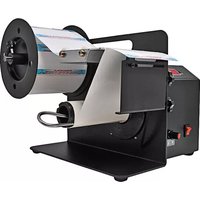
KL-100 - Label printer Tach-It - Free user manual and instructions
Find the device manual for free KL-100 Tach-It in PDF.


| Product Type | Label Printer |
| Brand | Tach-It |
| Model | KL-100 |
| Dimensions (H x W x D) | 200 mm x 150 mm x 100 mm |
| Weight | 1.2 kg |
| Power Supply | AC 100-240V, 50/60Hz |
| Power Consumption | 30W (max) |
| Print Technology | Thermal Transfer |
| Max Print Width | 50 mm |
| Max Print Speed | 30 mm/s |
| Label Roll Diameter (max) | 120 mm |
| Label Roll Core Diameter | 25.4 mm |
| Resolution | 203 dpi |
| Connectivity | USB 2.0 |
| Supported OS | Windows, macOS, Linux |
| Functions | Print labels, barcodes, text, graphics |
| Maintenance | Clean print head with isopropyl alcohol; avoid dust |
| Safety | Operate in dry environment; unplug when not in use |
| Spare Parts | Print head, power adapter, label roll holder |
| Repairability | User-replaceable print head and power supply |
Frequently Asked Questions - KL-100 Tach-It
User questions about KL-100 Tach-It
0 question about this device. Answer the ones you know or ask your own.
Ask a new question about this device
Download the instructions for your Label printer in PDF format for free! Find your manual KL-100 - Tach-It and take your electronic device back in hand. On this page are published all the documents necessary for the use of your device. KL-100 by Tach-It.
USER MANUAL KL-100 Tach-It
natural_image
Black-and-white photo of a Counter measuring instrument with rollers and metal components (no visible text or symbols)Ben Clements and Sons, Inc. / Clements Industries, Inc.
50 Ruta Court, South Hackensack, New Jersey 07606 USA
Tel: 201-440-5500 or 800-222-5540 Fax: 201-440-1455
Email: sales@tach-it.com Web: www.tach-it.com
Tach-It is a registered trademark of Ben Clements and Sons, Inc. Clements Industries, Inc. May 2012
SECTION 1 - CAUTIONS
1) BEFORE OPERATING THE MACHINE, READ THE COMPLETE OPERATOR'S MANUAL.
2) NEVER HAVE THE POWER ON THIS MACHINE PLUGGED INTO THE POWER SOURCE WHEN ANY OF THE COVERS OF THIS MACHINE HAVE BEEN REMOVED. THIS MACHINE HAS A HIGH VOLTAGE INPUT, AND ELECTRICAL SHOCKS ARE POSSIBLE IF PLUGGED IN AND THE COVERS ARE REMOVED.
3) NEVER ATTEMPT TO MOVE THIS MACHINE BY THE ARM THAT HOLDS THE ROLL OF LABELS OR THE REWIND ARM.
4) INSTALL AND OPERATE THIS MACHINE ONLY ON A FLAT, LEVEL, AND DRY SURFACE.
5) USE ONLY THE SPECIFIED ELECTRICAL POWER INPUT WITH THIS MACHINE.
6) ALWAYS KEEP HANDS, CLOTHING, JEWELRY, AND HAIR AWAY FROM ALL MOVING PARTS OF THIS MACHINE.
7) DO NOT OPERATE THIS MACHINE WITHOUT THE COVERS PROPERLY INSTALLED, OR IF ANY OF THE GUARDS HAVE BEEN REMOVED.
8) KEEP THIS MACHINE CLEAN AND DRY AT ALL TIMES.
9) SERVICE ON THIS MACHINE SHOULD ONLY BE PERFORMED BY FACTORY TRAINED AUTHORIZED SERVICE PERSONNEL.
10) NEVER USE THIS MACHINE FOR OTHER THAN ITS INTENDED APPLICATION. USE OF THE MACHINE ON UNINTENDED APPLICATIONS CAN CAUSE HARM TO THE OPERATOR AND THE MACHINE. PLEASE CONTACT THE MANUFACTURER IF THERE IS ANY QUESTION AS TO WHETHER THIS MACHINE CAN BE USED FOR A PARTICULAR APPLICATION
SECTION 2 – SPECIFICATIONS
| LABEL SIZE | MAXIMUM | 4.25” WIDE X 12” LONG | KL-1006” WIDE X 12” LONG | KL-150 | ||||
| MINIMUM | 3/8” | WIDE | X | 5/8” | LONG | 3/8” WIDE X 5/8” | ||
| LABEL | ROLL | MAXIMUM | 10” | O.D. | 10” | |||
| SPEED | 25 | FT | PER | MINUTE | 25 | FT | ||
| POWER | 110 | VOLT | A.C. | 110 | VOLT | A.C | ||
| DIMENSIONS | LENGTH = 10” | LENGTH = 10” | ||||||
| W | I | D | T | H | = | 1 | ||
| HEIGHT | = | 8” | HEIGHT | = | ||||
| WEIGHT | = | 12 | LBS | WEIGHT | = | |||
FIGURE 1

SECTION 4 – LABEL SETTING PROCEDURES
1) LOOSEN THUMB SCREW FROM ROLL GUIDE OUTSIDE AND SLIDE IT OFF THE LABEL ROLL HANGER.
2) DETERMINE WHETHER THE ROLL OF LABELS HAS A 3" CORE OR NOT. IF THE ROLL OF LABELS HAS A 3" CORE, INSERT THE ROLL GUIDE INSIDE AND ROLL GUIDE OUT SIDE AND PUT THE ROLL OF LABELS ONTO THE LABEL ROLL HANGER. IF THE CORE OF THE ROLL OF LABELS IS NOT 3", PUT THE ROLL GUIDE INSIDE ONTO THE LABEL ROLL HANGER, PUT THE ROLL OF LABELS ONTO THE LABEL ROLL HANGER, AND INSTALL AND TIGHTEN THE ROLL GUIDE OUTSIDE ONTO THE LABEL ROLL HANGER. IN THIS CASE, THE ROLL GUIDES WILL KEEP THE ROLL FROM WANDERING ALONG THE SHAFT.
3) CONTINUE TO THREAD THE LABELS TILL YOU REACH THE FIRST HOLD-DOWN BAR ATTACHED TO THE LABEL SEPARATING PLATE. SLIP THE LABELS UNDER THE FIRST HOLD-DOWN BAR OVER THE FELT PLATE WHICH IS THERE TO CREATE TEN SION ON THE LABEL WEB TO ASSIST WITH THE SEPARATING OF THE LABELS AND UNDER THE SECOND HOLD-DOWN BAR UNTIL THE LABELS EXIT FROM THE FRONT OF THE MACHINE.
4) BEND THE LABELS AROUND THE LABEL SEPARATING PLATE AND OVER THE PHOTO -SENSOR AND CONTINUE FEEDING THEM BY HAND UNTIL YOU REACH THE RE-WINDER ARM.
5) REMOVE THE RE-WINDER HOLD-DOWN BAR, SLIP THE LABELS UNDER THE BAR AND REINSTALL THE BAR INTO THE SLOT IT WAS REMOVED FROM.
6) SET THE LABEL LENGTH ADJUSTMENT KNOB ALL THE WAY TO THE LEFT (COUNTER- CLOCKWISE), AND TURN THE MACHINE ON.
7) ADJUST THE LABEL LENGTH ADJUSTMENT KNOB IN SMALL INCREMENTS UNTIL THE LABEL IS COMPLETELY FED FROM THE MACHINE, AND STILL HOLDING ON SLIGHTLY.
8) AS ONE LABEL IS REMOVED, THE NEXT ONE WILL FEED OUT AUTOMATICALLY.
9) PERIODICALLY, THE LABEL WEB WASTE WILL NEED TO BE REMOVED FROM THE RE-WINDER ARM. TO DO THIS FOLLOW THE STEPS ABOVE.
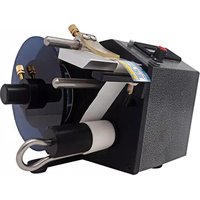
Brand : Tach-It
Model : KL-100
Category : Label printer