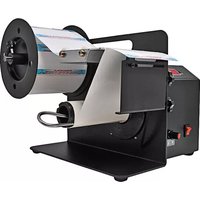
6500-TL - Label printer Tach-It - Free user manual and instructions
Find the device manual for free 6500-TL Tach-It in PDF.


Pick your language and provide your email: we'll send you a specifically translated version.
| Product Type | Label Printer |
| Brand | Tach-It |
| Model | 6500-TL |
| Dimensions (approx) | 6.5 x 5 x 2.5 inches |
| Weight (approx) | 1.5 lbs |
| Power Supply | AC adapter (12V, 1.5A) |
| Print Method | Direct Thermal |
| Print Resolution | 203 dpi |
| Print Speed | Up to 2 inches per second |
| Connectivity | USB 2.0 |
| Supported Label Width | 0.5 to 2 inches |
| Supported Label Length | 0.5 to 12 inches |
| Functions | Print barcodes, text, graphics, and logos |
| Maintenance | Clean print head with isopropyl alcohol and a lint-free cloth |
| Safety | Keep away from water; unplug when not in use |
| Spare Parts Available | Print head, cutter blade, platen roller |
| Reparability | User-replaceable print head and platen roller |
Frequently Asked Questions - 6500-TL Tach-It
How do I load labels into the Tach-It 6500-TL?
Open the label cover, remove any label roll, place a new roll with the labels feeding off the top, thread the leading edge under the guide and through the print mechanism, then close the cover. Ensure the label is aligned with the sensor.
How to connect the 6500-TL to my computer?
Use the included USB cable. Plug the square end into the printer and the standard end into your computer. Install the required drivers from the provided CD or download from Tach-It's website. The printer will be detected as a new device.
Why is my label printer not printing?
Check that the printer is powered on and the USB cable is securely connected. Ensure labels are loaded correctly and the roll has not run out. Verify that the print head is clean and the ribbon (if thermal transfer) is installed. Also check that the correct printer driver is selected in your software.
How do I clean the print head on the 6500-TL?
Turn off the printer, open the cover, remove any labels. Use a cotton swab lightly moistened with isopropyl alcohol to gently wipe the print head surface. Let it dry completely before closing the cover and printing. Clean after every roll or when print quality degrades.
What label sizes are supported by this printer?
The 6500-TL supports label widths from 0.5 to 2 inches and lengths from 0.5 to 12 inches. It accommodates continuous or die-cut labels with a gap sensor. Always use labels designed for direct thermal printing.
How do I install the printer driver on Windows?
Download the latest driver from Tach-It's support page. Run the installer, follow the on-screen prompts, and connect the printer when instructed. For manual installation, go to Control Panel > Devices and Printers > Add a Printer, then choose the downloaded driver file.
How do I perform a test print on the 6500-TL?
Most software has a test print function. Alternatively, press and hold the Feed button for 3 seconds (if available) to print a configuration label. Check the manual for specific steps, as the method may vary by firmware version.
Why are my labels printing misaligned?
Ensure the label roll is properly seated and the labels feed straight. Calibrate the gap sensor via the printer software or by holding the Feed button until the printer beeps. If using continuous labels, set the label length correctly in the print driver. Clean the label sensor if it's dirty.
Can I use rechargeable batteries in the 6500-TL?
The 6500-TL is designed to be powered via the included AC adapter. It does not have a battery compartment for rechargeable batteries. If you need portable operation, consider using a compatible external battery pack (not included).
Where can I find the user manual for my Tach-It 6500-TL?
The user manual is available for free download on notice-facile.com in PDF format. You can also access it directly from the Tach-It official website under the support section. If you need a different language, request a translated version via the manual page.
User questions about 6500-TL Tach-It
0 question about this device. Answer the ones you know or ask your own.
Ask a new question about this device
No questions yet. Be the first to ask one.
Download the instructions for your Label printer in PDF format for free! Find your manual 6500-TL - Tach-It and take your electronic device back in hand. On this page are published all the documents necessary for the use of your device. 6500-TL by Tach-It.
USER MANUAL 6500-TL Tach-It
Manual assistant
Powered by Anthropic
Waiting for your message
Product information
Brand : Tach-It
Model : 6500-TL
Category : Label printer