Hyper-Pro 15 Plus - Pregnant Soundsation - Free user manual and instructions
Find the device manual for free Hyper-Pro 15 Plus Soundsation in PDF.


User questions about Hyper-Pro 15 Plus Soundsation
0 question about this device. Answer the ones you know or ask your own.
Ask a new question about this device
Download the instructions for your Pregnant in PDF format for free! Find your manual Hyper-Pro 15 Plus - Soundsation and take your electronic device back in hand. On this page are published all the documents necessary for the use of your device. Hyper-Pro 15 Plus by Soundsation.
USER MANUAL Hyper-Pro 15 Plus Soundsation
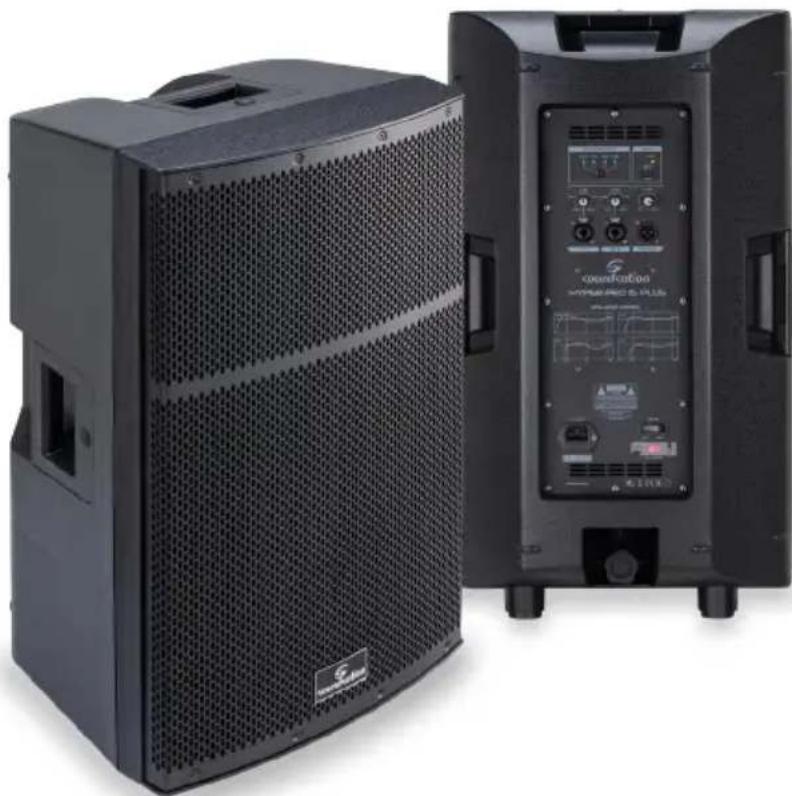
Bi-Amp Active Speakers With Digital Sound Processing
natural_image
Two black audio equipment units with visible sound dividers and control panels, no text or symbols present.First of all thanks far purchasing a Soundsation® product. Our mission is to satisfy all possible needs of musical instrument and professional audio users offering a wide range of products using the latest technologies.
We hope you will be satisfied with this item and, if you want to collaborate, we are looking for a feedback from you about the operation of the product and possible improvements to introduce in the next future. Go to our website www.soundsation-music.com and send an e-mail with your opinion, this will help us to build instruments ever closer to customer's real requirements.
One last thing: read this manual before using the instrument, an incorrect operation can cause damages to you and to the unit. Take care!
The Soundsation Team
Gentile Cliente,
- UNBOXING....5
- ACCESSORIES....6
- OVERVIEW......6
3.1. Main Features....6 - REAR PANEL DESCRIPTION....7
- AUDIO CONNECTIONS....9
- FIXED INSTALLATION....10
- HOOKUP DIAGRAMS ...... 11
7.1. Examples of Input Connections....11
7.2. Stereo Operation with Mixer....11
7.3. Bi-Amping with Hyper-Bass Active Subs....12 - SPECIFICATIONS....13
- WARRANTY AND SERVICE....14
- WARNING .... 14
IMPORTANT SAFET


The symbol is used to indicate that some hazardous live terminals are involved within this apparatus, even under the normal operating conditions, which may be sufficient to constitute the risk of electric shock or death.

The symbol is used in the service documentation to indicate that specific component shall be replaced only by the component specified in that documentation for safety reasons.

Protective grounding terminal

Alternating current/voltage

Hazardous live terminal

Denotes the apparatus is turned on
Denotes the apparatus is turned off
WARNING:
Describes precautions that should be observed to prevent the danger of injury or death to the operator.
CAUTION:
Describes precautions that should be observed to prevent danger of the apparatus.
TAKING CARE OF YOUR PRODUCT
▶ Read these instructions
▶ Keep these instructions
▶ Heed all warning
▶ Follow all instructions
1) WATER / MOISTURE
The apparatus should be protected from moisture and rain and can not be used near water; for example near a bathtub, a kitchen sink, a swimming pool, etc.
2) HEAT
The apparatus should be located away from heat sources such as radiators, stoves or other appliances that produce heat.
3) VENTILATION
Do not block areas of ventilation opening. Failure to do could result in fire. Always install according to the manufacturer's instructions.
4) OBJECT AND LIQUID ENTRY
Objects do not fall into and liquids are not spilled into the inside of the apparatus for safety.
5] POWER CORD AND PLUG
Protect the power cord from being walked on or pinched particularly at plugs, convenience receptacles, and the point where they exit from the apparatus. Do not defeat the safety purpose of the polarized or grounding-type plug. A polarized plug has two poles; a grounding-type plug has two poles and a third grounding terminal. The third prong is provided for your safety. If the provided plug does not fit into your outlet, refer to an electrician for replacement.
6) FUSE
To prevent the risk of fire and damaging the unit, please use only of the recommended fuse type as described in the manual. Before replacing the fuse, make sure the unit turned off and disconnected from the AC outlet.
Improper electrical wiring may invalidate the product warranty.
8) CLEANING
Clean only with a dry cloth. Do not use any solvents such as benzene or alcohol.
9) SERVICING
Do not implement any servicing other than those means described in the manual. Refer all servicing to qualified service personnel only. Only use accessories/attachments or parts recommended by the manufacturer.
10] WARNING
Please remember the high sound pressure do not only temporarily damage your sense of hearing, but can also cause permanent damage. Be careful to select a suitable volume.
I. UNBOXING
Thank you for purchasing Hyper-Pro Plus Series active loudspeakers. Each unit has been well tested and shipped in perfect operating conditions. Carefully unpack the carton and check the contents to ensure that all parts are present and in good conditions:
▶ 1 Loudspeaker
▶ 1 Power cable
▶ 1 User manual
If anything damaged during transport, notify the shipper immediately and keep packing material for inspection. Again, please save the carton and all the packing materials. If the unit must be returned to the manufacturer, it is important that the unit is returned in the original manufacturer's packing. Please do not take any action without first contacting us.

WARNING: Packaging box is not a toy! Keep out of reach of children!!! Keep in a safe place the original packaging material for future use.
2. ACCESSORIES
Soundsation can supply a wide range of quality accessories that you can use with Hyper-Pro Plus speaker, like mixers, Cables, Microphones, stands, etc.
All products in our catalogue have been long tested with this device so we recommend to use Genuine Soundsation Accessories and Spare Parts.
Ask your Soundsation dealer for any accessories you could need to ensure best performance of the product.
3. OVERVIEW
The new Hyper-Pro Plus speakers represent a new important stage in the evolution of the famous Hyper series of Soundsation. The power, audio quality and convenience of the previous models are now integrated with the functions which are essential for those who professionally use a speaker as a work tool.
700W continuous D-Class speakers, selected woofers and compression drivers, DSP for Crossover control, EQ, 2-Band Limiter, phase alignment and delay optimization of woofers and compression drivers. All this technology can ensure high performance and maximum audio quality in any use conditions.
The control panel includes two XLR-Combo Mic/Line inputs, the Mix output and 4 Audio Programs (Music, Live, Monitor, Vocal) to quickly adapt the speaker to the main uses.
The stylish and sturdy cabinet is designed to be installed vertically on the floor or on a 35mm pole/tripod, and also suspended horizontally or vertically thanks to the 4 M8 fixing points.
3.1. Main Features
▶ 2-way Loudspeaker, Bass-Reflex Design
700W Continuous / 1400W Peak Class-D amplifier
▶ 90°H x 60°V Coverage
DSP for Crossover, EQ and 2-Band Limiter Control, Phase and Time Optimization
▶ 4 EQ Presets (Music, Live, Monitor, Speech)
▶ 2 Mic-Line Combo Inputs and Balanced Mix Output
▶ On-off key for the Front LED
▶ 35mm Adapter for Pole or Tripod Stand
▶ 4 Fixing Points for M8 Eyebolts
4. REAR PANEL DESCRIPTION
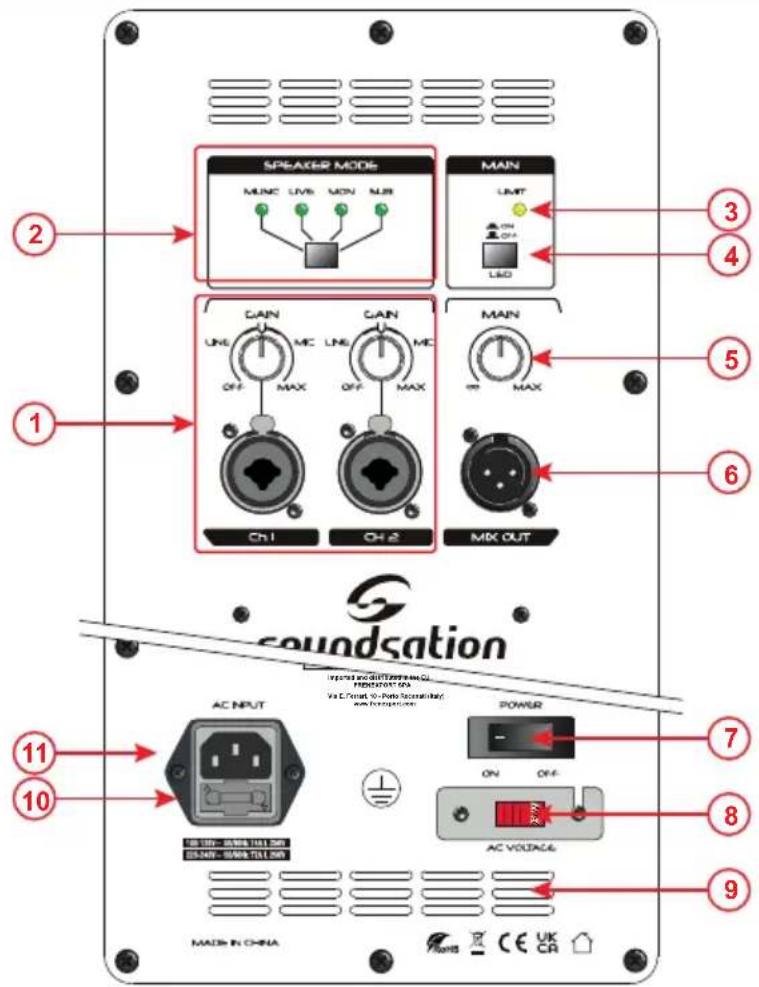
Hyper-Pro Plus Series active loudspeakers have several connectors, controls, and indicators the use of which you should understand.
1) CH 1 CH2 INPUTS
This section includes 2 Combo connectors for the use of both XLR and 1/4" Jack balanced and unbalanced signals. You can connect here musical instruments, mixers, DJ consoles, etc. The input audio signal can be adjusted by using the relative knob.

Note: Set the Gain control to minimum before connecting an audio signal. Once the system is powered up, we recommend that the Gain set to midway is a good starting point.

soundsation
Hyper-Pro Plus Series User manual
2) SPEAKER MODE
Four presets are included to optimize the response of the cabinet to suit your needs. Cycle through them using the Mode button.
▶ MUSIC: A bass lift with a flat mid to high response.
▶ LIVE: Similar to the MUSIC preset with the LF lift frequency shifted.
▶ MON: A LF and HF roll-off with a slight mid band cut for clarity.
▶ VOCAL: A bass roll-off with flat mid and upper frequencies.

Note: The EQ setting is stored and recalled following a power cycle.
3) LIMITER
This LED indicates that the limiter is on when the output voltage of the amplifier exceeds the maximum level, or when power overload is detected. Some flashing of this LED may be normal, but if it stays on for a long time, lower the input level.
4) FRONT LED SWITCH
This switch allows to turn ON/OFF the Blue front LED.
5) MASTER VOLUME
Controls the overall level of the speaker. Set this control to minimum when switching the unit ON or Off.
6] MIX OUT
A signal feed which can be used to connect a second Hyper-Pro Plus speaker or other PA or recording console. The MIX OUT signal level is not affected by the MASTER VOLUME knob.
7) POWER SWITCH
Use this switch to turn the speaker on and off. Ensure the Master Volume controls is set to minimum when switching on and off.
8] VOLTAGE SELECT SWITCH
Please check the voltage setting is correct before powering up for the first time your Hyper-Pro Plus speaker. Damage could occur if the voltage is incorrectly set. It is protected by a Plexiglas cover to prevent an accidental and incorrect voltage selection.
9) AIR VENTS
These are critical for the reliability of the amplifier. They let the internal power amplifier cooling to correctly operate, and preserve the amp from overheating. PLEASE DO NOT BLOCK.
10) FUSE HOLDER
In case of fuse burn, to prevent the risk of fire and damaging the unit, please use only of the recommended fuse type as described in "8. SPECIFICATIONS" on page 13. Before replacing the fuse, make sure the unit turned off and disconnected from the AC outlet.
11) IEC SOCKET
Plug the power cord into an AC socket properly configured for your particular model.

Note: If you happen to lose the AC line-cord, always use a three-pin plug with a ground pin. The wire correspondence is as follow:
| Cable Pin International | ||
| Brown Live L | ||
| Blue Neutral N | ||
| Yellow/Green Earth | ||
Always connect the earth! Pay attention to your safety!
Before taking into operation for the first time, the installation has to be approved by an expert.
5. AUDIO CONNECTIONS
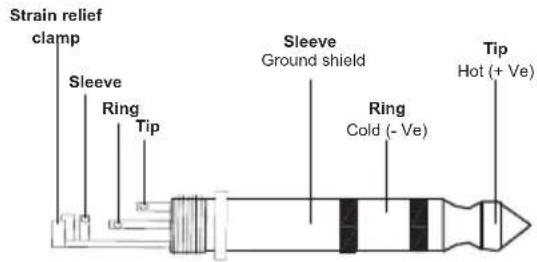
You will need several cables for the various connections to and from the speaker. See the pictures below that show the internal wiring of these cables. Be sure to use only high quality cables.
You can, of course, also connect unbalanced equipment to balanced inputs. Use either mono and stereo jack, making sure ring and collar are connected together (or pins 1 & 3 in the case of XLR connectors).
Balanced use of XLR connectors
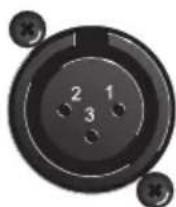
1 = Ground/Shield
2= Hot (+)
3 = Cold (-)
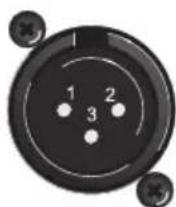
INPUT OUTPUT
In case of unbalanced use Pins 1 and 3 will be jumped

soundsatior
Hyper-Pro Plus Series User manual
Unbalanced use of 1/4" jack TS connector
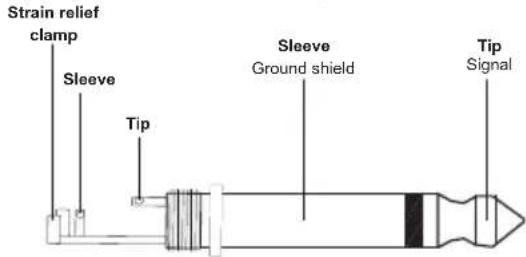
Balanced use of 1/4" jack TRS connector Headphones connection with 1/4" TRS connector
6. FIXED INSTALLATION
The installation of Hyper-Pro Plus speakers has to be built and constructed in a way that it can hold 10 times the weight for 1 hour without any harming demolition. The installation must always be secured with a secondary safety attachment (e.g. an appropriate catch net). This secondary safety attachment must be constructed in a way that no part of the installation can fall down if the main attachment fails.
When rigging, de-rigging or servicing the unit, staying in the area below the installation place, on bridges, under high working places and other endangered areas is forbidden. The operator has to make sure that the safety measure and the unit's technical installation is approved by an expert before taking into operation for the first time and after changes before taking into operation another time.

IMPORTANT: Overhead rigging requires extensive experience, including (but not limited to) calculating working load limits, installation material being used, and periodic safety inspection of all installation material and the loudspeaker. If you lack these qualifications, do not attempt the installation yourself, but instead use a professional structural rigger. Improper installation can result in bodily injury or property loss.
If the unit is to be placed lower from a high position such as a ceiling or high structures, professional truss systems must be used. The loudspeaker must never be installed in such a way that it can oscillate freely

CAUTION: Speakers may cause severe injuries when crashing down. If you have doubts concerning the safety of a possible installation, do not install the unit!
7. HOOKUP DIAGRAMS
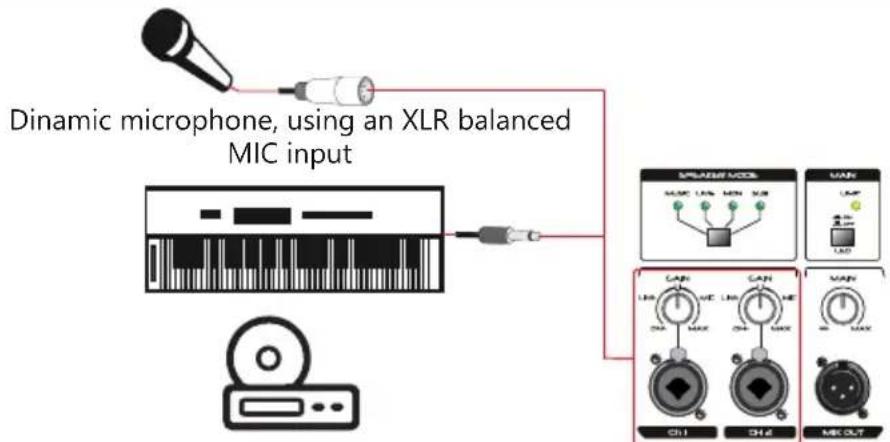
7.1. Examples of Input Connections
flowchart
graph TD
    A["User"] --> B["Dinamic microphone, using an XLR balanced MIC input"]
    B --> C["Audio stage"]
    C --> D["Control panel with LAM/MAX buttons"]
    D --> E["Output stage: MLM/LAM/MAN/ULR"]
    E --> F["Display screen with CAN indicators"]
    F --> G["Control panel: MAX buttons"]
    G --> H["Output stage: CH1/CH2/MIK OUT"]
Keyboard, CD player, or other balanced/unbalanced Line Level signals, using 1 or 2 TRS/TS 1/4" Jack
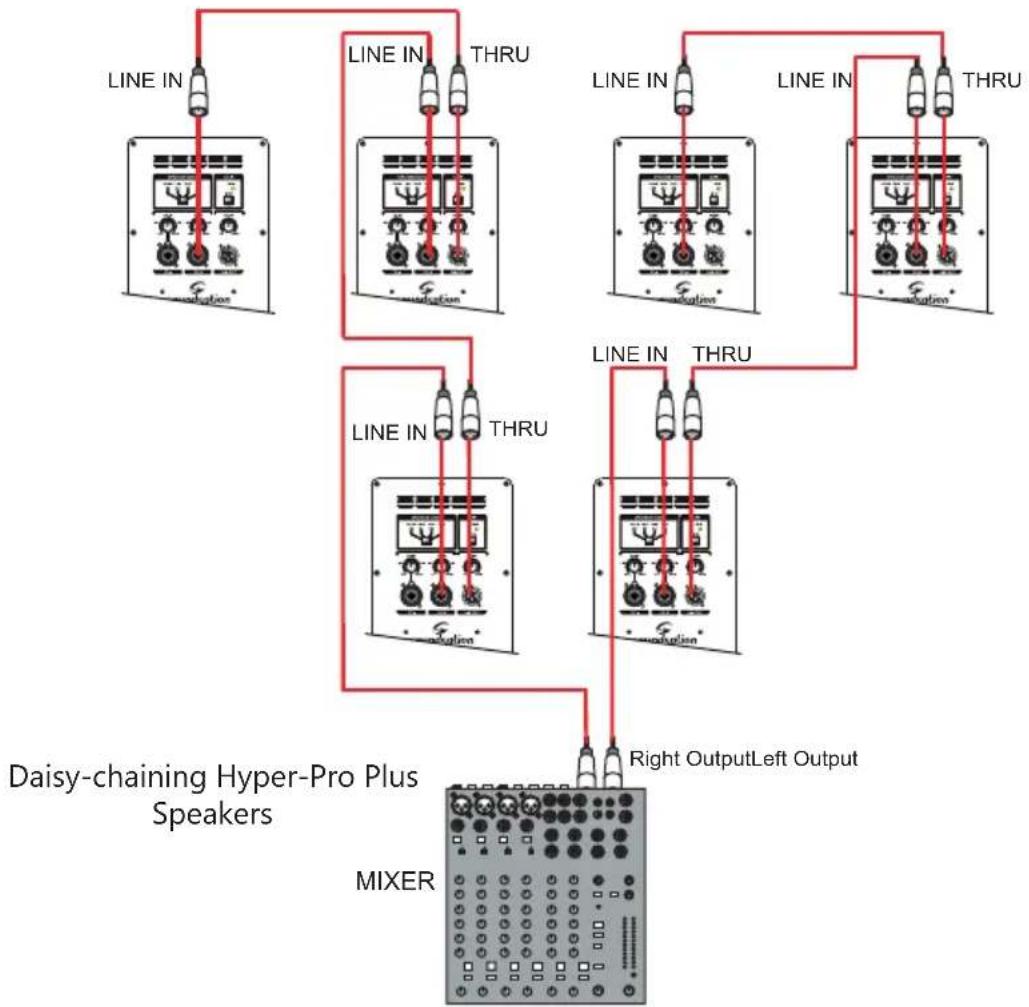
7.2. Stereo Operation with Mixer
flowchart
graph TD
    A["Daisy-chaining Hyper-Pro Plus Speakers"] --> B["MIXER"]
    B --> C["Right Output Left Output"]
    A --> D["Line IN"]
    A --> E["Line IN"]
    A --> F["Line IN"]
    A --> G["Line IN"]
    A --> H["Line IN"]
    A --> I["Line IN"]
    A --> J["Line IN"]
    A --> K["Line IN"]
    A --> L["Line IN"]
    A --> M["Line IN"]
    A --> N["Line IN"]
    A --> O["Line IN"]
    A --> P["Line IN"]
    A --> Q["Line IN"]
    A --> R["Line IN"]
    A --> S["Line IN"]
    A --> T["Line IN"]
    A --> U["Line IN"]
    A --> V["Line IN"]
    A --> W["Line IN"]
    A --> X["Line IN"]
    A --> Y["Line IN"]
    A --> Z["Line IN"]
    A --> AA["Line IN"]
    A --> AB["Line IN"]
    A --> AC["Line IN"]
    A --> AD["Line IN"]
    A --> AE["Line IN"]
    A --> AF["Line IN"]
    A --> AG["Line IN"]
    A --> AH["Line IN"]
    A --> AI["Line IN"]
    A --> AJ["Line IN"]
    A --> AK["Line IN"]
    A --> AL["Line IN"]
    A --> AM["Line IN"]
    A --> AN["Line IN"]
    A --> AO["Line IN"]
    A --> AP["Line IN"]
    A --> AQ["Line IN"]
    A --> AR["Line IN"]
    A --> AS["Line IN"]
    A --> AT["Line IN"]
    A --> AU["Line IN"]
    A --> AV["Line IN"]
    A --> AW["Line IN"]
7.3. Bi-Amping with Hyper-Bass Active Subs
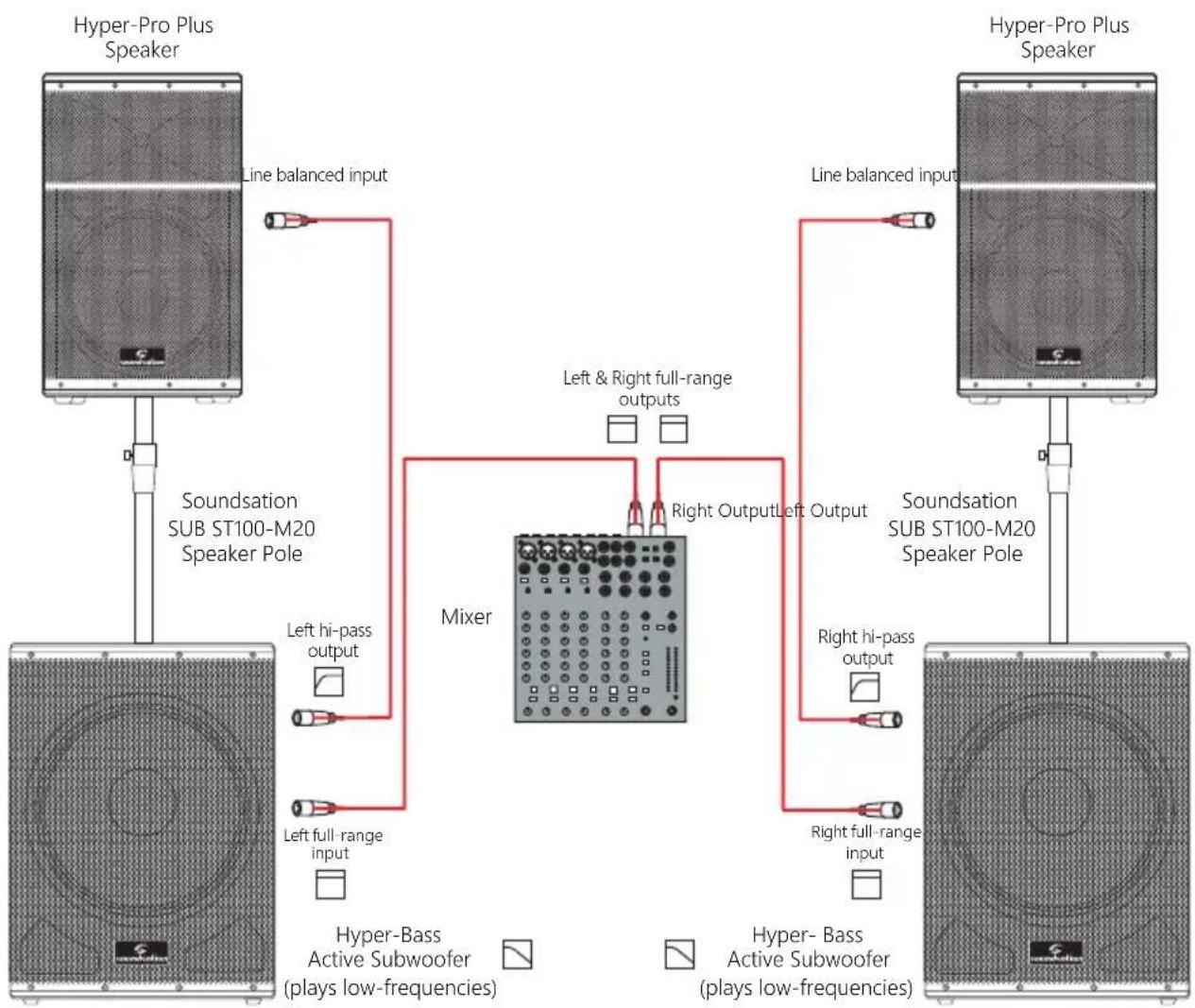
flowchart
graph TD
    A["Hyper-Pro Plus Speaker"] -->|Line balanced input| B["Mixer"]
    C["Hyper-Pro Plus Speaker"] -->|Line balanced input| B
    D["Soundation SUB ST100-M20 Speaker Pole"] -->|Left hi-pass output| B
    D -->|Left full-range input| B
    E["Soundation SUB ST100-M20 Speaker Pole"] -->|Right Output Left Output| B
    F["Soundation SUB ST100-M20 Speaker Pole"] -->|Right hi-pass output| B
    G["Soundation SUB ST100-M20 Speaker Pole"] -->|Right full-range input| B
    H["Hyper-Bass Active Subwoofer (plays low-frequencies)"] --> B
    I["Hyper-Bass Active Subwoofer (plays low-frequencies)"] --> B
8. SPECIFICATIONS
| Hyper-Pro 12 Plus Hyper-Pro 15 Plus | ||
| System Type 2-Way Active Speaker with Bass-Reflex | ||
| Power Rating 700W Continuous, 1400W Peak | ||
| Frequency Response 45Hz-20kHz 41Hz-20kHz | ||
| Max SPL 130dB SPL 131dB SPL | ||
| LF Driver 12" Custom Woofer 15" Custom Woofer | ||
| HF Driver 1" Compression Driver | ||
| Coverage 90°H x 60°V | ||
| Crossover Frequency 2.5kHz 12.5kHz | ||
| Input Connectors | 2x Balanced Combo XLR/1/4" Jack Connectors | |
| Output Connectors | 1x Balanced XLR Mix Output | |
| Indicators | Power, Clip, Preset, Front Led | |
| EQ | 4 Presets (Music, Live, Monitor, Vocal) | |
| DSP | Crossover, EQ, Dual Band Limiters, Phase and LF/HF Time Alignment | |
| Controls | 2x Channel Gain, Master Volume, Front Led On/Off, Ground Lift, EQ Preset | |
| AC Power | 100-120V~ or 220-240V~ 50/60Hz (User Selectable) | |
| Power Consumption | 360W Typical | |
| Cabinet | Polypropylene | |
| Handles | 2 on Sides, 1 on Top | |
| Monitor Angle | 45° | |
| Finish | Black | |
| Grille | Powder-Coated Steel with Acoustic Foam | |
| Pole-Mount | 36mm Pole Socket | |
| Flying Points | 4x M8 | |
| Unit Size (WxDxH) | 357 x 356 x 610 Mm (14.1" x 14" x 27") | 420 x 385 x 694 mm (16.5" x 15.2" x 27.3") |
| Net Weight | 14,4 Kg - 31.7 Lbs. | 18 Kg - 39.7 Lbs. |
| Carton Size (WxDxH) | 440 x 440 x 685 Mm (17.3" x 17.3" x 27") | 500 x 465 x 775 mm (19,7" x 18,3" x 30,5") |
| Packed Weight | 16.8Kg - 37 Lbs. | 121,4Kg - 47.2 lbs. |
NOTE: Our products are subject to a process of continual further development. Therefore modifications to the technical features remain subject to change without further notice.
9. WARRANTY AND SERVICE
All Soundsation products feature a limited two-year warranty. This two-year warranty is specific to the date of purchase as shown on your purchase receipt.
The following cases/components are not covered from the above warranty:
- Any accessories supplied with the product
- Improper use
- Fault due to wear and tear
- Any modification of the product effected by the user or a third party
Soundstation shall satisfy the warranty obligations by remedying any material or manufacturing faults free of charge at Soundsation's discretion either by repair or by exchanging individual parts or the entire appliance. Any defective parts removed from a product during the course of a warranty claim shall become the property of Soundsation.
While under warranty period, defective products may be returned to your local Soundsation dealer together with original proof of purchase. To avoid any damages in transit, please use the original packaging if available. Alternatively you can send the product to Soundsation SERVICE CENTER – Via Enzo Ferrari, 10 – 62017 Porto Recanati - Italy. In order to send a product to service center you need an RMA number. Shipping charges have to be covered by the owner of the product.
For further information please visit www.soundsationmusic.com
10. WARNING
PLEASE READ CAREFULLY – EU and EEA (Norway, Iceland and Liechtenstein) only
This symbol indicates that this product is not to be disposed of with your household waste, according to the WEEE Directive (2202/96/EC) and your national law.
This product should be handed over to a designated collection point, e.g., on an authorized one-for-one basis when you buy a new similar product or to an authorized collection site for recycling waste electrical and electronic equipment (WEEE).
Improper handling of this type of waste could have a possible negative impact on the environment and human health due to potentially hazardous substances that are generally associated with EEE. At the same time, your cooperation in the correct disposal of this product will contribute to the effective usage of natural resources.
For more information about where you can drop off your waste equipment for recycling, please contact your local city office, waste authority, approved WEEE scheme or your household waste disposal service.
SOMMARIO
Keyboard, CD player, or other balanced/unbalanced Line Level signals, using 1 or 2 TRS/TS 1/4" Jack
72 Sistema Audio Stereo con Mixer
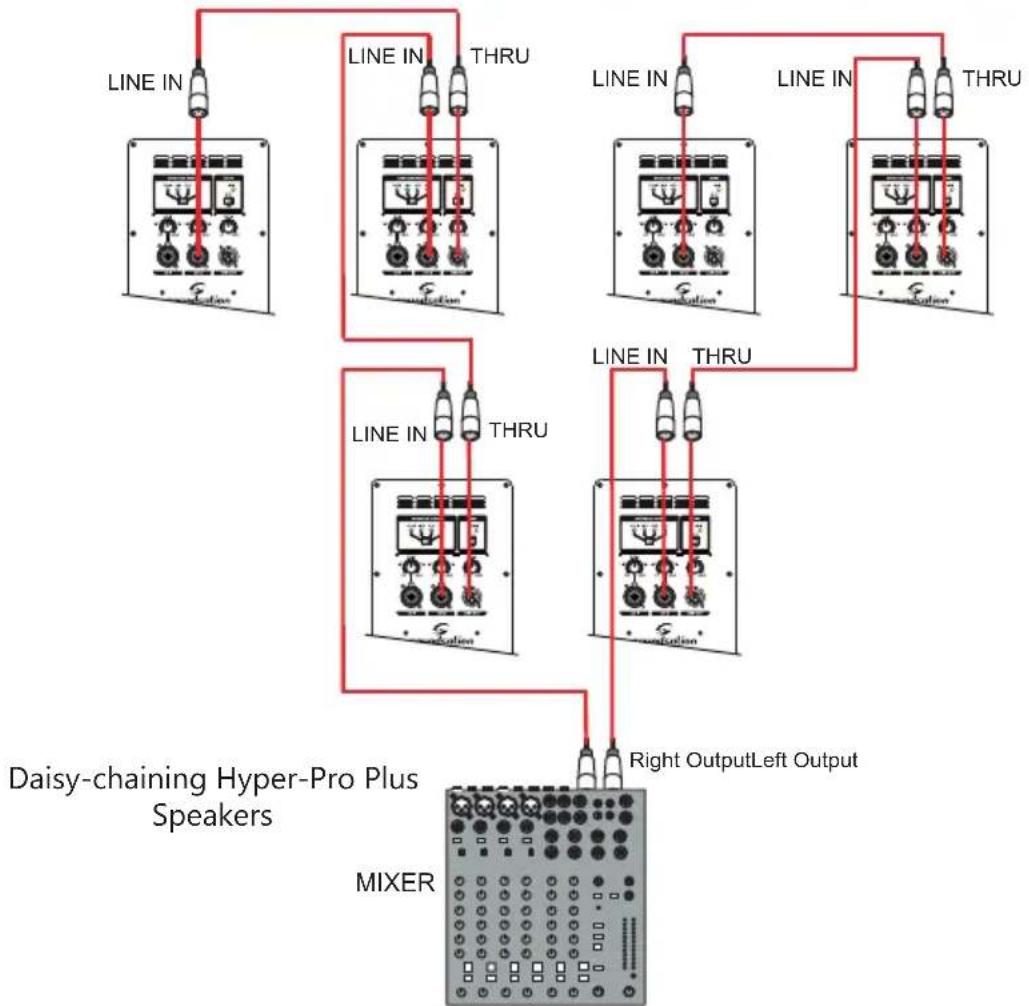
flowchart
graph TD
    A["Line IN"] --> B["Daisy-chaining Hyper-Pro Plus Speakers"]
    C["THRU"] --> B
    D["Line IN"] --> E["MIXER"]
    F["THRU"] --> E
    G["Line IN"] --> H["Daisy-chaining Hyper-Pro Plus Speakers"]
    I["THRU"] --> H
    J["Line IN"] --> K["MIXER"]
    L["THRU"] --> K
    M["Right Output Left Output"] --> K
    style A fill:#f9f,stroke:#333
    style C fill:#f9f,stroke:#333
    style D fill:#f9f,stroke:#333
    style F fill:#f9f,stroke:#333
    style G fill:#f9f,stroke:#333
    style I fill:#f9f,stroke:#333
    style J fill:#f9f,stroke:#333
    style K fill:#f9f,stroke:#333
This product is imported in EU by