SCA-H-VER31-2000 - Uncategorized Scarlett - Free user manual and instructions
Find the device manual for free SCA-H-VER31-2000 Scarlett in PDF.


| Product Type | Household Appliance |
| Brand | Scarlett |
| Model | SCA-H-VER31-2000 |
| Power Supply | 220-240V ~ 50/60Hz |
| Rated Power | 2000W |
| Dimensions (Approx.) | 200 x 150 x 100 mm |
| Net Weight | 1.2 kg |
| Cable Length | 1.5 m |
| Functions | Power on/off, adjustable settings |
| Safety Features | Overheat protection, auto shut-off |
| Maintenance & Cleaning | Unplug, wipe with damp cloth; do not immerse |
| Spare Parts | Available from manufacturer or authorized dealers |
| Repairability | Serviceable by qualified technician |
| Manual Languages | EN, KK, RU, UK |
| Documentation | User manual (44 pages PDF) |
Frequently Asked Questions - SCA-H-VER31-2000 Scarlett
User questions about SCA-H-VER31-2000 Scarlett
0 question about this device. Answer the ones you know or ask your own.
Ask a new question about this device
Download the instructions for your Uncategorized in PDF format for free! Find your manual SCA-H-VER31-2000 - Scarlett and take your electronic device back in hand. On this page are published all the documents necessary for the use of your device. SCA-H-VER31-2000 by Scarlett.
USER MANUAL SCA-H-VER31-2000 Scarlett
natural_image
White portable electric heater with black wheels and ventilation grille (no visible text or symbols)We thank you for your wise choice and for a purchase of an electric convector. It will serve you for a long time.
1. IMPORTANT INFORMATION
Please, read this manual before using the device. This manual contains important information regarding your safety, as well as recommendations concerning the correct use and maintenance of this appliance. Keep this manual together with a warranty card, cash register receipt and, if possible, carton and packaging material. This instruction manual describes different types of this device. The device you purchased may differ slightly from the description in the manual, which does not affect the methods of use and operation. The manufacturer reserves the right to make minor changes to the device without additional notice which is not fundamentally affect its safety, performance and functionality. There may be some misprints in text and digital notations in the present manual.
IMPORTANT!
Important safeguards and descriptions contained in this manual do not include all possible situations that you may experience using the device. The manufacturer is not responsible for damage of the appliance or its parts during transportation, as a result of incorrect installation or voltage fluctuations, as well as when any part of the appliance has been changed or modified.
NOTE
There is a label on the device which has all the necessary technical data and other useful information about the device. Use the appliance only for the purpose specified in this manual.
2. SAFEGUARDS
When using an electric convector, a number of safety precautions must be observed. Improper operation by ignoring safety precautions can result in damage to the health of the user and other people, as well as damage to their property. The manufacturer is not responsible for damage to health and property damage resulting from improper installation and operation of the device.
- Read these instructions carefully before using the appliance to avoid damage during use.
- Before starting up for the first time, check that the specifications on the product comply with the power supply specifications.
- The device is equipped with a euro plug with a ground contact. The plug should fit into a standard Euro outlet and plug into it without much effort. If it is impossible to insert euro plug into an outlet or it is hard to do so, flip the plug vertically 180 degrees and try again. If even after that you cannot easily insert
the plug into the outlet, call an electrician to replace the outlet. Never use the appliance if the plug is not fully inserted into the outlet.
- Never connect the appliance to the power supply if its surface is wet.
- Never use the device in a situation where it may come into contact with water.
- When the appliance is turned on and working, do not touch its surface and the surface of the control panel with wet hands and any wet parts of the body.
- Do not use the device outdoors or in high humidity areas.
- Do not put your fingers in and prevent foreign objects from getting into any ventilation, air intake or outlet openings, as this may result in electric shock or damage to the device.
- To prevent a possible fire, do not block the air inlets and outlets. Do not hang or dry things on the convector! Use the convector only on a flat, dry surface.
- The convector contains hot and sparkling components inside. Do not use the convector in places of use or storage of gasoline, paint or other flammable liquids. The device must be located away from flammable and easily deformable objects.
- Use only for domestic purposes in accordance with this instruction manual. Any other use not recommended by the manufacturer may result in fire, electric shock, or personal injury. The device is not intended for industrial use.
- In order to avoid overheating and the risk of fire, as well as damage to the internal electrical network, do not change the length of the power cord or connect the device through electrical extension cords. However, if necessary, an extension cord can be used if its parameters correspond to the power of the device and if it is not used by other consumers of electricity.
- Install and operate the appliance in a strictly upright position. It is forbidden to operate the device in horizontal or inclined positions.
- Make sure that the power cord does not touch sharp edges or hot surfaces.
- Do not use accessories that are not supplied.
- ATTENTION! DO NOT COVER THE DEVICE while it is operating. Do not dry clothes or any other fabrics and materials on it. This can lead to overheating, failure, or significant damage to you and / or your property.
- ATTENTION! The manufacturer considers this type of breakdown as a non-warranty case.
- The appliance must be monitored during its operation, especially if there are children nearby. Children must be supervised to prevent playing with the appliance.
• Always unplug the device before assembling, disassembling and cleaning, or if you are not using it.
- Do not turn on the convector if its power cord or plug is damaged. If the power cord or plug is
damaged, to avoid danger, it must be replaced by the manufacturer, authorized service center, or similar qualified personnel.
- Do not attempt to repair the device or change its parts by yourself. To repair the product, contact an authorized service center.
- It is forbidden to install and use the device in bathrooms, showers or pools, precisely in those places where there is a possibility of direct hit of jets and drops of water on its surface during the time when the device is turned on.
- Do not lay the appliance's power cord under carpets or press it with furniture. Route the power cord so that it was impossible stumble over it.
- When disconnecting the appliance from the mains, do not pull on the power cord, grasp the plug. Do not twist and do not wind it on anything.
- It is forbidden to install the device directly next to or under an electrical outlet or under a conducted electric cable. This can lead to overheating of them, which will create an emergency situation.
- The device is not intended for use by persons (including children) with reduced physical, sensory or mental abilities or in the absence of their life experience or knowledge, unless they are supervised or instructed on the use of the device by the person responsible for their safety.
- This appliance can be used by children aged from 8 years and above and persons with reduced physical, sensory or mental capabilities or lack of experience and knowledge if they have been given supervision or instruction concerning
use of the appliance in a safe way and understand the hazards involved.
- Cleaning and user maintenance shall not be made by children without supervision.
• Children of less than 3 years should be kept away unless continuously supervised. - Children aged from 3 years and less than 8 years shall only switch on/off the appliance provided that it has been placed or installed in its intended normal operating position and they have been given supervision or instruction concerning use of the appliance in a safe way and understand the hazards involved. Children aged from 3 years and less than 8 years shall not plug in, regulate and clean the appliance or perform user maintenance.
- CAUTION! Some parts of this product can become very hot and cause burns. Particular attention has to be given where children and vulnerable people are present.
- If the device was at a temperature below 0^ C for some time, it must be kept at room temperature for at least 2 hours before turning it on.
- Explanation of warning signs:
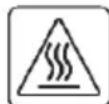
Caution! Hot surface
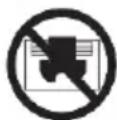
Attention! Do not cover
3. APPOINTMENT OF THE DEVICE
Convector heaters are intended for primary or secondary space heating and for creation of comfortable environment indoors during cold seasons. This device is easy to use and install, also it is efficient and economical due to minimal energy loss, increased heat transfer and efficient distribution of air flow. The main advantage of electric convectors is that their primary function is based on the principle of natural convection, thus providing a fast and efficient space heating.
4. SPECIFICATIONS
Specifications of the device are shown in Table 1.
Table 1
| Description | Units | SCA H VER31 1000 | SCA H VER31 1500 | SCA H VER31 2000 |
| Rated power consumption (power modes) | W | 500/1000 | 750/1500 | 1000/2000 |
| Power source | V/Hz | 220-240~/50 | 220-240~/50 | 220-240~/50 |
| Rated current | A | 4.3 | 6.5 | 8.7 |
| Net weight | kg | 3.82 | 4.6 | 5.46 |
| Device dimensions | mm | 270x497x465 | 270x495x615 | 270x495x773 |
| Electrical protection class | - | Class I | Class I | Class I |
| Heating area | m2 | 10-15 | 15-20 | 20-25 |
5. DEVICE DESCRIPTION
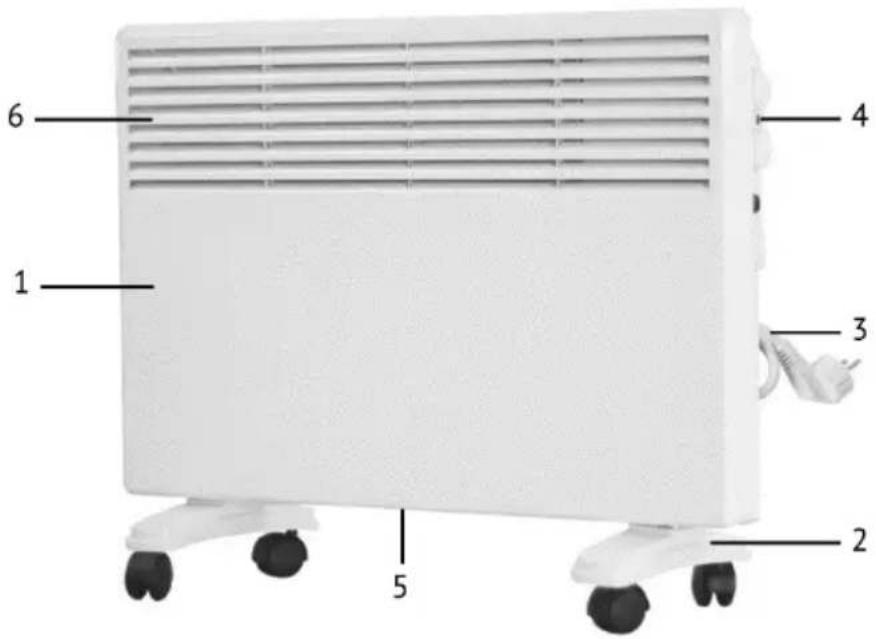
Fig. 1*
*The appearance of the device may differ from the images in the manual
IM2022
- Housing
- Support legs
- Power cord with plug
- Control panel
- Air intake grate
- Air outlet grate
6. DELIVERY SET
- Electric convector - 1 pc.
- Supporting feet - 2 pcs.
- Wall mounting set - 1 set
- Fixing screws set - 1 set
- Instruction manual - 1 pc.
- Warranty card - 1 pc.
- Packing of the device - 1 pc.
7. ASSEMBLY AND INSTALLATION
The convector is equipped with feet for installation on the floor and a wall mounting kit for installation on the wall.
Connecting feet to the convector
- Before using the convector, remove the set of feet and fixing screws from the package. Install the feet on the bottom of the convector. Fix the feet with screws, screwing them through special holes to the bottom panel.
- Install the convector on the floor and make sure it is stable.
Wall installation of the device
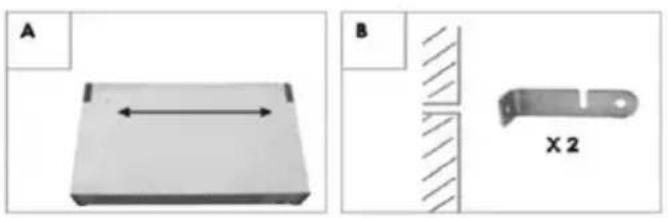
- Measure the distance between the slots on the back of the device (see Fig. 2A)
- Drill holes in the wall according to the slots on the back panel of the device and the mounting plates (see Figure 2B), providing a height from the floor to the bottom of the convector of at least 120 mm.
- Set in the drilled holes and using machine screws to fasten the wall mounting plate (see Fig. 2B).
- To turn the heater and using machine screws to fasten it to the bottom of the mounting plate (see Fig. 2C).
- Hang the heater on the wall-mounted mounting plate, aligning the slots in the mounting plate with the slots on the rear panel of the instrument, and he followed her into the wall mounting plate on the bottom of the device.
natural_image
Two technical diagrams showing a 3D block and a mechanical part cross-section (no text or symbols)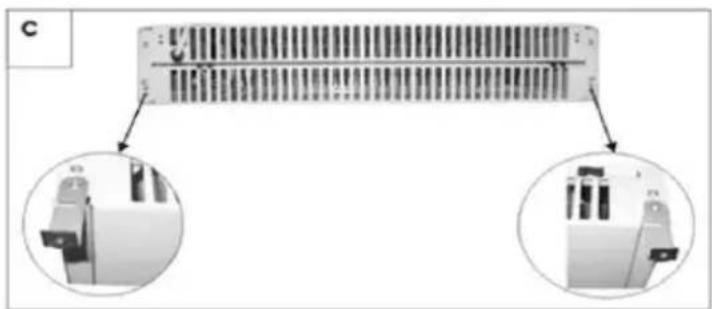
natural_image
Diagram of a server rack with two circular insets showing internal components (no text or symbols)Figure 2
Attention!
The device must be used only with the support feet installed or mounted on the wall. Operation of the convector without supporting feet or without installation on the wall is prohibited!
Connecting to the network
-
Convector is designed for connection to the socket with single-phase voltage 220-240V\~/50Hz.
-
Before connecting, make sure that the voltage is correct as specified on the nameplate with the technical data of the device.
-
When connecting the convector to the mains, the applicable electrical safety rules must be observed.
-
Electric outlet must be properly grounded. The socket must be rated for at least 10A. Electrical plug and socket must always be dry to prevent electrical leakage. Regularly check that the electrical plug is firmly connected to the outlet. Check the plug in the following order: insert the plug into the socket. After half an hour, turn off the convector and unplug the power cord, check if the plug is warm with the hand. If the plug is heated to a temperature above 50 °C, in order to avoid damage, accidents, fire, due to poor electrical contact replace the socket with help of a specialist.
Attention!
It is forbidden to operate the convector in the electrical network without grounding.
Used to set the desired room temperature.
2. Heating indicator
Lights up when the device is heated.
3. Power mode switch knob
Used to select the following heating power modes: off "0", low power" I", high power"II".
*The image is provided as a reference and may differ from the actual control panel
Operation of the convector
1. Switching on
1.1 Connect the convector to the electrical network, insert the plug of the power cord into the power outlet.
2. Select the heating power mode
2.1 Set the key to the "l" position to select a low heating power.
2.2 Set the key to the "II" position to select a high heating power.
Setting the temperature
Turn the thermostat knob clockwise until it stops. When the room temperature reaches the desired level, turn the thermostat knob counterclockwise until the appliance is switched off, and you will hear the click. The thermostat will maintain the set temperature, periodically turning on and off the convector.
In cold weather, the convector may not fully cope with the heating of the room. In this case, set the thermostat knob to a level slightly higher than desired.
Switching off
Set the keys of the heating power mode switch to the "0" position and disconnect the appliance from the electrical network.
9. CLEANING AND MAINTENANCE OF THE UNIT
The external body of the device must be regularly cleaned from dust and dirt, because this affects the efficiency of its work.
Before cleaning, turn off the device and unplug it from the network, let it cool, then wipe its body with a soft, slightly damp cloth. Then wipe it dry and allow the device to dry completely. It is not recommended to use detergents, including detergents with abrasive compounds to clean the body of the device. Do not damage the appliance with sharp objects, because scratches on paint can cause rust.
The rear side of the convector must also be periodically cleaned from dust and dirt. To do this, disconnect the device from the brackets, and after cleaning, put it back on the brackets.
Cleaning should be carried out periodically to maintain the technical condition of the convector and preserve its appearance for many years.
NOTE:
A change in the color of enamel on the front side is not a defect, but is a consequence of operation of the device in a room with a big amount of dust particles and other contaminants in the air.
10. STORAGE
Make sure that the appliance body and its heating element have cooled down before the appliance is dismantled and packed in its packaging for long-term storage.
Complete all requirements of chapter CLEAN AND CARE.
Reel on the power cord.
When the device is not in use for a long time, store it in a cool, dry place in the original cardboard box.
11. TROUBLE SHOOTING
Possible malfunctions and solutions for them are indicated in table 2. If it is impossible to fix these malfunctions with these methods, contact the authorized service center.
Table 2
| Malfunction | Possible cause | Solution |
| The device is connected to the mains, operating mode is set to heating but device doesn't work. | No power | Check whether the power supply is disconnected from the device and, if necessary, connect device to power supply |
| Temperature limiter parted electrical circuit and shut off the heating elements | Ensure that the air inlet or outlet grille is not blocked by foreign objects and wait for turning on of the temperature limiter, after the body of the device cools down. | |
| Malfunction in circuit breaker | Change the circuit breaker | |
| Defective power relay | Contact an authorized service center | |
| Defective thermostat | ||
| Defective heating element | ||
| Faulty temperature limiter | ||
| Power cord is broken | Contact an authorized service center to fix it | |
| Heating is not good enough | Low voltage in power network | Check power network |
| Low heating temperature is set on thermostat | Set the temperature higher on thermostat | |
| Defective heating element | Contact an authorized service center |
12. UTILIZATION RULES
After the lifetime of the device expires, it should be recycled in compliance with the laws, rules and methods in region of recycling. Detailed information about the recycling of the device, you can receive from a representative of the local authorities, after providing full information about the device. The manufacturer and authorized organization of the manufacturer do not carry responsibility for the fulfillment by the Buyer of the requirements of legislation on utilization and methods of utilization of the device selected by the Buyer. The lifetime of the device is indicated in the warranty card. Warranty period for the device and warranty terms are specified in the warranty card. The warranty card is an integral part of the documentation supplied with this unit. If there is no warranty card in the delivery set, ask for it from the Seller. The warranty card provided by the Seller must conform to the manufacturer's form. The manufacturer and the authorized organization of the manufacturer remove responsibility for any possible harm which can be caused to people, animals or property directly or indirectly, if this harm occurred as a result of noncompliance with the rules and operating conditions, installation of the device, intentional or reckless actions of the user- and / or third parties, as well as in situations caused by natural and / or anthropogenic accidents.
Шановний покупець!
natural_image
Two technical diagrams showing a 3D object with dimension line and a cross-sectional view labeled X2 (no text or symbols present)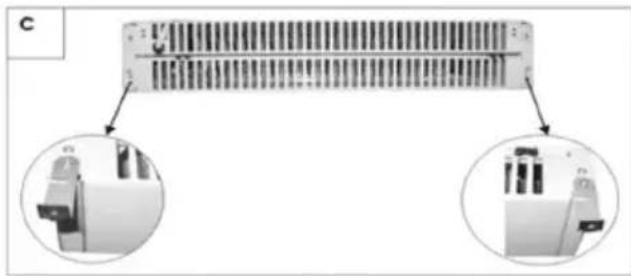
natural_image
Diagram showing a connector with internal structure and two circular insets highlighting internal components (no text or symbols present)2-cypet
Назар аударыңыз!
- IMPORTANT INFORMATION
- IMPORTANT!
- NOTE
- SAFEGUARDS
- APPOINTMENT OF THE DEVICE
- SPECIFICATIONS
- DEVICE DESCRIPTION
- IM2022
- DELIVERY SET
- ASSEMBLY AND INSTALLATION
- Connecting feet to the convector
- Wall installation of the device
- Attention!
- Connecting to the network
- Heating indicator
- Power mode switch knob
- Operation of the convector
- Switching on
- Select the heating power mode
- Switching off
- CLEANING AND MAINTENANCE OF THE UNIT
- NOTE:
- STORAGE
- TROUBLE SHOOTING
- UTILIZATION RULES
- Шановний покупець!
- 2-cypet
- Назар аударыңыз!
Brand : Scarlett
Model : SCA-H-VER31-2000
Category : Uncategorized