SC-WF04 - Uncategorized Scarlett - Free user manual and instructions
Find the device manual for free SC-WF04 Scarlett in PDF.


| Product Type | Water Flosser |
| Model | SC-WF04 |
| Brand | Scarlett |
| Dimensions (W x H x D) | 91 x 232 x 63 mm |
| Net Weight | 305 g |
| Water Tank Capacity | 180 ml |
| Water Pressure | 552-1103 kPa |
| Pulse Frequency | 1500-2000 pulses/min |
| Operating Modes | Clean, Soft, Pulse |
| Battery Type | Lithium-ion 1500 mAh |
| Charging Time | < 6 hours |
| Usage Time per Charge | 60 minutes |
| Charging Mode | USB (Type-C) |
| Charging Performance | 5 V — 2 W |
| Device Performance | 3.7 V — 7.5 W |
| Water Resistance | IPX7 |
| Overcharge Protection | Yes |
| Nozzle Types Included | Standard nozzle, Brace nozzle |
| Nozzle Replacement | Removable and replaceable |
| Non-slip Design | Yes |
| Package Contents | Water flosser, USB cable, Standard nozzle, Brace nozzle, Manual, Warranty card |
| Intended Use | Domestic oral care, cleaning teeth and gaps |
| Safety Features | Automatic shut-off when battery low, overcharge protection |
| Battery Removal for Disposal | Removable by professional |
Frequently Asked Questions - SC-WF04 Scarlett
User questions about SC-WF04 Scarlett
0 question about this device. Answer the ones you know or ask your own.
Ask a new question about this device
Download the instructions for your Uncategorized in PDF format for free! Find your manual SC-WF04 - Scarlett and take your electronic device back in hand. On this page are published all the documents necessary for the use of your device. SC-WF04 by Scarlett.
USER MANUAL SC-WF04 Scarlett
natural_image
White watercolor cleaning toolbar with a power button and spool of hair (no text or symbols visible)Read the instructionscarefully and keep it at a safe place for future reference before use.
The safety measures and instructions contained in this manual do not cover all possible issues that may arise during the operation of the device. When working with the device, the system could be guided by common sense, be careful and attentive.
SECURITY MEASURES
- The manufacturer is not responsible for damages caused by non-compliance with safety regulations and rules of operation of the device.
- This device is designed for domestic use and can be used in apartments, country houses or other similar conditions of non-industrial operation. Industrial or any other inappropriate use of the device will be considered a violation of the conditions of proper operation of the device. In this case, the manufacturer is not responsible for the possible consequences.
- Do not extend the Type-C cable in doorways or near heat sources. Make sure that the cable does not twist or bend, does not come into contact with sharp objects, corners and edges of furniture.
- Improper handling may result in damage to the device, damage to property and cause harm to the health of the user.
- If the power cord is damaged, it should be replaced with a special cord obtained from the manufacturer or cervice center.
•The manufacturer reserves the right to make minor changes in the design of the device that do not drastically affect its safety, performance and functionality. - Do not attempt to repair the device yourself. In case of malfunctions, please contact your dealer.
• The date of manufacture is indicated on the device and/or on the packaging, as well as in the
accompanying documentation, in the format XX.XXXX, where the first two digits "XX" are the month of manufacture, the next four digits "XXXX". XX" - the year of manufacture.
ATTENTION! THE WATER FLOSSER IS NOT A SUBSTITUTE FOR A TOOTHBRUSH, THEREFORE, IN ORDER TO ENSURE COMPREHENSIVE ORAL CARE OF THE ORAL CAVITY, IT IS RECOMMENDED TO MAKE BRUSHING FIRST. THE DEVICE IS DESIGNED TO CLEAN TEETH AND ORAL CAVITY, USE IT ONLY FOR ITS INTENDED PURPOSE.
REMEMBER: accidental damage to the USB cable can lead to problems that do not comply with the warranty conditions, as well as can cause electric shock.
- It is forbidden to operate the device outdoors: moisture or foreign objects entering the device body may cause serious damage to it.
Do not charge the device near water-filled containers (bathtubs, sinks, etc.). Keep the USB cable away from water.
ATTENTION!
- It is not recommended to immerse the device body in water or other liquids for a long time.
- Before charging, make sure that the device is completely dry.
- Consult a dentist before using the device.
- When wearing dentures, implants, crowns, etc., make sure that they can be cleaned with a water flosser. The manufacturer is not responsible for possible damage.
- Do not direct a stream of water under the tongue, into the ears, nose, eyes and other sensitive areas of the body – this can lead to injury.
• Take out all removable appliances from the mouth before using the device. -
Before cleaning the device, make sure it is unplugged and turned off. Strictly follow the cleaning instructions.
-
The device is not intended for use by people (including children) with reduced physical, sensory or mental abilities or with lack of experience or knowledge, unless these people are supervised or instructed in how to use this device by a person responsible for their safety.
• Children should be supervised to prevent playing with the device. - Self-repair of the device or modification of its design is prohibited. Unprofessionally performed work can lead to damage to the device, injury and property damage.
ATTENTION! IT IS FORBIDDEN TO USE THE DEVICE IN CASE OF ANY MALFUNCTION.
Technical specifications
• Water pressure: 552-1103 kPa
• Device performance: 3.7 V — 7.5 W
- Charging performance: 5 V — 2 W
- Charging mode: USB
• Water tank capacity: 180 ml
- Pulse frequency: 1500-2000 times per minute
• 1500 mAh lithium-ion battery
• Charging time: <6 hours
• Usage time: 60 minutes per charge
• Water Resistance: IPX7
• Overall Dimensions (W x H x D): 91 x 232 x 63 mm
• Net weight: 305 g
Features
• Non-slip design
- Removable and replaceable nozzle
• High-frequency pulses of water effectively remove plaque and clean the gaps between teeth
• USB charging function with LED indication of various modes
• Overcharge protection, which stops charging when the battery is fully charged
• The flosser will switch to low power mode when the battery runs out
• 3 modes: Clean, Soft, Pulse
PACKAGE CONTENT
| Water flosser: | 1 |
| USB cable: | 1 |
| Standard nozzle: | 1 |
| Brace nozzle: | 1 |
| Operation manual: | 1 |
| Warranty card: | 1 |
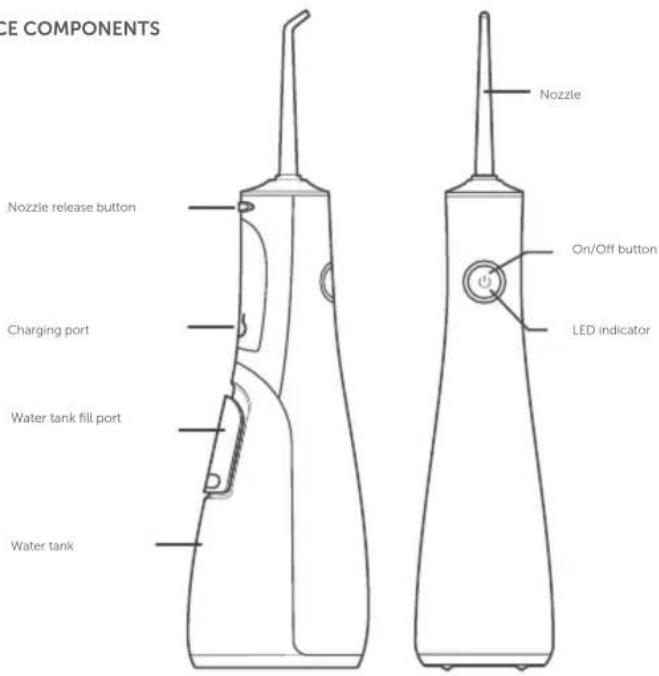
DEVICE COMPONENTS
Preparation for work
- Make sure that all packaging and protective tape are removed from the flosser
- Fully charge the flosser before use by plugging the USB cable into the flosser's charging port, then plug the other end into the USB charging box (not included), then plug into a wall outlet. Warning! The appliance will not operate while connected to the power supply.
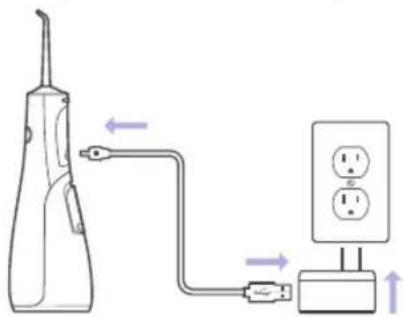
- When the battery runs out, the indicator will start flashing. It's time to recharge your device.
- When fully charged, the indicator lights up with a steady green light.
Reccomendations for selecting and operating mode
Use the On/Off button to select the operating mode. Press the button once for Clean, twice for Soft and three times for Pulse modes.
Clean - Standard operating mode. Suitable for daily use
Soft - Soft cleaning mode. Suitable for sensitive gums
Pulse - Pulsation mode. Suitable for deep cleaning and gum massage
Operating instructions
- Remove the charging cord from the flosser.
- Fill the reservoir with lukewarm water (recommended), DO NOT use hot water.
FILLING THE WATER TANK WITH HOT WATER, HERBAL DECOTIONS, SALT, OIL-CONTAINING OR ANTISEPTIC SOLUTIONS, TOOTHPASTE, CHEMICALS, NON-SPECIALIZED MOUTHWASH, AS WELL AS OTHER LIQUIDS NOT INTENDED FOR WATER FLOSSERS IS STRICTLY PROHIBITED! - Before turning on, place nozzle into mouth.
- Place nozzle close to teeth without touching them.
- Turn on the device, find the mode that is the most comfortable for you.
- Move nozzle from one tooth gap to the other and spend about 1-2 seconds at each gap. Do not tilt the device body by more than 45^ during operation.
- As water builds up in mouth, let it drain out of mouth.
- When finished, turn off flosser while nozzle is still in your mouth to prevent water splashing.
Replacing the nozzle
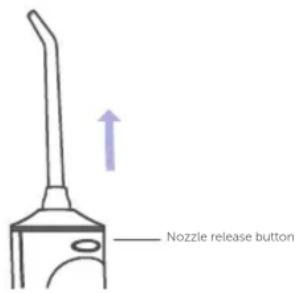
Insert the nozzle by pressing it into the hole until it clicks.
To remove the nozzle, press the nozzle release button and remove the nozzle.
When the additional nozzles are not in use, keep them in a safe place.
Daily care
• After use, wipe the flosser with a dry, clean towel and store it in a dry, safe place.
- Remove the nozzle from time to time and rinse with warm water. After removing the nozzle, wipe the nozzle opening with a cotton swab to prevent bacterial growth.
- Use soap and water to remove the bacteria from the surface.
- If the flosser is not used for a long time, drain the water from the reservoir and let it dry before storing the flosser.
- DO NOT immerse the dental floss in water, it is not completely waterproof.
Removing the battery:
- The battery must be removed from the device before disposal.
- The device must be disconnected from the mains when removing the battery.

This symbol on the device, packaging and/or accompanying documentation indicates that used electrical and electronic products should not be disposed of with normal household waste. They should be taken to a specialized collection points

This symbol on the device, packaging, and/or accompanying documentation indicates that the battery or battery pack used in this product must not be disposed of at the end of its service life together with other household waste
Contact your local authorities for more information on existing waste
collection systems. Proper disposal will help conserve valuable resources and prevent potential negative impacts on human health and the environment that may result from improper waste management

Brand : Scarlett
Model : SC-WF04
Category : Uncategorized