
39272 - Thermomètre environnemental Extech - Free user manual and instructions
Find the device manual for free 39272 Extech in PDF.


| Product Type | Environmental Thermometer |
| Brand | Extech |
| Model | 39272 |
| Temperature Measurement Range | -50°C to 70°C (-58°F to 158°F) |
| Accuracy | ±1°C (1.8°F) from 0°C to 40°C; ±2°C otherwise |
| Display | LCD with 1°C/1°F resolution |
| Power Supply | 1 x CR2032 battery |
| Battery Life | Approximately 1 year with normal use |
| Auto Power Off | After 10 minutes of inactivity |
| Dimensions | 4.0 x 2.5 x 1.2 cm (1.6 x 1.0 x 0.5 in) |
| Weight | 30 g (1.1 oz) including battery |
| Functions | Current temperature, MIN/MAX memory, Data Hold |
| Temperature Units | Switchable °C/°F |
| Cleaning | Wipe with a soft, dry cloth. Do not use solvents or abrasive cleaners. |
| Safety | Not intended for medical use. Keep away from children under 3 years. |
| Spare Parts | Battery (CR2032) is replaceable. No other user-serviceable parts. |
| Reparability | Non-repairable. Dispose in accordance with local regulations for electronic waste. |
Frequently Asked Questions - 39272 Extech
User questions about 39272 Extech
0 question about this device. Answer the ones you know or ask your own.
Ask a new question about this device
Download the instructions for your Thermomètre environnemental in PDF format for free! Find your manual 39272 - Extech and take your electronic device back in hand. On this page are published all the documents necessary for the use of your device. 39272 by Extech.
USER MANUAL 39272 Extech
Pocket Fold-up Thermometer Model 39272
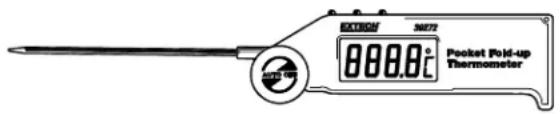
Congratulations on your purchase of the Extech 39272 Stem Thermometer. With proper care, this device will provide years of reliable service.
OPERATION
To turn the meter on, extend the probe away from the body of the thermometer. To turn the meter off, fold the probe completely against the meter. The meter will also turn off automatically after 1 hour of inactivity.
Adjust the probe arm to the best measurement angle. The probe will detent at 45^ , 90^ , 135^ and 180^ . Place the stainless-steel sensor in the area to be measured or insert the probe between 20 - 60mm (100mm max) into the material under test. Do not force probe into solid or semi-solid materials.
Press the F/C key to select the desired units, the display should indicate the change.
Press the H/T key to activate the Hold Temperature function. Hold Temperature freezes the current reading on the display. The Hold Temperature function is released by pressing the H/T key again.
Press the Max/Min key to activate the Max/Min function. Pressing the Max/Min key will toggle between the two functions, the display will indicate which reading is currently being displayed. To deactivate the Max/Min function, press the H/T key twice. The thermometer will return to normal operation.
To replace the battery, open the battery compartment and replace the battery with one AAA battery.
| Display | 3-1/2 digit LCD with °C/°F degree indicator |
| Measurement ranges | -50 to 300°C (-58 to 572°F) |
| Resolution | 0.1° F/C |
| Accuracy | 1°C (±1.8°F) from -30 to 250°C (-22 to 482°F) |
| Sensor length | 117mm (4.5") |
| Sensor material | Stainless steel |
| Operating temperature | -10 to 40°C (-14 to 122°F) |
| Battery power | (1) AAA Battery |
Copyright © 2021 Teledyne FLIR LLC
All rights reserved including the right of reproduction in whole or in part in any form
www.extech.com
Brand : Extech
Model : 39272
Category : Thermomètre environnemental