
42515 - Thermomètre environnemental Extech - Free user manual and instructions
Find the device manual for free 42515 Extech in PDF.


| Product Type | Environmental Thermometer / Humidity Meter |
| Temperature Measurement Range | -20°C to 60°C (-4°F to 140°F) |
| Temperature Accuracy | ±1.0°C (±1.8°F) |
| Humidity Measurement Range | 0% to 100% RH |
| Humidity Accuracy | ±3% RH at 25°C (77°F) |
| Additional Measurements | Dew Point, Wet Bulb Temperature |
| Display | Dual LCD with backlight |
| Data Hold | Yes |
| Min/Max Recording | Yes |
| Auto Power Off | Yes, after 15 minutes of inactivity |
| Low Battery Indicator | Yes |
| Power Supply | 1 x 9V battery (6LR61 or equivalent) |
| Battery Life | Approximately 100 hours |
| Dimensions | 160 x 55 x 30 mm (6.3 x 2.2 x 1.2 in) |
| Weight | Approximately 220 g (7.8 oz) including battery |
| Operating Temperature | 0°C to 50°C (32°F to 122°F) |
| Storage Temperature | -20°C to 60°C (-4°F to 140°F) |
| Operating Humidity | <80% RH non-condensing |
| Cleaning | Wipe with a damp cloth; do not use aggressive solvents |
| Safety Rating | Conforms to EN61326 EMC requirements |
| Warranty | 1 year from date of purchase |
Frequently Asked Questions - 42515 Extech
User questions about 42515 Extech
0 question about this device. Answer the ones you know or ask your own.
Ask a new question about this device
Download the instructions for your Thermomètre environnemental in PDF format for free! Find your manual 42515 - Extech and take your electronic device back in hand. On this page are published all the documents necessary for the use of your device. 42515 by Extech.
USER MANUAL 42515 Extech
Wide Range InfraRed (IR) Thermometer with Type K input and Laser Pointer
MODEL 42515
Introduction
Congratulations on your purchase of the Model 42515 IR Thermometer. The Model 42515 IR thermometer measures and displays non-contact (infrared) temperature readings up to 1472°F (800°C). The built-in laser pointer increases target accuracy while the backlit LCD and handy push-buttons combine for convenient, ergonomic operation. The Type K thermocouple input provides contact measurements up to 2498°F (1370°C)*. The adjustable emissivity feature allows the IR thermometer to measure the temperature of virtually any surface. This meter is shipped fully tested and calibrated and, with proper use, will provide years of reliable service.
* The supplied thermocouple is rated for 482°F (250°C).
Safety
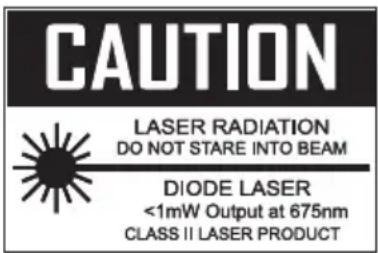
- Use extreme caution when the laser pointer is on
- Do not point the beam toward anyone's eye or allow the beam to strike the eye from a reflective surface
- Do not use the laser near explosive gases or in other potentially explosive areas
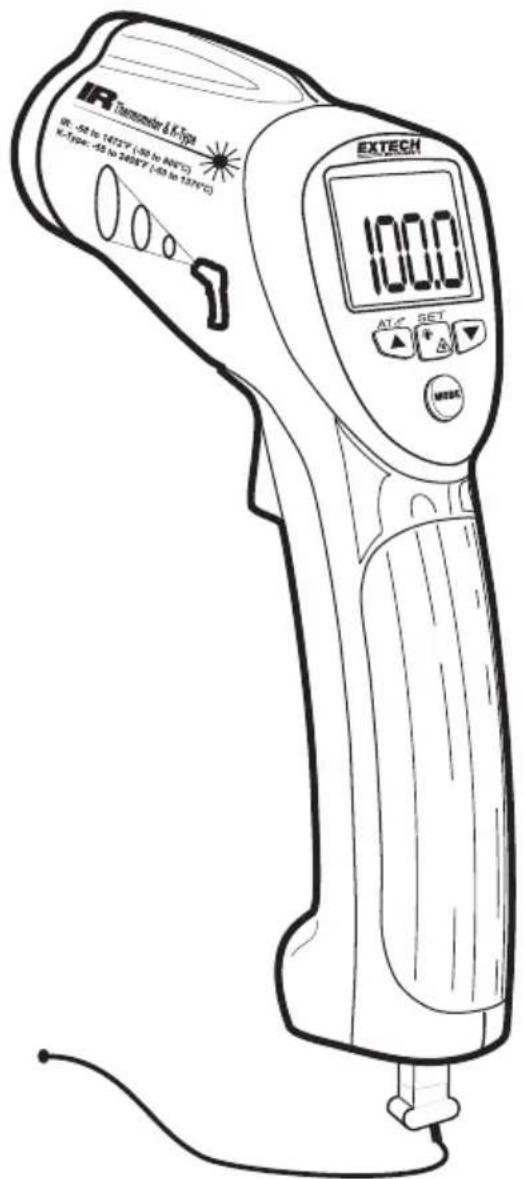
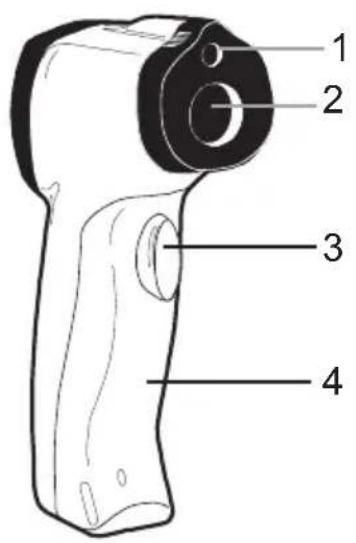
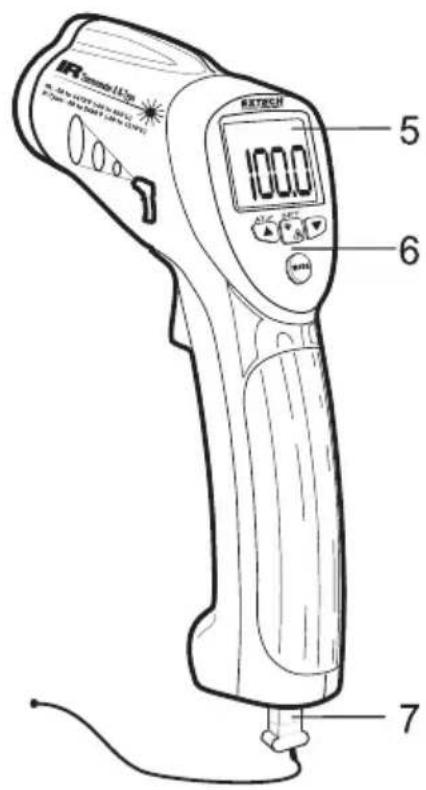
- Laser pointer
- IR Sensor
- Measurement Trigger
- Battery and Switch compartment
- LCD Display
- Function Buttons
- Type-K thermocouple
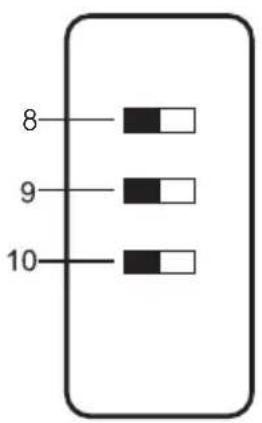
- Temperature units (°C or °F) switch
- Test lock ON / OFF switch
- Alarm ON / OFF switch
Note that switches are located in the battery compartment behind the battery.
IR (non-contact) Measurements
- Hold the meter by its handle and point it toward the surface to be measured.
- Pull and hold the trigger to turn the meter on and begin testing. The temperature reading, the flashing 'SCAN' icon, the emissivity, and the unit of measure will appear. Note: Replace the 9V battery if the display does not switch on.
- Release the Trigger and the reading will hold for approximately 7 seconds (HOLD will appear on the LCD) after which the meter will automatically shut off. The only exception to this is if the TEST LOCK switch is set to ON.
Note: Select the temperature units (°F/°C) using the top switch inside the battery compartment
Backlight/Laser Pointer
- While pulling the Trigger, push the backlight/laser button 🙏 once to turn on the backlight.
- Press it again to turn on the laser pointer. When the laser is ON the laser icon will appear in the LCD.
- Press the laser button to turn the backlight off.
- Pressing it again turns the laser off.
Note: Backlight and Laser settings will be retained after the meter powers down.
Type-K (contact) Measurements
- Plug the Type-K thermocouple sensor into the jacks at the bottom of the instrument. The jack accepts a standard sub-miniature connector. Note that one plug spade is wider than the other and the plug can only be inserted into the meter in one direction.
- Pull the trigger to turn the instrument ON.
- In order to keep the instrument's power on while testing, the user can a:) hold the trigger or b:) lock the instrument on by setting the center dip switch to the ON position (switches are located inside of the battery compartment).
- Repeatedly press the MODE button until the bottom display line of the LCD reads 'T k'. The temperature shown to the right of the 'T k' symbol is the temperature that the Type-K thermocouple is sensing.
- Hold the thermocouple in air or touch the tip of the sensor to the device that is to be tested. The LCD's bottom temperature display will provide the measurement value.
- The supplied thermocouple is rated for 482 °F (250°C).
The MODE button options
The MODE button is used to access the programming functions of the instrument. The selected function is displayed on the bottom line of the LCD. Each parameter is listed below with a detailed account of its use. Press the MODE button to step from one parameter to the next.
EMS (Emissivity Value)
To change the emissivity value, use the UP and DOWN arrows (the range is 0.10 to 1.00). The current emissivity setting is always shown at the top of the LCD display. A setting of 0.95 covers about 90% of all applications. Emissivity is discussed in a dedicated section of this manual.
MAX (Maximum function)
In the MAX mode, only the highest reading encountered in the current measurement session is displayed
MIN (Minimum function)
In the MIN mode, only the lowest reading is displayed
DIF (Max minus Min value)
In the DIF mode, the MAX less the MIN is displayed.
AVG (Average value)
In the AVG mode, all of the readings in the current measurement session are averaged and the value is displayed.
HAL (High Alarm setting)
The temperature that, when exceeded, causes the audible/visual alarm to trip.
LAL (Low Alarm setting)
The temperature that, when exceeded high to low, causes the audible/visual alarm to trip.
T k (Type-K contact thermocouple sensor function)
The temperature reading of the Type-K contact probe is shown next to the 'T k' icon display. If the sensor is not correctly inserted to the meter the display will show all dashes '----'. The supplied thermocouple is rated for 482°F (250°C).
LOG 1 through 20 (20 reading internal Datalogger)
Repeatedly press the MODE button unit the LOG icon is displayed on the lower left. Take a reading and then press the SET button to store the reading to the location represented by the number shown next to the LOG icon. Use the arrow keys to navigate the 20 storage locations. All dashes indicate that there is no reading stored in a memory location.
Automatic Emissivity Adjustment
The 42515 has the ability to automatically calibrate the emissivity setting. However, in order to do so, the temperature of the measured surface must be above 212^ F ( 100^ C).
Follow the steps below to use the automatic emissivity adjustment feature:
- Press the MODE button until the EMS (Emissivity) icon appears on the lower LCD line.
- Press and hold the Laser/Backlight button until the EMS icon begins to blink and the emissivity value is displayed as “____”.
- The IR temperature will be displayed on the middle line of the LCD and the Type-K temperature will be displayed on the lower LCD line.
- Touch the Type-K sensor to the surface and, at the same time, take an IR reading.
- When both the IR and the Type-K measurements stabilize, press the UP or DOWN arrow button. The new emissivity value will now be displayed.
- Proceed to take measurements.
Over-range Indicator
If the temperature measurement exceeds the specified temperature range, the thermometer will display dashes in place of a temperature reading.
High and Low Alarm Feature
The Model 42515 has an alarm feature whereas a High Alarm setting and a Low Alarm setting can be programmed by the user. When either Alarm point is reached the meter will alert the user via an audible beep and LCD display icon. Follow the steps below:
- Press the MODE button until the HAL (High Alarm) parameter is displayed. Use the UP and DOWN arrow keys to set the desired High Alarm setting.
- Press the MODE button until the LAL (Low Alarm) parameter is displayed. Use the UP and DOWN arrow keys to set the desired Low Alarm setting.
- When an alarm limit is reached, the audible alarm will sound and the display icon HIGH or LOW will appear in the lower right hand corner of the LCD.
- Note that if the bottom dip switch (located in the battery compartment) is set to OFF, the audible alarm will be disabled.
Internal Datalogging
The Model 42515 has a 20-reading internal memory.
- Use the MODE button to scroll to the LOG display (small LOG icon on the bottom left of the LCD)
- Take a reading and then press and hold the SET button to store the current reading in the memory location represented by the number shown next to the LOG icon
- Use the arrow keys to scroll and view the data in the 20 locations
Battery Replacement
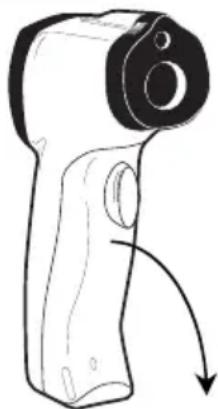
When the low battery symbol 📁 appears on the lower left side of the display, replace the meter's battery (9V). The battery compartment is located behind the light green panel that surrounds the meter's trigger (see diagram). Open the compartment by pulling the light green panel down from the trigger area. Replace the 9V battery and close the battery compartment cover.
natural_image
Line drawing of a handheld device with a curved arrow indicating motion (no text or symbols)
Never dispose of used batteries or rechargeable batteries in household waste. As consumers, users are legally required to take used batteries to appropriate collection sites, the retail store where the batteries were purchased, or wherever batteries are sold. Disposal: Do not dispose of this instrument in household waste. The user is obligated to take end-of-life devices to a designated collection point for the disposal of electrical and electronic equipment
IR Measurement Notes
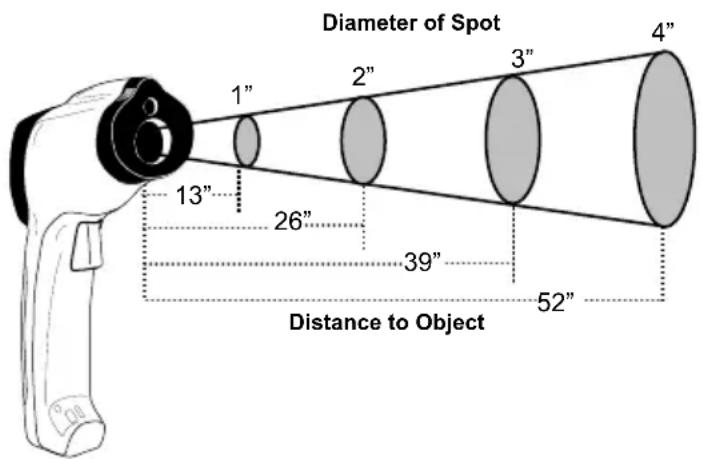
- The object under test should be larger than the spot (target) size calculated by the field of view diagram (printed on the side of the meter and in this guide).
- Before measuring, be sure to clean surfaces that are covered with frost, oil, grime, etc.
- If an object's surface is highly reflective, apply masking tape or flat black paint to the surface before measuring. Allow time for the paint or tape to adjust to the temperature of the surface it is covering.
- Measurements through transparent surfaces such as glass may not be accurate.
- Steam, dust, smoke, etc. can obscure measurements.
- The meter automatically compensates for deviations in ambient temperature. However, it can take up to 30 minutes for the meter to adjust to extremely wide changes.
- To find a hot spot, aim the meter outside the area of interest then scan across (in an up and down motion) until the hot spot is located.
Field of View
The meter's field of view is 13:1. For example, if the meter is 13 inches from the target (spot), the diameter of the target must be at least 1 inch. Other distances are shown in the field of view diagram. Note that measurements should normally be made as close as possible to the device under test. The meter can measure from moderate distances but the measurement may be affected by external sources of light. In addition, the spot size may be so large that it encompasses surface areas not intended to be measured.
Emissivity and IR Measurement Theory
IR Thermometers measure the surface temperature of an object. The thermometer's optics sense emitted, reflected, and transmitted energy. The thermometer's electronics translate the information into a temperature reading which is then displayed on the LCD.
The amount of IR energy emitted by an object is proportional to an object's temperature and its ability to emit energy. This ability is known as emissivity and is based upon the material of the object and its surface finish. Emissivity values range from 0.1 for a very reflective object to 1.00 for a flat black finish. For the Model 42515, the emissivity is adjustable from 0.1 to 1.00. Most organic materials and painted or oxidized surfaces have an emissivity factor of 0.95. When in doubt, set the emissivity to 0.95.
Emissivity Factors for Common Materials
| Material under test Emissivity Material under test Emissivity | |||
| Asphalt 0.90 to 0.98 Cloth (black) 0.98 | |||
| Concrete | 0.94 | Skin | (human) |
| Cement 0.96 Leather | 0.75 to 0.80 | ||
| Sand | 0.90 | Charcoal | (powder) |
| Soil 0.92 to 0.96 Lacquer | 0.80 to 0.95 | ||
| Water | 0.92 to 0.96 | Lacquer (matt) | 0.97 |
| Ice | 0.96 to 0.98 | Rubber (black) | 0.94 |
| Snow | 0.83 Plastic | 0.85 to 0.95 | |
| Glass | 0.90 to 0.95 | Timber | 0.90 |
| Ceramic | 0.90 to 0.94 | Paper | 0.70 to 0.94 |
| Marble | 0.94 | Chromium Oxides | 0.81 |
| Plaster | 0.80 to 0.90 | Copper Oxides | 0.78 |
| Mortar | 0.89 to 0.91 | Iron Oxides | 0.78 to 0.82 |
| Brick | 0.93 to 0.96 | Textiles | 0.90 |
Infrared Thermometer (Non-contact) Specifications
| Range / Resolution -50.0 to 800.0 °C (-58.0 to 1472.0°F) | Resolution: ° | ||
| Accuracy -50 to -1°C (-58 to 30°F) ± 2.0%rdg or ±6°F/3°C whichever is greater | |||
| Emissivity 0.10 to 1.00 adjustable (Automatic adjust above 212 °F or 100°C) | |||
| Field of View | D/S = Approx. 13:1 ratio (D = distance; S = spot or target) | ||
| Laser pointer Class 2 laser < 1mW power; Wavelength is 630 to 670nm | |||
| IR Spectral response | 8 to 14 μm (wavelength) | ||
0.1
Type K Thermocouple (Contact) Specifications
| Range / Resolution -58.0 to 1999.9 °F (-50.0 to 1370.0°C)2000°F to 2498°F* | 0.1°1° |
| Accuracy ± (1.5% of rdg + 2°F or 1°C)Note: Accuracy is specified for the following ambient temperature range:18 to 28°C (64 to 82°F) | |
* The supplied thermocouple is rated for 250°C (482°F)
General Specifications
| Display Backlit LCD display with function indicators | |
| Display update rate 1 second approx. | |
| Operating Temperature 0 | °C to 50°C (32°F to 122°F) |
| Operating Humidity | 80% Relative Humidity max. |
| Power Supply | 9V battery |
| Automatic Power Off Meter shuts off automatically after 7 seconds | |
| Weight | 180g / 6.4 oz. |
| Dimensions | 82 x 42 x 160mm (3.2 x 1.6 x 6.3") |
Copyright © 2014-2016 FLIR Systems, Inc.
All rights reserved including the right of reproduction in whole or in part in any form
ISO-9001 Certified
www.extech.com
- Wide Range InfraRed (IR) Thermometer with Type K input and Laser Pointer
- Introduction
- Safety
- IR (non-contact) Measurements
- Backlight/Laser Pointer
- Type-K (contact) Measurements
- The MODE button options
- EMS (Emissivity Value)
- MAX (Maximum function)
- MIN (Minimum function)
- DIF (Max minus Min value)
- AVG (Average value)
- HAL (High Alarm setting)
- LAL (Low Alarm setting)
- T k (Type-K contact thermocouple sensor function)
- LOG 1 through 20 (20 reading internal Datalogger)
- Automatic Emissivity Adjustment
- Over-range Indicator
- High and Low Alarm Feature
- Internal Datalogging
- Battery Replacement
- IR Measurement Notes
- Field of View
- Emissivity and IR Measurement Theory
- Copyright © 2014-2016 FLIR Systems, Inc.
Brand : Extech
Model : 42515
Category : Thermomètre environnemental