
DMW-BGG1PP - Battery Handle PANASONIC - Free user manual and instructions
Find the device manual for free DMW-BGG1PP PANASONIC in PDF.


| Product Type | Battery grip for digital camera |
| Brand | Panasonic |
| Model | DMW-BGG1PP |
| Dimensions | 127.4 mm (W) × 40.4 mm (H) × 65.1 mm (D) |
| Weight (with battery) | Approx. 291 g |
| Weight (without battery) | Approx. 242 g |
| Power supply | 8.4 V DC |
| Battery type | Rechargeable lithium-ion (Panasonic DMW-BLC12PP/DMW-BLC12E) |
| Battery voltage/capacity | 7.2 V / 1200 mAh |
| Main functions | Shutter button, front and rear dials, AF/AE LOCK button, Fn button, exposure compensation button |
| Compatibility | Panasonic digital cameras DMC-G80/DMC-G81/DMC-G85 |
| Dust and splash resistant | Yes |
| Included accessories | DMW-BLC12PP battery pack, connection terminal cap |
| Extended battery life | Simultaneous use of two batteries (one in the camera, one in the grip) |
| Maintenance and cleaning | Wipe with a soft, dry cloth; do not use solvents |
| Safety | Do not disassemble, heat, or dispose of in fire; use only recommended Panasonic batteries |
| Warranty | 1 year parts and labor (main product); 90 days for accessories |
| Operating temperature | 0 °C to 40 °C |
| Operating relative humidity | 10% to 80% |
Frequently Asked Questions - DMW-BGG1PP PANASONIC
User questions about DMW-BGG1PP PANASONIC
0 question about this device. Answer the ones you know or ask your own.
Ask a new question about this device
Download the instructions for your Battery Handle in PDF format for free! Find your manual DMW-BGG1PP - PANASONIC and take your electronic device back in hand. On this page are published all the documents necessary for the use of your device. DMW-BGG1PP by PANASONIC.
USER MANUAL DMW-BGG1PP PANASONIC
Operating Instructions
Please read these instructions carefully before using this product, and save this manual for future use.
If you have any questions, visit:
USA: http://shop.panasonic.com/support
Canada: www.panasonic.ca/english/support
Operating Instructions BATTERY GRIP
Thank you for purchasing this Panasonic product. Please read these instructions carefully before using this product, and save this manual for future use.
Contents
Information for Your Safety 2 Precautions 5 Supplied Accessories. 5 Names of the components 6 Mounting on and removing from the digital camera 7 Inserting/Removing the Battery 8 Using the battery grip 11 Cautions for Use 11 Specifications 13 Limited Warranty (ONLY FOR U.S.A.) 14 Limited Warranty (ONLY FOR CANADA) 17
Information for Your Safety
The socket outlet shall be installed near the equipment and shall be easily accessible.
CAUTION!
To reduce the risk of fire, electric shock or product damage, do not install or place this unit in a bookcase, built-in cabinet or in another confined space. Ensure this unit is well ventilated.
About the battery pack
CAUTION
Battery pack (Lithium ion battery pack)
- Use the specified unit to recharge the battery pack.
- Do not use the battery pack with equipment other than the specified unit.
- Do not get dirt, sand, liquids, or other foreign matter on the terminals.
- Do not touch the plug terminals (+ and -) with metal objects.
- Do not disassemble, remodel, heat or throw into fire.
If any electrolyte should come into contact with your hands or clothes, wash it off thoroughly with water.
If any electrolyte should come into contact with your eyes, never rub the eyes. Rinse eyes thoroughly with water, and then consult a doctor.
CAUTION
- Danger of explosion if battery is incorrectly replaced. Replace only with the type recommended by the manufacturer.
- When disposing of the batteries, please contact your local authorities or dealer and ask for the correct method of disposal.
- Do not heat or expose to flame.
- Do not leave the battery(ies) in a car exposed to direct sunlight for a long period of time with doors and windows closed.
Warning
Risk of fire, explosion and burns. Do not disassemble, heat above 60°C (140°F) or incinerate.
-If you see this symbol
Disposal of Old Equipment and Batteries Only for European Union and countries with recycling systems

These symbols on the products, packaging, and/or accompanying documents mean that used electrical and electronic products and batteries must not be mixed with general household waste.
For proper treatment, recovery and recycling of old products and used batteries, please take them to applicable collection points in accordance with your national legislation.
By disposing of them correctly, you will help to save valuable resources and prevent any potential negative effects on human health and the environment.
For more information about collection and recycling, please contact your local municipality.
Penalties may be applicable for incorrect disposal of this waste, in accordance with national legislation.

Note for the battery symbol (bottom symbol):
This symbol might be used in combination with a chemical symbol. In this case it complies with the requirement set by the Directive for the chemical involved.
For the U.S.A. and Canada only

A lithium ion battery that is recyclable powers the product you have purchased. Please call 1-800-8-BATTERY for information on how to recycle this battery.
- This unit is exclusively for Panasonic digital camera DMC-G80/DMC-G81/DMC-G85. (As of September 2016) For the latest information on compatible devices, see the operating instructions, catalogue or website of the digital camera.
- Ease of operation and grip when held vertically during the recording will improve. The attached battery pack (supplied), in addition to the battery in the digital camera, will allow longer recording time.
Handling the unit
- The dust- and splash-proofing of this unit is not a guarantee of full protection against the intrusion of dust and water. Please take care of the following when using. If the unit does not operate properly, please contact the dealer where you purchased the unit or Panasonic.
- Be careful not to allow sand, dust, or water to adhere to or enter into the terminal area, digital camera, or this unit when attaching or removing this unit.
- This unit is not waterproof, so it cannot be used underwater. For splash-proofing, the lens is constructed to resist the entry of water. If splashes of water etc. do adhere to the lens, wipe after use with a soft dry cloth.
- Do not subject the unit to strong vibration or impact. Those actions may result in malfunctions and failure.
- Please also read the manual of your digital camera.
Supplied Accessories
Product numbers correct as of September 2016. These may be subject to change.
Battery Pack
(Indicated as battery pack or battery in the text)
- Charge the battery before use.
Charge the battery with the battery charger supplied with the digital camera.
Terminal Cap
- The terminal cap is attached to the battery grip at the time of purchase.

DMW-BLC12PP (DMW-BGG1PP) DMW-BLC12E (DMW-BGG1E)

DVKV1001Z
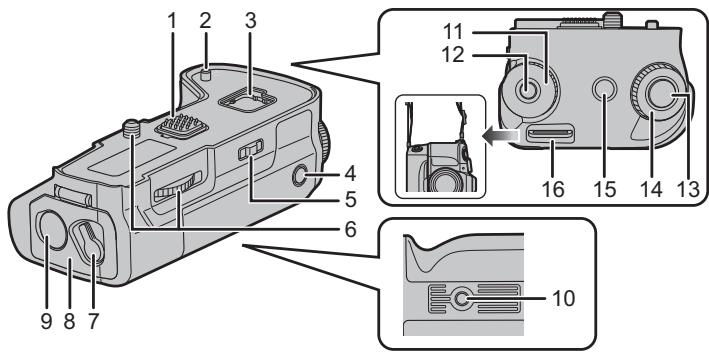
1 Electrical contacts 2 Camera attachment pins 3 Cover storage 4 [AF/AE LOCK] button 5 Operation ON/OFF switch 6 Attachment screw 7 Release lever 8 Battery door 9 DC coupler cover 10 Tripod mount
11 Rear dial 12 Function button (Fn11) 13 Shutter button 14 Front dial 15 [☑] (Exposure Compensation) button/[Fn] button (Fn1) 16 Strap attachment holder
- We recommend using the battery grip and the digital camera with the supplied shoulder strap attached to prevent them from dropping. (Read the digital camera operating instructions for details on how to attach the strap.)
* It works in the same way as [Fn1] or [Fn11] of the digital camera.
Mounting on and removing from the digital camera
- Check that the digital camera is turned off. (Mounting the unit onto, or disengaging it from, the camera while the power is on may cause trouble and is not recommended.)
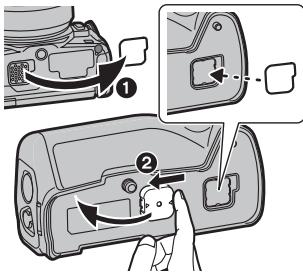
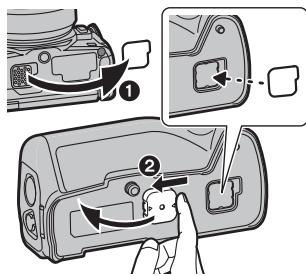
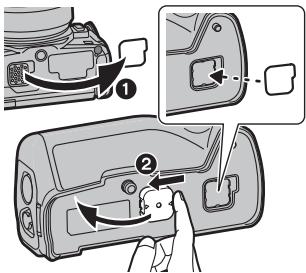
1 Remove the cover for the battery grip connector on the digital camera. 2 Remove the terminal cap on the electrical contacts of the battery grip.
- The cover for the battery grip connector can be stored in the cover storage in the battery grip.
- Return to their original position after use to protect the terminals.
- Be careful not to lose the terminal cap.
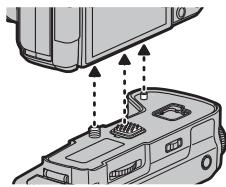
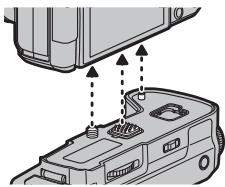
2 Insert by aligning the attachment screw, electrical contacts, and camera attachment pins.
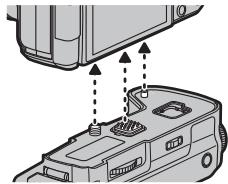
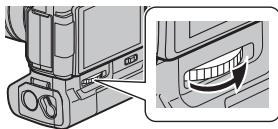
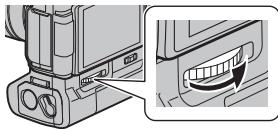
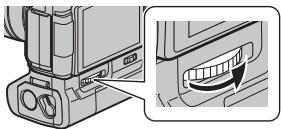
3 Turn the attachment screw in the direction of the arrow to attach securely.
- Confirm that the attachment screw is not loose while using.

Note
- Keep the Terminal Cap out of reach of children to prevent swallowing. Remove the battery grip from the digital camera
- Confirm that the digital camera is not powered, and turn the attachment screw in the opposite direction of the attachment.
For the U.S.A. and CANADA
Always use genuine Panasonic batteries (DMW-BLC12PP). - If you use other batteries, we cannot guarantee the quality of this product.
For Other Countries
- Always use genuine Panasonic batteries (DMW-BLC12E). If you use other batteries, we cannot guarantee the quality of this product.
- Use the battery after charging with a dedicated charger.
- The battery grip can be used when the battery is inserted in either the digital camera or the battery grip.
- Check that the digital camera is turned off.
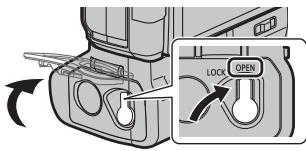
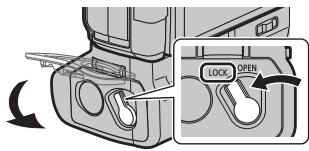
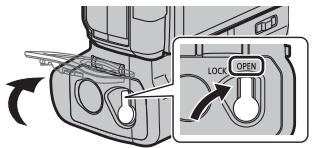
1 Turn the release lever of the battery grip toward [OPEN], and open the battery door.
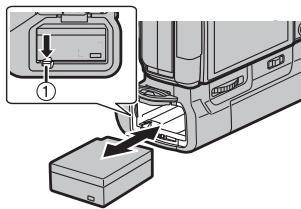
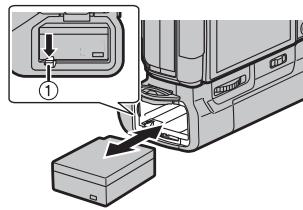
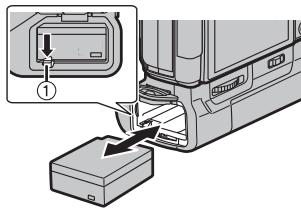
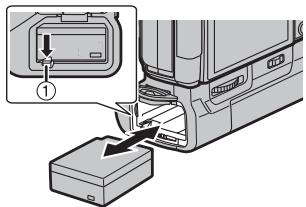
2 Taking care of the orientation, insert securely all the way until you hear locking, and confirm that the ① lever is hooked to the battery.
- When removing the battery, pull the ① lever toward the arrow and pull out the battery.
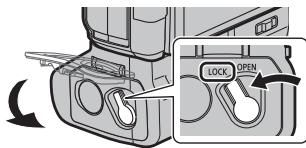
3 Close the battery door and turn the release lever toward [LOCK].

Note
- Remove the battery after use. (The battery will exhaust if it is left unused for long period of time.)
- The battery will be warm after using, while charging, and right after charging. The battery grip will also be warm while using, but this is not a malfunction.
- Confirm that there is no foreign matter on the battery door.
Using 2 batteries
The digital camera can be used for longer periods of time when batteries are inserted in both the digital camera and the battery grip. (It will switch to the other battery when one of the batteries is exhausted.)
- The battery to be used primarily can be set in the digital camera. Read the operating instructions of your digital camera for details.

Note
- Do not remove the battery when the battery in the battery grip is being used. (Power of the digital camera will be turned off.)
Using the AC adaptor (optional) and the DC coupler (optional) instead of the battery
For the U.S.A., CANADA and Latin America
- When using an AC adaptor, ensure that the Panasonic DC coupler (DMW-DCC8: optional) and AC adaptor (DMW-AC10PP: optional) are used.
- Always use a genuine Panasonic AC adaptor (DMW-AC10PP: optional).
For Europe and CIS
- When using an AC adaptor, ensure that the Panasonic DC coupler (DMW-DCC8: optional) and AC adaptor (DMW-AC10E: optional) are used.
- Always use a genuine Panasonic AC adaptor (DMW-AC10E: optional).
For Korea
- When using an AC adaptor, ensure that the Panasonic DC coupler (DMW-DCC8: optional) and AC adaptor (DMW-AC10GD: optional) are used.
- Always use a genuine Panasonic AC adaptor (DMW-AC10GD: optional).
For Other Countries
- When using an AC adaptor, ensure that the Panasonic DC coupler (DMW-DCC8: optional) and AC adaptor (DMW-AC10G: optional) are used.
- Always use a genuine Panasonic AC adaptor (DMW-AC10G: optional).
- Always use a genuine Panasonic DC coupler (DMW-DCC8: optional).
The digital camera can be used without worrying about battery exhaustion by connecting the AC adaptor and plugging it into an outlet. To use the AC adaptor, the DC coupler is required.

Note
- When the DC coupler is being mounted, the DC coupler cover opens, so the structure ceases to be dust-proof and splash-proof. Be careful not to allow sand, dust, water, etc. to adhere to or enter the structure. After use, check that there is no foreign matter attached to the coupler cover, and close it firmly.
- Also read the operating instructions for the AC adaptor and DC coupler.
Operation of the dials and buttons on the battery grip is the same as the digital camera.
Read the operating instructions for your digital camera for details.
1. Turn the power switch of the digital camera to [ON].
2. Turn the operation ON/OFF switch on the battery grip to [ON].
- Enables the operations of the dials and buttons.
- This cannot turn the power of the digital camera ON/OFF.
![PANASONIC DMW-BGG1PP - Turn the operation ON/OFF switch on the battery grip to [ON]. - 1](/content/2019/08/105897/images/4e3541a8e24fa2c5b1e7d3c183f7e45e90eed12b276adca6a20a81c09693f08a.jpg)
![PANASONIC DMW-BGG1PP - Turn the operation ON/OFF switch on the battery grip to [ON]. - 2](/content/2019/08/105897/images/1202b1755102a367ac1af4d5ebc8351f0139063fe81e3a93ee78fd6a7990f04a.jpg)
Note
- When the digital camera is held grasping on the grip, a button on the battery grip may be pushed accidentally. In such case, turn the operation ON/OFF switch of the battery grip to [OFF].
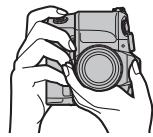
Cautions for use
About the unit
Keep the unit away from insecticide sprays and other volatile substances.
- If the unit is exposed to these sprays or substances, its external case may deteriorate and/or its paint may come off.
- Do not leave the unit in contact with any items made of rubber or PVC for prolonged periods of time.
- Under no circumstances should the unit be stored in any of the following locations since doing so may cause trouble in operation or malfunctioning:
- In direct sunlight or on a beach in summer
- In locations with high temperatures and humidity levels or where changes in temperature and humidity are acute
- Where there is fire
- Near heaters, air conditioners or humidifiers
- Where there is vibration
- Inside a vehicle
- Do not drop the unit, knock it into other objects or subject it to any other kind of strong impact or shock.
- Check the operation before using.
- This unit has an electrical contact that is connected to the digital camera electrically. Attach the supplied terminal cap when this unit is not attached to the digital camera and do not allow any metal objects (such as clips) to come in contact.
Cleaning
When cleaning, wipe the unit with a dry soft cloth.
- When the unit is soiled badly, it can be cleaned by wiping the dirt off with a wrung wet cloth, and then with a dry cloth.
- Do not use solvents such as benzine, thinner, alcohol, kitchen detergents, etc., to clean the unit, since they may deteriorate the external case or the coating may come off.
- When using a chemical cloth, be sure to follow the accompanying instructions.
About the battery pack
- The battery is not charged when the battery grip is shipped. Charge the battery before use.
- The battery is a rechargeable lithium ion battery. If the temperature is too high or too low, the operating time of the battery will become shorter.
- The battery becomes warm after using and during and after charging. The battery grip also becomes warm during use. This is not a malfunction.
- Do not leave any metal items (such as clips) near the batteries.
- Store the battery in a cool and dry place with a relatively stable temperature: [Recommended temperature: 15°C to 25°C (59°F to 77°F), Recommended humidity: 40% RH to 60% RH ]
- Do not store the battery for a long time while fully charged. When storing the battery for a long period of time, we recommend charging it once a year. Remove the battery from the battery grip and store it again after it has completely discharged.
Specifications are subject to change without notice.
Battery Grip (DMW-BGG1):
Information for your safety
Power Source: DC 8.4 V (== 8.4 V)
| Dimensions | Approx. 127.4 mm (W)×40.4 mm (H)×65.1 mm (D) [5.02" (W)×1.59"(H)×2.56" (D)] (excluding the projecting parts) |
| Mass (weight) | Approx. 291 g/0.642 lb (with the battery), Approx. 242 g/0.534 lb |
| Dust-proof and splash-proof | Yes |
| Operating temperature | 0 °C to 40 °C (32 °F to 104 °F) |
| Operating humidity | 10%RH to 80%RH |
Battery Pack (lithium-ion) (Panasonic DMW-BLC12PP/DMW-BLC12E): Information for your safety
Voltage/capacity: 7.2 V/1200 mAh
The symbols on this product (including the accessories) represent the following:
DC
For the U.S.A.
Panasonic Corporation of North America
Two Riverfront Plaza, Newark, NJ 07102-5490
http://shop.panasonic.com
For CANADA
Panasonic Canada Inc.
5770 Ambler Drive, Mississauga, Ontario L4W 2T3
www.panasonic.com
Printed in China
Panasonic Products Limited Warranty
Limited Warranty Coverage (For USA Only)
If your product does not work properly because of a defect in materials or workmanship, Panasonic Corporation of North America (referred to as "the warrantor") will, for the length of the period indicated on the chart below, which starts with the date of original purchase ("warranty period"), at its option either (a) repair your product with new or refurbished parts, (b) replace it with a new or a refurbished equivalent value product, or (c) refund your purchase price. The decision to repair, replace or refund will be made by the warrantor.
| Product or Part Name | Parts | Labor |
| Digital Camera Peripherals | 1 Year | 1 Year |
| Digital Camera Accessories | 90 Days | 90 Days |
| Rechargeable Batteries | 1 Year | 1 Year |
During the "Labor" warranty period there will be no charge for labor. During the "Parts" warranty period, there will be no charge for parts. This Limited Warranty excludes both parts and labor for non-rechargeable batteries, antennas, and cosmetic parts (cabinet). This warranty only applies to products purchased and serviced in the United States. This warranty is extended only to the original purchaser of a new product which was not sold "as is".
Mail-In Service--Online Repair Request
Online Repair Request
To submit a new repair request and for quick repair status visit our Web Site at http://shop.panasonic.com/support.
When shipping the unit, carefully pack, include all supplied accessories listed in the Owner's Manual, and send it prepaid, adequately insured and packed well in a carton box. When shipping Lithium Ion batteries please visit our Web Site at http://shop.panasonic.com/support as Panasonic is committed to providing the most up to date information. Include a letter detailing the complaint, a return address and provide a daytime phone number where you can be reached. A valid registered receipt is required under the Limited Warranty.
IF REPAIR IS NEEDED DURING THE WARRANTY PERIOD, THE PURCHASER WILL BE REQUIRED TO FURNISH A SALES RECEIPT/PROOF OF PURCHASE INDICATING DATE OF PURCHASE, AMOUNT PAID AND PLACE OF PURCHASE. CUSTOMER WILL BE CHARGED FOR THE REPAIR OF ANY UNIT RECEIVED WITHOUT SUCH PROOF OF PURCHASE.
Limited Warranty Limits and Exclusions
This warranty ONLY COVERS failures due to defects in materials or workmanship, and DOES NOT COVER normal wear and tear or cosmetic damage. The warranty ALSO DOES NOT COVER damages which occurred in shipment, or failures which are caused by products not supplied by the warrantor, or failures which result from accidents, misuse, abuse, neglect, mishandling, misapplication, alteration, faulty installation, set-up adjustments, misadjustment of consumer controls, improper maintenance, power line surge, lightning damage, modification, introduction of sand, humidity or liquids, commercial use such as hotel, office, restaurant, or other business or rental use of the product, or service by anyone other than a Factory Service Center or other Authorized Servicer, or damage that is attributable to acts of God.
THERE ARE NO EXPRESS WARRANTIES EXCEPT AS LISTED UNDER "LIMITED WARRANTY COVERAGE".
THE WARRANTOR IS NOT LIABLE FOR INCIDENTAL OR CONSEQUENTIAL DAMAGES RESULTING FROM THE USE OF THIS PRODUCT, OR ARISING OUT OF ANY BREACH OF THIS WARRANTY.
(As examples, this excludes damages for lost time, travel to and from the servicer, loss of or damage to media or images, data or other memory or recorded content.
The items listed are not exclusive, but for illustration only.)
ALL EXPRESS AND IMPLIED WARRANTIES, INCLUDING THE WARRANTY OF MERCHANTABILITY, ARE LIMITED TO THE PERIOD OF THE LIMITED WARRANTY.
Some states do not allow the exclusion or limitation of incidental or consequential damages, or limitations on how long an implied warranty lasts, so the exclusions may not apply to you.
This warranty gives you specific legal rights and you may also have other rights which vary from state to state. If a problem with this product develops during or after the warranty period, you may contact your dealer or Service Center. If the problem is not handled to your satisfaction, then write to:
Consumer Affairs Department
Panasonic Corporation of North America
661 Independence Pkwy
Chesapeake, VA 23320
PARTS AND SERVICE, WHICH ARE NOT COVERED BY THIS LIMITED WARRANTY, ARE YOUR RESPONSIBILITY.
Shop
Accessories!
for all your Panasonic gear
Go to
http://shop.panasonic.com/support
Get everything you need to get the most out of your Panasonic products
Accessories & Parts for your Camera, Phone, A/V products, TV, Computers & Networking, Personal
Care, Home Appliances, Headphones, Batteries, Backup Chargers & more...
Customer Services Directory
For Product Information, Operating Assistance, Parts, Owner's Manuals, Dealer and Service info go to http://shop.panasonic.com/support
For the hearing or speech impaired TTY: 1-877-833-8855
As of March 2016
Panasonic Canada Inc.
5770 Ambler Drive, Mississauga, Ontario L4W 2T3
PANASONIC PRODUCT - LIMITED WARRANTY
Panasonic Canada Inc. warrants this product to be free from defects in material and workmanship under normal use and for a period as stated below from the date of original purchase agrees to, at its option either (a) repair your product with new or refurbished parts, (b) replace it with a new or a refurbished equivalent value product, or (c) refund your purchase price. The decision to repair, replace or refund will be made by Panasonic Canada Inc.
| Digital Camera | One (1) year, parts and labour |
| Digital Camera Peripherals | One (1) year, parts and labour |
| Digital Camera Accessories | Ninety (90) days, parts and labour |
This warranty is given only to the original purchaser, or the person for whom it was purchased as a gift, of a Panasonic brand product mentioned above sold by an authorized Panasonic dealer in Canada and purchased and used in Canada, which product was not sold "as is", and which product was delivered to you in new condition in the original packaging.
IN ORDER TO BE ELIGIBLE TO RECEIVE WARRANTY SERVICE HEREUNDER, A PURCHASE RECEIPT OR OTHER PROOF OF DATE OF ORIGINAL PURCHASE, SHOWING AMOUNT PAID AND PLACE OF PURCHASE IS REQUIRED
LIMITATIONS AND EXCLUSIONS
This warranty ONLY COVERS failures due to defects in materials or workmanship, and DOES NOT COVER normal wear and tear or cosmetic damage. The warranty ALSO DOES NOT COVER damages which occurred in shipment, or failures which are caused by products not supplied by Panasonic Canada Inc., or failures which result from accidents, misuse, abuse, neglect, mishandling, misapplication, alteration, faulty installation, set-up adjustments, misadjustment of consumer controls, improper maintenance, improper batteries, power line surge, lightning damage, modification, introduction of sand, humidity or liquids, commercial use such as hotel, office, restaurant, or other business or rental use of the product, or service by anyone other than an Authorized Servicer, or damage that is attributable to acts of God.
Dry cell batteries, printer ink cartridges and paper are also excluded from coverage under this warranty.
Rechargeable batteries are warranted for ninety (90) days from the date of original purchase.
THIS EXPRESS, LIMITED WARRANTY IS IN LIEU OF ALL OTHER WARRANTIES, EXPRESS OR IMPLIED, INCLUDING ANY IMPLIED WARRANTY OF MERCHANTABILITY AND FITNESS FOR A PARTICULAR PURPOSE. IN NO EVENT WILL PANASONIC CANADA INC. BE LIABLE FOR ANY SPECIAL, INDIRECT OR CONSEQUENTIAL DAMAGES RESULTING FROM THE USE OF THIS PRODUCT OR ARISING OUT OF ANY BREACH OF ANY EXPRESS OR IMPLIED WARRANTY.
(As examples, this warranty excludes damages for lost time, travel to and from the Authorized Servicer, loss of or damage to media or images, data or other memory or recorded content. This list of items is not exhaustive, but for illustration only.) In certain instances, some jurisdictions do not allow the exclusion or limitation of incidental or consequential damages, or the exclusion of implied warranties, so the above limitations and exclusions may not be applicable. This warranty gives you specific legal rights and you may have other rights which vary depending on your province or territory.
WARRANTY SERVICE
For product operation, repairs and information assistance, please visit our Support page:
www.panasonic.ca/english/support
User's Manual POWER SUPPLY
Panasonic Canada Inc.
5770 Ambler Drive, Mississauga, Ontario L4W 2T3
www.panasonic.com
Printed in China
FOR CANADA
Panasonic Canada Inc.
5770, Ambler Drive, Mississauga (Ontario) L4W 2T3
PANASONIC PRODUCT - LIMITED WARRANTY
Panasonic Corporation of North America
Two Riverfront Plaza, Newark, NJ 07102-5490
http://shop.panasonic.com
Printed in China
Battery Grip (DMW-BGG1):
Clean the electrical contacts of the battery grip with a dry cloth.
The cap of the battery grip connector can be stored in the storage place on the battery grip. - After use, return the cap to its original position to protect the connectors. - Try not to lose the cap.
2 Perform the installation, aligning the mounting screw, electrical contacts, and mounting pin with the camera.
3 Turn the mounting screw in the direction indicated by the arrow to secure it firmly.
- Check the battery cover and make sure it is not left open for screw insertion.

Precautions
Keep the battery cover in a place inaccessible to children to prevent swallowing.
Charging the battery grip with the digital camera
- Make sure the digital camera power is off, then turn the screw in the direction opposite to the tightening direction.
- Always use genuine Panasonic batteries (DMW-BLC12E). If other batteries are used, we cannot guarantee the quality of operation of the product.
- Use the battery after charging it with the dedicated charger.
- The battery grip can be used when the battery is inserted in the digital camera or in the battery grip.
- Make sure the digital camera power is off.
1 Turn the battery grip lock lever in the [OPEN] direction and open the battery compartment cover.
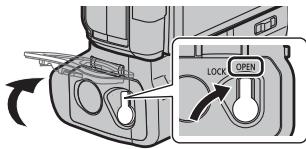
2 Insert the battery in the correct direction until it clicks into place, then make sure the lever ① locks the battery.
- To remove the battery
Slide the lever ① in the direction indicated by the arrow and remove the battery.
3. Open the battery door. Turn the lock lever in the direction of [LOCK].
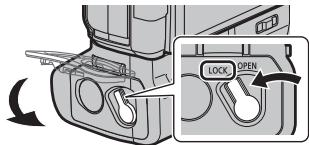

Note
- After using the battery, if you leave it unused for a long time, it will discharge. The battery heats up during use, and the battery grip also heats up during use, but this is not a sign of malfunction.
- Make sure there are no foreign particles on the battery door.
Using 2 batteries
You can use the digital camera for an extended period by inserting batteries into both the digital camera and the battery grip. (When one battery is depleted, switch to the other battery.)
The battery that is intended to be used first can be installed in the digital camera. For detailed information, refer to the instructions for the digital camera.

Note
- Do not remove the battery while using the battery grip. (The power to the digital camera will be turned off.)
Using the AC adapter (sold separately) and the DC coupler (sold separately) instead of the battery
- When using the AC adapter, make sure to use the Panasonic DC coupler (DMW-DCC8: sold separately) and the Panasonic AC adapter (DMW-AC10E: sold separately).
- Always use the specified Panasonic AC adapter (DMW-AC10E: sold separately). Always use the specified Panasonic DC coupler (DMW-DCC8: sold separately).
You can use the digital camera without worrying about battery drain by connecting the AC adapter to a wall outlet. To use the AC adapter, the DC coupler is required.

Note
- When installing the DC coupler, the cover of the DC coupler compartment opens, so the structure is no longer dustproof and splashproof. Be careful not to allow sand, dust, water, etc. to enter the inside of the structure. After use, make sure there are no foreign particles on the cover of the DC coupler compartment, and close the cover securely.
- Battery charger DC coupler for constant current.
Safety information
Power source: Constant current 8.4 V (=8.4V)
Manufacturer: Panasonic Corporation, Japan
Charge the battery before using the camera.
Charge the battery using the charger supplied with the digital camera.
Charging time
Charging time varies depending on the battery block conditions at the time of purchase.

DMW-BLC12E (DMW-BGG1E)

DVKV1001Z
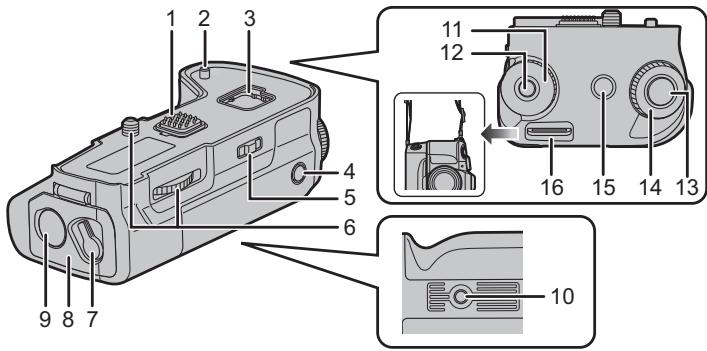
1 Electrical contacts 2 Tripod mount 3 Battery cover 4 [AF/AE LOCK] button 5 Switch 6 Lock lever 7 Release lever 8 Battery eject lever 9 DC coupler cover
10 Cover for terminals 11 Rear dial 12 Function button (Fn11) 13 Shutter button 14 Front dial 15 [ ] button (Exposure compensation)/[Fn] button (Fn1) 16 Mode dial
- We recommend using the battery block and AC adapter supplied with the digital camera to avoid malfunctions. (See the instructions for the AC adapter in the digital camera's operating instructions.)
* The same functions as [Fn1] or [Fn11] of the digital camera.
Attaching and removing the digital camera
Be sure to turn off the digital camera before inserting or removing the battery pack. (If you insert or remove the battery pack without turning off the camera, it may cause a malfunction, so this is not recommended.)
1. Remove the cover of the battery pack from the digital camera. 2. Remove the lock lever from the electrical contacts of the battery pack. The cover of the battery pack can be stored in the place for the battery pack cover. After using the camera, be sure to replace the lock lever and cover in their places to protect the contacts. Be careful not to lose the lock lever.
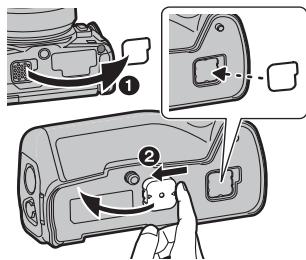
2. Remove the locking screw, electrical contacts, and the plate for securing the camera.
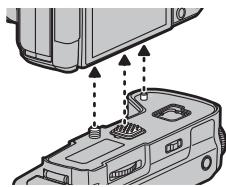
3. To disconnect, turn the locking screw in the direction indicated by the arrow.
- It is recommended to keep the locking screw tightened during use.
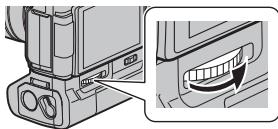

Note
Store the lock lever in a safe place to avoid losing it. ■Remove the battery pack from the digital camera - Make sure the camera is turned off, then turn the locking screw in the direction of the arrow to remove it.
- Always use genuine Panasonic batteries (DMW-BLC12E).
-If you use a battery that has not been charged by the specified charger, it may cause a malfunction.
Use the battery pack after charging it with the specified charger. -The battery pack can be used when the battery is inserted into the digital camera or the battery pack. -Check that the digital camera is turned off.
1. Move the battery pack lock lever in the direction of [OPEN] and open the battery door.
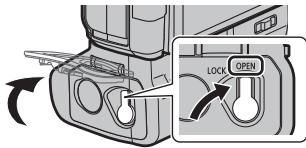
2. Insert the battery pack in the correct orientation, and make sure that the latch ① is engaged with the battery.
To remove the battery pack, press the latch ① in the direction of the arrow and pull out the battery pack.
3. Close the battery door and move the lock lever to the [LOCK] position.

Note
After using the battery, charge it fully before storing it. If it is stored uncharged, it may be damaged. After use, charge it and then immediately after charging, the battery will be warm. Batteries may be warm during use, which is not a sign of malfunction. It is recommended that there are no foreign substances on the battery terminals.
Using the batteries
The digital camera can be used fully once you insert the batteries into both the camera and the battery block. (After insertion, the camera will be ready for use).
The batteries that should be used with the camera are inserted into the digital camera. For details, see the instructions for the digital camera.

Note
- Do not remove the batteries from the battery block while they are in use. (This will turn off the digital camera).
Using the AC adapter (sold separately) and the DC coupler (sold separately) to charge the battery
When using the AC adapter, be sure to use the DC coupler (Panasonic DMW-DCC8: sold separately) and the AC adapter (Panasonic DMW-AC10E: sold separately). Use only genuine Panasonic AC adapters (DMW-AC10E: sold separately). Use only genuine Panasonic DC couplers (DMW-DCC8: sold separately).
Before charging the battery, you can connect the AC adapter to the digital camera by turning off the power. To use the AC adapter, the DC coupler is required.

Note
When the DC coupler is inserted, the corresponding cover is opened, so the entire structure becomes vulnerable to dust and splashes. Be careful not to let sand or water get inside. After using, close the DC coupler cover, after first checking that no foreign matter is attached to it. Also read the instructions for the AC adapter and DC coupler.
Using the battery block
Do not allow dust, insects, or other volatile substances to get inside.
If such substances or liquids get inside, they may damage the exterior or cause malfunction. Do not allow the device to come into prolonged contact with rubber or vinyl objects. Do not store the device in any of the following places, as this may cause problems in operation and malfunction:
Under direct sunlight or near heaters - In places with high temperature and humidity, or where temperature or humidity changes drastically - Where there are open flames - Near heaters, air conditioners, and humidifiers - In a vehicle
- Before using this product, please read these instructions carefully and save this manual for future use. - Before use, check that the product is working properly. This unit is an electrical contact, electrical connection with a digital camera. When removing the camera, close the contact with the cap, store the entire kit, and do not allow metal objects (e.g., clips) to touch them.
Cleaning
Kadoma, Osaka, Japan
Importer for Europe:
Panasonic Marketing Europe GmbH
Panasonic Testing Centre
Winsberging 15, 22525 Hamburg, Germany
:(DMW-BGG1)
(8.4---) DC 8.4
:(Panasonic DMW-BLC12E) (a)
1200/127.2
[60%RH all 40%RH j:1525 15n


.(DMW-BLC12E)Aipianosic
1
A. [OPEN]
2
A
2
A

a 1
aai
y 2016

DMW-BLC12E (DMW-BGG1E)
auiiia
a5d j. Ajbal lra jia o Jy Cldill oia (g)
(4)
aallll lallll allll lallll lallll
A

DVKV1001Z
J 1
aaiy aay ylll lal yllnss slls
.1 jiu
4
- OPERATING INSTRUCTIONS
- OPERATING INSTRUCTIONS BATTERY GRIP
- CONTENTS
- INFORMATION FOR YOUR SAFETY
- CAUTION
- ABOUT THE BATTERY PACK
- WARNING
- DISPOSAL OF OLD EQUIPMENT AND BATTERIES ONLY FOR EUROPEAN UNION AND COUNTRIES WITH RECYCLING SYSTEMS
- NOTE FOR THE BATTERY SYMBOL (BOTTOM SYMBOL)
- FOR THE U.S.A. AND CANADA ONLY
- HANDLING THE UNIT
- SUPPLIED ACCESSORIES
- BATTERY PACK
- MOUNTING ON AND REMOVING FROM THE DIGITAL CAMERA
- NOTE
- FOR THE U.S.A. AND CANADA
- FOR OTHER COUNTRIES
- USING 2 BATTERIES
- USING THE AC ADAPTOR (OPTIONAL) AND THE DC COUPLER (OPTIONAL) INSTEAD OF THE BATTERY
- FOR THE U.S.A., CANADA AND LATIN AMERICA
- FOR EUROPE AND CIS
- FOR KOREA
- TURN THE POWER SWITCH OF THE DIGITAL CAMERA TO [ON]
- TURN THE OPERATION ON/OFF SWITCH ON THE BATTERY GRIP TO [ON]
- CAUTIONS FOR USE
- ABOUT THE UNIT
- KEEP THE UNIT AWAY FROM INSECTICIDE SPRAYS AND OTHER VOLATILE SUBSTANCES
- CLEANING
- BATTERY GRIP (DMW-BGG1)
- FOR THE U.S.A
- FOR CANADA
- PANASONIC PRODUCTS LIMITED WARRANTY
- LIMITED WARRANTY COVERAGE (FOR USA ONLY)
- MAIL-IN SERVICE--ONLINE REPAIR REQUEST
- ONLINE REPAIR REQUEST
- LIMITED WARRANTY LIMITS AND EXCLUSIONS
- THERE ARE NO EXPRESS WARRANTIES EXCEPT AS LISTED UNDER "LIMITED WARRANTY COVERAGE
- PARTS AND SERVICE, WHICH ARE NOT COVERED BY THIS LIMITED WARRANTY, ARE YOUR RESPONSIBILITY
- SHOP
- ACCESSORIES
- CUSTOMER SERVICES DIRECTORY
- PANASONIC CANADA INC
- PANASONIC PRODUCT - LIMITED WARRANTY
- LIMITATIONS AND EXCLUSIONS
- WARRANTY SERVICE
- USER'S MANUAL POWER SUPPLY
- PRECAUTIONS
- USING THE AC ADAPTER (SOLD SEPARATELY) AND THE DC COUPLER (SOLD SEPARATELY) INSTEAD OF THE BATTERY
- ATTACHING AND REMOVING THE DIGITAL CAMERA
- USING THE BATTERIES
- USING THE AC ADAPTER (SOLD SEPARATELY) AND THE DC COUPLER (SOLD SEPARATELY) TO CHARGE THE BATTERY
- USING THE BATTERY BLOCK
Brand : PANASONIC
Model : DMW-BGG1PP
Category : Battery Handle