KEW2056R - Multimeter Kyoritsu - Free user manual and instructions
Find the device manual for free KEW2056R Kyoritsu in PDF.


| Product Type | Digital Clamp Multimeter |
| Brand | Kyoritsu |
| Model | KEW2056R |
| Dimensions (approx.) | 250 × 70 × 40 mm |
| Weight (approx.) | 300 g |
| Power Supply | 2 × AA batteries (1.5V) |
| AC Voltage Range | 0 to 600 V |
| DC Voltage Range | 0 to 600 V |
| AC Current (Clamp) | 0 to 600 A |
| Resistance Range | 0 to 60 MΩ |
| Capacitance Range | 0 to 60 mF |
| Frequency Range | 0 to 600 kHz |
| Diode Test & Continuity | Yes |
| Jaw Opening | 40 mm |
| Safety Rating | CAT III 600V, CAT IV 300V |
| Display | Digital LCD with backlight |
| Data Hold & Backlight | Yes |
| Auto Power Off | Yes (programmable) |
| Maintenance | Clean with dry cloth; no solvents |
| Spare Parts / Repairability | Replace battery; service by qualified personnel |
| General Information | CE marked, RoHS compliant |
Frequently Asked Questions - KEW2056R Kyoritsu
User questions about KEW2056R Kyoritsu
0 question about this device. Answer the ones you know or ask your own.
Ask a new question about this device
Download the instructions for your Multimeter in PDF format for free! Find your manual KEW2056R - Kyoritsu and take your electronic device back in hand. On this page are published all the documents necessary for the use of your device. KEW2056R by Kyoritsu.
USER MANUAL KEW2056R Kyoritsu
Protective fingerguard (Barrier)
It is a part providing protection against electrical shock and ensuring the minimum required air and creepage distances.
Cap
Uncapped condition for CAT II environment
Capped condition for CAT III/ IV environments. The Cap should be firmly attached to the probe

3-1. Measuring range & accuracy
(accuracy guaranteed at 23°C ±5°C, humidity 45–85%) AC Current 600A, 1000A Function
| Function | Measuring Range | Accuracy |
| KEW2045R KEW2055R | ||
| 600A | 0-600.0A Freak 1500A C=2-38500A C=3-30800A | ±2.0%rdg=5dgt(50/60Hz) ±3.5%rdg=5dgt(40~500Hz) +5.5%rdg=5dgt(500~1MHz * Add 2% at CF>2 |
| 1000A | 0-1000A Freak 1500A C=7-58900A C=3-30800A |
DC Current 600A, 1000A Function
| Function | Measuring Range | Accuracy | |
| KEW2046R | KEW2056R | ||
| 600A | 0-600.0A | ±1.5%rdg=5dgt | ±1.5%rdg=5dgt |
| 1000A | 0-1000A | ||
AC Voltage Function
(Auto-ranging, Input impedance: approx. 10MΩ)
| Range | Measuring Range | Accuracy | |
| KEW2046R | KEW2056R | ||
| 5/60/600V | 0-600.0V | ±1.5%rdg±4dgt(50/60Hz)±3.5%rdg±5dgt(40-400Hz) | |
DC Voltage Function
(Auto-ranging, Input impedance: approx. 10MΩ)
| Range | Measuring Range | Accuracy | |
| KEW2046R | KEW2056R | ||
| 500mV/6/60/600V | 0-500.0V | ± 1.0%rdg ± 3dgt | |
Resistance (Diode Check/ Continuity/ Capacity)
| Range | Measuring Range | Accuracy | |
| KDW2046R | KDW2056R | ||
| 60Ω/Hz/50V 60Ω/60Ω | 0-6.000MΩ | +1.0%rdg+5dgt | |
| 60MΩ | 600A-60.30MΩ | +5%rdg+8dgt | |
| Cont Buzzer | 0-600.0Ω | Buzzer sounds at 100Ω or less | |
| Diode | Test voltage: 0-2V | ||
Capacity Function
| Range | Measuring Range | Accuracy | |
| KEW204GR | KEW2056R | ||
| 40nF | 0.01nF 4000 μFAuto-ranging | the accuracy is not guaranteed | |
| 400nF | =2.5%rdg=10dgt | ||
| 4μF | |||
| 40μF | |||
| 400μF | the accuracy is not guaranteed | ||
| 4000μF | the accuracy is not guaranteed | ||
1. Features
● Designed to meet international safety standards.
IEC61010-1,IEC61010-031 & IEC61010-2-032
Measurement Category (CAT) IV 600V
Pollution Degree 2
● Double molded main body provides comfortable
single handed grip
● Data Hold Function
● LCD Backlight function to facilitate working at dimly
lit situations
● REL function to indicate measurement variation
(Current, voltage, Resistance measurement)
● MIN/MAX function enables easy reading of min &
max value during measurement.
● PEAK Hold Function enables Peak value measure-
ment of starting current. (only at ACA Range)
● With Continuity & Diode Check Function
● Capacity measurement of capacitors
● Temperature measurement, switchable between ℃
and F
● NCV (Non Contact Voltage) Function for wiring check
● 600V input protection
● Sleep Function to extend battery life
● With Bar Graph, 6039 count display
2. Safety Warnings
This instrument has been designed, manufactured and tested according to IEC 61010: Safety requirements for Electronic Measuring apparatus, and delivered in the best condition after passed the inspection.
This instruction manual contains warnings and safety rules which must be observed by the user to ensure safe operation of the instrument and retain it in safe condition.
Therefore, read through these operating instructions before using the instrument.
WARNING
- Read through and understand the instructions contained in this manual before using the instrument.
- Keep the manual at hand to enable quick reference
whenever necessary.
● The instrument is to be used only in its intended applications.
● Understand and follow all the safety instructions
● understand and follow all the safety instructions contained in the manual.
● It is essential that the above instructions are adhered to.
Failure to follow the instructions may cause injury, instrument damage and/or damage to equipment under test. Kyoritsu is by no means liable for any damage resulting from the instrument in contradiction to this cautionary note.
The symbol indicated on the instrument means that the user must refer to the related parts in the manual for safe operation of the instrument. It is essential to read the instructions wherever the symbol appears in the manual.
△ DANGER is reserved for conditions and actions that are likely to cause serious or fatal injury.
⚠ WARNING is reserved for conditions and actions that can cause serious or fatal injury.
△ CAUTION is reserved for conditions and actions that can cause injury or instrument damage.
Frequency/DUTY Function(Auto-ranging for Frequency)
| Range | Measuring Range | Accuracy | |
| KEW2046R | KEW2056R | ||
| ACA | 40Hz-400Hz | ±0.5%rdg±5dgt | |
| ACV | 1Hz~10kHz | ||
| 0.1-99.9%(Pulse width/Pulse period) | ±2.5%rdg±5dgt | ||
Note: Measurable inputs are: 40Vrms@ACV or
50Arms@AC600A.350A@AC1000A Range
Temperature Function
| Range | Measuring Range | Accuracy | |
| KDW2046R | KDW2056R | ||
| °C | 50°C - 0°C | ±5°C±5dgt | |
| 0°C - 150°C | ±3°C±2dgt | ||
| 150°C - 700°C | ±2%rdg±2dgt | ||
| °F | 58°F - 32°F | ±9°F±5dgt | |
| 32°F - 30°F | ±5°F±2dgt | ||
| 50°F~1232°F | ±2%rdg±2dgt | ||
Above specified accuracy is applied to Clamp meter itself. Accuracy of Temperature probe is excluded.
When measuring temperature, include the accuracy of the temperature probe used.
3-2. General Specification
● Mode of operation : mode
● Display : max. 6039 counts
(Frequency: 9999, Capacity & Temperature:4039)
& Bar graph
● Over-range indication : "OL" displayed when exceeding the measuring range.
(except for AC/DCV and 1000A Function)
- Range switching
Auto-ranging/Voltage, Resistance, Capacity Range Single range / Continuity, Diode check, DUTY and Temperature
● Sample rate : three times per second
● Functional construction
OFF/ACA/ACV/DCA/DCV/Ω/℃/°F
- Keys
SELECT(AC/DC switching &/Ω/→/·0/→),
PEAK HOLD/ Back Light, REL△,Hz/DUTY, MIN/MAX
● Power source : DC3V/ R03(UM-4) x 2pcs
● Low battery warning : "BATT" mark is displayed at 2.4V±0.15V or less.
● Temperature & humidity : 23°C +5°C, relative humidity accuracy guaranteed 85% or less (no condensation)
● Operating temperature : 0\~40°C, relative humidity 85% & humidity range or less (no condensation)
● Storage temperature : -20\~60°C , relative humidity & humidity range 85% or less (no condensation)
● Current consumption : approx. 25 mA
- Sleep Function: Automatically powered off in about 15 min after the last Function switch operation. Rotate the Function Switch from OFF to any position to exit from the Sleep state.
● Marks listed in the table below are used on this instrument.
| ⚠️ | User must refer to the manual. |
| ☐ | Instrument with double or reinforced insulation |
| Incicates that this instrument can clamp on bare conductors when measuring a voltage corresponding to the applicable measurement category, which is marked next to this symbol. | |
| ~ | AC |
| == | DC |
| ≈ | AC & DC |
| This instrument satisfies the marking requirement defined in the WEEE Directive. This symbol indicates separate collection for electrical and electronic equipment. |
DANGER
● Never make measurement on a circuit in which voltage over AC600V exists.
- Do not attempt to make measurement in the presence of flammable gasses. Otherwise, the use of the instrument may cause sparking, which can lead to an explosion.
●Transformer jaw tips are designed not to short the circuit under test. If equipment under test has exposed conductive parts, however, extra precaution should be taken to minimize the possibility of shorting.
● Never attempt to use the instrument if its surface or your hand is wet.
- Do not exceed the maximum allowable input of any measuring range.
●Never open the Battery cover during a measurement.
The instrument is to be used only in its intended applications or conditions. Otherwise, safety functions equipped with the instrument doesn't work, and instrument damage or serious personal injury may be caused.
- Verify proper operation on a known source before use or taking action as a result indication of the instrument.
- Keep your fingers and hands behind the protective fingerguard during measurement.
WARNING
● Never attempt to make measurement if any abnormal conditions, such as broken case and exposed metal parts are found on the instrument.
- Do not rotate the Function Switch while the test leads are being connected.
- Do not install substitute parts or make any modification to the instrument. For repair or recalibration, return the instrument to your local distributor from where it was purchased.
- Location for use
Outdoor use, Altitude up to 2000m
● Applicable Standards
IEC 61010-1, 61010-2-032, 61010-2-033
Measurement CAT IV 600V Pollution degree 2
EC 61010031
EMC : EN 61326-1
· EN 55022
• EN 61000-4-2 (performance criterion B)
• EN 61000-4-3 (performance criterion B)
RoHS : EN 50581
● Overload Protection
Current Range : 720A AC/10 sec@KEW2046R
1200A AC/DC/10 sec@KEW2056R
Voltage Range : 720V AC/DC/10sec
600V AC/DC/10sec
●Withstand Voltage
6720V AC (TRMS 50/60Hz) / 5 sec
(between Jaws and electrical circuit/ between internal circuit and enclosure)
● Insulation Resistance: 10MΩ or more/1000V
(between electrical circuit and enclosure)
● Conductor size
KEW2046R: approx. 33mm
KEW2056R: approx. 40mm
- Dimension
approx. 254(L)×82(W)×36(D)mm / KEW2056R
approx. 243(L)×77(W)×36(D)mm / KFW2046R
●Weight: approx 300g @ KFW2046R
310g @ KFW2056R
●Accessories
Test Leads
Battery
M-7066A / 1 set
R03 (UM-4) / 2pcs
Instruction manual
English, Japanese / 1pce
M-9094/1pcs
● Optional Accessories
K-type Temperature Probe M-8216
Accuracy +1.5%rde+1.5°C
Guaranteed accuracy range:
20°C (68°F)-300°C (572°F)
● Effective Value (RMS)
Most alternating currents and voltages are expressed in effective values, which are also referred to as RMS (Root-Mean-Square) values. The effective value is the square root of the average of square of alternating current or voltage values. Many clamp meters using a conventional rectifying circuit have 'RMS' scales for AC measurement. The scales are, however, actually calibrated in terms of the effective value of a sine wave though the clamp meter is responding to the average value. The calibration is done with a conversion factor of 1.111 for sine wave, which is found by dividing the effective value by the average value. These instruments are therefore in error if the input voltage or current has some other shape than sine wave.
- Do not try to replace the batteries if the surface of the instrument is wet.
- Disconnect all the cords and cables from the object under test and power off the instrument before opening the Battery Cover for Battery replacement.
- Stop using the test lead if the outer jacket is damaged and the inner metal or color jacket is exposed.
CAUTION
- Set the Function Switch to an appropriate position before starting measurement.
● Firmly insert the test leads. - Disconnect the test leads from the instrument for current measurement.
- Do not expose the instrument to the direct sun, high temperature and humidity or dewfall.
- Altitude 2000m or less. Appropriate operating temperature is within 0°C and 40°C.
● This instrument isn't dust & water proofed. Keep away from dust and water. - Be sure to power off the instrument after use. When the instrument will not be in use for a long period, place it in storage after removing the batteries.
- Use a cloth dipped in water or neutral detergent for cleaning the instrument. Do not use abrasives or solvents.
Measurement Category
To ensure safe operation of measuring instruments, IEC 61010 establishes safety standards for various electrical environments, categorized as O to CAT IV, and called measurement categories. Higher-numbered categories correspond to electrical environments with greater momentary energy, so a measuring instrument designed for CAT III environments can endure greater momentary energy than one designed for CAT II.
O : Circuits which are not directly connected to the mains power supply.
CAT II : Electrical circuits of equipment connected to an AC electrical outlet by a power cord.
CAT III : Primary electrical circuits of the equipment connected directly to the distribution panel, and feeders from the distribution panel to outlets.
CAT IV : The circuit from the service drop to the service entrance, and to the power meter and primary over-current protection device (distribution panel).
● CF (Crest Factor) is found by dividing the peak value by the effective value.
Examples: Sine wave: CF=1.414
Square wave with a 1:9 duty ratio: CF=3
| Waveform | Effective value Vmg | Average value Vmg | Conversion factor under Vmg | Receiving values for average ranging minimum | Cave factor CF |
| A | 12 | 22 | 32 | 0% | 34.476 |
| 0.0797 | 0.0457 | 0.1177 | |||
| A | A | A | 1 | 4+1.11644 × 100 | 1 |
| 0.115 | |||||
| A | 12 A | 0.0A | 22 | 100+0.0842 × 100 | 3 |
| 0.158 | -0.05 | 1.732 | |||
| A | A/D | A 12 A + D | 3A3 = 12 | (1.1143 - 0) × 100 | A |
| 100% | 1A3 = 12 |
3-3. Function Keys
The '●' mark shows available function at each Range.
| HOLD | PEAK | SELECT | ZERO | Hz/DUTY | MAX/MIN | |
| ACA | ● | ● | ● | ● | ● | ● |
| ACV | ● | - | - | ● | ● | ● |
| DCA | ● | - | ● | ● | - | ● |
| DCV | ● | - | - | ● | - | ● |
| ● | - | ● | ● | - | ● | |
| - | - | ● | - | - | - | |
| - | - | ● | - | - | - | |
| ● | - | ● | ● | - | - | |
| TEMP | ● | - | ● | ● | - | ● |
4. Preparation for measurement
4-1. Checking Battery Voltage
Set the Function Switch to any position other than 'OFF'. When the display is clear without 'BATT' mark, showing battery voltage is enough. When the display is blank or 'BATT' mark is indicated, replace the batteries according to Section 7, Battery Replacement.
CAUTION
The Sleep feature automatically powers the instrument off in about 15 min after the last switch or key operation. Therefore, the display may be blank even with the Function Switch set to a position other than 'OFF'. To operate the instrument in this case, turn the switch back to the 'OFF' position, then to any other position. Replace the batteries if nothing was displayed after above operations.
4-2. Checking Switch Setting & Operation
Confirm the Function Switch is set to the correct position, the instrument is set to the correct measurement mode, and the Data hold function is disabled. Otherwise, desired measurement cannot be made.
5. Measurement
5-1. AC Current Measurement
DANGER
● Never make measurement on a circuit in which voltage over AC600V exists to avoid getting electrical shock.
●Transformer jaw tips are designed not to short the circuit under test. If equipment under test has exposed conductive parts, however, extra precaution should be taken to minimize the possibility of shorting.
● Do not make measurement with the Battery Cover removed.
● Disconnect the test leads from the instrument for current measurement.
- Keep your fingers and hands behind the barrier during measurement.
(1) Set the Function Switch to "600A" or "1000A" position
(on KEW2046R, only "600A" is available) AC has been selected by default; press the SELECT key, when DC has been selected, to change it to AC. AC mark is displayed at the upper left on the display.
(2) Press the trigger to open the transformer jaws and clamp them onto the one conductor under test, then take the reading on the display. Pressing the 'Hz/DUTY' Key switches the indication in following sequence.

Hz/DUTY Function requires 50A or more at AC600A Range and 350A or more at AC1000A range.
CAUTION
● Max conductor size for KEW2046R is approx dia. 33mm and for KEW2056R is approx dia. 40mm. During current measurement, keep the transformer jaws fully closed. Other wise, accurate measurements cannot be taken.
- Keep your fingers and hands behind the barrier during measurement.
5-2. DC Current Measurement
△ DANGER
● Never make measurement on a circuit in which voltage over DC600V exists to avoid getting electrical shock.
● Do not make measurement with the Battery Cover removed.
- Keep your fingers and hands behind the barrier during measurement.
1) Set the Function Switch to '600A' or '1000A' position. AC has been selected by default; press the SELECT key, when AC has been selected, to change it to DC. (only 600A is available on KEW2046R) DC mark is displayed at the upper left on the display.
(2) With the transformer jaws closed and without clamping them onto the conductor, press the ZERO* key to zero adjust the display. (△ mark is displayed at the upper right on the display.)
(3)Press the trigger to open the transformer jaws and clamp them onto the one conductor under test, the conductor should be at the center of the jaws, then take the reading on the display.
(4) Set the Function Switch to an appropriate position according to current under test.
(5) Pressing the 'ZERO' key again releases 'ZERO' function. (△mark at the upper right on the display disappears.)
CAUTION
- When the current flows from the upside (the display side) to the underside of the instrument, the polarity of the reading is positive and vice versa.
5-3. AC Voltage Measurement
DANGER
● Never make measurement on a circuit in which voltage over AC600V exists to avoid getting electrical shock.
- Do not make measurement with the Battery Cover removed.
- Keep your fingers behind the protective fingerguard on the instrument during measurement.
(1) Set the Function Switch to 'ACV' position.
(2) Connect the red test lead to V/Ω terminal and the black test lead to COM terminal.
(3) Connect the test leads to the circuit under test. Take the reading on the display. Pressing the 'Hz/DUTY' key while reading is indicated on the display switches the indication in following sequence.

CAUTION
● Hz/DUTY Function requires AC40V or higher.
● To measure a frequency, measure the voltage or the electrical circuit in advance. Then press the Hz/DUTY key to enter into frequency measurement.
● Readings of frequency may fluctuate or be influenced under noisy environment.
- Keep your fingers and hands behind the barrier during measurement.
5-4. DC Voltage Measurement
DANGER
● Never make measurement on a circuit in which voltage over DC600V exists to avoid getting electrical shock.
- Do not make measurement with the Battery Cover removed.
- Keep your fingers behind the protective fingerguard on the instrument during measurement.
(1) Set the Function Switch to 'DCV' position.
(2) Connect the red test lead to V/Ω terminal and the black test lead to COM terminal.
(3)Connect the red and black test leads to the positive (+) and negative (-) sides of the circuit under test respectively. Take the reading on the display. If the connection is reversed, the display indicates the * mark.
5-5. Resistance/ Diode/ Cont/ Capacity Measurement
DANGER
- Never use the instrument on an energized circuit.
- Do not make measurement with the Battery Cover removed.
- Keep your fingers and hands behind the protective fingerguard during measurement.
Resistance
(1) Set the Function Switch to /Diode/Cont/Capacity position
(2) Connect the red test lead to V/ Ω terminal and the black test lead to COM terminal. Confirm 'OL' is indicated on the display, and then short-circuit the tips of test leads to make the indication zero.
(3) Connect the test leads to the both ends of the resistor under test.
(4) Take the reading on the display.
CAUTION
● Even if short the test lead tips, indicated value may not be zero. But this is because of the resistance of test leads and not a failure.
- When test leads are open, 'OL' is indicated on the display.
- Keep your fingers and hands behind the barrier during measurement.
Continuity
(1) Set the Function Switch to 'Ω/Diode/Cont/Capacity position. 'Ω' has been selected by default; press the SELECT key to change it to 'Continuity'
Resistance Diode Cont Capacity

(2) Connect the red test lead to V/ Ω terminal and the black test lead to COM terminal. Confirm 'OL' is indicated on the display and short circuit the tips of test leads. Indication should become zero and buzzer sounds.
(3) Connect the test leads to the both ends of the conductor under test. The buzzer sounds, if the resistance under test is 100 Ω or less.
Diode
(1) Set the Function Switch to 'Ω/Diode/Cont/Capacity position. "Ω" has been selected by default; press the SELECT key to change it to 'Diode'.
Resistance Diode Cont Capacity

(2) Connect the red test lead to V/Ω terminal and the black test lead to COM terminal.
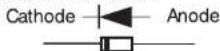
(3) Connect the red and black test leads to the Anode and Cathode of the diode under test respectively. Take the reading on the display. If the connection is reversed, the display indicates 'OL'.
CAUTION
- Some of diodes cannot be tested. Indication on the display will be 'OL'.
(Zener diode, LED and so on) - Keep your fingers and hands behind the barrier during measurement.
Capacity
(1) Set the Function Switch to 'Ω/Diode/Cont/Capacity' position. 'Ω' has been selected by default; press the SELECT key to change it to 'Capacity'
Resistance → Diode → Cont → Capacity

(2) Connect the red test lead to V/Ω terminal and the black test lead to COM terminal.
(3)Connect the test leads to the both ends of the capacitor under test.
(4) Take the reading on the display.
5-6 Temperature Measurement
(1) Set the Function Switch to "C/F" position.
(2) Connect the K-type Temperature Probe (Optional Accessories) to the input terminal. Positive (+) side of Probe should be connected to V/Ω.
(3) Contact the Sensor (metal part) of K-type Temperature Probe to the object under test. Take the reading on the display. Positive (+) side of Probe should be connected to V/Ω.
WARNING
● Never connect the Temperature Probe to an energized circuit.
CAUTION
- Room temperature is indicated on the LCD when setting the Function Switch to "C /F" position. In case that "OL" or anything other than room temperature is indicated, something may wrong with the instrument. Stop the use of instrument immediately.
- There may be a break in Probe when indication isn't changed if Sensor (metal part) of K-type Temperature Probe is contacted with the object under test.
● The measuring range of M-8216 temperature probe. / meter is from -50 °C (58°F) to 300 (572°F); however, accuracy guaranteed range is 20°C (68°F) to 300°C (572°F).
6. Other functions
6-1. Sleep Function
(1) This is a function to prevent the instrument from being left powered on in order to conserve battery life. This function causes the instrument to enter Sleep mode about 15 minutes after the last key operation. To exit the Sleep mode, turn the Function switch to "OFF", then to any other position.
(2) Sleep Function is disabled when;
MIN/MAX or PEAK Function is selected. Continuous measurement is made with the Sleep Function being disabled. To activate Sleep Function again, disable the MIN/MAX or PEAK Function.
CAUTION
● The instrument consumes small amount of battery power in the Sleep mode. Set the Function Switch to the OFF position after use.
6-2. HOLD Key
(1) Data Hold Function
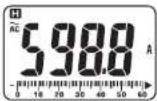
This is a function to freeze the measured value on the display. Press the "HOLD" key to freeze the reading.
The reading will be held regardless of subsequent variation in input. 'H' is indicated on the upper left corner of the display while the instrument is in the Data Hold mode. To exit Data Hold mode, press the 'HOLD' key again.
CAUTION
● Held readings are released when Sleep Function is activated while the instrument is in the Data Hold mode.
(2) Backlight ON/OFF
Pressing the HOLD key 2 sec or more lights up the Backlight. Pressing the HOLD key 2 sec or more again turns off the Backlight.
6-3. NCV Function
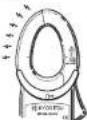
Red LED on the upper area on the Panel lights up at All functions except for OFF when electric field exceeding 100V is detected by the sensor installed in the Jaws.
It indicates a presence of voltage in an electrical circuit or equipment without touching them.
NCV Sensor can detect electrical field only from the direction indicated in the right figure. Put the fixed element (left side) closer to the conductor under test. Detection against in-wall outlet is impossible.
DANGER
●The LED may not light up due to installation condition of electrical circuit or equipment. Never touch the circuit under test to avoid possible danger even if the LED for NCV doesn't light up.
- Check the functionality of LED on a well-known power supply prior to measurement. When the LED doesn't light up, do not make measurement.
● NCV indication is affected by external voltage, how to hold or place the instrument.
- Keep your fingers and hands behind the barrier during measurement.
6-4. MIN/MAX Function
CAUTION
● Held readings are released when Sleep Function is activated while the instrument is in the Data Hold mode.
- SELECT, ZERO, Hz/DUTY keys are disabled while MIN/MAX Function is being activated.
(1)AC/DC Current Range (600A only on KEW2046R) Pressing the MIN/MAX Key at 600A & 1000A Function enables min or max value measurement. Press the MIN/MAX Key to select MAX or MIN. The max or min value within measuring range is being held until this function is disabled. MIN or MAX is indicated on the display while this function is being activated. To disable this function, press down the MIN/MAX Key at least 2 sec or change functions.
(2) AC/DC Voltage Range
CAUTION
Pressing the MIN/MAX Key without applying voltage disables the Auto-ranging function and fixes the Range to 6V. Connect the test leads to the circuit under test and press the MIN/MAX Key after an appropriate range is selected by Auto-ranging function. Pressing the MIN/MAX Key enables min or max value measurement. Press the MIN/MAX Key to select MAX or MIN. The max or min value within measuring range is being held until this function is disabled. 'MIN' or 'MAX' is indicated on the display while this function is being activated. To disable this function, press down the MIN/MAX Key at least 2 sec or change functions.
6-5. ZERO Function
CAUTION
MIN/MAX, PEAK keys are disabled while ZERO Function is being activated.
Zero Adjustment Function at Current Range ^* mark is to be indicated at the upper right on the display while ZERO function is being operated.
Indication of relative value at current, voltage, resistance:
Pressing the ZERO Key indicates REL (relative value) Press the ZERO Key to save the initial value at the start of measurement as a reference value. Then the difference between the later measured values and the reference value is indicated on the display. The Auto-ranging function is disabled, while this function is being activated, and the Range is fixed to the Range selected at the start of measurement. Relative value is indicated within following ranges.
(Measuring range) =
(Full-scale value at the fixed Range) - (Initial value)
To disable this function, press down the MIN/MAX Key at least 2 sec or change functions.
6-6. PEAK Function (600A only on KEW2046R)
(1) Set the Function Switch to 'AC Current' position and clamp onto a conductor under test.
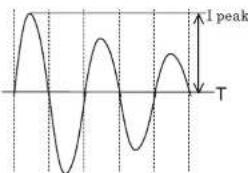
(2) Pressing the PEAK Key indicates "P MAX" on the display and initiates measurement.
(3) Readings indicates the PEAK of current crest value. When measuring sine wave, reading is about 2 times of RMS value.
line
| Time | Value | |------|-------| | Peak | 1 peak |(4) Press the PEAK Key at least 2 sec to reset the indication or release PEAK Function. Buzzer sounds twice, and the Function is released.
CAUTION
- PEAK indication for Crest value is up to 1500A. Error indication is given when exceeding this range value.
- Sleep Function is disabled when PEAK Function is selected. Care should be taken when performing continuous measurement.
6-7. Over-flow indication
When the input exceeds the measuring range at each Function other than Voltage, 1000A and Temperature Range 'OL' or '-OL' is indicated on the display.
7. Battery Replacement
WARNING
- To avoid electrical hazard, set the Function Switch to 'OFF' and remove the test leads from the instrument before trying to replace batteries.
CAUTION
● Do not mix old and new batteries.
● Install batteries in correct polarity as indicated in the Battery Compartment.
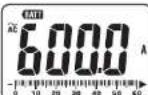
Replace the batteries when a Low Battery Voltage warning 'BATT' mark is indicated on the display. Note that when the battery is completely exhausted, the display blanks without 'BATT' mark shown.
(1) Set the Function Switch to "OFF" position.
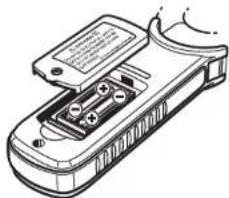
(2) Unscrew and remove the Battery Compartment Cover on the bottom of the instrument.
(3) Replace the batteries observing correct polarity. Use new R03 (AAA) or LRO3 / 1.5V batteries.
(4) Install the Battery Compartment and tighten the screws.
8. Maintenance
- Cleaning
Use a cloth dipped in water or neutral detergent for cleaning the instrument.
Do not use abrasives or solvents. Otherwise, instrument get damaged, deformed or discolored.
natural_image
Line drawing of a handheld electronic device with internal components (no text or symbols)DISTRIBUTOR
Kyoritsu reserves the rights to change specifications or designs described in this manual without notice and without obligations.
