95-6556 - Car stereo Metra - Free user manual and instructions
Find the device manual for free 95-6556 Metra in PDF.


User questions about 95-6556 Metra
0 question about this device. Answer the ones you know or ask your own.
Ask a new question about this device
Download the instructions for your Car stereo in PDF format for free! Find your manual 95-6556 - Metra and take your electronic device back in hand. On this page are published all the documents necessary for the use of your device. 95-6556 by Metra.
USER MANUAL 95-6556 Metra
natural_image
Interior view of a car dashboard with air filters and a central touchscreen display (no visible text or symbols)Jeep Commander (without NAV) 2006-2007
Visit MetraOnline.com for more detailed information about the product and up-to-date vehicle specific applications
KIT FEATURES
- ISO DDIN radio provision
- Painted to match the factory finish:
• 95-6556G - Gray
• 95-6556DK - Dark Khaki
KIT COMPONENTS
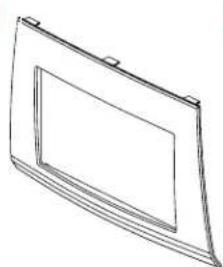
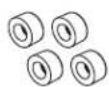
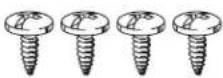
• A) Radio bezel • B) Radio brackets • C) Retaining caps • D) Philips screws (4)
AB
natural_image
Line drawing of a rectangular frame with a recessed inner panel and mounting brackets (no text or symbols)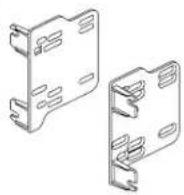


TABLE OF CONTENTS
Dash Disassembly 2
Kit Preparation 3
Kit Assembly 3
WIRING & ANTENNA CONNECTIONS (sold separately)
Wiring Harness: CHTO-01
Antenna Adapter: 40-CR10
TOOLS REQUIRED
- 9/32" Socket wrench • 5mm Allen screwdriver
- Cutting tool - Panel removal tool
• Phillips screwdriver • Solder gun
Attention! Let the vehicle sit with the key out of the ignition for a few minutes before removing the factory radio. When testing the aftermarket equipment, ensure that all factory equipment is connected before cycling the key to ignition.
DASH DISASSEMBLY
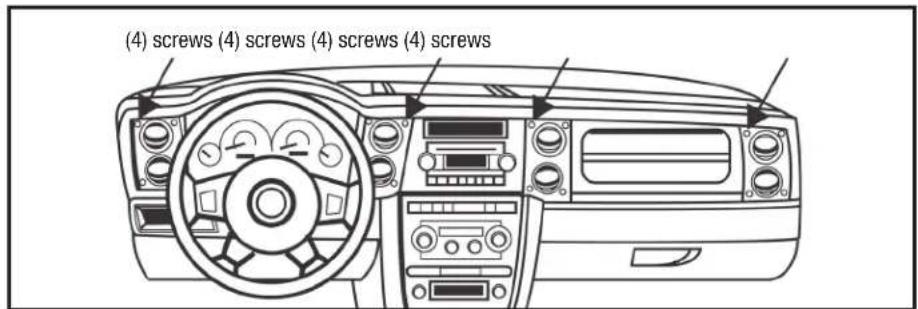
- Remove (16) 5mm Allen screws securing the dashboard trim panel. (Figure A)
- Unclip and remove the dashboard trim panel. (Figure B)
- Remove (4) 9/32" screws securing the radio. Slide the radio out, then unplug and remove.
Continue to Kit Preparation
text_image
(4) screws (4) screws (4) screws (4) screws(Figure A)

natural_image
Line drawing of a car dashboard with steering wheel, dashboard, and air vent (no text or symbols)(Figure B)
KIT PREPARATION KIT ASSEMB
From the factory dashboard trim panel:
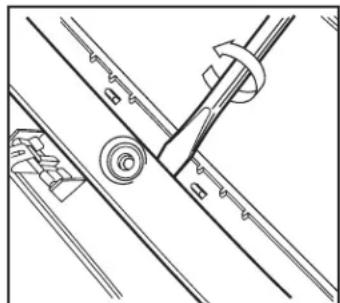
- Using either a solder gun or cutting tool, remove the plastic welds holding the factory radio bezel in place. (Figure A)
- Using a pry tool, remove the factory radio bezel from the center of the factory dash panel.
Note: Be sure NOT to damage the holes in the dash panel, so they can be used for mounting the radio bezel in the next step.
- Clip the radio bezel in, then place the retaining caps over the (4) screw holes. Using a manual screwdriver, secure using (4) Phillips screws provided. (Figure B)
Continue to Kit Assembly
natural_image
Technical line drawing of mechanical components and fasteners (no text or symbols)
natural_image
Pure technical line drawing of a mechanical assembly without any text, numbers, or symbols(Figure B)
- Secure the radio brackets to the radio using screws supplied with the radio. (Figure A)
- Locate the factory wiring harness and antenna connector in the dash and complete all necessary connections to the radio. Metra recommends using the proper mating adapter from Metra and/or Axxess. Test the radio for proper operation.
- Slide the radio into the dash, then secure using the factory screws.
- Reinstall the dash in reverse order of disassembly to complete the installation.

natural_image
Technical line drawing of an electronic device casing with mounting brackets and internal components (no text or symbols)(Figure A)(Figure A)
If you are having difficulties with the installation of this product, contact our Tech Support line either by phone at 386-257-1187, or email at techsupport@metra-autosound.com. Before doing so, look over the instruction booklet a second time and ensure that the installation was performed exactly as the instruction booklet is stated. Have the vehicle apart and ready to perform troubleshooting steps before contacting Metra/Axxess Tech Support.

KNOWLEDGE IS POWER
Enhance your installation and fabrication skills by enrolling in the most recognized and respected mobile electronics school in our industry. Log onto www.installerinstitute.com or call 800-354-6782 for more information and take steps toward a better tomorrow.
Metra recommends MECP certified technicians

natural_image
Interior view of a car dashboard with air filters and a digital display (no visible text or symbols)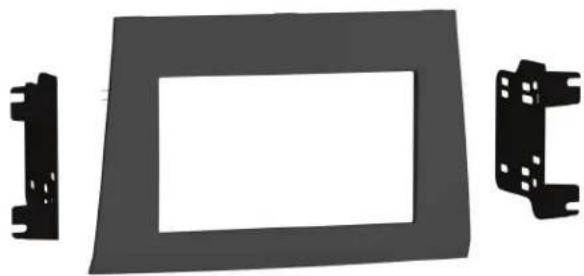
natural_image
Exterior view of a car dashboard frame with two side brackets (no text or symbols)HARDWARE INCLUDED
Jeep Commander (without NAV) 2006-2007
Visit MetraOnline.com for more detailed information about the product and up-to-date vehicle specific applications.

ISO DDIN radio provision

Painted to match the factory finish:
• 95-6556G - Gray
• 95-6556DK - Dark Khaki
KIT COMPONENTS
• Radio bezel
- Radio brackets
- Retaining caps
• Philips screws (4)
WIRING & ANTENNA CONNECTIONS
(sold separately)
- Wiring Harness: CHTO-01
- Antenna Adapter: 40-CR10
SALES 800-221-0932