
VR-S3000 - Voltage regulator Sven - Free user manual and instructions
Find the device manual for free VR-S3000 Sven in PDF.


| Product Type | Automatic Voltage Regulator (AVR) |
| Model | VR-S3000 |
| Brand | Sven |
| Max Output Power | 1800 W |
| Input Voltage Range | 140 V – 275 V ±3% |
| Output Voltage | ~230 V (-14% / +10%) |
| Input/Output Frequency | 50 Hz |
| Switching Time | ≤ 10 ms |
| Circuit Breaker Trip Current | 20 A |
| Protection Features | High/low voltage, overload, short circuit, thermal, high-frequency interference |
| Display | Digital display of input/output voltage, status LEDs (green, yellow, red) |
| Pause Function | 6 s or 180 s selectable delay |
| Cooling | Automatic fan |
| Mounting | Wall-mountable (holes on rear panel) |
| Dimensions (W × H × D) | 450 × 250 × 80 mm |
| Weight | 8.1 kg |
| Output Sockets | 3 × CEE7/4 |
| Operating Temperature | 0 °C to 40 °C |
| Operating Humidity | 10% to 90% (non-condensing) |
| Package Contents | Regulator, manual, warranty card, screw positioning paper |
| Safety Clearances | At least 25 cm around device for ventilation |
| Materials | Slim metal case |
Frequently Asked Questions - VR-S3000 Sven
User questions about VR-S3000 Sven
0 question about this device. Answer the ones you know or ask your own.
Ask a new question about this device
Download the instructions for your Voltage regulator in PDF format for free! Find your manual VR-S3000 - Sven and take your electronic device back in hand. On this page are published all the documents necessary for the use of your device. VR-S3000 by Sven.
USER MANUAL VR-S3000 Sven
natural_image
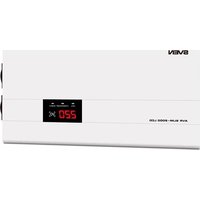
White industrial device labeled 'SVEN' with digital display and 'VR-53000' branding (no readable text beyond labels)Congratulations on the purchase of Sven automatic voltage regulator!
Please read this Operation Manual before using the unit and retain this Operation Manual in a safe place for future reference.
COPYRIGHT
© 2018. SVEN PTE. LTD. Version 1.0 (V 1.0).
This Manual and information contained in it are copyrighted. All rights reserved.
TRADEMARKS
All trademarks are the property of their legal holders.
NOTICE OF RESPONSIBILITY RESTRICTION
Despite the exerted efforts to make this Manual more exact, some discrepancies may occur. The information in this Manual is given on «as is» terms. The author and the publisher do not bear any liability to a person or an organization for loss or damage which has arisen from the information contained in this Manual.
UNPACKING
- Unpack the device carefully. Make sure there are no accessories left in the box. Check up the device for damage; if the product was damaged during transportation, address the firm which carried out the delivery; if the product functions incorrectly, address the dealer at once.
- Shipping and transportation equipment is permitted only in the original container.
- Does not require special conditions for realization.
- Dispose of in accordance with regulations for the disposal of household and computer equipment.
CONTENTS
RUS 2
UKR 8
ENG....14
- SAFETY PRECAUTIONS.... 15
- PACKAGE CONTENTS.... 15
- SPECIAL FEATURES....15
- DESCRIPTION 16
- APPLICATION 16
- MOUNTING....17
- INSTALLATION....17
-
PAUSE FUNCTION ...... 18
-
PROTECTION FUNCTION AGAINST HIGH AND LOW INPUT VOLTAGE, OVERLOAD AND OVERHEAT....18
-
TROUBLESHOOTING .... 18
-
TECHNICAL SPECIFICATIONS.... 19
Technical support is on www.sven.fi.
Operation Manual
VR-S
1. SAFETY PRECAUTIONS
Before using this device, please read the safety rules carefully:
- Do not switch on the speaker system immediately after you bring it into a room from environment with negative temperature! After unpacking, the speaker system should be kept in conditions of room temperature for at least 4 hours.
- Do not installed the stabilizer in a place with insufficient ventilation. The minimum air gap is of 25 cm.
- It is strongly forbidden to open the cover of the device, there is high voltage inside. If some problems occur, please read the operation manual carefully or address an authorized service center. For the list of authorized service centers please go to www.sven.fi.
- Do not let liquid get inside the device, it can cause short circuit or electric shock.
- In case there are signs of improper operation of the device (sparkling, unusual smells, etc.), unplug the device from the mains immediately and address your nearest authorized service center.
- It is forbidden to connect the automatic voltage regulator to devices with power consumption higher than its maximum output power. It can cause breakdown of the device.
- Do not let children operate the device.
It is strongly forbidden to operate the device in the following conditions:
– in dusty environment or environment containing highly inflammable gas;
- at temperature higher than 40^ or lower than 0^ ;
- at relative humidity level higher than 90% ;
– in direct sunlight or next to heating elements;
– in vibration areas.
- In case of fire use only powder fire extinguisher, as water can cause electric shock.
2. PACKAGE CONTENTS
• Automatic voltage regulator — 1 pc
• Operation manual — 1 pc
- Warranty card — 1 pc
- Screw positioning paper — 1 pc
3. SPECIAL FEATURES
- CPU control
- Extended precision of output voltage regulation
- Protection of consumer-devices against high or low output voltage
• Stabilizer protection from overload and short circuit - Autotransformer thermal protection; automatic cooling
- Pause function (6 or 180 s) for safe voltage supply
- Digital display of input/output voltage on the front panel
- Slim metal case, wall mounting
- Protecting of consumer-devices from high-frequency and pulsed interference
SVEN®
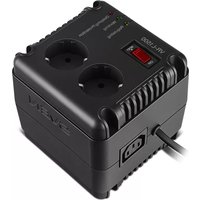
Wall-Mounted Automatic Voltage Regulator

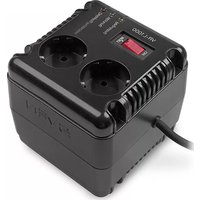
Fig. 1. Front/back panel VR-S3000

Fig. 2. Control panel

Fig. 3. Rear panel
4. DESCRIPTION (see. Fig. 1-3)
① WORKING: LED (green) lights up when there is a input voltage
② REGULATING: LED (yellow) lights up when operating stabilizer for rise/fall if the input voltage display is turned off
③ PROTECTING: LED (red) lights up in case of an accident (switch-protection against high/low voltage operation of thermal auto-transformer) flashes when developing the delay enable/disable (overload protection)
④ Digital display: on default it displays output/input voltage level (displaying accuracy ± 3%); "H" is displayed after shutoff due to high voltage; "L" is displayed after shutoff due to low voltage; "C" is displayed on overheating protection operation. In the Pause mode the countdown time to switch on the Automatic voltage regulator is displayed; "P" is overload
⑤ I/O: selection button is displayed the input or output voltage on the digital display
⑥ Wall mounting holes
⑦ Output socket
⑧ Pause: delay selection button (6 or 180 s): while pressing the delay time will be 180 s, when not pressed – 6 seconds
⑨ Bimetallic breaker. There is a circuit breaker into 3000VA model
⑩ There is a 3 * 2,1mm² connection wire
⑪ Automatic fan
5. APPLICATION
Automatic voltage regulator (AVR) is designed for providing various equipment with high-quality stable electric power supply in conditions of significant and continuous deviations of mains voltage and protecting your equipment against high-voltage and pulsed interference.
6. MOUNTING
Important! Before mountint the regulator, make sure that all fixing elements durable fastened to the wall!
- For securely wall mounting it is necessary to determine the type of wall material (wood, brick, concrete, drywall, and etc.) for corresponding fastener selection.
- Mounting stabilizer location should be close to the wall outlet, considering the stabilizer power cord length (1.25 m ± 3%).
- Next, make a mounting fasteners (not included) to the wall, considering the wall mounting holes location ⑥ on the stabilizer rear panel (see Fig. 3).
- Then hang the stabilizer on fixing elements.
7 INSTALLATION
Attention! Before connecting the regulator, make sure that all consuming devices connected to the regulator are switched off and the switch ⑨ is in OFF position. The maximum current of the circuit breaker must be not less, than the current of the circuit breaker of AVR.
For the VR-S3000 electrical connection should only be performed by a qualified technician.
Before installing the AVR, please make sure that total power of all consumers is lower than AVR output power. Taking into account the starting loads and power factor of consumers, it is necessary to apply power margin factor with the coefficient 1.2–1.5; but for such equipment as air conditioners, fridges, etc., it should be 1.5–2.
Attention! When choosing an AVR, it is necessary to know that reduction of input voltage increases an input current value, consequently, the maximum power of AVR is reduced too! Such dependence is shown in the graph below:

line
| Input voltage, V | Output power, % | |---|---| | 140 | 25 | | 187 | 100 | | 260 | 100 |Note. Adhere strictly to such dependence. If the condition stated above is not adhered to, warranty servicing becomes void!
- Turn off the pre-using equipment and connect it to the stabilizer sockets.
- Plug the stabilizer power cord ⑩ in the wall outlet.
- Turn on stabilizer with switch ⑨.
- The green indicator will light up, the red indicator will flash (load connection delay). At the same time the digital indicator ④ will display the expiration of the delay. The total delay makes 6 or 180 seconds depending on the "Pause" button (ON/ OFF) ⑧ position.
- When the mains voltage exceeds the allowable rate (lower threshold is 140 V, upper threshold is 275 V) the LED ③ illuminates, the AVR disconnects the load automatically and the LED ④ displays “L” or “H”.
Attention! It is recommended to switch off the AVR and every connected consumer-device when the power supply is dropped.
8. PAUSE FUNCTION
- The Pause mode feature is designed to protect equipment in case of frequent drops of the mains supply. This is particularly important for consumer appliances with electric motors or compressors. After power supply has been recovered, the AVR switches on within 6 or 180 seconds, depending on the "Pause" button (ON/OFF) ⑧ position.
9. PROTECTION FUNCTION AGAINST HIGH AND LOW INPUT VOLTAGE, OVERLOAD AND OVERHEAT
- The stabilizer is equipped with an unique circuit overvoltage and undervoltage protection. In the case of mains voltage deviation over 275 V or below 140 V it turns off the load automatically. At the same time red LED ③ illuminates, and the display ④ shows the "H" (for activation overvoltage protection) or symbol "L" (when triggered undervoltage protection). When the input voltage range returning to 140-275 V the stabilizer automatically resumes operation.
-
In case of overload* or short-circuit bimetallic circuit-breaker ⑨ will triggered. After elimination overload cause or short circuits, press circuit-breaker button ⑨, and stabilizer will resume operation (There is a circuit breaker).
-
TROUBLESHOOTING
| Problem Cause | Solution | |
| The AVR does not start. 1. | There is no power in the socket.2. The bimetallic circuit-breaker 9 has activated. | 1. Make sure there is electric power supply.2. Disconnect part of the load and switch on the AVR again. |
| The AVR is in operation mode, but there is no output voltage. | The AVR is out of order. The AVR is regulating output voltage. | |
| The AVR often produces clicking sound. | Input voltage is very unstable. | The AVR is regulating output voltage. |
If none of the above methods can solve the problem, please seek professional advice at your nearest service center. Never attempt to repair the product yourself.
- TECHNICAL SPECIFICATIONS
| Parameters\Models | VR S-3000 |
| Maximal output power, W 1800 | |
| Circuit-breaker trip current, A 20 | |
| Input voltage, V ~140 - 275 ± 3% | |
| Input/output frequency, Hz 50 | |
| Output voltage, V ~230 (-14/+10 %) | |
| Switching time, msec ≤ 10 | |
| Protection | against high/low mains voltage, high-frequency interference and interference pulses, short circuit and overloading; integrated thermal protection |
| Environment temperature, °C 0 ~ 40 | |
| Relative humidity, % 10 ~ 90 (with out condensation) | |
| Output socket 3 × CEE7/4 | |
| Dimensions, mm 450 × 250 × 80 | |
| Weight, kg 8,1 | |
| Mounting dimensions, mm x = 380; y = 181.5 |
Notes:
- Technical specifications given in this table are supplemental information and cannot give occasion to claims.
- Technical specifications are subject to change without notice due to the improvement of SVEN production.
natural_image
Exterior view of a white electronic device labeled 'SVEN' with a digital display and control panel (no readable text beyond branding)Модель: VR-S3000
Manufacturer: SVEN PTE. LTD, 176 Joo Chiat Road, N° 02- 02, Singapore, 427447. Produced under the control of Oy Sven Scandinavia Ltd. 15, Kotolahdentie, Kotka, Finland, 48310. Made in China.
® Registered Trademark of Oy SVEN
Scandinavia Ltd. Finland.


v01
VR-S3000

- Congratulations on the purchase of Sven automatic voltage regulator!
- COPYRIGHT
- TRADEMARKS
- NOTICE OF RESPONSIBILITY RESTRICTION
- UNPACKING
- CONTENTS
- Operation Manual
- VR-S
- SAFETY PRECAUTIONS
- It is strongly forbidden to operate the device in the following conditions:
- PACKAGE CONTENTS
- SPECIAL FEATURES
- SVEN®
- Wall-Mounted Automatic Voltage Regulator
- DESCRIPTION (see. Fig. 1-3)
- APPLICATION
- MOUNTING
- INSTALLATION
- PAUSE FUNCTION
- PROTECTION FUNCTION AGAINST HIGH AND LOW INPUT VOLTAGE, OVERLOAD AND OVERHEAT
- Notes:
Brand : Sven
Model : VR-S3000
Category : Voltage regulator