BEC455TS - Coffee maker BAUMATIC - Free user manual and instructions
Find the device manual for free BEC455TS BAUMATIC in PDF.


| Product Type | Fully automatic built-in coffee machine |
| Brand | Baumatic |
| Model | BEC455TS |
| Dimensions (H x W x D) | 453 mm x 598 mm x 533 mm |
| Aperture Dimensions (H x W x D) | 458 mm x 560 mm x 560 mm |
| Capacity - Water Tank | 2.5 litres |
| Capacity - Coffee Bean Drawer | 400 g |
| Pump Pressure | 12 bar |
| Power Supply | 230 V ~ 50-60 Hz |
| Maximum Connected Load | 2.00 kW |
| Boiler Power - Coffee | 500 W |
| Boiler Power - Steam | 1200 W |
| Control Type | Touch control with LED indicators |
| Coffee Options | 1 or 2 cups: Espresso, Regular, Steam, Hot water |
| Adjustable Coffee Strength | Light, Medium, Strong (3 levels) |
| Adjustable Grind | Yes, via knob (clockwise finer, anticlockwise coarser) |
| Self-Cleaning Cycle | Yes, programmable |
| Indicators | Water tank empty, coffee grounds full, replace filter, malfunction, coffee probe |
| Warnings | Empty water tank, replace filter, empty coffee grounds, malfunction |
| Accessories | Telescopic runners, fixed support, screws, lateral guides, plates |
| Installation | Built-in only, must be installed by qualified person |
| Safety Features | Auto standby after 45 min, child safety warning, double-pole switched fuse spur required |
Frequently Asked Questions - BEC455TS BAUMATIC
User questions about BEC455TS BAUMATIC
0 question about this device. Answer the ones you know or ask your own.
Ask a new question about this device
Download the instructions for your Coffee maker in PDF format for free! Find your manual BEC455TS - BAUMATIC and take your electronic device back in hand. On this page are published all the documents necessary for the use of your device. BEC455TS by BAUMATIC.
USER MANUAL BEC455TS BAUMATIC
Fully automatic built in coffee machine
INSTRUCTION MANUAL

natural_image
Simple line drawing of a fish with fins and tail, no text or symbols presentUser Manual for your Baumatic
BEC455TS
Fully automatic built-in coffee machine
natural_image
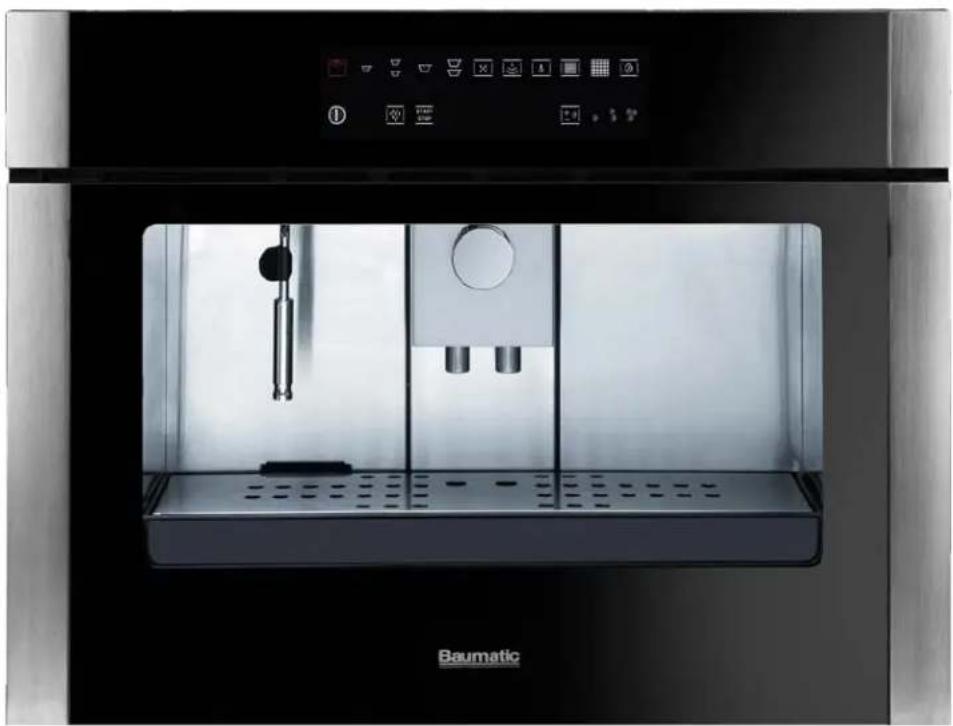
Exterior view of a modern stainless steel coffee machine (Baumatic) with control panel and display screen (no readable text or symbols)
NOTE: This User Instruction Manual contains important information, including safety & installation points, which will enable you to get the most out of your appliance. Please keep it in a safe place so that it is easily available for future reference; for you or any person not familiar with the operation of the appliance.
GS 11/07/12
Contents
| EnvironmentalIMPORTANT | noteSAFETY | INFORMATION | 4 | 5-6 | |||||||||||||||
| S | p | e | c | i | f | i | c | a | t | i | o | n | s | ||||||
| Product and aperture dimensions | 7 | ||||||||||||||||||
| Product specifications | |||||||||||||||||||
| S | t | a | n | d | a | r | d | a | c | c | e | s | |||||||
| Technical specifications | |||||||||||||||||||
| Description of the coffee machine | 9 | ||||||||||||||||||
| C | o | n | t | r | o | l | p | a | n | e | l | ||||||||
| B | e | f | o | r | e | f | i | r | s | t | u | ||||||||
| C | l | e | a | n | i | n | g | ||||||||||||
| Filling the water tank | 12 | ||||||||||||||||||
| F | i | l | l | i | n | g | w | i | t | h | c | c | |||||||
| Using your coffee machine | 14-19 | ||||||||||||||||||
| Turning the coffee machine on | |||||||||||||||||||
| C | o | f | f | e | e | g | r | i | n | d | 15 | ||||||||
| M | a | k | i | n | g | c | o | f | f | e | e | ||||||||
| Dispensing hot water | |||||||||||||||||||
| Dispensing steam | |||||||||||||||||||
| Settings | |||||||||||||||||||
| Programming the quantity of ground coffee 19 | |||||||||||||||||||
| Programming the grinding time | |||||||||||||||||||
| Programming the coffee cup quantity 19-20 | |||||||||||||||||||
| Restoring the factory settings | |||||||||||||||||||
| Using the coffee machine light 20 | |||||||||||||||||||
| W | a | r | n | i | n | g | s | ||||||||||||
| Fill water tank warning | |||||||||||||||||||
| Replace the filter warning | |||||||||||||||||||
| Empty coffee grounds warning | |||||||||||||||||||
| Coffee probe malfunction warning | |||||||||||||||||||
| Malfunction warning | |||||||||||||||||||
| R | e | c | i | p | e | s | |||||||||||||
| Cleaning and maintenance | |||||||||||||||||||
| Stainless steel sections | |||||||||||||||||||
| S | t | e | a | m | n | o | z | z | l | e | |||||||||
| D | r | i | p | t | r | a | y | ||||||||||||
| W | a | t | e | r | t | a | n | k | |||||||||||
| Emptying the used coffee grounds 25-26 | |||||||||||||||||||
| Self-cleaning cycle | |||||||||||||||||||
| I | n | s | t | a | l | l | a | t | i | o | n | ||||||||
| I | n | s | t | a | l | l | a | t | i | o | n | c | c | ||||||
| E | l | e | c | t | r | i | c | a | l | c | o | n | |||||||
| Installing the coffee machine into a kitchen cabinet 29 | |||||||||||||||||||
| P | o | s | i | t | i | o | n | i | n | g | |||||||||
| Installation of the coffee machine 30-31 | |||||||||||||||||||
| T | r | o | u | b | l | e | s | h | o | o | t | i | n | ||||||
| Coffee glossary | |||||||||||||||||||
| Baumatic consumables | |||||||||||||||||||
| Contact details | |||||||||||||||||||
This appliance is marked according to the European directive 2002/96/EC on Waste electrical and Electronic Equipment (WEEE). By ensuring this product is disposed of correctly, you will help prevent potential negative consequences for the environment and human health, which could otherwise be caused by inappropriate waste handling of this product.
The symbol

on the product, or on the documents accompanying the product, indicates that this appliance may not be treated as household waste. Instead it shall be handed over to the applicable collection point for the recycling of electrical and electronic equipment.
Disposal must be carried out in accordance with local environmental regulations for waste disposal.
For more detailed information about treatment, recovery and recycling of this product, please contact your local city office, your household waste disposal service or the shop where you purchased the product.

natural_image
Symbol of a trash bin crossed with a diagonal line and a horizontal line, representing waste sorting or disposal (no text present)- The packaging materials that Baumatic uses are environmentally friendly and can be recycled.
- Please discard all packaging material with due regard for the environment.
IMPORTANT SAFETY INFORMATION

Your safety is of the utmost importance to Bauma. Please make sure that you read this instruction booklet before attempting to install or use the appliance. If you are unsure of any of the information contained in this booklet, please contact the Baumatic Advice Line.
General Information
- This appliance is designed for domestic household use only. It can ONLY be built into a standard kitchen cabinet or housing unit and should NOT be used as a freestanding appliance.
- The use of this appliance for any other purpose or in any other environment without the express agreement of Baumatic Ltd. will invalidate any warranty or liability claim.
- Your new appliance is guaranteed against electrical or mechanical defects, subject to certain exclusions that are noted in Baumatic's Conditions Of Guarantee. The foregoing does not affect your statutory rights.
○ Repairs may only be carried out by Baum atic service engineers or their authorised service agent.

Warning and safety instructions

- This appliance complies with all current European safety legislation. Baumatic do wish to emphasise that this compliance does not remove the fact that the appliance surfaces will become extremely hot during use and retain heat after operation.
- Extreme care MUST be taken when removing any of the filters or nozzles. They should be allowed to cool before they are removed from the appliance.

Child Safety
○ Baumatic strongly recommend that babies and young children are prevented from being near to the appliance and not allowed to touch the appliance at any time.
○ If it is necessary for younger family members to be in the kitchen, please ensure that they are kept under close supervision at all times.

General Safety
o Do not leave the coffee machine unattended when in use.
Do not allow electrical fittings or cables to come into contact with areas on the appliance that get hot.
Do not install the appliance next to curtains or soft furnishings.

Cleaning
○ Cleaning of the coffee machine should be carried out on a regular basis.
- Great care should be taken whilst using this appliance and when following the cleaning procedure.
○ IMPORTANT: The appliance must be disconnected from the mains before following the cleaning procedure.

Installation
This appliance must be installed by a suitably qualified person, strictly in accordance with the manufacturer's instructions.
○ Baumatic Ltd. declines any responsibility for injury or damage, to any person or property, as a result of improper use or installation of this appliance.
The manufacturer declares that the coffee machine is built using certified materials and requires the appliance to be installed in accordance with the standards currently in force. This appliance must be used by a trained person for domestic purposes only.
pecifications S

Product Dimensions
Height: 453 mm
Width: 598 mm
Depth: 533 mm
ApertureoDismensi
Height: 458 mm
Width: 560 mm
Depth: 560 mm
Product specifications
- Touch control operation
○ Mark resistant coating
○ Choice of 1 or 2 cups - Steam spout for cappuccino, hot chocolate, tea and instant coffee
- Coffee quantity regulation
- Drawer for coffee beans (capacity 400g)
o Regulation knob for grinding coffee beans Empty water tank indicator o
o Empty coffee grounds container i ndicator
o Pull-out drawer for c offee waste - Self-cleaning cycle
Standard accessories
- Telescopic runners for appliance extraction
Technical specifications
○ Coffee / steam pump pressure: 12 bar
○ Coffee boiler output 500 W
o Steam boiler output 1200 W
- Water tank capacity: 2.5 litres
- MAX connected load: 2.00 kW
- Power supply 230 Vac 50 – 60 Hz
o Supply connection 13A (double pole switched fused outlet with 3 mm contact gap)
o Mains supply lead 3 × 1.5mm^2
For future reference please record the following information which can be found on the rating plate and the date of purchase which can be found on your sales invoice. The rating plate for your coffee machine can be located by opening the pull out drawer at the bottom of the coffee maker.
Model Number
Serial Number
Date of Purchase
escription of the coffee machine D

1) Water tank
2) Decalcifying filter
3) Dispenser
4) Water / steam dispensing nozzle
5) Drip tray
6) Coffee container
7) Grind regulation knob
8) Control panel
9) Door / tray for emptying the coffee grounds
Control panel
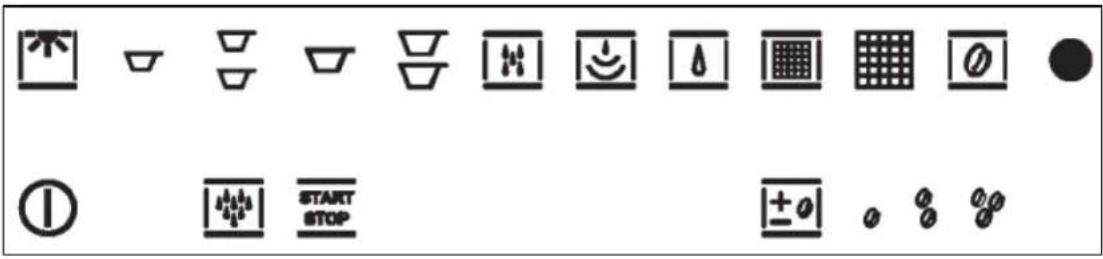
O N / O F F b u t
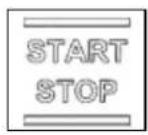
START / STOP button

ESPRESSO COFFEE button

REGULAR COFFEE button
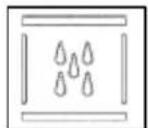
WATER button
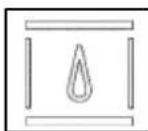
Fill water tank indicator

Empty coffee grounds indicator

Malfunction warning indicator
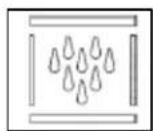
SELF-CLEANING cycle button

LIGHT button
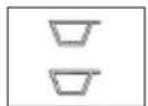
TWO ESPRESSO COFFEES button
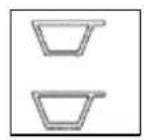
TWO REGULAR COFFEES button
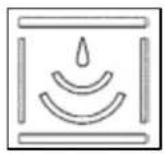
STEAM button
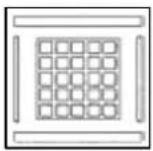
Replace filter indicator
Coffee probe malfunction indicator

COFFEE QUANTITY REGULATION button
Light coffee indicator
Medium coffee indicator
Strong coffee indicator
Before first use

1) Cleaning
- It is strongly recommended to clean the appliance prior to its first use. Particular attention should be paid to the water tank.
- For further information on cleaning the appliance, please refer to the cleaning instructions on pages 24 - 26.
○ Install the appliance as per the installation instructions contained within this booklet.
2) Filling the water tank
Before filling the water tank, ensure that the decalcifying filter is soaked in cold water for at least 20 minutes. You should always follow the manufacturer's instructions.

- Remove the drip tray from the machine as shown in the diagram on the left.

natural_image
Technical line drawing of a mechanical assembly inside a housing (no text or symbols)o Press the unlocking lever under the drip tray, in the directions shown in the diagram on the left, and pull the machine towards you.
natural_image
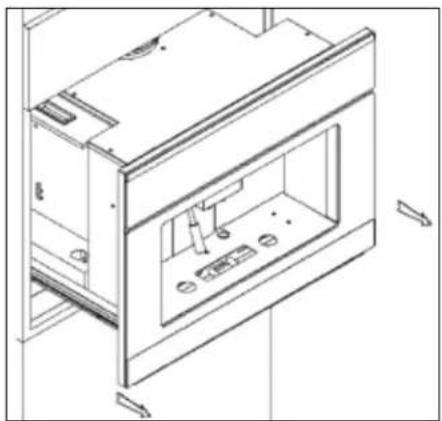
Technical line drawing of a cabinet or enclosure with internal compartments and mounting points (no text or symbols)- Carefully pull the coffee machine out of the furniture housing by sliding it on its telescopic runners.

natural_image
Technical line drawing of a mechanical assembly with internal components (no text or symbols)- Remove the water tank lid and insert the decalcifying filter as shown in the diagram on the left. Press the filter into place until you hear a click.
- The water in the tank should be changed regularly, especially if the machine has not been used in a long time.
○ Replacement filters can be purchased from many appliance stores or supermarkets.
natural_image
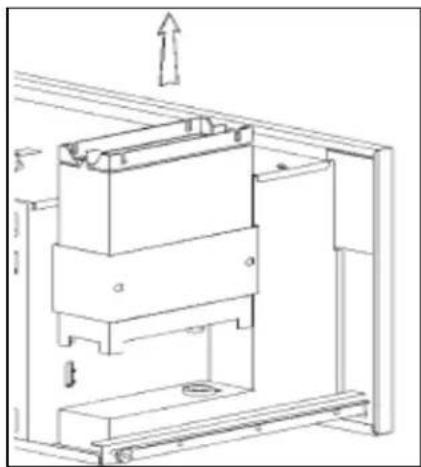
Technical line drawing of a mechanical assembly with no visible text or symbols- Remove the water tank by pulling it upwards out of the coffee machine as shown in the diagram on the left.
- Fill the water tank with drinking water. The tank can hold a maximum of 2.5 litres of water.

natural_image
Technical line drawing of a mechanical assembly with no visible text or symbols- Place the water tank back into the coffee machine by sliding it down carefully.
- You should ensure that the two connection points at the bottom match up.
3) Filling with coffee beans
○ IMPORTANT: Before pouring coffee beans into the container, you should check that there are no foreign bodies inside.

natural_image
Line drawing of a coffee machine with a coffee cup and a circular lid, no text or symbols present- Open the coffee container lid and pour approximately 200g of coffee beans into the container as shown in the diagram on the left.
natural_image
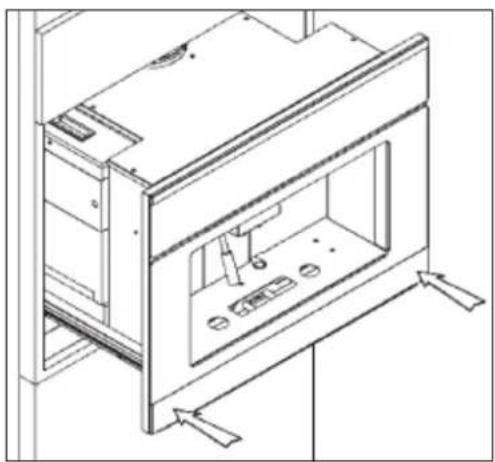
Technical line drawing of a cabinet or enclosure with internal components and mounting brackets (no text or symbols)Carefully push the machine back into the furniture housing until you hear a click. This indicates that the machine is locked into place.
Using your coffee machine
Turning the coffee machine on
natural_image
Technical line drawing of an air conditioner unit with a cable and power outlet, showing internal components and wiring (no text or symbols)o Pull the machine out of the furniture housing as described in the previous section.
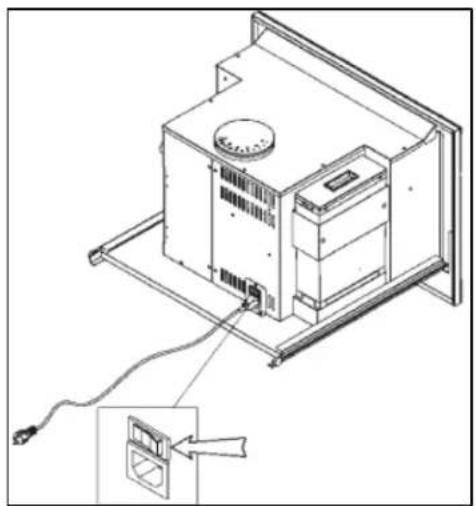
Turn the main switch, located at the back of the machine, to position '1' as shown in the diagram on the left.
- Push the machine back into the furniture housing. The appliance will now be in stand-by mode.
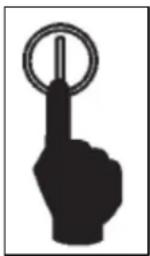
- Press the ON / OFF button. The LED lights will flash before turning on which indicates that the machine is ready to use.
○ IMPORTANT: If the coffee machine is not used for 45 minutes, it will return to stand-by mode.
Coffee grind regulation

IMPORTANT: The fineness of the coffee grind is initially set at the default factory setting. The fineness can be adjusted to suit personal taste.
○ A grind that is too coarse produces coffee that flows too quickly without creaminess and body. On the other hand, a grind that is too fine produces coffee that flows very slowly with an intense taste and a burnt smell.
- The average pouring time for a regular espresso coffee is between 20 – 30 seconds.
To regulate the coffee grind you should pull the machine out of the furniture housing as described in the "Before First Use" section on page 12.
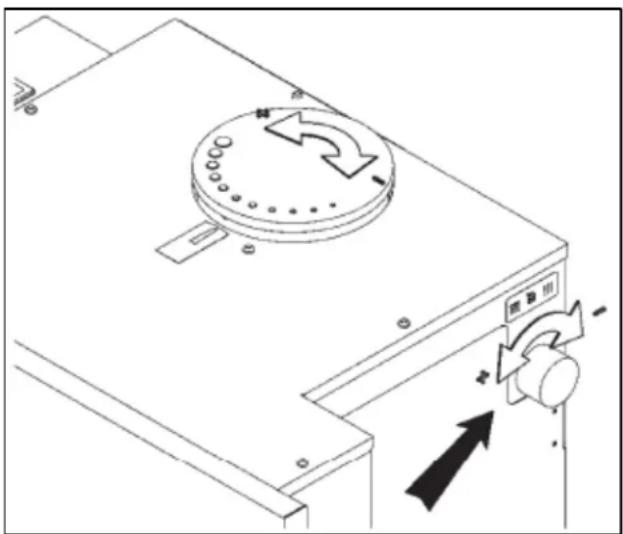
○ Locate the grind regulation knob on the right hand side of the machine and rotate the knob accordingly.
○ Turning the knob clockwise produces a finer grind and stronger coffee. Turning the knob anticlockwise produces a coarser grind and lighter coffee.
- The grinding fineness can be viewed on the lid of the coffee bean container.
- Push the machine back into the furniture housing until it clicks into place.
Making coffee
- The dispensing time for an excellent espresso coffee is about 15 – 25 seconds. Factors that can influence the dispensing time are the fineness of the coffee grind and the quantity of ground coffee. You can adjust either of these settings by following the relevant instructions in this manual.
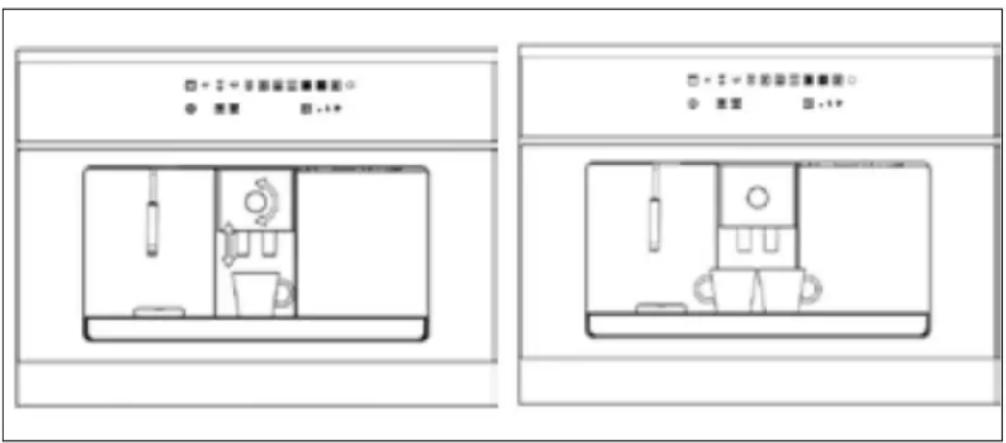
- Place one or two cups under the dispenser and adjust the height of the dispenser nozzle. Turning the dial raises or lowers the nozzle accordingly.

natural_image
Four identical black-and-white geometric shapes resembling bowls or containers, arranged horizontally (no text or symbols)o Press the relevant button for the number of coffees and type that you need.
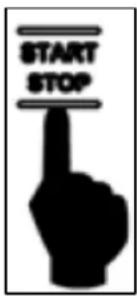
- Press the START / STOP button within 10 seconds of making your selection and the coffee making process will begin.
- The dispensing of the coffee will end automatically when the quantity of coffee selected has been poured. You can stop the dispensing of coffee at any time by pressing the START / STOP button.
- IMPORTANT: If the START / STOP button is not pressed within 10 seconds of making your coffee selection, the machine will cancel the selection.
Dispensing hot water

ANT: Please note that the main boiler and the steam boiler CANNOT be operated at the same time.
○ IMPORTANT: You should not dispense hot water immediately after dispensing steam.
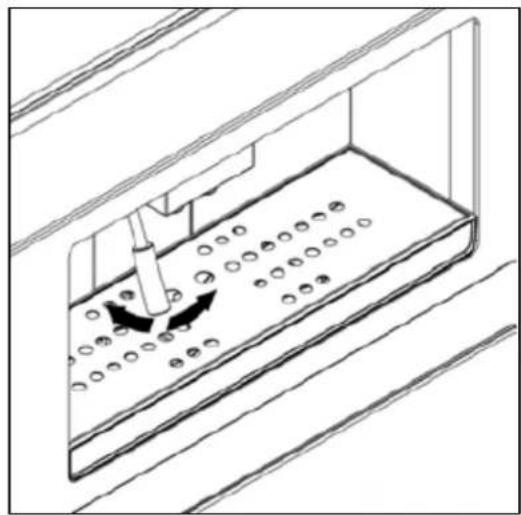
Before dispensing hot water, place the water / steam nozzle in a suitable position and place a container beneath it.
natural_image
Technical line drawing of a mechanical assembly with circular holes and directional arrows (no text or symbols)
- Press the WATER button.
o Press and hold the START / STOP button within 10 seconds of selecting the hot water function.
- The water will be dispensed all the time the button is held down. To stop the dispensing of hot water, release the button.
○ IMPORTANT: If the START / STOP button is not pressed within 10 seconds of making your selection, the machine will cancel the selection.
Dispensing steam

natural_image
Simple icon showing an information symbol above a water droplet inside a square frame (no text or symbols)IMPORTANT: Please note that the main boiler and the steam boiler CANNOT be operated at the same time.
- Press the STEAM button. The indicator light will flash for about 15 seconds. When the indicator light stops flashing and remains on this shows that the machine is ready to produce steam.
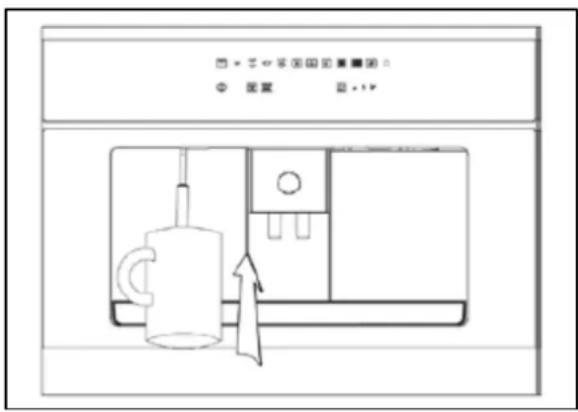
- Place the water / steam nozzle in a suitable position and place the container of liquid to be heated below the nozzle.
- You should ensure that the nozzle is fully immersed in the liquid.

- Press and hold the START / STOP button and the steam will be dispensed. The steam will continue to flow until you release the button.
- If you are preparing milk for a cappuccino it is recommended that you agitate the milk for best results.
- IMPORTANT: If the START / STOP button is not pressed within 10 seconds of the steam being ready, the machine will cancel the selection.

o WARNING: During this operation, extreme caution should be exercised, as the dispensing pipe will get hot.
- When releasing steam, avoid directing the steam towards your person. There is a danger of scalding.
- Always use a container or a mug underneath the dispensing pipe whilst dispensing steam.
Settings
Programming the quantity of ground coffee
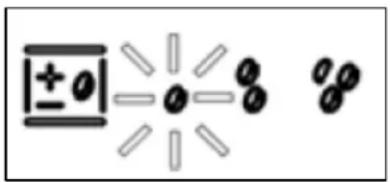
- You are able to choose from 3 strengths of coffee which are light, medium and strong.
To change the strength of coffee, press the COFFEE QUANTITY REGULATION button repeatedly. The LED for the selected coffee strength will light.
chemical
Chemical structure diagram showing a central atom with three surrounding atoms and bonds, possibly representing a molecular or atomic model.○ One bean indicates a light strength, two beans indicate a medium strength and 3 beans indicate a strong coffee.
Programming the grinding time
- You can program the grinding time for the strong coffee setting and the medium and light coffee settings will adjust accordingly.

To enter the programming mode, press and hold the START / STOP button for about 5 seconds when the machine is in stand-by mode.
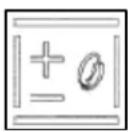
- The LEDs on the upper left line light up to indicate the grinding time. Press the COFFEE QUANTITY REGULATION button to increase the time.

o Press the START / STOP button to decrease the time. When you have set the correct grind time press the ON / OFF button to confirm the changes and exit the programming mode.
Programming the coffee cup quantity
- All of the coffee making options have a preset quantity, except for hot water and steam. The machine is initially set to the default factory setting to dispense the ideal quantity of coffee for an espresso or regular cup.

- When coffee is being dispensed you can stop the flow before the preset time by pressing the START / STOP button.
- You can also lengthen the pouring time for a larger quantity of coffee by holding down the START / STOP button within 3 seconds from the end of the preset time. The coffee will keep pouring until the button is released for up to a maximum of 20 seconds.
Restoring the factory settings
- The coffee machine is programmed at the factory for Italian-style espresso coffee and German-style regular coffee.
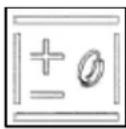
- If changes have been made to the settings and you wish to revert to the default factory programming, you must press and hold the COFFEE QUANTITY REGULATION button for about 6 seconds when the machine is in standby mode.
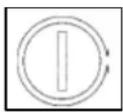
- All of the LEDs, except the ON / OFF button will flash for 5 seconds and after this the factory settings will be restored.
- Press the ON / OFF button to begin making coffee using the default programming.
Using the coffee machine light
- The coffee machine has LEDs for illuminating the dispensing compartment for easier usage and observation.
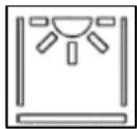
To turn the light on, press the LIGHT button once. Press this button once again to turn the light back off.
- The light function is only available when the machine is turned on and not when it is in stand-by mode.
Warnings
- The coffee machine may display a warning which prompts you to carry out an action or alerts you to a problem with the machine.
Fill water tank warning
- The machine is equipped with a sensor which detects water in the water tank.

- If there is no water in the tank, the fill water tank indicator will light. The coffee machine will not function until the water tank is filled.
Before attempting to use the coffee machine, you should fill the water tank by following the instructions outlined on pages 12 – 13.
Replace the filter warning

- When the coffee machine has dispensed 80 litres of water, the replace filter indicator will start to flash.
-
When the machine has dispensed 100 litres of water, the replace filter indicator will turn on.
-
This prompts you to replace the decalcifying filter with a new one by following the instructions on pages 12 – 13.
- It is recommended that the filter is replaced within 3 months from when the replace filter indicator turns on.
Empty coffee grounds warning
- After the machine has made 15 cups of coffee, the empty coffee grounds indicator will turn on.
- The coffee machine will not operate until the coffee grounds tray has been emptied. You should empty the coffee grounds tray by following the instructions outline on pages 25 - 26 of this manual.
Coffee probe malfunction warning
- The coffee machine warns you when the coffee unit probe is malfunctioning. When this occurs, the coffee probe malfunction indicator will flash.
- You should turn the machine off and then on again to try and rectify the problem. If the issue persists you should call the Baumatic Customer Care Department.
Malfunction warning
- If the malfunction warning indicator lights, this shows that there is a problem with the coffee machine. The indicator can light for a variety of reasons which include:
1) The coffee dispensing unit is blocked.
2) The actions of the coffee dispensing unit did not occur correctly.
3) The door for removing coffee grounds is open.
4) The appliance did not detect the movement of water.
5) The temperature probe is not working correctly.
6) There is no water in the tank.
- You should turn the machine off and then on again to try and rectify the problem. If the issue persists you should call the Baumatic Customer Care Department.
Recipes
Cappuccino

natural_image
Illustration of a coffee mug, steaming cup of coffee, and pouring coffee beans (no text or symbols)An espresso topped with an equal amount of steamed milk and froth.

○ IMPORTANT: When making a cappuccino, the steam boiler should be heated before the main boiler in order to reduce the time taken to heat up the main boiler.
○ After making a cup of espresso, you should follow the dispensing steam section on pages 18 – 19.
○ Using a suitable jug fill approximately 150 - 200 ml of milk required for frothing.
- Heat the jug of milk using the steam function. Move the container of milk up and down very slowly whilst simultaneously rotating the container at the same time.
- The temperature of the milk should be monitored by carefully touching the container with the palm of your hand.
o Milk should not be overheated, in order to avoid it being diluted.
- When the required froth has been achieved, release the START / STOP button to turn off the steam.
- Put the espresso shot into a large cup and then pour the heated milk from the jug into it. The froth achieved during the frothing process should be spooned over the top or alternatively add whipped cream over the top for a Viennese cappuccino.

- IMPORTANT: To get the best results, milk should be semi-skimmed and preferably at room temperature.
Cold espresso chilled in a shaker
○ Make an espresso by following the relevant instructions in this manual. Add sugar and then immediately pour into a shaker with large cubes of ice and shake for several seconds.
- Serve in a tumbler or flute glass.
Irish coffee
○ Make a regular coffee by following the relevant instructions in this manual. Pour in a single measure of whiskey and cane sugar.
- Add freshly whipped cream by sliding it on with the lower part of a spoon to create a light layer of cream over the hot coffee.
Mexican coffee
○ Make a regular coffee by following the relevant instructions in this manual. Pour in a teaspoon of chocolate syrup and add cinnamon and then mix well.
- In a separate small cup mix one dose of double cream, a teaspoon of cinnamon, a pinch of nutmeg and sugar. Whip together before using to top the coffee. Garnish with a teaspoon of vanilla-flavoured whipped cream.
Cappuccino ice-cream
○ Make two cups of espresso by following the relevant instructions in this manual. Heat in a pan with 34 cup of whipping cream and 12 cup of sugar and bring to the boil. Remove from the heat and allow to cool.
- When the mixture is lukewarm, place it in the freezer for 4 – 5 hours.
- Allow the ice-cream to cool in the refrigerator for 12 hour before serving.
o Put two or three scoops in a bowl and garnish with toasted coffee beans.
Cleaning and maintenance

Cleaning operations must only be carried out when the coffee maker is cold.
The appliance should be disconnected from your mains supply before commencing any cleaning process.
Stainless steel sections
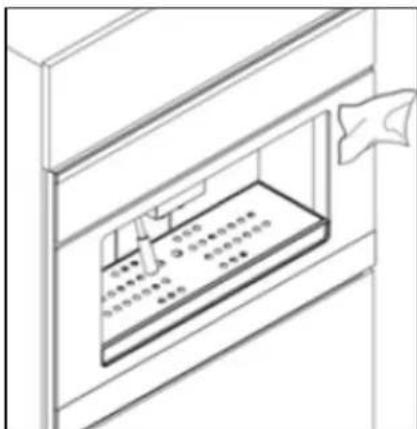
- The stainless steel sections should be cleaned using warm soapy water.
- No abrasive detergents or cleaners should be used.
- No abrasive sponges or steel wool should be used on any area of the appliance.
- Dry the appliance afterwards thoroughly with a soft cloth.
- We would recommend that an appropriate stainless steel cleaner and polish is regularly used on the stainless steel surfaces.
Steam nozzle
- You should flush the steam nozzle thoroughly with steam after each use.
NOTE: When milk cools, it creates impurities which may block the steam discharge hole and cause the appliance to function poorly. - If you have used the steam nozzle, you should dismantle the device and wipe both the sections using a clean sponge or a damp cloth.
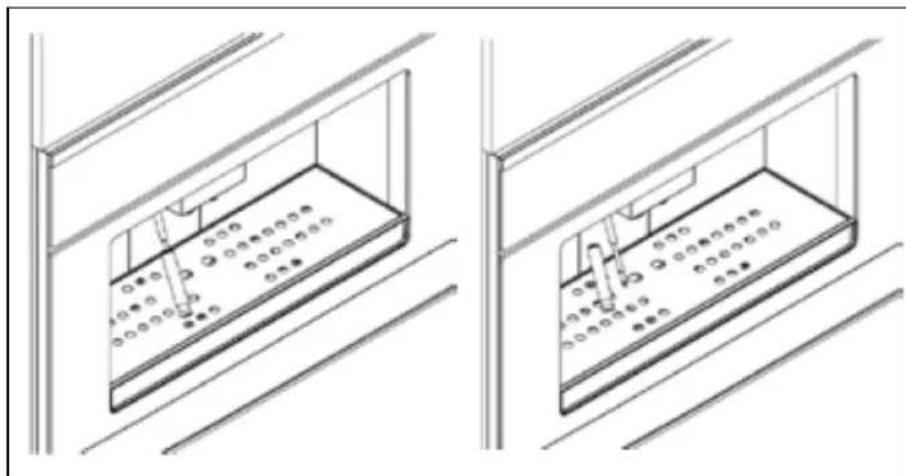
natural_image
Technical line drawing of two identical indoor lighting fixtures with internal compartments and ventilation grilles (no text or symbols)Drip tray
- Remove the drip tray from the coffee machine as shown in the diagram below.

○ Make sure that you empty the drip tray regularly to avoid liquid spills that could ruin the furniture below.
- The basin and metal grill can be washed in warm soapy water or placed in a dishwasher.
Water tank
- If you have not used the coffee machine in a long time, it is recommended that you change the water in the tank.
- The water tank should be cleaned regularly to avoid lime-scale build-up. The water tank can be washed in warm soapy water or placed in a dishwasher.
Emptying the used coffee grounds

IMPORTANT: Do not empty the coffee grounds tray when the machine is ON or still hot to avoid accidental contact with hot parts.
- In order to open the door of the coffee grounds compartment you must first remove the drip tray as shown in the diagram on the next page.
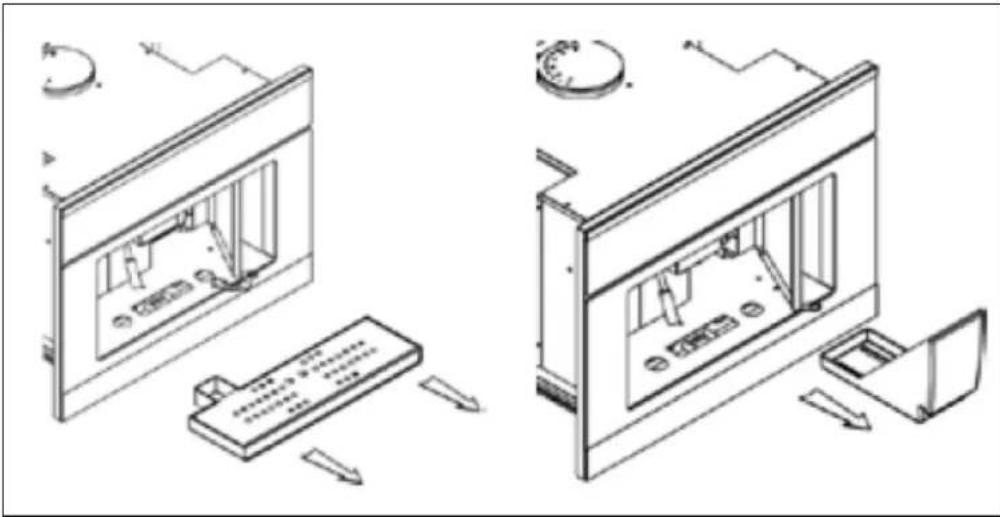
natural_image
Technical line drawing of a computer monitor with internal components and external hardware (no text or symbols)- Remove the coffee grounds tray, empty the coffee grounds and wash the tray with warm soapy water or place it in the dishwasher.
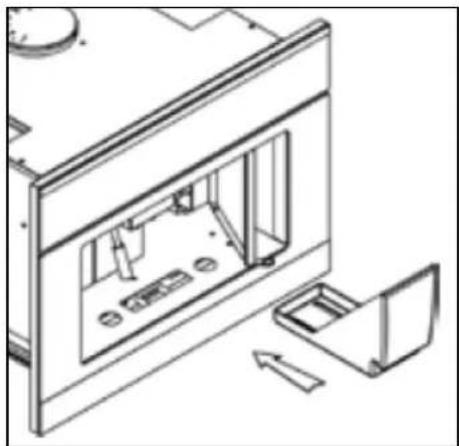
natural_image
Technical line drawing of an open refrigerator with internal compartments and doorways (no text or symbols)○ Replace the coffee grounds tray back into its correct position.
Self-cleaning cycle
- You are able to set the coffee machine to carry out a self-cleaning cycle when the machine is turned on and not in stand-by mode.
o Press the SELF-CLEANING CYCLE button followed by the START / STOP button and the coffee machine will begin the washing process.
- If a coffee selection button is pressed during the wash cycle, the self-cleaning cycle LED will turn off and the process will end.
INSTALLATION

Installation of this appliance must be carried out by a suitably qualified person, in accordance with the current version of the following.
- UK Regulations and Safety Standards or their European Norm Replacements.
○ Building Regulations (issued by the Department of the Environment).
○ Building Standards (issued by the Scottish Development Department).
○ IEE Wiring Regulations. - Electricity At Work Regulations.
Installation components
- The installation components shown below are supplied with the machine.
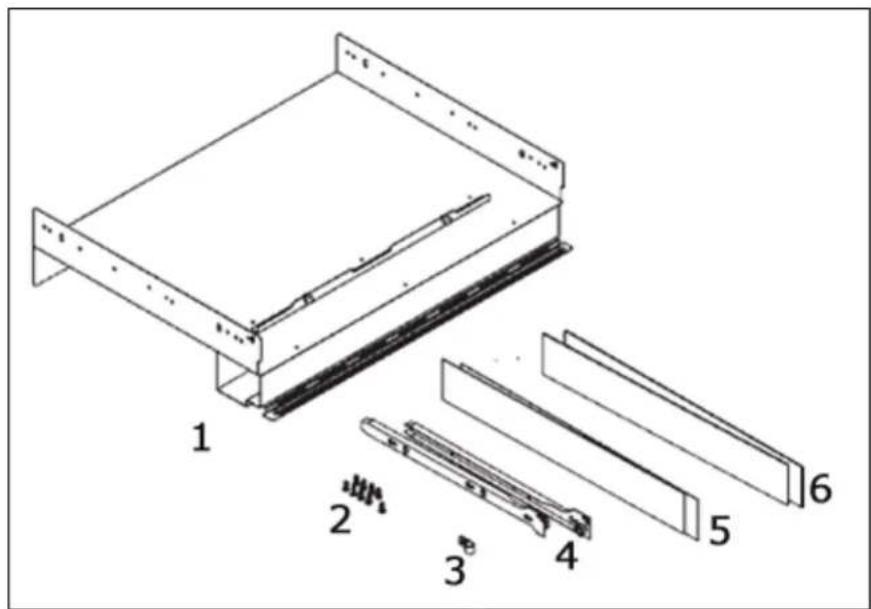
1) Fixed machine support
2) 13 x Self-threading screws (3.9 x 19)
3) 1 x Power cord support
4) 2 x Lateral guides
5) 2 x Lateral 1 mm plates
6) 2 x Lateral 2 mm plates
Electrical connection
Before connecting the appliance, make sure that the supply voltage marked on the rating plate corresponds with your mains supply voltage.

WARNING: THIS APPLIANCE MUST BE EARTHED.
- This appliance should be wired into a 13 A double pole switched fused spur outlet, having 3 mm contact separation and placed in an easily accessible position adjacent to the appliance. The spur outlet must still be accessible even when your coffee machine is located in its housing.
| MAINS | LIVE | L |
| POWER | EARTH | |
| SUPPLY | NEUTRAL | N |
- If you have to change the coffee machine power cord, the earthing (yellow/green) conductor must always be 10 mm longer than the line conductors.
- Care must be taken to ensure that the temperature of the mains supply cable does not exceed 50°C.
○ If the mains supply cable is damaged, then it must be replaced with a suitable cable.
natural_image
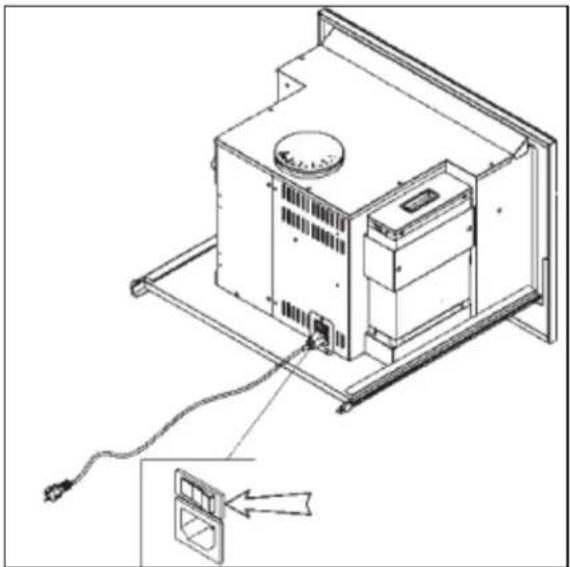
Technical line drawing of an electronic device with a cable and connector, showing internal components and wiring (no text or symbols)- Connect the power cord to the back of the coffee machine as shown in the diagram on the left.
Installing the coffee machine into a kitchen cabinet
Positioning

- Ensure that the aperture that you will be fitting the coffee machine into is of the size given in the diagram above.
o Ensure that the rear panel of the furniture housing unit has been removed and that the ventilation cut out shown is adhered to. - It is recommended to install the appliance at a certain distance from refrigerators or freezers as the heat it emits could affect their operation.
Installation of the coffee machine

natural_image
Isometric line drawing of a mechanical assembly with a rectangular base and a vertical rod, no text or symbols present○ Position the fixed machine support (1) by resting it on the base surface of the furniture cut-out.
- The width of the furniture housing cut-out will be affected by the thickness of the sides of the furniture. The side plates can be used to compensate for any empty spaces.
- Four plates are supplied to compensate for the different width measures. There are two which are 2mm thick (6) and two which are 1 mm thick (5). They can be used to obtain the required width dimensions for installation of 560 mm.
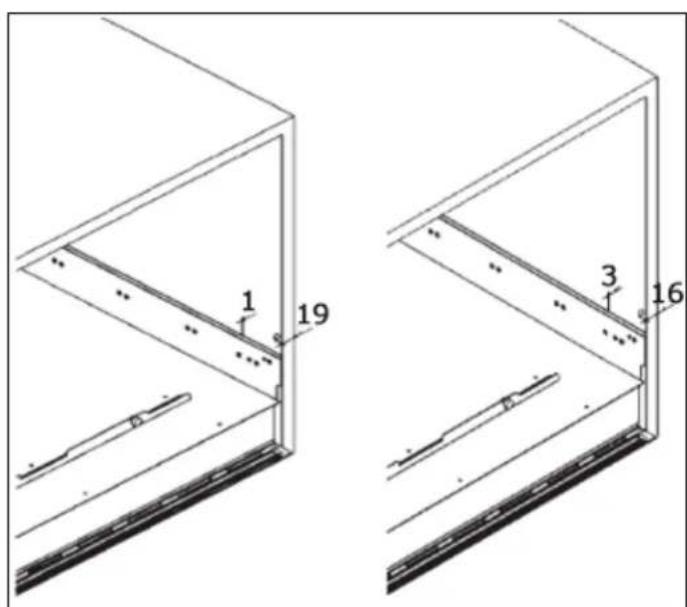
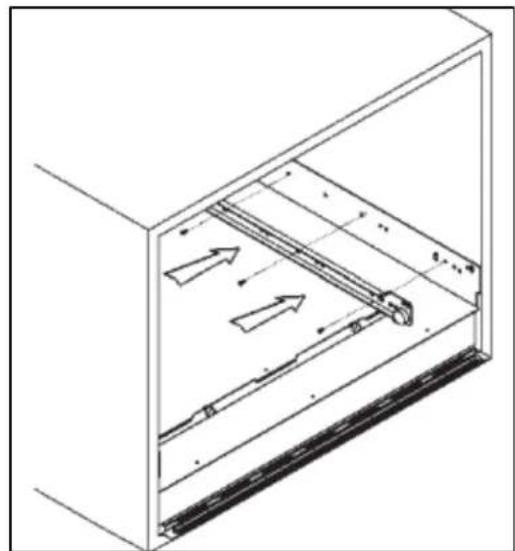
natural_image
Technical line drawing of a mechanical assembly inside a housing (no text or symbols)- Then mount the 2 lateral guides (4) onto either side of the housing using the remaining self-threading screws.

natural_image
Technical line drawing of a mechanical or electrical enclosure with internal components and mounting brackets (no text or symbols)Insert the coffee machine into the housing unit by matching up the guides on the sides of the machine with the supports already mounted in the housing unit.
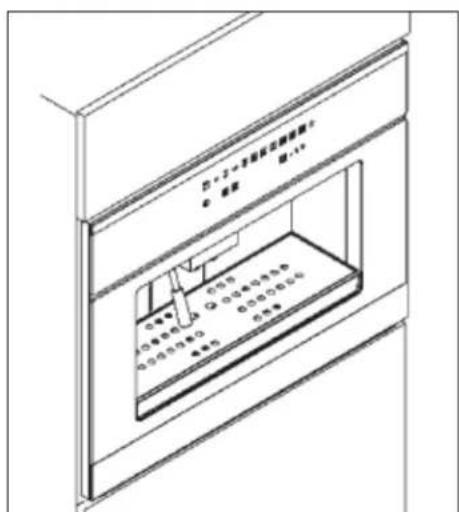
- Slide the coffee machine all the way in until the safety stops click, locking the appliance into position.
TROUBLESHOOTING

My coffee machine will not work at all.
- Check your mains supply and the electrical connection.

My coffee machine will not dispense water.
- Check that the water tank is filled with water.

Is it 'OK' to leave my espresso machine switched ON?
- The appliance should not be left unattended when the drinks making process is in progress.
- The appliance will go in a stand by mode when not in use after approximately 45 minutes. To restart press the ON / OFF button.

A warning indicator has turned on.
- Refer to pages 20 – 22 for instructions.
- Switch off the appliance and restart after approximately 60 minutes. If the error still persists, contact the Baumatic Customer Care Department to arrange an engineer's visit.
Coffee glossary
Caffe- Italian word for a standard espresso
Caffe Americano- a thin espresso with water added
Caffe latte- a double espresso mixed in a large cup with hot milk. It should be topped with little or no foam.

natural_image
Illustration of a coffee cup with whipped cream and a teapot, accompanied by scattered beans (no text or symbols)Caffe mocha-made from equal parts milk and cocoa.
natural_image
Illustration of a glass pitcher and a cup on a saucer (no text or symbols)Caffeine- espresso's caffeine content is only a third or half of that found in coffee. The stronger the roast, the less caffeine the espresso will contain.
Cappuccino- is espresso frothed with milk. It is equal parts of espresso, foam and hot milk.
natural_image
Illustration of a steaming cup of whipped cream with coffee beans and a saucer (no text or symbols)Crema- this is the sign of the perfect cup of espresso; a fine, nutty or cinnamon brown foam on the surface of the espresso. This is only created when the pressure is sufficiently high. The crema contains the foamed oils which are rich in flavour and aroma.
Espresso- see "caffe".
Macchiato- espresso carrying a dollop of hot, foaming milk to give a dappled look.

IMPORTANT: If your appliance appears not to be operating correctly, then you should disconnect it from your mains supply and then contact the Customer Care Department on telephone number (0118) 933 6911.
DO NOT ATTEMPT TO REPAIR THE APPLIANCE YOURSELF.
The manufacturer has the right to change any specifications on the product without giving prior notice.
Please note that if an engineer is asked to attend whilst the product is under guarantee and finds that the problem is not the result of an appliance fault, then you may be liable for the cost of the call out charge.
The appliance must be accessible for the engineer to perform any necessary repair. If your appliance is installed in such a way that an engineer is concerned that damage will be caused to the appliance or your kitchen, then he will not complete a repair.
This includes situations where appliances have been tiled in, sealed in with sealant, have wooden obstructions placed in front of the appliance, like plinths. Or any installation other than the one specified by Baumatic Ltd. has been completed.
Please refer to the conditions of guarantee that appear on the warranty card that you receive with the appliance.
IMPORTANT: Baumatic Ltd. operates a policy of continuous improvement and reserves the right to adjust and modify its products without prior notification.
Baumatic consumables
o BC001 Degreaser for Dishwashers (200g)
- BC002 Descaler for Washing Machines and Dishwashers (200g)
- BC003 Ceramic Hob Cleaner (250ml)
- BC004 Oven Cleaner (250ml)
o BC005 Stainless Steel Cleaner and Protector (250ml)
- BC007 E-Cloth – General Purpose Cloth
- BC008 Microwave Cover
To order a Baumatic consumable product please call 0123 5437 244 and quote the product code. You can also order online from eshop.baumatic.co.uk
Baumatic®
United Kingdom
Baumatic Ltd.,
Baumatic Buildings,
6 Bennet Road,
Reading, Berkshire
RG2 0QX
United Kingdom
Sales Telephone
(0118) 933 6900
Sales Fax
(0118) 931 0035
Customer Care Telephone
(0118) 933 6911
Customer Care Fax
(0118) 986 9124
Spares Telephone
(01235) 437244
Advice Line Telephone
(0118) 933 6933
E-mail:
sales@baumatic.co.uk
customercare@baumatic.co.uk
spares@baumatic.co.uk
technical@baumatic.co.uk
Website:
www.baumatic.co.uk
Facebook:
www.facebook.com/baumatic.uk
Republic of Ireland
Service Telephone
1-890 812 724
Spares Telephone
091 756 771
Czech Republic
Baumatic CR s.r.o.
Lípová 665
460 01, Liberec 4
Czech Republic
+420 483 577 200
www.baumatic.cz
Slovakia
Baumatic Slovakia, s.r.o.
Panenská 34
811 03 Bratislava - Staré Mesto
Slovakia
+421 255 640 618
www.baumatic.sk
Germany
Baumatic GmbH
Bachstr.10-12
D-32257 Bünde
Germany
+49 (0) 5223 99408 0
www.baumatic.de
Italy
Baumatic Italia S.R.L.
Via Galvani N.3
35011 Campodarsego (PD)
+3904 9920 2297
www.baumatic.it
Holland
Baumatic Benelux B.V.
Dukdalfweg 15d
1332 BH ALMERE
Nederland
+31(0)36 549 1553
www.baumatic.nl

- Fully automatic built in coffee machine
- INSTRUCTION MANUAL
- User Manual for your Baumatic
- BEC455TS
- Fully automatic built-in coffee machine
- The symbol
- IMPORTANT SAFETY INFORMATION
- General Information
- Warning and safety instructions
- Child Safety
- General Safety
- Cleaning
- Installation
- pecifications S
- Product Dimensions
- ApertureoDismensi
- Product specifications
- Standard accessories
- Technical specifications
- escription of the coffee machine D
- Control panel
- Before first use
- 1) Cleaning
- 2) Filling the water tank
- 3) Filling with coffee beans
- Using your coffee machine
- Turning the coffee machine on
- Coffee grind regulation
- Making coffee
- Dispensing hot water
- Dispensing steam
- Settings
- Programming the quantity of ground coffee
- Programming the grinding time
- Programming the coffee cup quantity
- Restoring the factory settings
- Using the coffee machine light
- Warnings
- Fill water tank warning
- Replace the filter warning
- Empty coffee grounds warning
- Coffee probe malfunction warning
- Malfunction warning
- Recipes
- Cappuccino
- Cold espresso chilled in a shaker
- Irish coffee
- Mexican coffee
- Cappuccino ice-cream
- Cleaning and maintenance
- Stainless steel sections
- Steam nozzle
- Drip tray
- Water tank
- Emptying the used coffee grounds
- Self-cleaning cycle
- Installation components
- Electrical connection
- WARNING: THIS APPLIANCE MUST BE EARTHED.
- Installing the coffee machine into a kitchen cabinet
- Positioning
- Installation of the coffee machine
- TROUBLESHOOTING
- Coffee glossary
- Baumatic consumables
- Baumatic®
- United Kingdom
- Sales Telephone
- Sales Fax
- Customer Care Telephone
- Customer Care Fax
- Spares Telephone
- Advice Line Telephone
- E-mail:
- Website:
- Facebook:
- Republic of Ireland
- Service Telephone
- Czech Republic
- Slovakia
- Germany
- Italy
- Holland
Brand : BAUMATIC
Model : BEC455TS
Category : Coffee maker