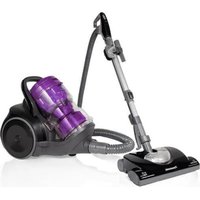
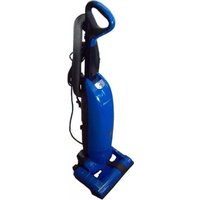
MCCL433 - Vacuum Cleaner PANASONIC - Free user manual and instructions
Find the device manual for free MCCL433 PANASONIC in PDF.


User questions about MCCL433 PANASONIC
0 question about this device. Answer the ones you know or ask your own.
Ask a new question about this device
Download the instructions for your Vacuum Cleaner in PDF format for free! Find your manual MCCL433 - PANASONIC and take your electronic device back in hand. On this page are published all the documents necessary for the use of your device. MCCL433 by PANASONIC.
USER MANUAL MCCL433 PANASONIC
APPLIANCE ACCESSORIES
ACCESSIONS DE L'APPAREIL
ACCESORIOS DEL APARATO
HOW TO OPERATE THE APPLIANCE
FONCTIONNEMENT DE L'APPAREIL
COMO OPERAR EL APARATO
HOW TO STORE THE APPLIANCE 11
COMMENT RANGER L'APPA
CÓMO ALMACENAR EL APARATO
HOW TO CLEAN DUST COMPARTMENT 12
COMMENT NETTOYER LE COMPARTIMENT À POUSSIÈRE
CÓMOLIMPIAR EL COMPARTIMENTO DE POLVO
MAINTENANCE 15
ENTRETIEN
MANTENIMIENTO
BEFORE REQUESTING SERVICE 18
AVANT DE DEMANDER L'ASSISTANCE TECHNIQUE
ANTES DE REQUERIR SERVICIO
SPECIFICATIONS 19
SPECIFICATIONS
ESPECIFICACIONES
WHAT TO DO WHEN SERVICE IS NEEDED 20
SERVICE APRÉS-VENTE
Please read IMPORTANT SAFETY INSTRUCTIONS FOR THE USER on page 2 before use.
Read and understand all instructions.
TO OUR VALUED CUSTOMER
We are very pleased to welcome you to the Panasonic family of products. Thank you for purchasing this product. Our intent is you become
one of our satisfied customers.
- Proper assembly and safe use of your appliance are your responsibilities. Your appliance is intended only for household use. The
appliance should be stored in a dry indoor area. Read the Operating Instructions carefully for important use and safety information.
- Special care is required when vacuuming certain types of carpet or floor covering.
Always check the carpet or floor covering manufacturer's recommended cleaning instructions before vacuuming.
PLEASE PAY CLOSE ATTENTION TO ALL WARNING AND CAUTION STATEMENTS

WARNING
WARNING statements are designed to alert you to the possibility of injury, loss of human life, and/or
damage to the appliance and/or personal property if the instructions given are not followed.

WARNING
TO AVOID ELECTRICAL SHOCK
Never vacuum damp or wet surfaces or liquids.
DO NOT store or use appliance outdoors.
Replace worn or frayed Power Cord immediately by qualified/authorized Service Center.
Unplug from outlet when not in use and before servicing.
TO AVOID ACCIDENTS
Except for hand-held cleaners, keep appliance on floor - not on chairs, tables, steps, stairs, etc. Store
appliance promptly after each use to prevent accidents such as tripping over Power Cord or appliance . Use
appliance and accessories only in a manner intended by the manufacturer. DO NOT use an extension cord.
IMPORTANT SAFETY INSTRUCTIONS FOR THE USER
When using this appliance, basic precautions should always be followed, including the following:
READ ALL INSTRUCTIONS BEFORE USING THIS APPLIANCE

WARNING
- DO NOT leave appliance when plugged in. Unplug from outlet when not in use and before servicing.
- This appliance is not intended for use by persons (including children) with reduced physical, sensory or mental capabilities or lack of
To reduce the risk of fire, electric shock or injury:
experience and knowledge of the product, unless they have been given supervision or instruction concerning use of the appliance by a
person responsible for their safety.
3. To reduce the risk of electric shock, DO NOT use for outdoors or on wet surfaces.
4. DO NOT allow appliance to be used as a toy. Close attention is necessary when used by or near children.
5. Use only as described in this manual. Use only manufacturer's recommended attachments.
6. DO NOT pull the appliance beyond its Power Cord length.
7. DO NOT use with a damaged Power Cord or Plug. If appliance is not working as it should, has been dropped, damaged, left outdoors, or dropped into water, return it to a service center.
8. DO NOT pull or carry by Power Cord, use Power Cord as a handle, close a door on Power Cord or pull Power Cord around sharp edges or
corners. DO NOT run appliance over Power Cord. Keep Power Cord away from heated surfaces.
9. DO NOT unplug by pulling on Power Cord. To unplug, grasp the Plug not the Power Cord.
10. DO NOT handle Plug or appliance with wet hands.
11. DO NOT put any object into openings. DO NOT use with any opening blocked; keep free of dust, lint, hair, and anything that may reduce air flow.
12. Keep hair, loose clothing, fingers, and all parts of body away from openings and moving parts.
13 DO NOT pick up anything that is burning or smoking, such as cigarettes, matches or hot ashes.
14. DO NOT use the appliance without Filter and Dust Compartment in place.
15. Turn off all controls before unplugging.
- Use extra care when cleaning on stairs.
- DO NOT use to pick up flammable or combustible liquids such as gasoline or use in areas where they may be present.
- Hold Plug when rewinding onto cord reel. DO NOT allow Plug to whip when rewinding.
- DO NOT use an extension cord.
SAVE THESE INSTRUCTIONS
THIS APPLIANCE IS INTENDED FOR HOUSEHOLD USE ONLY
- To reduce the risk of electric shock, this appliance has a polarized Plug (one blade is wider than the other). This Plug will fit in a polarized outlet only one way. If the Plug does not fit fully in the outlet, reverse the Plug. If it still does not fit, contact a qualified electrician to install the proper outlet. Do not change the Plug in any way.
Notice:
Before you plug in your appliance, make sure that the voltage indicated on the rating plate located at the bottom of the appliance is the same as your local supply.
RENSEIGNEMENTS IMPORTANTS
- CAUTION statements are designed to alert you to the possibility of damage to the appliance and/or personal property if the instructions given are not followed.

ATTENTION
Switching between carpet and flooring:
- Flooring: Press lever A.
- Carpet: Press lever B.
Insert and twist to connect.
Twist and pull to disconnect.
To use Detachable Dusting Brush, press to release EZ Release Nozzle.
APPLIANCE ACCESSORIES
ACCESSOIRES DE L'APPAREIL
ACCESORIOS DEL APARATO
| DESCRIPTION / DESCRIPTION / DESCRIPCION | MC-CL433 |
| Hose assembly Assemblage du tuyau Caño Flexible | YMV84PFW*00-P |
| Metal Telescopic Wand Tube télécopique en métal Vara telescópica de metal | YMV99P62*00 |
| Curved Wand Tube courbé Empuñadura | YMV98PDN*00 |
| Crevice Nozzle B Suceur plat B Boquilla para Rincones B | YMV60R9L*80 |
| Dusting Brush A Brosse à épousseter A Cepillo para quitar polvo A | YMC88RYX*80 |
| EZ Release Nozzle Tête d'aspiration à dégagement rapide Boquilla de liberación EZ | YMV99RFV*00 |
| Detachable Dusting Brush Brosse à épousseter amovible Cepillo desmontable | YMV0VRFV*00 |
| Dust Compartment Compartment à poussière Compartmento de polvo | YMV88KFW*RU |
| Accessory Holder (assemble in Unit) Porte-accessoires (pour assembler à l'appareil) Porta accesorios (ensemble en unidad) | YMV76PDN*00 |
| HEPA Filter Filtre HEPA Filtro HEPA | YMV72KFV*00 |
| Brush (in the set) Brosse (dans l'ensemble) Cepillo (en el=juego) | YMV36PFV*00 |
EZ Release Nozzle
To avoid scratching the floor surface, lightly slide the EZ Release Nozzle over the wood flooring.
To prevent damaging the floor surface, do not vacuum by moving the EZ Release Nozzle side to side.
To decrease the suction power
After you finish vacuuming, remove the Plug from the socket outlet and press the Cord Rewind Button.
Place the unit in an upright position for storage in corner. (2 ways to store)
Empty the Dust Compartment when it is full or low suction power.
Before cleaning the Dust Compartment, turn off the power supply and disconnect the Plug from the socket outlet.
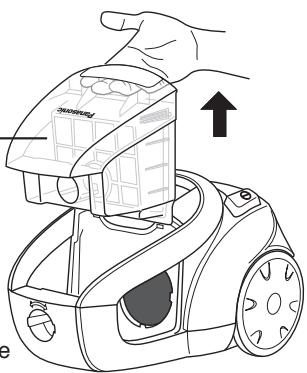
Hold the body and take out the Dust Compartment.
- Pull out the Dust Compartment while holding the appliance unit with the other hand.
Cleaning the Dust Compartment.
- Hold the Dust Compartment and place it on a clean area.
- Slide the Beater Lever 10 times (Until the filter is completely clean).
Find a plastic bag or similar item.
- Open the Dust Compartment to discard the dust.
Using Brush.
- Use Brush to clean the dust in tight areas.
- The end side of the Brush is used to clean the dust in locations that the Brush cannot reach.
- To avoid any possible damage to the Dust Compartment, do not use the end side of the Brush with force when removing dust.
Push in until a click sound is heard. Enforcez jusqu'à entendre un clic. Empuje hasta que se escuche un clic (sonido)
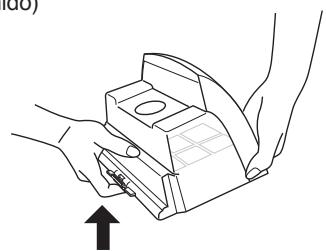
Detach the Dust Cover from Dust Compartment.
Clean the Dust Compartment surface by using a soft cloth that has been moistened with water.
Clean the Dust Cover surface by using a soft cloth that has been moistened with water.
Attach the Dust Cover to the Dust Compartment.
Re-install the Dust Compartment.
- Make sure the Dust Compartment is closed before re-installation.
- Re-install the Dust Compartment to the original location on the appliance.
Nozzle (Inspect once a month)
- Fiber waste and hair strands that accumulate in the Nozzle can reduce the suction power of appliance.
- Inspect once a month.
Using an old toothbrush or similar tools, clean any dirt or lint from the brush, roller and etc. Cut off any carpet pile and lint entangled at the roller shaft with a pair of scissors.
When particularly dirty (Nozzle only)
- Wash with water and shake firmly about five times with the ducts facing down to drain off the water.
- Leave it sitting upside down for about 12 hours to dry.
Main unit and accessories
Dust Compartment
Compartment à poussière
Compartmento de polvo
-
Wash it with water.
-
Soak the Filter in water, squeeze the water out, then hang it in a shady spot until it is completely dry.
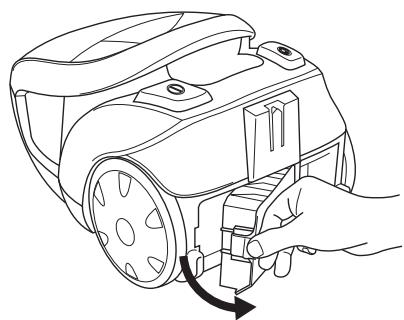
HEPA Filter is installed on the rear side of the appliance. This Filter retains any small dust particles which may be present in the expelled air. It is advisable to change the HEPA Filter every year. Do not wash the HEPA Filter to avoid damaging it. To take out the HEPA Filter, hold the Filter Case (as illustrated) and pull it out.
②
(3)
Replace the filter with a new one.
Check that the appliance is correctly plugged in and that the socket outlet is working. If the thermal cut-off device has operated, wait until it resets (approximately 60 minutes).
What to do if Supply Cord does not retract completely or Supply Cord is twisted /
If your Panasonic appliance needs service, call 1-800-211-PANA (7262) toll free to find a convenient service center. Or, visit the Panasonic website at: www.us.panasonic.com/help
DO NOT send the product to the Executive or Regional Sales offices. They are NOT equipped to make repairs.
É.-U.
For product operation and information assistance,
please visit our Support page: www.panasonic.ca/english/support
For product operation and information assistance,
please visit our Support page: www.panasonic.com/pa/home/
Limited Warranty (ONLY FOR U.S.A. AND PUERTO RICO)
Panasonic Corporation of North America
Two Riverfront Plaza, Newark, NJ 07102-5490
Panasonic Vacuum Cleaner Limited Warranty
Limited Warranty Coverage (For USA and Puerto Rico Only)
If your product does not work properly because of a defect in materials or workmanship, Panasonic Home and Health Company (referred to as "the warrantor") will, for the length of the period indicated on the chart below, which starts with the date of original purchase ("warranty period"), at its option either (a) repair your product with new or refurbished parts, (b) replace it with a new or a refurbished equivalent value product, or (c) refund your purchase price. The decision to repair, replace or refund will be made by the warrantor.
| Product or Part Name | Parts | Labor |
| Vacuum Cleaner | 1 yr. | 1 yr. |
During the "Labor" warranty period there will be no charge for labor. During the "Parts" warranty period, there will be no charge for parts.
This Limited Warranty excludes both parts and labor for the following items which require normal replacement: Disposable Dust Bag, Filters, Belts, Light Bulbs, Agitator Brushes and batteries (if supplied).
This warranty only applies to products purchased and serviced in the United States or Puerto Rico. This warranty is extended only to the original purchaser of a new product which was not sold "as is".
Carry-In or Mail in Service:
To find a service center please visit http://www.us.panasonic.com/help or call 1-800-211-PANA (7262).
IF REPAIR IS NEEDED DURING THE WARRANTY PERIOD, THE PURCHASER WILL BE REQUIRED TO FURNISH A SALES RECEIPT/PROOF OF PURCHASE INDICATING DATE OF PURCHASE, AMOUNT PAID AND PLACE OF PURCHASE. CUSTOMER WILL BE CHARGED FOR THE REPAIR OF ANY UNIT RECEIVED WITHOUT SUCH PROOF OF PURCHASE.
Limited Warranty Limits And Exclusions
This warranty ONLY COVERS failures due to defects in materials or workmanship, and DOES NOT COVER normal wear and tear or cosmetic damage. The warranty ALSO DOES NOT COVER damages which occurred in shipment, or failures which are caused by products not supplied by the warrantor, or failures which result from accidents, misuse, abuse, neglect, mishandling, misapplication, alteration, faulty installation, set-up adjustments, misadjustment of consumer controls, improper maintenance, power line surge, lightning damage, modification, introduction of sand, humidity or liquids, commercial use such as hotel, office, restaurant, or other business or rental use of the product, or service by anyone other than a Factory Service Center or other Authorized Servicer, or damage that is attributable to acts of God.
THERE ARE NO EXPRESS WARRANTY EXCEPT AS LISTED UNDER "LIMITED WARRANTY COVERAGE".
THE WARRANTYOR IS NOT LIABLE FOR INCIDENTAL OR CONSEQUENTIAL DAMAGES RESULTING FROM THE USE OF THIS PRODUCT, OR ARISING OUT OF ANY BREACH OF THIS
WARRANTY. (As examples, this excludes damages for lost time, travel to and from the servicer, loss of or damage to media or images, data or other memory or recorded content. The items listed are not exclusive, but for illustration only.)
ALL EXPRESS AND IMPLIED WARRANTY, INCLUDING THE WARRANTY OF MERCHANTABILITY, ARE LIMITED TO THE PERIOD OF THE LIMITED WARRANTY.
Some states do not allow the exclusion or limitation of incidental or consequential damages, or limitations on how long an implied warranty lasts, so the exclusions may not apply to you.
This warranty gives you specific legal rights and you may also have other rights which vary from state to state. If a problem with this product develops during or after the warranty period, you may contact your dealer or Service Center. If the problem is not handled to your satisfaction, then write to the warrantor's Consumer Affairs Department at the addresses listed for the warrantor.
PARTS AND SERVCE, WHICH ARE NOT COVERED BY THIS LIMITED WARRANTY, ARE YOUR RESPONSIBILITY.
Customer Services Directory (United States and Puerto Rico)
Obtain Product Information and Operating Assistance; locate your nearest Dealer or Service Center; purchase Parts and Accessories; or make Customer Service and Literature requests by visiting our Web Site at:
http://www.us.panasonic.com/help
or, contact us via the web at:
http://www.us.panasonic.com/contactinfo
You may also contact us directly at:
1-800-211-PANA (7262)
Monday-Friday 9am-9pm, Saturday-Sunday 10am-7pm EST
For hearing or speech impaired TTY users, TTY: 1-877-833-8855
Accessory Purchases (United States and Puerto Rico)
Purchase Parts, Accessories and Instruction Books online for all Panasonic Products by visiting our Web Site at:
http://www.pstc.panasonic.com
Or, send your request by E-mail to:
npcparts@us.panasonic.com
You may also contact us directly at:
1-800-332-5368 (Phone) 1-800-237-9080 (Fax Only)
(Monday-Friday 9am-9pm EST)
Panasonic Service and Technology Company
20421 84th Avenue South, Kent, WA 98032
(We accept Visa, MasterCard, Discover Card, American Express, and Personal Checks)
For hearing or speech impaired TTY users, TTY: 1-866-605-1277
As of Dec 2013
Panasonic Canada Inc.
5770 Ambler Drive, Mississauga, Ontario L4W 2T3
PANASONIC PRODUCT - LIMITED WARRANTY
EXCHANGE PROGRAM
Panasonic Canada Inc. warrants this product to be free from defects in material and workmanship under normal use and for a period as stated below from the date of original purchase agrees to, at its option either (a) repair your product with new or refurbished parts, (b) replace it with a new or a refurbished equivalent value product, or (c) refund your purchase price. The decision to repair, replace or refund will be made by Panasonic Canada Inc.
Vacuum Cleaner
One (1) year
This warranty is given only to the original purchaser, or the person for whom it was purchased as a gift, of a Panasonic brand product mentioned above sold by an authorized Panasonic dealer in Canada and purchased and used in Canada, which product was not sold "as is", and which product was delivered to you in new condition in the original packaging.
IN ORDER TO BE ELIGIBLE TO RECEIVE WARRANTY SERVICE HEREUNDER, A PURCHASE RECEIPT OR OTHER PROOF OF DATE OF ORIGINAL PURCHASE, SHOWING AMOUNT PAID AND PLACE OF PURCHASE IS REQUIRED
LIMITATIONS AND EXCLUSIONS
This warranty ONLY COVERS failures due to defects in materials or workmanship, and DOES NOT COVER normal wear and tear or cosmetic damage. The warranty ALSO DOES NOT COVER damages which occurred in shipment, or failures which are caused by products not supplied by Panasonic Canada Inc., or failures which result from accidents, misuse, abuse, neglect, mishandling, misapplication, alteration, faulty installation, set-up adjustments, misadjustment of consumer controls, improper maintenance, power line surge, lightning damage, modification, introduction of sand, humidity or liquids, commercial use such as hotel, office, restaurant, or other business or rental use of the product, or service by anyone other than a Authorized Servicer, or damage that is attributable to acts of God.
Parts such as disposable dust bags, filters, belts, light bulbs and agitator brushes are not covered by this warranty.
THIS EXPRESS, LIMITED WARRANTY IS IN LIEU OF ALL OTHER WARRANTYES, EXPRESS OR IMPLIED, INCLUDING ANY IMPLIED WARRANTY OF MERCHANTABILITY AND FITNESS FOR A PARTICULAR PURPOSE. IN NO EVENT WILL PANASONIC CANADA INC. BE LIABLE FOR ANY SPECIAL, INDIRECT OR CONSEQUENTIAL DAMAGES RESULTING FROM THE USE OF THIS PRODUCT OR ARISING OUT OF ANY BREACH OF ANY EXPRESS OR IMPLIED WARRANTY. (As examples, this warranty excludes damages for lost time, travel to and from the Authorized Servicer, loss of or damage to media or images, data or other memory or recorded content. This list of items is not exhaustive, but for illustration only.)
In certain instances, some jurisdictions do not allow the exclusion or limitation of incidental or consequential damages, or the exclusion of implied warranties, so the above limitations and exclusions may not be applicable. This warranty gives you specific legal rights and you may have other rights which vary depending on your province or territory.
CONTACT INFORMATION
For product information and operation assistance, please visit our Support page: www.panasonic.ca/english/support
For defective product exchange within the warranty period, please contact the original dealer.
Panasonic Canada Inc.
5770 Ambler Drive, Mississauga, Ontario L4W 2T3