Transmit 2 - Network audio player Joranalogue - Free user manual and instructions
Find the device manual for free Transmit 2 Joranalogue in PDF.


| Product Type | Network Audio Player |
| Brand | Joranalogue |
| Model | Transmit 2 |
| Dimensions (W x H x D) | 120 x 40 x 100 mm |
| Weight | 0.3 kg |
| Power Supply | 12V DC, 500mA (included) |
| Network Connectivity | Ethernet (RJ45), Wi-Fi 802.11 b/g/n |
| Audio Outputs | RCA (stereo), 3.5mm headphone jack |
| Audio Formats Supported | MP3, WAV, FLAC, AAC, WMA |
| Streaming Protocols | DLNA, UPnP, AirPlay, Spotify Connect |
| Control Options | Front panel buttons, remote control, mobile app |
| Display | 2-line OLED, 128x64 pixels |
| Frequency Response | 20 Hz - 20 kHz ±0.5 dB |
| Signal-to-Noise Ratio | >95 dB |
| Total Harmonic Distortion | <0.05% |
| Operating Temperature | 0°C to 40°C |
| Storage Temperature | -20°C to 60°C |
| Relative Humidity | 5% to 90% (non-condensing) |
| Safety Certifications | CE, FCC, RoHS |
| Warranty | 2 years limited |
Frequently Asked Questions - Transmit 2 Joranalogue
User questions about Transmit 2 Joranalogue
0 question about this device. Answer the ones you know or ask your own.
Ask a new question about this device
Download the instructions for your Network audio player in PDF format for free! Find your manual Transmit 2 - Joranalogue and take your electronic device back in hand. On this page are published all the documents necessary for the use of your device. Transmit 2 by Joranalogue.
USER MANUAL Transmit 2 Joranalogue
Whether it's in the studio or on a live stage, keeping audio interconnections free from unwanted hum and interference can be a challenge. Balanced lines are the proven solution to this problem.
Conventional balanced output solutions often rely on transformers providing galvanic isolation to mitigate the effects of ground loops. Unfortunately, these components are bulky, expensive and colour the sound (often unfavourably, especially in the low end).
Instead, Transmit 2 (or TX2 for short) takes a fully solid-state approach. Offering a stereo pair of XLR balanced outputs, it ensures that the sonic clarity of your carefully planned modular system is not lost in its interface to the outside world.
Eengineered to provide massive headroom while retaining extremely low noise and distortion, Transmit 2's circuitry incorporates low-impedance design practices, radio-frequency (RF) filtering and premium balanced drivers to provide transformer-like interconnect performance in a compact and affordable module. And thanks to the electrostatic (ESD) and phantom power discharge protection, it's rugged enough to survive the rigours of performing on the road.
Adjusting the main output level is a breeze thanks to the dual peak-responding LED meters. A high-end headphone amplifier is included as well, controlled by a separate level knob. It can deliver the voltage and current required to power practically any headphones, regardless of the impedance or driver technology. This 3.5 mm stereo socket can function as an auxiliary stereo line output or even drive small passive speakers, making Transmit 2 an all-round flexible answer to all your output needs.
CONTENTS
In the Transmit 2 box, you'll find:
- Product card, stating serial number and production batch.
■ 16-to-10-pin Eurorack power cable. - Mounting hardware: two black M3 x 6 mm hex screws, two black nylon washers and a hex key.
- And finally, the module itself, in a protective cotton bag.
If any of these items are missing, please contact your dealer or support@joranalogue.com.
CONTROLS & CONNECTIONS
1 LED METERS
The peak-responding LED bar meters give a visual indication of the output levels on the main XLR outputs. The scale ranges from -18 to +6 dB, with 0 dB corresponding to the +4 dBu nominal level common in professional audio systems.
2 HEADPHONES OUTPUT
Headphones can be plugged in here. Thanks to the extremely low output impedance and high current drive capability, Transmit 2 delivers outstanding performance driving a variety of headphones. This socket can also be used as an auxiliary stereo line output.
Take care not to plug in a mono cable, as this will short out the right channel. The headphone amplifier is short-circuit protected, so no damage will occur, but this will draw unnecessary current from the power supply.
Since the headphone amplifier is completely separated from the main XLR outputs, overloading it will not affect the main output signal integrity.
3 HEADPHONE LEVEL KNOB
Adjust the output level of the headphone amplifier using this knob. The range is -∞ to 0 dB (unity gain), so high-impedance headphones, which require relatively high voltage levels, can be driven with ease.
CAUTION: listening at high sound pressure levels (SPLs) for extended time can cause permanent hearing damage!
Always start listening with the level knob set to minimum, and slowly turn it up until you reach a comfortable level. The loudness range of the knob will vary greatly depending on the impedance and sensitivity of the headphones used.
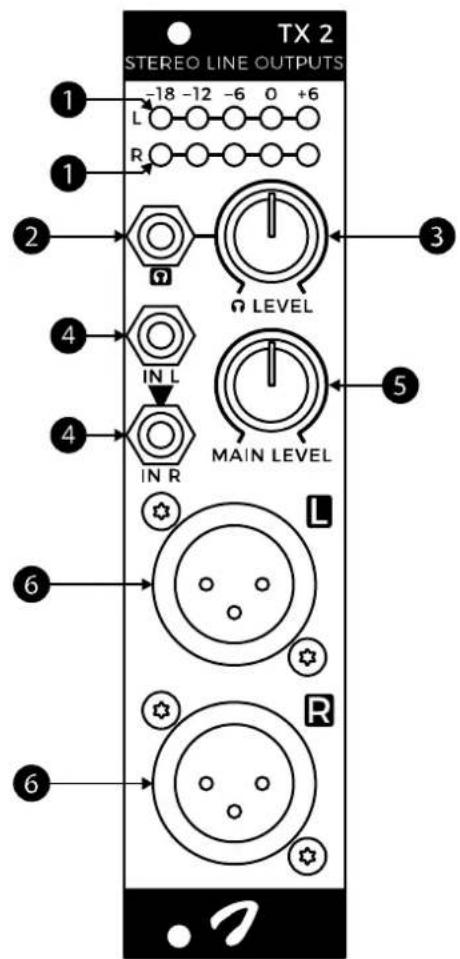
4 SIGNAL INPUTS
Connect the signals you want to send to the outside world here. Note that the inputs are AC-coupled, so any DC offset that may be present is removed.
If only the left input socket is used, its signal is sent to the right as well. In this configuration, you have two identical mono outputs which can be sent to different devices. The same signal will also be heard in both channels of the headphones.
5 MAIN LEVEL KNOB
This knob is used to set the level for both XLR outputs. The range is - to +6 dB. With standard 10 V_pp input signals, it will typically be set near the centre position to reach +4 dBu.
6 EXTERNAL OUTPUTS
These are the main balanced outputs. Make sure to connect them to line inputs: dedicated microphone inputs may also use XLR sockets, but typically have too much gain to accept line level signals.
Transmit 2 can also drive single-ended inputs if needed, for example when using XLR to mono jack cables. It will do so without the 6 dB level drop you normally get when driving a single-ended input from a balanced source, although you lose the benefits of a balanced interconnection and 6 dB of headroom.
Transmit 2 features separate signal and chassis ground planes, joined together at the front panel. This helps to avoid ground currents running through the circuitry and causing audible interference, provided the module is installed in a Eurorack enclosure which is properly earth-connected at its chassis.
In sub-optimal installations, shorting together the ground planes on the rear of the circuit board at the 'ground short' solder bridge point may improve performance.
SPECIFICATIONS
MODULE FORMAT
Doepfer A-100 'Eurorack' compatible module
3 U, 6 HP, 45 mm deep (inc. power cable)
Milled 2 mm aluminium front panel with non-erasable graphics
MAXIMUM CURRENT DRAW
+12 V: 100 mA
-12 V: 100 mA
POWER PROTECTION
Reverse polarity (MOSFET)
I/O IMPEDANCE
All inputs: 100 kΩ
Main XLR outputs: 25 Ω
Headphone output: <1 Ω
MAXIMUM HEADPHONE DRIVE CURRENT
2x 50 mA peak
OUTER DIMENSIONS
128.5 x 30 x 57 mm (H x W x D)
MASS
Module: 85 g
With packaging and accessories: 170 g
SUPPORT
As all Joranalogue Audio Design products, Transmit 2 is designed, manufactured and tested with the highest standards, to provide the performance and reliability music professionals expect.
In case your module isn't functioning as it should, make sure to check your Eurorack power supply and all connections first.
If the problem persists, contact your dealer or send an email to support@joranalogue.com. Please mention your serial number, which can be found on the product card or on the module's rear side.
REVISION HISTORY
Revision B: initial release.
With compliments to the following fine people, who helped to make Transmit 2 a reality!
Ben 'DivKid' Wilson Björn Jauss
Boris Uytterhaegen Gregory Delabelle
Jan D'Hooghe Jens Van Daele
Everyone at Wired Electronics
Transmit 2 User Manual version 2019-03-07
21 ^st Century Analogue Synthesis—Made in Belgium
© 2019
Joranologue AUDIO DESIGN
info@joranalogue.com https://joranalogue.com/
Brand : Joranalogue
Model : Transmit 2
Category : Network audio player