V-Panel V24R-C - Monitor Crestron - Free user manual and instructions
Find the device manual for free V-Panel V24R-C Crestron in PDF.


User questions about V-Panel V24R-C Crestron
0 question about this device. Answer the ones you know or ask your own.
Ask a new question about this device
Download the instructions for your Monitor in PDF format for free! Find your manual V-Panel V24R-C - Crestron and take your electronic device back in hand. On this page are published all the documents necessary for the use of your device. V-Panel V24R-C by Crestron.
USER MANUAL V-Panel V24R-C Crestron
Regulatory Compliance
As of the date of manufacture, the V24R-C has been tested and found to comply with specifications for CE marking and standards per EMC and Radiocommunications Compliance Labelling.

Federal Communications Commission (FCC) Compliance Statement
This device complies with part 15 of the FCC Rules. Operation is subject to the following conditions: (1) This device may not cause harmful interference and (2) this device must accept any interference received, including interference that may cause undesired operation.
CAUTION: Changes or modifications not expressly approved by the manufacturer responsible for compliance could void the user's authority to operate the equipment.
NOTE: This equipment has been tested and found to comply with the limits for a Class B digital device, pursuant to part 15 of the FCC Rules. These limits are designed to provide reasonable protection against harmful interference in a residential installation. This equipment generates, uses and can radiate radio frequency energy and, if not installed and used in accordance with the instructions, may cause harmful interference to radio communications. However, there is no guarantee that interference will not occur in a particular installation. If this equipment does cause harmful interference to radio or television reception, which can be determined by turning the equipment off and on, the user is encouraged to try to correct the interference by one or more of the following measures:
• Reorient or relocate the receiving antenna
- Increase the separation between the equipment and receiver
- Connect the equipment into an outlet on a circuit different from that to which the receiver is connected
- Consult the dealer or an experienced radio/TV technician for help
Industry Canada (IC) Compliance Statement
This Class B digital apparatus complies with Canadian ICES-003.
The specific patents that cover Crestron products are listed at patents.crestron.com.
Crestron, the Crestron logo, Crestron Toolbox, Core 3, Core 3 UI, DigitalMedia, DigitalMedia 8G, DigitalMedia 8G+, DM, DM 8G+, SmartObjects, TouchPoint and V-Panel are either trademarks or registered trademarks of Crestron Electronics, Inc. in the United States and/or other countries. Acrobat, Adobe and Flash are either trademarks or registered trademarks of Adobe Systems Incorporated in the United States and/or other countries. Blu-ray Disc is a registered trademark of the Blu-ray Disc Association (BDA) in the United States and/or other countries. YouTube is either a trademark or registered trademark of Google Inc. in the United States and/or other countries. HDMI is either a trademark or registered trademark of HDMI Licensing LLC in the United States and/or other countries. Excel, Internet Explorer, Microsoft, PowerPoint and Windows Media are either trademarks or registered trademarks of Microsoft Corporation in the United States and/or other countries. Netflix is either a trademark or registered trademark of Netflix, Inc. in the United States and/or other countries. Java is a trademark or registered trademark of Oracle America, Inc. in the United States and/or other countries. Other trademarks and trade names may be used in this document to refer to either the entities claiming the marks and names or their products. Crestron disclaims any proprietary interest in the marks and names of others.
©2012 Crestron Electronics, Inc.
Contents
V-Panel™ 24"HD Touch Screen Displays: V24R-C 1
Introduction ...... 1
Features and Functions....1
Applications....5
Specifications 6
Physical Description....9
Setup....17
Configuring the V-Panel....17
Hardware Hookup 17
Recommended Cleaning....17
Resources....18
Reference Documents....18
Further Inquiries....18
Future Updates 18
Return and Warranty Policies....19
Merchandise Returns / Repair Service 19
Crestron Limited Warranty....19
V-Panel™ 24"HD
Touch Screen Displays: V24R-C
Introduction
The V-Panel™ V24R-C merges high definition Crestron® touch screen control and HD video in one stylish and versatile 24" touch screen display. Its generous WUXGA screen delivers stunning video performance even at extreme viewing angles, providing an exceptional HDTV or computer display solution with integrated touch screen functionality powered by the groundbreaking Core 3 UI™.
The V24R-C suits a broad range of residential and commercial applications, excelling as a home controller and television display for a luxury kitchen or bedroom, as a presentation control panel for a university lecture hall or as a video control surface for corporate and government command centers. The choice of flush in-wall, lectern or VESA mounting affords a clean, modern appearance for any custom installation.
The V24R-C replaces separate touch screens, TV displays and computer monitors with one gorgeous device. Whether mounted flush in a wall or on a wall bracket, desk stand or articulating arm, its streamlined design allows it to be installed virtually anywhere. Complete connectivity is provided through a simple, one wire interface that allows for long wire runs while affording a clean appearance. Together with a DGE-2 Digital Graphics Engine (sold separately), the V24R-C delivers a powerful and elegant touch screen control solution featuring advanced Core 3 UI touch screen graphics, dual window HD video, high performance H.264 streaming video, onboard multimedia and Web browsing and built-in annotation.
Features and Functions
- High definition 24" (610 mm) widescreen touch display
• 1920 x 1200 WUXGA display resolution
• High definition 24-bit graphics powered by Core 3 ^TM
• High performance S-PVA display technology - Rich, accurate color reproduction
• High speed 6 ms response
• High contrast ratio, high aperture, high color gamut
• Ultra-wide 178 degree viewing angles
(Continued on following page)
Features and Functions
(Continued)
- Fully HDCP compliant
- Digital Graphics Engine (DGE-2) installs up to 330 feet (\~101 meters) away ^1,2
• Also works with DVPHD and DVPHD-GB Digital Video Processors ^1,2,3 - Single wire DigitalMedia 8G+TM connectivity
- Compatible with DigitalMedia switchers and transmitters
• Built-in HD scaler enables full screen video without a DGE
• USB keyboard/mouse port
• VESA 100 x 200 mounting option
• Stylish flush wall and lectern mount options
• Available in white or black
Beyond High Definition Video
With a display resolution of 1920 x 1200, the V24R-C provides substantial real estate for all kinds of custom controls and icons with true feedback and real time status display, full motion video windows and advanced navigation of digital media servers, tuners and other devices. The 16:10 aspect ratio allows a full HD 1080p video image to appear full size along with a custom control bar, providing immediate access to AV and lighting controls, clock and weather widgets, scrolling text and other objects while simultaneously watching TV or viewing a video camera.
The V24R-C employs high performance S-PVA display technology to deliver an optimum HD experience with rich, accurate color reproduction, high speed response and excellent black depth and contrast. Ultra-wide 178 degree horizontal and vertical viewing angles ensure consistent picture quality on and off axis, alleviating the need to be directly in front of the screen when reaching for an on-screen control or just catching the morning news.
Digital Graphics Engine
For a typical control application using the V24R-C, a DGE-2 Digital Graphics Engine (sold separately) is also required. The DGE-2 can be installed at the central equipment location, dramatically reducing all the wiring from the head end AV sources, switchers and the control network. A single CAT5e or DigitalMedia 8G ^TM cable connects the V24R-C to the DGE-2 over a wiring distance of up to 330 feet (\~101 meters), affording exceptional flexibility while minimizing wiring cost and complexity. ^2
- Item(s) sold separately.
- The V24R-C features a DM 8G+TM type input. Connection to a DGE-2 or DVPHD requires a DM 8G+ transmitter or DM® switcher (all sold separately). For wiring cable up to 330 feet (\~101 meters) in length, use Crestron DM-CBL-8G DigitalMedia 8G cable or generic CAT5e (or better) UTP or STP. Shielded cable and connectors are recommended to safeguard against unpredictable environmental electrical noise, which may impact performance. Refer to the latest version of the Crestron DigitalMedia Design Guide (Doc. 4546) for DM system design guidelines, which is available from the Crestron Web site (www.crestron.com/dmresources). The V24R-C and V24RL-C models each include (1) V-CBL-SC6 six foot (\~1.8 meter) V-Cable and V24-IMCW-C wall mount interface module. The V24R-WALL-C model includes no cable or interface module.
- An Ethernet enabled control system and DM 8G+ interface are required for use with a DVPHD. Be advised, DVPIID does not support streaming media, Web browser or other embedded PC functionality.
Powered by Core 3
Crestron touch screens have always offered the ultimate user experience. With Core 3 UI, they also deliver the ultimate value, enabling the creation of dynamically rich user interfaces with incredible efficiency and unparalleled functionality. Using Core 3 UI, programmers can swiftly integrate fluid gesture driven controls, animated feedback, metadata, embedded apps and full motion video for a deeply engaging and ultra-intuitive touch screen experience.
Some Core 3 UI enhancements:
- Cool looking graphical buttons, sliders, knobs and gauges are intuitive and fun to use.
- Kinetic effects enhance the feeling of realism with lists and toolbars that scroll with momentum at the flick of a fingertip.
- Drag and drop objects snap into place offering an easy way to assign AV assets to rooms.
- Desktop widgets personalize the touch screen with animated clocks, calendars, weather, news and other information.
- Customizable themes allow a completely different look and feel for every user, event or season.
- Fully developed SmartObjects™ enable sophisticated control over complex devices with minimal programming.
- Smart resizing scales objects perfectly and instantly for faster GUI development, even across different sized touch screens.
Embedded PC Applications
In combination with a DGE-2 graphics engine, the V24R-C provides everything you need to enjoy online music and videos, browse the Internet and even review digital documents without a separate computer. With Microsoft ^® Internet Explorer ^® embedded, you have full access to the entire World Wide Web including sites that use Flash ^® or Java ^™ . Windows Media ^® Player ensures broad compatibility for playing most types of digital media. Adobe ^® Acrobat ^® Reader and Microsoft PowerPoint ^® , Word and Excel ^® document viewers complete the online experience, allowing you to download and view documents and presentations.
In addition, VNC Viewer support delivers enhanced cross-platform interaction with computers over the network or Internet, allowing remote access and control of desktop applications to unleash a host of possibilities for system integration and multimedia presentation.
HD Streaming Video
High definition streaming video capability makes it possible to view security cameras and other video sources over the network right on the touch screen. Native support for H.264 and MJPEG formats allows the V24R-C and DGE-2 (sold separately) to display live video images from Web cameras and servers such as the Crestron CEN-NVS200 Network Video Streamer (sold separately). Also, through the embedded Web browser and media player, they support a wide variety of other streaming and downloadable video formats, enabling access to all kinds of content from media servers and Web sites like YouTube® and Netflix®*.
HDMI and Analog Video
In addition to handling streaming video, the V24R-C can simultaneously display up to two fully scalable full motion video windows, each supporting HD or SD video and high resolution computer signals from external sources. All connections are made at the DGE-2 using conventional HDMI ^® , VGA and BNC type cables.
HDCP Support
Industry leading support for HDCP (High-bandwidth Digital Content Protection) ensures seamless compatibility with content protected DVD, Blu-ray Disc ^36 , digital HDTV and multimedia computer sources.
Keyboard/Mouse Options
On-screen keyboard and mouse capabilities enable complete control of the embedded Web browser and can also be used to control computers running TouchPoint™ Virtual Mouse & Keyboard Software (VMK-WIN). A USB port is also provided on the V24R-C, allowing for the connection of a physical keyboard and mouse.
Real Time Annotation
Whether conducting a high level boardroom meeting, training seminar or watching sports in your home theater, annotation helps put the fine point on any presentation. Built-in annotation provides the ability to illustrate your thoughts on the fly, letting you draw and write over high definition video and computer images and sketch out ideas on a whiteboard screen, without leaving the podium or your favorite chair while other viewers watch on the big screen.
Remote Annotation
Remote annotation capability allows multiple touch screen users to draw with their fingertips over the same video image or whiteboard screen, enabling enhanced interaction between several participants in a courtroom, classroom or council chamber.
Presentation Output
Through an HDMI or DigitalMedia connection at the DGE-2, the V24R-C screen image can be sent to additional display devices, allowing videos, PowerPoint presentations, annotation and other on-screen media to be shared with a live audience. Audio can also be enabled, using powered speakers or a larger audio system connected to the DGE-2's HDMI, DigitalMedia or analog audio outputs.
DigitalMedia
DigitalMedia (DM ^® ) connectivity opens up new ways to configure a touch screen control system. For instance, using a DM switcher such as the DM-MD8X8 (sold separately), multiple V24R-C touch screens can be connected to a single DGE-2, providing a simple, cost effective way for multiple participants to view and control the same graphical interface. DigitalMedia also provides a versatile means for distributing touch screen content to additional displays and sound systems to serve a larger audience.
The V24R-C features a DM 8G+TM type input, supporting the connection to a DGE-2 Digital Graphics Engine (sold separately) via a DM 8G+ transmitter (DM-TX-201-C or equivalent, sold separately). It can also connect directly to any DM switcher equipped with a DM 8G+ output. A single CAT5e or DigitalMedia 8G cable carries all video, audio, Ethernet, USB, control and power signals up to 330 feet (\~101 meters). ^1
DVPHD Integration
In addition to the DGE-2, V-Panel is also compatible with the award winning DVPHD High Definition Digital Video Processor (sold separately), enabling the display of up to eight simultaneous video windows along with HD touch screen graphics and annotation. The DVPHD supports high definition video and computer signals from a wide variety of digital and analog sources. Its DVI output connects to the V24R-C via a DM 8G+ transmitter or DigitalMedia™ switcher. ^1,2
Applications
The following diagram shows a V24R-C in a typical application.
V24R-C in a Typical Application
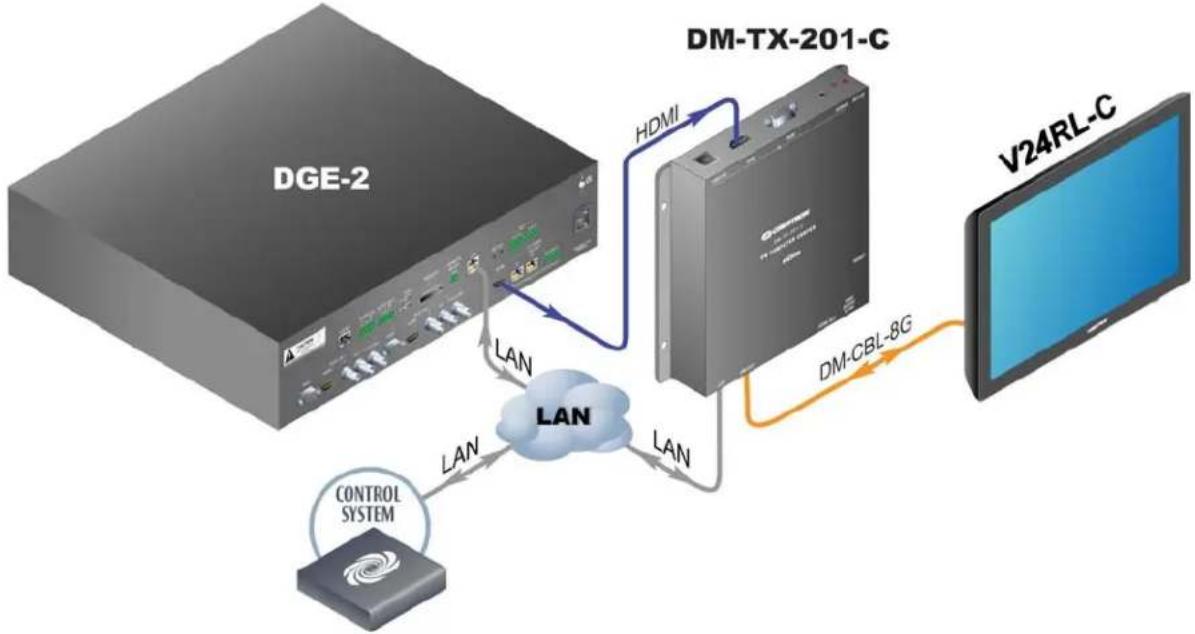
flowchart
graph TD
    A["DGE-2"] -->|LAN| B["DM-TX-201-C"]
    B -->|HDMI| C["V24RL-C"]
    B -->|LAN| D["CONTROL SYSTEM"]
    D -->|LAN| B
    B -->|LAN| E["DM-CBL-8G"]
- The V24R-C features a DM 8G+TM type input. Connection to a DGE-2 or DVPHD requires a DM 8G+ transmitter or DM switcher (all sold separately). For wiring cable up to 330 feet (\~101 meters) in length, use Crestron DM-CBL-8G DigitalMedia 8G cable or generic CAT5c (or better) UTP or STP. Shielded cable and connectors are recommended to safeguard against unpredictable environmental electrical noise, which may impact performance. Refer to the latest version of the Crestron DigitalMedia Design Guide (Doc. 4546) for DM system design guidelines. The V24R-C and V24RL-C models each include (1) V-CBL-SC6 six foot (\~1.8 meter) V-Cable and V24-IMCW-C wall mount interface module. The V24R-WALL-C model includes no cable or interface module.
- An Ethernet enabled control system and DM 8G- interface are required for use with a DVPHD. Be advised, DVPHD does not support streaming media. Web browser or other embedded PC functionality.
Specifications
Specifications for the V24R-C are listed in the following table.
V24R-C Specifications
| SPECIFICATION | DETAILS |
| Touch Screen Display | |
| Display Type TFT Active Matrix Color LCD | |
| Size 24 inch (610 mm) diagonal | |
| Aspect Ratio 16:10 WUXGA | |
| Resolution 1920 x 1200 pixels | |
| Brightness 300 nits | |
| Contrast 1000:1 | |
| Response Time 6 ms G to G | |
| Color Depth 24-bit, 16.7 million colors | |
| Illumination Backlit fluorescent | |
| Viewing Angle ±89° horizontal, ±89° vertical | |
| Touch Screen Resistive | |
| Communications | |
| DigitalMedia | DM 8G+, HDCP, EDID, 100 Mbps Ethernet |
| USB | USB host, supports USB HID (Human Interface Device) class devices |
| Video | Refer to DGE-2 or DVPHD specifications for additional information. They are available in the latest version of the DGE-2 Digital Graphics Engine Operations Guide (Doc. 6809) and the DVPHD High Definition Digital Video Processor Operations Guide (Doc. 6545), respectively. |
| Input Signal Type | DM 8G+ (DigitalMedia over one CAT5e twisted pair copper) |
| Input Resolutions | 1920 x 1200 @ 60 Hz native or any other progressive resolution up to 1920 x 1200 @ 60 Hz |
| Power Requirements | |
| Power Pack | 3.7 Amps @ 24 Volts DC100-240 Volt AC, 50/60 Hz power pack included1 |
| Environmental | |
| Temperature | 41° to 113° F (5° to 45° C) |
| Humidity | 10% to 90% RH (non-condensing) |
| Heat Dissipation | 291 BTU/Hr |
| Enclosure | |
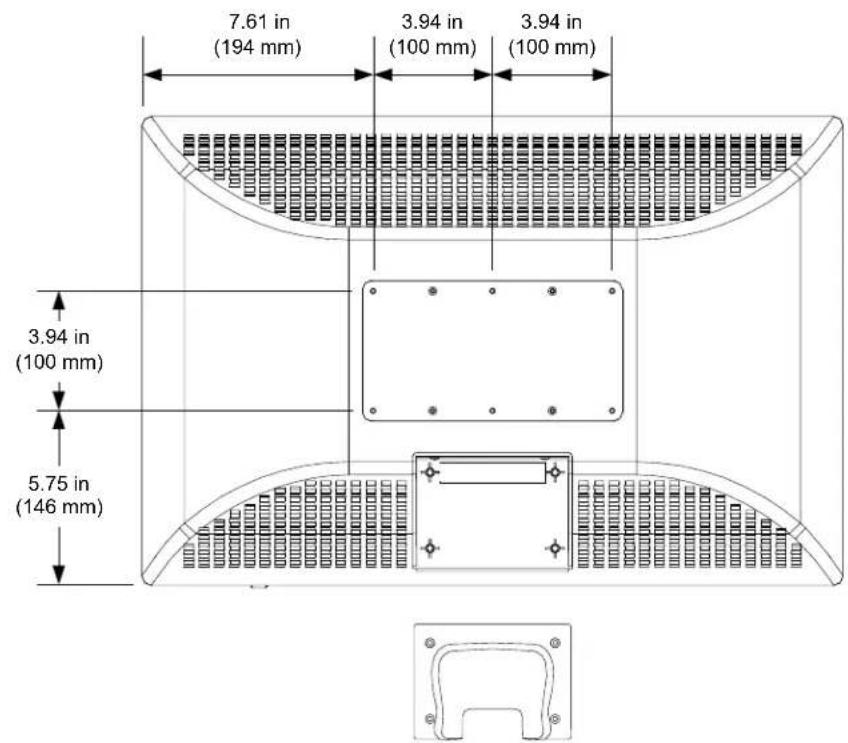
| V24R-C | Plastic case, VESA 100 x 200 mm mountable |
| V24R-WALL-C | Includes metal rear enclosure with plastic front bezel, additional mounting accessory required2,3 |
| V24RL-C | Includes metal rear enclosure with plastic front bezel, fan cooled, additional mounting accessory recommended2,3 |
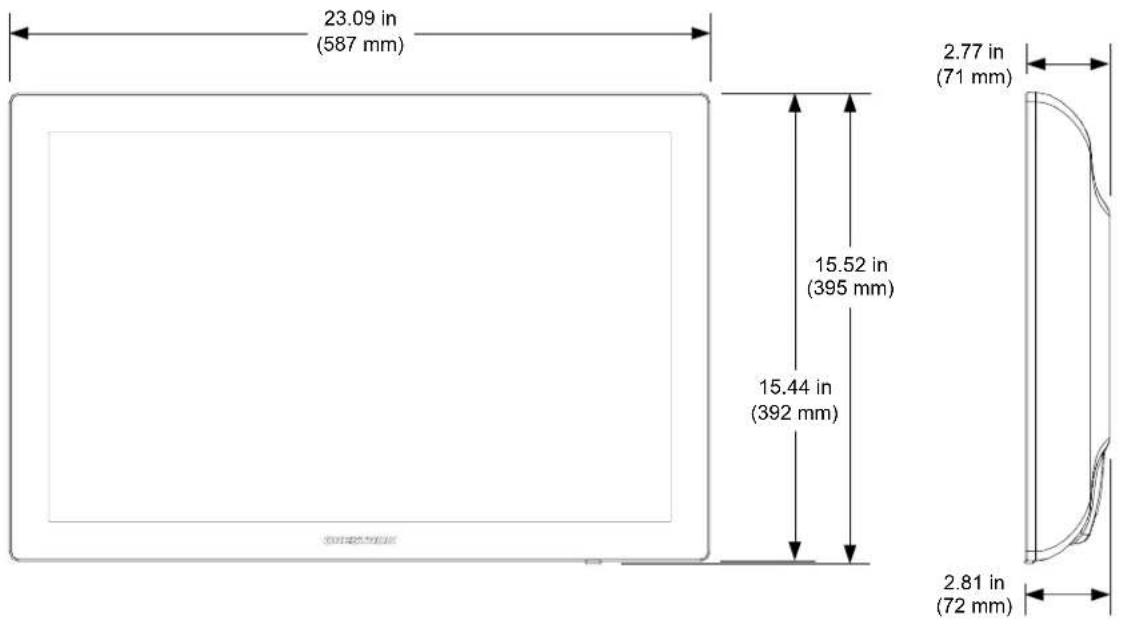
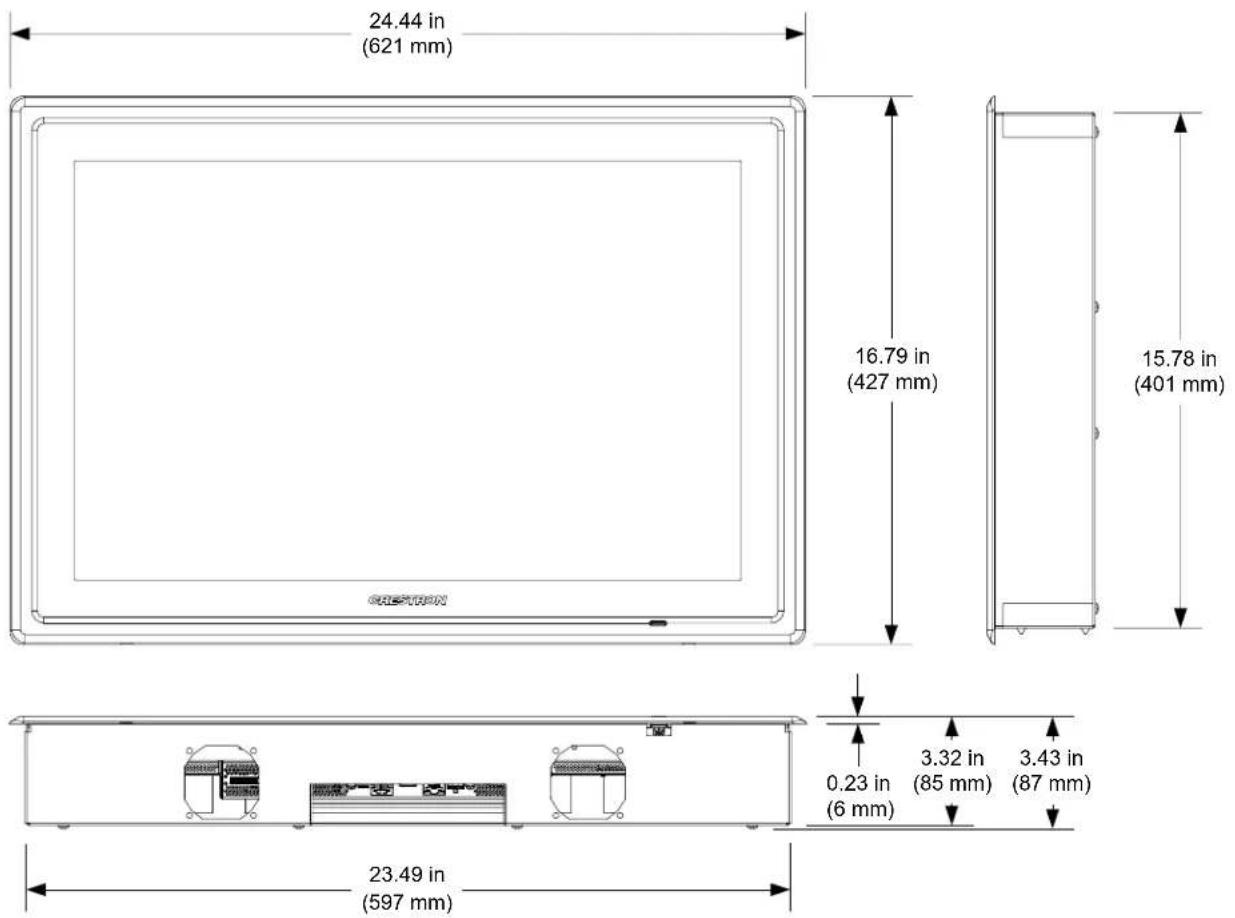
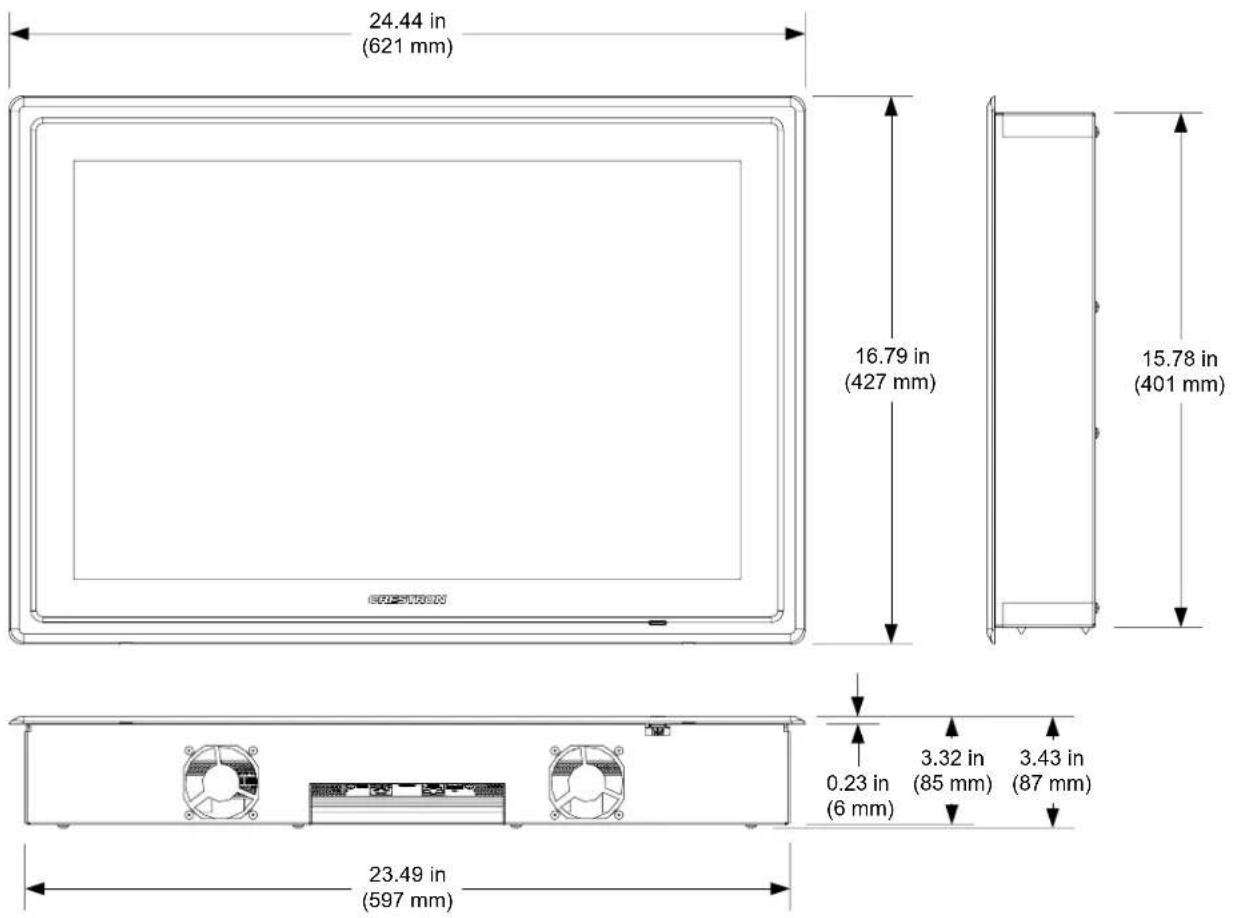
| DimensionsV24R-CHeight 15.52 in (395 mm)Width 23.09 in (587 mm)Depth 2.81 in (72 mm)V24R-WALL-CHeight 16.79 in (427 mm)Width 24.44 in (621 mm)Depth 3.43 in (87 mm)V24RL-CHeight 16.79 in (427 mm)Width 24.44 in (621 mm)Depth 3.43 in (87 mm) | |
| WeightV24R-C 21.5 lbs (9.8 kg)V24R-WALL-C 24.0 lbs (10.9 kg)V24RL-C 24.6 lbs (11.2 kg) | |
| Available ModelsV24R-C-BV24R-C-WV24R-WALL-C-BV24R-WALL-C-WV24RL-C-BV24RL-C-W | V-Panel 24" VESA Mount HD Touch Screen Display, DM 8G+, BlackV-Panel 24" VESA Mount HD Touch Screen Display, DM 8G+, WhiteV-Panel 24" Wall Mount HD Touch Screen Display, DM 8G+, BlackV-Panel 24" Wall Mount HD Touch Screen Display, DM 8G+, WhiteV-Panel 24" Lectern Mount HD Touch Screen Display, DM 8G+, BlackV-Panel 24" Lectern Mount HD Touch Screen Display, DM 8G+, White |
| Included AccessoriesPower PackV-CBL-S6CV24-IMCW-C | 3.7 Amps @ 24 Volts DC;100-240 Volt AC, 50/60 Hz, UniversalV-Cable Siamese Cable, DM-8G+, 6 feet (~1.8 meters) (included with V24R-C and V24RL-C models only)V-Panel Interface Module for V-24R-C,DM 8G+(included with V24R-C and V24RL-C models only) |
| Available Accessories | |
| BB-V24 | Pre-Construction Wall Mount Back Box for V24R-WALL-C |
| BBI-V24 | Wall Mount Back Box for V24R-WALL-C – International Version |
| DGE-2 | Digital Graphics Engine with HDMI and DigitalMedia CAT Connectivity (Requires DM-TX-201-C) |
| DM-8G-CONN DigitalMedia 8G Cable Connector | |
| DM-8G-CRIMP Crimp Tool for DM-8G-CONN | |
| DM-CBL-8G DigitalMedia 8G Cable | |
| DM-TX-201-C DigitalMedia 8G+ Transmitter 201 | |
| PMK-V24 | Pre-Construction Wall or Lectern Mounting Kit for V24R-WALL-C and V24RL-C |
| V-CBL-SC V-Cable Siamese Cables, DM 8G+ | |
| V24-IMCW-C | V-Panel Interface Module for V24R-C, DM 8G+ |
- V24R-C and V24RL-C models include power pack, which connects to the included V24-IMCW-C interface module. V24R-WALL-C models include power pack, which connects directly to touch screen.
- Item(s) sold separately.
- V24R-WALL-C model must be installed in an upright position with the screen perpendicular to the floor. V24RL-C model may be mounted in an angled lectern or table top. Allow adequate space at the top and bottom of the rear housing for proper ventilation.
Physical Description
This section provides information on the connections, controls and indicators available on your V24R-C.
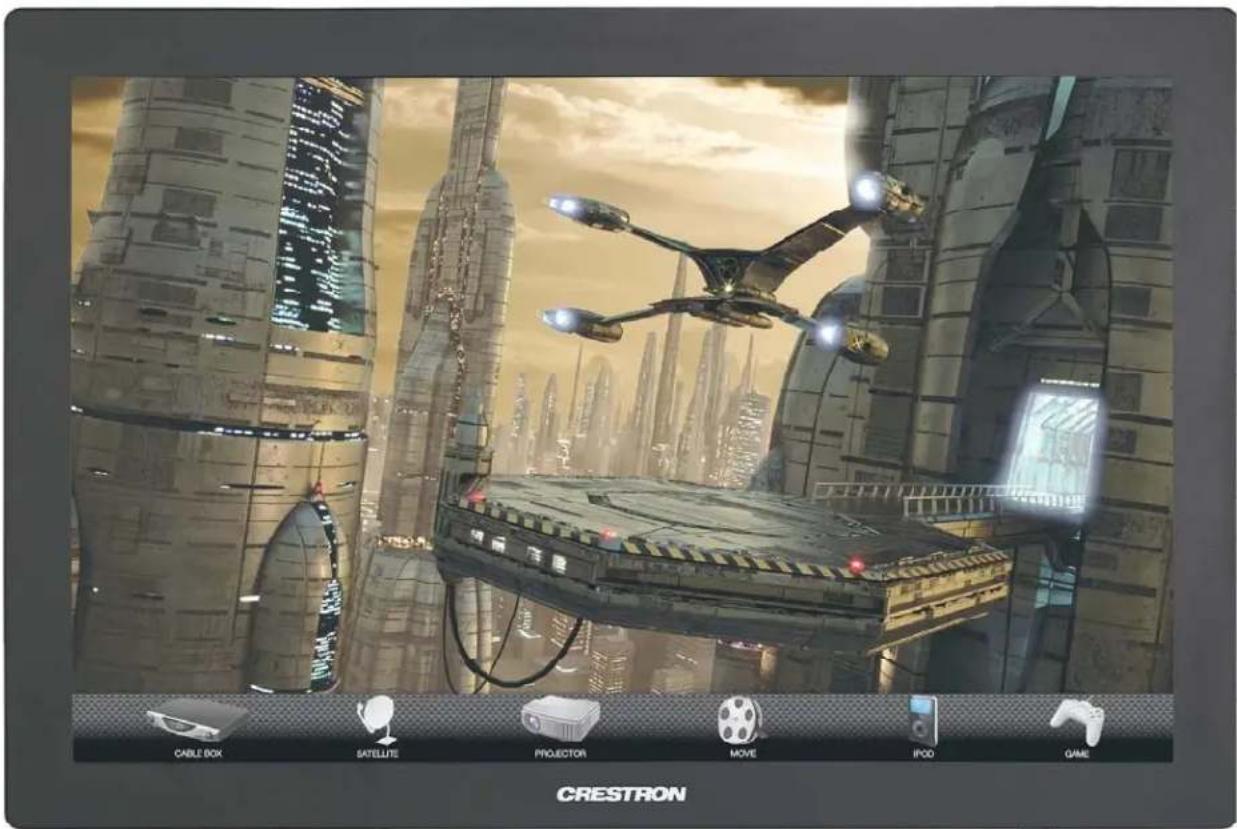
V24R-C Physical View (Shown in Black)
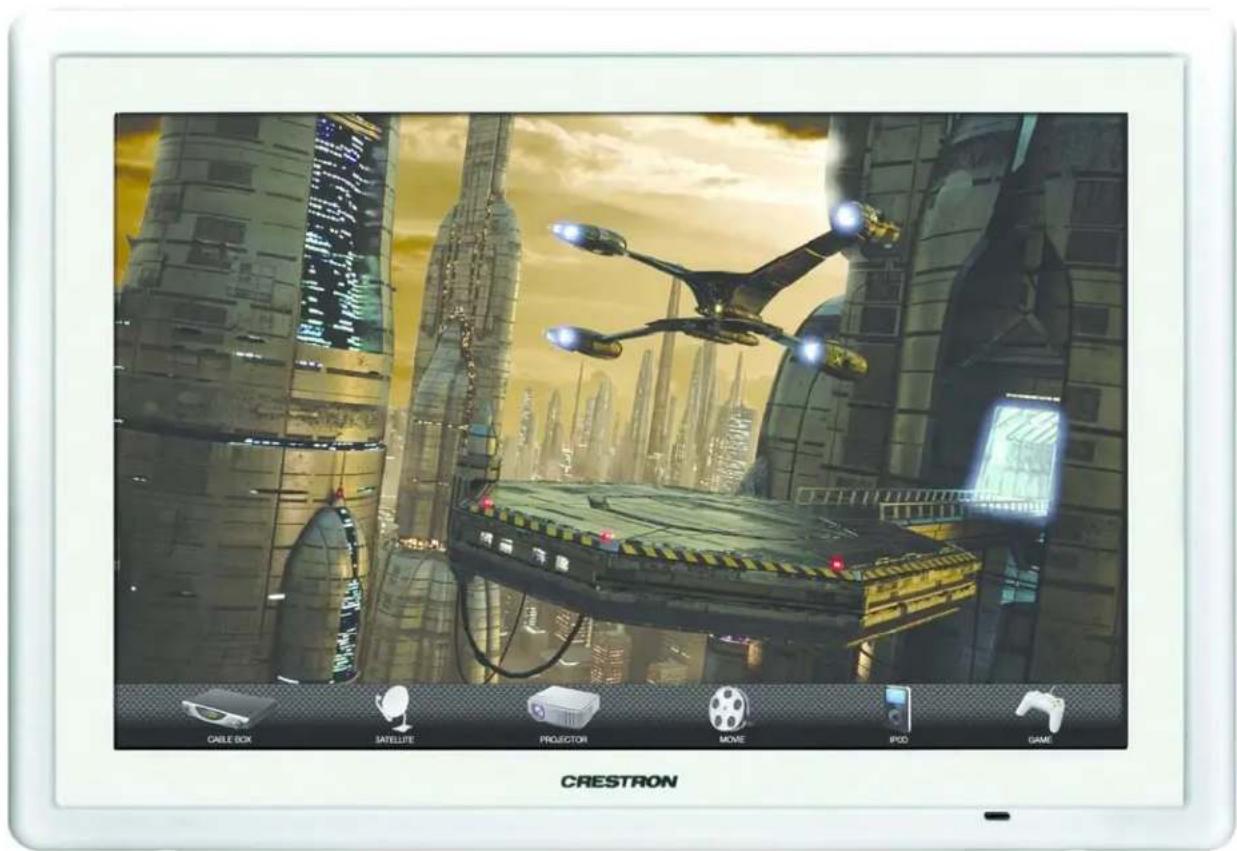
V24RL-C Physical View (Shown in White - V24R-WALL-C is Physically Identical)
V24R-C Physical View (Rear Showing Connector Ports)
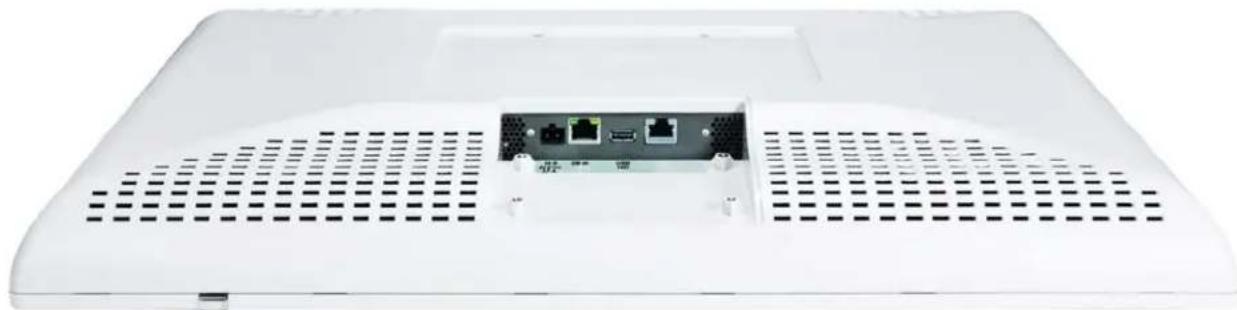
natural_image
Front view of a white electronic device rear panel with ventilation grilles and internal ports (no visible text or symbols)V24R-C Overall Dimensions (Front and Side Views)
V24R-C Overall Dimensions (Rear View)
NOTE: In the illustration above, the V24R-C is shown with the rear cover removed. When making cable connections to the V24R-C, it will be necessary to remove the cover by first removing the four screws holding it in place. Replace the cover when connections have been made.
V24R-WALL-C Overall Dimensions (Front View - Without Bezel)
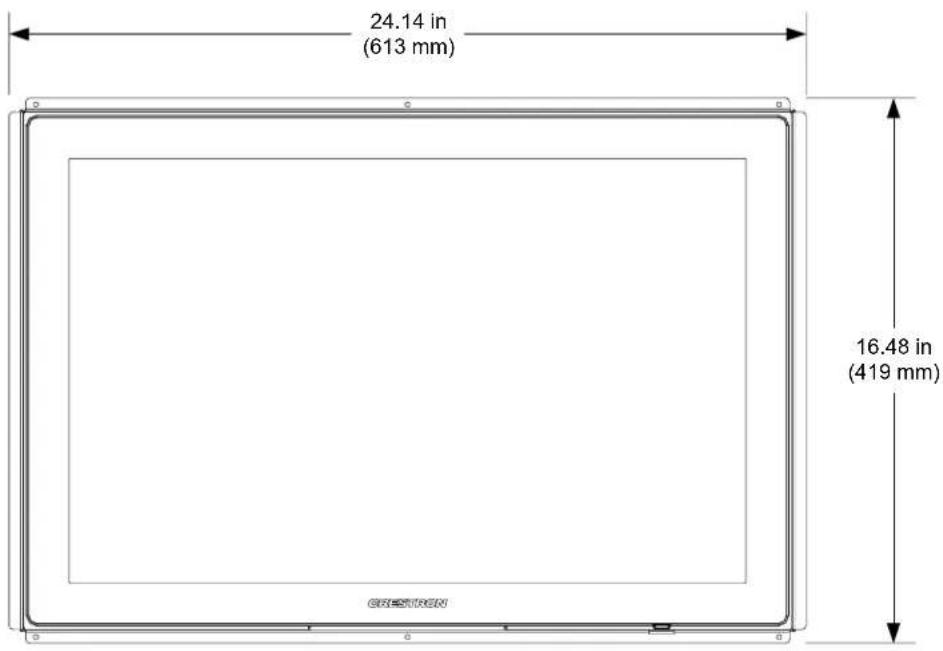
V24R-WALL-C Overall Dimensions (Front, Side and Bottom Views - With Bezel)
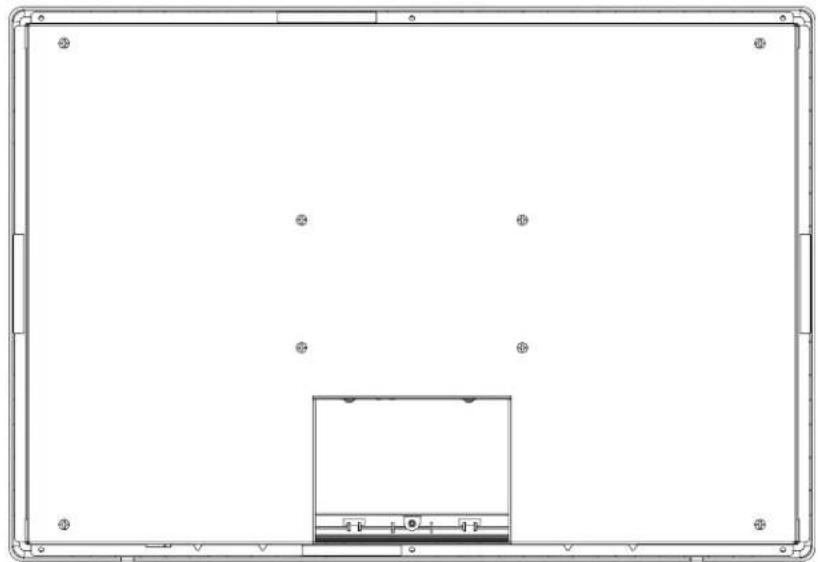
V24R-WALL-C (Rear View)
natural_image
Front view of a rectangular frame with a small central rectangle and eight corner markers (no text or symbols)V24RL-C Overall Dimensions (Front, Side and Bottom Views)
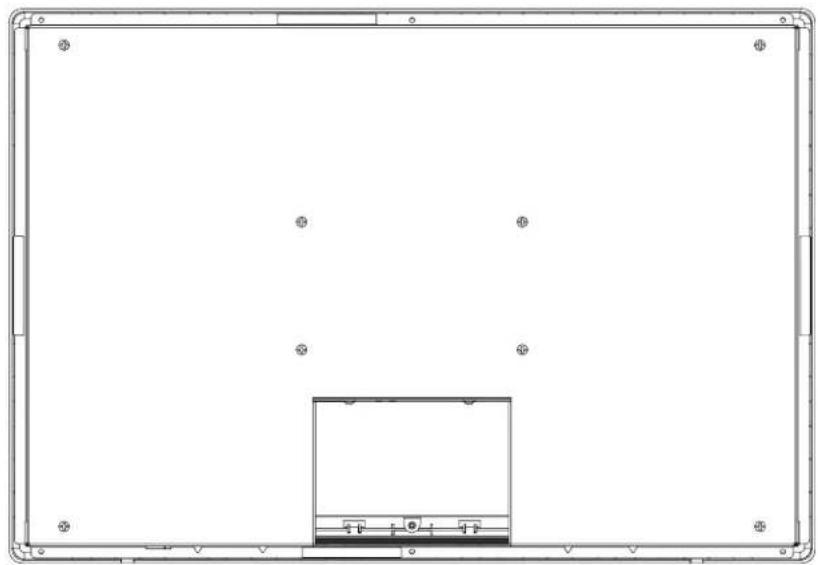
V24RL-C (Rear View)
natural_image
Pure technical diagram of a rectangular frame with a central rectangular component and scattered circular features (no text or symbols)V24R-C Connectors (V24R-C Shown)
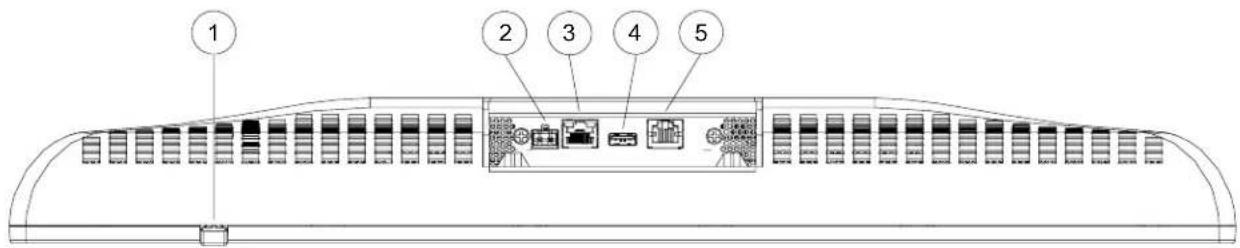
Connectors, Controls & Indicators
| # | CONNECTORS ^1 ,CONTROLS &INDICATORS | DESCRIPTION |
| 1 | Hard | Key(1) Programmable push button, illuminates green to indicate power is on, also reboots the DGE if held for five seconds |
| 2 | 24VDC 3.7A | (1) 2-pin 5 mm detachable terminal block, 24 Volt DC power input ^2 (power pack included) |
| 3 | DM 8G INGreen AmberLED LED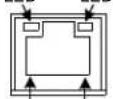 Pin 8 Pin 1 Pin 8 Pin 1 | (1) 8-pin RJ-45 female, shielded DM 8G+ input ^2,3,4,5,6 Green LED indicates DM link status, Solid amber LED indicates HDCP video, Blinking amber LED indicates non-HDCP video |
| 4 | USB HID | (1) USB Type A female; USB 1.1 host port for connection of a mouse/keyboard or other HID (Human Interface Device) compliant device |
| 5 Unused This port is not used | ||
- An interface connector for the 24 VDC port is provided with the unit.
- On V24R-C and V24RL-C models, connects to V24-IMCW-C interface module via included V-CBL-SC cable.
- On V24R-WALL-C model, connects to DM 8G+ output of a DM transmitter or switcher via CAT5c or Crestron CM-CBL-8G.
- The V24R-C features a DM 8G+TM type input. Connection to a DGE-2 or DVPHD requires a DM 8G+ transmitter or DM switcher (all sold separately). For wiring cable up to 330 feet (\~101 meters) in length, use Crestron DM-CBL-8G DigitalMedia 8G cable or generic CAT5e (or better) UTP or STP. Shielded cable and connectors are recommended to safeguard against unpredictable environmental electrical noise, which may impact performance. Refer to the latest version of the Crestron DigitalMedia Design Guide (Doc. 4546) for DM system design guidelines. The V24R-C and V24RL-C models each include (1) V-CBL-SC6 six foot (\~1.8 meter) V-Cable and V24-IMCW-C wall mount interface module. The V24R-WALL-C model includes no cable or interface module.
-
To determine which is pin 1 on the cable, hold the cable so the end of the eight pin modular plug is facing away from you, with the clip down and copper side up. Pin 1 is on the far left.
-
Refer to the following table for the DM 8G IN connector pinouts.
DM 8G IN Port
| PIN # WIRE COLOR PIN # | WIRE COLOR | ||
| 1 Orange/White 5 Blue/White | |||
| 2 Orange 6 Green | |||
| 3 Green/White | 7 | Brown/White | |
| 4 Blue 8 Brown | |||
Setup
Configuring the V-Panel
To configure the V24R-C, use Crestron Toolbox™ to set up the V24R-C's IP table entry. Then assign the address of the device with which the V24R-C is communicating (e.g., DGE-2) using device extenders that are programmed into SIMPL Windows. For more information on device extenders, refer to the SIMPL Windows help file.
Hardware Hookup
Ventilation
The V24R-C should be used in a well-ventilated area. To prevent overheating, do not operate this product in an area that exceeds the environmental temperature range listed in the table of specifications.
Connect the Device
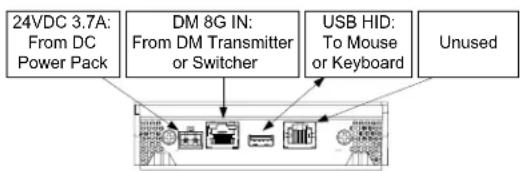
Make the necessary connections as called out in the illustration that follows this paragraph. Apply power after all connections have been made. When making connections to the V24R-C, use Crestron power supplies for Crestron equipment.
Hardware Connections for the V24R-C
flowchart
graph TD
    A["24VDC 3.7A: From DC Power Pack"] --> B["DM 8G IN: From DM Transmitter or Switcher"]
    B --> C["USB HID: To Mouse or Keyboard"]
    C --> D["Unused"]
NOTE: The V24R-C features a DM 8G+ type input. Connection to a DGE-2 or DVPHD requires a DM 8G+ transmitter or DM switcher (all sold separately). For wiring cable up to 330 feet (\~101 meters) in length, use Crestron DM-CBL-8G DigitalMedia 8G cable or generic CAT5e (or better) UTP or STP. Shielded cable and connectors are recommended to safeguard against unpredictable environmental electrical noise, which may impact performance. The V24R-C and V24RL-C models each include (1) V-CBL-SC6 six foot (\~1.8 meter) V-Cable and V24-IMCW-C wall mount interface module. The V24R-WALL-C model includes no cable or interface module.
NOTE: It is normal for the V24R-C to feel warm during extended use.
NOTE: An Ethernet enabled control system is required for use with a DVPHD. Be advised, DVPHD does not support streaming media, Web browser or other embedded PC functionality.
Recommended Cleaning
Keep the surface of the touch screen free of dirt, dust or other materials that could degrade optical properties. Long-term contact with abrasive materials can scratch the surface, which may detrimentally affect image quality.
For best cleaning results, use a clean, damp, non-abrasive cloth with any commercially available non-ammonia glass cleaner. Bezels may not provide a complete watertight seal. Therefore, apply cleaning solution to the cloth rather than the surface of the touch screen. Wipe touch screen clean and avoid getting moisture beneath the bezel.
Resources
Reference Documents
The latest version of all documents mentioned within the guide can be obtained from the Crestron Web site.
List of Related Reference Documents
| DOCUMENT TITLE |
| Crestron DigitalMedia Design Guide (www.crestron.com/dmresources) |
| DGE-2 Digital Graphics Engine (www.crestron.com/manuals) |
| DVPHD High Definition Digital Video Processor (www.crestron.com/manuals) |
Further Inquiries
If you cannot locate specific information or have questions after reviewing this guide, please take advantage of Crestron's award winning customer service team by calling Crestron at 1-888-CRESTRON [1-888-273-7876]. For assistance in your region, please refer to the Crestron Web site (www.crestron.com/offices) for a listing of Crestron worldwide offices.
You can also log onto the online help section of the Crestron Web site (www.crestron.com/onlinchelp) to ask questions about Crestron products. First-time users must establish a user account to fully benefit from all available features.
Future Updates
As Crestron improves functions, adds new features and extends the capabilities of the V24R-C, additional information may be made available as manual updates. These updates are solely electronic and serve as intermediary supplements prior to the release of a complete technical documentation revision.
Check the Crestron Web site periodically for manual update availability and its relevance. Updates are identified as an "Addendum" in the Download column.
Return and Warranty Policies
Merchandise Returns / Repair Service
- No merchandise may be returned for credit, exchange or service without prior authorization from Crestron. To obtain warranty service for Crestron products, contact an authorized Crestron dealer. Only authorized Crestron dealers may contact the factory and request an RMA (Return Merchandise Authorization) number. Enclose a note specifying the nature of the problem, name and phone number of contact person, RMA number and return address.
- Products may be returned for credit, exchange or service with a Crestron Return Merchandise Authorization (RMA) number. Authorized returns must be shipped freight prepaid to Crestron, 6 Volvo Drive, Rockleigh, N.J. or its authorized subsidiaries, with RMA number clearly marked on the outside of all cartons. Shipments arriving freight collect or without an RMA number shall be subject to refusal. Crestron reserves the right in its sole and absolute discretion to charge a 15% restocking fee plus shipping costs on any products returned with an RMA.
- Return freight charges following repair of items under warranty shall be paid by Crestron, shipping by standard ground carrier. In the event repairs are found to be non-warranty, return freight costs shall be paid by the purchaser.
Crestron Limited Warranty
Crestron Electronics, Inc. warrants its products to be free from manufacturing defects in materials and workmanship under normal use for a period of three (3) years from the date of purchase from Crestron, with the following exceptions: disk drives and any other moving or rotating mechanical parts, pan/tilt heads and power supplies are covered for a period of one (1) year; touch screen display and overlay components are covered for 90 days; batteries and incandescent lamps are not covered.
This warranty extends to products purchased directly from Crestron or an authorized Crestron dealer. Purchasers should inquire of the dealer regarding the nature and extent of the dealer's warranty, if any.
Crestron shall not be liable to honor the terms of this warranty if the product has been used in any application other than that for which it was intended or if it has been subjected to misuse, accidental damage, modification or improper installation procedures. Furthermore, this warranty does not cover any product that has had the serial number altered, defaced or removed.
This warranty shall be the sole and exclusive remedy to the original purchaser. In no event shall Crestron be liable for incidental or consequential damages of any kind (property or economic damages inclusive) arising from the sale or use of this equipment. Crestron is not liable for any claim made by a third party or made by the purchaser for a third party.
Crestron shall, at its option, repair or replace any product found defective, without charge for parts or labor. Repaired or replaced equipment and parts supplied under this warranty shall be covered only by the unexpired portion of the warranty.
Except as expressly set forth in this warranty, Crestron makes no other warranties, expressed or implied, nor authorizes any other party to offer any warranty, including any implied warranties of merchantability or fitness for a particular purpose. Any implied warranties that may be imposed by law are limited to the terms of this limited warranty. This warranty statement supersedes all previous warranties.

CRESTRON®
Crestron Electronics, Inc. Operations Guide - DOC. 7327B
15 Volvo Drive Rockleigh, NJ 07647 (2032855)
Tel: 888.CRESTRON 04.12
Fax: 201.767.7576 Specifications subject to
www.crestron.com change without notice.