
San Marino 500 - Receiver BLAUPUNKT - Free user manual and instructions
Find the device manual for free San Marino 500 BLAUPUNKT in PDF.


| Product Type | Car Radio Receiver |
| Brand | Blaupunkt |
| Model | San Marino 500 |
| Power Supply | 11-14.4V DC, max 10A |
| Maximum Power Output | 4 x 45W channels |
| Dimensions (W x D x H) | 177 x 102 x 42 mm |
| Weight | 0.52 kg |
| Operating Temperature | -20°C to 60°C |
| Screen Size | 7 inch TFT LCD |
| Screen Resolution | 800 x 480 pixels |
| Aspect Ratio | 4:3 / 16:9 |
| FM Radio Frequency Range | 87.5 - 108 MHz |
| FM Preset Stations | 18 |
| AM/MW Radio Frequency Range | 531 - 1602 kHz |
| AM/MW Preset Stations | 12 |
| Audio Frequency Response | 20 Hz - 20 kHz |
| Supported Media (USB/SD) | MP3, WMA, OGG, FLAC, APE, AAC, AC3, ATRA, DTS, MKV, AVI, MP4, MOV, TS, ASF, FLV, PMP, RMVB, MPG, VOB, WMV, JPEG, BMP, GIF, PNG |
| Inputs | USB 2.0, microSD, AUX IN (3.5mm), Bluetooth, Camera input |
| Bluetooth | Yes, with hands-free and audio streaming |
| PhoneLink (Android) | Android Auto support (via USB, 2-way control) |
| Remote Control | Included with battery |
| Equalizer | Preset EQ settings (Treble, Bass, Fader, Balance) |
| Safety Features | Brake detection, rear camera input, volume safety |
| Installation Type | DIN slot, ISO connector |
| Included Accessories | Manual, remote control, connecting cable, mounting sleeves |
Frequently Asked Questions - San Marino 500 BLAUPUNKT
User questions about San Marino 500 BLAUPUNKT
0 question about this device. Answer the ones you know or ask your own.
Ask a new question about this device
Download the instructions for your Receiver in PDF format for free! Find your manual San Marino 500 - BLAUPUNKT and take your electronic device back in hand. On this page are published all the documents necessary for the use of your device. San Marino 500 by BLAUPUNKT.
USER MANUAL San Marino 500 BLAUPUNKT
CAR RADIO
SAN MARINO 500

Enjoy it.
Operating and Installation Instructions
CAUTIONS
Safety Notes
This car radio has been manufactured according to established safety guidelines. However, dangers may still occur if the safety notes in this manual are not observed. This manual is intended to familiarize the user with the car radio's important functions. Read this carefully prior to using the car radio. Keep this manual in an easily accessible location. In addition, observe the instructions of the devices used in conjunction with this car radio.
Road Safety
Always observe the following notes for road safety:
- The car radio must be used in a way that complements the safety of the user when driving the vehicle. It is recommended for the user to stop at an appropriate location when operating the car radio. While driving, the user is not recommended to use applications that can be prone to distraction, e.g., streaming videos, entering destinations, etc.
- The user is recommended to proceed with proposed driving routes only if it does not violate any traffic regulations. Local traffic signs and regulations always prevail over the routes proposed.
- The user is advised to keep the volume of the car radio at a moderate level for the protection of the ears and to increase the ability to hear any emergency warning signals (e.g., police and ambulance sirens). Do not increase the car radio volume while the car radio is muted as it is not audible. The car radio volume can be too loud when the car radio is unmuted.
General Safety Notes:
Observe the following for protection against injuries:
- This car radio is intended for installation and operation in a vehicle with a 12V vehicle system voltage. Hence, the radio unit must be installed in a DIN slot. Observe the output limits of the car radio. Do not dismantle or modify the car radio. Installation and repairs, if necessary, should be performed by a specialist. We are not liable for any loss or damage caused or resulting from unauthorized disassembly or modification to the product.
- This car radio's core components may be damaged when the car is driven on bumpy roads for a prolonged period of time or if it is used to play non-standard or severely damaged discs.
- Please do not operate the car radio under extreme temperature conditions (extremely high or extremely low temperature); make sure that the temperature within the car ranges from -20°C to 80°C before you connect the car radio to the power supply.
- For abnormalities, please refer to the "Troubleshooting" section. If the problem cannot be resolved, please press the Reset button to recover its factory settings. Otherwise, please contact the respective installer/seller directly for help.
- As SD/USB file formats, codecs, bitrate, resolution, and other parameters available in the market are not all the same, there is no guarantee that this car radio can play all media file formats.
- Different cars may have different configurations. It is normal that some CAN-Bus functions cannot be enabled because they are not supported by the user's car or this car radio.
- Solvents, cleaning and scouring agents, as well as dashboard spray and plastics care products, may contain materials that can damage the surface and screen of the car radio. Use only a dry or slightly moistened cloth to clean the car radio surface and screen. This manual may be updated from time to time without any notice.
Road Safety
In no event shall Blaupunkt be liable for any direct, indirect, punitive, incidental, special, or consequential damages to property or life whatsoever arising out of or connected with the use or misuse of our products.
USA & CANADA: This product is not intended for sale in the United States and Canada. If purchased in the U.S. or Canada, this product is purchased on an as-is basis. No warranty, whether expressed or implied, is provided in the U.S. or Canada.
CAUTIONS
Scope of Delivery
The scope of delivery includes:
- Car sound system • Operating / installation instructions • Remote control (including battery)
- Connecting cable
KEY FUNCTIONS

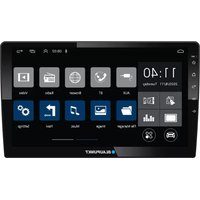
1 Microphone 2 MicroSD card slot 3 Increase sound 4 Power button
- Press to turn on
- Press and hold to turn off (when unit is turned on)
Mute button
- Press to mute / unmute
5 Decrease sound 6 Home Page 7 USB 8 AUX IN
REMOTE CONTROL

- Press to switch between MODE: Radio - USB - CARD - AVIN
- Press to turn on or press and hold to turn off
- Radio mode : Press to select radio band FM1 - FM2 - FM3 - AM1 - AM2
- Press to select Treble / Bass / Fader / Balance or select options
- • SD/USB mode: Press to skip to the previous track/chapter. Press and hold to rewind the current track. • Radio mode: Press to decrease the radio frequency manually. Press and hold to decrease the radio frequency automatically.
- Equalizer
- Radio mode: Use the digit to select a radio station or press and hold to save the station. • SD/USB mode: Use the digit to select a track. • Playback mode: Introduce every track for 10 seconds.
- Radio mode: Use the digit to select a radio station or press and hold to save the station. SD/USB mode: Use the digit to select a track. Playback mode: Pause/Play
- • Radio mode: Use the digit to select a radio station or press and hold to save the station.
- SD/USB mode: Use the digit to select a track. - Playback mode: Press to shuffle playback.
- • Radio mode: Use the digit to select a radio station or press and hold to save the station.
- SD/USB mode: Use the digit to select a track. - Playback mode: Press to skip to the next 10th song or press and hold to skip to the next folder.
- • Radio mode: Use the digit to select a radio station or press and hold to save the station.
- SD/USB mode: Use the digit to select a track. - Playback mode: Press to skip to the previous 10th song or press and hold to skip to the previous folder.
- • Radio mode: Use digit to select radio station or press and hold to save the station.
- SD/USB mode: Use digit to select track - Playback mode: Press to repeat All / Folder / Song
- • Playback mode: Press to hide function tab or press and hold to adjust clock setting
- Decrease volume
- • SD/USB mode: Press to skip to next track/chapter. Press & hold to fast forward current track. • Radio mode: Press to increase radio frequency manually. Press & hold to increase radio frequency automatically.
- Radio mode: Press and hold for automatic radio stations scan and save
- Increase volume
- Mute
OPERATION
HOME PAGE
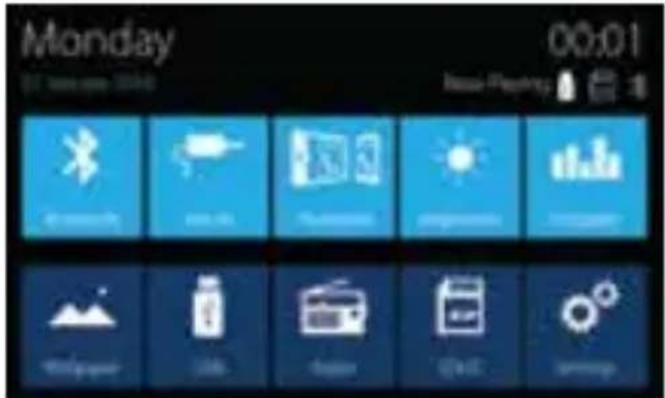
BLUETOOTH
• Pre-pair Bluetooth
Ensure mobile phone supports Bluetooth function before pairing. Different mobile phones will have different emissive power. To get the best connection, the recommended distance range is 3m without any object obstruction.
- Pairing
- Turn on mobile phone's Bluetooth to set up. (Please refer to the instruction manual of the mobile phone on how to operate Bluetooth) "SAN MARINO 500" should appear on your available Bluetooth scanning list.
- Select "SAN MARINO 500" then insert password "0000", if password is required. Select confirm buttons when pairing prompt message appear. *will appear in white colour in the Home Page when pairing successful
PHONELINK
Android - Support Android 4 & above (2-way)
• Pre-pair PhoneLink
Go to mobile phone's Settings to connect to car radio's Bluetooth (for audio output) and enable USB debugging (Please refer to the instruction manual of mobile phone on how to operate USB debugging and Bluetooth setting).
- Pairing
Connect the unit with smartphone using USB cable. The unit will begin to project smartphone's display when pairing successful. Now you can control the smartphone from either the unit too.
GENERAL
Power supply ....11 \~ 14.4V DC Current consumption ....max. 10 A Maximum power output ....4 x 45W channels (max) Dimension (WxDxH) ....177 x 102 x 42mm Weight ....0.52kg Operation temperature ....-20° \~ 60° Screen size ....7 inch Resolution ....800 x 480 pixel Aspect ratio ....4:3 / 16:9
FM Stereo Radio
Frequency range....87.5 - 108MHz Preset memory stations....18
AM/MW Radio
Frequency range.... 531 - 1602kHz Preset memory stations.... 12
Audio Specification
Frequency response 20Hz-20kHz
Input
USB 2.0 / microSD .... MKV, AVI, MP4, MOV, TS, ASF, FLV, PMP, RMVB, MPG, VOB, WMV, JPEG, BMP, GIF, PNG MP3, WMA, OGG, FLAC, APE AAC, AC3, ATRA, DTS
Aux-in 3.5mm jack
TROUBLESHOOTING
If any of the following problem occur, please resort to Troubleshooting for the possible solutions. Consult Blaupunkt authorized dealer if problem persist.
| Problems | Possible Causes | Solutions |
| Unable to start up | The car key is not inserted into the ignition; ignition is off | Insert the car key and turn on the ignition. |
| Power Cable is not inserted into the main body. | Insert the power cable. | |
| Burnt power fuse . | Replace it with a new fuse. | |
| Drained car battery. | Charge or replace the car battery. | |
| No sound | Audio cables are not properly connected to the unit. | Ensure proper connection of the audio cables. |
| Mute setting is on. | Unmute the volume. | |
| Low volume. | Adjust the volume. | |
| No sound from front, rear, left & right speakers due to Fade-Balance settings. | Select Equalizer from Home Page to adjust setting. | |
| Dim screen or black-&-white screen while playing video | Brightness, contrast ratio and color values are excessively adjusted. | Ensure brightness, color and contrast ratio values are in normal range. |
| Slow in SD card reading | The pixel of the picture file exceeds this system's capacity. | Replace it with a new audio/video SD card with compatible file formats. |
| SD card may contain corrupted files or virus. | ||
| No rear-view reverse image | The rear camera is not appropriately connected with power supply. | Examine the camera's power supply connectivity. |
| Camera's signal line not plugged in. | Insert the camera's signal line into the interface port of this unit. | |
| Unable to search radio stations | Radio's antenna is not well inserted. | Ensure radio antenna is properly installed. |
ISO
| B8 | B6 | B4 | B2 | |
| B7 | B5 | B3 | B1 | C |
| A8 | A6 | A4 | A2 | |
| A7 | A5 | A3 | A1 |

D6 D4 D2 D1


D8

D7 D5 D3


| NO. | WIRE | A |
| A1 | BLACK | GND |
| A2 | RED | ACC |
| A3 | PINK | ILL |
| A4 | BLUE | AUTO ANT |
| A5 | YELLOW | BATTERY |
| A6 | ORANGE/BLACK | EXT KEY |
| A7 | BROWN | BACK |
| A8 | PINK/BLACK | BRAKE |
| NO. | WIRE | B |
| B1 | GREEN/BLACK | RL- |
| B2 | GREEN | RL+ |
| B3 | WHITE/BLACK | FL- |
| B4 | WHITE | FL+ |
| B5 | GREY/BLACK | FR- |
| B6 | GREY | FR+ |
| B7 | PURPLE/BLACK | RR- |
| B8 | PURPLE | RR+ |
| NO. | WIRE | C |
| C | FUSE | 10A |
| NO. | WIRE | D |
| D1 | ANT | RADIO |
| D2 | CVBS IN | AUX |
| D3 | AV IN | CAM |
| D4 | OUT1 | CVBS |
| D5 | OUT2 | CVBS |
| D6 | RL | RCA |
| D7 | RR | RCA |
| D8 | MIC | EXT |
Brand : BLAUPUNKT
Model : San Marino 500
Category : Receiver